
spring boot 整合pagehelper分页插件
Spring Boot 整合pagehelper分页插件
测试环境:
spring boot 版本 2.0.0.M7
mybatis starter 版本 1.3.1
jdk 1.8
---------------------------------------------------
1. maven 引入 pagehelper 相关Jar包
        <!-- 分页插件pagehelper -->

        <dependency>

            <groupId>com.github.pagehelper</groupId>

            <artifactId>pagehelper</artifactId>

            <version>5.0.0</version>

        </dependency>

        <dependency>

            <groupId>com.github.pagehelper</groupId>

            <artifactId>pagehelper-spring-boot-autoconfigure</artifactId>

            <version>1.2.3</version>

        </dependency>

        <dependency>

            <groupId>com.github.pagehelper</groupId>

            <artifactId>pagehelper-spring-boot-starter</artifactId>

            <version>1.2.3</version>

        </dependency>

        <!-- 分页插件pagehelper -->
2. Service层代码 只需添加一句核心分页代码 (要在dao调用之前)
参数page为当前页码 、pagesize为每页显示多少条记录
    public List<UserEntity> usersList(String loginName, int pageSize, int page) {

        PageHelper.startPage(page,pageSize);

        return userDao.usersList();

    }
3. Controller层代码 用pagehelper封装的 PageInfo类封装返回查询的list结果 如下图红色字体
    @GetMapping("/users")

    public PageInfo<UserEntity> usersList(String loginName, int pageSize, int page) {

        List<UserEntity> list = userService.usersList(loginName,pageSize,page);

        PageInfo<UserEntity> pageinfo = new PageInfo<UserEntity>(list);

        log.debug("The method is ending");

        return pageinfo;

    }
下断点调试后 显示 pageinfo的结果为
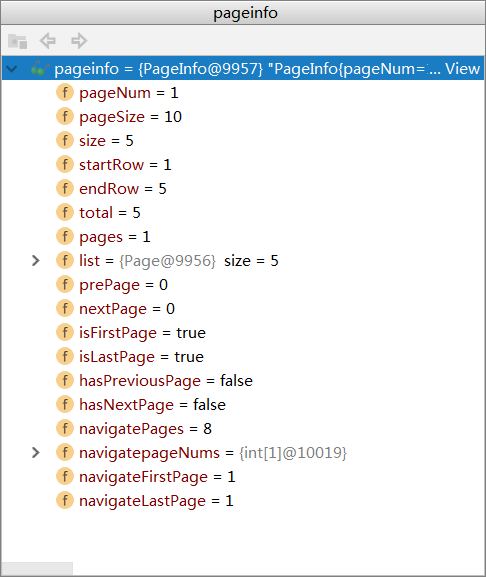
各项信息都已经显示出来 分页插件加载成功!
spring boot 整合pagehelper分页插件的更多相关文章
- spring boot集成mybatis分页插件
mybatis的分页插件能省事,本章记录的是 spring boot整合mybatis分页插件. 1.引入依赖 <!-- 分页插件pagehelper --> <dependency ...
- Spring Boot实践——Mybatis分页插件PageHelper的使用
出自:https://blog.csdn.net/csdn_huzeliang/article/details/79350425 在springboot中使用PageHelper插件有两种较为相似的方 ...
- Spring Boot+Mybatis+Pagehelper分页
Spring Boot 集成MyBatis和Pagehelper分页插件 mybatis-spring-boot-starter依赖树如下: pom配置 <project xmlns=" ...
- SpringBoot集成整合pageHelper分页插件
今天来讲讲springboot 集成 pagehelper插件, 引入jar 依赖包 <!-- 分页插件 --><dependency> <groupId>com. ...
- Spring Boot整合tk.mybatis及pageHelper分页插件及mybatis逆向工程
Spring Boot整合druid数据源 1)引入依赖 <dependency> <groupId>com.alibaba</groupId> <artif ...
- 【spring boot】14.spring boot集成mybatis,注解方式OR映射文件方式AND pagehelper分页插件【Mybatis】pagehelper分页插件分页查询无效解决方法
spring boot集成mybatis,集成使用mybatis拖沓了好久,今天终于可以补起来了. 本篇源码中,同时使用了Spring data JPA 和 Mybatis两种方式. 在使用的过程中一 ...
- spring boot 整合mybatis 的xml版本【包括逆向工程以及分页插件】
逆向工程很方便,可以直接根据数据库和配置文件生成pojo,mapper接口和相应的映射文件. xml版本和全注解版本其实差不多,大部分情况下,都会保留xml文件方便其他人去扩展新的dml方法. 文章旨 ...
- SpringBoot入门篇--整合mybatis+generator自动生成代码+druid连接池+PageHelper分页插件
原文链接 我们这一篇博客讲的是如何整合Springboot和Mybatis框架,然后使用generator自动生成mapper,pojo等文件.然后再使用阿里巴巴提供的开源连接池druid,这个连接池 ...
- SpringBoot整合系列-PageHelper分页插件
原创作品,可以转载,但是请标注出处地址:https://www.cnblogs.com/V1haoge/p/9971043.html SpringBoot整合MyBatis分页插件PageHelper ...
随机推荐
- yum和编译两种方式升级or降级Centos内核
http://blog.51cto.com/renzhiyuan/1882599 今天探讨用yum和编译两种方式升级或者降级内核版本: 升级:比如玩kvm,docker等虚拟化,centos内核则升级 ...
- Zookeeper Java API调用
引入zookeeper-3.4.11.jar public class ZooKeeperTest implements Watcher{ //public final static String z ...
- HTTP 状态码的完整列表
一.1xx(临时响应) 表示临时响应并需要请求者继续执行操作的状态码.SC_CONTINUE = 100; 100(继续)请求者应当继续提出请求.服务器返回此代码表示已收到请求的第一部分,正在等待其余 ...
- app崩溃后自动重启
android 引用:http://blog.csdn.net/caiwenfeng_for_23/article/details/41184353 package com.tan.abnormalr ...
- CentOS7局域网下安装离线Ambari
1 Ambari介绍.安装与应用案例介绍 1.1 Ambari Ambari 跟 Hadoop 等开源软件一样,也是 Apache Software Foundation 中的一个项目,并且是顶级项目 ...
- 微信JS API PHP类
CURL操作类: <?php namespace app\common; class curl{ public static function wxcurl($getUrl){ $ch = cu ...
- Windows Azure Web Site (18) Azure Web App设置MIME
<Windows Azure Platform 系列文章目录> 在笔者之前的文章中,介绍了我们在使用Azure Web App,可以把静态资源保存到Azure Storage中: Wind ...
- MySQL 单条记录长度最大65535
今天设计表结构,加了几个字段,结果报错了 Ligne trop grande. Le taille maximale d'une ligne, sauf les BLOBs, est 65535... ...
- Selenium Python FirefoxWebDriver处理打开保存对话框
代码如下(网上示例): #profile = webdriver.FirefoxProfile(r"C:\Users\Skyyj\AppData\Roaming\Mozilla\Firef ...
- MySQL锁之三:MySQL的共享锁与排它锁编码演示
一.行锁之MySQL 使用SELECT ... FOR UPDATE 做事务写入前的确认 以MySQL 的InnoDB 为例,预设的Tansaction isolation level 为REPEA ...