
springboot整合rabbitMq实现消息延时发送
实现思路:利用mq的ttl设置消息失效时间 当达到设置时间后通过交换机到达死信队列中,消费者端绑定读取死信队列中信息来达到延时发送消息的功能。
demo 如下:
(1)在pom.xml 中引入rabbitMq相关包
        <dependency>

            <groupId>org.springframework.boot</groupId>

            <artifactId>spring-boot-starter-amqp</artifactId>

        </dependency>
(2)创建rabbitMq连接的工具类
public class MqConnectionUtil {

    public static Connection getConnection() throws Exception {

        ConnectionFactory factory = new ConnectionFactory();

        factory.setHost("localhost");

        factory.setPort(5672);

        factory.setVirtualHost("virtualHost_wl");

        factory.setUsername("admin");

        factory.setPassword("admin");

        Connection connection = factory.newConnection();

        return connection;

    }

}
(3)创建生产者发送消息
public class Send {

    private final static String QUEUE_NAME = "msg_ttl_queue";

    public static void main(String[] argv) throws Exception {

        //获取连接

        Connection connection = MqConnectionUtil.getConnection();

        //创建通道

        Channel channel = connection.createChannel();

        //设置延时队列

        HashMap<String, Object> args = new HashMap<>();

        args.put("x-dead-letter-exchange", "delay-exchange");

        args.put("x-dead-letter-routing-key", "msg_ttl_routingKey");

        channel.queueDeclare("delay_queue", true, false, false, args);

        //声明队列

        channel.queueDeclare(QUEUE_NAME, true, false, false, null);

        //绑定路由(delay-queue队列消息失效之后转发到msg_ttl_queue中)

        channel.queueBind(QUEUE_NAME, "delay-exchange", "msg_ttl_routingKey");

        //设置延时属性

        AMQP.BasicProperties.Builder builder = new AMQP.BasicProperties.Builder();

        //设置延时时间 1分钟

        AMQP.BasicProperties properties = builder.expiration("60000").deliveryMode(2).build();

        //消息内容

        SimpleDateFormat sft = new SimpleDateFormat("yyyy-MM-dd HH:mm:ss");

        String message = "生产者创建时间: " + sft.format(new Date());

        channel.basicPublish("", "delay_queue", properties, message.getBytes());

        System.out.println("Sent: '" + message + "'");

        //关闭通道和连接

        channel.close();

        connection.close();

    }

}
(4)创建对应的消费者接受消息
public class Receive {

    private final static String QUEUE_NAME = "msg_ttl_queue";

    public static void main(String[] argv) throws Exception {

        //获取连接

        Connection connection = MqConnectionUtil.getConnection();

        //创建通道

        Channel channel = connection.createChannel();

        // 声明队列

        channel.queueDeclare(QUEUE_NAME, true, false, false, null);

        // 定义队列的消费者

        MyConsumer myConsumer = new MyConsumer(channel);

        // 监听队列

        channel.basicConsume(QUEUE_NAME, true, myConsumer);

    }

}
自定义消费者类为:
public class MyConsumer extends DefaultConsumer {

    public MyConsumer(Channel channel) {

        super(channel);

    }

    @Override

    public void handleDelivery(String consumerTag, Envelope envelope, AMQP.BasicProperties properties, byte[] body) throws IOException {

        SimpleDateFormat sft = new SimpleDateFormat("yyyy-MM-dd HH:mm:ss");

        System.out.println("消费者接受时间:" + sft.format(new Date()));

        System.out.println("consumerTag: " + consumerTag);

        System.out.println("envelope: " + envelope);

        System.out.println("properties: " + properties);

        System.out.println("body: " + new String(body));

    }

}
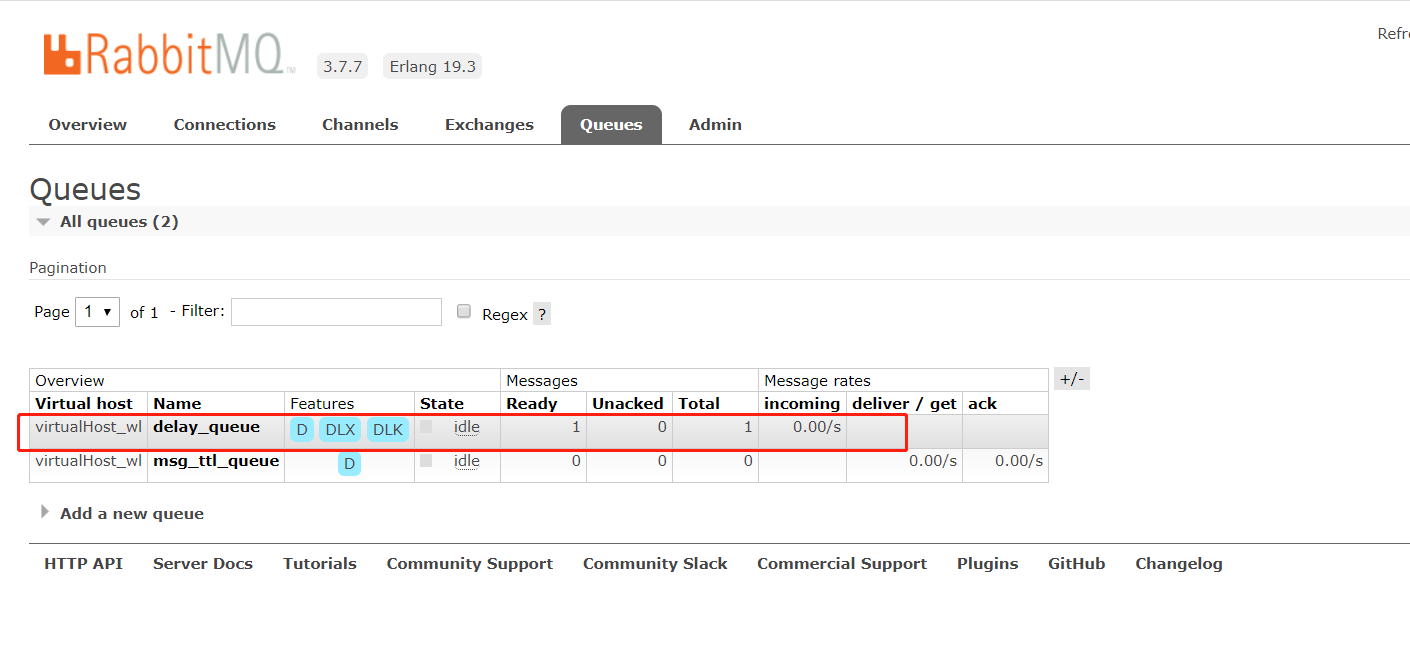
生产者发送消息到延时队列:
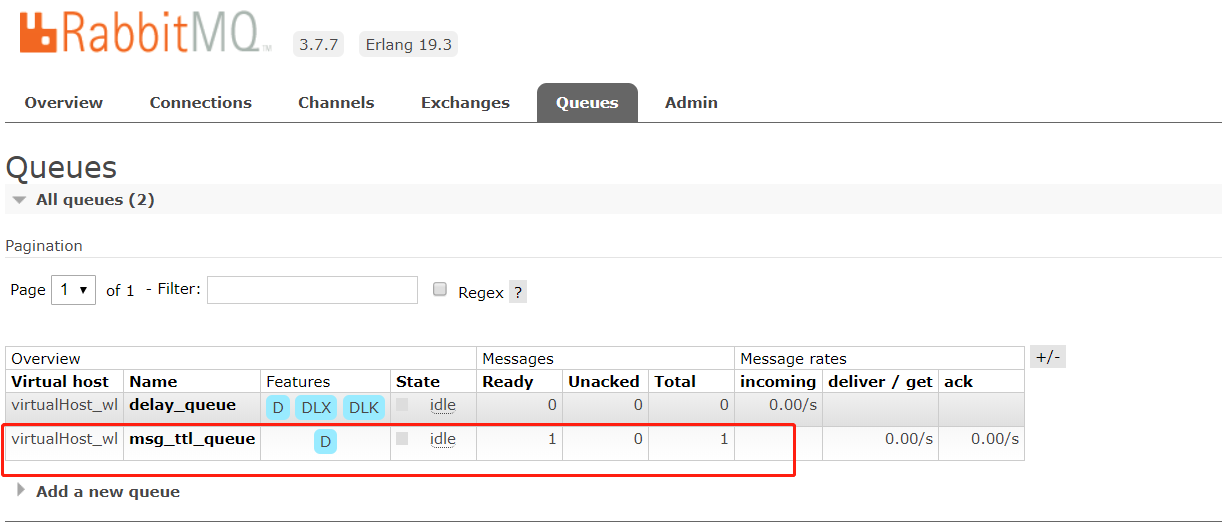
到达设定的失效时间1分钟后到达指定的队列中:
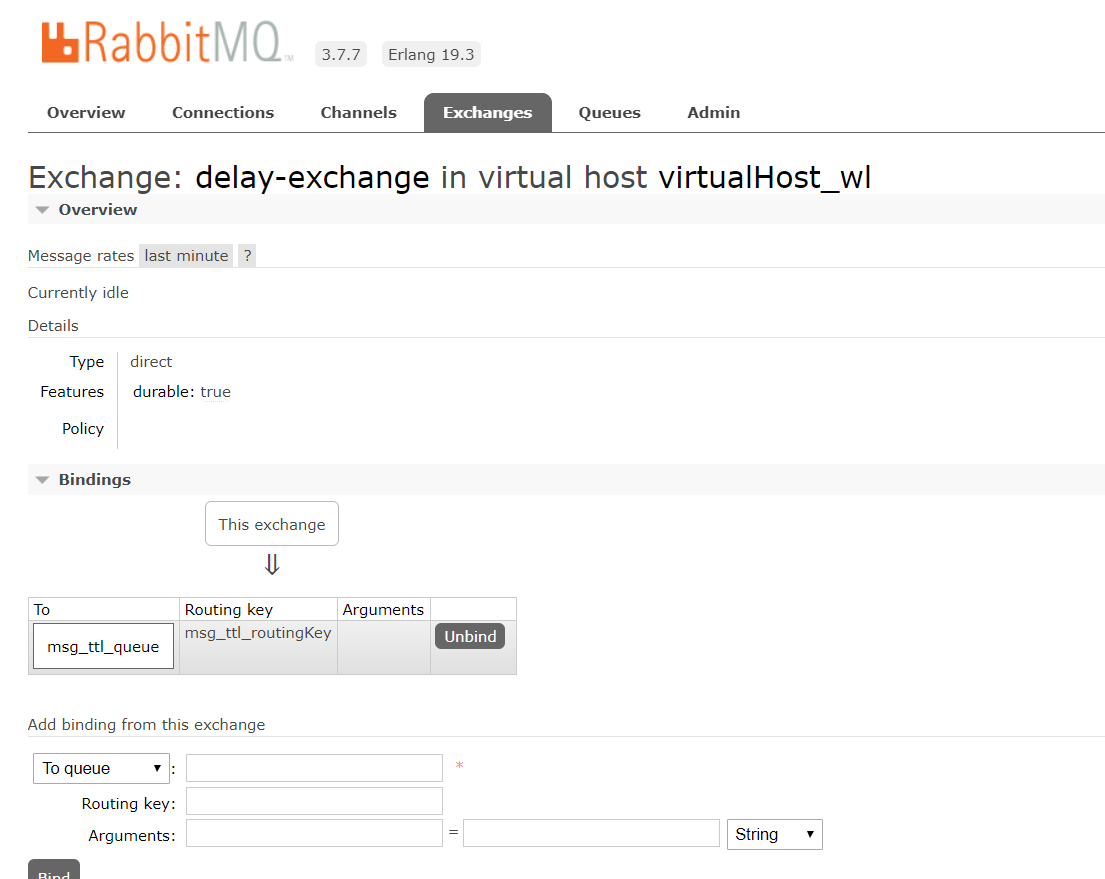
设置的延时交换机为:
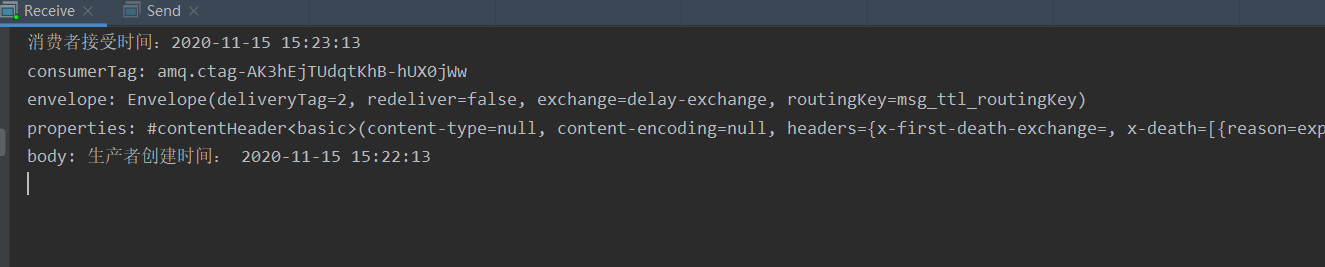
控制台打印信息为:
springboot整合rabbitMq实现消息延时发送的更多相关文章
- SpringBoot 整合 RabbitMQ 实现消息可靠传输
消息的可靠传输是面试必问的问题之一,保证消息的可靠传输主要在生产端开启 comfirm 模式,RabbitMQ 开启持久化,消费端关闭自动 ack 模式. 环境配置 SpringBoot 整合 Rab ...
- springboot项目整合rabbitMq涉及消息的发送确认,消息的消费确认机制,延时队列的实现
1.引入maven依赖 <dependency> <groupId>org.springframework.boot</groupId> <artifactI ...
- springboot整合rabbitmq,支持消息确认机制
安装 推荐一篇博客https://blog.csdn.net/zhuzhezhuzhe1/article/details/80464291 项目结构 POM.XML <?xml version= ...
- SpringBoot整合Rabbitmq设置消息请求头
String str = "{\"origin\":\"BBC\",\"origin_coupon_id\":51,\" ...
- SpringBoot系列八:SpringBoot整合消息服务(SpringBoot 整合 ActiveMQ、SpringBoot 整合 RabbitMQ、SpringBoot 整合 Kafka)
声明:本文来源于MLDN培训视频的课堂笔记,写在这里只是为了方便查阅. 1.概念:SpringBoot 整合消息服务 2.具体内容 对于异步消息组件在实际的应用之中会有两类: · JMS:代表作就是 ...
- springboot整合rabbitmq实现生产者消息确认、死信交换器、未路由到队列的消息
在上篇文章 springboot 整合 rabbitmq 中,我们实现了springboot 和rabbitmq的简单整合,这篇文章主要是对上篇文章功能的增强,主要完成如下功能. 需求: 生产者在启 ...
- springboot学习笔记-6 springboot整合RabbitMQ
一 RabbitMQ的介绍 RabbitMQ是消息中间件的一种,消息中间件即分布式系统中完成消息的发送和接收的基础软件.这些软件有很多,包括ActiveMQ(apache公司的),RocketMQ(阿 ...
- 一篇学习完rabbitmq基础知识,springboot整合rabbitmq
一 rabbitmq 介绍 MQ全称为Message Queue,即消息队列, RabbitMQ是由erlang语言开发,基于AMQP(Advanced MessageQueue 高级消息队列协议 ...
- 【MQ中间件】RabbitMQ -- SpringBoot整合RabbitMQ(3)
1.前言说明 前面一篇博客中提到了使用原生java代码进行测试RabbitMQ实现多种交换机类型的队列场景.但是在项目中我们一般使用SpringBoot项目,而且RabbitMQ天生对于Spring的 ...
随机推荐
- Docker学习:(一)初识Docker
Docker(容器虚拟化技术)要点(秒级启动) Docker的WWH公式学习 What[是什么]. Why[为什么要用它]. How[怎么用] 1.Docker简介 (1)问题:为什么会有docker ...
- 2017-01-26--编译Linux内核2.6.30版本报错解决
错误一: LD .tmp_vmlinux1 init/built-in.o: In function `run_init_process': /home/ox/tq2440/opt/EmbedSky/ ...
- 手工实现docker的vxlan
前几天了解了一下docker overlay的原理,然后一直想验证一下自己的理解是否正确,今天模仿docker手工搭建了一个overlay网络.先上拓扑图,其实和上次画的基本一样.我下面提到的另一台机 ...
- linux启动过程中建立临时页表
intel的x86这种架构为了兼容以前同系列的架构有一些很繁琐无用的东西.比如分段和分页两种机制都可以实现隔离进程的内存空间,在x86上两种机制都有,用起来比较繁琐.所以linux内核在启动的时候通过 ...
- golang xpath解析网页
https://github.com/antchfx/htmlquery package main import ( "fmt" "github.com/antchfx/ ...
- spring boot:使用多个线程池实现实现任务的线程池隔离(spring boot 2.3.2)
一,为什么要使用多个线程池? 使用多个线程池,把相同的任务放到同一个线程池中,可以起到隔离的作用,避免有线程出错时影响到其他线程池,例如只有一个线程池时,有两种任务,下单,处理图片,如果线程池被处理图 ...
- composer使用git作为仓储
composer.json "repositories": [ { "type":"git", "url":" ...
- phpstorm10.0.3 下载与激活
phpstorm10.0.3 百度网盘下载 提取码: kqvc 激活服务器: http://jetbrains.tencent.click/ (2016-09-19 可用) http://owo. ...
- MySQL安装版本介绍
MySQL安装 源码安装 二进制格式的程序包 程序包管理器安装 yum dnf MySQL在CentOS上的情况 6上只有mySQL 7上只有mariadb 8上既有mysql也有mariadb Ce ...
- IDEA操作git的一些常用技巧
转自:https://blog.csdn.net/ck4438707/article/details/53455962 Git原理以后会分章节介绍,本次主要说一下intellij怎样操作git.int ...