
[WPF系列]-基础系列 Property Trigger, DataTrigger & EventTrigger
So far, we worked with styles by setting a static value for a specific property. However, using triggers, you can change the value of a given property, once a certain condition changes. Triggers come in multiple flavors: Property triggers, event triggers and data triggers. They allow you to do stuff that would normally be done in code-behind completely in markup instead, which is all a part of the ongoing process of separating style and code.
Property trigger
The most common trigger is the property trigger, which in markup is simply defined with a <Trigger> element. It watches a specific property on the owner control and when that property has a value that matches the specified value, properties can change. In theory this might sound a bit complicated, but it's actually quite simple once we turn theory into an example:
<Window x:Class="WpfTutorialSamples.Styles.StyleTriggersSample"
        xmlns="http://schemas.microsoft.com/winfx/2006/xaml/presentation"
        xmlns:x="http://schemas.microsoft.com/winfx/2006/xaml"
        Title="StyleTriggersSample" Height="100" Width="300">
    <Grid>
        <TextBlock Text="Hello, styled world!" FontSize="28" HorizontalAlignment="Center" VerticalAlignment="Center">
            <TextBlock.Style>
                <Style TargetType="TextBlock">
                    <Setter Property="Foreground" Value="Blue"></Setter>
                    <Style.Triggers>
                        <Trigger Property="IsMouseOver" Value="True">
                            <Setter Property="Foreground" Value="Red" />
                            <Setter Property="TextDecorations" Value="Underline" />
                        </Trigger>
                    </Style.Triggers>
                </Style>
            </TextBlock.Style>
        </TextBlock>
    </Grid>
</Window>
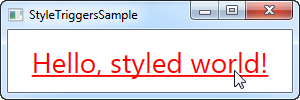
In this style, we set the Foreground property to blue, to make it look like a hyperlink. We then add a trigger, which listens to theIsMouseOver property - once this property changes to True, we apply two setters: We change the Foreground to red and then we make it underlined. This is a great example on how easy it is to use triggers to apply design changes, completely without any code-behind code.
We define a local style for this specific TextBlock, but as shown in the previous articles, the style could have been globally defined as well, if we wanted it to apply to all TextBlock controls in the application.
Data triggers
Data triggers, represented by the <DataTrigger> element, are used for properties that are not necessarily dependency properties. They work by creating a binding to a regular property, which is then monitored for changes. This also opens up for binding your trigger to a property on a different control. For instance, consider the following example:
<Window x:Class="WpfTutorialSamples.Styles.StyleDataTriggerSample"
        xmlns="http://schemas.microsoft.com/winfx/2006/xaml/presentation"
        xmlns:x="http://schemas.microsoft.com/winfx/2006/xaml"
        Title="StyleDataTriggerSample" Height="200" Width="200">
    <StackPanel HorizontalAlignment="Center" VerticalAlignment="Center">
        <CheckBox Name="cbSample" Content="Hello, world?" />
        <TextBlock HorizontalAlignment="Center" Margin="0,20,0,0" FontSize="48">
            <TextBlock.Style>
                <Style TargetType="TextBlock">
                    <Setter Property="Text" Value="No" />
                    <Setter Property="Foreground" Value="Red" />
                    <Style.Triggers>
                        <DataTrigger Binding="{Binding ElementName=cbSample, Path=IsChecked}" Value="True">
                            <Setter Property="Text" Value="Yes!" />
                            <Setter Property="Foreground" Value="Green" />
                        </DataTrigger>
                    </Style.Triggers>
                </Style>
            </TextBlock.Style>
        </TextBlock>
    </StackPanel>
</Window>
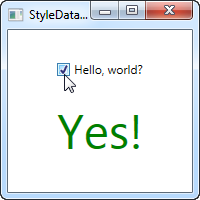
In this example, we have a CheckBox and a TextBlock. Using a DataTrigger, we bind the TextBlock to the IsCheckedproperty of the CheckBox. We then supply a default style, where the text is "No" and the foreground color is red, and then, using a DataTrigger, we supply a style for when the IsChecked property of the CheckBox is changed to True, in which case we make it green with a text saying "Yes!" (as seen on the screenshot).
Event triggers
Event triggers, represented by the <EventTrigger> element, are mostly used to trigger an animation, in response to an event being called. We haven't discussed animations yet, but to demonstrate how an event trigger works, we'll use them anyway. Have a look on the chapter about animations for more details. Here's the example:
<Window x:Class="WpfTutorialSamples.Styles.StyleEventTriggerSample"
        xmlns="http://schemas.microsoft.com/winfx/2006/xaml/presentation"
        xmlns:x="http://schemas.microsoft.com/winfx/2006/xaml"
        Title="StyleEventTriggerSample" Height="100" Width="300">
    <Grid>
        <TextBlock Name="lblStyled" Text="Hello, styled world!" FontSize="18" HorizontalAlignment="Center" VerticalAlignment="Center">
            <TextBlock.Style>
                <Style TargetType="TextBlock">
                    <Style.Triggers>
                        <EventTrigger RoutedEvent="MouseEnter">
                            <EventTrigger.Actions>
                                <BeginStoryboard>
                                    <Storyboard>
                                        <DoubleAnimation Duration="0:0:0.300" Storyboard.TargetProperty="FontSize" To="28" />
                                    </Storyboard>
                                </BeginStoryboard>
                            </EventTrigger.Actions>
                        </EventTrigger>
                        <EventTrigger RoutedEvent="MouseLeave">
                            <EventTrigger.Actions>
                                <BeginStoryboard>
                                    <Storyboard>
                                        <DoubleAnimation Duration="0:0:0.800" Storyboard.TargetProperty="FontSize" To="18" />
                                    </Storyboard>
                                </BeginStoryboard>
                            </EventTrigger.Actions>
                        </EventTrigger>
                    </Style.Triggers>
                </Style>
            </TextBlock.Style>
        </TextBlock>
    </Grid>
</Window>
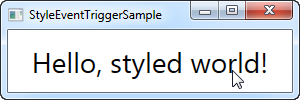
The markup might look a bit overwhelming, but if you run this sample and look at the result, you'll see that we've actually accomplished a pretty cool animation, going both ways, in ~20 lines of XAML. As you can see, I use an EventTrigger to subscribe to two events: MouseEnter and MouseLeave. When the mouse enters, I make a smooth and animated transition to a FontSize of 28 pixels in 300 milliseconds. When the mouse leaves, I change the FontSize back to 18 pixels but I do it a bit slower, just because it looks kind of cool.
Summary
WPF styles make it easy to get a consistent look, and with triggers, this look becomes dynamic. Styles are great in your application, but they're even better when used in control templates etc. You can read more about that elsewhere in this tutorial.
In the next article, we'll look at multi triggers, which allow us to apply styles based on multiple properties.
引用自 Trigger, DataTrigger & EventTrigger
参考
WPF MultiTrigger and MultiDataTrigger
[WPF系列]-基础系列 Property Trigger, DataTrigger & EventTrigger的更多相关文章
- [WPF系列]-基础系列 TabControl应用
引言 Tabcontrol控件也是我们在项目中经常用到的一个控件,用它将相关的信息组织在一起分类显示. 简介 ========================================= ...
- WPF入门教程系列一——基础
一. 前言 最近在学习WPF,学习WPF首先上的是微软的MSDN,然后再搜索了一下网络有关WPF的学习资料.为了温故而知新把学习过程记录下来,以备后查.这篇主要讲WPF的开发基础,介绍了如何使用V ...
- WPF入门教程系列(二) 深入剖析WPF Binding的使用方法
WPF入门教程系列(二) 深入剖析WPF Binding的使用方法 同一个对象(特指System.Windows.DependencyObject的子类)的同一种属性(特指DependencyProp ...
- WPF入门教程系列(一) 创建你的第一个WPF项目
WPF入门教程系列(一) 创建你的第一个WPF项目 WPF基础知识 快速学习绝不是从零学起的,良好的基础是快速入手的关键,下面先为大家摞列以下自己总结的学习WPF的几点基础知识: 1) C#基础语法知 ...
- C#基础系列——Attribute特性使用
前言:上篇 C#基础系列——反射笔记 总结了下反射得基础用法,这章我们来看看C#的另一个基础技术——特性. 1.什么是特性:就博主的理解,特性就是在类的类名称.属性.方法等上面加一个标记,使这些类.属 ...
- WPF入门教程系列二——Application介绍
一.Application介绍 WPF和WinForm 很相似, WPF与WinForm一样有一个 Application对象来进行一些全局的行为和操作,并且每个 Domain (应用程序域)中仅且只 ...
- C#基础系列:实现自己的ORM(反射以及Attribute在ORM中的应用)
反射以及Attribute在ORM中的应用 一. 反射什么是反射?简单点吧,反射就是在运行时动态获取对象信息的方法,比如运行时知道对象有哪些属性,方法,委托等等等等.反射有什么用呢?反射不但让你在运行 ...
- SpringBoot基础系列-SpringCache使用
原创文章,转载请标注出处:<SpringBoot基础系列-SpringCache使用> 一.概述 SpringCache本身是一个缓存体系的抽象实现,并没有具体的缓存能力,要使用Sprin ...
- SpringBoot基础系列-SpringBoot配置
原创作品,可以转载,但是请标注出处地址:https://www.cnblogs.com/V1haoge/p/9990680.html SpringBoot基础系列-SpringBoot配置 概述 属性 ...
随机推荐
- 浅谈web网站架构演变过程
前言 我们以javaweb为例,来搭建一个简单的电商系统,看看这个系统可以如何一步步演变. 该系统具备的功能: 用户模块:用户注册和管理 商品模块:商品展示和管理 交易模块:创建交易和管理 阶 ...
- 黑社会团伙(gangs)
题目描述 众所周知,香港的黑社会组织猖獗,警方希望能摸清他们的内部构成情况,特派小生前往调查.经过长期的卧底,小生初步获得了一些资料:整个组织有 n 个人,任何两个认识的人不是朋友就是敌人. 而且满足 ...
- spring Mvc + Mybatis 中使用junit
在Spring Mvc + Mybatis的项目中我们有时候需要在测试代码中注入Dao操作数据库,对表进行增删改查,实现如下: 这是一般的maven项目项目结构 测试代码一般写在src/test/ja ...
- Hibernate —— 概述与 HelloWorld
一.Hibernate 概述 1.Hibernate 是一个持久化框架 (1)从狭义的角度来讲,“持久化” 仅仅指把内存中的对象永久的保存到硬盘中的数据库中. (2)从广义的角度来讲,“持久化” 包括 ...
- 【工匠大道】一些Vim(Linux)不常见但很逼格的命令(不断更新中)
本文地址 分享提纲: 1. :Tlist 2. :colorscheme 3. :set cursorline 4. ma 5. vim -x 6. CTRL-] 7. 折叠 8. 向别的用户终端写信 ...
- ASP.NET WEBAPI 的身份验证和授权
定义 身份验证(Authentication):确定用户是谁. 授权(Authorization):确定用户能做什么,不能做什么. 身份验证 WebApi 假定身份验证发生在宿主程序称中.对于 web ...
- 001.Getting Started -- 【入门指南】
Getting Started 入门指南 662 of 756 people found this helpful Meng.Net 自译 1. Install .NET Core 到官网安装 .NE ...
- SQL复制表结构或表数据
需求: 软件开发过程中,一般会部署两个数据库:一个测试数据库提供给开发和测试过程使用:一个运维数据库提供上线使用.当需求变化需增加表时,会遇到数据库表结构或表数据同步的问题,这时就要复制表结构或表数据 ...
- 接入统计Crash的工具Crashlytics-ios
1. 注册账户 登录网站 https://get.fabric.io/ 来注册新的账户 2. account confirmed之后就出现相应的设置页面,设置你的team的名称 3. 出现页面提示下载 ...
- if语句,case语句
1.句式:if...then.判断赋值 例: if RadioButton1.Checked then sex:='男' else if RadioButton2.Checked then sex:= ...