
09_消息通知Toast和Notification
1. Toast
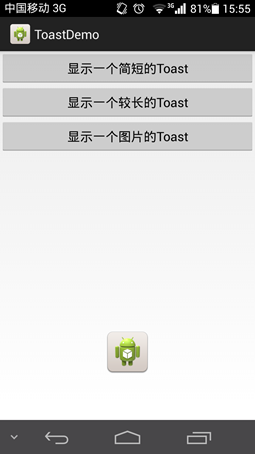
学习创建长短不一的Toast提示,并自定义Toast在屏幕上的位置以及Toast的外观。
 1 package com.example.toastdemo;

 2

 3 import android.app.Activity;

 4 import android.app.ActionBar;

 5 import android.app.Fragment;

 6 import android.os.Bundle;

 7 import android.view.Gravity;

 8 import android.view.LayoutInflater;

 9 import android.view.Menu;

10 import android.view.MenuItem;

11 import android.view.View;

12 import android.view.ViewGroup;

13 import android.widget.Button;

14 import android.widget.ImageView;

15 import android.widget.Toast;

16 import android.os.Build;

17

18 public class MainActivity extends Activity {

19

20     private Button btnShowToastShort, btnShowToastLong, btnShowToastImage;

21

22     @Override

23     protected void onCreate(Bundle savedInstanceState) {

24         super.onCreate(savedInstanceState);

25         setContentView(R.layout.activity_main);

26

27         btnShowToastShort = (Button) findViewById(R.id.btnShowToast);

28         btnShowToastLong = (Button) findViewById(R.id.btnShowToastLong);

29         btnShowToastImage = (Button) findViewById(R.id.btnShowToastImage);

30

31         btnShowToastShort.setOnClickListener(new View.OnClickListener() {

32

33             @Override

34             public void onClick(View v) {

35                 // 可以改变Toast显示的位置;

36

37                 Toast shortToast = Toast.makeText(MainActivity.this,

38                         "显示一个简短的Toast", Toast.LENGTH_SHORT);

39                 shortToast.setGravity(Gravity.CENTER, 0, 0);

40                 shortToast.show();

41             }

42         });

43

44         btnShowToastLong.setOnClickListener(new View.OnClickListener() {

45

46             @Override

47             public void onClick(View v) {

48                 Toast.makeText(MainActivity.this, "显示一个较长的Toast",

49                         Toast.LENGTH_LONG).show();

50             }

51         });

52

53         btnShowToastImage.setOnClickListener(new View.OnClickListener() {

54

55             // 显示图片之后,就不会显示文字。

56             // 若想显示其它,需要定义Layout

57             @Override

58             public void onClick(View v) {

59                 Toast imageToast = Toast.makeText(MainActivity.this,

60                         "显示一个图片的Toast", Toast.LENGTH_LONG);

61                 ImageView imageView = new ImageView(MainActivity.this);

62                 imageView.setImageResource(R.drawable.ic_launcher);

63                 imageToast.setView(imageView);

64                 imageToast.show();

65             }

66         });

67

68     }

69

70 }
MainActivity
 1 <LinearLayout xmlns:android="http://schemas.android.com/apk/res/android"

 2     xmlns:tools="http://schemas.android.com/tools"

 3     android:id="@+id/container"

 4     android:layout_width="match_parent"

 5     android:layout_height="match_parent"

 6     android:orientation="vertical"

 7     tools:context="com.example.toastdemo.MainActivity"

 8     tools:ignore="MergeRootFrame" >

 9

10     <Button

11         android:id="@+id/btnShowToast"

12         android:layout_width="fill_parent"

13         android:layout_height="wrap_content"

14         android:text="显示一个简短的Toast" />

15

16     <Button

17         android:id="@+id/btnShowToastLong"

18         android:layout_width="fill_parent"

19         android:layout_height="wrap_content"

20         android:text="显示一个较长的Toast" />

21

22     <Button

23         android:id="@+id/btnShowToastImage"

24         android:layout_width="fill_parent"

25         android:layout_height="wrap_content"

26         android:text="显示一个图片的Toast" />

27

28 </LinearLayout>
activity_main.xml
 1 <?xml version="1.0" encoding="utf-8"?>

 2 <manifest xmlns:android="http://schemas.android.com/apk/res/android"

 3     package="com.example.toastdemo"

 4     android:versionCode="1"

 5     android:versionName="1.0" >

 6

 7     <uses-sdk

 8         android:minSdkVersion="14"

 9         android:targetSdkVersion="19" />

10

11     <application

12         android:allowBackup="true"

13         android:icon="@drawable/ic_launcher"

14         android:label="@string/app_name"

15         android:theme="@style/AppTheme" >

16         <activity

17             android:name="com.example.toastdemo.MainActivity"

18             android:label="@string/app_name" >

19             <intent-filter>

20                 <action android:name="android.intent.action.MAIN" />

21

22                 <category android:name="android.intent.category.LAUNCHER" />

23             </intent-filter>

24         </activity>

25     </application>

26

27 </manifest>
AndroidManifest.xml
2. Notification
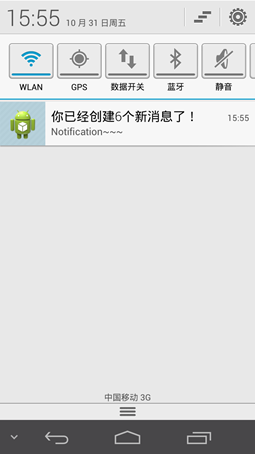
学习创建Notification对象,为其指定标题、内容和图标,以及Notification的更新方法。
 1 package com.example.notificationdemo;

 2

 3 import android.app.Activity;

 4 import android.app.Notification;

 5 import android.app.NotificationManager;

 6 import android.content.Context;

 7 import android.os.Bundle;

 8 import android.support.v4.app.NotificationCompat;

 9 import android.support.v4.app.NotificationCompat.Builder;

10 import android.view.View;

11 import android.widget.Button;

12

13 public class MainActivity extends Activity {

14

15     public static final int NOTIFICATION_ID = 1234;

16     private Button btn1;

17     private int conter = 0;

18

19     @Override

20     protected void onCreate(Bundle savedInstanceState) {

21         super.onCreate(savedInstanceState);

22         setContentView(R.layout.activity_main);

23

24         btn1 = (Button) findViewById(R.id.but1);

25         btn1.setOnClickListener(new View.OnClickListener() {

26

27             @Override

28             public void onClick(View v) {

29                 conter++;

30                 Builder builder = new NotificationCompat.Builder(

31                         MainActivity.this);

32                 builder.setSmallIcon(R.drawable.ic_launcher);

33                 builder.setContentTitle("你已经创建" + conter + "个新消息了!");

34                 builder.setContentText("Notification~~~");

35

36                 Notification notification = builder.build();

37                 NotificationManager manager = (NotificationManager) getSystemService(Context.NOTIFICATION_SERVICE);

38                 manager.notify(NOTIFICATION_ID, notification);

39

40             }

41         });

42

43     }

44

45 }
MainActivity
 1 <FrameLayout xmlns:android="http://schemas.android.com/apk/res/android"

 2     xmlns:tools="http://schemas.android.com/tools"

 3     android:id="@+id/container"

 4     android:layout_width="match_parent"

 5     android:layout_height="match_parent"

 6     tools:context="com.example.notificationdemo.MainActivity"

 7     tools:ignore="MergeRootFrame" >

 8

 9     <Button

10         android:id="@+id/but1"

11         android:layout_width="fill_parent"

12         android:layout_height="wrap_content"

13         android:text="创建一个提示" />

14

15 </FrameLayout>
activity_main.xml
 1 <?xml version="1.0" encoding="utf-8"?>

 2 <manifest xmlns:android="http://schemas.android.com/apk/res/android"

 3     package="com.example.notificationdemo"

 4     android:versionCode="1"

 5     android:versionName="1.0" >

 6

 7     <uses-sdk

 8         android:minSdkVersion="14"

 9         android:targetSdkVersion="19" />

10

11     <application

12         android:allowBackup="true"

13         android:icon="@drawable/ic_launcher"

14         android:label="@string/app_name"

15         android:theme="@style/AppTheme" >

16         <activity

17             android:name="com.example.notificationdemo.MainActivity"

18             android:label="@string/app_name" >

19             <intent-filter>

20                 <action android:name="android.intent.action.MAIN" />

21

22                 <category android:name="android.intent.category.LAUNCHER" />

23             </intent-filter>

24         </activity>

25     </application>

26

27 </manifest>
AndroidManifest.xml
09_消息通知Toast和Notification的更多相关文章
- 桌面消息通知:HTML5 Notification
先上一段完整代码 //注册权限 Notification.requestPermission(function (status) { // 这将使我们能在 Chrome/Safari 中使用 Noti ...
- Android消息通知(notification)和PendingIntent传值
通知栏的自定义布局:转:http://blog.csdn.net/vipzjyno1/article/details/25248021 拓展 实现自定义的通知栏效果: 这里要用到RemoteViews ...
- Android消息通知-Notification
Android中常用的消息提醒,一种是Toast弹出提醒内容,一种是AlterDialog弹出框来提醒用户,还有一种就是消息通知的,用Android经常收到各种通知就是Notifation.Notif ...
- Android 通知机制 Toast和Notification
Android常用的反馈系统状态信息的方式主要有三种 Toast提醒 通知栏提醒 对话框提醒 三种提醒分别适用于页面的提示.系统交互事件的通知和非常重要的提醒: 一.Toast Toast toast ...
- Android中的消息通知(NotificationManager和Notification)
下面来谈谈notification,这个notification一般用在电话,短 信,邮件,闹钟铃声,在手机的状态栏上就会出现一个小图标,提示用户处理这个通知,这时手从上方滑动状态栏就可以展开并处理这 ...
- Android Notification 消息通知 相关资料.md
目录 Android Notification 消息通知 相关资料 Android 5.0 Lollipop (API 21)无法正常显示通知图标,只能看到一个白色方块或灰色方块的问题 解决方案 参考 ...
- UWP消息通知
在Windows 10通常是使用Toast通知方式进行的消息通知,但是在应用通知是不需要通知带有音效的,但是又不能在系统通知中心留下记录,那么需要监听ToastNotification实例的Dismi ...
- 使用 Windows10 自定义交互消息通知
消息通知是最常用的应用功能之一了,但是由于平台的差异,IOS Android 以及 Windows 都有其特殊性,Android开发者在国内常常都是使用三方的一些推送服务,或者是使用自建的服务器为应用 ...
- 【wpf】在win10系统上弹出toast和notification
原文:[wpf]在win10系统上弹出toast和notification 老规矩,先看效果 右下角的notification: 操作中心的notification: 整体效果: 前提条件 1.需要在 ...
随机推荐
- 从ReentrantLock加锁解锁角度分析AQS
本文用于记录在学习AQS时,以ReentrantLock为切入点,深入源码分析ReentrantLock的加锁和解锁过程. 同步器AQS的主要使用方式是继承,子类通过继承同步器并实现它的抽象方法来管理 ...
- CO函数库
CO函数库 用于 Generator 函数的自动执行,co函数返回一个promise对象 Generator 函数: 协程的概念:A执行- A暂停,执行权给B--- B交回执行权--- A恢复执行 G ...
- Ubuntu 16.04升级18.04
原文:https://blog.csdn.net/sean_8180/article/details/81075659 1.更新资源$ sudo apt-get update$ sudo apt-ge ...
- 痞子衡嵌入式:超级下载算法(RT-UFL)开发笔记(1) - 执行在不同CM内核下
大家好,我是痞子衡,是正经搞技术的痞子.今天痞子衡给大家介绍的是超级下载算法开发笔记(1)之执行在不同CM内核下. 文接上篇 <RT-UFL - 一个适用全平台i.MXRT的超级下载算法设计&g ...
- 正则表达式-获取Json属性值
需求 需要获取json的字符串参数中的某个属性的值,只用json转对象后再获取层级比较多,所以使用简单的正则表达式进行获取 具体实现 public static void main(String[] ...
- 利用Github Action和.Net 5 自动执行米游社原神每日签到福利
GenshinDailyHelper 原神的签到福利是需要单独下载APP进行才可以领取,并且每天需要打卡,虽然奖励并不是很可观,但有一些摩拉,食材和可观的经验书累计起来还是挺有吸引力的.可能本身不怎么 ...
- linux kernel 的 procfs sysfs 对查问题的帮助
遇到进程卡死,没有gdb 符号表:只能strace 跟踪处理分析 排查过程: 1.ps -aux 查看卡死进程pid 2.strace -T -tt -e trace=all -p 查看卡死进程系统调 ...
- 适合 Go 新手学习的开源项目——在 GitHub 学编程
作者:HelloGitHub-小鱼干&卤蛋 故事要从 2007 年说起.因为受够了 C++ 煎熬的 Google 首席软件工程师 Rob Pike 召集 Robert Griesemer 和 ...
- Quirc二维码识别模块
背景 师兄要用这个参加集赛,但是说自己C语言不太行,花了一个多小时帮他分析了一下(虽然自己也不太行). 对应模块的GitHub地址:https://github.com/dlbeer/quirc. 记 ...
- IDA-hook so层方法与java之间的映射关键
第一步 1.首先用ida打开so文件 第二步 第三步