
使用RestTemplate,显示请求信息,响应信息
使用RestTemplate,显示请求信息,响应信息
这里不讲怎么用RestTemplate具体细节用法,就是一个学习中的过程记录
一个简单的例子
public class App {

    public static void main(String[] args) {

        String url = "https://api.uixsj.cn/hitokoto/get";

        RestTemplate restTemplate = new RestTemplate();

        String body = restTemplate.getForObject(url, String.class);

        System.out.println(body);

    }

}
运行结果:

:现在我想看看他的请求头,请求参数,响应头,响应体的详细信息是怎么样子的,这样也方便以后检查请求参数是否完整,响应正确与否。
经过搜集资料发现ClientHttpRequestInterceptor满足需求,于是就有了下面的代码
打印请求头/响应头
public class App {

    public static void main(String[] args) {

        String url = "https://api.uixsj.cn/hitokoto/get";

        RestTemplate restTemplate = new RestTemplate();

        // 加上拦截器打印将请求请求,响应信息打印出来

        restTemplate.setInterceptors(Collections.singletonList(new LoggingInterceptor()));

        String body = restTemplate.getForObject(url, String.class);

        System.out.println(body);

    }

}

@Slf4j

class LoggingInterceptor implements ClientHttpRequestInterceptor {

    @Override

    public ClientHttpResponse intercept(HttpRequest request, byte[] body, ClientHttpRequestExecution execution) throws IOException {

        displayRequest(request, body);

        ClientHttpResponse response = execution.execute(request, body);

        displayResponse(response);

        return response;

    }

    /**

     * 显示请求相关信息

     * @param request

     * @param body

     */

    private void displayRequest(HttpRequest request, byte[] body) {

        log.debug("====request info====");

        log.debug("URI         : {}", request.getURI());

        log.debug("Method      : {}", request.getMethod());

        log.debug("Req Headers : {}", this.headersToString(request.getHeaders()));

        log.debug("Request body: {}", body == null ? "" : new String(body, StandardCharsets.UTF_8));

    }

    /**

     * 显示响应相关信息

     * @param response

     * @throws IOException

     */

    private void displayResponse(ClientHttpResponse response) throws IOException {

        StringBuilder inputStringBuilder = new StringBuilder();

        try (BufferedReader bufferedReader = new BufferedReader(new InputStreamReader(response.getBody(), StandardCharsets.UTF_8))) {

            String line = bufferedReader.readLine();

            while (line != null) {

                inputStringBuilder.append(line);

                inputStringBuilder.append('\n');

                line = bufferedReader.readLine();

            }

        }

        log.debug("====response info====");

        log.debug("Status code  : {}", response.getStatusCode());

        log.debug("Status text  : {}", response.getStatusText());

        log.debug("Resp Headers : {}", headersToString(response.getHeaders()));

        log.debug("Response body: {}", inputStringBuilder.toString());

    }

    /**

     * 将Http头信息格式化处理

     * @param httpHeaders

     * @return

     */

    private String headersToString(HttpHeaders httpHeaders) {

        if (Objects.isNull(httpHeaders)) {

            return "[]";

        }

        return httpHeaders.entrySet().stream()

                .map(entry -> {

                    List<String> values = entry.getValue();

                    return "\t" + entry.getKey() + ":" + (values.size() == 1 ?

                            "\"" + values.get(0) + "\"" :

                            values.stream().map(s -> "\"" + s + "\"").collect(Collectors.joining(", ")));

                })

                .collect(Collectors.joining(", \n", "\n[\n", "\n]\n"));

    }

}
运行结果:
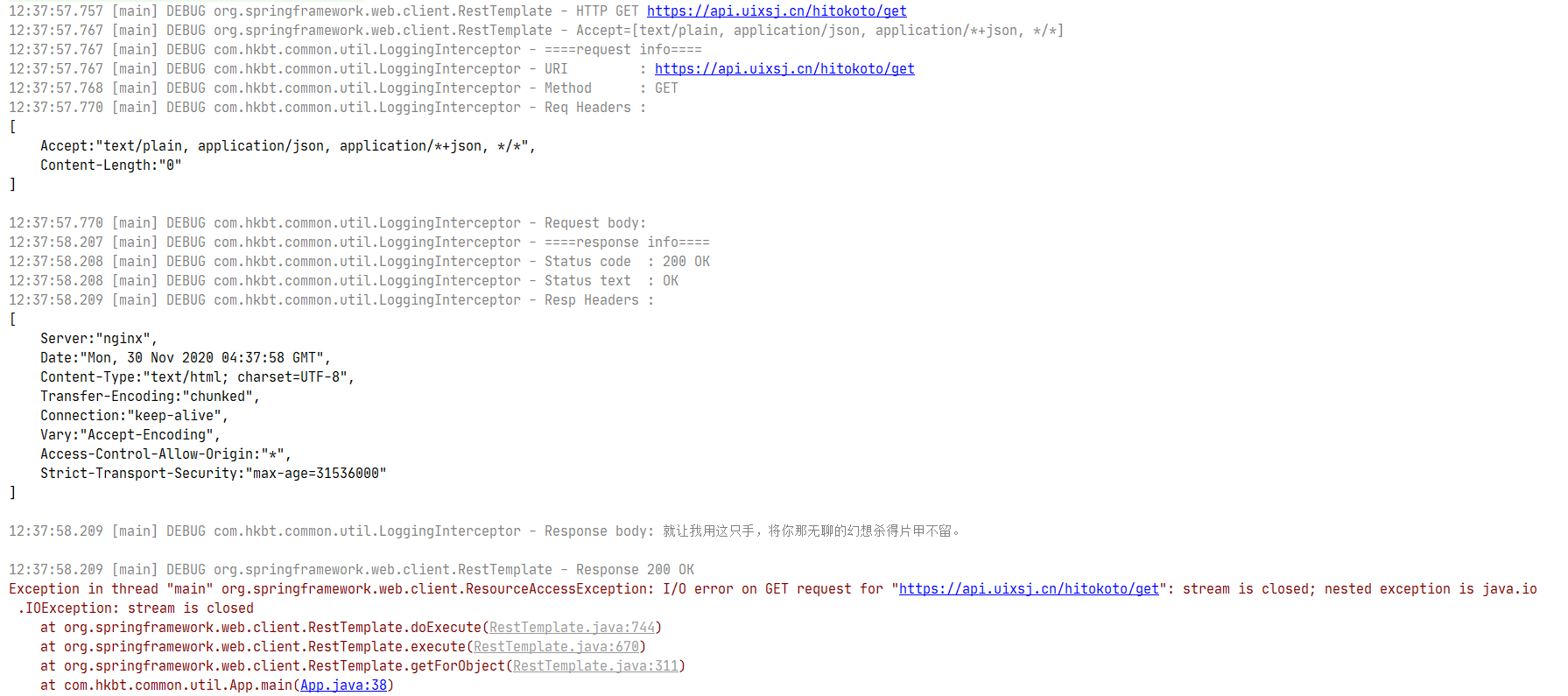
执行过程中会报错,具体错误信息是
Exception in thread "main" org.springframework.web.client.ResourceAccessException: I/O error on GET request for "https://api.uixsj.cn/hitokoto/get": stream is closed; nested exception is java.io.IOException: stream is closed
这里报错信息是流已关闭,报错是在添加LoggingInterceptor后出现的,那就是新加代码引起的。在看看LoggingInterceptor的实现,什么地方操作了流,并且关闭了流。
LoggingInterceptor.displayResponse这个方法里面,为了读取响应体操作了流response.getBody(),
try (...) {

}

// 这个try块结束后就把流给关了
注释掉代码中流操作相关代码,再次运行没有错误信息。因该是在拦截器后,RestTemplate也需要操作了response.getBody()的流(废话)。
Response body 不能读第二次这个很要命呀
问题找到了,初步的想到了几种解决
- 改写代码,不
close流,读取完之后再reset流 - 代理一下
ClientHttpResponse每次调用getBody都返回一个新的输入流
解决不能重复读Response body
方法一:读取完后不关闭流
// 略...

InputStream responseBody = response.getBody();

BufferedReader bufferedReader = new BufferedReader(new InputStreamReader(responseBody, StandardCharsets.UTF_8));

String line = bufferedReader.readLine();

while (line != null) {

    inputStringBuilder.append(line);

    inputStringBuilder.append('\n');

    line = bufferedReader.readLine();

}

responseBody.reset();

// 略...
很遗憾,执行后依旧有错误
Exception in thread "main" org.springframework.web.client.ResourceAccessException: I/O error on GET request for "https://api.uixsj.cn/hitokoto/get": mark/reset not supported; nested exception is java.io.IOException: mark/reset not supported
说的很清楚,不支持mark/reset方法。很明显了它不允许随意修改读取定位。没办法只转为第二种方法了。
方法二:代理,每次都返回一个新的流
- 静态代理实现
ClientHttpResponse接口,好在ClientHttpResponse实现的接口数量不多,实现的代码如下。
@Slf4j

class LoggingInterceptor implements ClientHttpRequestInterceptor {

    @Override

    public ClientHttpResponse intercept(HttpRequest request, byte[] body, ClientHttpRequestExecution execution) throws IOException {

        displayRequest(request, body);

        ClientHttpResponse response = execution.execute(request, body);

        // 包装代理一下

        response = new ClientHttpResponseWrapper(response);

        displayResponse(response);

        return response;

    }

    /**

     * 显示请求相关信息

     * @param request

     * @param body

     */

    private void displayRequest(HttpRequest request, byte[] body) {

        // 略...

    }

    /**

     * 显示响应相关信息

     * @param response

     * @throws IOException

     */

    private void displayResponse(ClientHttpResponse response) throws IOException {

        StringBuilder inputStringBuilder = new StringBuilder();

        try (BufferedReader bufferedReader = new BufferedReader(new InputStreamReader(response.getBody(), StandardCharsets.UTF_8))) {

            String line = bufferedReader.readLine();

            while (line != null) {

                inputStringBuilder.append(line);

                inputStringBuilder.append('\n');

                line = bufferedReader.readLine();

            }

        }

        // 略...

    }

    /**

     * 将Http头信息格式化处理

     * @param httpHeaders

     * @return

     */

    private String headersToString(HttpHeaders httpHeaders) {

        // 略...

    }

    private class ClientHttpResponseWrapper implements ClientHttpResponse {

        private ClientHttpResponse clientHttpResponse;

        private byte[] body;

        public ClientHttpResponseWrapper(ClientHttpResponse clientHttpResponse) {

            this.clientHttpResponse = clientHttpResponse;

        }

        @Override

        public HttpStatus getStatusCode() throws IOException {

            return this.clientHttpResponse.getStatusCode();

        }

        @Override

        public int getRawStatusCode() throws IOException {

            return this.clientHttpResponse.getRawStatusCode();

        }

        @Override

        public String getStatusText() throws IOException {

            return this.clientHttpResponse.getStatusText();

        }

        @Override

        public void close() {

            this.clientHttpResponse.close();

        }

        /**

         * 缓存body每次返回一个新的输入流

         * @return

         * @throws IOException

         */

        @Override

        public InputStream getBody() throws IOException {

            if (Objects.isNull(this.body)) {

                this.body = StreamUtils.copyToByteArray(this.clientHttpResponse.getBody());

            }

            return new ByteArrayInputStream(this.body == null ? new byte[0] : this.body);

        }

        @Override

        public HttpHeaders getHeaders() {

            return this.clientHttpResponse.getHeaders();

        }

    }

}
运行效果:
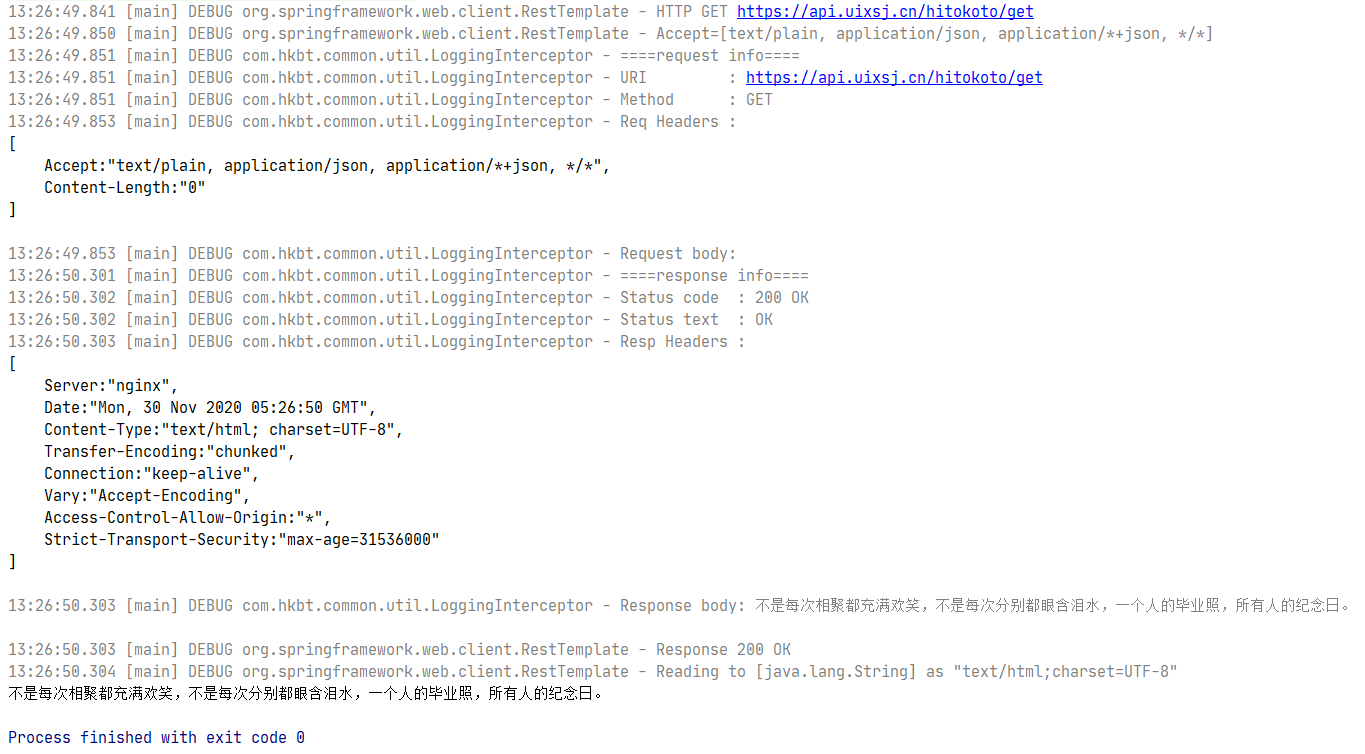
代码运行没问题,但是总感觉代码写出来笨笨的,要重写这么多用不着的方法,看着不舒服,换个写法。
- 动态代理
public class App {

    public static void main(String[] args) {

        String url = "https://api.uixsj.cn/hitokoto/get";

        RestTemplate restTemplate = new RestTemplate();

        restTemplate.setInterceptors(Collections.singletonList(new LoggingInterceptor()));

        String body = restTemplate.getForObject(url, String.class);

        System.out.println(body);

    }

}

@Slf4j

class LoggingInterceptor implements ClientHttpRequestInterceptor {

    @Override

    public ClientHttpResponse intercept(HttpRequest request, byte[] body, ClientHttpRequestExecution execution) throws IOException {

        displayRequest(request, body);

        ClientHttpResponse response = execution.execute(request, body);

        // 包装代理一下

        response = (ClientHttpResponse) Proxy.newProxyInstance(response.getClass().getClassLoader(), new Class[]{ClientHttpResponse.class}, new ClientHttpResponseHandler(response));

        displayResponse(response);

        return response;

    }

    /**

     * 显示请求相关信息

     * @param request

     * @param body

     */

    private void displayRequest(HttpRequest request, byte[] body) {

        // 略......

    }

    /**

     * 显示响应相关信息

     * @param response

     * @throws IOException

     */

    private void displayResponse(ClientHttpResponse response) throws IOException {

        StringBuilder inputStringBuilder = new StringBuilder();

        try (BufferedReader bufferedReader = new BufferedReader(new InputStreamReader(response.getBody(), StandardCharsets.UTF_8))) {

            String line = bufferedReader.readLine();

            while (line != null) {

                inputStringBuilder.append(line);

                inputStringBuilder.append('\n');

                line = bufferedReader.readLine();

            }

        }

        // 略......

    }

    /**

     * 将Http头信息格式化处理

     * @param httpHeaders

     * @return

     */

    private String headersToString(HttpHeaders httpHeaders) {

        // 略......

    }

    private static class ClientHttpResponseHandler implements InvocationHandler {

        private static final String methodName = "getBody";

        private ClientHttpResponse clientHttpResponse;

        private byte[] body;

        ClientHttpResponseHandler(ClientHttpResponse clientHttpResponse) {

            this.clientHttpResponse = clientHttpResponse;

        }

        @Override

        public Object invoke(Object proxy, Method method, Object[] args) throws Throwable {

            if (StringUtils.equals(methodName, method.getName())) {

                if (Objects.isNull(this.body)) {

                    this.body = StreamUtils.copyToByteArray(this.clientHttpResponse.getBody());

                }

                return new ByteArrayInputStream(this.body == null ? new byte[0] : this.body);

            }

            return method.invoke(this.clientHttpResponse, args);

        }

    }

}
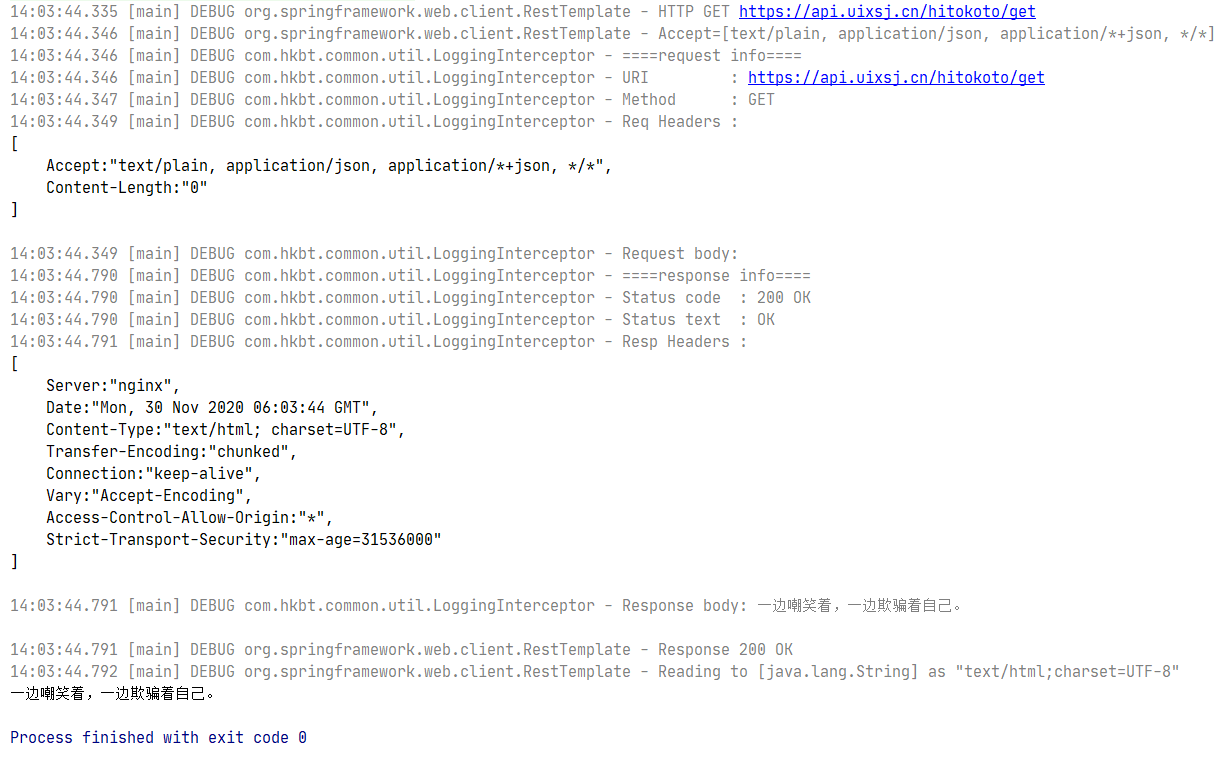
运行结果:
总结
- 使用RestTemplate想要显示详细请求信息,和响应信息
- 添加拦截器
- 拦截器中操作InputSteam导致流关闭,不能重复读Response body
- 尝试不关闭流,重置流的方案失败
- 使用代理解决 Response body 不能读第二次读的问题
- 静态代理(可以重复读Response body了)
- 动态代理(可以重复读Response body了)
- 静态代理的代码有点啰嗦,动态代理又有点不够味,看来『茴』字不好写呀
使用RestTemplate,显示请求信息,响应信息的更多相关文章
- springboot+aop切点记录请求和响应信息
本篇主要分享的是springboot中结合aop方式来记录请求参数和响应的数据信息:这里主要讲解两种切入点方式,一种方法切入,一种注解切入:首先创建个springboot测试工程并通过maven添加如 ...
- Spring Boot使用AOP在控制台打印请求、响应信息
AOP称为面向切面编程,在程序开发中主要用来解决一些系统层面上的问题,比如日志,事务,权限等. AOP简介 AOP全称Aspect Oriented Programming,面向切面,AOP主要实现的 ...
- openresty(完整版)Lua拦截请求与响应信息日志收集及基于cjson和redis动态路径以及Prometheus监控(转)
直接上文件 nginx.conf #运行用户和组,缺省为nobody,若改为别的用户和组,则需要先创建用户和组 #user wls81 wls; #开启进程数,一般与CPU核数等同 worker_pr ...
- 第14.14节 爬虫实战准备:csdn博文点赞过程http请求和响应信息分析
如果要对csdn博文点赞,首先要登录CSDN,然后打开一篇需要点赞的文章,如<第14.1节 通过Python爬取网页的学习步骤>按<第14.3节 使用google浏览器获取网站访问的 ...
- tornado 03 请求与响应
tornado 03 请求与响应 一.请求与响应 浏览器与服务器之间沟通的到底是什么信息 #服务器在后台一直保持运行着 #浏览器通过URL(路由.地址)发送请求 #服务器接收请求了通过tornado处 ...
- Fiddler如何自动修改请求和响应包
Charles的Map功能可以将某个请求进行重定向,用重定向的内容响应请求的内容.这个功能非常方便.在抓包过程当中,有时候为了调试方便,需要将线上的服务定位到内网.比如我们线上的服务器域名为 api. ...
- 【转帖】客户端通过 HTTP 请求和响应 的 Header 信息总结
请求Header原帖地址:http://technique-digest.iteye.com/blog/1174581 响应Header原帖地址:http://blog.pfan.cn/hurongl ...
- day112:MoFang:种植园使用websocket代替http&服务端基于flask-socketio提供服务&服务端响应信息&种植园页面显示初始化
目录 1.种植园使用websocket代替http 2.服务端基于socket提供服务 3.服务端响应信息 4.种植园页面展示 1.种植园使用websocket代替http 我们需要完成的种植园,是一 ...
- LoadRunner 获取接口请求响应信息
Action() { int nHttpRetCode; // 默认最大长度为256,get请求需注意缓存问题,需要根据content-length进行修改 web_set_max_html_para ...
随机推荐
- DTU是什么 常见的DTU有哪些
DTU也叫数据传输终端,它的主要功能是把远端设备的数据通过无线的方式传送回后台中心,想要完成数据的传输就需要建立一套完整的数据传输系统.DTU是一种现代物联网行业广泛使用的无线数据终端,利用公用运营商 ...
- Union-Find算法应用
上篇文章很多读者对于 Union-Find 算法的应用表示很感兴趣,这篇文章就拿几道 LeetCode 题目来讲讲这个算法的巧妙用法. 首先,复习一下,Union-Find 算法解决的是图的动态连通性 ...
- 妙用 Intellij IDEA 创建临时文件,Git 跟踪不到的那种
| 好看请赞,养成习惯 你有一个思想,我有一个思想,我们交换后,一个人就有两个思想 If you can NOT explain it simply, you do NOT understand it ...
- [C#] (原创)一步一步教你自定义控件——04,ProgressBar(进度条)
一.前言 技术没有先进与落后,只有合适与不合适. 本篇的自定义控件是:进度条(ProgressBar). 进度条的实现方式多种多样,主流的方式有:使用多张图片去实现.使用1个或2个Panel放到Use ...
- day85:luffy:购物车根据有效期不同切换价格&购物车删除操作&价格结算&订单页面前戏
目录 1.购物车有效期切换 2.根据有效期不同切换价格 3.购物车删除操作 4.价格结算 5.订单页面-初始化 1.购物车有效期切换 1.关于有效期表结构的设计 1.course/models.py ...
- Thinkphp3.2 cms之权限管理
五.权限管理 <?php namespace Admin\Controller; use Think\Controller; class CommonController extends Con ...
- Layui弹出层详解
今天空了学习一下弹出层 还是一步步展示把 首先,layer可以独立使用,也可以通过Layui模块化使用.我个人一直是用的模块化的 所以下面素有的都是基于模块化的. 引入好相关文件就可以开始啦 今天放 ...
- Docker学习—Machine
前言 前面<Docker学习-Compose>文中介绍了Compose的使用方式:接下来继续了解docker三剑客之一的 Machine: 一.Docker Machine简介 1.什么是 ...
- 深坑啊!同一个Spring AOP的坑,我一天踩了两次!
GitHub 18k Star 的Java工程师成神之路,不来了解一下吗! GitHub 18k Star 的Java工程师成神之路,真的不来了解一下吗! GitHub 18k Star 的Java工 ...
- TypeError: react__WEBPACK_IMPORTED_MODULE_2___default.a.createClass is not a function
在看阮一峰的react入门的时候,写到一段代码,但是写完就报错了,经过多方查找,终于解决掉了 错误描述: 解决方法: 将React.createClass换成React.Component, 但是不知 ...