
C#设计模式之14-命令模式
命令模式(Command Pattern)
该文章的最新版本已迁移至个人博客【比特飞】,单击链接 https://www.byteflying.com/archives/413 访问。
命令模式属于行为型模式,它尝试将一个请求封装成一个对象,从而使您可以用不同的请求对客户进行参数化。
在该设计模式中,请求以命令的形式包裹在对象中并传给调用对象。调用对象寻找可以处理该命令的合适的对象,并把该命令传给相应的对象请求执行。
角色:
1、抽象命令(Command)
定义命令的接口,声明命令执行的方法;
2、具体命令(Concrete Command)
命令接口实现对象,需要维持对接收者的引用,并调用接收者的功能来完成命令要执行的操作;
3、接收者(Receiver)
真正执行命令的对象。任何类都可能成为一个接收者,只要它能够实现命令要求实现的相应功能;
4、调用者(Invoker)
要求命令对象执行请求,需要维持命令对象的引用,可以持有很多的命令对象。
示例:
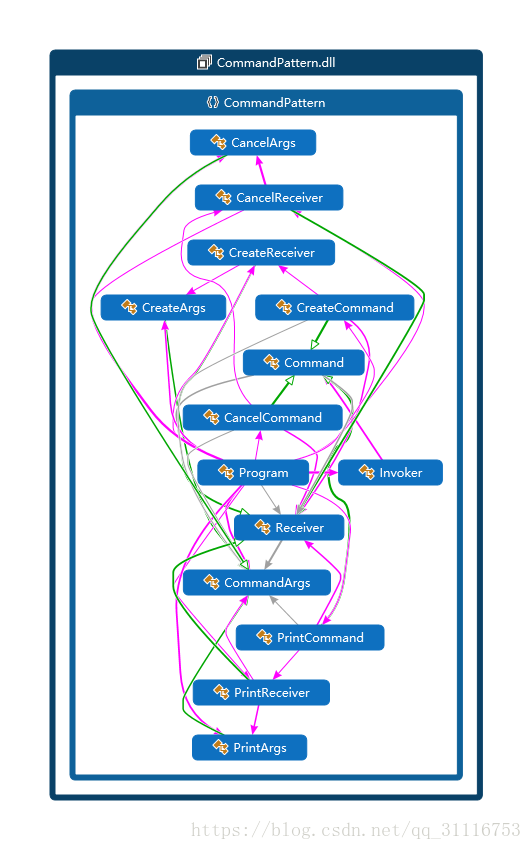
命名空间CommandPattern中包含Command基类、发票开具命令类CreateCommand、发票作废命令类CancelCommand、发票打印命令类PrintCommand、命令参数基类CommandArgs、发票开具命令参数类CommandArgs、发票作废命令参数类CancelArgs、发票打印命令参数类PrintArgs、接收者类Receiver和调用者类Invoker。本命尝试通过客户端调用不同的参数化发票命令来使调用者调用不同的功能。
namespace CommandPatternpublic abstract class Command {
protected Receiver _receiver = null;
protected CommandArgs _commandArgs = null;
public Command(Receiver receiver, CommandArgs commandArgs) {
this._receiver = receiver;
this._commandArgs = commandArgs;
}
public abstract void Action();
}抽象命令基类,包含Action动作执行命令,并且维持对接受者和命令参数的引用。
public class CreateCommand : Command {

    public CreateCommand(Receiver receiver, CommandArgs commandArgs)

        : base(receiver, commandArgs) {

    }

    public override void Action() {

        _receiver.CommandArgs = _commandArgs;

        (_receiver as CreateReceiver)?.CreateInvoice();

    }

}
这是发票开具命令,由于基类维持了对调用者的引用,所以在Action方法中通过调用CreateInvoice方法来开具一张发票。
public class CancelCommand : Command {

    public CancelCommand(Receiver receiver, CommandArgs commandArgs)

        : base(receiver, commandArgs) {

    }

    public override void Action() {

        _receiver.CommandArgs = _commandArgs;

        (_receiver as CancelReceiver)?.CancelInvoice();

    }

}
这是发票作废命令,由于基类维持了对调用者的引用,所以在Action方法中通过调用CancelInvoice方法来作废一张发票。
public class PrintCommand : Command {

    public PrintCommand(Receiver receiver, CommandArgs commandArgs)

        : base(receiver, commandArgs) {

    }

    public override void Action() {

        _receiver.CommandArgs = _commandArgs;

        (_receiver as PrintReceiver)?.PrintInvoice();

    }

}
这是发票打印命令,由于基类维持了对调用者的引用,所以在Action方法中通过调用PrintInvoice方法来打印一张发票。
public class CommandArgs {

    public string InvoiceType { get; set; }

}
public class CreateArgs : CommandArgs {
public DateTime BillingDate { get; set; }
}public class CancelArgs : CommandArgs {
public string InvoiceCode { get; set; }
public int InvoiceNumber { get; set; }
public string CancelReason { get; set; }
public string CancelMan { get; set; }
public DateTime CancelDate { get; set; }
}public class PrintArgs : CommandArgs {
public string InvoiceCode { get; set; }
public int InvoiceNumber { get; set; }
}参数化的命令参数基类CommandArgs和它的3个具体实现类。实际开发过程中可以将参数化命令信息封装在具体命令类中,本例为了更好的扩展性,将参数化命令信息抽象出来。
public class Invoker {

    private Command _command = null;

    public Invoker(Command command) {

        this._command = command;

    }

    public void Execute() {

        _command.Action();

    }

}
调用者类Invoker,实际开发中这个应为具体的调用类。例如我们需要从MQ获取实时数据,并根据从MQ获取到的JSON数据来处理不同的命令,那么这个调用者类应该为MQ所在的管理类(假如名为ActiveMQManager)。这时我们需要在ActiveMQManager类中维持对命令基类的引用,并在收到不同的JSON数据时解析出相应命令和命令参数信息,然后执行命令中的Action方法。
public abstract class Receiver {

    public CommandArgs CommandArgs { get; set; }

    protected const string LINE_BREAK =

        "-------------------------" +

        "-------------------------";

    //文章排版需要,故折成2行

}
public class CreateReceiver : Receiver {
public void CreateInvoice() {
var args = CommandArgs as CreateArgs;
if (args == null) throw new InvalidOperationException();
Console.WriteLine("Create Invoice!");
Console.WriteLine(
$"InvoiceType is {args.InvoiceType},{Environment.NewLine}" +
$"BillingDate is {args.BillingDate.ToString("yyyy-MM-dd HH:mm:ss")}!");
Console.WriteLine(LINE_BREAK);
}
}public class CancelReceiver : Receiver {
public void CancelInvoice() {
var args = CommandArgs as CancelArgs;
if (args == null) throw new InvalidOperationException();
Console.WriteLine("Cancel Invoice!");
Console.WriteLine(
$"InvoiceCode is {args.InvoiceCode},{Environment.NewLine}" +
$"InvoiceNumber is {args.InvoiceNumber},{Environment.NewLine}" +
$"InvoiceType is {args.InvoiceType},{Environment.NewLine}" +
$"CancelReason is {args.CancelReason},{Environment.NewLine}" +
$"CancelMan is {args.CancelMan},{Environment.NewLine}" +
$"CancelDate is {args.CancelDate.ToString("yyyy-MM-dd HH:mm:ss")}!");
Console.WriteLine(LINE_BREAK);
}
}public class PrintReceiver : Receiver {
public void PrintInvoice() {
var args = CommandArgs as PrintArgs;
if (args == null) throw new InvalidOperationException();
Console.WriteLine("Print Invoice!");
Console.WriteLine(
$"InvoiceCode is {args.InvoiceCode},{Environment.NewLine}" +
$"InvoiceNumber is {args.InvoiceNumber},{Environment.NewLine}" +
$"InvoiceType is {args.InvoiceType}!");
Console.WriteLine(LINE_BREAK);
}
}接收者基类Receiver和它的3个具体接收者类,需要维持对命令参数基类的引用,以便我们可以获取相应信息。接收者基类并不是命令模式必须的,但考虑到里氏替换原则和开闭原则,我们引入接收者基类并在不同的实现类里解耦不同的命令操作。
public class Program {

    private static Receiver _receiver = null;

    public static void Main(string[] args) {

        _receiver = new CreateReceiver();

        Command command = new CreateCommand(

            _receiver, new CreateArgs {

                InvoiceType = "004",

                BillingDate = DateTime.UtcNow

            });

        var invoker = new Invoker(command);

        invoker.Execute();

        _receiver = new CancelReceiver();

        command = new CancelCommand(

            _receiver, new CancelArgs {

                InvoiceCode = "310987289304",

                InvoiceNumber = 34156934,

                InvoiceType = "007",

                CancelReason = "Invoice missing!",

                CancelMan = "Iori",

                CancelDate = DateTime.UtcNow

            });

        invoker = new Invoker(command);

        invoker.Execute();

        _receiver = new PrintReceiver();

        command = new PrintCommand(

            _receiver, new PrintArgs {

                InvoiceCode = "310987289304",

                InvoiceNumber = 34156934,

                InvoiceType = "026"

            });

        invoker = new Invoker(command);

        invoker.Execute();

        Console.ReadKey();

    }

}
以上是为了测试本案例所编写的代码,通过不同的命令并提供额外的参数化命令信息来执行不同的功能。以下是这个案例的输出结果:
Create Invoice!

InvoiceType is 004,

BillingDate is 2018-07-19 05:34:45!

--------------------------------------------------

Cancel Invoice!

InvoiceCode is 310987289304,

InvoiceNumber is 34156934,

InvoiceType is 007,

CancelReason is Invoice missing!,

CancelMan is Iori,

CancelDate is 2018-07-19 05:34:45!

--------------------------------------------------

Print Invoice!

InvoiceCode is 310987289304,

InvoiceNumber is 34156934,

InvoiceType is 026!

--------------------------------------------------
优点:
该文章的最新版本已迁移至个人博客【比特飞】,单击链接 https://www.byteflying.com/archives/413 访问。
1、降低对象之间的耦合度,通过参数化的命令信息来驱动程序的运行;
2、新的命令可以很容易地加入到系统中;
3、可以比较容易地设计一个组合命令;
4、调用同一方法实现不同的功能。
缺点:
使用命令模式可能会导致某些系统有过多的具体命令类,导致子类膨胀。
使用场景:
1、系统需要将请求调用者和请求接收者解耦,使得调用者和接收者不直接交互;
2、系统需要在不同的时间指定请求、将请求排队和执行请求;
3、系统需要支持命令的撤销(Undo)操作和恢复(Redo)操作。
C#设计模式之14-命令模式的更多相关文章
- [设计模式] 14 命令模式 Command
Command 模式通过将请求封装到一个对象(Command)中,并将请求的接受者存放到具体的 ConcreteCommand 类中(Receiver)中,从而实现调用操作的对象和操作的具体实现者之间 ...
- C#设计模式学习笔记:(14)命令模式
本笔记摘抄自:https://www.cnblogs.com/PatrickLiu/p/7873322.html,记录一下学习过程以备后续查用. 一.引言 今天我们要讲行为型设计模式的第二个模式--命 ...
- 设计模式学习之命令模式(Command,行为型模式)(12)
一.命令模式的定义 命令模式属于对象的行为型模式.命令模式是把一个操作或者行为抽象为一个对象中,通过对命令的抽象化来使得发出命令的责任和执行命令的责任分隔开.命令模式的实现可以提供命令的撤销和恢复功能 ...
- 14.命令模式(Command Pattern)
耦合与变化: 耦合是软件不能抵御变化灾难的根本性原因.不仅实体对象与实体对象之间存在耦合关系,实体对象与行为操作之间也存在耦合关系. ...
- Java设计模式学习记录-命令模式
前言 这次要介绍的是命令模式,这也是一种行为型模式.最近反正没有面试机会我就写博客呗,该投的简历都投了.然后就继续看书,其实看书也会给自己带来成就感,原来以前不明白的东西,书上已经给彻底的介绍清楚了, ...
- java设计模式-----23、命令模式
概念: Command模式也叫命令模式 ,是行为设计模式的一种.Command模式通过被称为Command的类封装了对目标对象的调用行为以及调用参数. 命令模式(Command Pattern)是一种 ...
- c#设计模式系列:命令模式(Command Pattern)
引言 命令模式,我感觉"命令"就是任务,执行了命令就完成了一个任务.或者说,命令是任务,我们再从这个名字上并不知道命令的发出者和接受者分别是谁,为什么呢?因为我们并不关心他们是谁, ...
- 大话设计模式Python实现-命令模式
命令模式(Command Pattern):将请求封装成对象,从而使可用不同的请求对客户进行参数化:对请求排队或记录请求日志,以及支持可撤消的操作. 下面是一个命令模式的demo: #!/usr/bi ...
- 《Head first设计模式》之命令模式
命令模式将"请求"封装成对象,以便使用不同的请求.队列或者日志来参数化其他对象.命令模式也支持可撤销的操作. 一个家电公司想邀请你设计一个家电自动化遥控器的API.这个遥控器有7个 ...
- 重学 Java 设计模式:实战命令模式「模拟高档餐厅八大菜系,小二点单厨师烹饪场景」
作者:小傅哥 博客:https://bugstack.cn - 原创系列专题文章 沉淀.分享.成长,让自己和他人都能有所收获! 一.前言 持之以恒的重要性 初学编程往往都很懵,几乎在学习的过程中会遇到 ...
随机推荐
- Spring声明式事务快速上手
1.什么是事务 首先我们要知道什么是事务.知其然,才能知其所以然. 事务(Transaction)是一个业务,是一个不可分割的逻辑工作单元,基于事务可以更好的保证业务的正确性. 这么说可能有点难以理解 ...
- for循环实现Fibonacci数列
Fibonacci数列的递推公式为:Fn=Fn-1+Fn-2,其中F1=F2=1. 当n比较大时,Fn也非常大,现在我们想知道,Fn除以10007的余数是多少. 输入格式 输入包含一个整数n. 输出格 ...
- 关于RecyclerView(一)基本使用
前言 最近在项目中用到了ListView,不知道为什么总是出现数据错乱的情况,另外RecyclerView包含很多Item动画,所以改成了RecyclerView. 简单使用 RecyclerView ...
- sql数据管理语句
一.数据管理 1.增加数据 INSERT INTO student VALUES(1,'张三','男',20); -- 插入所有字段.一定依次按顺序插入 -- 注意不能少或多字段值 如只需要插入部分字 ...
- matplotlib示例
plt.plot 内只有一个列表示例 import matplotlib.pyplot as plt lst = [4.53,1.94,4.75,0.43,2.02,1.22,2.13,2.77] p ...
- Numpy改变数组的形状
import numpy as np n = np.arange(10) # array([0, 1, 2, 3, 4, 5, 6, 7, 8, 9]) # 查看数组的大小 n.size # # 将数 ...
- PDOStatement::getColumnMeta
PDOStatement::getColumnMeta — 返回结果集中一列的元数据(PHP 5 >= 5.1.0, PECL pdo >= 0.2.0)高佣联盟 www.cgewang. ...
- luogu P2252 威佐夫博弈 模板 博弈
LINK:威佐夫博弈 四大博弈 我都没有好好整理 不过大致可以了解一下. 在这个博弈中 存在一些局面 先手遇到必胜. 不过由于后手必胜的局面更具规律性这里研究先手遇到的局面后手必胜的情况. 这些局面分 ...
- CF R 635 div2 1337D Xenia and Colorful Gems 贪心 二分 双指针
LINK:Xenia and Colorful Gems 考试的时候没想到一个很好的做法. 赛后也有一个想法. 可以考虑答案的样子 x,y,z 可以发现 一共有 x<=y<=z,z< ...
- zabbix配置钉钉机器人告警
目录 zabbix配置钉钉机器人告警 1. 在钉钉中创建群聊,在群里面添加自定义机器人 2. 配置钉钉告警脚本 3. 配置脚本告警 3.1 创建媒介 3.2 为用户添加对应媒介 3.3 创建动作 4. ...