
GoodReads: Machine Learning (Part 3)
In the first installment of this series, we scraped reviews from Goodreads. In thesecond one, we performed exploratory data analysis and created new variables. We are now ready for the “main dish”: machine learning!
Setup and general data prep
Let’s start by loading the libraries and our dataset.
library(data.table)

library(dplyr)

library(caret)

library(RTextTools)

library(xgboost)

library(ROCR)

setwd("C:/Users/Florent/Desktop/Data_analysis_applications/GoodReads_TextMining")

data <- read.csv("GoodReadsCleanData.csv", stringsAsFactors = FALSE)
To recap, at this point, we have the following features in our dataset:
review.id

book

rating

review

review.length

mean.sentiment

median.sentiment

count.afinn.positive

count.afinn.negative

count.bing.negative

count.bing.positive
For this example, we’ll simplify the analysis by collapsing the 1 to 5 stars rating into a binary variable: whether the book was rated a “good read” (4 or 5 stars) or not (1 to 3 stars). This will allow us to use classification algorithms, and to have less unbalanced categories.
set.seed(1234)

# Creating the outcome value

data$good.read <- 0

data$good.read[data$rating == 4 | data$rating == 5] <- 1
The “good reads”, or positive reviews, represent about 85% of the dataset, and the “bad reads”, or negative reviews, with good.read == 0, about 15%. We then create the train and test subsets. The dataset is still fairly unbalanced, so we don’t just randomly assign data points to the train and test datasets; we make sure to preserve the percentage of good reads in each subset by using the caret function `createDataPartition` for stratified sampling.
trainIdx <- createDataPartition(data$good.read,

                                p = .75,

                                list = FALSE,

                                times = 1)

train <- data[trainIdx, ]

test <- data[-trainIdx, ]
Creating the Document-Term Matrices (DTM)
Our goal is to use the frequency of individual words in the reviews as features in our machine learning algorithms. In order to do that, we need to start by counting the number of occurrence of each word in each review. Fortunately, there are tools to do just that, that will return a convenient “Document-Term Matrix”, with the reviews in rows and the words in columns; each entry in the matrix indicates the number of occurrences of that particular word in that particular review.
A typical DTM would look like this:
| Reviews | about | across | ado | adult |
|---|---|---|---|---|
| Review 1 | 0 | 2 | 1 | 0 |
| Review 2 | 1 | 0 | 0 | 1 |
We don’t want to catch every single word that appears in at least one review, because very rare words will increase the size of the DTM while having little predictive power. So we’ll only keep in our DTM words that appear in at least a certain percentage of all reviews, say 1%. This is controlled by the “sparsity” parameter in the following code, with sparsity = 1-0.01 = 0.99.
There is a challenge though. The premise of our analysis is that some words appear in negative reviews and not in positive reviews, and reversely (or at least with a different frequency). But if we only keep words that appear in 1% of our overall training dataset, because negative reviews represent only 15% of our dataset, we are effectively requiring that a negative word appears in 1%/15% = 6.67% of the negative reviews; this is too high a threshold and won’t do.
The solution is to create two different DTM for our training dataset, one for positive reviews and one for negative reviews, and then to merge them together. This way, the effective threshold for negative words is to appear in only 1% of the negative reviews.
# Creating a DTM for the negative reviews

sparsity <- .99

bad.dtm <- create_matrix(train$review[train$good.read == 0],

                         language = "english",

                         removeStopwords = FALSE,

                         removeNumbers = TRUE,

                         stemWords = FALSE,

                         removeSparseTerms = sparsity)

#Converting the DTM in a data frame

bad.dtm.df <- as.data.frame(as.matrix(bad.dtm),

                            row.names = train$review.id[train$good.read == 0])

# Creating a DTM for the positive reviews

good.dtm <- create_matrix(train$review[train$good.read == 1],

                          language = "english",

                          removeStopwords = FALSE,

                          removeNumbers = TRUE,

                          stemWords = FALSE,

                          removeSparseTerms = sparsity)

good.dtm.df <- data.table(as.matrix(good.dtm),

                          row.names = train$review.id[train$good.read == 1])

# Joining the two DTM together

train.dtm.df <- bind_rows(bad.dtm.df, good.dtm.df)

train.dtm.df$review.id <- c(train$review.id[train$good.read == 0],

                            train$review.id[train$good.read == 1])

train.dtm.df <- arrange(train.dtm.df, review.id)

train.dtm.df$good.read <- train$good.read
We also want to use in our analyses our aggregate variables (review length, mean and median sentiment, count of positive and negative words according to the two lexicons), so we join the DTM to the train dataset, by review id. We also convert all NA values in our data frames to 0 (these NA have been generated where words were absent of reviews, so that’s the correct of dealing with them here; but kids, don’t convert NA to 0 at home without thinking about it first).
train.dtm.df <- train %>%

  select(-c(book, rating, review, good.read)) %>%

  inner_join(train.dtm.df, by = "review.id") %>%

  select(-review.id)

train.dtm.df[is.na(train.dtm.df)] <- 0
# Creating the test DTM

test.dtm <- create_matrix(test$review,

                          language = "english",

                          removeStopwords = FALSE,

                          removeNumbers = TRUE,

                          stemWords = FALSE,

                          removeSparseTerms = sparsity)

test.dtm.df <- data.table(as.matrix(test.dtm))

test.dtm.df$review.id <- test$review.id

test.dtm.df$good.read <- test$good.read

test.dtm.df <- test %>%

  select(-c(book, rating, review, good.read)) %>%

  inner_join(test.dtm.df, by = "review.id") %>%

  select(-review.id)
A challenge here is to ensure that the test DTM has the same columns as the train dataset. Obviously, some words may appear in the test dataset while being absent of the train dataset, but there’s nothing we can do about them as our algorithms won’t have anything to say about them. The trick we’re going to use relies on the flexibility of the data.tables: when you join by rows two data.tables with different columns, the resulting data.table automatically has all the columns of the two initial data.tables, with the missing values set as NA. So we are going to add a row of our training data.table to our test data.table and immediately remove it after the missing columns will have been created; then we’ll keep only the columns which appear in the training dataset (i.e. discard all columns which appear only in the test dataset).
test.dtm.df <- head(bind_rows(test.dtm.df, train.dtm.df[1, ]), -1)

test.dtm.df <- test.dtm.df %>%

  select(one_of(colnames(train.dtm.df)))

test.dtm.df[is.na(test.dtm.df)] <- 0
With this, we have our training and test datasets and we can start crunching numbers!
Machine Learning
We’ll be using XGboost here, as it yields the best results (I tried Random Forests and Support Vector Machines too, but the resulting accuracy is too instable with these to be reliable).
We start by calculating our baseline accuracy, what would get by always predicting the most frequent category, and then we calibrate our model.
baseline.acc <- sum(test$good.read == "1") / nrow(test)

XGB.train <- as.matrix(select(train.dtm.df, -good.read),

                       dimnames = dimnames(train.dtm.df))

XGB.test <- as.matrix(select(test.dtm.df, -good.read),

                      dimnames=dimnames(test.dtm.df))

XGB.model <- xgboost(data = XGB.train,

                     label = train.dtm.df$good.read,

                     nrounds = 400,

                     objective = "binary:logistic")

XGB.predict <- predict(XGB.model, XGB.test)

XGB.results <- data.frame(good.read = test$good.read,

                          pred = XGB.predict)
The XGBoost algorithm yields a probabilist prediction, so we need to determine a threshold over which we’ll classify a review as good. In order to do that, we’ll plot the ROC (Receiver Operating Characteristic) curve for the true negative rate against the false negative rate.
ROCR.pred <- prediction(XGB.results$pred, XGB.results$good.read)

ROCR.perf <- performance(ROCR.pred, 'tnr','fnr')

plot(ROCR.perf, colorize = TRUE)
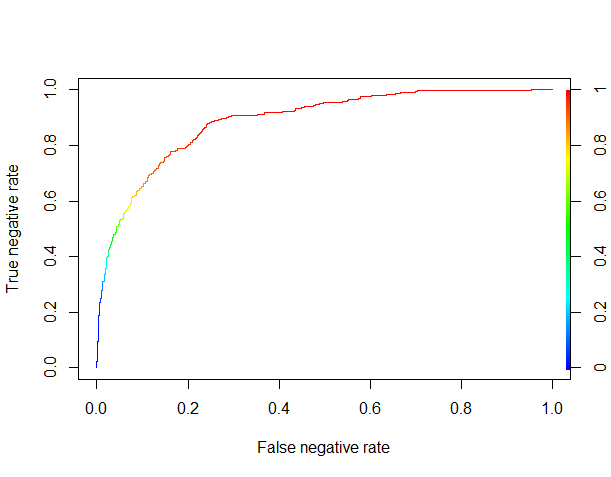
Things are looking pretty good. It seems that by using a threshold of about 0.8 (where the curve becomes red), we can correctly classify more than 50% of the negative reviews (the true negative rate) while misclassifying as negative reviews less than 10% of the positive reviews (the false negative rate).
XGB.table <- table(true = XGB.results$good.read,

                   pred = as.integer(XGB.results$pred >= 0.80))

XGB.table

XGB.acc <- sum(diag(XGB.table)) / nrow(test)
Our overall accuracy is 87%, so we beat the benchmark of always predicting that a review is positive (which would yield a 83.4% accuracy here, to be precise), while catching 61.5% of the negative reviews. Not bad for a “black box” algorithm, without any parameter optimization or feature engineering!
Directions for further analyses
If we wanted to go deeper in the analysis, a good starting point would be to look at the relative importance of features in the XGBoost algorithm:
### Feature analysis with XGBoost

names <- colnames(test.dtm.df)

importance.matrix <- xgb.importance(names, model = XGB.model)

xgb.plot.importance(importance.matrix[1:20, ])
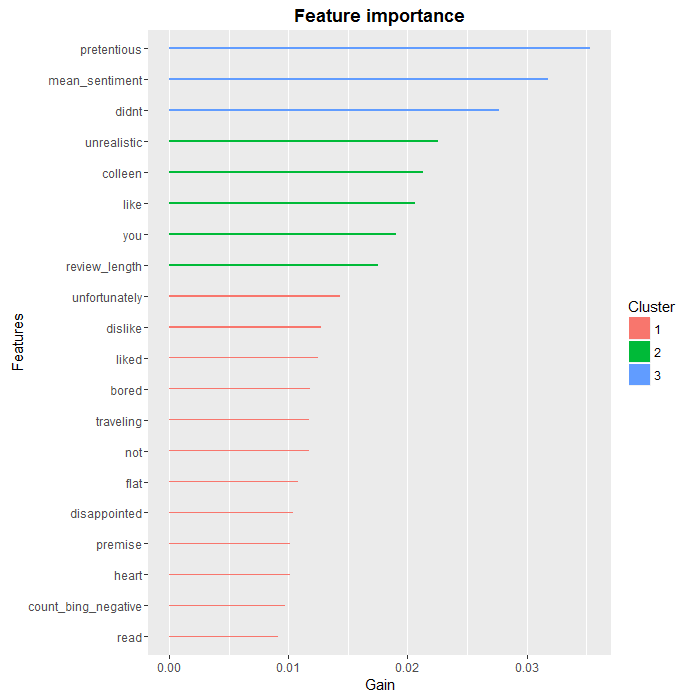
As we can see, there are a few words, such as “colleen” or “you” that are unlikely to be useful in a more general setting, but overall, we find that the most predictive words are negative ones, which was to be expected. We also see that two of our aggregate variables, review.length and count.bing.negative, made the top 10.
There are several ways we could improve on the analysis at this point, such as:
- using N-grams (i.e. sequences of words, such as “did not like”) in addition to single words, to better qualify negative terms. “was very disappointed” would obviously have a different impact compared to “was not disappointed”, even though on a word-by-word basis they could not be distinguished.
- fine-tuning the parameters of the XGBoost algorithm.
- looking at the negative reviews that have been misclassified, in order to determine what features to add to the analysis.
Conclusion
We have covered a lot of ground in this series: from webscraping to sentiment analysis to predictive analytics with machine learning. The main conclusion I would draw from this exercise is that we now have at our disposal a large number of powerful tools that can be used “off-the-shelf” to build fairly quickly a complete and meaningful analytical pipeline.
As for the first two installments, the complete R code for this part is available onmy github.
转自:https://www.r-bloggers.com/goodreads-machine-learning-part-3/
GoodReads: Machine Learning (Part 3)的更多相关文章
- How do I learn mathematics for machine learning?
https://www.quora.com/How-do-I-learn-mathematics-for-machine-learning How do I learn mathematics f ...
- 【Machine Learning】KNN算法虹膜图片识别
K-近邻算法虹膜图片识别实战 作者:白宁超 2017年1月3日18:26:33 摘要:随着机器学习和深度学习的热潮,各种图书层出不穷.然而多数是基础理论知识介绍,缺乏实现的深入理解.本系列文章是作者结 ...
- 【Machine Learning】Python开发工具:Anaconda+Sublime
Python开发工具:Anaconda+Sublime 作者:白宁超 2016年12月23日21:24:51 摘要:随着机器学习和深度学习的热潮,各种图书层出不穷.然而多数是基础理论知识介绍,缺乏实现 ...
- 【Machine Learning】机器学习及其基础概念简介
机器学习及其基础概念简介 作者:白宁超 2016年12月23日21:24:51 摘要:随着机器学习和深度学习的热潮,各种图书层出不穷.然而多数是基础理论知识介绍,缺乏实现的深入理解.本系列文章是作者结 ...
- 【Machine Learning】决策树案例:基于python的商品购买能力预测系统
决策树在商品购买能力预测案例中的算法实现 作者:白宁超 2016年12月24日22:05:42 摘要:随着机器学习和深度学习的热潮,各种图书层出不穷.然而多数是基础理论知识介绍,缺乏实现的深入理解.本 ...
- 【机器学习Machine Learning】资料大全
昨天总结了深度学习的资料,今天把机器学习的资料也总结一下(友情提示:有些网站需要"科学上网"^_^) 推荐几本好书: 1.Pattern Recognition and Machi ...
- [Machine Learning] Active Learning
1. 写在前面 在机器学习(Machine learning)领域,监督学习(Supervised learning).非监督学习(Unsupervised learning)以及半监督学习(Semi ...
- [Machine Learning & Algorithm]CAML机器学习系列2:深入浅出ML之Entropy-Based家族
声明:本博客整理自博友@zhouyong计算广告与机器学习-技术共享平台,尊重原创,欢迎感兴趣的博友查看原文. 写在前面 记得在<Pattern Recognition And Machine ...
- machine learning基础与实践系列
由于研究工作的需要,最近在看机器学习的一些基本的算法.选用的书是周志华的西瓜书--(<机器学习>周志华著)和<机器学习实战>,视频的话在看Coursera上Andrew Ng的 ...
随机推荐
- 百度Web前端面试经历
今天面了百度的前端实习职位.一面.时间大概是50分钟.面试官是位很帅气的小伙子,非常友好的一个人.进门的时候他让我等一会,我瞄了一眼他的电脑屏幕,发现他在coding…… 9点50开始的面试. 面试官 ...
- jQuery的发展史
jQuery的发展史,你知道吗? 每天多学一点知识,就少写一行代码2006年1月,jQuery的第一个版本面世,至今已经有6年多了(注:这个时间点是截止至出书时间).虽然过了这么久,但它依然以其简洁. ...
- Oracle数据库报错:索引中丢失 IN 或 OUT 参数
另外,我记得好像以前也有这样的错误发生,当时的错误原因是,参数类型和数据库的类型不匹配引起的. 所以,如果有这种错误发生,应该仔细检查每个字段赋值的地方,检查类型及非空. 也可能是传参数问题,传参数过 ...
- Doctype 文档类型,标准模式,混杂模式
HTML4.01和XHTML1.0 基于 SGML,支持DTD声明,HTML5不是,但是需要 doctype 来规范浏览器的行为. 标准模式是指,DTD声明定义了标准文档的类型后,浏览器按W3C标准解 ...
- MongoDB系列:把mongodb作为windows的服务来启动
1.首先切换到mongodb安装目录下的bin目录,在控制台直接运行以下命令 "C:\Program Files\MongoDB\Server\3.0\bin\mongod.exe" ...
- 关于AysncController的一次测试(url重写后静态页文件内容的读取是否需要使用异步?)
因为做网站的静态页缓存,所以做了这个测试 MVC项目 准备了4个Action,分两组,一组是读取本地磁盘的一个html页面文件,一组是延时2秒 public class TestController ...
- AngularJS创建新指令 - 函数功能
首先先介绍下AngularJS指令下的几种函数 Link函数和Scope 指令生成出的模板其实没有太多意义,除非它在特定的scope下编译.默认情况下,指令并不会创建新的子scope.更多的,它使用父 ...
- java类集框架(ArrayList,LinkedList,Vector区别)
主要分两个接口:collection和Map 主要分三类:集合(set).列表(List).映射(Map)1.集合:没有重复对象,没有特定排序方式2.列表:对象按索引位置排序,可以有重复对象3.映射: ...
- 内嵌的Component调用外部的方法
如果一个内嵌的Component控件需要调用外部定义的方法,用outerDocument.方法名来调用,前提是该方法是public的.如:<mx:DataGridColumn headerTex ...
- Winform控件根据文字内容自动调整最合适大小
private void AutoSizeControl(Control control, int textPadding) { // Create a Graphics object for the ...