
MYBATIS 简单整理与回顾
这两天简单整理了一下MyBatis
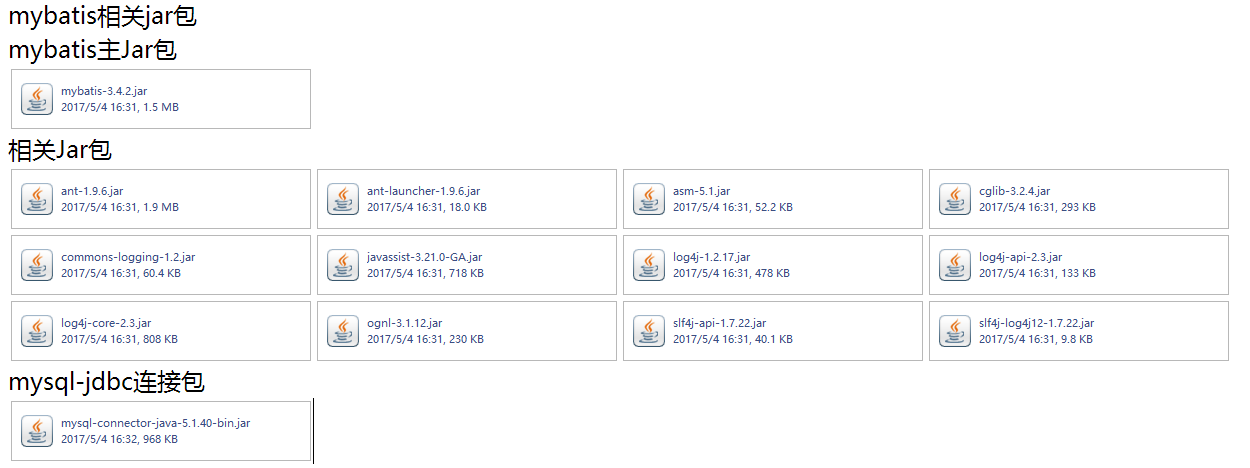
相关api和jar包这里提供一个下载地址,免得找了
链接:http://pan.baidu.com/s/1jIl1KaE 密码:d2yl
A.简单搭建跑项目
2.进行相关xml配置
放在根目录下

<?xml version="1.0" encoding="UTF-8" ?>

<!DOCTYPE mapper PUBLIC "-//mybatis.org//DTD Mapper 3.0//EN" "http://mybatis.org/dtd/mybatis-3-mapper.dtd">

<mapper namespace="com.jhdx.mapper.T_CustomerMapper">

      <!-- 通过编号查询用户 -->

      <select id="getAllCustomer"  resultType="Customer">

            select * from t_customer

      </select>

      <select id="getCustomerById" parameterType="java.lang.Integer" resultType="Customer">

      select * from t_customer where id=#{id}

      </select>

      <select id="getCustomerByName" parameterType="java.lang.String" resultType="Customer">

      select * from t_customer where name like "%"#{name}"%"

      </select>

      <insert id="insertCustomer"  parameterType="Customer">

      insert into t_customer(name,age,tel) values(#{name},#{age},#{tel})

      </insert>

</mapper>
      String resource = "mybatis-config.xml";

      InputStream inputStream=null;

      inputStream = Resources.getResourceAsStream(resource);

      SqlSessionFactory sqlSessionFactory = new SqlSessionFactoryBuilder().build(inputStream);

      //创建session工厂

      SqlSession session=sqlSessionFactory.openSession();

      //调用接口方法

      T_CustomerMapper t_CustomerMapper=session.getMapper(T_CustomerMapper.class);

      T_Customer t_Customer = new T_Customer();

      t_Customer=t_CustomerMapper.getCustomerByName("1");

      System.out.println(t_Customer.getName());

      <mappers>

            <!-- 配置映射文件 -->

            <mapper resource="com/jhdx/mapper/T_customerMapper.xml" />

            <mapper class="com.jhdx.mapper.T_customerMapper" />

      </mappers>
<select id="getCustomerByName" parameterType="java.lang.String" resultType="Customer">

      select * from t_customer where name like "%"#{name}"%"

</select>


  <resultMap id="BaseResultMap" type="com.jhdx.model.entity.User">

    <id column="userId" jdbcType="INTEGER" property="userid" />

    <result column="userName" jdbcType="VARCHAR" property="username" />

    <result column="userPwd" jdbcType="VARCHAR" property="userpwd" />

    <collection property="contents" ofType="Content" column="userId" select="selectAllContents"></collection>

  </resultMap>

  <select id="selectAllContents" resultType="Content" parameterType="java.lang.Integer">

  select * from content where userId=#{userId}

  </select>
<select id="selectUsers" resultType="map">

select

<include refid="userColumns"><property name="alias" value="t1"/></include>,

<include refid="userColumns"><property name="alias" value="t2"/></include>

from some_table t1

cross join some_table t2

</select>
<sql id="sometable">

${prefix}Table

</sql>

<sql id="someinclude">

from

<include refid="${include_target}"/>

</sql>

<select id="select" resultType="map">

select

field1, field2, field3

<include refid="someinclude">

<property name="prefix" value="Some"/>

<property name="include_target" value="sometable"/>

</include>

</select>
DAO层的函数方法

Public User selectUser(String name,String area);

对应的Mapper.xml

<select id="selectUser" resultMap="BaseResultMap">

    select  *  from user_user_t   where user_name = #{0} and user_area=#{1}

</select>
此方法采用Map传多参数.

Dao层的函数方法

Public User selectUser(Map paramMap);

对应的Mapper.xml

<select id=" selectUser" resultMap="BaseResultMap">

  select  *  from user_user_t  where user_name = #{userName,jdbcType=VARCHAR} and user_area=#{userArea,jdbcType=VARCHAR}

</select>

Service层调用

Private User xxxSelectUser(){

Map paramMap=new hashMap();

paramMap.put(“userName”,”对应具体的参数值”);

paramMap.put(“userArea”,”对应具体的参数值”);

User user=xxx. selectUser(paramMap);}
Dao层的函数方法

Public User selectUser(@param(“userName”)Stringname,@parm(“userArea”String area);

对应的Mapper.xml

<select id=" selectUser" resultMap="BaseResultMap">

   select  *  from user_user_t   where user_name = #{userName,jdbcType=VARCHAR} and user_area=#{userArea,jdbcType=VARCHAR}

</select>
- • 映射语句文件中的所有select 语句将会被缓存。
- • 映射语句文件中的所有insert,update 和delete 语句会刷新缓存。
- • 缓存会使用Least Recently Used(LRU,最近最少使用的)算法来收回。
- • 根据时间表(比如no Flush Interval,没有刷新间隔), 缓存不会以任何时间顺序来刷新。
- • 缓存会存储列表集合或对象(无论查询方法返回什么)的1024 个引用。
- 缓存会被视为是read/write(可读 /可写 )的缓存,意味着对象检索不是共享的 ,而 且可以 安全地被调用者修改 ,而不干扰其他调用者或线程所做的潜在修改。
- • LRU– 最近最少使用的:移除最长时间不被使用的对象。
- • FIFO– 先进先出:按对象进入缓存的顺序来移除它们。
- • SOFT– 软引用:移除基于垃圾回收器状态和软引用规则的对象。
- • WEAK– 弱引用:更积极地移除基于垃圾收集器状态和弱引用规则的对象。
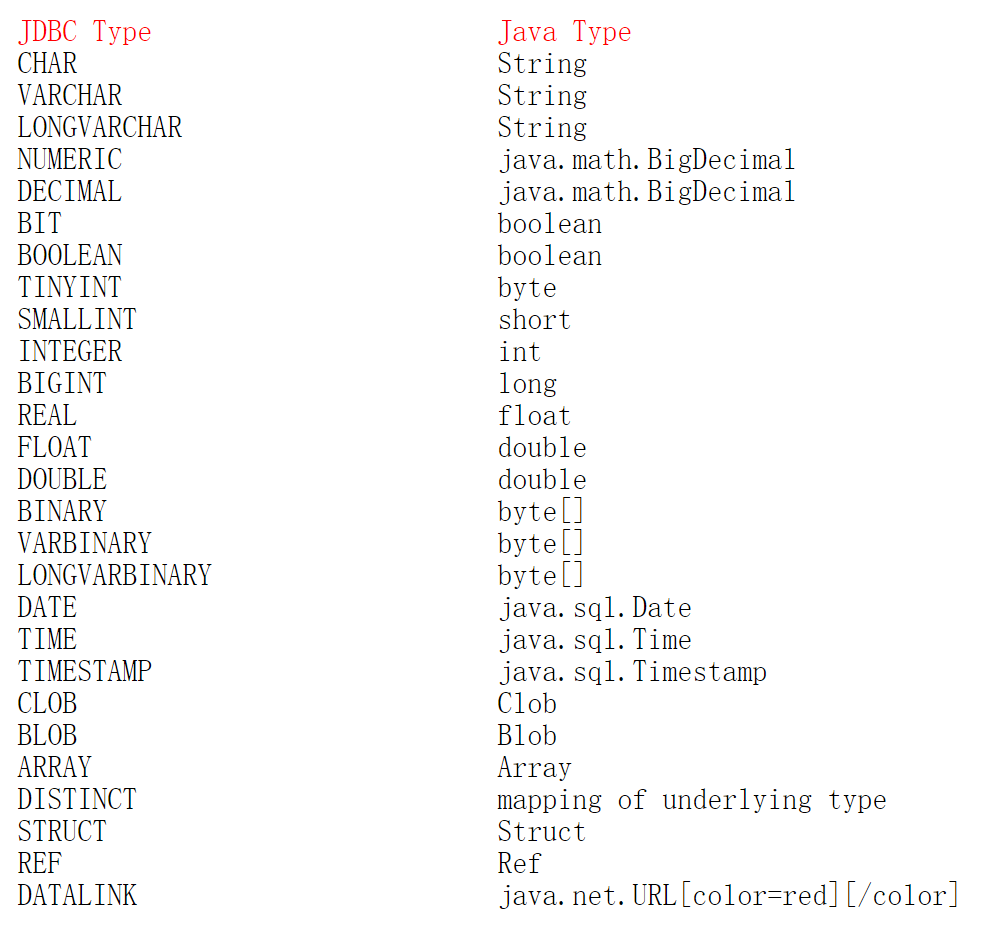
1. mybatis中 jdbcType 时间类型
当jdbcType = DATE 时, 只传入了 年月日
jdbcType = TIMESTAMP , 年月日+ 时分秒
使用时, 没有加jdbcType 正常,
1. #将传入的数据都当成一个字符串,会对自动传入的数据加一个双引号。如:order by #user_id#,如果传入的值是111,那么解析成sql时的值为order by "111", 如果传入的值是id,则解析成的sql为order by "id".
2. $将传入的数据直接显示生成在sql中。如:order by $user_id$,如果传入的值是111,那么解析成sql时的值为order by user_id, 如果传入的值是id,则解析成的sql为order by id.
3. #方式能够很大程度防止sql注入。
4.$方式无法防止Sql注入。
5.$方式一般用于传入数据库对象,例如传入表名.
6.一般能用#的就别用$.
MYBATIS 简单整理与回顾的更多相关文章
- 浅析MyBatis(二):手写一个自己的MyBatis简单框架
在上一篇文章中,我们由一个快速案例剖析了 MyBatis 的整体架构与整体运行流程,在本篇文章中笔者会根据 MyBatis 的运行流程手写一个自定义 MyBatis 简单框架,在实践中加深对 MyBa ...
- .NET Web开发技术简单整理
在最初学习一些编程语言.一些编程技术的时候,做的更多的是如何使用该技术,如何更好的使用该技术解决问题,而没有去关注它的相关性.关注它的理论支持,这种学习技术的方式是短平快.其实工作中有时候也是这样,公 ...
- 转载:.NET Web开发技术简单整理
在最初学习一些编程语言.一些编程技术的时候,做的更多的是如何使用该技术,如何更好的使用该技术解决问题,而没有去关注它的相关性.关注它的理论支持,这种学习技术的方式是短平快.其实工作中有时候也是这样,公 ...
- MyBatis简单的增删改查以及简单的分页查询实现
MyBatis简单的增删改查以及简单的分页查询实现 <? xml version="1.0" encoding="UTF-8"? > <!DO ...
- 哪些CSS是可以被继承的--简单整理
那些CSS是可以被继承的--简单整理1.文本相关属性是继承的:font-size,font-family,line-height,text-index等2.列表相关属性是继承的:list-style- ...
- spring+springMVC+mybatis简单整合
spring+springMVC+mybatis简单整合, springMVC框架是spring的子项目,所以框架的整合方式为,spring+Mybatis或springMVC+mybatis. 三大 ...
- .NET Web开发技术简单整理 转
.NET Web开发技术简单整理 原文:http://www.cnblogs.com/SanMaoSpace/p/3157293.html 在最初学习一些编程语言.一些编程技术的时候,做的更多的是如何 ...
- MyBatis简单使用方式总结
MyBatis简单使用方式总结 三个部分来理解: 1.对MyBatis的配置部分 2.实体类与映射文件部分 3.使用部分 对MyBatis的配置部分: 1.配置用log4J显式日志 2.导入包的别名 ...
- Spring Boot Mybatis简单使用
Spring Boot Mybatis简单使用 步骤说明 build.gradle:依赖添加 application.properties:配置添加 代码编写 测试 build.gradle:依赖添加 ...
随机推荐
- iOS 给UITextView加一个placeholder
苹果并没有为UITextView提供placeholder功能.我们可以通过两种办法实现. 方法一: 思路:设置默认显示的文字,颜色设置为灰色.代理方法监听textView点击. 缺点:如果点击到文字 ...
- 4.熟悉Java基本类库系列——Java 正则表达式类库
正则表达式语法结构图: Java正则表达式类库结构图: Java典型例子 1.String类 matches()方法 判断字符串是否符合特定正则表达式 @Test public void testRe ...
- MySQL学习笔记(一)—数据库基础
一.数据库概述 1.数据库的组织结构 (1)数据库就是用来存放信息的仓库. (2)数据库里的数据集合都存放在数据表(table)里. (3)数据表由数据行(row)和数据 ...
- 在Caffe中实现模型融合
模型融合 有的时候我们手头可能有了若干个已经训练好的模型,这些模型可能是同样的结构,也可能是不同的结构,训练模型的数据可能是同一批,也可能不同.无论是出于要通过ensemble提升性能的目的,还是要设 ...
- OS X background process
Types of Background Process 1. login item 2. xpc service 3. daemon/agent (也可以叫 mach service) 4. star ...
- HTTP协议介绍
一.什么是HTTP协议呢? 维基百科 写道 超文本传输协议(英文:HyperText Transfer Protocol,缩写:HTTP)是互联网上应用最为广泛的一种网络协议.HTTP是一个客户端终端 ...
- ABCD多选正则表达式
正则表达式: 4个选项,可单选可多选不允许重复 ABCD正则: regexp : /^(?!.*((A.*){2,}|(B.*){2,}|(C.*){2,}|(D.*){2,})$)[A-D]{1,4 ...
- 通过web对.exe程序进行更新和修改
实现功能:通过网站更新用户的软件,需要联网,也可以通过本地网站更新局域网用户软件. 根本实现:1.一个网站(我用的是自己的www.aq36.xyz ,本地就可以,可以用localhost)然后运行up ...
- EZChart - 在线图表生成器
朋友写材料时,需要用到一些分析图表,嫌Excel的太丑,就为他写了一个在线图表生成器. 纯静态实现,基于:H5 + Bootstrap + FusionCharts 本地存储使用H5的localSto ...
- Linux 3.2中回写机制的变革
原创作品,允许转载,转载时请务必以超链接形式标明文章 原始出处 .作者信息和本声明.否则将追究法律责任.http://alanwu.blog.51cto.com/3652632/1109952 wri ...