
你知道BFC、IFC、FFC、GFC及多栏自适应布局吗?
FC(Formatting Context)格式化内容,常见的FC有BFC、IFC、FFC、GFC四种类型,BFC和IFC是W3C CSS2.1规范提出的概念,FFC和GFC是W3C CSS3规范提出的概念,其实就是定义了一套页面渲染的规则,决定了盒子以什么样的方式渲染从而占据什么样的位置区域,本文只是简单的学习笔记以供参考。
想要弄懂FC,首先得弄清楚盒子模型,常见的两种盒子模型为:
IE盒子模型(怪异模式):
width = content-width + padding-width + border-width;
height = content-height + padding-height + border-height;
W3C盒子模型(标准):
width = content-width;
height = content-height;
IE总是与众不同,让人精疲力尽,好在IE8开始支持CSS3的属性box-sizing:border-box/content-box/inherit;有了这个属性,我们在布局时就游刃有余了,其实这些都是基于BFC的,下面开始进入正文:
BFC(Block formatting contexts):
Floats, absolutely positioned elements, block containers (such as inline-blocks, table-cells, and table-captions) that are not block boxes, and block boxes with 'overflow' other than 'visible' (except when that value has been propagated to the viewport) establish new block formatting contexts for their contents.
总结要点如下:
float 的值不为 none
position 的值不为 static 或 relative
display 的值为 table-cell、table-caption、inline-block、flex 或 inline-flex
overflow 的值不为 visibility
特点:
块盒子垂直排列,垂直方向上在外边距上会进行塌陷,以大的外边距为二者之间的距离
浮动的块盒子左右外边距也会发生同样的塌陷,以大的外边距为二者之间的距离
IFC(Ininle formatting contexts):
In an inline formatting context, boxes are laid out horizontally, one after the other, beginning at the top of a containing block. Horizontal margins, borders, and padding are respected between these boxes. The boxes may be aligned vertically in different ways: their bottoms or tops may be aligned, or the baselines of text within them may be aligned. The rectangular area that contains the boxes that form a line is called a line box.
总结要点如下:
水平方向上排列
行盒子以不同的方式水平对齐,文字的话一般以文字的基线对齐
- 还有一种特殊的类型是在块盒子里包含着行盒子称作inline-block
特点:
没有宽度和高度
FFC(Flex formatting contexts):
Made up of telescopic containers and telescopic items. You can get a telescopic container by setting the display attribute of the element to flex or inline-flex. Containers set to flex are rendered as a block level element, while containers that are set to inline-flex are rendered as inline elements.
总结要点如下:
自适应上下文,俗称弹性盒模型
display属性值为flex或inline-flex时即可实现块盒子和行盒子
特点:
可伸缩性的盒子,盒子内外都不受影响,任意实现复杂布局
GFC(Gird formatting contexts):
When set to a display element value of grid, this element will get an independent rendering area, we can in the grid container (grid container) defined on the grid definition line (grid definition rows) and grid (grid definition columns) as defined in the attributes of each grid project (grid item) on the definition the grid line (grid row) and grid column (grid columns) for each grid project (grid item) defines the location and space.
总结要点如下:
网络式布局,真正的二维空间布局
display属性值为gird时即可实现网络布局,在网格容器的行列上再次进行行列布局
特点:
二维布局,适用于超级复杂的两个维度布局
常用的四种布局方式,要知其然并知其所以然,CSS规范博大精深,前端路上还需不断学习巩固加深!
谈到了FC,必然会提到多栏自适应布局,下面简单介绍常用的几种方法:
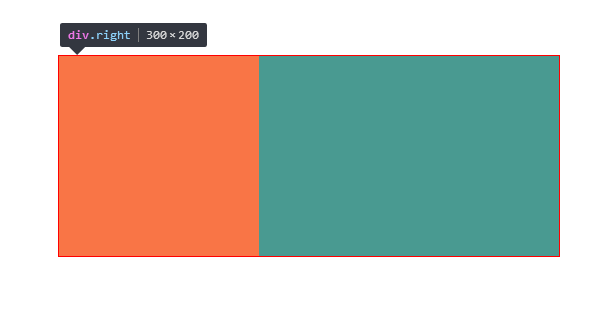
1.float+margin实现两栏布局:
样式:

.box {

    width: 500px;

    height: 200px;

    margin: 100px auto;

    border: 1px solid red;

}

.left {

    width: 200px;

    height: 200px;

    float: left;

    background-color: red;

}

.right {

    margin-left: 200px;

    background-color: green;

    height: 200px;

}

布局:

<div class="box">

    <div class="left"></div>

    <div class="right"></div>

</div>
效果如下:
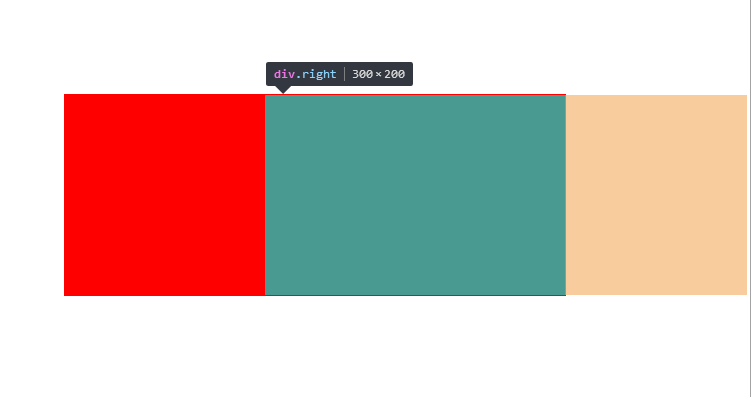
2.float+overflow实现两栏布局:
样式:

.box {

    width: 500px;

    height: 200px;

    margin: 100px auto;

    border: 1px solid red;

}

.left {

    width: 200px;

    height: 200px;

    float: left;

    background-color: red;

}

.right {

    overflow: hidden;

    background-color: green;

    height: 200px;

}

布局:

<div class="box">

    <div class="left"></div>

    <div class="right"></div>

</div>
效果如下:
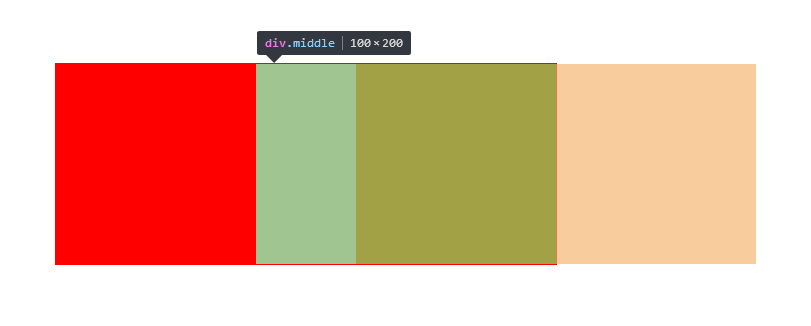
3. float+overflow实现三栏布局:
样式:

.box {

    width: 500px;

    height: 200px;

    margin: 100px auto;

    border: 1px solid red;

}

.left {

    width: 200px;

    height: 200px;

    float: left;

    background-color: red;

}

.middle {

    height: 200px;

    overflow: hidden;

    background-color: yellow;

}

.right {

    width: 200px;

    height: 200px;

    float: right;

    background-color: green;

}

布局:

<div class="box">

    <div class="left"></div>

    <div class="right"></div>

    <div class="middle"></div>

</div>
效果如下:

有了这些认识之后,你应该对多栏自适应布局游刃有余了吧,下次面试官问你BFC、IFC时,千万别说没听过哦!
你知道BFC、IFC、FFC、GFC及多栏自适应布局吗?的更多相关文章
- 【转】CSS深入理解流体特性和BFC特性下多栏自适应布局
这篇文章发布于 2015年02月12日,星期四,23:36,归类于 css相关. 阅读 30873 次, 今日 63 次 by zhangxinxu from http://www.zhangxinx ...
- CSS深入理解流体特性和BFC特性下多栏自适应布局
一.块状元素的流体特性与自适应布局 块状元素像放在容器中的水流一样,内容区域会随着margin, padding, border的出现自动填满剩余空间,这就是块状元素的流体特性. 来一个小实验: di ...
- BFC特性下多栏自适应布局
BFC 已经是一个耳听熟闻的词语了,网上有许多关于 BFC 的文章,介绍了如何触发 BFC 以及 BFC 的一些用处(如清浮动,防止 margin 重叠等).虽然我知道如何利用 BFC 解决这些问题, ...
- BFC之宽度自适应布局篇
说到自适应布局,我们曾在“抛砖引玉之宽度自适应布局”一文中学习过.当时的核心思想主要是利用float+margin的形式.利用块状元素的流体特性,然后计算出float元素的宽度,并赋予到块状元素的相应 ...
- BFC,IFC,GFC,FFC的定义及功能
What's FC?一定不是KFC,FC的全称是:Formatting Contexts,是W3C CSS2.1规范中的一个概念.它是页面中的一块渲染区域,并且有一套渲染规则,它决定了其子元素将如何定 ...
- 初识 BFC、 IFC、GFC、FFC
首先本文中介绍的 BFC. IFC.GFC.FFC 均为 CSS 中常见问题的解读,如没兴趣,可以绕道了. 然后在介绍这么多的 *FC 之前,我们得了解 一下 Box 和 Formatting Con ...
- 【转】前端的BFC、IFC、GFC和FFC
什么是BFC.IFC.GFC和FFC CSS2.1中只有BFC和IFC, CSS3中才有GFC和FFC. FC的全称是:Formatting Contexts,是W3C CSS2.1规范中的一个概念. ...
- 什么是BFC、IFC、GFC和FFC
什么是BFC.IFC.GFC和FFC CSS2.1中只有BFC和IFC, CSS3中才有GFC和FFC. FC的全称是:Formatting Contexts,是W3C CSS2.1规范中的一个概念. ...
- css3中的BFC,IFC,GFC和FFC
出处:https://www.jianshu.com/p/e75f351e11f8 表格比较: 名称 英文全称 含义 BFC Block Formatting Contexts 块级格式化上下文 IF ...
随机推荐
- 某pdf转word v6.3.0.2算法分析
某pdf转word v6.3.0.2算法分析 [文章标题]某pdf转word v6.3.0.2算法分析 [文章作者]jieliuhouzi[原版下载]www.pdfcword.cn [保护方式]序列号 ...
- quzrtz的使用
Quartz是一个大名鼎鼎的Java版开源定时调度器,功能强悍,使用方便. 一.核心概念 1.Job 表示一个工作,要执行的具体内容,此接口只有一个方法 void execute(JobExecuti ...
- Android学习笔记(10).布局管理器
布局管理器的几个类都是ViewGroup派生的,用于管理组件的分布和大小,使用布局管理器能够非常好地解决屏幕适配问题. 布局管理器本身也是一个UI组件,布局管理器能够相互嵌套使用,以下是布局管理器的类 ...
- 启用oracle 11g自己主动收集统计信息
今天接到朋友数据库一个case,在DBCA建库时,把自己主动收集统计信息的选项去掉了,数据库执行半年没有收集过统计信息.如今要启用方法例如以下: exec DBMS_AUTO_TASK_ADMIN.E ...
- JavaScript 实现命名空间(namespace)的最佳方案——兼容主流的定义类(class)的方法,兼容所有浏览器,支持用JSDuck生成文档
作者: zyl910 一.缘由 在很多的面向对象编程语言中,我们可以使用命名空间(namespace)来组织代码,避免全局变量污染.命名冲突.遗憾的是,JavaScript中并不提供对命名空间的原生支 ...
- 大数据学习(4)MapReduce编程Helloworld:WordCount
Maven依赖: <dependency> <groupId>jdk.tools</groupId> <artifactId>jdk.tools< ...
- GDB scheduler-locking 命令详解
GDB scheduler-locking 命令详解 GDB> show scheduler-locking //显示线程的scheduler-locking状态GDB> set ...
- Missing number in array
Given an array of size n-1 and given that there are numbers from 1 to n with one missing, the missin ...
- bzoj 2753: [SCOI2012]滑雪与时间胶囊
Description a180285非常喜欢滑雪.他来到一座雪山,这里分布着M条供滑行的轨道和N个轨道之间的交点(同时也是景点),而且每个景点都有一编号i(1<=i<=N)和一高度Hi. ...
- ubuntu设置静态ip
设置固定ip地址 >>>>>>>>>> ifconfig -a, (注:p1p1为网卡名称) 配置静态ip vim /etc/networ ...