
登录窗口java
这次代码是登录窗口的制作。
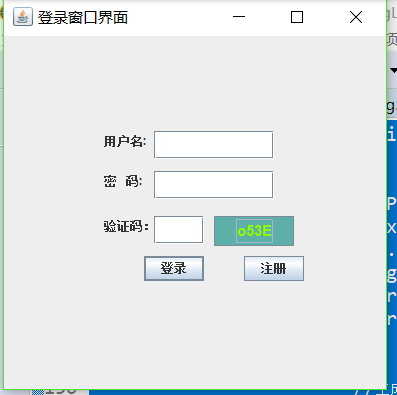
主要的方面是是包括,用户名、密码、验证码。以及输入数据所需要的文本框,对于验证码可以通过点击验证码进行修改。同时对于验证码的前景色和背景色同时都得到修改。
点击注册(这里还不完善)系统会提示你登录时需要输入的字符串,之后按照提示的字符串进行输入之后烯烃会对用户名以及密码验证码进行判断。可以通过enter直接进行登录二不用点击相应的按钮,之后如果错误会清空所输入的东西让您继续输入。 输入成功后即完成简单的登录。
重要内容是验证码的随机产生并进行显示。可以控制验证码的颜色以及字体还有大小。
package com.登录窗口;

    //模拟登录窗口

    import java.util.Random;

    import java.awt.Color;

    import java.awt.Font;

    import java.awt.event.ActionEvent;

    import java.awt.event.ActionListener;

    import javax.swing.*;

    public class DengLu  extends JFrame

    {

        /**

         *

         */

        private static final long serialVersionUID = 1L;//系统进行的添加

        static String wen=new String();

        private JLabel yonghula;

        private JLabel mimala;

        private JLabel yanzhengla;

        private JTextField yonghutxt;

        private JPasswordField mimatxt;

        private JTextField yanzhengtxt;

        private JButton anniu1bt;

        private JButton anniu2bt;

        private JButton mianban;

         public Color getRandomColor()

         {//获得随机颜色

             Random r=new Random();

             int R=r.nextInt(255),G=r.nextInt(255),B=r.nextInt(255);

              return new Color(R,G,B);

         }

        public String random()

        {

            Random r=new Random();

                String result = "";//随机产生四个数字或者是字母

                for(int i=0;i<4;i++){

                    int shuzi;

                    //生成一个1~3的int型的整数

                    shuzi=(r.nextInt(3)+1);

                     if(shuzi==1){//数字

                        shuzi=(r.nextInt(8)+1);

                        result=result+shuzi;

                    }

                    else if(shuzi==2){//大写字母

                        shuzi=(r.nextInt(25)+97);

                        result=result+(char)shuzi;

                    }

                    else {//小写字母

                        shuzi=(r.nextInt(25)+65);

                        result=result+(char)shuzi;

                    }

                }

                return result;

        }

        public DengLu()

        {

            this.setTitle("登录窗口界面");

            //用户的文本

            yonghula=new JLabel();

            yonghula.setText("用户名:");

            yonghula.setSize(60,50);

            yonghula.setLocation(100,80);

            //用户的输入框

            yonghutxt=new JTextField();

            yonghutxt.setSize(120,28);

            yonghutxt.setLocation(150,95);

            //密码文本

            mimala=new JLabel();

            mimala.setText("密   码:");

            mimala.setSize(50,50);

            mimala.setLocation(100,120);

            //密码输入框

            mimatxt=new JPasswordField();

            mimatxt.setEchoChar('$');

            mimatxt.setSize(120,28);

            mimatxt.setLocation(150,135);

            //登录按钮

            anniu1bt=new JButton("登录");

            anniu1bt.setSize(60,25);

            anniu1bt.setLocation(140,220);

            //注册按钮

            anniu2bt = new JButton("注册");

            anniu2bt.setSize(60, 25);

            anniu2bt.setLocation(240, 220);

            //验证码文本

            yanzhengla=new JLabel();

            yanzhengla.setText("验证码:");

            yanzhengla.setSize(70, 50);

            yanzhengla.setLocation(100,165);

            //验证码文本框

            yanzhengtxt= new JTextField();

            yanzhengtxt.setSize(50, 28);

            yanzhengtxt.setLocation(150, 180);

            //验证码

            mianban = new JButton();

            mianban.setSize(80, 30);

            mianban.setLocation(210, 180);

            wen=random();

            mianban.setText(wen);

            mianban.setFont(new Font("华文行楷",Font.BOLD,15));

            //判断

            anniu1bt.addActionListener(new ActionListener() {

                public void actionPerformed(ActionEvent arg0) {

                    if(yonghutxt.getText().trim().equals("dazhi")&&new String(mimatxt.getPassword()).trim().equals("dazhi666")&&yanzhengtxt.getText().trim().equals(wen))

                    {

                        JOptionPane.showMessageDialog(null, "登陆成功!");

                        System.exit(-1);

                    }

                    else if(yonghutxt.getText().trim().equals(""))

                        JOptionPane.showMessageDialog(null, "用户名不能为空");

                    else if(new String(mimatxt.getPassword()).trim().equals(""))

                        JOptionPane.showMessageDialog(null, "密码不能为空");

                    else if(yanzhengtxt.getText().trim().equals(""))

                        JOptionPane.showMessageDialog(null, "验证码不能为空");

                    else

                        JOptionPane.showMessageDialog(null, "登录错误");

                    yonghutxt.setText("");

                    mimatxt.setText("");

                    yanzhengtxt.setText("");

                    mianban.setBackground(getRandomColor());

                    mianban.setForeground(getRandomColor());

                    Random r=new Random();

                       String result = "";//随机产生四个数字或者是字母

                       for(int i=0;i<4;i++){

                           int shuzi;

                           //生成一个1~3的int型的整数

                           shuzi=(r.nextInt(3)+1);

                            if(shuzi==1){//数字

                               shuzi=(r.nextInt(8)+1);

                               result=result+shuzi;

                           }

                           else if(shuzi==2){//大写字母

                               shuzi=(r.nextInt(25)+97);

                               result=result+(char)shuzi;

                           }

                           else {//小写字母

                               shuzi=(r.nextInt(25)+65);

                               result=result+(char)shuzi;

                           }

                       }

                    wen=result;

                    mianban.setText(wen);

                }

            });

            //验证码处理

            anniu2bt.addActionListener(new ActionListener() {

                public void actionPerformed(ActionEvent arg0) {

                    // TODO 自动生成的方法存根

                    JOptionPane.showMessageDialog(null, "注册成功\n用户名:dazhi\n密码:dazhi666");

                       yonghutxt.setText("");

                       mimatxt.setText("");

                       yanzhengtxt.setText("");

                       Random r=new Random();

                       String result = "";//随机产生四个数字或者是字母

                       for(int i=0;i<4;i++){

                           int shuzi;

                           //生成一个1~3的int型的整数

                           shuzi=(r.nextInt(3)+1);

                        if(shuzi==1){//数字

                               shuzi=(r.nextInt(8)+1);

                               result=result+shuzi;

                           }

                           else if(shuzi==2){//大写字母

                               shuzi=(r.nextInt(25)+97);

                               result=result+(char)shuzi;

                           }

                           else {//小写字母

                               shuzi=(r.nextInt(25)+65);

                               result=result+(char)shuzi;

                           }

                       }

                       wen=result;

                       mianban.setText(wen);

                }

                });

            //重新获取验证码

           mianban.addActionListener(new ActionListener() {

                public void actionPerformed(ActionEvent arg0) {

                    mianban.setBackground(getRandomColor());

                    mianban.setForeground(getRandomColor());

                    Random r=new Random();

                       String result = "";//随机产生四个数字或者是字母(大写后者小写)

                       for(int i=0;i<4;i++){

                           int shuzi;

                           //生成一个1~3的int型的整数

                           shuzi=(r.nextInt(3)+1);

                            if(shuzi==1){//数字

                               shuzi=(r.nextInt(8)+1);

                               result=result+shuzi;

                           }

                           else if(shuzi==2){//大写字母

                               shuzi=(r.nextInt(25)+97);

                               result=result+(char)shuzi;

                           }

                           else {//小写字母

                               shuzi=(r.nextInt(25)+65);

                               result=result+(char)shuzi;

                           }

                       }

                    wen=result;

                    mianban.setText(wen);

                }

            });

         this.setLayout(null);//告知管理器这里不用布局管理器

         this.getRootPane().setDefaultButton(anniu1bt);//按回车需要执行的按钮操作

         this.setSize(400, 400);

         this.add(yonghula);

         this.add(yonghutxt);

         this.add(mimala);

         this.add(mimatxt);

         this.add(mimala);

         this.add(yanzhengla);

         this.add(yanzhengtxt);

         this.add(anniu1bt);

         this.add(anniu2bt);

         this.add(mianban);

         this.setVisible(true);//使窗口可视

         this.setResizable(true);//生成的窗口是否可以自由改变大小

         this.setDefaultCloseOperation(WindowConstants.EXIT_ON_CLOSE);

        }

        public static void main(String[] args)

        {

            new DengLu();

        }

    }
登录窗口java的更多相关文章
- 课程登记窗口java
设计窗口,实现课程的登记,并且将相应的数据写入文件之中.保证的是课程名称不可以重复,对于任课老师必须是在已经设定好的五位老师之中.并且上课地点也是在预先设定的范围内.窗口可以持续进行保存,数据将在判断 ...
- 【转】【WPF】WPF 登录窗口关闭时打开主窗口
在WPF中设计登录窗口关闭时打开主窗口,自动生成的App.xaml不能满足要求, 1.把App.xaml的属性窗口中的生成操作设定为 无 2.添加Program类 static class Progr ...
- SourceTree不出现用户登录窗口,提示错误fatal: unable to access'...'; error setting certificate verify locations
SourceTree不出现用户登录窗口,提示错误fatal: unable to access'...'; error setting certificate verify locations; .. ...
- QUI操作超时弹出登录窗口登录的处理方式
在使用QUI开发的业务系统中,如果长时间没操作,session过期后,再次操作系统超时会自动跳转到登陆页面,如果当前有一些操作没有保存,需要重新登录后再次填写信息,用户体验很不好! 为了避免超时后页面 ...
- C#实现登录窗口(不用隐藏)
C#登录窗口的实现,特点就是不用隐藏,感兴趣的朋友不要错过 (1).在程序入口处,打开登录窗口 复制代码代码如下: static void Main() { Application.EnableV ...
- 基于WebForm+EasyUI的业务管理系统形成之旅 -- 登录窗口(Ⅱ)
上篇<基于WebForm+EasyUI的业务管理系统形成之旅 -- 系统设置>,主要是介绍系统浏览器在线下载安装,这些前期准备是非常重要的. 最近忙于将工程管理系统中各个模块,用业务流程方 ...
- 高仿QQ即时聊天软件开发系列之三登录窗口用户选择下拉框
上一篇高仿QQ即时聊天软件开发系列之二登录窗口界面写了一个大概的布局和原理 这一篇详细说下拉框的实现原理 先上最终效果图 一开始其实只是想给下拉框加一个placeholder效果,让下拉框在未选择未输 ...
- 高仿QQ即时聊天软件开发系列之二登录窗口界面
继上一篇高仿QQ即时聊天软件开发系列之一开端之后,开始做登录窗口 废话不多说,先看效果,只有界面 可能还有一些细节地方没有做,例如那个LOGO嘛,不要在意这些细节 GIF虽短,可是这做起来真难,好吧因 ...
- C# WPF 建立无边框(标题栏)的登录窗口
前言:笔者最近用c#写WPF做了一个项目,此前未曾做过完整的WPF项目,算是一边学一边用,网上搜了不少资料,效率当然是不敢恭维的,有时会在一些很简单的问题上纠结很长时间,血与泪的教训可不少. 不过,正 ...
随机推荐
- Python数据基本类型3
-*- coding:utf-8 -*-字典 键值对数据 dict dic = {'键':'值'}存储数据 字典的查找快一些不可哈希的,就是可变的数据 可变的数据不能哈希 不可变的数据能哈希 pyth ...
- js实践篇:例外处理Try{}catch(e){}
本文转载至:http://blog.csdn.net/ocean20/article/details/7301008 程序开发中,编程人员经常要面对的是如何编写代码来响应错误事件的发生,即例外处理(e ...
- PDF顯示插件
1. ie瀏覽器適用<object id="pdf_panel" class="pdf-panel" classid="clsid:CA8A97 ...
- 小白学 Python 数据分析(19):Matplotlib(四)常用图表(下)
人生苦短,我用 Python 前文传送门: 小白学 Python 数据分析(1):数据分析基础 小白学 Python 数据分析(2):Pandas (一)概述 小白学 Python 数据分析(3):P ...
- Tomcat 启动过滤器异常
严重 [RMI TCP Connection(2)-127.0.0.1] org.apache.catalina.core.StandardContext.filterStart 启动过滤器异常 ja ...
- docker redis安装及配置(外网访问 关闭安全限制 设置密码)
docker run -p 6379:6379 --name redis -v /usr/local/redis/etc/redis.conf:/etc/redis/redis.conf -v /us ...
- 【2019南昌网络赛】B-Fire-Fighting Hero
题目链接 分析 英雄方面很简单,跑一遍 Dijkstra 就行了,但是灭火团队就有点麻烦了. 这里可以借助一下最大流的建边来解决这个问题: 我们可以另外找一个点作为起点,然后建立从那个点到每一个团队的 ...
- 子序列宽度求和 Sum of Subsequence Widths
2019-10-14 17:00:10 问题描述: 问题求解: 如果暴力求解,时间复杂度是exponational的,因为这里是子序列而不是子数组.显然,直接枚举子序列是不太现实的了,那么可以怎么做呢 ...
- python逐行读取文本
一.使用open打开文件后一定要记得调用文件对象的close()方法.比如可以用try/finally语句来确保最后能关闭文件. 二.需要导入import os 三.下面是逐行读取文件内容的三种方法: ...
- 粒子群优化算法(PSO)之基于离散化的特征选择(FS)(三)
作者:Geppetto 前面我们介绍了特征选择(Feature Selection,FS)与离散化数据的重要性,总览的介绍了PSO在FS中的重要性和一些常用的方法,介绍了FS与离散化的背景,介绍本文所 ...