
24-Java-Spring框架(二)
Spring框架的了解、SpringIOC的部分内容请阅读23-Java-Spring框架(一)
SpringAOP的了解、运用及原理等部分内容请阅读25-Java-Spring框架(三)
三、Spring Web MVC(Model View Controller)
1.SpringMVC了解
Spring提供了一个Web MVC框架,便于开发MVC结构的Java Web程序。Spring MVC属于SpringFrameWork的后续产品,已经融合在Spring Web Flow里面。
Spring 框架提供了构建 Web 应用程序的全功能 MVC 模块。使用 Spring 可插入的 MVC 架构,从而在使用Spring进行WEB开发时,可以选择使用Spring的Spring
MVC框架或集成其他MVC开发框架。
通过策略接口,Spring 框架是高度可配置的,而且包含多种视图技术,例如 JavaServer Pages(JSP)技术、Velocity、Tiles、iText和POI。Spring MVC 框架
并不知道使用的视图,所以不会强迫开发者只使用 JSP 技术。Spring MVC 分离了控制器、模型对象、过滤器以及处理程序对象的角色,这种分离让它们更容易进行
定制。
SpringMVC框架中提供了一个控制器(DispatcherServlet),负责接收客服端的请求,然后将请求分发到不同的处理器进行业务请求,最后由控制器完成转发动作。
2.SpringMVC相关组件
(1)DispatcherServlet(前端控制器,请求入口)
(2)HandlerMapping(控制器,请求派发)
(3)Controller(控制器,请求处理流程)
(4)ModelAndView(模型,封装处理结果和视图)
(5)ViewResolver(视图,视图显示处理器)
3.SpringMVC请求流程:SpringMVC是通过传统的Servlet来实现对框架源代码的封装以及整个流程的控制
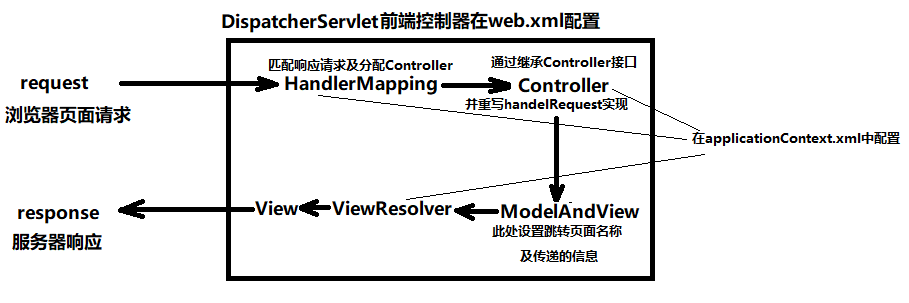
(1)浏览器向服务器(tomcat)发送http请求,web服务器对http请求进行解析,解析后如果URL地址匹配了DispatcherSerlvet的映射路径(serlvet-mapping),
web容器就会将请求交给DispatcherServlet来处理。
(2)DispatcherServet接收到请求后,再次对URL进行解析,得到URI,然后调用相应的方法得到HandlerMapping,再根据URI调用这个对象相对应的方法得
到Handler,此时并不会操作它,需要调用HandlerAdapter对Hander进行调用以及控制。
(3)DispatcherServlet根据得到的Handler对象选择合适的HandlerAdapter创建实例,执行拦截器中的preHander()方法
(4)Handler执行完毕后返回一个ModeAndView对象给DispatcherServlet。
(5)这个ModeAndView只是一个逻辑视图,并不是真正的视图,DispatcherServlet通过ViewResolver视图解析器将逻辑视图转化成一个真正的视图
(6)DispatcherServlet通过Model将ModeAndView中得到的数据解析后渲染视图,将得到的最终的视图通过http响应返回客服端。
4.SpringMVC的运用一(通过XML配置的方式)
第一步:搭建SpringMVC环境
(1)创建web项目
(2)添加SpringIOC和web MVC相关jar包(想要如下jar包的网友评论留言私聊)
ioc相关jar包:
aopalliance-1.0.jar
aspectjweaver-1.5.3.jar
spring-aop-4.1.6.RELEASE.jar
spring-aspects-4.1.6.RELEASE.jar
webmvc相关jar包:
spring-web-4.1.6.RELEASE.jar
spring-webmvc-4.1.6.RELEASE.jar
(3)添加Spring配置文件applicationContext.xml(也可以用注解的方式代替此步骤)
(4)在web.xml中配置DispatcherServlet前端控制器组件
 <?xml version="1.0" encoding="UTF-8"?>

 <web-app version="3.0"

     xmlns="http://java.sun.com/xml/ns/javaee"

     xmlns:xsi="http://www.w3.org/2001/XMLSchema-instance"

     xsi:schemaLocation="http://java.sun.com/xml/ns/javaee

     http://java.sun.com/xml/ns/javaee/web-app_3_0.xsd">

   <display-name></display-name>

   <welcome-file-list>

     <welcome-file>Hello.jsp</welcome-file>

   </welcome-file-list>

   <servlet>

       <servlet-name>springmvc</servlet-name>

       <servlet-class>org.springframework.web.servlet.DispatcherServlet</servlet-class>

       <init-param>

           <param-name>contextConfigLocation</param-name>

           <param-value>classpath:applicationContext.xml</param-value>

       </init-param>

       <load-on-startup>1</load-on-startup>

   </servlet>

   <servlet-mapping>

       <servlet-name>spring</servlet-name>

       <!-- 拦截以.do结尾的请求 -->

       <url-pattern>*.do</url-pattern>

   </servlet-mapping>

 </web-app>
第二步:开发SpringMVC
(1)设计请求到响应的处理流程
(2)编写Controller组件
 package com.springmvc.Controller;

 import javax.servlet.http.HttpServletRequest;

 import javax.servlet.http.HttpServletResponse;

 import org.springframework.web.servlet.ModelAndView;

 import org.springframework.web.servlet.mvc.Controller;

 //XML配置

 //首先创建ControllerClass 实现Controller接口返回ModelAndView

 public class ControllerClass implements Controller{

     //该方法是约定的处理请求的方法,请求进入Controller对象后自动调用该方法

     @Override

     public ModelAndView handleRequest(HttpServletRequest request,HttpServletResponse response) throws Exception {

         System.out.println("进入Controller组件");

         //接下来往JSP页面传递一个消息并跳转到Hello.jsp页面

         ModelAndView mav = new ModelAndView();

         mav.setViewName("Hello");//指定视图名称

         mav.getModel().put("msg","I am happy!");

         return mav;

     }

 }
(3)JSP或html页面
 <%@ page language="java" import="java.util.*" pageEncoding="UTF-8"%>

 <%

 String path = request.getContextPath();

 String basePath = request.getScheme()+"://"+request.getServerName()+":"+request.getServerPort()+path+"/";

 %>

 <!DOCTYPE HTML PUBLIC "-//W3C//DTD HTML 4.01 Transitional//EN">

 <html>

   <head>

     <base href="<%=basePath%>">

     <title>My JSP 'Hello.jsp' starting page</title>

     <meta http-equiv="pragma" content="no-cache">

     <meta http-equiv="cache-control" content="no-cache">

     <meta http-equiv="expires" content="0">

     <meta http-equiv="keywords" content="keyword1,keyword2,keyword3">

     <meta http-equiv="description" content="This is my page">

   </head>

   <body>

         <h1>hi,Spring</h1>

         <h1>${msg }</h1>

   </body>

 </html>
(4)在applicationContext.xml中配置Controller组件(也可以用注解的方式代替此步骤)
(5)在applicationContext.xml中配置HandlerMapping组件(也可以用注解的方式代替此步骤)
(6)在applicationContext.xml中配置ViewResolver组件
 <?xml version="1.0" encoding="UTF-8"?>

 <beans xmlns="http://www.springframework.org/schema/beans"

        xmlns:xsi="http://www.w3.org/2001/XMLSchema-instance"

        xmlns:context="http://www.springframework.org/schema/context"

        xmlns:aop="http://www.springframework.org/schema/aop"

        xmlns:tx="http://www.springframework.org/schema/tx"

        xmlns:jdbc="http://www.springframework.org/schema/jdbc"

        xmlns:jee="http://www.springframework.org/schema/jee"

        xmlns:mvc="http://www.springframework.org/schema/mvc"

        xmlns:util="http://www.springframework.org/schema/util"

        xsi:schemaLocation="

             http://www.springframework.org/schema/beans http://www.springframework.org/schema/beans/spring-beans.xsd

             http://www.springframework.org/schema/tx http://www.springframework.org/schema/tx/spring-tx.xsd

             http://www.springframework.org/schema/aop http://www.springframework.org/schema/aop/spring-aop.xsd

             http://www.springframework.org/schema/util http://www.springframework.org/schema/util/spring-util.xsd

             http://www.springframework.org/schema/jdbc http://www.springframework.org/schema/jdbc/spring-jdbc.xsd

             http://www.springframework.org/schema/jee http://www.springframework.org/schema/jee/spring-jee.xsd

             http://www.springframework.org/schema/mvc http://www.springframework.org/schema/mvc/spring-mvc.xsd

             http://www.springframework.org/schema/context http://www.springframework.org/schema/context/spring-context.xsd">

         <!-- 配置Contorller组件 -->

         <bean id="Controller" class="com.springmvc.Controller.ControllerClass"></bean>

         <!-- 配置HandlerMapping组件 -->

         <bean id="simpleurlhandlermapping" class="org.springframework.web.servlet.handler.SimpleUrlHandlerMapping">

             <property name="mappings">

                 <props>

                     <prop key="/hello.do">Controller</prop>

                 </props>

             </property>

         </bean>

         <!-- 配置ViewResolver视图解析器 -->

         <!-- 完整的页面路径:前缀+视图名称+后缀 -->

         <bean id="ViewResolver" class="org.springframework.web.servlet.view.InternalResourceViewResolver">

             <!-- 前缀 -->

             <property name="prefix" value="/"></property>

             <!-- 后缀 -->

             <property name="suffix" value=".jsp"></property>

         </bean>

 </beans>
第三步:测试运行
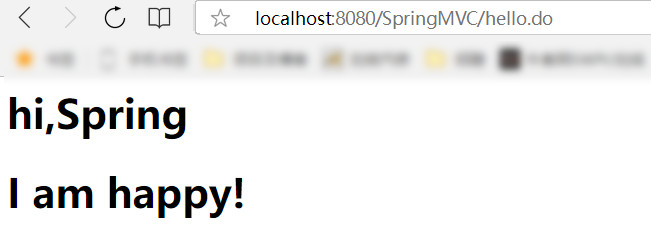
5.SpringMVC的运用二(通过注解的方式)
第一步:搭建SpringMVC环境
(1)创建web项目
(2)添加SpringIOC、AOP和web MVC相关jar包(想要如下jar包的网友评论留言私聊)
ioc相关jar包:
aopalliance-1.0.jar
aspectjweaver-1.5.3.jar
spring-aop-4.1.6.RELEASE.jar
spring-aspects-4.1.6.RELEASE.jar
aop相关jar包:
aopalliance-1.0.jar
aspectjweaver-1.5.3.jar
spring-aop-4.1.6.RELEASE.jar
spring-aspects-4.1.6.RELEASE.jar
webmvc相关jar包:
spring-web-4.1.6.RELEASE.jar
spring-webmvc-4.1.6.RELEASE.jar
(3)添加Spring配置文件applicationContext.xml(也可以用注解的方式代替此步骤)
(4)在web.xml中配置DispatcherServlet前端控制器组件(同运用一的web.xml)
第二步:开发SpringMVC
(1)设计请求到响应的处理流程
(2)编写Controller组件
 package com.springmvc.Controller;

 import org.springframework.stereotype.Controller;

 import org.springframework.web.bind.annotation.RequestMapping;

 import org.springframework.web.servlet.ModelAndView;

 @Controller//此处相当于继承了Controller接口的作用

 public class ControllerClass {

     @RequestMapping("/hello.do")//此处等价于applicationContext.xml中的配置HandlerMapping组件

     public ModelAndView hello(){

         System.out.println("进入Controller组件");

         //接下来往JSP页面传递一个消息并跳转到Hello.jsp页面

         ModelAndView mav = new ModelAndView();

         mav.setViewName("Hello");

         mav.getModel().put("msg", "I am pretty good");

         return mav;

     }

 }
(3)JSP或html页面(同运用一的Hello.jsp)
(4)在applicationContext.xml中配置handler组件
(5)在applicationContext.xml中配置组件扫描
(6)在applicationContext.xml中配置ViewResolver组件
 <?xml version="1.0" encoding="UTF-8"?>

 <beans xmlns="http://www.springframework.org/schema/beans"

        xmlns:xsi="http://www.w3.org/2001/XMLSchema-instance"

        xmlns:context="http://www.springframework.org/schema/context"

        xmlns:aop="http://www.springframework.org/schema/aop"

        xmlns:tx="http://www.springframework.org/schema/tx"

        xmlns:jdbc="http://www.springframework.org/schema/jdbc"

        xmlns:jee="http://www.springframework.org/schema/jee"

        xmlns:mvc="http://www.springframework.org/schema/mvc"

        xmlns:util="http://www.springframework.org/schema/util"

        xsi:schemaLocation="

             http://www.springframework.org/schema/beans http://www.springframework.org/schema/beans/spring-beans.xsd

             http://www.springframework.org/schema/tx http://www.springframework.org/schema/tx/spring-tx.xsd

             http://www.springframework.org/schema/aop http://www.springframework.org/schema/aop/spring-aop.xsd

             http://www.springframework.org/schema/util http://www.springframework.org/schema/util/spring-util.xsd

             http://www.springframework.org/schema/jdbc http://www.springframework.org/schema/jdbc/spring-jdbc.xsd

             http://www.springframework.org/schema/jee http://www.springframework.org/schema/jee/spring-jee.xsd

             http://www.springframework.org/schema/mvc http://www.springframework.org/schema/mvc/spring-mvc.xsd

             http://www.springframework.org/schema/context http://www.springframework.org/schema/context/spring-context.xsd">

         <!-- 配置Handler简配 -->

         <mvc:annotation-driven/>

         <!-- 配置组件扫描 -->

         <context:component-scan base-package="com.springmvc"/>

         <!-- 配置ViewResolver视图解析器 -->

         <!-- 完整的页面路径:前缀+视图名称+后缀 -->

         <bean id="ViewResolver" class="org.springframework.web.servlet.view.InternalResourceViewResolver">

             <!-- 前缀 -->

             <property name="prefix" value="/"></property>

             <!-- 后缀 -->

             <property name="suffix" value=".jsp"></property>

         </bean>

 </beans>
第三步:测试运行
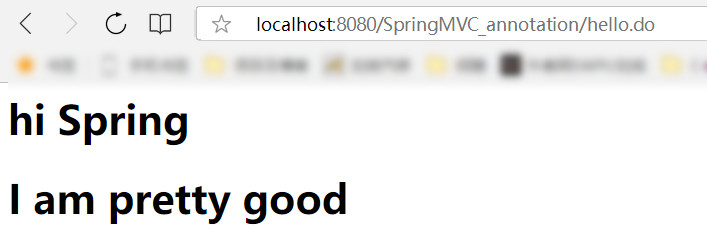
24-Java-Spring框架(二)的更多相关文章
- 基于java spring框架开发部标1078视频监控平台精华文章索引
部标1078视频监控平台,是一个庞杂的工程,涵盖了多层协议,部标jt808,jt809,jt1078,苏标Adas协议等,多个平台功能标准,部标796标准,部标1077标准和苏标主动安全标准,视频方面 ...
- 《Java Spring框架》SpringXML配置详解
Spring框架作为Bean的管理容器,其最经典最基础的Bean配置方式就是纯XML配置,这样做使得结构清晰明了,适合大型项目使用.Spring的XML配置虽然很繁琐,而且存在简洁的注解方式,但读懂X ...
- [Java]Spring框架
在这里学习Spring框架: >>spring&struts框架学习 >>spring >>Java回顾之Spring基础 >>IBM Java ...
- 吴裕雄--天生自然JAVA SPRING框架开发学习笔记:SSM(Spring+Spring MVC+MyBatis)框架整合搭建详细步骤
因为 Spring MVC 是 Spring 框架中的一个子模块,所以 Spring 与 SpringMVC 之间不存在整合的问题.实际上,SSM 框架的整合只涉及 Spring 与 MyBatis ...
- 吴裕雄--天生自然JAVA SPRING框架开发学习笔记:SSH框架(Struts2+Spring+Hibernate)搭建整合详细步骤
在实际项目的开发中,为了充分利用各个框架的优点,通常都会把 Spring 与其他框架整合在一起使用. 整合就是将不同的框架放在一个项目中,共同使用它们的技术,发挥它们的优点,并形成互补.一般而言,在进 ...
- 吴裕雄--天生自然JAVA SPRING框架开发学习笔记:Spring使用AspectJ开发AOP基于XML和基于Annotation
AspectJ 是一个基于 Java 语言的 AOP 框架,它扩展了 Java 语言.Spring 2.0 以后,新增了对 AspectJ 方式的支持,新版本的 Spring 框架,建议使用 Aspe ...
- 吴裕雄--天生自然JAVA SPRING框架开发学习笔记:Spring JDK动态代理
JDK 动态代理是通过 JDK 中的 java.lang.reflect.Proxy 类实现的.下面通过具体的案例演示 JDK 动态代理的使用. 1. 创建项目 在 MyEclipse 中创建一个名称 ...
- 吴裕雄--天生自然JAVA SPRING框架开发学习笔记:Spring DI(依赖注入)的实现方式属性注入和构造注入
依赖注入(Dependency Injection,DI)和控制反转含义相同,它们是从两个角度描述的同一个概念. 当某个 Java 实例需要另一个 Java 实例时,传统的方法是由调用者创建被调用者的 ...
- 吴裕雄--天生自然JAVA SPRING框架开发学习笔记:Spring IoC容器BeanFactory和ApplicationContext
IoC 是指在程序开发中,实例的创建不再由调用者管理,而是由 Spring 容器创建.Spring 容器会负责控制程序之间的关系,而不是由程序代码直接控制,因此,控制权由程序代码转移到了 Spring ...
- 吴裕雄--天生自然JAVA SPRING框架开发学习笔记:Spring体系结构详解
Spring 框架采用分层架构,根据不同的功能被划分成了多个模块,这些模块大体可分为 Data Access/Integration.Web.AOP.Aspects.Messaging.Instrum ...
随机推荐
- CVPR2020| 阿里达摩院最新力作SA-SSD
作者:蒋天园 Date:2020-04-16 来源:SA-SSD:阿里达摩院最新3D检测力作(CVPR2020) Brief 来自CVPR2020的研究工作,也是仅仅使用Lidar数据进行3D检测的文 ...
- python数据类型及有关的实用函数
本系列例子使用python3.x, 编辑时间:2019-09-03,23:03:36 python以“对象引用”来存储数据,以对象来表达数据,每个对象都具有身份,对象和值. 实用函数: id(): 查 ...
- Python Requests-学习笔记(11)-请求与响应对象
任何时候调用requests.*()你都在做两件主要的事情.其一,你在构建一个 Request 对象, 该对象将被发送到某个服务器请求或查询一些资源.其二,一旦 requests 得到一个从 服务器返 ...
- idea打包报错Cleaning up unclosed ZipFile for archive D:\m2\commons-beanutils\commons-beanutils\1.9.2\...
关于idea的打包报错:Cleaning up unclosed ZipFile for archive D:\m2\commons-beanutils\commons-beanutils\1.9.2 ...
- 智芯微版本的智能配变融合终端交流采集APP
1. 交采APP基本原理 通过SPI总线周期性的召测交流采集底板的“实时数据”,对“实时数据”变换.加工.统计分析得到“分析数据”和“统计数据”后,通过MQTT总线把这些数据同步到“数据中心”供其他 ...
- Java课程设计之——爬虫篇
主要使用的技术 Httplcient Jsoup 多线程 dao模式 网络爬虫简介 网络爬虫(又称为网页蜘蛛,网络机器人,在FOAF社区中间,更经常的称为网页追逐者),是一种按照一定的规则,自动地抓取 ...
- 【Java】Junit单元测试
什么是单元测试? 单元测试(unit testing),是指对软件中的最小可测试单元进行检查和验证. 对于单元测试中单元的含义,一般来说,要根据实际情况去判定其具体含义,如C语言中单元指一个函数,Ja ...
- 【selenium】各种exception
selenium中的Exception解释 exception selenium.common.exceptions.ElementClickInterceptedException(msg=None ...
- api测试用例(编写思路)
在API的自动化测试维度中,测试维度分为两个维度,一个是单独的对API的验证,客户端发送一个请求后,服务端得到客户端的请求并且响应回复给客户端: 另外一个维度是基于业务场景的测试,基于业务场景的也就是 ...
- CVE 2019-0708 漏洞复现+
PART 1 参考链接:https://blog.csdn.net/qq_42184699/article/details/90754333 漏洞介绍: 当未经身份验证的攻击者使用 RDP 连接到目标 ...