
[原] KVM 环境下MySQL性能对比
KVM 环境下MySQL性能对比
标签(空格分隔): Cloud2.0
测试目的
对比MySQL在物理机和KVM环境下性能情况
压测标准
压测遵循单一变量原则,所有的对比都是只改变一个变量的前提下完成
测试方式
以物理机MySQL为基准,分别做两次测试
- 测试IO相关参数(writethrough, innodb flush method)
- 测试CPU相关参数(NUMA Balancing)
测试环境
CPU:Intel(R) Xeon(R) CPU E5-2620 v2 @ 2.10GHz X 24

MEM:48G

Disk:SSD 1.3T

System:Ubuntu 14.04.4 LTS

Kernel:3.16.0-30-generic

MySQL:mysql-5.5.31-linux2.6-x86_64

Sysbench:0.4.12

KVM:QEMU emulator version 2.0.0 (Debian 2.0.0+dfsg-2ubuntu1.22)
测试变量
因相关资料说明,writethrough IO模式能够保障数据一致性,所以在MySQL环境下,默认只测试writethrough环境
以打开NUMA Balancing的物理机环境为基准,测试KVM环境如下变量:
- writethrough cache模式下的 innodb io (O_DIRECT, O_SYNC)
- KVM 宿主机 NUMA Balancing 对MySQL性能影响
测试软件环境
配置模板如下(只列举关键参数)
# The MySQL server

[mysqld]

default-storage-engine = innodb

# MyISAM setup

key_buffer_size = 128M

myisam_sort_buffer_size = 64M

## gloabl config

max_allowed_packet = 16M

max_heap_table_size = 64M

tmp_table_size = 8M

max_connections = 4000

open_files_limit = 6000

table_open_cache = 512

read_buffer_size = 2M

read_rnd_buffer_size = 4M

join_buffer_size = 256K

sort_buffer_size = 2M

thread_cache_size = 8

query_cache_size = 0

thread_concurrency = 16

# Replication Master setup

log-bin = mysql-bin

relay-log = mysqld-relay-bin

max_binlog_size = 100M

binlog_format = row

binlog_cache_size=32K

thread_stack=262144

auto_increment_increment = 3

auto_increment_offset = 1

# Logging

slow_query_log  = 1

long_query_time = 2

# InnoDB setup

innodb_file_format = Barracuda

innodb_file_per_table

innodb_buffer_pool_size = 4096M

innodb_log_file_size = 16M

innodb_log_buffer_size = 40M

innodb_flush_log_at_trx_commit = 2

innodb_lock_wait_timeout = 50

innodb_log_files_in_group=2

innodb_io_capacity=2000

[mysqldump]

quick

extended-insert = false

default-character-set = utf8

max_allowed_packet = 16M

[mysql]

no-auto-rehash

[myisamchk]

key_buffer_size = 8M

sort_buffer_size = 8M

read_buffer = 2M

write_buffer = 2M

[mysqlhotcopy]

interactive-timeout
KVM-qemu 配置如下:
<domain type='kvm'>

	<name>mysql1</name>

	<memory unit='MiB'>5120</memory>

	<currentMemory unit='MiB'>5120</currentMemory>

	<vcpu placement='static'>4</vcpu>

	<os>

		<type>hvm</type>

		<boot dev='hd' />

	</os>

	<features>

		<acpi />

		<apic />

		<pae />

	</features>

	<clock offset='utc' />

	<on_poweroff>destroy</on_poweroff>

	<on_reboot>restart</on_reboot>

	<on_crash>restart</on_crash>

	<devices>

		<emulator>/usr/bin/kvm-spice</emulator>

		<disk type='file' device='disk'>

			<driver name='qemu' type='qcow2' />

			<source file='/data2/kvm/image1/mysql.qcow2' />

			<target dev='vda' bus='virtio' />

		</disk>

		<disk type='file' device='disk'>

			<driver name='qemu' type='qcow2' cache='writethrough'/>

			<source file='/data2/kvm/image1/data.qcow2' />

			<target dev='vdb' bus='virtio' />

		</disk>

		<interface type='network'>

			<source network='default1' />

			<model type='virtio' />

		</interface>

		<console type='pty'>

			<target port='0' />

		</console>

		<graphics type='vnc' autoport='yes' sharePolicy='allow-exclusive' keymap='en-us'>

			<listen type='address' address='0.0.0.0' />

		</graphics>

	</devices>

</domain>
测试基准
测试以物理机的MySQL实例作为参照
物理机MySQL默认情况下,使用4G+4Core,关闭NUMA Balancing
基准数据
Innodb_flush_method = O_DIRECT
OLTP test statistics:

    queries performed:

        read:                            14000028

        write:                           5000010

        other:                           2000004

        total:                           21000042

    transactions:                        1000002 (1375.45 per sec.)

    deadlocks:                           0      (0.00 per sec.)

    read/write requests:                 19000038 (26133.48 per sec.)

    other operations:                    2000004 (2750.89 per sec.)

Test execution summary:

    total time:                          727.0382s

    total number of events:              1000002

    total time taken by event execution: 17443.5464

    per-request statistics:

         min:                                  1.78ms

         avg:                                 17.44ms

         max:                               1048.03ms

         approx.  95 percentile:              32.64ms

Threads fairness:

    events (avg/stddev):           41666.7500/646.28

    execution time (avg/stddev):   726.8144/0.00
关闭 Innodb_flush_method = O_DIRECT, 使用默认值
OLTP test statistics:

    queries performed:

        read:                            14000028

        write:                           5000010

        other:                           2000004

        total:                           21000042

    transactions:                        1000002 (1390.26 per sec.)

    deadlocks:                           0      (0.00 per sec.)

    read/write requests:                 19000038 (26414.92 per sec.)

    other operations:                    2000004 (2780.52 per sec.)

Test execution summary:

    total time:                          719.2920s

    total number of events:              1000002

    total time taken by event execution: 17257.6867

    per-request statistics:

         min:                                  1.78ms

         avg:                                 17.26ms

         max:                               1476.86ms

         approx.  95 percentile:              32.76ms

Threads fairness:

    events (avg/stddev):           41666.7500/709.66

    execution time (avg/stddev):   719.0703/0.00
基准数据分析
在物理机MySQL实例情况下,innodb_flush_method对MySQL性能有一定影响关系
测试结果
第一次压测,KVM环境下 (单一变量 innodb_flush_method)
单纯虚拟机(kvm)压测, Innodb_flush_method = O_DIRECT
打开 Numa balancing, kvm cache模式改为 writethrough
KVM 配置:

    CPU = 4 core

    Mem = 5 G

    MySQL = 4G

    Cache = writethrough

MySQL 配置:

    Mem = 4G

    Innodb_flush_method = O_DIRECT
Innodb_flush_method = O_DIRECT
sysbench --test=oltp --oltp-table-size=1000000  --mysql-db=test --max-requests=1000000 --num-threads=24 --mysql-host=192.168.100.244 --mysql-user=test run

OLTP test statistics:

    queries performed:

        read:                            14000042

        write:                           5000015

        other:                           2000006

        total:                           21000063

    transactions:                        1000003 (1041.22 per sec.)

    deadlocks:                           0      (0.00 per sec.)

    read/write requests:                 19000057 (19783.20 per sec.)

    other operations:                    2000006 (2082.44 per sec.)

Test execution summary:

    total time:                          960.4138s

    total number of events:              1000003

    total time taken by event execution: 23044.1587

    per-request statistics:

         min:                                  3.43ms

         avg:                                 23.04ms

         max:                                958.60ms

         approx.  95 percentile:              43.71ms

Threads fairness:

    events (avg/stddev):           41666.7917/865.32

    execution time (avg/stddev):   960.1733/0.01
Innodb_flush_method = DEFAULT(O_SYNC)
sysbench 0.4.12:  multi-threaded system evaluation benchmark

OLTP test statistics:

    queries performed:

        read:                            14000042

        write:                           5000015

        other:                           2000006

        total:                           21000063

    transactions:                        1000003 (1025.90 per sec.)

    deadlocks:                           0      (0.00 per sec.)

    read/write requests:                 19000057 (19492.01 per sec.)

    other operations:                    2000006 (2051.79 per sec.)

Test execution summary:

    total time:                          974.7614s

    total number of events:              1000003

    total time taken by event execution: 23388.1224

    per-request statistics:

         min:                                  3.75ms

         avg:                                 23.39ms

         max:                               1306.42ms

         approx.  95 percentile:              44.38ms

Threads fairness:

    events (avg/stddev):           41666.7917/863.10

    execution time (avg/stddev):   974.5051/0.01
第一次压测总结
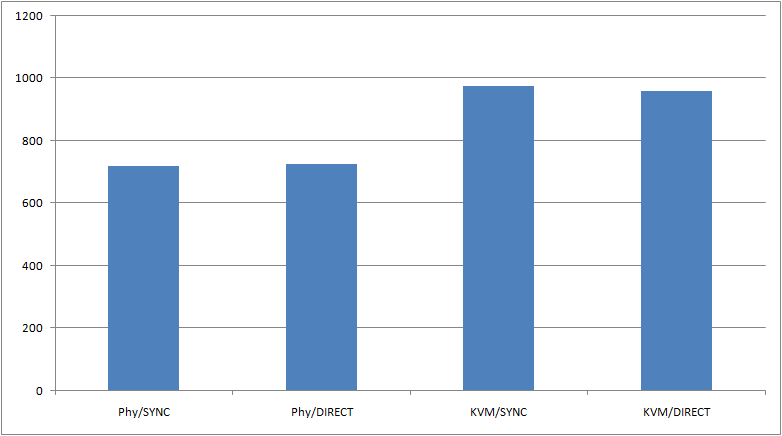
从压测报告显示,在kvm打开writethrough前提下,O_DIRECT方式,MySQL的效率更高
使用kvm,MySQL性能约为物理机的75%
纵坐标为总执行时间
IO模式建议优化手段
在宿主机打开writethrough前提下,配置 Innodb_flush_method = O_DIRECT有效提高MySQL性能
约为物理机O_DIRECT模式下性能的97%
第二次压测, KVM环境下 (单一变量 numa balancing)
单纯虚拟机(kvm)压测, 打开 numa balancing
关闭宿主机 Numa balancing, kvm cache模式改为 writethrough
Innodb_flush_method = O_SYNC
OLTP test statistics:

    queries performed:

        read:                            14000014

        write:                           5000005

        other:                           2000002

        total:                           21000021

    transactions:                        1000001 (1068.76 per sec.)

    deadlocks:                           0      (0.00 per sec.)

    read/write requests:                 19000019 (20306.35 per sec.)

    other operations:                    2000002 (2137.51 per sec.)

Test execution summary:

    total time:                          935.6690s

    total number of events:              1000001

    total time taken by event execution: 22450.9403

    per-request statistics:

         min:                                  3.51ms

         avg:                                 22.45ms

         max:                               1170.10ms

         approx.  95 percentile:              41.65ms

Threads fairness:

    events (avg/stddev):           41666.7083/855.51

    execution time (avg/stddev):   935.4558/0.01
Innodb_flush_method = O_DIRECT
OLTP test statistics:

    queries performed:

        read:                            14000042

        write:                           5000015

        other:                           2000006

        total:                           21000063

    transactions:                        1000003 (1062.79 per sec.)

    deadlocks:                           0      (0.00 per sec.)

    read/write requests:                 19000057 (20193.07 per sec.)

    other operations:                    2000006 (2125.59 per sec.)

Test execution summary:

    total time:                          940.9197s

    total number of events:              1000003

    total time taken by event execution: 22577.0003

    per-request statistics:

         min:                                  3.36ms

         avg:                                 22.58ms

         max:                                756.58ms

         approx.  95 percentile:              41.50ms

Threads fairness:

    events (avg/stddev):           41666.7917/943.69

    execution time (avg/stddev):   940.7083/0.01
第二次压测总结
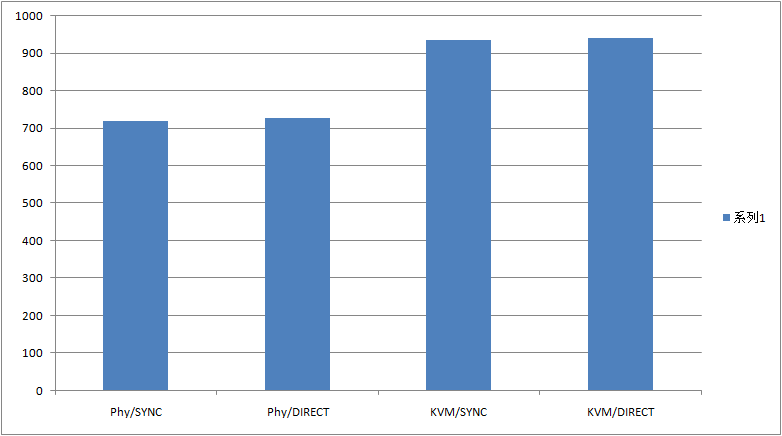
打开NUMA绑定后,性能下降约3%
CPU优化建议
关闭NUMA绑定
Q&A
为什么不采用多个实例做高负载压测?
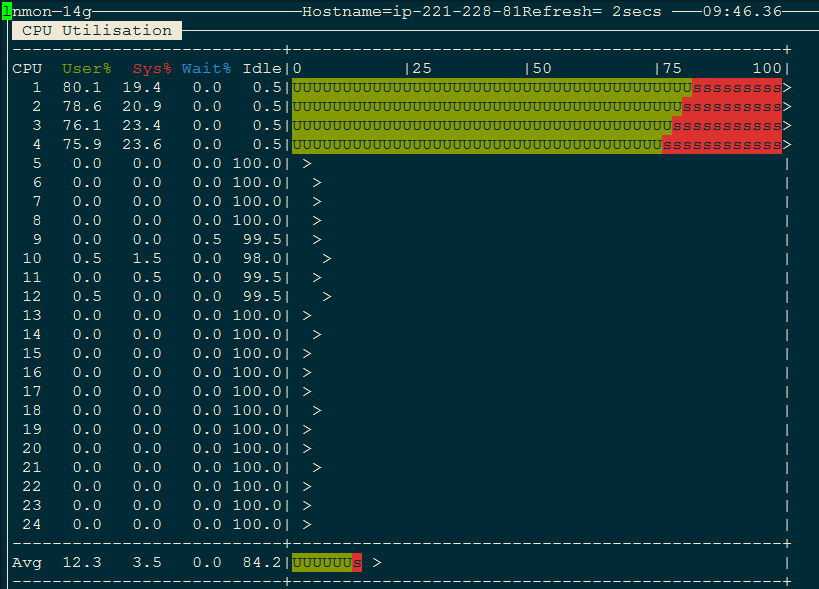
在测试的过程中,利用cgroup可以将实例的CPU全部跑到对应的核,在对应CPU上,负载是满的
为什么NUMA对性能影响如此之大?
猜测vCPU的多个线程可能位于不同的CPU Nodes, 导致跨node的内存访问,不太清楚vCPU是否会产生这样的调度,但是关闭NUMA是不会导致的。
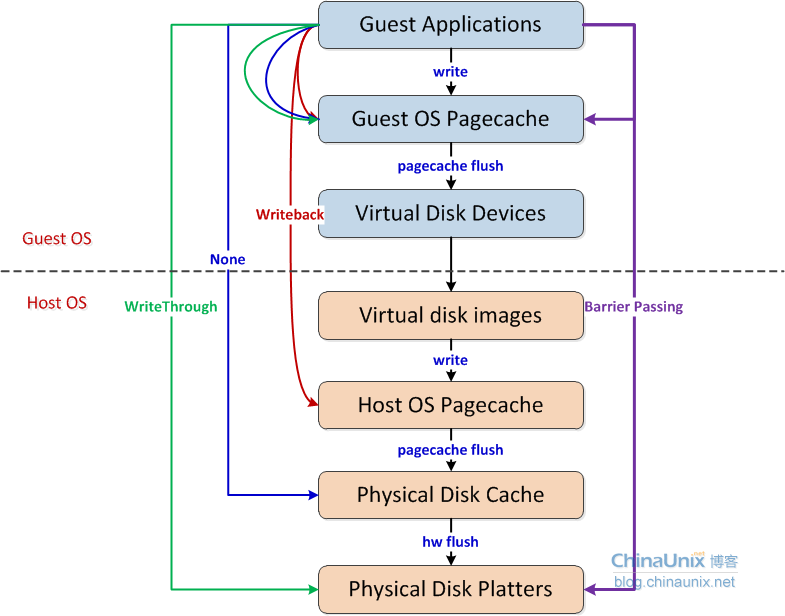
有没有一张图解释不同kvm cache?
[原] KVM 环境下MySQL性能对比的更多相关文章
- tensorflow在各种环境下搭建与对比
tensorflow在各种环境下搭建与对比 由于有些训练是要长时间进行训练(几天),才能看出显著的结果,如果只是通过本地的计算机进行训练是不可能的.因此这周花了一些时间调研如何才能让神经网络长时间的进 ...
- [原]生产环境下的nginx.conf配置文件(多虚拟主机)
[原]生产环境下的nginx.conf配置文件(多虚拟主机) 2013-12-27阅读110 评论0 我的生产环境下的nginx.conf配置文件,做了虚拟主机设置的,大家可以根据需求更改,下载即可在 ...
- windows 环境下mysql 如何修改root密码
windows 环境下mysql 如何修改root密码 以windows为例: 无法开启服务,将mysql更目录下的data文件夹清空,然后调用 mysqld --initialize 开启mysql ...
- win10环境下MySql(5.7.21版本)安装过程
windows10上安装mysql(详细步骤) 2016年09月06日 08:09:34 阅读数:60405 环境:windwos 10(1511) 64bit.mysql 5.7.14 时间:201 ...
- docker环境下mysql参数修改
原文:docker环境下mysql参数修改 需要修改log_bin为on,看了好几个博客说都需要删掉容器重新生成,然而并非如此, 我们可以用docker cp 命令将docker的文件"下载 ...
- Linux环境下MySql安装和常见问题的解决
MySql安装 首先当然是要连接上linux服务器咯,然后就是下面的命令甩过去,梭哈,一通运行就是啦 梭哈 下载: sudo wget http://dev.mysql.com/get/mysql ...
- Windows环境下Mysql 5.7读写分离之使用mysql-proxy练习篇
本文使用mysql-proxy软件,结合mysql读写分离,实现实战练习. 前期准备: 三台机器: 代理机,IP:192.168.3.33 mysql Master,IP:192.168.3.32 m ...
- windowns环境下mysql 安装教程
windowns环境下mysql 安装教程 一:这里以绿色版安装为例(解压就可以使用) 下载地址: 下载页面:https://dev.mysql.com/downloads/mysql/ 2:点击 ...
- 【Data Cluster】真机环境下MySQL数据库集群搭建
真机环境下MySQL-Cluster搭建文档 摘要:本年伊始阶段,由于实验室对不同数据库性能测试需求,才出现MySQL集群搭建.购置主机,交换机,双绞线等一系列准备工作就绪,也就开始集群搭建.起初笔 ...
随机推荐
- 编写高质量代码:改善Java程序的151个建议(第5章:数组和集合___建议75~78)
建议75:集合中的元素必须做到compareTo和equals同步 实现了Comparable接口的元素就可以排序,compareTo方法是Comparable接口要求必须实现的,它与equals方法 ...
- 网站定位之---根据IP获得区域
记得以前做一个培训机构网站时候需要定位,那时候用的搜狐的api,不是很精准. demo:https://github.com/dunitian/LoTCodeBase/tree/master/NetC ...
- javaScript的原型继承与多态性
1.prototype 我们可以简单的把prototype看做是一个模版,新创建的自定义对象都是这个模版(prototype)的一个拷贝 (实际上不是拷贝而是链接,只不过这种链接是不可见,给人们的感觉 ...
- 香蕉云APP,2016下半年开发日记
2016-6-17 数据库设计不应该过多依赖范式,适度的冗余可以加快搜索速度,在服务器的配置还可以的情况下,可以采用冗余来解决查找慢的问题.还一个是要选择好数据库引擎,例如 InnoDB 和 myi ...
- const let,console.log('a',a)跟console.log('a'+a)的区别
const 创建一个只读的常量 let块级作用域 const let重复赋值都会报错 console.log('a',a) a console.log('a'+a) a2 逗号的值会有空格:用加号的值 ...
- Javascript高性能编程-提高Dom访问速度
在浏览器中对于Dom的操作和普通的脚本的操作处于两个不同的dll中,两个dll的交互是比较耗时的,优化对Dom的操作可以提高脚本的执行速度.下面是对如何优化的一些总结: 将需要多次操作的节点存储在一个 ...
- (转载)linux下各个文件夹的作用
linux下的文件结构,看看每个文件夹都是干吗用的/bin 二进制可执行命令 /dev 设备特殊文件 /etc 系统管理和配置文件 /etc/rc.d 启动的配置文件和脚本 /home 用户主目录的基 ...
- linux之查看系统命令
cpu信息 1.查看逻辑cpu核数 # cat /proc/cpuinfo| grep "processor"| wc -l 2.查看物理cpu个数 # cat /proc/cpu ...
- 超炫的HTML5粒子效果进度条 VS 如何规范而优雅地code
最近瞎逛的时候发现了一个超炫的粒子进度效果,有多炫呢?请擦亮眼镜! // _this.ch){ _this.particles.splice(i, 1); } }; this.Particle.p ...
- 【技巧】使用weeman来做一个钓鱼网页
本文来自网友836834283 对玄魂工作室的投稿. 工具项目地址:https://github.com/Hypsurus/weeman/ 克隆地址:https://github.com/Hypsur ...