
Android 在不同Actitity之间数据传递
本文实现一个简易的人品计算器来实践在不同Actitity之间数据传递
intent的数据传递
从A界面打开B界面 把A界面的数据传递给B界面
1. intent.setData(uri) -- intent.getData();
可以传递简单的文本数据。
2. intent.putExtra(name, value)
8大基本类型的数据,数组都可以传递
String对象 可以传递 charSequence
可以序列化的对象(序列化到文件) Serializable 也可以传递
可以序列化的对象(序列化到内存) Parcelable 也可以传递 bitmap
可以传递 一个map集合 Bundle extras = new Bundle();
本文地址:http://www.cnblogs.com/wuyudong/p/5679191.html,转载请注明源地址。
新建项目,MainActivity中的代码如下:
package com.wuyudong.testrp;

import android.os.Bundle;

import android.app.Activity;

import android.content.Intent;

import android.text.TextUtils;

import android.view.View;

import android.widget.EditText;

import android.widget.Toast;

public class MainActivity extends Activity {

    private EditText et_name;

    @Override

    protected void onCreate(Bundle savedInstanceState) {

        super.onCreate(savedInstanceState);

        setContentView(R.layout.activity_main);

        et_name = (EditText)findViewById(R.id.et_name);

    }

    public void click(View view) {

        String name = et_name.getText().toString().trim();

        if (TextUtils.isEmpty(name)) {

            Toast.makeText(this, "名字不能为空", 1).show();

            return;

        }

        Intent intent = new Intent(this, ResultActivity.class);

        intent.putExtra("name", name);

        startActivity(intent);

    }

}
activity_main.xml中的代码如下:
<LinearLayout xmlns:android="http://schemas.android.com/apk/res/android"

    xmlns:tools="http://schemas.android.com/tools"

    android:layout_width="match_parent"

    android:layout_height="match_parent"

    android:orientation="vertical"

    tools:context=".MainActivity" >

    <TextView

        android:layout_width="fill_parent"

        android:layout_height="wrap_content"

        android:gravity="center_horizontal"

        android:text="人品计算器"

        android:textColor="#ff0000"

        android:textSize="26sp" />

    <EditText

        android:id="@+id/et_name"

        android:layout_width="match_parent"

        android:layout_height="wrap_content"

        android:hint="请输入姓名" >

    </EditText>

    <RelativeLayout

        android:layout_width="match_parent"

        android:layout_height="match_parent" >

        <Button

            android:layout_centerInParent="true"

            android:onClick="click"

            android:layout_width="wrap_content"

            android:layout_height="wrap_content"

            android:text="计算"

            >

        </Button>

    </RelativeLayout>

</LinearLayout>
界面如下:
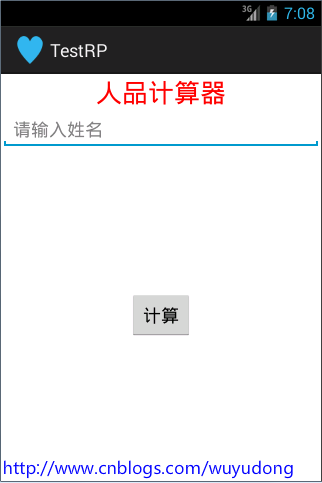
输入姓名后,点击按钮跳转到另一个结果界面:activity_result.xml
<?xml version="1.0" encoding="utf-8"?>

<LinearLayout xmlns:android="http://schemas.android.com/apk/res/android"

    android:layout_width="match_parent"

    android:layout_height="match_parent"

    android:orientation="vertical" >

    <TextView

        android:layout_width="match_parent"

        android:layout_height="wrap_content"

        android:text="测试结果:"

        android:textColor="#ff0000"

        android:textSize="20sp" />

    <TextView

        android:id="@+id/tv_result"

        android:text="xxx:"

        android:layout_width="match_parent"

        android:layout_height="wrap_content"

        android:textColor="#99000000"

        android:textSize="17sp" />

    <ProgressBar

        android:id="@+id/progressBar1"

        android:max="100"

        style="?android:attr/progressBarStyleHorizontal"

        android:layout_width="fill_parent"

        android:layout_height="wrap_content" />

</LinearLayout>
界面如下:

ResultActivity.java代码如下:
package com.wuyudong.testrp;

import java.util.Random;

import android.app.Activity;

import android.content.Intent;

import android.os.Bundle;

import android.widget.ProgressBar;

import android.widget.TextView;

public class ResultActivity extends Activity {

    @Override

    protected void onCreate(Bundle savedInstanceState) {

        super.onCreate(savedInstanceState);

        setContentView(R.layout.activity_result);

        TextView tv_result = (TextView) findViewById(R.id.tv_result);

        Intent intent = getIntent();

        String name = intent.getStringExtra("name");

        Random rm = new Random();

        int rp = rm.nextInt(101);

        tv_result.setText(name + ":您的人品值为:" + rp);

        ProgressBar pb = (ProgressBar)findViewById(R.id.progressBar1);

        pb.setProgress(rp);

    }

}
Android 在不同Actitity之间数据传递的更多相关文章
- android 应用程序Activity之间数据传递与共享的几种途径
一.基于消息的通信机制 Intent ---boudle ,extraAndroid为了屏蔽进程的概念,利用不同的组件[Activity.Service]来表示进程之间的通信!组件间通信的核心机制是I ...
- 无废话Android之smartimageview使用、android多线程下载、显式意图激活另外一个activity,检查网络是否可用定位到网络的位置、隐式意图激活另外一个activity、隐式意图的配置,自定义隐式意图、在不同activity之间数据传递(5)
1.smartimageview使用 <LinearLayout xmlns:android="http://schemas.android.com/apk/res/android&q ...
- 解析activity之间数据传递方法的详解
转自:http://www.jb51.net/article/37227.htm 本篇文章是对activity之间数据传递的方法进行了详细的分析介绍,需要的朋友参考下 1 基于消息的通信机制 ...
- PCB MVC启动顺序与各层之间数据传递对象关系
准备着手基于MVC模式写一套Web端流程指示查看,先着手开发WebAPI打通数据接口,后续可扩展手机端 这里将MVC基本关系整理如下: 一.MVC启动顺序 二.MVC各层之间数据传递对象关系
- android Activity之间数据传递 Parcelable和Serializable接口的使用
Activity之间传数据时,为了避免麻烦,往往会将一些值封装成对象,然后将整个对象传递过去.传对象的时候有两种情况,一种是实现Parcelable接口,一种是实现Serializable接口.0.解 ...
- Android activity之间数据传递和共享的方式之Application
1.基于消息的通信机制 Intent ---bundle ,extra 数据类型有限,比如遇到不可序列化的数据Bitmap,InputStream,或者LinkedList链表等等数据类型就不太好用 ...
- Android——不同activity之间数据传递
/* * 不同activity之间数据的传递 */ public class MainActivity extends Activity { private EditText et_name; @Ov ...
- 转-Activity之间数据传递之Intent数据传递
Intent意图 可用于Activity之间的数据传递,一般可分为下面两种情况,从当前Activity传递到目标Activity后有无返回值: 1.传递后无返回值的情况: 1 2 3 4 5 6 7 ...
- Android笔记——Activity中的数据传递案例(用户注冊)
1.创建程序activity_main: <RelativeLayout xmlns:android="http://schemas.android.com/apk/res/andro ...
随机推荐
- Struts2 源码分析——项目分析
项目知识点分析 从上一章中我们知道了接下来我们要去了解源码的项目(struts2-showcase).而这一章将讲述我三年后在次接触struts2-showcase项目是一个什么样子的情况.我有一个工 ...
- postgres配置主从流复制
postgres主从流复制 postgres在9.0之后引入了主从的流复制机制,所谓流复制,就是从库通过tcp流从主库中同步相应的数据.postgres的主从看过一个视频,大概效率为3w多事务qps. ...
- bootbox上的浮层弹出如何加上datepicker
bootbox和datepicker都是插件,我想要做的需求大致长这样: 我希望使用bootbox弹出的对话框中能弹出一个截止时间的选择框,这个选择框使用datepicker来做. 看了下这个帖子: ...
- 四、BLE(中)
1.1 GATT Manager GATT MGR模块管理所有的GATT服务,同时也是连接GATT模块与GATT ServiceS模块的桥梁. 1.1.1 主要功能模块 先来看一张该 ...
- 【分享】学长的安利来了~~O(∩_∩)O
前言:应栋哥要求,学长把演讲稿稍微整理下发布出来,这可以算是一篇安利文,也可以说是一篇经历文吧.作为一个确确实实从软工里收获到挺多东西的过来人,学长希望可以通过学长的经历来让你们对软工更加期待. 安利 ...
- Chrome开发者工具详解(2)-Network面板
Chrome开发者工具详解(2)-Network面板 注: 这一篇主要讲解面板Network,参考了Google的相关文档,主要用于公司内部技术分享. Chrome开发者工具面板 面板上包含了Elem ...
- Javascript 布尔操作符总结
在一门编程语言中,布尔操作符的重要性堪比相等操作符.如果没有测试两个值关系的能力,那么诸如if...else和循环之类的语句就不会有用武之地了.在像javascript这样弱类型语言更有其妙用,让我们 ...
- Git for Windows v2.11.0 Release Notes
homepage faq contribute bugs questions Git for Windows v2.11.0 Release Notes Latest update: December ...
- C#基础整理参数
基本概念 把数据传入方法中,可以使方法有多个返回值. 参数的传递 值参数,通过将实参的值复制到形参的方式传递数据.值参数的实参可以是变量或者是表达式
- .Net语言 APP开发平台——Smobiler学习日志:用MenuView控件仿钉钉APP的首页菜单
最前面的话:Smobiler是一个在VS环境中使用.Net语言来开发APP的开发平台,也许比Xamarin更方便 一.目标样式 我们要实现上图中的效果,需要如下的操作: 1.从工具栏上的”Smobil ...