
javascript运动系列第一篇——匀速运动
前面的话
除了拖拽以外,运动也是javascript动画的一个基本操作。通过CSS属性transition和animation可以实现运动。但是,要进行更精细地操作,javascript运动是必不可少的。本文将详细介绍javascript运动
简单运动
让一个元素在页面中运动起来很简单,设置定时器,改变定位元素的left或top值即可
<button id="btn">开始运动</button>

<button id="reset">还原</button>

<div id="test" style="height: 100px;width: 100px;background-color: pink;position:absolute;left:0;"></div>

<script>

var timer;

reset.onclick = function(){history.go();}

btn.onclick = function(){

    timer = setInterval(function(){

        if(test.offsetLeft < 500){

            test.style.left = test.offsetLeft + 10 + 'px';

        }else{

            test.style.left = '500px';

            clearInterval(timer);

        }

    },30);

}

</script>
定时器管理
上面的代码中没有进行定时器管理。当元素在运动的过程中,多次按下按钮,会开启多个定时器,从而使元素运动速度加快
有两种定时器管理方式
【1】开启新定时器前,消除旧定时器
[注意]即使没有定时器的情况下,消除定时器也不会报错,只是静默失败
<button id="btn">开始运动</button>

<button id="reset">还原</button>

<div id="test" style="height: 100px;width: 100px;background-color: pink;position:absolute;left:0;"></div>

<script>

var timer;

reset.onclick = function(){history.go();}

btn.onclick = function(){

    clearInterval(timer);

    timer = setInterval(function(){

        if(test.offsetLeft < 500){

            test.style.left = test.offsetLeft + 10 + 'px';

        }else{

            test.style.left = '500px';

            clearInterval(timer);

        }

    },30);

}

</script>
【2】当定时器未停止时,不允许开启新定时器
[注意]由于定时器开启时,其返回值是一个不为0的整数,所以可以通过判断其返回值,来确定是否使用return语句
<button id="btn">开始运动</button>

<button id="reset">还原</button>

<div id="test" style="height: 100px;width: 100px;background-color: pink;position:absolute;left:0;"></div>

<script>

var timer;

reset.onclick = function(){history.go();}

btn.onclick = function(){

    if(timer) return;

    timer = setInterval(function(){

        if(test.offsetLeft < 500){

            test.style.left = test.offsetLeft + 10 + 'px';

        }else{

            test.style.left = '500px';

            clearInterval(timer);

        }

    },30);

}

</script>
分享效果
现在要做一个类似于“分享到”侧边栏的效果
<style>

#test{

    width: 100px;

    height: 100px;

    background-color: lightblue;

    text-align:center;

    position:absolute;

    top: 0;

    left: -100px;

}

#test-in{

    width: 30px;

    height: 60px;

    background-color: orange;

    margin-left: 100px;

    position:relative;

    top: 20px;

}

</style>

<div id="test">

    <div id="test-in">分享到</div>

</div>

<script>

test.onmouseover = function(){test.style.left = '0px';}

test.onmouseout = function(){test.style.left = '-100px';}

</script>
移入移出
如果把鼠标移入和鼠标移出都增加运动效果,则需要使用运动函数
但是,有一个很重要的问题需要注意的是,鼠标移入移出的顺序问题
如果把移入移出事件都加在父元素的身上,则需要做如下处理
由于鼠标从子元素移动到父元素上时,会触发子元素的移出事件,通过冒泡也会触发父元素移出事件。此时,有两种方法解决该问题。一种是在子元素移出事件中阻止冒泡,另一种是在父元素移出事件设置target判断条件。当target为父元素本身时才执行
鼠标从父元素移动到子元素的过程中,会按照顺序触发父元素的移出事件、子元素的移入事件以及父元素的移入事件
为了避免触发移入事件。此时,使用开关变量对移入事件的代码进行限制。移出事件代码完成之前不执行移入事件代码
<script>

var testIn = document.getElementById('test-in');

var timer1,timer2;

var onOff = false;

test.onmouseover = function(){

    if(!onOff){

        clearInterval(timer1);

        timer1 = setInterval(function(){

            if(!onOff){

                if(test.offsetLeft < 0){

                    test.style.left = test.offsetLeft + 10 + 'px';

                }else{

                    test.style.left = '0';

                    clearInterval(timer1);

                    timer1 = 0;

                }

            }else{

                clearInterval(timer1);

            }

        },30);

    }

}

test.onmouseout = function(e){

    e = e || event;

    var target = e.target || e.srcElement;

    if(target === test){

        //当触发父元素移出事件时,开启开关

        onOff = true;

        clearInterval(timer2);

        timer2 = setInterval(function(){

            if(test.offsetLeft > -100){

                test.style.left = test.offsetLeft - 10 + 'px';

            }else{

                test.style.left = '-100px';

                clearInterval(timer2);

                timer2 = 0;

                //当运动结束后,关闭开关

                onOff = false;

            }

        },30);

    }

}

</script>
运动函数
从上面的代码中,可以看出运动部分的重复代码较多,把运动封装为带参数的函数更合适
<style>

#test{width: 100px;height: 100px;background-color:lightblue;text-align:center;position:absolute;top: 0;left: -100px;}

#test-in{width: 30px;height: 60px;background-color: orange;margin-left: 100px;position:relative;top: 20px;}

</style>

<div id="test">

    <div id="test-in">分享到</div>

</div>

<script>

var testIn = document.getElementById('test-in');

var timer;

test.onmouseover = function(){move(test,0,10);}

test.onmouseout = function(){move(test,-100,-10)}

function move(obj,target,speed){

    clearInterval(timer);

    timer = setInterval(function(){

        if((obj.offsetLeft - target)*speed < 0){

            obj.style.left = obj.offsetLeft + speed + 'px';

        }else{

            obj.style.left = target + 'px';

            clearInterval(timer);

            timer = 0;

        }

    },16);

}

</script>
由于不仅仅是left值可以做运动,其他属性(如width)也可以。所以,属性attr也应该作为参数提取出来
这时就无法使用offset类属性,而应该使用计算样式的兼容函数getCSS()
function getCSS(obj,style){

    if(window.getComputedStyle){

        return getComputedStyle(obj)[style];

    }

    return obj.currentStyle[style];

}

function move(obj,attr,target,speed){

    clearInterval(timer);

    timer = setInterval(function(){

        var cur = parseInt(getCSS(obj,attr));

        if((cur - target)*speed < 0){

            obj.style.left = cur + speed + 'px';

        }else{

            obj.style.left = target + 'px';

            clearInterval(timer);

            timer = 0;

        }

    },30);

}
透明度
透明度是一个比较特殊的样式,因为IE8-浏览器不支持opacity,只能通过滤镜的方式写成filter:alpha(opacity=透明值)
但是,由于IE浏览器获取计算样式时,可以获得自定义样式,所以虽然opacity属性在IE8-浏览器无法生效,但是可以获得它的值
如果透明度做运动的话,则需要对运动函数进行重新封装
[注意]由于透明度涉及小数计算,如0.07*100=> 7.000000000000001,所以需要用Math.round()去掉尾巴
<style>

#test{width: 100px;height: 100px;background-color:lightblue;text-align:center;position:absolute;top: 0;left: 0;}

#test-in{width: 30px;height: 60px;background-color: orange;margin-left: 100px;position:relative;top: 20px;}

</style>

<div id="test">

    <div id="test-in">分享到</div>

</div>

<script>

var testIn = document.getElementById('test-in');

var timer;

test.onmouseover = function(){move(test,'opacity',0.1,-0.05);}

test.onmouseout = function(){move(test,'opacity',1,0.05)}

function getCSS(obj,style){

    if(window.getComputedStyle){

        return getComputedStyle(obj)[style];

    }

    return obj.currentStyle[style];

}

function move(obj,attr,target,speed){

    clearInterval(timer);

    var cur;

    timer = setInterval(function(){

        if(attr == 'opacity'){

            cur = Math.round(getCSS(obj,attr)*100);

            if((cur - target*100)*speed < 0){

                obj.style.opacity = (cur + speed*100)/100;

                obj.style.filter = 'alpha(opacity=' + (cur + speed*100) + ')';

            }else{

                obj.style.opacity = target;

                obj.filter = 'alpha(opacity=' + target + ')';

                clearInterval(timer);

                timer = 0;

            }

        }else{

            cur = parseInt(getCSS(obj,attr));

            if((cur - target)*speed < 0){

                obj.style[attr] = cur + speed + 'px';

            }else{

                obj.style[attr] = target + 'px';

                clearInterval(timer);

                timer = 0;

            }

        }

    },30);

}

</script>
多值
如果一个元素有多个值同时运动时,像下面这样直接调用move()函数是有问题的
move(test,'opacity',0.1,-0.05);

move(test,'left',-100,-1);
因为函数里面定时器的变量timer是一个公共变量,当一个运动停止时,会清除定时器。这时另一个运动即使没有完成,定时器已经停止了,就无法继续运动了
所以,合适的做法是在参数对象obj下面设置一个自定义属性timers,timers为一个空对象,然后将定时器返回值储存在timers对象下的attr属性中,此时两个定时器不会相互干扰
<style>

#test{width: 100px;height: 100px;background-color: lightblue;text-align:center;position:absolute;top: 0;left: -100px;opacity:1;}

#test-in{width: 30px;height: 60px;background-color: orange;margin-left: 100px;position:relative;top: 20px;}

</style>

<div id="test">

    <div id="test-in">分享到</div>

</div>

<script>

test.onmouseover = function(){

    move(test,'opacity',0.1,-0.05);

    move(test,'left',0,10);

}

test.onmouseout = function(){

    move(test,'opacity',1,0.05);

    move(test,'left',-100,-10);

}

function getCSS(obj,style){

    if(window.getComputedStyle){

        return getComputedStyle(obj)[style];

    }

    return obj.currentStyle[style];

}

function move(obj,attr,target,speed){

    if(!obj.timers){

        obj.timers = {};

    }

    clearInterval(obj.timers[attr]);

    var cur;

    obj.timers[attr] = setInterval(function(){

        if(attr == 'opacity'){

            cur = Math.round(getCSS(obj,attr)*100);

            if((cur - target*100)*speed < 0){

                obj.style.opacity = (cur + speed*100)/100;

                obj.style.filter = 'alpha(opacity=' + (cur + speed*100) + ')';

            }else{

                obj.style.opacity = target;

                obj.filter = 'alpha(opacity=' + target + ')';

                clearInterval(obj.timers[attr]);

                obj.timers[attr] = 0;

            }

        }else{

            cur = parseInt(getCSS(obj,attr));

            if((cur - target)*speed < 0){

                obj.style[attr] = cur + speed + 'px';

            }else{

                obj.style[attr] = target + 'px';

                clearInterval(obj.timers[attr]);

                obj.timers[attr] = 0;

            }

        }

    },30);

}

</script>
多物体
如果在页面中有多个元素利用运动函数进行运动。由于定时器返回值在不同元素不同属性中都不会受影响。所以,上面的运动函数可以直接使用
<style>

div{height: 100px;width: 100px;position: absolute;left: 0;}

#test1{background-color: pink;top: 40px;}

#test2{background-color: lightblue;top: 150px;}

</style>

<div id="test1">元素一</div>

<div id="test2">元素二</div>

<button id="btn">开始运动</button>

<button id="reset">还原</button>

<script>

reset.onclick = function(){history.go();}

btn.onclick = function(){

    move(test1,'width',300,10);

    move(test1,'left',100,10);

    move(test2,'width',500,20);

    move(test2,'left',200,10);

}

function getCSS(obj,style){

    if(window.getComputedStyle){

        return getComputedStyle(obj)[style];

    }

    return obj.currentStyle[style];

}

function move(obj,attr,target,speed){

    if(!obj.timers){

        obj.timers = {};

    }

    clearInterval(obj.timers[attr]);

    var cur;

    obj.timers[attr] = setInterval(function(){

        if(attr == 'opacity'){

            cur = Math.round(getCSS(obj,attr)*100);

            if((cur - target*100)*speed < 0){

                obj.style.opacity = (cur + speed*100)/100;

                obj.style.filter = 'alpha(opacity=' + (cur + speed*100) + ')';

            }else{

                obj.style.opacity = target;

                obj.filter = 'alpha(opacity=' + target + ')';

                clearInterval(obj.timers[attr]);

                obj.timers[attr] = 0;

            }

        }else{

            cur = parseInt(getCSS(obj,attr));

            if((cur - target)*speed < 0){

                obj.style[attr] = cur + speed + 'px';

            }else{

                obj.style[attr] = target + 'px';

                clearInterval(obj.timers[attr]);

                obj.timers[attr] = 0;

            }

        }

    },30);

}

</script>
回调
物体的多个属性可能不是同时运动,可能是一个属性运动完成之后,另一个属性再运动。如果要完成这种需求,就需要用到回调函数
在运动函数中,定时器停止时,再调用运动函数,就可以接续运动效果
<style>

div{height: 100px;width: 100px;position: absolute;left: 0;}

#test{background-color: pink;top: 40px;}

</style>

<div id="test">元素</div>

<button id="btn">开始运动</button>

<button id="reset">还原</button>

<script>

reset.onclick = function(){history.go();}

btn.onclick = function(){

    move(test,'left',100,20,function(){

        move(test,'width',300,10)

    });

}

function getCSS(obj,style){

    if(window.getComputedStyle){

        return getComputedStyle(obj)[style];

    }

    return obj.currentStyle[style];

}

function move(obj,attr,target,speed,fn){

    if(!obj.timers){obj.timers = {};}

    clearInterval(obj.timers[attr]);

    var cur;

    obj.timers[attr] = setInterval(function(){

        if(attr == 'opacity'){

            cur = Math.round(getCSS(obj,attr)*100);

            if((cur - target*100)*speed < 0){

                obj.style.opacity = (cur + speed*100)/100;

                obj.style.filter = 'alpha(opacity=' + (cur + speed*100) + ')';

            }else{

                obj.style.opacity = target;

                obj.filter = 'alpha(opacity=' + target + ')';

                clearInterval(obj.timers[attr]);

                obj.timers[attr] = 0;

                fn && fn.call(obj);

            }

        }else{

            cur = parseInt(getCSS(obj,attr));

            if((cur - target)*speed < 0){

                obj.style[attr] = cur + speed + 'px';

            }else{

                obj.style[attr] = target + 'px';

                clearInterval(obj.timers[attr]);

                obj.timers[attr] = 0;

                fn && fn.call(obj);

            }

        }

    },30);

}

</script>
函数完善
【速度参数】
上面封装的函数中,传递速度参数时,需要在速度参数前添加正负号作为方向标识。实际上,这步可以写在函数的程序内,而只传递正的速度参数即可
speed = parseInt(getCSS(obj,attr)) < target ? speed : -speed;
【拉回操作】
还有一个可以升级的地方,就是拉回操作。通过判断元素是否到达目标点,如果超过目标点后,将元素拉回到目标点位置
cur = parseInt(getCSS(obj,attr));

if((cur - target)*speed < 0){

    obj.style[attr] = cur + speed + 'px';

}else{

    obj.style[attr] = target + 'px';

    clearInterval(obj.timers[attr]);

    obj.timers[attr] = 0;

    fn && fn.call(obj);

}
更合理的操作,应该是元素肯定不能超过目标点
所以应该把判断条件用来处理speed,当speed是一个合适的值时,再赋值给obj.style[attr],可更改如下
cur = parseInt(getCSS(obj,attr));

//若速度设置值使得元素超过目标点时,将速度设置值更改为目标点值 - 当前值

if((cur +speed - target)*speed > 0){

    speed = target - cur;

}

//将合适的speed值赋值给元素的样式

obj.style[attr] = cur + speed + 'px';

//当元素到达目标点后,停止定时器

if(speed == target - cur){

    clearInterval(obj.timers[attr]);

    obj.timers[attr] = 0;

    fn && fn.call(obj);

}
【使用步长】
其实,把元素的位移变化命名为速度并不合适,只是因为约定俗成的关系才如此起名,将其命名为步长step更为合适,定时器每运行一次,该元素前进一步
Interval函数
以move.js的名字对该运动函数进行保存,在线地址
function getCSS(obj,style){

    if(window.getComputedStyle){

        return getComputedStyle(obj)[style];

    }

    return obj.currentStyle[style];

}

function move(obj,attr,target,step,fn){

    //如果没有建立定时器对象,则在obj下建立定时器对象

    if(!obj.timers){obj.timers = {};}

    //清除定时器

    clearInterval(obj.timers[attr]);

    //声明当前值变量cur

    var cur;

    //判断步长step的正负值

    step = parseInt(getCSS(obj,attr)) < target ? step : -step;

    //开启定时器

    obj.timers[attr] = setInterval(function(){

        //如果样式是透明度

        if(attr == 'opacity'){

            //对当前值的取值进行四舍五入,去除由于javascript小数计数中的bug存在的小尾巴

            cur = Math.round(getCSS(obj,attr)*100);

            if((cur - target*100)*step < 0){

                //设置透明度

                obj.style.opacity = (cur + step*100)/100;

                //IE兼容

                obj.style.filter = 'alpha(opacity=' + (cur + step*100) + ')';

            //透明度到达指定目标时

            }else{

                obj.style.opacity = target;

                obj.filter = 'alpha(opacity=' + target + ')';

                //清除定时器

                clearInterval(obj.timers[attr]);

                obj.timers[attr] = 0;

                //设置回调函数

                fn && fn.call(obj);

            }

        //当样式不是透明度时

        }else{

            //获取样式当前值并赋值给cur

            cur = parseFloat(getCSS(obj,attr));

            ////若步长设置值使得元素超过目标点时,将步长设置值更改为目标点值 - 当前值

            if((cur + step - target)*step > 0){

                step = target - cur;

            }

            //将合适的步长值赋值给元素的样式

            obj.style[attr] = cur + step + 'px';

            //当元素到达目标点后,停止定时器

            if(step == target - cur){

                clearInterval(obj.timers[attr]);

                obj.timers[attr] = 0;

                fn && fn.call(obj);

            }

        }

    },30);

}
【实例】
下面以一个实例来说明move函数的应用,点击document即可查看效果
<!DOCTYPE html>

<html lang="en">

<head>

<meta charset="UTF-8">

<title>Document</title>

<style>

div{

    width: 50px;

    height: 50px;

    position: absolute;

    top: 0;

    background-color:lightblue;

}

div:nth-child(odd){

    background-color:pink;

}

</style>

</head>

<body>

<script src="http://files.cnblogs.com/files/xiaohuochai/move.js"></script>

<script>

var str = '';

var len = 10;

var timer;

var num = 0;

for(var i = 0; i < len; i++){

    str+= '<div style="left:'+60*i+'px;"></div>';

}

document.body.innerHTML = str;

document.onclick = function(){

    var aDiv = document.getElementsByTagName('div');

    if(timer) return;

    timer = setInterval(function(){

        move(aDiv[num++],'top', 200,10,function(){

            var _this = this;

            setTimeout(function(){

                move(_this,'top', 0,10);

            },1000)

        });

        if(num == len){

            clearInterval(timer);

            num = 0;

            setTimeout(function(){

                timer = 0;

            },2000);

        }

    },100);

}

</script>

</body>

</html>
Frame函数
使用setInterval()的问题在于,定时器代码可能在代码再次被添加到队列之前还没有完成执行,结果导致定时器代码连续运行好几次,而之间没有任何停顿。而JS引擎对这个问题的解决是:当使用setInterval()时,仅当没有该定时器的任何其他代码实例时,才将定时器代码添加到队列中。这确保了定时器代码加入到队列中的最小时间间隔为指定间隔
但是,这样会导致两个问题:1、某些间隔被跳过;2、多个定时器的代码执行之间的间隔可能比预期的小
为了避免setInterval()定时器的问题,可以使用链式requestAnimationFrame()调用,IE9-浏览器可以使用setTimeout()兼容
以frameMove.js的名称保存该js文件
if (!window.requestAnimationFrame) {

    requestAnimationFrame = function(fn) {

        setTimeout(fn, 17);

    };

}

if (!window.cancelAnimationFrame) {

    window.cancelAnimationFrame = function(id) {

        clearTimeout(id);

    };

}

function getCSS(obj,style){

    if(window.getComputedStyle){

        return getComputedStyle(obj)[style];

    }

    return obj.currentStyle[style];

}

function move(obj,attr,target,step,fn){

  //如果没有建立定时器对象,则在obj下建立定时器对象

  if(!obj.timers){

    obj.timers = {};

  }

  //清除定时器

  cancelAnimationFrame(obj.timers[attr]);

  //声明当前值变量cur

  var cur;

  //判断步长step的正负值

  step = parseInt(getCSS(obj,attr)) < target ? step : -step;

  //开启定时器

  obj.timers[attr] = requestAnimationFrame(function func(){

    //如果样式是透明度

    if(attr == 'opacity'){

        //对当前值的取值进行四舍五入,去除由于javascript小数计数中的bug存在的小尾巴

        cur = Math.round(getCSS(obj,attr)*100);

        if((cur - target*100)*step < 0){

            //设置透明度

            obj.style.opacity = (cur + step*100)/100;

            //IE兼容

            obj.style.filter = 'alpha(opacity=' + (cur + step*100) + ')';

            //递归调用定时器

            obj.timers[attr] = requestAnimationFrame(func);

        //透明度到达指定目标时

        }else{

            obj.style.opacity = target;

            obj.filter = 'alpha(opacity=' + target + ')';

            //清除定时器

            cancelAnimationFrame(obj.timers[attr]);

            obj.timers[attr] = 0;

            //设置回调函数

            fn && fn.call(obj);

        }

    //当样式不是透明度时

    }else{

      //获取样式当前值并赋值给cur

      cur = parseInt(getCSS(obj,attr));

      //若步长设置值使得元素超过目标点时,将步长设置值更改为目标点值 - 当前值

      if((cur + step - target)*step > 0){

          step = target - cur;

      }

      //将合适的步长值赋值给元素的样式

      obj.style[attr] = cur + step + 'px';

      //递归调用定时器

      obj.timers[attr] = requestAnimationFrame(func);

      //当元素到达目标点后,停止定时器

      if(step == target - cur){

        cancelAnimationFrame(obj.timers[attr]);

        obj.timers[attr] = 0;

        fn && fn.call(obj);

      }

    }

  });

}
浏览器问题
不论是Interval版本的运动函数,还是requestAnimationFrame版本的运动函数,语法都没有问题。但浏览器却有问题。为了节电,对于那些不处于当前窗口的页面,浏览器会将时间间隔扩大到1000毫秒。另外,如果笔记本电脑处于电池供电状态,Chrome和IE10+浏览器,会将时间间隔切换到系统定时器,大约是16.6毫秒
定时器时间间隔的变化,得到运动不能按照预期进行,很多时间会出现预想不到的bug
比如,还是上面的例子,它是以iframe内联框架的形式引入页面的。如果元素在运动过程中,拖动滚动条,使可视区域展示其他内容。过几秒钟后,再移回来时,发现运动的元素已经出现了bug
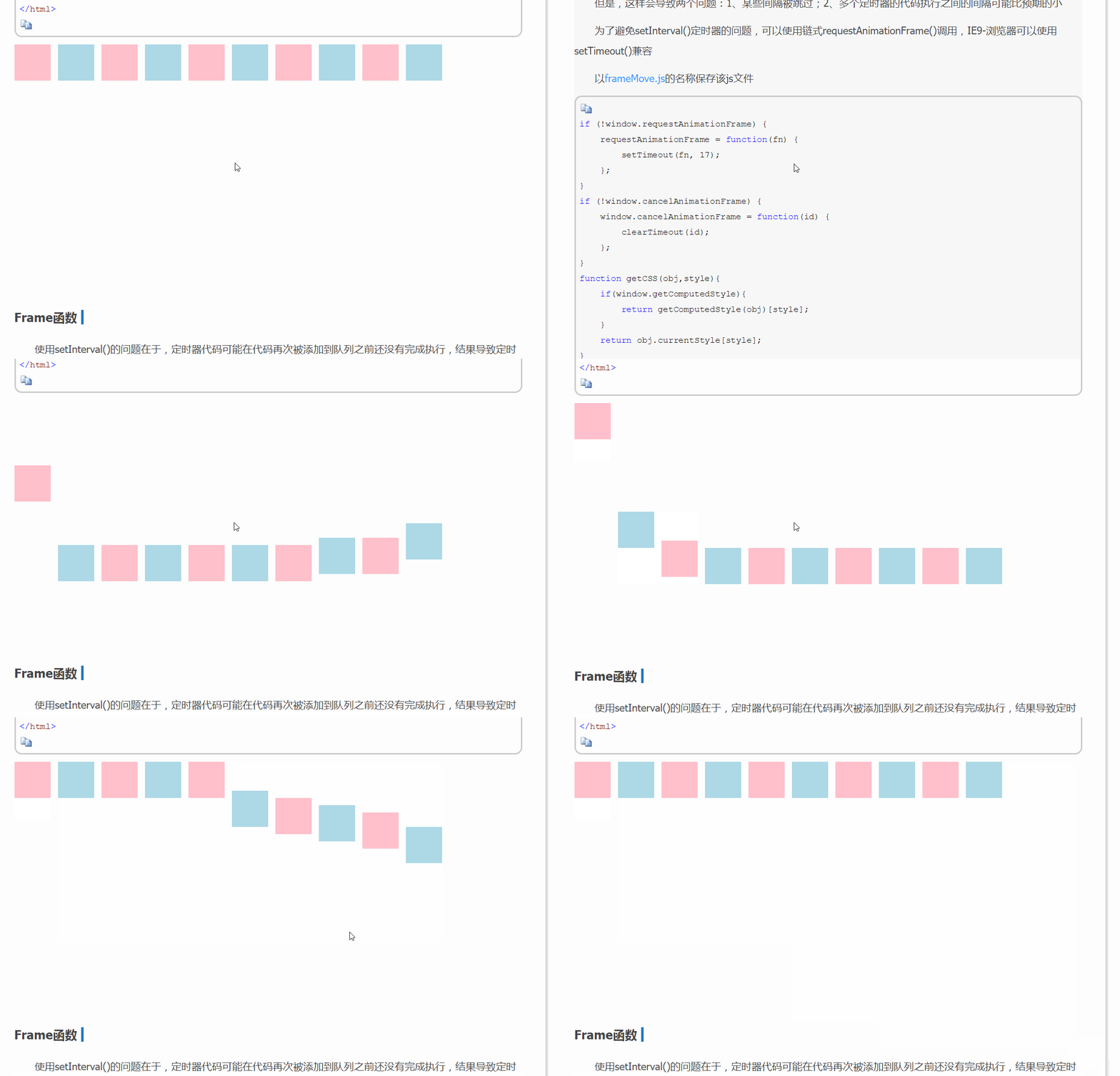
关于以上情况的解决办法是,只要页面不处于活动状态,定时器就停止运行,回到活动状态时,再恢复运行。可以使用window的onblur和onfocus事件来解决
  window.onblur = function(){

    //清除定时器

    cancelAnimationFrame(timer);

  }

  window.onfocus = function(){

    //开启定时器

    timer = requestAnimationFrame(func)

  }
[注意]只能使用window.onblur的形式,而不能使用window.addEventListener的形式
但是,当出现多个定时器时,此问题仍然不好解决。更好的办法是使用时间版运动
javascript运动系列第一篇——匀速运动的更多相关文章
- 深入理解javascript函数系列第一篇——函数概述
× 目录 [1]定义 [2]返回值 [3]调用 前面的话 函数对任何一门语言来说都是一个核心的概念.通过函数可以封装任意多条语句,而且可以在任何地方.任何时候调用执行.在javascript里,函数即 ...
- 深入理解javascript函数系列第一篇
前面的话 函数对任何一门语言来说都是核心的概念.通过函数可以封装任意多条语句,而且可以在任何地方.任何时候调用执行.在javascript里,函数即对象,程序可以随意操控它们.函数可以嵌套在其他函数中 ...
- 深入理解javascript对象系列第一篇——初识对象
× 目录 [1]定义 [2]创建 [3]组成[4]引用[5]方法 前面的话 javascript中的难点是函数.对象和继承,前面已经介绍过函数系列.从本系列开始介绍对象部分,本文是该系列的第一篇——初 ...
- 深入理解javascript作用域系列第一篇——内部原理
× 目录 [1]编译 [2]执行 [3]查询[4]嵌套[5]异常[6]原理 前面的话 javascript拥有一套设计良好的规则来存储变量,并且之后可以方便地找到这些变量,这套规则被称为作用域.作用域 ...
- 深入理解javascript作用域系列第一篇
前面的话 javascript拥有一套设计良好的规则来存储变量,并且之后可以方便地找到这些变量,这套规则被称为作用域.作用域貌似简单,实则复杂,由于作用域与this机制非常容易混淆,使得理解作用域的原 ...
- javascript动画系列第一篇——模拟拖拽
× 目录 [1]原理介绍 [2]代码实现 [3]代码优化[4]拖拽冲突[5]IE兼容 前面的话 从本文开始,介绍javascript动画系列.javascript本身是具有原生拖放功能的,但是由于兼容 ...
- javascript运动系列第二篇——变速运动
× 目录 [1]准备工作 [2]加速运动 [3]重力运动[4]减速运动[5]缓冲运动[6]加减速运动[7]往复运动[8]变速函数 前面的话 前面介绍过匀速运动的实现及注意事项,本文在匀速运动的基础上, ...
- javascript运动系列第九篇——碰撞运动
× 目录 [1]碰撞检测 [2]无损碰撞 [3]有损碰撞 前面的话 碰撞可以分为碰壁和互碰两种形式,上篇介绍了碰壁运动,本文将从浅入深地介绍碰撞运动的互碰形式 碰撞检测 对于互碰形式的碰撞运动来说,首 ...
- javascript面向对象系列第一篇——构造函数和原型对象
× 目录 [1]构造函数 [2]原型对象 [3]总结 前面的话 一般地,javascript使用构造函数和原型对象来进行面向对象编程,它们的表现与其他面向对象编程语言中的类相似又不同.本文将详细介绍如 ...
随机推荐
- Git 在团队中的最佳实践--如何正确使用Git Flow
我们已经从SVN 切换到Git很多年了,现在几乎所有的项目都在使用Github管理, 本篇文章讲一下为什么使用Git, 以及如何在团队中正确使用. Git的优点 Git的优点很多,但是这里只列出我认为 ...
- JavaScript中Math对象的方法介绍
1.比较最值方法 比较最值有两种方法,max() 和 min() 方法. 1.1 max() 方法,比较一组数值中的最大值,返回最大值. var maxnum = Math.max(12,6,43,5 ...
- $.extend()的实现源码 --(源码学习1)
目标: $.extend({ add:function(a,b){ return a + b; } }) console.log($.a ...
- 快速搭建springmvc+spring data jpa工程
一.前言 这里简单讲述一下如何快速使用springmvc和spring data jpa搭建后台开发工程,并提供了一个简单的demo作为参考. 二.创建maven工程 http://www.cnblo ...
- dagger2系列之Scope
Dagger的Scope注解代表的是作用域,通过实现自定义@Scope注解,标记当前生成对象的使用范围,标识一个类型的注射器只实例化一次,在同一个作用域内,只会生成一个实例, 然后在此作用域内共用一个 ...
- 破解SQLServer for Linux预览版的3.5GB内存限制 (RHEL篇)
微软发布了SQLServer for Linux,但是安装竟然需要3.5GB内存,这让大部分云主机用户都没办法尝试这个新东西 这篇我将讲解如何破解这个内存限制 要看关键的可以直接跳到第6步,只需要替换 ...
- C++ 拷贝构造函数和赋值运算符
本文主要介绍了拷贝构造函数和赋值运算符的区别,以及在什么时候调用拷贝构造函数.什么情况下调用赋值运算符.最后,简单的分析了下深拷贝和浅拷贝的问题. 拷贝构造函数和赋值运算符 在默认情况下(用户没有定义 ...
- git提交项目到已存在的远程分支
今天想提交项目到github的远程分支上,那个远程分支是之前就创建好的,而我的本地关联分支还没创建. 之前从未用github提交到远程分支过,弄了半个钟,看了几篇博文,终于折腾出来.现在把步骤整理 ...
- Win10连接远程桌面时提示“您的凭据不工作”
我遇到这个问题的时候查找网上都给出一堆高大上的解决办法, 然而我的错误实际上是用户名的问题, 很多人以为远程用户名就一定是锁屏状态下的登录名, 其实不是,跟自己设置有关,所以首先应该检查远程用户名是否 ...
- 如何开发FineReport的自定义控件?
FineReport作为插件化开发的报表软件,有些特殊需求的功能需要自己开发,开发的插件包帆软官方有提提供,可以去帆软论坛上找,本文将主要介绍如何开发一个自定义控件,这里讲讲方法论. 第一步:实例化一 ...