
JS双月份显示联动效果,点击日期浮出消息提示
<!DOCTYPE html PUBLIC "-//W3C//DTD XHTML 1.0 Transitional//EN" "http://www.w3.org/TR/xhtml1/DTD/xhtml1-transitional.dtd">

<html xmlns="http://www.w3.org/1999/xhtml">

<head>

<meta http-equiv="Content-Type" content="text/html; charset=utf-8" />

<title>原生JS写的日历月历 - demo by js.alixixi.com</title>

<style type="text/css">

<!--

body {font-size: 14px;line-height: 20px;margin: 0px;padding: 0px;text-align:center;font-family: Arial;}

#overlay{position:absolute;z-index:999;top:0;left:0;width:100%;height:100%;background:#000;opacity:0.3;filter:alpha(opacity=30);display:none;}

#win{position:absolute;z-index:999;top:50%;left:50%;width:400px;height:200px;background:rgba(00, 00, 00, 0.5);margin:-100px 0 0 -200px;display:none;}

#win #otitle{color:#fff;height:33px;padding-left:10px;text-align:left;background:rgba(00, 00, 00, 0.7);}

#win #otitle #otitlestr {float:left;width:200px;height:30px;line-height:30px;}

#win #otitle #close {font-size:24px;width:33px;height:33px;line-height:33px;text-align:center;font-weight:bold;float:right;cursor:pointer;}

#win #showstr {color:#fff;margin:10px;text-align:left;}

.clear{clear: both;}

em{font-style: normal;}

ul,li{list-style-type: none;margin:0px;padding:0px;}

#newDate{width:1230px;height:auto;margin:35px auto 0 auto;}

#newDate #nowDate{width:600px;height:600px;float:left;cursor:pointer;}

#newDate #nextDate{width:600px;height:600px;float:right;cursor:pointer;}

#newDate .Header{width:594px;height:50px;background:#e6dcda;border-bottom-width: 1px;border-bottom-style: solid;border-bottom-color: #FFF;position:relative;-moz-user-select:none;-webkit-user-select:none;user-select:none;  }

#newDate .c{font-size:24px;font-weight:bold;height:50px;line-height:50px;text-align:center;}

#newDate .l{font-size:24px;font-weight:bold;height:50px;line-height:50px;position:absolute; top:0px; left:14px;}

#newDate .r{font-size:24px;font-weight:bold;height:50px;line-height:50px;position:absolute; top:0px; right:14px;}

#newDate .Weeks{width:595px;height:30px;}

#newDate span{font-weight:bold;width:84px;height:30px;line-height:30px;text-align:center;background:#e6dcda;margin-right:1px;float:left;}

#newDate ul li{color:#999;font-size:24px;width:84px;height:70px;line-height:70px;text-align:center;margin-top:1px;margin-right:1px;background:#f5f5f5;float:left;}

-->

</style>

<!--[IF lt IE 9]>

<style>

#win,#win #otitle{filter: progid:DXImageTransform.Microsoft.gradient(startColorstr=#7f000000,endColorstr=#7f000000);}

</style>

<![endif]-->

<script type="text/javascript">

window.onload = function(){

    function $(id){return typeof id === "string" ? document.getElementById(id) : id;}

 function lightBoxShow(title,str)

 {

  var oWin = $("win");

     var oLay = $("overlay");

  $("otitlestr").innerHTML = title;

  $("showstr").innerHTML = str;

  oLay.style.display = "block";

  oWin.style.display = "block";

  $("close").onclick = function ()

     {

      oLay.style.display = "none";

      oWin.style.display = "none"

     }

 }

    var newDate = document.getElementById("newDate");

 var nowDate = document.getElementById("nowDate");

 var nextDate = document.getElementById("nextDate");

 var nDate = new Date();

 if(nDate.getMonth()+1==12){

     viewDate(nowDate,nDate.getFullYear(),nDate.getMonth()+1,true);

  viewDate(nextDate,nDate.getFullYear()+1,1);

 }else{

     viewDate(nowDate,nDate.getFullYear(),nDate.getMonth()+1,true);

  viewDate(nextDate,nDate.getFullYear(),nDate.getMonth()+2);

 }

 showBtn();

 function viewDate(obj,year,month,bBtn){

     var nDate = new Date();

  var dayNum = 0;

        if(!obj.bBtn){

            obj.Header = document.createElement("div");

            obj.Header.className = "Header";

            obj.appendChild(obj.Header);

            var Weeks = document.createElement("div");

            Weeks.className = "Weeks";

            obj.appendChild(Weeks);

            var weeksArr = ['SUN','MON','TUE','WEB','THU','FRI','SAT'];

            for(var i=0;i<7;i++){

                var nSpan = document.createElement("span");

                nSpan.innerHTML = weeksArr[i];

                if(i==0 || i==6){

                    nSpan.style.color = "red";

                }

                Weeks.appendChild(nSpan);

            }

            var nUl = document.createElement("ul");

            for(var i=0;i<42;i++){

                var nLi = document.createElement("li");

                nUl.appendChild(nLi);

            }

            obj.appendChild(nUl);

            obj.bBtn = true;

        }

        obj.Header.innerHTML = ( bBtn ? '<div class="l">< <em>'+(month-1)+'</em></div>' : '<div class="r"><em>'+(month+1)+'</em> ></div>')+'<div class="c"><em>'+year+'</em>-<em>'+month+'</em></div>';

        var aLi = obj.getElementsByTagName("li");

        for(var i=0;i<aLi.length;i++){

            aLi[i].innerHTML = "";

            aLi[i].style.background = "#f5f5f5";

            aLi[i].style.color = "#999";

        }

        if(month==1 || month==3 || month==5 || month==7 || month==8 || month==10 || month==12){

   dayNum = 31;

  }

  else if(month==4 || month==6 || month==9 || month==11){

   dayNum = 30;

  }

  else if(month==2 && isLeapYear(year)){

   dayNum = 29;

  }

  else{

   dayNum = 28;

  }

  nDate.setFullYear(year);

  nDate.setMonth(month-1);

  nDate.setDate(1);

  function Today(){

      var tDate = new Date();

   var tEm = aLi[i].parentNode.parentNode.getElementsByTagName("em");

      var tMonth = parseInt(tEm[2].innerHTML);

      var tYear = parseInt(tEm[1].innerHTML);

   if(aLi[i].innerHTML == tDate.getDate() && tYear == tDate.getFullYear() && tMonth == tDate.getMonth()+1){

          aLi[i].style.color = "#000";

          aLi[i].style.background = "#e6dcda";

      }

  }

  switch(nDate.getDay()){

   case 0:

    for(var i=0;i<dayNum;i++){

     aLi[i].innerHTML = i+1;

     Today();

    }

   break;

   case 1:

    for(var i=0;i<dayNum;i++){

     aLi[i+1].innerHTML = i+1;

     Today();

    }

   break;

   case 2:

    for(var i=0;i<dayNum;i++){

     aLi[i+2].innerHTML = i+1;

     Today();

          }

   break;

   case 3:

    for(var i=0;i<dayNum;i++){

     aLi[i+3].innerHTML = i+1;

     Today();

    }

   break;

   case 4:

    for(var i=0;i<dayNum;i++){

     aLi[i+4].innerHTML = i+1;

     Today();

    }

   break;

   case 5:

    for(var i=0;i<dayNum;i++){

     aLi[i+5].innerHTML = i+1;

     Today();

    }

   break;

   case 6:

    for(var i=0;i<dayNum;i++){

     aLi[i+6].innerHTML = i+1;

     Today();

    }

   break;

  }

  if(month==1 && bBtn){

   obj.Header.getElementsByTagName('em')[0].innerHTML = 12;

  }

  else if(month==12 && !bBtn){

   obj.Header.getElementsByTagName('em')[0].innerHTML = 1;

  }

 }

 function isLeapYear(year){

  if(year%4==0 && year%100!=0){

   return true;

  }

  else{

   if(year%400==0){

    return true;

   }

   else{

    return false;

   }

  }

 }

 function showBtn(){

  var nowEm = nowDate.getElementsByTagName("em");

  var nextEm = nextDate.getElementsByTagName("em");

  var leftMonth = parseInt(nowEm[0].innerHTML);

  var leftYear = parseInt(nowEm[1].innerHTML);

  var rightMonth = parseInt(nextEm[0].innerHTML);

  var rightYear = parseInt(nextEm[1].innerHTML);

  nowEm[0].parentNode.onclick = function(){

   if(leftMonth == 12){

    viewDate(nowDate,leftYear-1,leftMonth,true);

    viewDate(nextDate,leftYear,1);

   }

   else{

    viewDate(nowDate,leftYear,leftMonth,true);

    viewDate(nextDate,leftYear,leftMonth+1);

   }

   showBtn();

  };

  nextEm[0].parentNode.onclick = function(){

   if(rightMonth == 1){

    viewDate(nowDate,rightYear,12,true);

    viewDate(nextDate,rightYear+1,rightMonth);

   }

   else{

    viewDate(nowDate,rightYear,rightMonth-1,true);

    viewDate(nextDate,rightYear,rightMonth);

   }

   showBtn();

  };

 }

 function nowDay(){

     var tLi = newDate.getElementsByTagName("li");

     var tDate = new Date();

     for(var i=0;i<tLi.length;i++){

         tLi[i].onmouseover = function(){

          if(this.innerHTML != ""){

              this.style.color = "#000";

              this.style.background = "#e6dcda";

       }

      }

      tLi[i].onmouseout = function(){

          if(this.innerHTML != ""){

             this.style.color = "#999";

             this.style.background = "#f5f5f5";

       }

      }

      tLi[i].onclick = function(){

          var tEm = this.parentNode.parentNode.getElementsByTagName("em");

          var tMonth = parseInt(tEm[2].innerHTML);

          var tYear = parseInt(tEm[1].innerHTML);

          if(this.innerHTML!=""){

              lightBoxShow(tYear+"-"+tMonth+"-"+this.innerHTML+" Message","None");

              //alert(tYear+"-"+tMonth+"-"+this.innerHTML);

          }

      }

     }

     for(var j=tLi.length/2;j<tLi.length;j++){

         if(tLi[j].innerHTML == tDate.getDate()){

          tLi[j].style.color = "#000";

          tLi[j].style.background = "#e6dcda";

      }

     }

 }

 nowDay();

}

</script>

</head>

<body>

<div id="newDate">

   <div id="nextDate"></div>

   <div id="nowDate"></div>

</div>

<div id="overlay"></div>

<div id="win">

    <div id="otitle">

        <div id="close">×</div>

     <div id="otitlestr"></div>

    </div>

    <div id="showstr"></div>

</div>

</body>

</html>
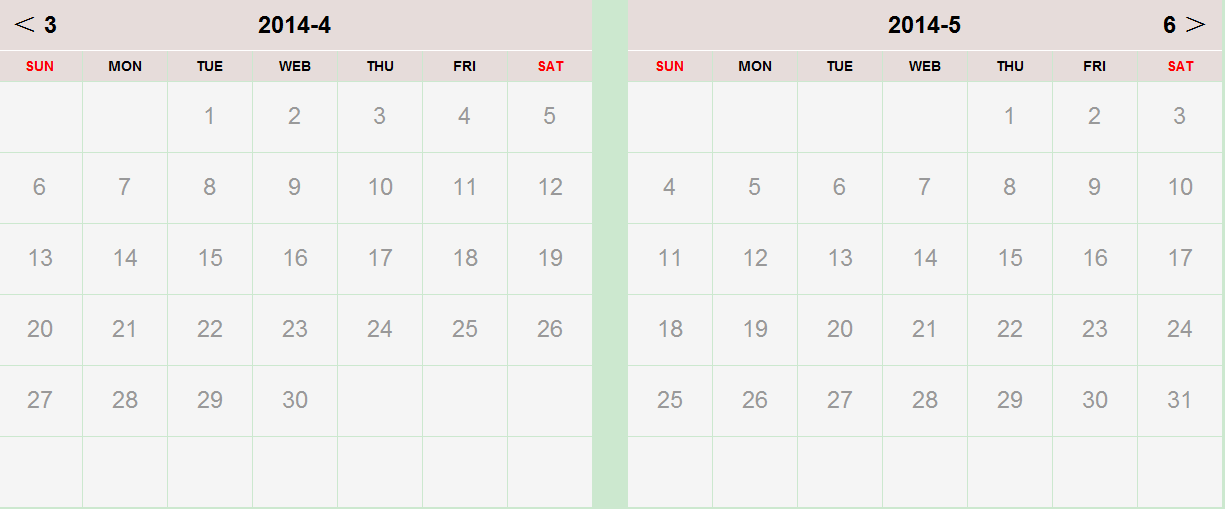
效果:
JS双月份显示联动效果,点击日期浮出消息提示的更多相关文章
- unity点击按钮弹出操作提示界面
1.首先在相应的位置添加一个(UGUI控件)image,在image下添加文本框和按钮设计弹出框内容如图: 2.新建C#脚本UITips using System.Collections; using ...
- js鼠标滑动图片显示隐藏效果
<!DOCTYPE html PUBLIC "-//W3C//DTD XHTML 1.0 Transitional//EN" "http://www.w3.org/ ...
- js图片未加载完显示loading效果
<html> <title>js图片未加载完显示loading效果</title> <body> <style> img{float:lef ...
- jquery.cityselect.js基于jQuery+JSON的省市或自定义联动效果
一.插件介绍 最早做省市联动的时候都特别麻烦,后来在helloweba的一篇文章中看到这个插件,很不错的,后来就一直用了. 省市区联动下拉效果在WEB中应用非常广泛,尤其在一些会员信息系统.电商网站最 ...
- js兼容火狐显示上传图片预览效果
js兼容火狐显示上传图片预览效果[谷歌也适用] <!doctype html> <html> <head> <meta content="text/ ...
- JS省市区联动效果
省市区联动下拉效果在WEB中应用非常广泛,尤其在电商网站最为常见.一般使用Ajax实现无刷新下拉联动.利用jQuery,通过读取JSON数据,实现无刷新动态下拉省市二(三)级联动效果. 首先我们可以看 ...
- jQuery点击图片放大显示原图效果
HTML部分:<div id="append_parent"></div> JS代码部分: ? 1 2 3 4 5 6 7 8 9 10 11 12 13 ...
- js进阶 12-15 jquery如何实现点击button显示列表,点击其它位置隐藏列表
js进阶 12-15 jquery如何实现点击button显示列表,点击其它位置隐藏列表 一.总结 一句话总结:在button中阻止事件冒泡. 1.如何咋button中阻止事件冒泡(两种方法)? ev ...
- js之省市区(县)三级联动效果
省市区(县)三级联动效果,是我们软件开发比较常用的,特别是对一些crm,erp之类,当然也包括其他的后台管理系统,基本都涉及到,今天贴出这个常用的,方便个人复用和大家使用 <!DOCTYPE h ...
随机推荐
- go runtime.Gosched() 和 time.Sleep() 做协程切换
网上看到个问题: package main import ( "fmt" "time" ) func say(s string) { ; i < ; i+ ...
- [leetcode 24] Swap Nodes in k-Group
1 题目: 目前被墙,看不了. 2 思路: 比较简单,注意处理边界点就好 3 代码: public ListNode swapPairs(ListNode head) { int temp; if(h ...
- WCF Failed to invoke the service. Possible causes: The service is offline or inaccessible
今天写WCf 时遇到如下报错: 调试过程发现,各个过程都无异常,但是返回给调用端数据时出现如下错误. Failed to invoke the service. Possible causes: Th ...
- libQtCassandra 0.5.0 发布
libQtCassandra 0.5.0 修复了 QCassandraRow::exists() 函数的问题,更新了 Thrift 库. libQtCassandra 是一个高级的 C++ 库用来访问 ...
- C# System.Threading.Timer 使用方法
public class TimerHelper { System.Threading.Timer timer; public TaskSendMMS tasksendmms { get; set; ...
- AMD加载器实现笔记(四)
继续这一系列的内容,到目前为止除了AMD规范中config的map.config参数外,我们已经全部支持其他属性了.这一篇文章中,我们来为增加对map的支持.同样问题,想要增加map的支持首先要知道m ...
- 一个App完成入门篇(一)-从Hello world开始
程序员学习新技术都是通过Hello World开始的,我们也不例外.第一课我们简单了解利用do平台开发App的基本流程,能了解到的知识点是: 开发环境搭建 创建开发者账号 新建项目 拖拽一个组件 修改 ...
- Alpha阶段冲刺总结
Alpha阶段冲刺阶段总结 预期计划: 本阶段的预期计划是实现打地鼠游戏的基本功能,包括:游戏功能.难度调节功能.计时功能.计数记分功能.DIY设置功能.分数记录功能. 实际进展: 在经过三周的Alp ...
- 谈谈对BPM的理解
BPM的产生缘由 近年来,随着计算机技术的发展和互联网时代的到来,我们已经进入了信息时代,也称为数字化时代,在这数字化的时代里,企业的经营管理都受到了极大的挑战.从上世纪90年代起至今,企业的信息化工 ...
- Linux vim命令
介绍 vim命令和vi的操作基本一致,vim命令的参数很多,我在这里列出了一些平时需要用的一些参数,vim主要有两个界面一个是esc的操作界面还有一个是输入i的编辑界面. 移动光标 0 (零):将光标 ...