
@ViewDebug.ExportedProperty的使用
- 原文链接:http://daemon369.github.io/android/2014/06/12/android-viewdebug-exportedproperty/
- http://www.eoeandroid.com/thread-55461-1-1.html;
This annotation can be used to mark fields and methods to be dumped by the view server. Only non-void methods with no arguments can be annotated by this annotation.
这个注释可以用来标记域和方法,该域和方法将会被视服务所“转存”,只有不带参数的非空方法才能被这个注释所诠释;
在查看View源码时,但不清楚@ViewDebug.ExportedProperty的用法:
    /**

     * The view flags hold various views states.

     * {@hide}

     */

    @ViewDebug.ExportedProperty

    int mViewFlags;

    /**

     * The distance in pixels from the left edge of this view's parent

     * to the left edge of this view.

     * {@hide}

     */

    @ViewDebug.ExportedProperty(category = "layout")

    protected int mLeft;

    /**

     * The distance in pixels from the left edge of this view's parent

     * to the right edge of this view.

     * {@hide}

     */

    @ViewDebug.ExportedProperty(category = "layout")

    protected int mRight;

    /**

     * The distance in pixels from the top edge of this view's parent

     * to the top edge of this view.

     * {@hide}

     */

    @ViewDebug.ExportedProperty(category = "layout")

    protected int mTop;

    /**

     * The distance in pixels from the top edge of this view's parent

     * to the bottom edge of this view.

     * {@hide}

     */

    @ViewDebug.ExportedProperty(category = "layout")

    protected int mBottom;

    /**

     * The offset, in pixels, by which the content of this view is scrolled

     * horizontally.

     * {@hide}

     */

    @ViewDebug.ExportedProperty(category = "scrolling")

    protected int mScrollX;

    /**

     * The offset, in pixels, by which the content of this view is scrolled

     * vertically.

     * {@hide}

     */

    @ViewDebug.ExportedProperty(category = "scrolling")

    protected int mScrollY;

    /**

     * The left padding in pixels, that is the distance in pixels between the

     * left edge of this view and the left edge of its content.

     * {@hide}

     */

    @ViewDebug.ExportedProperty(category = "padding")

    protected int mPaddingLeft;

    /**

     * The right padding in pixels, that is the distance in pixels between the

     * right edge of this view and the right edge of its content.

     * {@hide}

     */

    @ViewDebug.ExportedProperty(category = "padding")

    protected int mPaddingRight;

    /**

     * The top padding in pixels, that is the distance in pixels between the

     * top edge of this view and the top edge of its content.

     * {@hide}

     */

    @ViewDebug.ExportedProperty(category = "padding")

    protected int mPaddingTop;

    /**

     * The bottom padding in pixels, that is the distance in pixels between the

     * bottom edge of this view and the bottom edge of its content.

     * {@hide}

     */

    @ViewDebug.ExportedProperty(category = "padding")

    protected int mPaddingBottom;

    /**

     * Briefly describes the view and is primarily used for accessibility support.

     */

    private CharSequence mContentDescription;

    /**

     * Cache the paddingRight set by the user to append to the scrollbar's size.

     */

    @ViewDebug.ExportedProperty(category = "padding")

    int mUserPaddingRight;

    /**

     * Cache the paddingBottom set by the user to append to the scrollbar's size.

     */

    @ViewDebug.ExportedProperty(category = "padding")

    int mUserPaddingBottom;
使用@ViewDebug.ExportedProperty注解,我们可以在android提供的工具Monitor(或已经废弃的DDMS)中的Hierarchy Viewer中调试View的属性。我们可以直接观察View的某个变量或方法的值,实时观察View的状态变化。
ExprotedProperty注解源码
/**

 * This annotation can be used to mark fields and methods to be dumped by

 * the view server. Only non-void methods with no arguments can be annotated

 * by this annotation.

 */

@Target({ ElementType.FIELD, ElementType.METHOD })

@Retention(RetentionPolicy.RUNTIME)

public @interface ExportedProperty {

    /**

     * When resolveId is true, and if the annotated field/method return value

     * is an int, the value is converted to an Android's resource name.

     *

     * @return true if the property's value must be transformed into an Android

     *         resource name, false otherwise

     */

    boolean resolveId() default false;

    /**

     * A mapping can be defined to map int values to specific strings. For

     * instance, View.getVisibility() returns 0, 4 or 8. However, these values

     * actually mean VISIBLE, INVISIBLE and GONE. A mapping can be used to see

     * these human readable values:

     *

     * <pre>

     * @ViewDebug.ExportedProperty(mapping = {

     *     @ViewDebug.IntToString(from = 0, to = "VISIBLE"),

     *     @ViewDebug.IntToString(from = 4, to = "INVISIBLE"),

     *     @ViewDebug.IntToString(from = 8, to = "GONE")

     * })

     * public int getVisibility() { ...

     * <pre>

     *

     * @return An array of int to String mappings

     *

     * @see android.view.ViewDebug.IntToString

     */

    IntToString[] mapping() default { };

    /**

     * A mapping can be defined to map array indices to specific strings.

     * A mapping can be used to see human readable values for the indices

     * of an array:

     *

     * <pre>

     * @ViewDebug.ExportedProperty(indexMapping = {

     *     @ViewDebug.IntToString(from = 0, to = "INVALID"),

     *     @ViewDebug.IntToString(from = 1, to = "FIRST"),

     *     @ViewDebug.IntToString(from = 2, to = "SECOND")

     * })

     * private int[] mElements;

     * <pre>

     *

     * @return An array of int to String mappings

     *

     * @see android.view.ViewDebug.IntToString

     * @see #mapping()

     */

    IntToString[] indexMapping() default { };

    /**

     * A flags mapping can be defined to map flags encoded in an integer to

     * specific strings. A mapping can be used to see human readable values

     * for the flags of an integer:

     *

     * <pre>

     * @ViewDebug.ExportedProperty(flagMapping = {

     *     @ViewDebug.FlagToString(mask = ENABLED_MASK, equals = ENABLED, name = "ENABLED"),

     *     @ViewDebug.FlagToString(mask = ENABLED_MASK, equals = DISABLED, name = "DISABLED"),

     * })

     * private int mFlags;

     * <pre>

     *

     * A specified String is output when the following is true:

     *

     * @return An array of int to String mappings

     */

    FlagToString[] flagMapping() default { };

    /**

     * When deep export is turned on, this property is not dumped. Instead, the

     * properties contained in this property are dumped. Each child property

     * is prefixed with the name of this property.

     *

     * @return true if the properties of this property should be dumped

     *

     * @see #prefix()

     */

    boolean deepExport() default false;

    /**

     * The prefix to use on child properties when deep export is enabled

     *

     * @return a prefix as a String

     *

     * @see #deepExport()

     */

    String prefix() default "";

    /**

     * Specifies the category the property falls into, such as measurement,

     * layout, drawing, etc.

     *

     * @return the category as String

     */

    String category() default "";

}
使用
下面是@ViewDebug.ExportedProperty注解的部分属性的使用介绍:
1.category
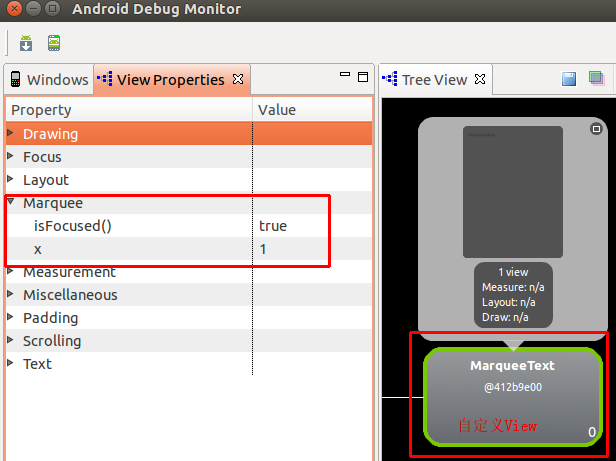
category用来指定属性的类别,例如measurement, layout, drawing等。我们在自定义View中为使用@ViewDebug.ExportedProperty注解的变量或方法指定category:
@ExportedProperty(category = "marquee")

int x = 1;

@Override

@ExportedProperty(category = "marquee")

public boolean isFocused() {

    return true;

}
运行程序,在Hierarchy Viewer中查看View的属性如下:
2.resolveId
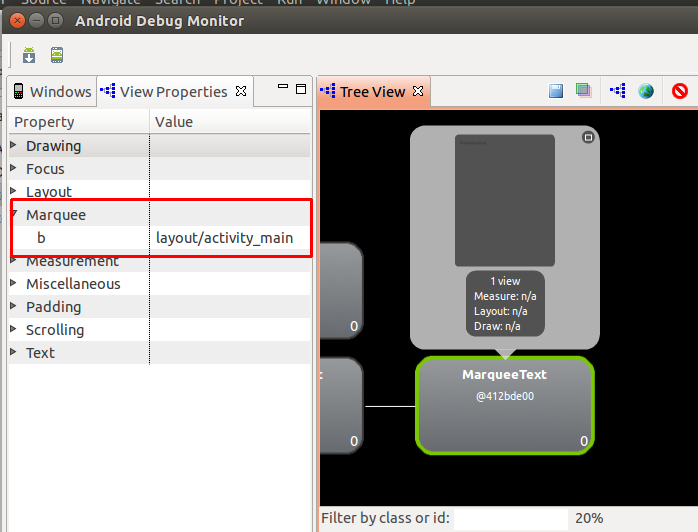
当resolveId为true时,如果使用注解的变量或方法的值为int数据,那么这个值会被转化为对应的Android资源的名称。
在R.java中找到一个资源ID:
public static final int activity_main=0x7f030000;
使用注解属性resolveId:
@ExportedProperty(category = "marquee", resolveId = true)

int b = 0x7f030000;
结果如下:
3.mapping
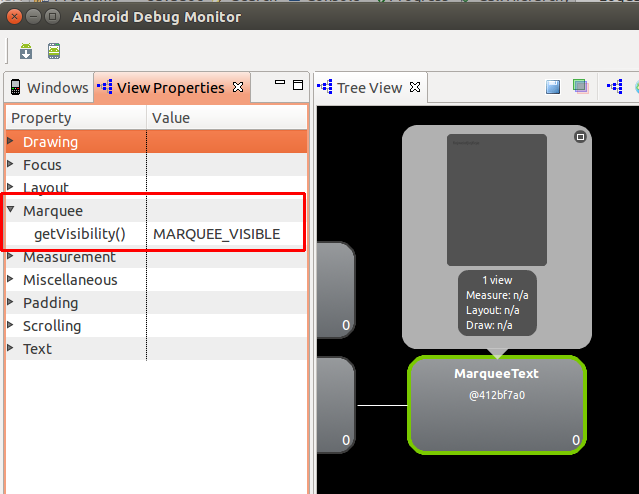
mapping可以将int值映射到指定的字符串值,例如View.getVisibility()返回的值是int值,View中使用注解将其映射为字符串,其中0为”VISIBLE”,4为”INVISIBLE”,8为”GONE”。我们重载View.getVisibility()并加上我们自己定制的映射:
@Override

@ViewDebug.ExportedProperty(category = "marquee",

        mapping = {

                @ViewDebug.IntToString(from = VISIBLE, to = "MARQUEE_VISIBLE"),

                @ViewDebug.IntToString(from = INVISIBLE, to = "MARQUEE_INVISIBLE"),

                @ViewDebug.IntToString(from = GONE, to = "MARQUEE_GONE")

        })

public int getVisibility() {

    return super.getVisibility();

}
结果如下:
4.indexMapping
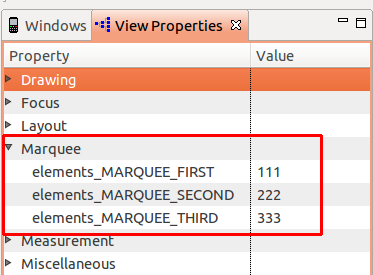
indexMapping可以将数组的序号映射为字符串。
@ExportedProperty(category = "marquee",

        indexMapping = {

                @ViewDebug.IntToString(from = 0, to = "MARQUEE_FIRST"),

                @ViewDebug.IntToString(from = 1, to = "MARQUEE_SECOND"),

                @ViewDebug.IntToString(from = 2, to = "MARQUEE_THIRD")

        })

int[] elements = new int[] {

        111, 222, 333

};
结果如下:
Demo
package com.daemon.demo;

import android.content.Context;

import android.graphics.Rect;

import android.util.AttributeSet;

import android.view.ViewDebug;

import android.view.ViewDebug.ExportedProperty;

import android.widget.TextView;

public class MarqueeText extends TextView {

    public MarqueeText(Context context) {

        super(context);

    }

    public MarqueeText(Context context, AttributeSet attrs) {

        super(context, attrs);

    }

    public MarqueeText(Context context, AttributeSet attrs, int defStyle) {

        super(context, attrs, defStyle);

    }

    @Override

    protected void onFocusChanged(boolean focused, int direction, Rect previouslyFocusedRect) {

    }

    @ExportedProperty(category = "marquee")

    int x = 1;

    @Override

    @ExportedProperty(category = "marquee")

    public boolean isFocused() {

        return true;

    }

    @ExportedProperty(category = "marquee", resolveId = true)

    int b = 0x7f030000;

    @Override

    @ViewDebug.ExportedProperty(category = "marquee",

            mapping = {

                    @ViewDebug.IntToString(from = VISIBLE, to = "MARQUEE_VISIBLE"),

                    @ViewDebug.IntToString(from = INVISIBLE, to = "MARQUEE_INVISIBLE"),

                    @ViewDebug.IntToString(from = GONE, to = "MARQUEE_GONE")

            })

    public int getVisibility() {

        return super.getVisibility();

    }

    @ExportedProperty(category = "marquee",

            indexMapping = {

                    @ViewDebug.IntToString(from = 0, to = "MARQUEE_FIRST"),

                    @ViewDebug.IntToString(from = 1, to = "MARQUEE_SECOND"),

                    @ViewDebug.IntToString(from = 2, to = "MARQUEE_THIRD")

            })

    int[] elements = new int[] {

            111, 222, 333

    };

}
@ViewDebug.ExportedProperty的使用的更多相关文章
- 和我一起看API(一)你所不知道的LinearLayout补充
楼主英语水平差,翻译的不好的话请多多指正,嘿嘿... A Layout that arranges its children in a single column or a single row. T ...
- View Focus的处理过程及ViewGroup的mFocused字段分析
通过上篇的介绍,我们知道在对KeyEvent的处理中有非常重要的一环,那就是KeyEvent在focus view的path上自上而下的分发, 换句话说只有focus的view才有资格参与KeyEve ...
- scrollTo 和 scrollBy
涉及到滑动,就涉及到VIEW,大家都知道,Android的UI界面都是由一个一个的View以及View的派生类组成,View作为基类,而常用的布局里面的各种布局就是它派生出来的ViewGroup的 ...
- 滑动的Button
在介绍SwitchButton之前,先来看一下系统Button是如何实现的.源码如下: @RemoteView public class Button extends TextView { publi ...
- 简单研究Android View绘制二 LayoutParams
2015-07-28 17:23:20 本篇是关于LayoutParams相关 ViewGroup.LayoutParams文档解释如下: LayoutParams are used by views ...
- Android 实现多行文本跑马灯效果
Android TextView 实现跑马灯的效果很简单,只要加三个属性就可以了. android:ellipsize="marquee" android:focusable=&q ...
- Android开发之Theme、Style探索及源码浅析
1 背景 前段时间群里有伙伴问到了关于Android开发中Theme与Style的问题,当然,这类东西在网上随便一搜一大把模板,所以关于怎么用的问题我想这里也就不做太多的说明了,我们这里把重点放在理解 ...
- 向左对齐的Gallery
系统自带的Gallery选中的item总是在组件的中间.但是有些时候我们需要把选中的元素放在左边或者是Gallery一出来就要放在左边.修改Gallery靠左对齐的思路:1.Gellary总是对cen ...
- android 布局之滑动探究 scrollTo 和 scrollBy 方法使用说明
涉及到滑动,就涉及到VIEW,大家都知道,Android的UI界面都是由一个一个的View以及View的派生类组成,View作为基类,而常用的布局里面的各种布局就是它派生出来的ViewGroup的子类 ...
随机推荐
- 异常:“System.Reflection.Metadata”已拥有为“System.Collections.Immutable”定义的依赖项
参考动态执行T4模板:https://msdn.microsoft.com/zh-cn/library/bb126579.aspx 我项目是.NET Framework 4.5控制台应用程序写的. 执 ...
- windows下CMake使用图文手册 Part 4
例子4:链接静态库(.lib) 例子3里面我们构建了date.lib, 这个例子里我们调用这个库. 前提: date.h的头文件在 E:\Playground\CMakeExamples\DateLi ...
- lombok
参考http://blog.csdn.net/mlinge/article/details/51340362
- C语言获得文件一行
C语言获得一行的数据还是比较麻烦的,这里讲一下几种曾经用过的方法. 第一种,是最笨的方法,就是一个一个字符的读取,也是最容易想到的方法.具体实现如下:void read_line(char l ...
- 【ios 7】 之后的设置系统的状态栏隐藏的方法分享
由于在做视频播放的的项目,一直困扰的是,视频全屏幕播放的时候,系统的状态栏会隐藏不掉,虽然可以设置为透明的状态来显示,但是电池的状态一直隐藏不掉,查看网上的说法也就是说,要么来控制,他的hidden ...
- linux命令小常识
作为一个tester我们必须要会linux,也许你会说不用也可以.那么我想问,你部署测试环境在哪里,你下载war包并部署war包呢,你看日志在哪里? 基于测试需要用到liunx,我这里只针对需要用到的 ...
- hibernate 左链接查询
select pro from Provide as pro left join pro.labels as la left join pro.city as c where 1=1
- Cordova webapp实战开发(20161207 )
http://www.cnblogs.com/zhoujg/archive/2015/05/28/4534932.html 1.https://www.jetbrains.com/idea/downl ...
- Hibernate框架简单应用
Hibernate框架简单应用 Hibernate的核心组件在基于MVC设计模式的JAVA WEB应用中,Hibernate可以作为模型层/数据访问层.它通过配置文件(hibernate.proper ...
- java后端书籍推荐
书架主要针对Java后端开发. 3.0版把一些后来买的.看的书添补进来,又或删掉或降级一些后来没有再翻开过的书. 更偏爱那些能用简短流畅的话,把少壮不努力的程序员所需的基础补回来的薄书,而有些教课书可 ...