
Get a “step-by-step” evaluation in Mathematica
Is it possible in Mathematica to get a step-by-step evaluation of some functions; that's to say, outputting not only the result but all the stages that have led to it? If so, how does one do it?
----------------------------------------------------------------------------------
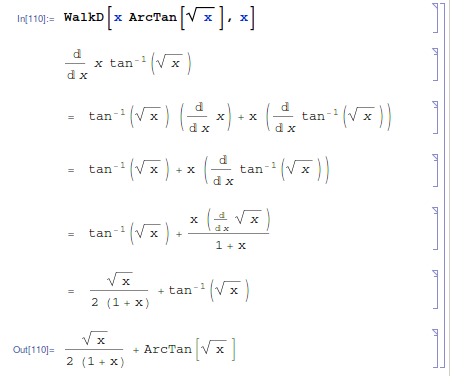
Here's an attempt to (somewhat) modernize WalkD[]:
Format[d[f_, x_], TraditionalForm] := DisplayForm[RowBox[{FractionBox["\[DifferentialD]",RowBox[{"\[DifferentialD]", x}]], f}]];

SpecificRules = {d[x_, x_] :> 1, d[(f_)[x_], x_] :> D[f[x], x],

                 d[(a_)^(x_), x_] :> D[a^x, x] /; FreeQ[a, x]};

ConstantRule = d[c_, x_] :> 0 /; FreeQ[c, x];

LinearityRule = {d[f_ + g_, x_] :> d[f, x] + d[g, x],

                 d[c_ f_, x_] :> c d[f, x] /; FreeQ[c, x]};

PowerRule = {d[x_, x_] :> 1, d[(x_)^(a_), x_] :> a*x^(a - 1) /; FreeQ[a, x]};

ProductRule = d[f_ g_, x_] :> d[f, x] g + f d[g, x];

QuotientRule = d[(f_)/(g_), x_] :> (d[f, x]*g - f*d[g, x])/g^2;

InverseFunctionRule = d[InverseFunction[f_][x_], x_] :>1/Derivative[1][f][InverseFunction[f][x]];

ChainRule = {d[(f_)^(a_), x_] :> a*f^(a - 1)*d[f, x] /; FreeQ[a, x],

             d[(a_)^(f_), x_] :> Log[a]*a^f*d[f, x] /; FreeQ[a, x],

             d[(f_)[g_], x_] :> (D[f[x], x] /. x -> g)*d[g, x],

             d[(f_)^(g_), x_] :> f^g*d[g*Log[f], x]};

$RuleNames = {"Specific Rules", "Constant Rule", "Linearity Rule", "Power Rule","Product Rule", "Quotient Rule", "Inverse Function Rule", "Chain Rule"};

displayStart[expr_] := CellPrint[Cell[BoxData[MakeBoxes[HoldForm[expr], TraditionalForm]], "Output",Evaluatable -> False, CellMargins -> {{Inherited, Inherited}, {10, 10}},CellFrame -> False, CellEditDuplicate -> False]]

displayDerivative[expr_, k_Integer] := CellPrint[Cell[BoxData[TooltipBox[RowBox[{InterpretationBox["=", Sequence[]], "  ",MakeBoxes[HoldForm[expr], TraditionalForm]}], $RuleNames[[k]],LabelStyle -> "TextStyling"]], "Output", Evaluatable -> False,CellMargins -> {{Inherited, Inherited}, {10, 10}},CellFrame -> False, CellEditDuplicate -> False]]

WalkD[f_, x_] := Module[{derivative, oldderivative, k},

        derivative = d[f, x]; displayStart[derivative];While[! FreeQ[derivative, d],

            oldderivative = derivative; k = 0;While[oldderivative == derivative,

                      k++;

                      derivative = derivative /.ToExpression[StringReplace[$RuleNames[[k]], " " -> ""]]];

            displayDerivative[derivative, k]];D[f, x]]
I've tried to make the formatting of the derivative look a bit more traditional, as well as having the differentiation rule used be a tooltip instead of an explicitly generated cell (thus combining the best features of WalkD[] and RunD[]); you'll only see the name of the differentiation rule used if you mouseover the corresponding expression.
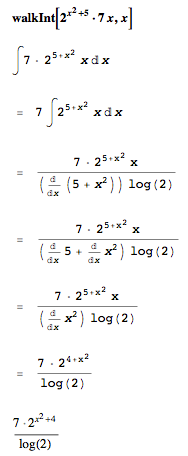
I have improved J. M.'s version of walkD by adding error handling. I have also added walkInt that works like walkD except for integration. Code:
Format[d[f_, x_], TraditionalForm] := Module[{paren, boxes},

    paren = MatchQ[f,Plus[_,__]];

    boxes = RowBox[{f}];If[paren,

        boxes = RowBox[{"(", boxes, ")"}]];

    boxes = RowBox[{FractionBox["\[DifferentialD]", RowBox[{"\[DifferentialD]", x}]], boxes}];DisplayForm[boxes]];

dSpecificRules = {d[x_, x_] :> 1, d[(f_)[x_], x_] :> D[f[x], x],

                 d[(a_)^(x_), x_] :> D[a^x, x] /; FreeQ[a, x]};

dConstantRule = d[c_, x_] :> 0 /; FreeQ[c, x];

dLinearityRule = {d[f_ + g_, x_] :> d[f, x] + d[g, x],

                 d[c_ f_, x_] :> c d[f, x] /; FreeQ[c, x]};

dPowerRule = {d[x_, x_] :> 1, d[(x_)^(a_), x_] :> a*x^(a - 1) /; FreeQ[a, x]};

dProductRule = d[f_ g_, x_] :> d[f, x] g + f d[g, x];

dQuotientRule = d[(f_)/(g_), x_] :> (d[f, x]*g - f*d[g, x])/g^2;

dInverseFunctionRule := d[InverseFunction[f_][x_], x_] :>1/Derivative[1][f][InverseFunction[f][x]];

dChainRule = {d[(f_)^(a_), x_] :> a*f^(a - 1)*d[f, x] /; FreeQ[a, x],

             d[(a_)^(f_), x_] :> Log[a]*a^f*d[f, x] /; FreeQ[a, x],

             d[(f_)[g_], x_] :> (D[f[x], x] /. x -> g)*d[g, x],

             d[(f_)^(g_), x_] :> f^g*d[g*Log[f], x]};

$dRuleNames = {"Specific Rules", "Constant Rule", "Linearity Rule", "Power Rule","Quotient Rule", "Product Rule", "Inverse Function Rule", "Chain Rule"};

displayStart[expr_] := CellPrint[Cell[BoxData[MakeBoxes[HoldForm[expr], TraditionalForm]], "Output",Evaluatable -> False, CellMargins -> {{Inherited, Inherited}, {10, 10}},CellFrame -> False, CellEditDuplicate -> False]];

displayDerivative[expr_, k_Integer] := CellPrint[Cell[BoxData[TooltipBox[RowBox[{InterpretationBox["=", Sequence[]], "  ",MakeBoxes[HoldForm[expr], TraditionalForm]}], "Differentation: " <> $dRuleNames[[k]],LabelStyle -> "TextStyling"]], "Output", Evaluatable -> False,CellMargins -> {{Inherited, Inherited}, {10, 10}},CellFrame -> False, CellEditDuplicate -> False]];walkD::differentationError = "Failed to differentiate expression!";

walkD[f_, x_] := Module[{derivative, oldderivative, k},

    derivative = d[f, x]; displayStart[derivative];While[! FreeQ[derivative, d],

        oldderivative = derivative; k = 0;While[oldderivative == derivative,

            k++;If[k > Length@$dRuleNames,Message[walkD::differentationError];Return[D[f, x]];];

    			derivative = derivative /. ToExpression["d" <> StringReplace[$dRuleNames[[k]], " " -> ""]]];

        displayDerivative[derivative, k]];D[f, x]];Format[int[f_,x_],TraditionalForm]:= (

    paren = MatchQ[f,Plus[_,__]];

    boxes = RowBox[{f}];If[paren,

        boxes = RowBox[{"(", boxes, ")"}]];

    boxes = RowBox[{boxes, "\[DifferentialD]", x}];

    boxes = RowBox[{"\[Integral]", boxes}];DisplayForm[boxes]);

intSpecificRules = {int[(f_)[x_], x_] :> Integrate[f[x], x],

                   int[(a_)^(x_), x_] :> Integrate[a^x, x] /; FreeQ[a, x]};

intConstantRule = int[c_, x_] :> c*x /; FreeQ[c, x];

intLinearityRule = {int[f_ + g_, x_] :> int[f, x] + int[g, x],

                   int[c_ f_, x_] :> c int[f, x] /; FreeQ[c, x]};

intPowerRule = {int[x_, x_] :> x^2 / 2, int[1/x_, x_] :> Log[x], int[(x_)^(a_), x_] :> x^(a + 1)/(a + 1) /; FreeQ[a, x]};

intSubstitutionRule = {

                        int[(f_)^(a_), x_] :> ((Integrate[u^a, u] / d[f, x]) /. u -> f) /; FreeQ[a, x] && FreeQ[D[f, x], x],

                        int[(f_)^(a_) g_, x_] :> ((Integrate[u^a, u] / d[f, x]) * g /. u -> f) /; FreeQ[a, x] && FreeQ[FullSimplify[D[f, x] / g], x],

                        int[(a_)^(f_), x_] :> (a ^ f)/(d[f, x] * Log[a]) /; FreeQ[a, x] && FreeQ[D[f, x], x],

                        int[(a_)^(f_) g_, x_] :> (a ^ f)/(d[f, x] * Log[a]) * g /; FreeQ[a, x] && FreeQ[FullSimplify[D[f, x] / g], x],

                        int[(f_)[g_], x_] :> (Integrate[f[u], u] /. u -> g) / d[g, x] /; FreeQ[D[g, x], x],

                        int[(f_)[g_] h_, x_] :> (Integrate[f[u], u] /. u -> g) / d[g, x] * h /; FreeQ[FullSimplify[D[g, x] / h], x]};

intProductRule = int[f_ g_, x_] :> int[f, x] g - int[int[f, x] * d[g, x], x];

$intRuleNames = {"Specific Rules", "Constant Rule", "Linearity Rule", "Power Rule", "Substitution Rule", "Product Rule"};

displayIntegral[expr_, k_Integer] := CellPrint[Cell[BoxData[TooltipBox[RowBox[{InterpretationBox["=", Sequence[]], "  ",MakeBoxes[HoldForm[expr], TraditionalForm]}], "Integration: " <> $intRuleNames[[k]],LabelStyle -> "TextStyling"]], "Output", Evaluatable -> False,CellMargins -> {{Inherited, Inherited}, {10, 10}},CellFrame -> False, CellEditDuplicate -> False]];walkInt::integrationError = "Failed to integrate expression!";walkInt::differentationError = "Failed to differentiate expression!";

walkInt[f_, x_] := Module[{integral, oldintegral, k, leafcounts, ruleused},

    integral = int[f, x]; displayStart[integral];

    leafcounts = {};

    ruleused = "";While[! FreeQ[integral, int],If[ruleused == "Product Rule",AppendTo[leafcounts, LeafCount @ integral];If[Length @ leafcounts >= 5 && OrderedQ @ Take[leafcounts, -5],Message[walkInt::integrationError];Return[Integrate[f, x]];];];

        oldintegral = integral; k = 0;While[oldintegral == integral,

            k++;If[k > Length@$intRuleNames,Message[walkInt::integrationError];Return[Integrate[f, x]];];

    			integral = integral /. ToExpression["int" <> StringReplace[$intRuleNames[[k]], " " -> ""]]];

        ruleused = $intRuleNames[[k]];

    		displayIntegral[integral, k];While[! FreeQ[integral, d],

    			oldintegral = integral; k = 0;While[oldintegral == integral,

    				k++;If[k > Length@$dRuleNames,Message[walkInt::differentationError];Return[Integrate[f, x]];];

                integral = integral /. ToExpression["d" <> StringReplace[$dRuleNames[[k]], " " -> ""]]];

            displayDerivative[integral, k]];];Integrate[f, x]];
Sample output:
Get a “step-by-step” evaluation in Mathematica的更多相关文章
- Step by step Dynamics CRM 2011升级到Dynamics CRM 2013
原创地址:http://www.cnblogs.com/jfzhu/p/4018153.html 转载请注明出处 (一)检查Customizations 从2011升级到2013有一些legacy f ...
- Step by Step 创建一个新的Dynamics CRM Organization
原创地址:http://www.cnblogs.com/jfzhu/p/4012833.html 转载请注明出处 前面演示过如何安装Dynamics CRM 2013,参见<Step by st ...
- Step by step Install a Local Report Server and Remote Report Server Database
原创地址:http://www.cnblogs.com/jfzhu/p/4012097.html 转载请注明出处 前面的文章<Step by step SQL Server 2012的安装 &g ...
- Step by step Dynamics CRM 2013安装
原创地址:http://www.cnblogs.com/jfzhu/p/4008391.html 转载请注明出处 SQL Server可以与CRM装在同一台计算机上,也可安装在不同的计算机上.演示 ...
- Step by step 活动目录中添加一个子域
原创地址:http://www.cnblogs.com/jfzhu/p/4006545.html 转载请注明出处 前面介绍过如何创建一个域,下面再介绍一下如何在该父域中添加一个子域. 活动目录中的森林 ...
- SQL Server 维护计划实现数据库备份(Step by Step)(转)
SQL Server 维护计划实现数据库备份(Step by Step) 一.前言 SQL Server 备份和还原全攻略,里面包括了通过SSMS操作还原各种备份文件的图形指导,SQL Server ...
- 转:eclipse以及step into step over step return的区别
首先来讲一下step into step over step return的区别: step into就是单步执行,遇到子函数就进入并且继续单步执行:(F5) step over是在单步执行时,在函数 ...
- [转]Bootstrap 3.0.0 with ASP.NET Web Forms – Step by Step – Without NuGet Package
本文转自:http://www.mytecbits.com/microsoft/dot-net/bootstrap-3-0-0-with-asp-net-web-forms In my earlier ...
- EF框架step by step(7)—Code First DataAnnotations(2)
上一篇EF框架step by step(7)—Code First DataAnnotations(1)描述了实体内部的采用数据特性描述与表的关系.这一篇将用DataAnnotations描述一下实体 ...
- EF框架step by step(6)—处理实体complex属性
上一篇的中介绍过了对于EF4.1框架中,实体的简单属性的处理 这一篇介绍一下Code First方法中,实体Complex属性的处理.Complex属性是将一个对象做为另一个对象的属性.映射到数据库中 ...
随机推荐
- ajax防止表单自动提交
重写表单的checkForm方法,并用if和else解决异步判断的问题. function checkForm(){ 1 var flag = false; $.ajaxSetup({async : ...
- 使用grunt搭建自动化的web前端开发环境
使用grunt搭建自动化的web前端开发环境 我们一定经常听过grunt和gulp,它们都是用于搭建自动化的web前端开发环境的,这里主要介绍grunt的使用,值得一提的是,jQuery.bootst ...
- tomcat监控工具probe
probe官网:http://www.lambdaprobe.org/ 但是已经链接至github了:https://github.com/psi-probe/psi-probe 下载psi-prob ...
- [中英对照]The Art Of Reporting Bugs | 报bug的艺术
前言:因为最近要给兄弟Team分享一下如何有效地报告bug, 故多做一做功课.下面给出一篇博客的中英文对照翻译. The Art Of Reporting Bugs | 报bug的艺术 My init ...
- 05 synchronized
转载自: Java并发编程:synchronized http://www.cnblogs.com/dolphin0520/p/3923737.html 前文中也有相关的详细描述:02 如何创建线程 ...
- java调用c/c++代码简单实现以及遇见的坑
以下内容均来自互联网,感谢你们的分享,我只是使用的时候看这方便,可以称呼我“搬运工” 如有不合适的地方请与我联系,我会及时改正 首先你可能会遇见以下错误 第一个错误是你在vs编译器没有选择使用rele ...
- Golang build命令解析
go build,是我们非常常用的命令,它可以启动编译,把我们的包和相关的依赖编译成一个可执行的文件. usage: go build [-o output] [-i] [build flags] [ ...
- [转]OData – the best way to REST–实例讲解ASP.NET WebAPI OData (V4) Service & Client
本文转自:http://www.cnblogs.com/bluedoctor/p/4384659.html 一.概念介绍 1.1,什么是OData? 还是看OData官网的简单说明: An open ...
- JavaScript的原型链继承__propt__、prototype、constructor的理解、以及他们之间相互的关系。
回想自己已经工作了有一段时间了,但是自己对JavaScript的原型链.和继承的理解能力没有到位,最近他们彻底的整理并且复习了一遍. 本案例中部分文案来自网络和书籍,如有侵权请联系我,我只是把我的理解 ...
- unity项目git管理
Unity设置 (关键) Edit -> Project Settings -> Editor -> Version Control Mode 开启 Visible Meta Fil ...