
Entity Framework应用:使用Code First模式管理数据库创建和填充种子数据
一、管理数据库连接
1、使用配置文件管理连接之约定
在数据库上下文类中,如果我们只继承了无参数的DbContext,并且在配置文件中创建了和数据库上下文类同名的连接字符串,那么EF会使用该连接字符串自动计算出数据库的位置和数据库名。比如,我们的数据库上下文定义如下:
 using System;

 using System.Collections.Generic;

 using System.Data.Entity;

 using System.Linq;

 using System.Text;

 using System.Threading.Tasks;

 namespace ConventionConfigure.EF

 {

     /// <summary>

     /// 继承无参数的DbContext

     /// </summary>

     public class SampleDbEntities :DbContext

     {

         public SampleDbEntities()

         {

             // 数据库不存在时创建数据库

             Database.CreateIfNotExists();

         }

     }

 }
在配置文件中定义的连接字符串如下:
<connectionStrings>

    <add name="SampleDbEntities" connectionString="Data Source=.;Initial Catalog=TestDb;Integrated Security=True;MultipleActiveResultSets=True" providerName="System.Data.SqlClient" />

</connectionStrings>
定义的连接字符串中name的value值和创建的数据库上下文类的类名相同,这样EF会使用该连接字符串执行数据库操作,究竟会发生什么呢?
运行程序,Program类定义如下:
 using ConventionConfigure.EF;

 using System;

 using System.Collections.Generic;

 using System.Linq;

 using System.Text;

 using System.Threading.Tasks;

 namespace ConventionConfigure

 {

     class Program

     {

         static void Main(string[] args)

         {

             using (var context = new SampleDbEntities())

             { }

             Console.WriteLine("创建成功");

             Console.ReadKey();

         }

     }

 }
当运行应用程序时,EF会寻找我们的数据库上下文类,即“SampleDbEntities”,并在配置文件中寻找和它同名的连接字符串,然后它会使用该连接字符串计算出应该使用哪个数据库provider,之后检查数据库位置,之后会在指定的位置创建一个名为TestDb.mdf的数据库文件,同时根据连接字符串的Initial Catalog属性创建了一个名为TestDb的数据库。创建的数据库结构如下:
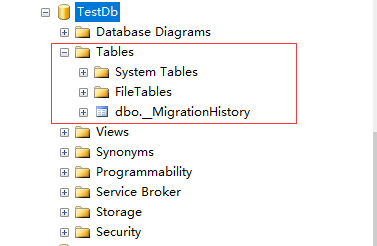
查看创建后的数据库,会发现只有一张迁移记录表。
2、使用已经存在的ConnectionString
如果我们已经有了一个定义数据库位置和名称的ConnectionString,并且我们想在数据库上下文类中使用这个连接字符串,连接字符串如下:
<connectionStrings>

    <add name="AppConnection" connectionString="Data Source=.;Initial Catalog=TestDb;Integrated Security=True;MultipleActiveResultSets=True" providerName="System.Data.SqlClient" />

</connectionStrings>
以上面创建的数据库TestDb作为已经存在的数据库,新添加实体类Student,使用已经存在的ConnectionString查询数据库的Student表,Student实体类定义如下:
 using System;

 using System.Collections.Generic;

 using System.ComponentModel.DataAnnotations.Schema;

 using System.Linq;

 using System.Text;

 using System.Threading.Tasks;

 namespace ExistsConnectionString.Model

 {

     [Table("Student")]

     public class Student

     {

         public int Id { get; set; }

         public string Name { get; set; }

         public string Sex { get; set; }

         public int Age { get; set; }

     }

 }
我们将该连接字符串的名字传入数据库上下文DbContext的有参构造函数中,数据库上下文类定义如下:
 using ExistsConnectionString.Model;

 using System;

 using System.Collections.Generic;

 using System.Data.Entity;

 using System.Linq;

 using System.Text;

 using System.Threading.Tasks;

 namespace ExistsConnectionString.EF

 {

     public class SampleDbEntities : DbContext

     {

         public SampleDbEntities()

             : base("name=AppConnection")

         {

         }

         // 添加到数据上下文中

         public virtual DbSet<Student> Students { get; set; }

     }

 }
上面的代码将连接字符串的名字传给了DbContext类的有参构造函数,这样一来,我们的数据库上下文就会开始使用该连接字符串了,在Program类中输出Name和Age字段的值:
 using ExistsConnectionString.EF;

 using System;

 using System.Collections.Generic;

 using System.Linq;

 using System.Text;

 using System.Threading.Tasks;

 namespace ExistsConnectionString

 {

     class Program

     {

         static void Main(string[] args)

         {

             using (var context = new SampleDbEntities())

             {

                 foreach (var item in context.Students)

                 {

                     Console.WriteLine("姓名:"+item.Name+" "+"年龄:"+item.Age);

                 }

             }

         }

     }

 }
运行程序,发现会报下面的错误:
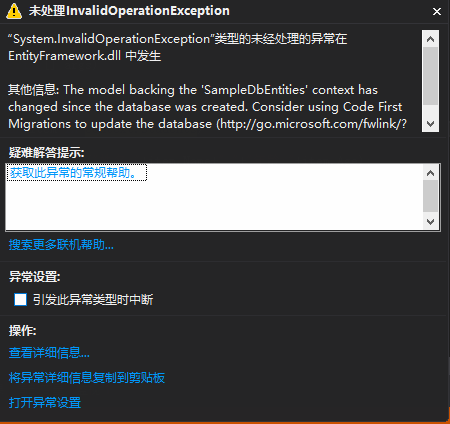
出现上面报错的原因是因为数据库上下文发生了改变,与现有数据库不匹配。解决方案:
1、把数据库里面的迁移记录表删掉或者重命名即可。
重新运行程序,结果如下:
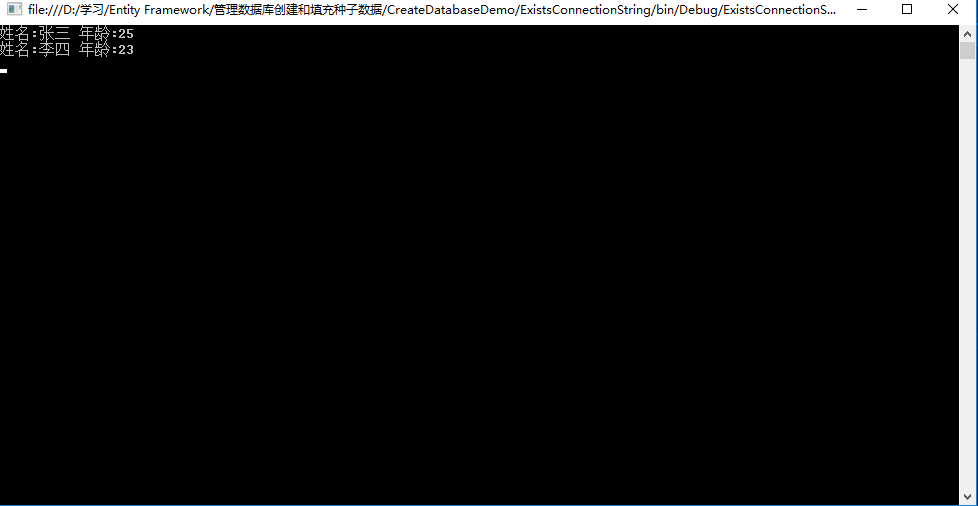
注意:如果在配置文件中还有一个和数据库上下文类名同名的ConnectionString,那么就会使用这个同名的连接字符串。无论我们对传入的连接字符串名称如何改变,都是无济于事的,也就是说和数据库上下文类名同名的连接字符串优先权更大。(即约定大于配置)
3、使用已经存在的连接
通常在一些老项目中,我们只会在项目中的某个部分使用EF Code First,同时,我们想对数据上下文类使用已经存在的数据库连接,如果要实现这个,可将连接对象传给DbContext类的构造函数,数据上下文定义如下:
 using ExistsDbConnection.Model;

 using System;

 using System.Collections.Generic;

 using System.Data.Common;

 using System.Data.Entity;

 using System.Linq;

 using System.Text;

 using System.Threading.Tasks;

 namespace ExistsDbConnection.EF

 {

     public class SampleDbEntities :DbContext

     {

         public SampleDbEntities(DbConnection con)

             : base(con, contextOwnsConnection: false)

         {

         }

         public virtual DbSet<Student> Students { get; set; }

     }

 }
这里要注意一下contextOwnsConnection参数,之所以将它作为false传入到上下文,是因为它是从外部传入的,当上下文超出了范围时,可能会有人想要使用该连接。如果传入true的话,那么一旦上下文出了范围,数据库连接就会立即关闭。
Program类定义如下:
 using System;

 using System.Collections.Generic;

 using System.Data.Common;

 using System.Data.SqlClient;

 using System.Linq;

 using System.Text;

 using System.Threading.Tasks;

 using System.Configuration;

 using ExistsDbConnection.EF;

 namespace ExistsDbConnection

 {

     class Program

     {

         static void Main(string[] args)

         {

             // 读取连接字符串

             string conn = ConfigurationManager.ConnectionStrings["AppConnection"].ConnectionString;

             // DbConnection是抽象类,不能直接实例化,声明子类指向父类对象

             DbConnection con = new SqlConnection(conn);

             using (var context = new SampleDbEntities(con))

             {

                 foreach (var item in context.Students)

                 {

                     Console.WriteLine("姓名:" + item.Name + " " + "年龄:" + item.Age);

                 }

             }

             Console.WriteLine("读取完成");

             Console.ReadKey();

         }

     }

 }
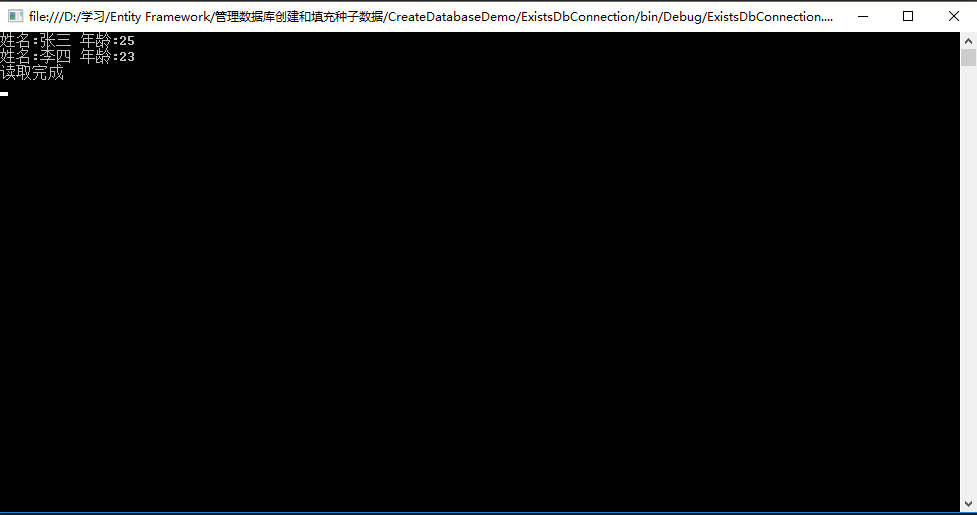
运行程序,结果如下:
二、管理数据库创建
首次运行EF Code First应用时,EF会做下面的这些事情:
1、检查正在使用的DbContext类。
2、找到该上下文类使用的connectionString。
3、找到领域实体并提取模式相关的信息。
4、创建数据库。
5、将数据插入系统。
一旦模式信息提取出来,EF会使用数据库初始化器将该模式信息推送给数据库。数据库初始化器有很多可能的策略,EF默认的策略是如果数据库不存在,那么就重新创建;如果存在的话就使用当前存在的数据库。当然,我们有时也可能需要覆盖默认的策略,可能用到的数据库初始化策略如下:
CreateDatabaseIfNotExists:CreateDatabaseIfNotExists:顾名思义,如果数据库不存在,那么就重新创建,否则就使用现有的数据库。如果从领域模型中提取到的模式信息和实际的数据库模式不匹配,那么就会抛出异常。
DropCreateDatabaseAlways:如果使用了该策略,那么每次运行程序时,数据库都会被销毁。这在开发周期的早期阶段通常很有用(比如设计领域实体时),从单元测试的角度也很有用。
DropCreateDatabaseIfModelChanges:这个策略的意思就是说,如果领域模型发生了变化(具体而言,从领域实体提取出来的模式信息和实际的数据库模式信息失配时),就会销毁以前的数据库(如果存在的话),并创建新的数据库。
MigrateDatabaseToLatestVersion:如果使用了该初始化器,那么无论什么时候更新实体模型,EF都会自动地更新数据库模式。这里很重要的一点是:这种策略更新数据库模式不会丢失数据,或者是在已有的数据库中更新已存在的数据库对象。MigrateDatabaseToLatestVersion初始化器只有从EF4.3才可用。
1、设置初始化策略
EF默认使用CreateDatabaseIfNotExists作为默认初始化器,如果要覆盖这个策略,那么需要在DbContext类中的构造函数中使用Database.SetInitializer方法,下面的例子使用DropCreateDatabaseIfModelChanges策略覆盖默认的策略。数据库上下文类定义如下:
 using InitializationStrategy.Model;

 using System;

 using System.Collections.Generic;

 using System.Data.Entity;

 using System.Linq;

 using System.Text;

 using System.Threading.Tasks;

 namespace InitializationStrategy.EF

 {

     public class SampleDbEntities : DbContext

     {

         public SampleDbEntities()

             : base("name=AppConnection")

         {

             // 使用DropCreateDatabaseIfModelChanges策略覆盖默认的策略

             Database.SetInitializer<SampleDbEntities>(new DropCreateDatabaseIfModelChanges<SampleDbEntities>());

         }

         // 添加到数据上下文中

         public virtual DbSet<Student> Students { get; set; }

     }

 }
这样一来,无论什么时候创建上下文类,Database.SetInitializer()方法都会被调用,并且将数据库初始化策略设置为DropCreateDatabaseIfModelChanges。
Student领域实体类新增加Email和Address两个属性:
 using System;

 using System.Collections.Generic;

 using System.ComponentModel.DataAnnotations.Schema;

 using System.Linq;

 using System.Text;

 using System.Threading.Tasks;

 namespace InitializationStrategy.Model

 {

     [Table("Student")]

     public class Student

     {

         public int Id { get; set; }

         public string Name { get; set; }

         public string Sex { get; set; }

         public int Age { get; set; }

         public string Email { get; set; }

         public string Address { get; set; }

     }

 }
Program类定义如下:
 using InitializationStrategy.EF;

 using System;

 using System.Collections.Generic;

 using System.Linq;

 using System.Text;

 using System.Threading.Tasks;

 namespace InitializationStrategy

 {

     class Program

     {

         static void Main(string[] args)

         {

             using (var context = new SampleDbEntities())

             {

                 foreach (var item in context.Students)

                 {

                 }

             }

             Console.WriteLine("创建成功");

             Console.ReadKey();

         }

     }

 }
运行程序后,数据库表结构如下:
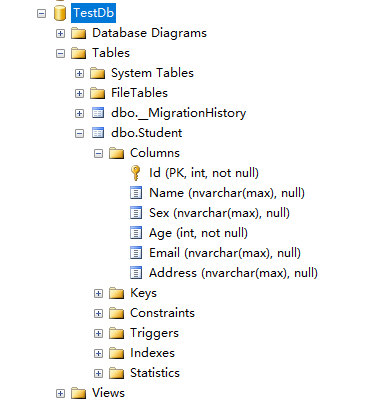
注意:如果处于生产环境,那么我们肯定不想丢失已经存在的数据。这时我们就需要关闭该初始化器,只需要将null传给Database.SetInitlalizer()方法,如下所示:
public SampleDbEntities(): base("name=AppConnection")

{

Database.SetInitializer<SampleDbEntities>(null);

}
2、填充种子数据
到目前为止,无论我们选择哪种策略初始化数据库,生成的数据库都是一个空的数据库。但是许多情况下我们总想在数据库创建之后、首次使用之前就插入一些数据。此外,开发阶段可能想以admin的资格为其填充一些数据,或者为了测试应用在特定的场景中表现如何,想要伪造一些数据。
当我们使用DropCreateDatabaseAlways和DropCreateDatabaseIfModelChanges初始化策略时,插入种子数据非常重要,因为每次运行应用时,数据库都要重新创建,每次数据库创建之后在手动插入数据非常乏味。接下来我们看一下当数据库创建之后如何使用EF来插入种子数据。
为了向数据库插入一些初始化数据,我们需要创建满足下列条件的数据库初始化器类:
1、从已存在的数据库初始化器类中派生数据。
2、在数据库创建期间种子化。
下面演示如何初始化种子数据
1、定义领域实体类
 using System;

 using System.Collections.Generic;

 using System.ComponentModel.DataAnnotations.Schema;

 using System.Linq;

 using System.Text;

 using System.Threading.Tasks;

 namespace InitializationSeed.Model

 {

     [Table("Employee")]

     public class Employee

     {

         public int EmployeeId { get; set; }

         public string FirstName { get; set; }

         public string LastName { get; set; }

     }

 }
2、创建数据库上下文
使用EF的Code First方式对上面的模型创建数据库上下文:
public class SampleDbEntities : DbContext

{

    public virtual DbSet<Employee> Employees { get; set; }

}
3、创建数据库初始化器类
假设我们使用的是DropCreateDatabaseAlways数据库初始化策略,那么初始化器类就要从该泛型类继承,并传入数据库上下文作为类型参数。接下来,要种子化数据库就要重写DropCreateDatabaseAlways类的Seed()方法,而Seed()方法拿到了数据库上下文,因此我们可以使用它来将数据插入数据库:
 using InitializationSeed.Model;

 using System;

 using System.Collections.Generic;

 using System.Data.Entity;

 using System.Linq;

 using System.Text;

 using System.Threading.Tasks;

 namespace InitializationSeed.EF

 {

     /// <summary>

     /// 数据库初始化器类

     /// </summary>

     public class SeedingDataInitializer : DropCreateDatabaseAlways<SampleDbEntities>

     {

         /// <summary>

         /// 重写DropCreateDatabaseAlways的Seed方法

         /// </summary>

         /// <param name="context"></param>

         protected override void Seed(SampleDbEntities context)

         {

             for (int i = ; i < ; i++)

             {

                 var employee = new Employee

                 {

                   FirstName="测试"+(i+),

                   LastName="工程师"

                 };

                 context.Employees.Add(employee);

             }

                 base.Seed(context);

         }

     }

 }
上面的代码通过for循环创建了6个Employee对象,并将它们添加给数据库上下文类的Employees集合属性。这里值得注意的是我们并没有调用DbContext.SaveChanges()方法,因为它会在基类中自动调用。
4、将数据库初始化器类用于数据库上下问类
 using InitializationSeed.Model;

 using System;

 using System.Collections.Generic;

 using System.Data.Entity;

 using System.Linq;

 using System.Text;

 using System.Threading.Tasks;

 namespace InitializationSeed.EF

 {

     public class SampleDbEntities :DbContext

     {

         public SampleDbEntities()

             : base("name=AppConnection")

         {

             // 类型传SeedingDataInitializer

             Database.SetInitializer<SampleDbEntities>(new SeedingDataInitializer());

         }

         // 领域实体添加到数据上下文中

         public virtual DbSet<Employee> Employees { get; set; }

     }

 }
5、Main方法中访问数据库
 using InitializationSeed.EF;

 using System;

 using System.Collections.Generic;

 using System.Linq;

 using System.Text;

 using System.Threading.Tasks;

 namespace InitializationSeed

 {

     class Program

     {

         static void Main(string[] args)

         {

             using (var context = new SampleDbEntities())

             {

                 foreach (var item in context.Employees)

                 {

                     Console.WriteLine("FirstName:"+item.FirstName+" "+"LastName:"+item.LastName);

                 }

             }

             Console.WriteLine("读取完成");

             Console.ReadKey();

         }

     }

 }
6、运行程序,查看结果
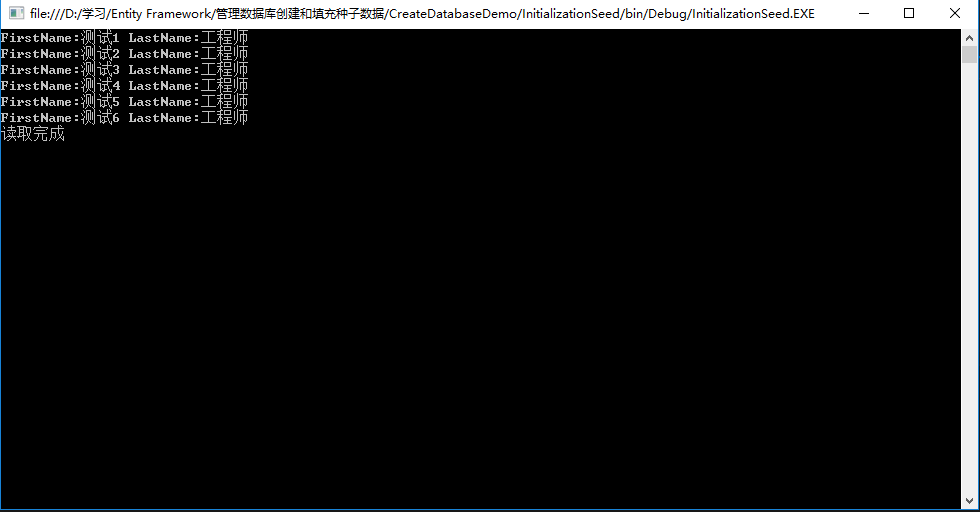
查看数据库
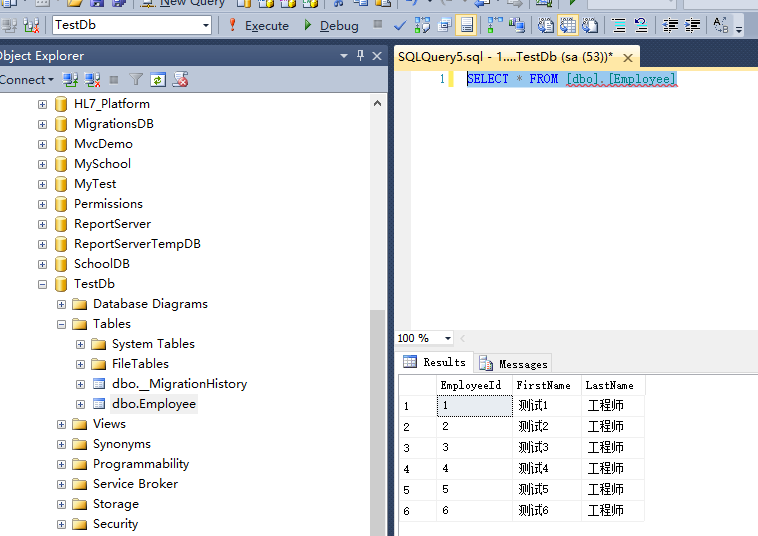
种子数据填充完成。
5、使用数据迁移的方式填充种子数据
使用数据迁移的方式会生成Configuration类,Configuration类定义如下:
 namespace DataMigration.Migrations

 {

     using System;

     using System.Data.Entity;

     using System.Data.Entity.Migrations;

     using System.Linq;

     internal sealed class Configuration : DbMigrationsConfiguration<DataMigration.SampleDbEntities>

     {

         public Configuration()

         {

             AutomaticMigrationsEnabled = false;

         }

         protected override void Seed(DataMigration.SampleDbEntities context)

         {

             //  This method will be called after migrating to the latest version.

             //  You can use the DbSet<T>.AddOrUpdate() helper extension method

             //  to avoid creating duplicate seed data.

         }

     }

 }
重写Configuration类的Seed()方法也可以实现插入种子数据,重写Seed()方法:
 namespace DataMigration.Migrations

 {

     using DataMigration.Model;

     using System;

     using System.Data.Entity;

     using System.Data.Entity.Migrations;

     using System.Linq;

     internal sealed class Configuration : DbMigrationsConfiguration<DataMigration.SampleDbEntities>

     {

         public Configuration()

         {

             AutomaticMigrationsEnabled = false;

         }

         protected override void Seed(DataMigration.SampleDbEntities context)

         {

             //  This method will be called after migrating to the latest version.

             //  You can use the DbSet<T>.AddOrUpdate() helper extension method

             //  to avoid creating duplicate seed data.

             context.Employees.AddOrUpdate(

                  new Employee { FirstName = "测试1", LastName = "工程师" },

                  new Employee { FirstName = "测试2", LastName = "工程师" }

                 );

         }

     }

 }
使用数据迁移,然后查看数据库结果:
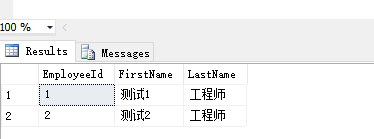
发现使用数据迁移的方式也将种子数据插入到了数据库中。
代码下载地址:https://pan.baidu.com/s/1i5By8EL
Entity Framework应用:使用Code First模式管理数据库创建和填充种子数据的更多相关文章
- Code First开发系列之管理数据库创建,填充种子数据以及LINQ操作详解
返回<8天掌握EF的Code First开发>总目录 本篇目录 管理数据库创建 管理数据库连接 管理数据库初始化 填充种子数据 LINQ to Entities详解 什么是LINQ to ...
- 8天掌握EF的Code First开发系列之3 管理数据库创建,填充种子数据以及LINQ操作详解
本文出自8天掌握EF的Code First开发系列,经过自己的实践整理出来. 本篇目录 管理数据库创建 管理数据库连接 管理数据库初始化 填充种子数据 LINQ to Entities详解 什么是LI ...
- Entity Framework应用:Code First模式数据迁移的基本用法
使用Entity Framework的Code First模式在进行数据迁移的时候会遇到一些问题,熟记一些常用的命令很重要,下面整理出了数据迁移时常用的一些命令. 一.模型设计 EF默认使用id字段作 ...
- Entity Framework应用:使用Code First模式管理事务
一.什么是事务 处理以数据为中心的应用时,另一个重要的话题是事务管理.ADO.NET为事务管理提供了一个非常干净和有效的API.因为EF运行在ADO.NET之上,所以EF可以使用ADO.NET的事务管 ...
- Entity Framework应用:使用Code First模式管理视图
一.什么是视图 视图在RDBMS(关系型数据库管理系统)中扮演了一个重要的角色,它是将多个表的数据联结成一种看起来像是一张表的结构,但是没有提供持久化.因此,可以将视图看成是一个原生表数据顶层的一个抽 ...
- 学习Entity Framework 中的Code First
这是上周就写好的文章,是在公司浩哥的建议下写的,本来是部门里面分享求创新用的,这里贴出来分享给大家. 最近在对MVC的学习过程中,接触到了Code First这种新的设计模式,感觉很新颖,并且也体验到 ...
- 转载:学习Entity Framework 中的Code First
看完觉得不错,适合作为学习资料,就转载过来了 原文链接:http://www.cnblogs.com/Wayou/archive/2012/09/20/EF_CodeFirst.html 这是上周就写 ...
- Entity Framework 6.x Code Frist For Oracle 实践与注意点
Entity Framework 6.x Code Frist For Oracle 实践与注意点 开发环境 Visual Studio.net 2015/2017 Oracle 11g/12c 数据 ...
- Entity Framework 6.x Code First 基础
安装扩展工具 "Entity Framework Power Tools Beta4" 可选, 主要用于数据库变结构反向生成C#的对象和对应的mapping类.如果你熟悉mappi ...
随机推荐
- 苹果越狱后必备软件,总有你需要的!11月23日追加14个,支持【iOS4】
http://bbs.dospy.com/thread-7398730-1-301-2.html越狱后必备软件,总有你需要的!11月23日追加14个,支持[iOS4] 背景自定义插件
- Word 2007 Blog Test
MAC 方法一: 引用 sudo gedit /etc/network/interfaces 将iface eth0 inet static后面添加一行 hwaddress ether 0 ...
- 转 Python标准库01 正则表达式 (re包)
作者:Vamei 出处:http://www.cnblogs.com/vamei 欢迎转载,也请保留这段声明.谢谢! 我将从正则表达式开始讲Python的标准库.正则表达式是文字处理中常用的工具,而且 ...
- SSAS多维数据集以及维度的建立
首先打开vs建立一个Analysis Services项目,然后点击数据源文件右键[新建数据源],根据数据源向导建立自己的数据源,如图1: 点击[确定],选择刚才的数据连接,点击[下一步]进入模拟信息 ...
- 摘:用ADO操作数据库的方法步骤
用ADO操作数据库的方法步骤 ADO接口简介 ADO库包含三个基本接口:_ConnectionPtr接口._CommandPtr接口和_RecordsetPtr接口. _ConnectionPtr接口 ...
- Android特性与系统架构
Android特性与系统架构 一.Android特性 • 应用程序框架支持组件的重用与替换 • Dalvik 虚拟机专为移动设备优化 • 集成的浏览器基于开源的WebKit 引擎 • 优化的图形库包括 ...
- 甲骨文关闭OpenSSO后,OpenAM成为其继续者
消息来源:http://os.51cto.com/art/201003/190108.htm OpenAM主页连接: ht ...
- SyntaxError: missing ] after element list 火狐问题
关于火狐运行var obj = eval('(' + data + ')');时 报SyntaxError: missing ] after element list错误,Chrome和IE正常 情形 ...
- THINKPHP导入全部post参数
@extract($_POST);//导入全部POST参数直接使用变量
- 浅谈CPU,GPU,TPU,DPU,NPU,BPU
https://www.sohu.com/a/191538165_777155 A12宣传的每秒5万亿次运算,用计算机语言描述就是5Tops. 麒麟970 NPU,根据资料是 1.92Tops. 麒麟 ...