
Redis Windows环境安装
1、下载Windows 版本 Redis:
https://github.com/ServiceStack/redis-windows
2、 解压文件:
F:\开源代码学习\01_Redis 打开 目录:F:\开源代码学习\01_Redis\src\msopentech\redis64-2.6.12.1
3、启动Redis
指向CMD命令:

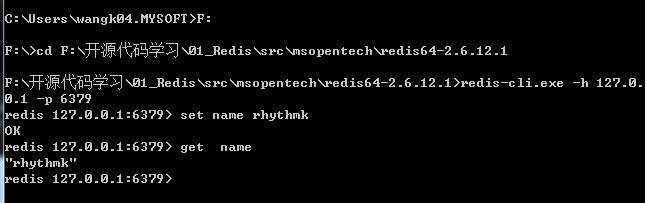
4、测试安装成果:
新建一个CMD 窗口:
运行命令:
5、讲Redis 加工成 windows :
namespace RedisService

{

    /// <summary>

    /// 参考文档:

    /// http://www.saltwebsites.com/2012/how-run-redis-service-under-windows

    ///

    /// sc create Redis start= auto DisplayName= Redis binpath= "\"C:\Program Files\Redis\RedisService.exe\" \"C:\Program Files\Redis\redis.conf\""

    ///

    /// </summary>

    class Program : ServiceBase

    {

        const string RedisServer = "redis-server.exe";

        const string RedisCLI = "redis-cli.exe";

        static string _path;

        static int _port;

        static void Main(string[] args)

        {

            _path = AppDomain.CurrentDomain.BaseDirectory;

            if (!File.Exists(Path.Combine(_path, RedisServer)))

                Exit("Couldn`t find " + RedisServer);

            if (!File.Exists(Path.Combine(_path, RedisCLI)))

                Exit("Couldn`t find " + RedisCLI);

            if (Environment.UserInteractive)

            {

                SetConsoleCtrlHandler(ConsoleCtrlCheck, true);

                //Console.CancelKeyPress += (sender, eventArgs) => StopRedis();

                StartRedis(args.Length ==  ? args[] : null);

            }

            else

                Run(new Program());

        }

        protected override void OnStart(string[] args)

        {

            var arguments = Environment.GetCommandLineArgs();

            if (arguments.Length > )

                Exit("Too many arguments");

            base.OnStart(args);

            StartRedis(arguments.Length ==  ? arguments[] : null);

        }

        protected override void OnStop()

        {

            base.OnStop();

            StopRedis();

        }

        static void StartRedis(string configPath = null)

        {

            var pi = new ProcessStartInfo(Path.Combine(_path, RedisServer));

            if (configPath != null)

            {

                FindPort(configPath);

                // Workaround for spaces in configuration filename.

                pi.Arguments = Path.GetFileName(configPath);

                pi.WorkingDirectory = Path.GetDirectoryName(configPath);

            }

            using (var process = new Process { StartInfo = pi })

            {

                if (process.Start())

                    if (Environment.UserInteractive)

                        process.WaitForExit();

                    else

                    {

                    }

                else

                    Exit("Failed to start Redis process");

            }

        }

        private static void FindPort(string path)

        {

            using (var reader = new StreamReader(path))

            {

                string line;

                while ((line = reader.ReadLine()) != null)

                {

                    if (line.IndexOf("port") == )

                    {

                        _port = int.Parse(line.Substring(, line.Length - ));

                        break;

                    }

                }

                if (_port == )

                    Exit("Couldn`t find Redis port in config file");

            }

        }

        static void StopRedis()

        {

            var pi = new ProcessStartInfo(Path.Combine(_path, RedisCLI)) { Arguments = (_port ==  ? "" : String.Format("-p {0} ", _port)) + "shutdown" };

            if (!(new Process { StartInfo = pi }).Start())

                Exit("Failed to stop Redis process");

        }

        static void Exit(string message)

        {

            if (Environment.UserInteractive)

            {

                Console.WriteLine(message);

                Environment.Exit(-);

            }

            else

            {

                //File.WriteAllText(Path.Combine(_path, "error.txt"), message);

                throw new ApplicationException(message);

            }

        }

        [DllImport("Kernel32")]

        private static extern bool SetConsoleCtrlHandler(HandlerRoutine handler, bool add);

        // A delegate type to be used as the handler routine

        // for SetConsoleCtrlHandler.

        private delegate bool HandlerRoutine(CtrlTypes ctrlType);

        // An enumerated type for the control messages

        // sent to the handler routine.

        private enum CtrlTypes

        {

            CTRL_C_EVENT = ,

            CTRL_BREAK_EVENT,

            CTRL_CLOSE_EVENT,

            CTRL_LOGOFF_EVENT = ,

            CTRL_SHUTDOWN_EVENT

        }

        private static bool ConsoleCtrlCheck(CtrlTypes ctrlType)

        {

            StopRedis();

            return true;

        }

    }

}
Redis Windows环境安装的更多相关文章
- Redis windows环境安装 以及 redis整合spring
Redis对于Linux是官方支持的,安装和使用没有什么好说的,普通使用按照官方指导,5分钟以内就能搞定.详情请参考: http://redis.io/download Redis官方是不支持wind ...
- Redis——windows环境安装redis和redis sentinel部署
一:Redis的下载和安装 1:下载Redis Redis的官方网站Download页面,Redis提示说:Redis的正式版不支持Windows,要Windows学习Redis,请点击Learn m ...
- Redis:在windows环境安装Redis
Redis:在windows环境安装Redis 第一步: 下载windows版本的Redis:https://github.com/MSOpenTech/Redis. 第二步: 在命令行执行:D:\r ...
- PHP XAMPP windows环境安装扩展redis 致命错误: Class 'Redis' not found解决方法
PHP XAMPP windows环境安装扩展redis 致命错误: Class 'Redis' not found解决方法 1.电脑需要先安装redis服务端环境,并在安装目录下打开客户端redis ...
- Windows环境安装tesseract-ocr 4.00并配置环境变量
最近要做文字识别,不让直接用别人的接口,所以只能尝试去用开源的类库.tesseract-ocr是惠普公司开源的一个文字识别项目,通过它可以快速搭建图文识别系统,帮助我们开发出能识别图片的ocr系统.因 ...
- windows环境安装MySQL
转:https://www.cnblogs.com/ayyl/p/5978418.html windows环境安装MySQL mySQL下载链接:MySQL Installer 5.7 :http:/ ...
- Windows环境安装MySQL数据库
Windows环境安装MySQL数据库 作者:尹正杰 版权声明:原创作品,谢绝转载!否则将追究法律责任. 最近在学习Java语言,开发环境在Windows操作系统上,因此需要在Windows上安装My ...
- MongoDB(二):在Windows环境安装MongoDB
1. 在Windows环境安装 1.1 MongoDB下载 要在Windows上安装MongoDB,首先打开MongoDB官网:https://www.mongodb.com/download-cen ...
- window安装reidis完成之后,想要把数据存入redis,必须开扩展,不然报错,redis windows phpstudy 安装扩展
redis windows phpstudy 安装扩展 1.http://windows.php.net/downloads/pecl/releases/redis/3.1.5rc1/ 2.htt ...
随机推荐
- office-word
目录(大纲) word中大纲的视图(也就是目录)是根据1/2/3级大纲决定的 格式刷 可以刷成一样的格式,字体,编号以及大纲等等. 主要用于编号和目录,快捷键(ctrl+shift) 编号设置(不建议 ...
- UVA-10384 The Wall Pushers (IDA*)
题目大意:走迷宫,遇到墙时可以推着墙走,但墙后还是墙时便不能推.求出一条任意的最短路径. 题目分析:这道题出的比较人性,输入的时候便是将四周的墙用二进制数表示好了,其实这样减轻了做题人的负担.IDA* ...
- 素数对猜想之python3实现
题目 让我们定义dn为:dn=pn+1−pn,其中pi是第i个素数.显然有d1=1,且对于n>1有dn是偶数.“素数对猜想”认为“存在无穷多对相邻且差为 ...
- Collections中的各种方法
一.各种方法介绍 Counter 统计个数 elements most_common subtract defaultdict 字典默认值 ChainMap 合并多个映射对象(字典) Ord ...
- js中字符串处理成数字的方法
<script> var a="11.1111"; var b="12.2222"; //第一种方法:乘以1的方法 //alert(a*1+b*1) ...
- web 开发 css 默认值列表
css默认值列表 HTML标签CSS属性默认值汇总 这个东西,在你需要还原默认值的时候,比较有用. 开始的时候 *{margin:0;padding:0;},当需要使用边距的时候,就需要还原HTML默 ...
- Python数据类型-01.数字和布尔值
本节主要介绍Python中的基础知识中的数据类型,数字和布尔值 介绍几个知识点:1)内置函数print()的用法,直接打印括号里面的内容,或者print后跟多个输出,以逗号分隔.2)内置函数type( ...
- CUDA 安装完成以后如何判断安装是否成功
最近在家里过寒假,可能这是还在学校里带着最大的福利了,无意之中翻出了多年前买的几本关于CUDA编程的书,于是随便在自己电脑上配置了一下环境,试试能不能把当年没有看完的书给看完了,于是有了今天这个判断C ...
- BZOJ1835: [ZJOI2010]base 基站选址【线段树优化DP】
Description 有N个村庄坐落在一条直线上,第i(i>1)个村庄距离第1个村庄的距离为Di.需要在这些村庄中建立不超过K个通讯基站,在第i个村庄建立基站的费用为Ci.如果在距离第i个村庄 ...
- nginx中使用 md5
core/ngx_md5.h 头文件 /* * Copyright (C) Igor Sysoev * Copyright (C) Nginx, Inc. */ #ifndef _NGX_MD5_H_ ...