
WPF属性绑定实现双向变化
WPF依赖项属性可以实现属性的绑定,成功绑定之后只要修改后台绑定的属性,即可UI同步自动更新绑定的值,无需手动刷新界面;同样,前台的值变化后,通过获取绑定的属性值也可获取UI变化后的值,实现双向变化的效果。属性绑定使得UI更新非常的方便,下面分享一个小栗子说明使用的方式。
1、先做了一个有一个TextBlock和一个Button的UI,想要实现点击后TextBlock发生变化。
<Window x:Class="WPFDemo.Window1"

        xmlns="http://schemas.microsoft.com/winfx/2006/xaml/presentation"

        xmlns:x="http://schemas.microsoft.com/winfx/2006/xaml"

        xmlns:d="http://schemas.microsoft.com/expression/blend/2008"

        xmlns:mc="http://schemas.openxmlformats.org/markup-compatibility/2006"

        xmlns:local="clr-namespace:WPFDemo"

        mc:Ignorable="d"

        Title="Window1" Height="" Width="">

    <Grid>

        <Button Name="Button_OK" MaxWidth="" MaxHeight="" Click="Button_OK_Click">OK</Button>

        <TextBlock MaxWidth="" MaxHeight="" VerticalAlignment="Top"  HorizontalAlignment="Left" Text="{Binding Text}"></TextBlock>

    </Grid>

</Window>
2、创建UI更新类(现在是测试,所以属性比较少,正常开发建议一个UI创建一个UI更新类专门用于UI更新),如下为完整代码
public class PropertyToUI : INotifyPropertyChanged

    {

        #region 私有变量

        /// <summary>

        /// 状态栏显示文本

        /// </summary>

        private string text = "";

        #endregion

        #region 属性

        /// <summary>

        /// 属性-显示文本

        /// </summary>

        public string Text

        {

            get { return text; }

            set

            {

                text = value;

                OnPropertyChanged("Text");

            }

        }

        #endregion

        #region 属性变化通知事件

        /// <summary>

        /// 属性变化通知事件

        /// </summary>

        public event PropertyChangedEventHandler PropertyChanged;

        /// <summary>

        /// 属性变化通知

        /// </summary>

        /// <param name="e"></param>

        public void OnPropertyChanged(PropertyChangedEventArgs e)

        {

            if (PropertyChanged != null)

            {

                PropertyChanged(this, e);

            }

        }

        /// <summary>

        /// 属性变化通知事件

        /// </summary>

        /// <param name="PropertyName"></param>

        public void OnPropertyChanged(string PropertyName)

        {

            PropertyChangedEventArgs e = new PropertyChangedEventArgs(PropertyName);

            if (PropertyChanged != null)

            {

                PropertyChanged(this, e);

            }

        }

        #endregion

    }
这个部分有如下几个关键点:
(1)、需要实现INotifyPropertyChanged接口,这是一个属性更新接口,可以看一下它的实现,有一个属性更新事件,所以要说声明该事件。
namespace System.ComponentModel

{

    //

    // 摘要:

    //     Notifies clients that a property value has changed.

    public interface INotifyPropertyChanged

    {

        //

        // 摘要:

        //     Occurs when a property value changes.

        event PropertyChangedEventHandler PropertyChanged;

    }

}
(2)、创建属性更新函数
     /// <summary>

        /// 属性变化通知

        /// </summary>

        /// <param name="e"></param>

        public void OnPropertyChanged(PropertyChangedEventArgs e)

        {

            if (PropertyChanged != null)

            {

                PropertyChanged(this, e);

            }

        }
参数为某个属性的更新事件,而后触发PropertyChanged(this, e)通知UI更新指定属性
(3)、包装属性
    public string Text
       {

            get { return text; }

            set

            {

                text = value;

                OnPropertyChanged("Text");

            }

        }
在设置器中调用属性更新事件,即当后台设置值时(想要更新UI值),就会触发属性更新事件,通知前台绑定的依赖项属性进行更新(事件中带有属性的身份标识和值进行传递)。
3、前台依赖项属性对属性更新类中的属性进行绑定(Binding语法)
<TextBlock MaxWidth="" MaxHeight="" VerticalAlignment="Top" HorizontalAlignment="Left" Text="{Binding Text}"></TextBlock>
属性名绑定即可
4、绑定数据源的说明(这是比较容易忘记的地方)
PropertyToUI UI = new PropertyToUI();

this.DataContext = UI;  //事件绑定数据源
以上就是属性绑定的必要步骤了,如果没什么问题基本就成功了,没成功的再好好检查一下。
如下为完整的后台代码:
/// <summary>

    /// Window1.xaml 的交互逻辑

    /// </summary>

    public partial class Window1 : Window

    {

        /// <summary>

        /// UI更新类对象

        /// </summary>

        PropertyToUI UI = new PropertyToUI();

        /// <summary>

        /// 构造函数

        /// </summary>

        public Window1()

        {

            InitializeComponent();

            this.DataContext = UI;  //事件绑定数据源

            UI.Text = "程序开启";

        }

        /// <summary>

        /// OK按键点击事件

        /// </summary>

        /// <param name="sender"></param>

        /// <param name="e"></param>

        private void Button_OK_Click(object sender, RoutedEventArgs e)

        {

            UI.Text = "我更新了";

            MessageBox.Show(UI.Text);

        }

    }
运行效果如下:
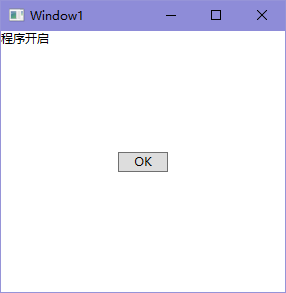
点击OK按键后:

WPF属性绑定实现双向变化的更多相关文章
- 2-4 Vue中的属性绑定和双向数据绑定
<!DOCTYPE html> <html lang="en"> <head> <meta charset="UTF-8&quo ...
- Vue学习之vue属性绑定和双向数据绑定
<!DOCTYPE html> <html lang="en"> <head> <meta charset="UTF-8&quo ...
- vuejs属性绑定和双向绑定
属性绑定 html <div v-bind:title="title">hello world</div> js new Vue({ el:'#root', ...
- WPF使用MVVM(一)-属性绑定
WPF使用MVVM(一)-属性绑定 简单介绍MVVM MVVM是Model(数据类型),View(界面),ViewModel(数据与界面之间的桥梁)的缩写,是一种编程模式,优点一劳永逸,初步增加一些逻 ...
- 【WPF】如何把一个枚举属性绑定到多个RadioButton
一.说明 很多时候,我们要把一个枚举的属性的绑定到一组RadioButton上.大家都知道是使用IValueConverter来做,但到底怎么做才好? 而且多个RadioButton的Checked和 ...
- 学习WPF——元素绑定
概念 从源对象提取一些信息,并用这些信息设置目标对象的属性 示例 在给TextBlock控件的FontSize属性赋值时,我们使用了绑定表达式 数据绑定表达式使用XAML的标记扩展(因此具有花括号)( ...
- WPF - 属性系统 (3 of 4)
依赖项属性元数据 在前面的章节中,我们已经介绍了WPF依赖项属性元数据中的两个组成:CoerceValueCallback回调以及PropertyChangedCallback.而在本节中,我们将对其 ...
- 控制文本和外观------Attr Binding(attr属性绑定)
Attr Binding(attr属性绑定) 目的 attr 绑定提供了一种方式可以设置DOM元素的任何属性值.你可以设置img的src属性,连接的href属性.使用绑定,当模型属性改变的时候,它会自 ...
- 【Angular 5】数据绑定、事件绑定和双向绑定
本文为Angular5的学习笔记,IDE使用Visual Studio Code,内容是关于数据绑定,包括Property Binding.Class Binding.Style Binding. 在 ...
随机推荐
- python爬取网页数据
一.利用webbrowser.open()打开一个网站: ? 1 2 3 >>> import webbrowser >>> webbrowser.open('ht ...
- 微信小程序的坑(持续更新中)
参与微信小程序开发有一段时间了,先后完成信息查询类和交易类的两个不同性质的小程序产品的开发:期间遇到各种各样的小程序开发的坑,有的是小程序基础功能不断改进完善而需要业务持续的适配,有的是小程序使用上的 ...
- IT兄弟连 HTML5教程 HTML5做到了与之前版本的兼容
为了保证HTML5能与之前的HTML版本达到最大的兼容,HTML5对一些元素标记的省略.boolean值的属性,以及引号的省略这几方面进行了兼顾,确保与之前版本的HTML达到兼容.在下面示例中,将本节 ...
- (十六)c#Winform自定义控件-文本框哪里去了?-HZHControls
官网 http://www.hzhcontrols.com 前提 入行已经7,8年了,一直想做一套漂亮点的自定义控件,于是就有了本系列文章. GitHub:https://github.com/kww ...
- Navicat Premium12.0 常用快捷键
- Error creating bean with name 'sqlSessionFactory' defined in class path resource [config/spring/applicationContext.xml]: Invocation of init method failed;
我报的错: org.springframework.beans.factory.BeanCreationException: Error creating bean with name 'sqlSes ...
- jstree级联禁用后代节点的选择框
用jstree+jquery,做的树形展示. 这个话题,在Stack Overflow上有问答,要获取要禁用的节点,然后用获取子节点方法遍历后代节点,设置禁用选择框. 之后发现,jstree的获取子节 ...
- f.lux
这软件很小,安装后基本不用管,它会自动运行自动调节.在它运行的时候,一般在桌面右小角可以找到.平时不用去管它,它自会按时自动调节好屏幕的色温,以保护视力. https://justgetflux.co ...
- Codeforces Round #608 (Div. 2)
传送门 A. Suits 签到. Code /* * Author: heyuhhh * Created Time: 2019/12/15 17:16:33 */ #include <iostr ...
- python包matplotlib绘制图像
使用matplotlib绘制图像 import matplotlib.pyplot as plt from matplotlib.pyplot import MultipleLocator impor ...