
Winform的控件以及DataGridView的一般使用
先上学习测试的一些截图
1:获取多个控件上面的值(checkbox,combobox,textbox,radiobutton)
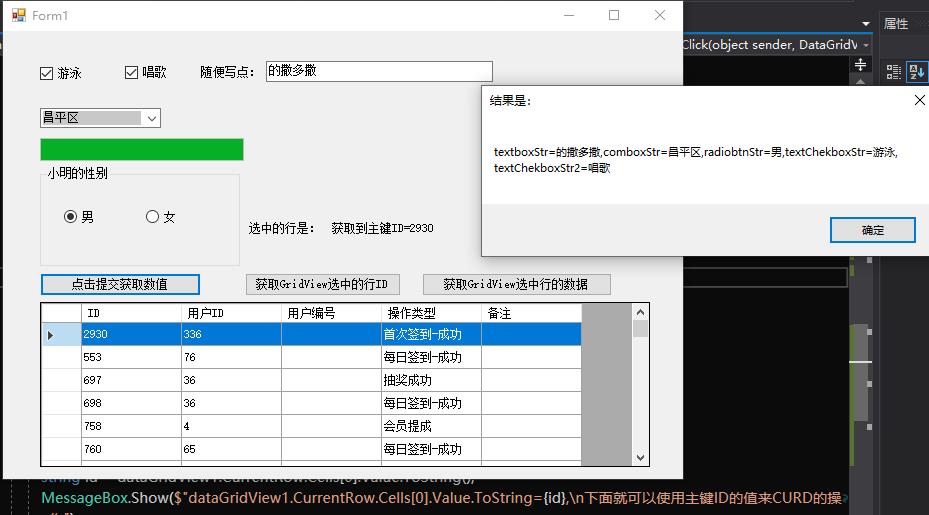
2:获取到选择行的主键ID的value,方便我们进一步CURD
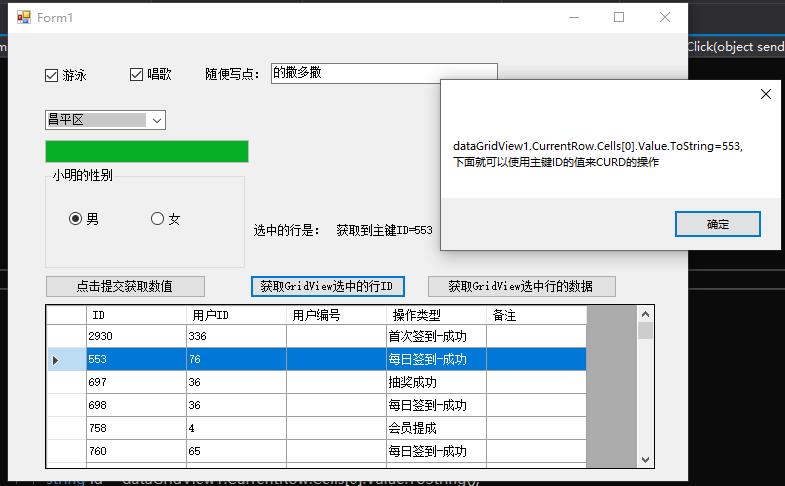
3:获取选择一行的数据以及一行是多少列

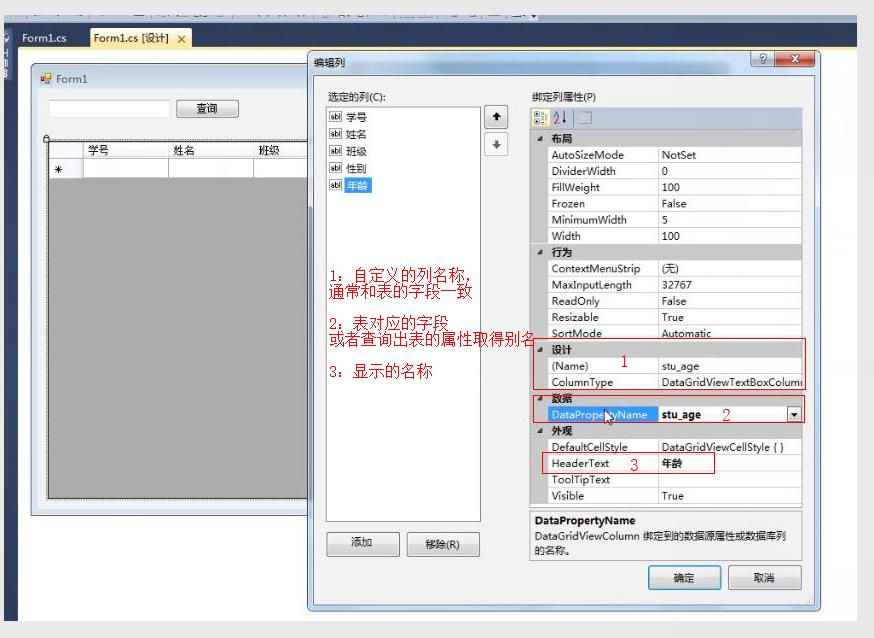
4:绑定显示自定义的列头名称
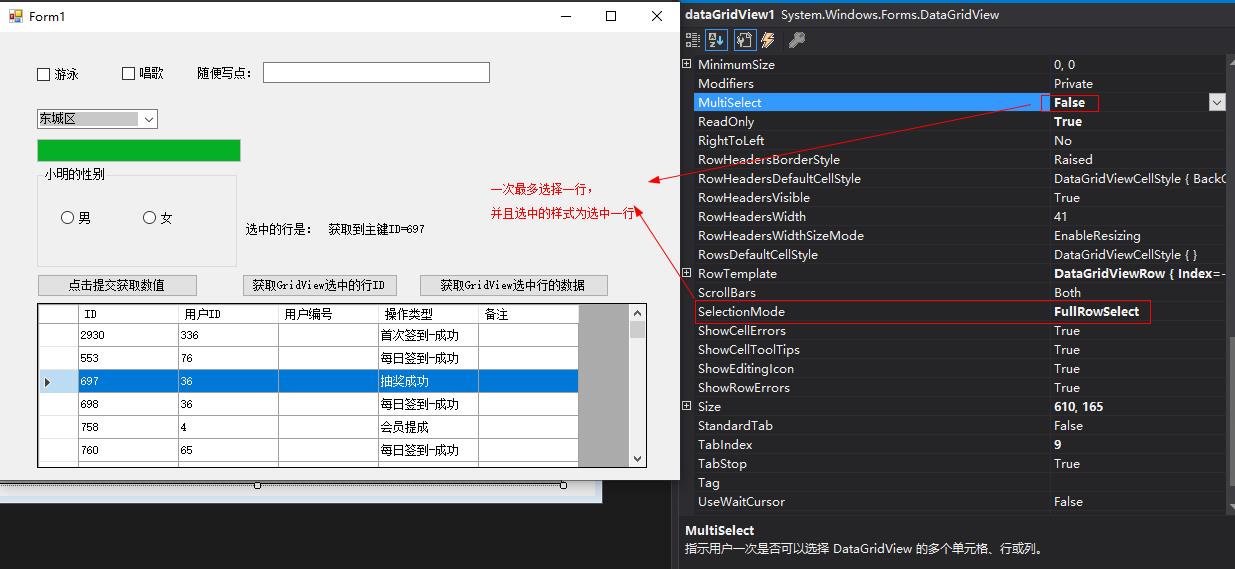
5:选中一行的属性设置操作
6:全部代码
 using System;

 using System.Text;

 using System.Windows.Forms;

 namespace WindowsFormsDemo

 {

     using System.Configuration;

     using System.Data;

     using System.Data.SqlClient;

     public partial class Form1 : Form

     {

         private static readonly string connectionstr = ConfigurationManager.ConnectionStrings["hydb"].ConnectionString;

         public Form1()

         {

             InitializeComponent();

         }

         private void Form1_Load(object sender, EventArgs e)

         {

             // TODO: 这行代码将数据加载到表“huayaDBDataSet.K_City”中。您可以根据需要移动或删除它。

             this.k_CityTableAdapter.Fill(this.huayaDBDataSet.K_City);

             BingDataGridview();

         }

         private void BingDataGridview()

         {

             using (SqlConnection conn = new SqlConnection(connectionstr))

             {

                 conn.Open();

                 using (SqlDataAdapter ad = new SqlDataAdapter("select ID,userID,userno ,Optext,Remark from F_OperateLog", conn))

                 {

                     using (DataSet set = new DataSet())

                     {

                         ad.Fill(set);

                         this.dataGridView1.DataSource = set.Tables[].DefaultView;//绑定数据

                         dataGridView1.MultiSelect = false;//单选

                         dataGridView1.Rows[].Selected=true;//默认第二行为选中的状态

                     }

                 }

             }

         }

         private void dataGridView1_CellClick(object sender, DataGridViewCellEventArgs e)

         {

             string id = dataGridView1.CurrentRow.Cells[].Value.ToString();

             if (!string.IsNullOrEmpty(id))

             {

                 // MessageBox.Show($"获取到主键ID={id}");

                 labshowid.Text = $"获取到主键ID={id}";

             }

         }

         /// <summary>

         /// 获取选中行的key ID

         /// </summary>

         /// <param name="sender"></param>

         /// <param name="e"></param>

         private void BtnSelectID_Click(object sender, EventArgs e)

         {

             string id = dataGridView1.CurrentRow.Cells[].Value.ToString();

             MessageBox.Show($"dataGridView1.CurrentRow.Cells[0].Value.ToString={id},\n下面就可以使用主键ID的值来CURD的操作");

         }

         /// <summary>

         /// 获取选中行的所有数据

         /// </summary>

         /// <param name="sender"></param>

         /// <param name="e"></param>

         private void BtnSelectRowData_Click(object sender, EventArgs e)

         {

             int rowIndex = dataGridView1.CurrentRow.Index;//选中当前行的索引

             int cellCount = dataGridView1.GetCellCount(DataGridViewElementStates.Selected);//获取一行的列有多少个

             StringBuilder sb = new StringBuilder();

             for (int i = ; i < cellCount; i++)

             {

                 sb.Append(dataGridView1.CurrentRow.Cells[i].Value.ToString() + ",");

             }

             MessageBox.Show(sb.ToString().TrimEnd(',')+ ",\n\ncellCount=" + cellCount+ ",rowIndex=" + rowIndex);

         }

         private void BtnProStart_Click(object sender, EventArgs e)

         {

             for (int i = ; i < ; i++)

             {

                 this.progressBar1.Value = (int)(((i + ) / 100.0) * );

                 Application.DoEvents();

                 int miao = new Random().Next(, );

                 System.Threading.Thread.Sleep(miao * );

             }

             MessageBox.Show("数据加载成功!", "请稍后", MessageBoxButtons.YesNo, MessageBoxIcon.Asterisk);

         }

         private void BtnSubmit_Click(object sender, EventArgs e)

         {

             string textboxStr = this.texboxStr.Text;

             string comboxStr = this.comboBox1.Text;

             string radiobtnStr = this.radioButton1.Checked == true ? "男" : "女";

             string textChekboxStr = string.IsNullOrEmpty(this.checkBox1.Text) == true ? "" : this.checkBox1.Text;

             string textChekboxStr2 = string.IsNullOrEmpty(this.checkBox2.Text) == true ? "" : this.checkBox2.Text;

             string msg = $"textboxStr={textboxStr},comboxStr={comboxStr},radiobtnStr={radiobtnStr},textChekboxStr={ textChekboxStr},textChekboxStr2={textChekboxStr2}";

             MessageBox.Show(msg, "结果是:");

         }

     }

 }
Winform的控件以及DataGridView的一般使用的更多相关文章
- winform 分页控件
http://www.cnblogs.com/liuyunsheng/p/4853387.html http://www.cnblogs.com/wuhuacong/archive/2011/07/0 ...
- winform基础控件总结
转自:http://www.cnblogs.com/top5/archive/2010/04/29/1724039.html 基础 - 常用控件 C# WinForm开发系列 - CheckBox/B ...
- [原创][开源]SunnyUI.Net, C# .Net WinForm开源控件库、工具类库、扩展类库、多页面开发框架
SunnyUI.Net, 基于 C# .Net WinForm 开源控件库.工具类库.扩展类库.多页面开发框架 Blog: https://www.cnblogs.com/yhuse Gitee: h ...
- 在DevExpress程序中使用Winform分页控件直接录入数据并保存
一般情况下,我们都倾向于使用一个组织比较好的独立界面来录入或者展示相关的数据,这样处理比较规范,也方便显示比较复杂的数据.不过在一些情况下,我们也可能需要直接在GridView表格上直接录入或者修改数 ...
- winform窗体控件(全)
回顾跟补充下除了昨天那常用6个其他的winform窗体控件作用 1:Button:按钮 (1)AutoSize:如果是True的情况下,内容将会撑开:False的话会另起一行 (2)Enabled: ...
- winform基本控件----按钮
这次来引用一个我们上课时候老师给的一个实验内容,来说一下winform程序设计中的按钮控件的使用.下面是我们老师给的实验内容. 实验目的: 掌握Winform的开发环境. 掌握窗体的创建和基本方法. ...
- WinForm给控件加入hint文字
本文代码主要是参考别人的,仅为个人记录,方面后续使用~ 效果图: 主要代码在一个Win32Utility类中,代码如下: public static class Win32Utility { [Dll ...
- C# WinForm实现控件拖动实例介绍
主要是设计控件的MouseDown.MouseLeave.MouseMove事件.一步步来吧:1.定义一个枚举类型,描述光标状态 private enum EnumMousePointPosition ...
- Winform DevExpress控件库(一) DevExpress控件库的安装与新建第一个DevExpress项目
前言:因为这段时间要接触到DevExpress控件库,而我本身甚至对winform的控件都了解甚少,所以处在学习中,写下博客主要是为了方便后期的回顾,当然也可以给一些新人第一次接触时做为学习的参考,以 ...
随机推荐
- 数据库系统原理(第四章:SQL与关系数据库基本操作 )
一.SQL概述 sql是结构化查询语言(Structured Query Language,SQL)是专门用来与数 据库通信的语言,它可以帮助用户操作关系数据库. SQL的特点: SQL不是某个特定数 ...
- JavaWeb之(1)Tomcat安装及项目的发布方法
Tomcat安装及项目的发布方法 Tomcat安装 1.直接解压,然后找到bin/startup.bat 2.双击,如果出现命令行界面且最后一句为"信息: Server startup in ...
- 【Web】解决简书图片不显示问题“系统维护中,图片暂时无法加载”
简书不显示图片的解决方法 首次编辑于2019-6-6 最近几天在浏览简书上的文章时,发现图片显示不出来,提示"系统维护中,图片暂时无法加载". 猜测应该是简书由于某种原因暂时屏蔽了 ...
- 安装新版Magisk卡在启动页面等问题以及解决办法
手持小米9,之前更新了新版本的Magisk Manager之后,发现手机再打开会一直卡在进入界面无法启动(如下图显示) 逛了逛Github.XDA.Stack Overflow等论坛,大致结论 ...
- [日常] gocron源码阅读-使用go mod管理依赖源码启动gocron
从 Go1.11 开始,golang 官方支持了新的依赖管理工具go modgo mod download: 下载依赖的 module 到本地 cachego mod edit: 编辑 go.modg ...
- centos7中启动tomcat提示bash: tomcat8.0.39/bin/startup.sh: 权限不够
问题描述: centos7中启动tomcat提示bash: tomcat8.0.39/bin/startup.sh: 权限不够 解决方案:先进入bin目录 [root@localhost/]# cd ...
- if, elif, else及if嵌套
if 要判断的条件: 条件成立时,要做的事 ..... 注意:if语句以及缩进部分是看成一个完整的代码块,例如上述例子,不管age条件满不满足,最后一句打印欢迎光临始终会执行 else语法格式 i ...
- 14.Java基础_函数/函数重载/参数传递
Java函数和函数重载 /* 函数定义: public static 返回类型 func(参数){ 方法体: } 函数重载 在调用时,Java虚拟机会通过参数的不同来区分同名的函数 满足: 1.多个函 ...
- C++中的异常处理(下)
array.h #ifndef _ARRAY_H_ #define _ARRAY_H_ #include <stdexcept> using namespace std; template ...
- 【java】svn显示×
背景:将客服系统代码赋值到商户子系统中,复制过去后,所有代码svn显示×. 可能:代码直接复制过去只是表面上再maven中显示的代码复制过去,不是真的代码,所以对于svn来讲真的代码删了,又来了一堆新 ...