
百度编辑器UEditor与UEditor 公式插件完整Demo
1、下载UEditor(我的是.net项目)

2、下载UEditor公式插件

3、新建解决方案和项目

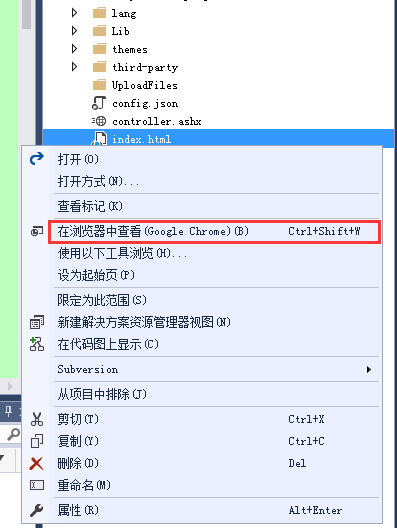
4、在浏览器中预览index.html页面
结果:

5、index.html源码
<!DOCTYPE HTML PUBLIC "-//W3C//DTD HTML 4.01 Transitional//EN"

          "http://www.w3.org/TR/html4/loose.dtd">

<html>

<head>

    <title>完整demo</title>

    <meta http-equiv="Content-Type" content="text/html;charset=utf-8" />

    <script type="text/javascript" charset="utf-8" src="ueditor.config.js"></script>

    <script type="text/javascript" charset="utf-8" src="ueditor.all.min.js"> </script>

    <!--建议手动加在语言,避免在ie下有时因为加载语言失败导致编辑器加载失败-->

    <!--这里加载的语言文件会覆盖你在配置项目里添加的语言类型,比如你在配置项目里配置的是英文,这里加载的中文,那最后就是中文-->

    <script type="text/javascript" charset="utf-8" src="lang/zh-cn/zh-cn.js"></script>

    <!--公式编辑器-->

    <script type="text/javascript" charset="utf-8" src="./kityformula-plugin/addKityFormulaDialog.js"></script>

    <script type="text/javascript" charset="utf-8" src="./kityformula-plugin/getKfContent.js"></script>

    <script type="text/javascript" charset="utf-8" src="./kityformula-plugin/defaultFilterFix.js"></script>

    <style type="text/css">

        div { width: 100%; }

    </style>

</head>

<body>

    <div>

        <h1>完整demo</h1>

        <script id="editor" type="text/plain" style="width:1024px;height:500px;">

        </script>

    </div>

    <div id="btns">

        <div><button onclick="ReplaceImage()">imagebase64替换为image</button>

            <button onclick="getAllHtml()">获得整个html的内容</button>

            <button onclick="getContent()">获得内容</button>

            <button onclick="setContent()">写入内容</button>

            <button onclick="setContent(true)">追加内容</button>

            <button onclick="getContentTxt()">获得纯文本</button>

            <button onclick="getPlainTxt()">获得带格式的纯文本</button>

            <button onclick="hasContent()">判断是否有内容</button>

            <button onclick="setFocus()">使编辑器获得焦点</button>

            <button onmousedown="isFocus(event)">编辑器是否获得焦点</button>

            <button onmousedown="setblur(event)">编辑器失去焦点</button>

        </div>

        <div>

            <button onclick="getText()">获得当前选中的文本</button>

            <button onclick="insertHtml()">插入给定的内容</button>

            <button id="enable" onclick="setEnabled()">可以编辑</button>

            <button onclick="setDisabled()">不可编辑</button>

            <button onclick=" UE.getEditor('editor').setHide()">隐藏编辑器</button>

            <button onclick=" UE.getEditor('editor').setShow()">显示编辑器</button>

            <button onclick=" UE.getEditor('editor').setHeight(300)">设置高度为300默认关闭了自动长高</button>

        </div>

        <div>

            <button onclick="getLocalData()">获取草稿箱内容</button>

            <button onclick="clearLocalData()">清空草稿箱</button>

        </div>

    </div>

    <div>

        <button onclick="createEditor()">

            创建编辑器

        </button>

        <button onclick="deleteEditor()">

            删除编辑器

        </button>

    </div>

    <script type="text/javascript">

        //实例化编辑器

        //建议使用工厂方法getEditor创建和引用编辑器实例,如果在某个闭包下引用该编辑器,直接调用UE.getEditor('editor')就能拿到相关的实例

        var ue = UE.getEditor('editor', {

            toolbars: [['fullscreen', 'source', '|',

                'undo', 'redo', '|',

                'bold', 'italic', 'underline', 'superscript', 'subscript', 'pasteplain', '|',

                'forecolor', 'backcolor', 'insertorderedlist', 'insertunorderedlist', '|',

                'paragraph', 'fontfamily', 'fontsize', '|',

                'indent', 'justifyleft', 'justifycenter', 'justifyright', 'justifyjustify', '|',

                'simpleupload', 'horizontal', 'inserttable', '|',

                'searchreplace', 'kityformula'

            ]],

            autoHeightEnabled: true,

            autoFloatEnabled: true,

            serverUrl: "/controller.ashx"

        });

        function ReplaceImage() {

            ue.getKfContent(function (content) { });//将image的src从base64替换为文件名

        }

        function isFocus(e) {

            alert(UE.getEditor('editor').isFocus());

            UE.dom.domUtils.preventDefault(e)

        }

        function setblur(e) {

            UE.getEditor('editor').blur();

            UE.dom.domUtils.preventDefault(e)

        }

        function insertHtml() {

            var value = prompt('插入html代码', '');

            UE.getEditor('editor').execCommand('insertHtml', value)

        }

        function createEditor() {

            enableBtn();

            UE.getEditor('editor');

        }

        function getAllHtml() {

            alert(UE.getEditor('editor').getAllHtml())

        }

        function getContent() {

            var arr = [];

            arr.push("使用editor.getContent()方法可以获得编辑器的内容");

            arr.push("内容为:");

            arr.push(UE.getEditor('editor').getContent());

            alert(arr.join("\n"));

        }

        function getPlainTxt() {

            var arr = [];

            arr.push("使用editor.getPlainTxt()方法可以获得编辑器的带格式的纯文本内容");

            arr.push("内容为:");

            arr.push(UE.getEditor('editor').getPlainTxt());

            alert(arr.join('\n'))

        }

        function setContent(isAppendTo) {

            var arr = [];

            arr.push("使用editor.setContent('欢迎使用ueditor')方法可以设置编辑器的内容");

            UE.getEditor('editor').setContent('欢迎使用ueditor', isAppendTo);

            alert(arr.join("\n"));

        }

        function setDisabled() {

            UE.getEditor('editor').setDisabled('fullscreen');

            disableBtn("enable");

        }

        function setEnabled() {

            UE.getEditor('editor').setEnabled();

            enableBtn();

        }

        function getText() {

            //当你点击按钮时编辑区域已经失去了焦点,如果直接用getText将不会得到内容,所以要在选回来,然后取得内容

            var range = UE.getEditor('editor').selection.getRange();

            range.select();

            var txt = UE.getEditor('editor').selection.getText();

            alert(txt)

        }

        function getContentTxt() {

            var arr = [];

            arr.push("使用editor.getContentTxt()方法可以获得编辑器的纯文本内容");

            arr.push("编辑器的纯文本内容为:");

            arr.push(UE.getEditor('editor').getContentTxt());

            alert(arr.join("\n"));

        }

        function hasContent() {

            var arr = [];

            arr.push("使用editor.hasContents()方法判断编辑器里是否有内容");

            arr.push("判断结果为:");

            arr.push(UE.getEditor('editor').hasContents());

            alert(arr.join("\n"));

        }

        function setFocus() {

            UE.getEditor('editor').focus();

        }

        function deleteEditor() {

            disableBtn();

            UE.getEditor('editor').destroy();

        }

        function disableBtn(str) {

            var div = document.getElementById('btns');

            var btns = UE.dom.domUtils.getElementsByTagName(div, "button");

            for (var i = 0, btn; btn = btns[i++];) {

                if (btn.id == str) {

                    UE.dom.domUtils.removeAttributes(btn, ["disabled"]);

                } else {

                    btn.setAttribute("disabled", "true");

                }

            }

        }

        function enableBtn() {

            var div = document.getElementById('btns');

            var btns = UE.dom.domUtils.getElementsByTagName(div, "button");

            for (var i = 0, btn; btn = btns[i++];) {

                UE.dom.domUtils.removeAttributes(btn, ["disabled"]);

            }

        }

        function getLocalData() {

            alert(UE.getEditor('editor').execCommand("getlocaldata"));

        }

        function clearLocalData() {

            UE.getEditor('editor').execCommand("clearlocaldata");

            alert("已清空草稿箱")

        }

    </script>

</body>

</html>
6、上传图片
修改config.json


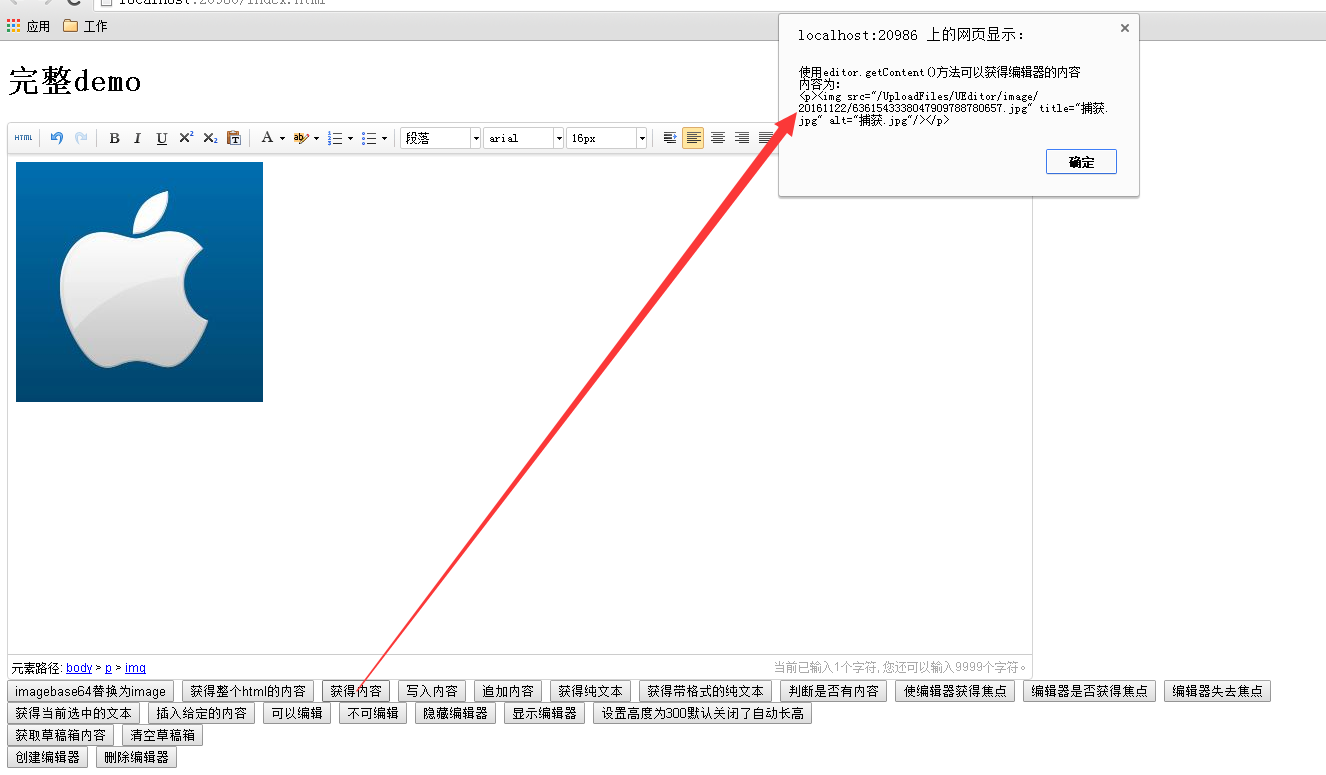
这样的话上传的图片就会在网站根目录/UploadFiles/UEditor/image/20161122(这个名称根据时间变化)/底下
测试看看:

现在公式也可以用:


现在的图片还是base64的,然后把image的src从base64替换为文件名

替换好了
百度编辑器UEditor与UEditor 公式插件完整Demo的更多相关文章
- 【完整靠谱版】结合公司项目,仔细总结自己使用百度编辑器实现FTP上传的完整过程
说在前面 工作中会遇到很多需要使用富文本编辑器的地方,比如我现在发布这篇文章离不开这个神器,而且现在网上编辑器太多了.记得之前,由于工作需要自己封装过一个编辑器的公共插件,是用ckeditor改版的, ...
- ueditor 百度编辑器图片上传 接 node.js 及一些前端自定义
百度编辑器 用node.js 做服务端 demo 大神已整理的 记录一下 以作参考 https://github.com/netpi/ueditor 1. 前端图片工具栏上传input file在这里 ...
- Thinkphp 3.2.3配置百度编辑器(UEditor)
Thinkphp 3.2.3配置百度编辑器(UEditor) 1.把百度编辑器放到项目的Public目录下 命名为:UEditor 2.找到thinkphp框架系统自带类中的Html.class.ph ...
- 百度地图 ijintui以及七牛、百度编辑器、kindeditor
密码是明文存储的 sig错误是因为params没拼接上md5后的秘钥,测试时候可以在 Api\Controller\CommonController\_initialize 方法里注释掉效验的代码 代 ...
- Ueditor百度编辑器插件的安装
目录 插件下载地址: 1. 引入 2. 编辑器显示处 id="content" 3.底部 4.ueditor编辑器按钮配置方法 定制工具栏图标 修改配置项的方法: 插件下载地址: ...
- [转载]百度编辑器-Ueditor使用
前段时间发表过一篇关于“KindEditor在JSP中使用”的博文.这几天在沈阳东软进行JavaWeb方面的实习工作,在一个CMS系统的后台和博客板块中又要用到文本编辑器,突然发现了这个——百度编辑器 ...
- 又一编辑神器-百度编辑器-Ueditor
(Lionden<hsdlionden@gmail.com> 转载说明) 前段时间发表过一篇关于“KindEditor在JSP中使用”的博文.这几天在沈阳东软进行JavaWeb方面的实习工 ...
- 百度编辑器ueditor前台代码高亮无法自动换行解决方法
这两天本站成功安装整合了百度编辑器ueditor,用着还挺不错,但是遇到了点小问题 问题描述: 在内容里面插入代码高亮显示,后台编辑器中是可以自动换行的,但是发表后,在前台查看,发现代码不能自动换 ...
- 百度编辑器ueditor 使用
ueditor 百度开源的一个 编辑器 ,支持api.扩展,demo丰富.推荐下 以前写 编辑 词典的使用 jquery-te 轻量级编辑器..当时看中了 它代码轻巧.容易改. 把他的功能改了好多. ...
随机推荐
- Android Notification 详解(一)——基本操作
Android Notification 详解(一)--基本操作 版权声明:本文为博主原创文章,未经博主允许不得转载. 微博:厉圣杰 源码:AndroidDemo/Notification 文中如有纰 ...
- spring源码分析之freemarker整合
FreeMarker是一款模板引擎: 即一种基于模板和要改变的数据, 并用来生成输出文本(HTML网页.电子邮件.配置文件.源代码等)的通用工具. 它不是面向最终用户的,而是一个Java类库,是一款程 ...
- C#中将DataTable导出为HTML的方法
今天我要向大家分享一种将DataTable导出为到HTML格式的方法.有时我们需要HTML格式的输出数据, 以下代码就可以帮助我们达到目的,. 首先,我们要绑定DataTable和 DataGridV ...
- WebGIS项目中利用mysql控制点库进行千万条数据坐标转换时的分表分区优化方案
文章版权由作者李晓晖和博客园共有,若转载请于明显处标明出处:http://www.cnblogs.com/naaoveGIS/ 1. 背景 项目中有1000万条历史案卷,为某地方坐标系数据,我们的真实 ...
- ASP.NET Core 中文文档 第四章 MVC(4.5)测试控制器逻辑
原文: Testing Controller Logic 作者: Steve Smith 翻译: 姚阿勇(Dr.Yao) 校对: 高嵩(Jack) ASP.NET MVC 应用程序的控制器应当小巧并专 ...
- PHP设计模式(二)工厂方法模式(Factory Method For PHP)
简单工厂简述: 简单工厂模式实现了生产产品类的代码跟客户端代码分离,在工厂类中你可以添加需要生成长跑的逻辑代码(new 产品类),但是问题来了,优秀的代码是符合"开闭原则"如果你要 ...
- Quartz2D总结
天了噜,脑子完全懵了,最起码说出来个上下文啊,连这个都给忘了,特此总结一下,并以此缅怀这次面试 Quartz2D的API来自于Core Graphics(这就是为什么CGContextRef是以CG开 ...
- 基于SOA架构的TDD测试驱动开发模式
以需求用例为基,Case&Coding两条线并行,服务(M)&消费(VC)分离,单元.接口.功能.集成四层质量管理,自动化集成.测试.交付全程支持. 3个大阶段(需求分析阶段.研发准备 ...
- 烂泥:VMWare Workation双网卡配置IP地址
本文由ilanniweb提供友情赞助,首发于烂泥行天下 想要获得更多的文章,可以关注我的微信ilanniweb 前几天给一个客户做远程项目实施,客户那边的服务器是Windows OS的,我们这边的业务 ...
- jetBrain系列软件
请尽量支持正版软件!https://www.jetbrains.com/ 本文仅供参考 以下提供一种方法可以无限期体验JetBrain2016系列软件. 1.下载JetbrainsCrack-2.5. ...