
Thinkphp 3.2.3配置百度编辑器(UEditor)
Thinkphp 3.2.3配置百度编辑器(UEditor)
1、把百度编辑器放到项目的Public目录下 命名为:UEditor
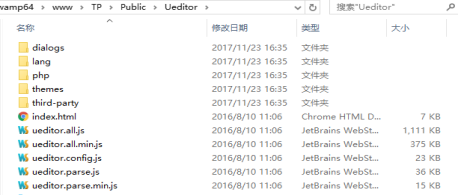
2、找到thinkphp框架系统自带类中的Html.class.php,并且添加在switch(strtoupper($type)) {}中添加代码

case 'UEDITOR':
$parseStr = "\n".'<script type="text/javascript" charset="utf-8"
src="__ROOT__/Public/UEditor/ueditor.config.js"></script>'."\n".'
<script type="text/javascript" charset="utf-8"
src="__ROOT__/Public/UEditor/ueditor.all.js"></script>'."\n".'
<script type="text/plain" id="'.$id.'" name="'.$name.'" style="'
.$style.'">'.$content.'</script>'."\n".'<script type="text/javascript">var ue_'.$id.' = UE.getEditor("'.$id.'");</script>'."\n";
break;
3. 在项目文件的www/myproject/Application/Admin/Conf目录下新建ueditconfig.json文件,

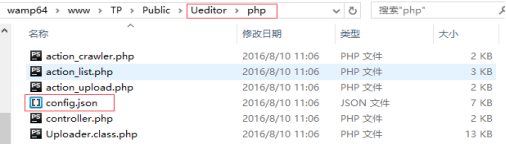
4. 把ueditor源码的php文件夹下的config.json中的内容复制到ueditconfig.json文件中
5.在百度编辑器目录的ueditor.config.js文件内修改:(好像可以省略)
// 服务器统一请求接口路径
, serverUrl: URL + "../../index.php/Home/Index/ueditup"

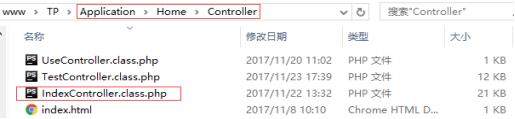
6. 就是你需要的用TP自带上传类处理上传了,在Home模块的Index控制器里加上下面的方法:
public function ueditup(){
header("Content-Type: text/html; charset=utf-8");
$editconfig = json_decode(preg_replace("/\/\*[\s\S]+?\*\//", "", file_get_contents(COMMON_PATH."Conf/ueditconfig.json")), true);
//dump($editconfig);
$action = I('get.action');
//echo $action;
switch ($action) {
case 'config':
$result = json_encode($editconfig);
break;
/* 上传图片 */
case 'uploadimage':
$result = $this->editup('img');
break;
/* 上传涂鸦 */
case 'uploadscrawl':
$result = $this->editup('img');
break;
case 'uploadvideo':
$result = $this->editup('video');
break;
case 'uploadfile':
$result = $this->editup('file');
//$result = include("action_upload.php");
break;
/* 列出图片 */
case 'listimage':
$result = $this->editlist('listimg');
break;
/* 列出文件 */
case 'listfile':
$result = $this->editlist('listfile');
break;
/* 抓取远程文件 */
case 'catchimage':
//$result = include("action_crawler.php");
break;
default:
$result = json_encode(array(
'state'=> '请求地址出错'
));
break;
}
/* 输出结果 */
if (isset($_GET["callback"])) {
if (preg_match("/^[\w_]+$/", $_GET["callback"])) {
echo htmlspecialchars($_GET["callback"]) . '(' . $result . ')';
} else {
echo json_encode(array(
'state'=> 'callback参数不合法'
));
}
} else {
echo $result;
}
}
public function editup($uptype){
if($this->islogin==false){
$_re_data['state'] = '请登陆';
return json_encode($_re_data);
}
$editconfig = json_decode(preg_replace("/\/\*[\s\S]+?\*\//", "", file_get_contents(COMMON_PATH."Conf/ueditconfig.json")), true);
switch ($uptype) {
case 'img':
$upload = new \Think\Upload();// 实例化上传类
$upload->rootPath = '.';
$upload->maxSize = $editconfig['imageMaxSize'];
$upload->exts = explode('.', trim(join('',$editconfig['imageAllowFiles']),'.'));
$upload->savePath = $editconfig['imagePathFormat'];
$upload->saveName = time().rand(100000,999999);
$info = $upload->uploadOne($_FILES[$editconfig['imageFieldName']]);
break;
case 'file':
$upload = new \Think\Upload();// 实例化上传类
$upload->rootPath = '.';
$upload->maxSize = $editconfig['fileMaxSize'];
$upload->exts = explode('.', trim(join('',$editconfig['fileAllowFiles']),'.'));
$upload->savePath = $editconfig['filePathFormat'];
$upload->saveName = time().rand(100000,999999);
$info = $upload->uploadOne($_FILES[$editconfig['fileFieldName']]);
break;
case 'video':
$upload = new \Think\Upload();// 实例化上传类
$upload->rootPath = '.';
$upload->maxSize = $editconfig['videoMaxSize'];
$upload->exts = explode('.', trim(join('',$editconfig['videoAllowFiles']),'.'));
$upload->savePath = $editconfig['videoPathFormat'];
$upload->saveName = time().rand(100000,999999);
$info = $upload->uploadOne($_FILES[$editconfig['videoFieldName']]);
break;
default:
return false;
break;
}
if(!$info) {// 上传错误提示错误信息
$_re_data['state'] = $upload->getError();
$_re_data['url'] = '';
$_re_data['title'] = '';
$_re_data['original'] = '';
$_re_data['type'] = '';
$_re_data['size'] = '';
}else{// 上传成功 获取上传文件信息
$_re_data['state'] = 'SUCCESS';
$_re_data['url'] = $info['savepath'].$info['savename'];
$_re_data['title'] = $info['savename'];
$_re_data['original'] = $info['name'];
$_re_data['type'] = '.'.$info['ext'];
$_re_data['size'] = $info['size'];
}
return json_encode($_re_data);
}
public function editlist($listtype){
$editconfig = json_decode(preg_replace("/\/\*[\s\S]+?\*\//", "", file_get_contents(COMMON_PATH."Conf/ueditconfig.json")), true);
switch ($listtype) {
case 'listimg':
$allowFiles = $editconfig['imageManagerAllowFiles'];
$listSize = $editconfig['imageManagerListSize'];
$path = $editconfig['imageManagerListPath'];
break;
case 'listfile':
$allowFiles = $editconfig['fileManagerAllowFiles'];
$listSize = $editconfig['fileManagerListSize'];
$path = $editconfig['fileManagerListPath'];
break;
default:
return false;
break;
}
/* 获取参数 */
$size = isset($_GET['size']) ? htmlspecialchars($_GET['size']) : $listSize;
$start = isset($_GET['start']) ? htmlspecialchars($_GET['start']) : 0;
$end = $start + $size;
/* 获取文件列表 */
$path = $_SERVER['DOCUMENT_ROOT'] . (substr($path, 0, 1) == "/" ? "":"/") . $path;
$files = $this->getfiles($path, $allowFiles);
if (!count($files)) {
return json_encode(array(
"state" => "no match file",
"list" => array(),
"start" => $start,
"total" => count($files)
));
}
/* 获取指定范围的列表 */
$len = count($files);
for ($i = min($end, $len) - 1, $list = array(); $i < $len && $i >= 0 && $i >= $start; $i--){
$list[] = $files[$i];
}
//倒序
//for ($i = $end, $list = array(); $i < $len && $i < $end; $i++){
// $list[] = $files[$i];
//}
/* 返回数据 */
$result = json_encode(array(
"state" => "SUCCESS",
"list" => $list,
"start" => $start,
"total" => count($files)
));
return $result;
}
/**
* 遍历获取目录下的指定类型的文件
* @param $path
* @param array $files
* @return array
*/
public function getfiles($path, $allowFiles, &$files = array())
{
if (!is_dir($path)) return null;
if(substr($path, strlen($path) - 1) != '/') $path .= '/';
$handle = opendir($path);
while (false !== ($file = readdir($handle))) {
if ($file != '.' && $file != '..') {
$path2 = $path . $file;
if (is_dir($path2)) {
$this->getfiles($path2, $allowFiles, $files);
} else {
if(in_array('.'.pathinfo($file, PATHINFO_EXTENSION), $allowFiles)){
$files[] = array(
'url'=> substr($path2, strlen($_SERVER['DOCUMENT_ROOT'])),
'mtime'=> filemtime($path2)
);
}
}
}
}
return $files;
}
(7.8在一个页面进行)
7. 在需要用到编辑器的模板head内加上: (哪里需要它就就调用)
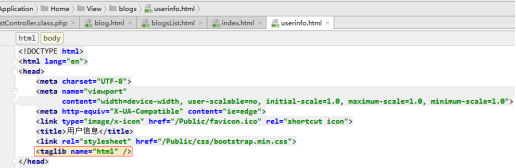
<taglib name="html" />
8. 在用到编辑器的地方加上:(哪里需要它就就调用)

<html:editor id="info" name="info" type="UEDITOR" >{$info.info}</html:editor>
综上效果

补充:使用UEDITOR存在数据库的资料带有标签和样式
当我们打印值的时候会出现如下情况(需要)
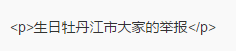

<{:htmlspecialchars_decode($xx['xx'])}>

Thinkphp 3.2.3配置百度编辑器(UEditor)的更多相关文章
- 关于百度编辑器UEditor的一点说明
大家在使用的时候要特别注意editor_config.js中的“URL”这个参数 我的理解:1.这个参数是editor整个结构的总路径 2.首先要把这个路径配置好了.才能正常的显示, ...
- [转载]百度编辑器-Ueditor使用
前段时间发表过一篇关于“KindEditor在JSP中使用”的博文.这几天在沈阳东软进行JavaWeb方面的实习工作,在一个CMS系统的后台和博客板块中又要用到文本编辑器,突然发现了这个——百度编辑器 ...
- 百度编辑器 ueditor .net开发
ueditor1.4.3 下载地址:http://pan.baidu.com/s/1bnCQVtd <!--editor--> <script type="text/j ...
- drupal7 安装百度编辑器Ueditor及后续使用
参考文章:drupal7安装百度编辑器ueditor 一.下载 1.需要下载安装的模块: 1.1.wysiwyg 1.2.ueditor 1.3Libraries 下载后安装在\sites\all\m ...
- 解决:百度编辑器UEditor,怎么将图片保存到图片服务器,或者上传到ftp服务器的问题(如果你正在用UE,这篇文章值得你看下)
在使用百度编辑器ueditor的时候,怎么将图片保存到另一个服务器,或者上传到ftp服务器?这个问题,估计很多使用UE的人会遇到.而且我百度过,没有找到这个问题的解决方案.那么:本篇文章就很适合你了. ...
- 百度编辑器UEditor,保存图片的配置问题
前言: 在使用百度编辑器UEditor的时候,如何将图片保存到服务器,我刚开始以为是要自己写上传文件的方法,后来发现只需要配置一下即可,如果你也正在使用百度富文本编辑器UEditor的话,这篇文章将非 ...
- 百度编辑器ueditor插入表格没有边框颜色的解决方法
附:从word excel 中 复制的表格提交后无边框,参考这个同学的,写的很详细: http://blog.csdn.net/lovelyelfpop/article/details/51678 ...
- 百度编辑器ueditor插入表格没有边框,没有颜色的解决方法 2015-01-06 09:24 98人阅读 评论(0) 收藏
百度富文本编辑器..很强大.. - - ,不过有些BUG..真的很无解.. 最近用这个,发现上传的表格全部没有表框.. 解决办法如下: 转载的.. 百度编辑器ueditor插入一个表格后,在编辑过程中 ...
- 百度编辑器ueditor 异步加载时,初始化没办法赋值bug解决方法
百度编辑器ueditor 异步加载时,初始化没办法赋值bug解决方法 金刚 前端 ueditor 初始化 因项目中使用了百度编辑器——ueditor.整体来说性能还不错. 发现问题 我在做一个编辑页面 ...
随机推荐
- boot分区剩余空间不足
Linux boot分区用于存放内核文件以及Linux一些启动配置文件,一般情况下分区大小为500M足够使用,如果出现空间不足的问题可以使用以下方法来解决. 查看已经安装的内核 dpkg --ge ...
- SQL反模式-1
SQL反模式讲了很多数据库设计中遇到的难题.跟我最近的工作很相关.因此特意拜读了下.本文主要讲解"多值列"和"幼稚的树" 多值列要分成映射表,比如(A,B),其 ...
- linux系统编程之进程(一):进程与程序
本节目标: 什么是程序 什么是进程 进程数据结构 进程与程序区别与联系 一,什么是程序? 程序是完成特定任务的一系列指令集合 二,什么是进程? 从用户的角度来看进程是程序的一次动态执行过程 从操作系统 ...
- visual studio 2015 update 3 简体中文企业版下载地址
文件名: cn_visual_studio_enterprise_2015_with_update_3_x86_x64_dvd_8923298.iso语言: Chinese - SimplifiedS ...
- 全球第一开源云ERP Odoo操作手册 模块安装和界面汉化指南
之前介绍了odoo的安装和初始设置以及数据库,下面来介绍odoo的模块安装和界面汉化. 1.4 模块安装和界面汉化 Odoo 的功能包含在不同的模块中, 刚创建的数据库除 Odoo 的核心模块外, 其 ...
- Spring 开发第一步(四)Spring与JDBC事务
Spring使用各种不同的TransactionManager来管理各种不同数据源事务底层(比如jdbc数据源.hibernate数据源.JPA数据源等等).在此基础上使用各种对应的Template来 ...
- 枚举类型内部函数 enumerate
enumerate()说明enumerate()是python的内置函数enumerate在字典上是枚举.列举的意思对于一个可迭代的(iterable)/可遍历的对象(如列表.字符串),enumera ...
- 编码CODING
摘自(复制)于海燕博客: http://www.cnblogs.com/haiyan123/p/7230533.html 1.内存和硬盘都是用来存储的. CPU:速度快 硬盘:永久保存 2.文本编辑器 ...
- 分布式ehcache缓存
今天在这里了记录一下学习ehcache分布式集群的过程. ehcache的三种最为常用集群方式,分别是 RMI.JGroups 以及 EhCache Server . 这里主要讲一下rmi方式. 1. ...
- 一次对webshell的后门的查看
本文作者i春秋作家——非主流 昨天晚上突发奇想的想去看看github上面tennc的webshell收集项目中的shell有没有漏洞,比如未授权啊啥的,结果找半天都没找到...但是机缘巧合下,居然给我 ...