
ios之UI中自定义cell
*:first-child {
margin-top: 0 !important; }
body > *:last-child {
margin-bottom: 0 !important; }
a {
color: #4183C4; }
a.absent {
color: #cc0000; }
a.anchor {
display: block;
padding-left: 30px;
margin-left: -30px;
cursor: pointer;
position: absolute;
top: 0;
left: 0;
bottom: 0; }
h1, h2, h3, h4, h5, h6 {
margin: 20px 0 10px;
padding: 0;
font-weight: bold;
-webkit-font-smoothing: antialiased;
cursor: text;
position: relative; }
h1:hover a.anchor, h2:hover a.anchor, h3:hover a.anchor, h4:hover a.anchor, h5:hover a.anchor, h6:hover a.anchor {
background: url(data:image/png;base64,iVBORw0KGgoAAAANSUhEUgAAABAAAAAQCAYAAAAf8/9hAAAAGXRFWHRTb2Z0d2FyZQBBZG9iZSBJbWFnZVJlYWR5ccllPAAAA09pVFh0WE1MOmNvbS5hZG9iZS54bXAAAAAAADw/eHBhY2tldCBiZWdpbj0i77u/IiBpZD0iVzVNME1wQ2VoaUh6cmVTek5UY3prYzlkIj8+IDx4OnhtcG1ldGEgeG1sbnM6eD0iYWRvYmU6bnM6bWV0YS8iIHg6eG1wdGs9IkFkb2JlIFhNUCBDb3JlIDUuMy1jMDExIDY2LjE0NTY2MSwgMjAxMi8wMi8wNi0xNDo1NjoyNyAgICAgICAgIj4gPHJkZjpSREYgeG1sbnM6cmRmPSJodHRwOi8vd3d3LnczLm9yZy8xOTk5LzAyLzIyLXJkZi1zeW50YXgtbnMjIj4gPHJkZjpEZXNjcmlwdGlvbiByZGY6YWJvdXQ9IiIgeG1sbnM6eG1wPSJodHRwOi8vbnMuYWRvYmUuY29tL3hhcC8xLjAvIiB4bWxuczp4bXBNTT0iaHR0cDovL25zLmFkb2JlLmNvbS94YXAvMS4wL21tLyIgeG1sbnM6c3RSZWY9Imh0dHA6Ly9ucy5hZG9iZS5jb20veGFwLzEuMC9zVHlwZS9SZXNvdXJjZVJlZiMiIHhtcDpDcmVhdG9yVG9vbD0iQWRvYmUgUGhvdG9zaG9wIENTNiAoMTMuMCAyMDEyMDMwNS5tLjQxNSAyMDEyLzAzLzA1OjIxOjAwOjAwKSAgKE1hY2ludG9zaCkiIHhtcE1NOkluc3RhbmNlSUQ9InhtcC5paWQ6OUM2NjlDQjI4ODBGMTFFMTg1ODlEODNERDJBRjUwQTQiIHhtcE1NOkRvY3VtZW50SUQ9InhtcC5kaWQ6OUM2NjlDQjM4ODBGMTFFMTg1ODlEODNERDJBRjUwQTQiPiA8eG1wTU06RGVyaXZlZEZyb20gc3RSZWY6aW5zdGFuY2VJRD0ieG1wLmlpZDo5QzY2OUNCMDg4MEYxMUUxODU4OUQ4M0REMkFGNTBBNCIgc3RSZWY6ZG9jdW1lbnRJRD0ieG1wLmRpZDo5QzY2OUNCMTg4MEYxMUUxODU4OUQ4M0REMkFGNTBBNCIvPiA8L3JkZjpEZXNjcmlwdGlvbj4gPC9yZGY6UkRGPiA8L3g6eG1wbWV0YT4gPD94cGFja2V0IGVuZD0iciI/PsQhXeAAAABfSURBVHjaYvz//z8DJYCRUgMYQAbAMBQIAvEqkBQWXI6sHqwHiwG70TTBxGaiWwjCTGgOUgJiF1J8wMRAIUA34B4Q76HUBelAfJYSA0CuMIEaRP8wGIkGMA54bgQIMACAmkXJi0hKJQAAAABJRU5ErkJggg==) no-repeat 10px center;
text-decoration: none; }
h1 tt, h1 code {
font-size: inherit; }
h2 tt, h2 code {
font-size: inherit; }
h3 tt, h3 code {
font-size: inherit; }
h4 tt, h4 code {
font-size: inherit; }
h5 tt, h5 code {
font-size: inherit; }
h6 tt, h6 code {
font-size: inherit; }
h1 {
font-size: 28px;
color: black; }
h2 {
font-size: 24px;
border-bottom: 1px solid #cccccc;
color: black; }
h3 {
font-size: 18px; }
h4 {
font-size: 16px; }
h5 {
font-size: 14px; }
h6 {
color: #777777;
font-size: 14px; }
p, blockquote, ul, ol, dl, li, table, pre {
margin: 15px 0; }
hr {
background: transparent url(data:image/png;base64,iVBORw0KGgoAAAANSUhEUgAAAAYAAAAECAYAAACtBE5DAAAAGXRFWHRTb2Z0d2FyZQBBZG9iZSBJbWFnZVJlYWR5ccllPAAAAyJpVFh0WE1MOmNvbS5hZG9iZS54bXAAAAAAADw/eHBhY2tldCBiZWdpbj0i77u/IiBpZD0iVzVNME1wQ2VoaUh6cmVTek5UY3prYzlkIj8+IDx4OnhtcG1ldGEgeG1sbnM6eD0iYWRvYmU6bnM6bWV0YS8iIHg6eG1wdGs9IkFkb2JlIFhNUCBDb3JlIDUuMC1jMDYwIDYxLjEzNDc3NywgMjAxMC8wMi8xMi0xNzozMjowMCAgICAgICAgIj4gPHJkZjpSREYgeG1sbnM6cmRmPSJodHRwOi8vd3d3LnczLm9yZy8xOTk5LzAyLzIyLXJkZi1zeW50YXgtbnMjIj4gPHJkZjpEZXNjcmlwdGlvbiByZGY6YWJvdXQ9IiIgeG1sbnM6eG1wPSJodHRwOi8vbnMuYWRvYmUuY29tL3hhcC8xLjAvIiB4bWxuczp4bXBNTT0iaHR0cDovL25zLmFkb2JlLmNvbS94YXAvMS4wL21tLyIgeG1sbnM6c3RSZWY9Imh0dHA6Ly9ucy5hZG9iZS5jb20veGFwLzEuMC9zVHlwZS9SZXNvdXJjZVJlZiMiIHhtcDpDcmVhdG9yVG9vbD0iQWRvYmUgUGhvdG9zaG9wIENTNSBNYWNpbnRvc2giIHhtcE1NOkluc3RhbmNlSUQ9InhtcC5paWQ6OENDRjNBN0E2NTZBMTFFMEI3QjRBODM4NzJDMjlGNDgiIHhtcE1NOkRvY3VtZW50SUQ9InhtcC5kaWQ6OENDRjNBN0I2NTZBMTFFMEI3QjRBODM4NzJDMjlGNDgiPiA8eG1wTU06RGVyaXZlZEZyb20gc3RSZWY6aW5zdGFuY2VJRD0ieG1wLmlpZDo4Q0NGM0E3ODY1NkExMUUwQjdCNEE4Mzg3MkMyOUY0OCIgc3RSZWY6ZG9jdW1lbnRJRD0ieG1wLmRpZDo4Q0NGM0E3OTY1NkExMUUwQjdCNEE4Mzg3MkMyOUY0OCIvPiA8L3JkZjpEZXNjcmlwdGlvbj4gPC9yZGY6UkRGPiA8L3g6eG1wbWV0YT4gPD94cGFja2V0IGVuZD0iciI/PqqezsUAAAAfSURBVHjaYmRABcYwBiM2QSA4y4hNEKYDQxAEAAIMAHNGAzhkPOlYAAAAAElFTkSuQmCC) repeat-x 0 0;
border: 0 none;
color: #cccccc;
height: 4px;
padding: 0;
}
body > h2:first-child {
margin-top: 0;
padding-top: 0; }
body > h1:first-child {
margin-top: 0;
padding-top: 0; }
body > h1:first-child + h2 {
margin-top: 0;
padding-top: 0; }
body > h3:first-child, body > h4:first-child, body > h5:first-child, body > h6:first-child {
margin-top: 0;
padding-top: 0; }
a:first-child h1, a:first-child h2, a:first-child h3, a:first-child h4, a:first-child h5, a:first-child h6 {
margin-top: 0;
padding-top: 0; }
h1 p, h2 p, h3 p, h4 p, h5 p, h6 p {
margin-top: 0; }
li p.first {
display: inline-block; }
li {
margin: 0; }
ul, ol {
padding-left: 30px; }
ul :first-child, ol :first-child {
margin-top: 0; }
dl {
padding: 0; }
dl dt {
font-size: 14px;
font-weight: bold;
font-style: italic;
padding: 0;
margin: 15px 0 5px; }
dl dt:first-child {
padding: 0; }
dl dt > :first-child {
margin-top: 0; }
dl dt > :last-child {
margin-bottom: 0; }
dl dd {
margin: 0 0 15px;
padding: 0 15px; }
dl dd > :first-child {
margin-top: 0; }
dl dd > :last-child {
margin-bottom: 0; }
blockquote {
border-left: 4px solid #dddddd;
padding: 0 15px;
color: #777777; }
blockquote > :first-child {
margin-top: 0; }
blockquote > :last-child {
margin-bottom: 0; }
table {
padding: 0;border-collapse: collapse; }
table tr {
border-top: 1px solid #cccccc;
background-color: white;
margin: 0;
padding: 0; }
table tr:nth-child(2n) {
background-color: #f8f8f8; }
table tr th {
font-weight: bold;
border: 1px solid #cccccc;
margin: 0;
padding: 6px 13px; }
table tr td {
border: 1px solid #cccccc;
margin: 0;
padding: 6px 13px; }
table tr th :first-child, table tr td :first-child {
margin-top: 0; }
table tr th :last-child, table tr td :last-child {
margin-bottom: 0; }
img {
max-width: 100%; }
span.frame {
display: block;
overflow: hidden; }
span.frame > span {
border: 1px solid #dddddd;
display: block;
float: left;
overflow: hidden;
margin: 13px 0 0;
padding: 7px;
width: auto; }
span.frame span img {
display: block;
float: left; }
span.frame span span {
clear: both;
color: #333333;
display: block;
padding: 5px 0 0; }
span.align-center {
display: block;
overflow: hidden;
clear: both; }
span.align-center > span {
display: block;
overflow: hidden;
margin: 13px auto 0;
text-align: center; }
span.align-center span img {
margin: 0 auto;
text-align: center; }
span.align-right {
display: block;
overflow: hidden;
clear: both; }
span.align-right > span {
display: block;
overflow: hidden;
margin: 13px 0 0;
text-align: right; }
span.align-right span img {
margin: 0;
text-align: right; }
span.float-left {
display: block;
margin-right: 13px;
overflow: hidden;
float: left; }
span.float-left span {
margin: 13px 0 0; }
span.float-right {
display: block;
margin-left: 13px;
overflow: hidden;
float: right; }
span.float-right > span {
display: block;
overflow: hidden;
margin: 13px auto 0;
text-align: right; }
code, tt {
margin: 0 2px;
padding: 0 5px;
white-space: nowrap;
border: 1px solid #eaeaea;
background-color: #f8f8f8;
border-radius: 3px; }
pre code {
margin: 0;
padding: 0;
white-space: pre;
border: none;
background: transparent; }
.highlight pre {
background-color: #f8f8f8;
border: 1px solid #cccccc;
font-size: 13px;
line-height: 19px;
overflow: auto;
padding: 6px 10px;
border-radius: 3px; }
pre {
background-color: #f8f8f8;
border: 1px solid #cccccc;
font-size: 13px;
line-height: 19px;
overflow: auto;
padding: 6px 10px;
border-radius: 3px; }
pre code, pre tt {
background-color: transparent;
border: none; }
sup {
font-size: 0.83em;
vertical-align: super;
line-height: 0;
}
* {
-webkit-print-color-adjust: exact;
}
@media screen and (min-width: 914px) {
body {
width: 854px;
margin:0 auto;
}
}
@media print {
table, pre {
page-break-inside: avoid;
}
pre {
word-wrap: break-word;
}
}
-->
自定义cell:frame,autolayout,xib,storyboard,不等高问题
利用frame和autolayout自定义cell
新建一个继承自UITableViewCell的子类,比如LJTgCell
@interface XMGTgCell : UITableViewCell

@end
在LJTgCell.m文件中
- 重写
-initWithStyle:reuseIdentifier:方法- 在这个方法中添加所有需要显示的子控件
- 给子控件做一些初始化设置(设置字体、文字颜色等)
- 注意:如果是autolayout就要
添加子控件的完整约束
/**

 *  在这个方法中添加所有的子控件

 */

- (instancetype)initWithStyle:(UITableViewCellStyle)style reuseIdentifier:(NSString *)reuseIdentifier

{

    if (self = [super initWithStyle:style reuseIdentifier:reuseIdentifier]) {

        // ......

    }

    return self;

}- 重写
-layoutSubviews方法- 一定要调用
[super layoutSubviews] - 在这个方法中计算和设置所有子控件的frame
- 一定要调用
/**

 *  在这个方法中计算所有子控件的frame

 */

- (void)layoutSubviews

{

    [super layoutSubviews]; // 这句话很容易漏写
    // ......

}
在LJTgCell.h文件中提供一个模型属性,比如LJTg模型
@class LJTg;

@interface LJTgCell : UITableViewCell

/** 团购模型数据 */

@property (nonatomic, strong) LJTg *tg;

@end
在LJTgCell.m中重写模型属性的set方法
- 在set方法中给子控件设置模型数据
- (void)setTg:(XMGTg *)tg

{

    _tg = tg;

    // .......

}
在控制器中
- 实现数据源方法
// 有多少组

- (NSInteger)numberOfSectionsInTableView:(UITableView *)tableView

// 每组有多少行

- (NSInteger)tableView:(UITableView *)tableView

  numberOfRowsInSection:(NSInteger)section

// 每行里面的内容

- (UITableViewCell *)tableView:(UITableView *)tableView

cellForRowAtIndexPath:(NSIndexPath *)indexPath- 注册cell的类型(frame版)
[self.tableView registerClass:[LJTgCell class] forCellReuseIdentifier:ID];- 注意:注册cell的类型(xib版)
[self.tableView registerNib:[UINib nibWithNibName:

NSStringFromClass([LJTgCell class]) bundle:nil]forCellReuseIdentifier:ID];- 给cell传递模型数据
- (UITableViewCell *)tableView:(UITableView *)tableView cellForRowAtIndexPath:(NSIndexPath *)indexPath

{

    // 访问缓存池

    XMGTgCell *cell = [tableView dequeueReusableCellWithIdentifier:ID];

    // 设置数据(传递模型数据)

    cell.tg = self.tgArray[indexPath.row];

    return cell;

}
利用xib自定义cell
新建一个继承自UITableViewCell的子类,比如LJTgCell
@interface LJTgCell : UITableViewCell@end新建一个xib文件(文件名最好跟类名一致,比如LJTgCell.xib)
- 可以在新建cell类上直接新建对应的xib文件

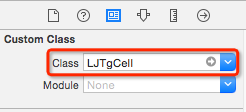
- 修改cell的class为LJTgCell
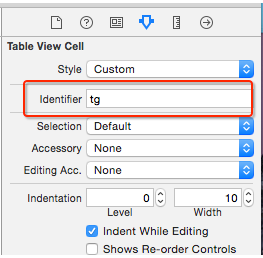
- 绑定循环利用标识
- 添加子控件,设置子控件约束

- 将子控件连线到类扩展中
@interface LJTgCell()

@property (weak, nonatomic) IBOutlet UIImageView *iconImageView;

@property (weak, nonatomic) IBOutlet UILabel *titleLabel;

@property (weak, nonatomic) IBOutlet UILabel *priceLabel;

@property (weak, nonatomic) IBOutlet UILabel *buyCountLabel;

@end
在LJTgCell.h文件中提供一个模型属性,比如LJTg模型
@class LJTg;

@interface LJTgCell : UITableViewCell

/** 团购模型数据 */

@property (nonatomic, strong) LJTg *tg;

@end
在LJTgCell.m中重写模型属性的set方法
- 在set方法中给子控件设置模型数据
- (void)setTg:(Tg *)tg

{

    _tg = tg;

    // .......

}
在控制器中
- 注册xib文件(xib版)
[self.tableView registerNib:[UINibnibWithNibName:

NSStringFromClass([LJTgCell class]) bundle:nil] forCellReuseIdentifier:ID];- 给cell传递模型数据
- (UITableViewCell *)tableView:(UITableView *)tableView

  cellForRowAtIndexPath:(NSIndexPath *)indexPath

{

    // 访问缓存池

    LJTgCell *cell = [tableView dequeueReusableCellWithIdentifier:ID];

    // 设置数据(传递模型数据)

    cell.tg = self.tgs[indexPath.row];

    return cell;

}
利用stroyboard自定义cell
新建一个继承自UITableViewCell的子类,比如LJTgCell
@interface LJTgCell : UITableViewCell

@end
在storyboard文件中,找到UITableView里面的cell(动态cell)
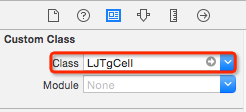
- 修改cell的class为LJTgCell
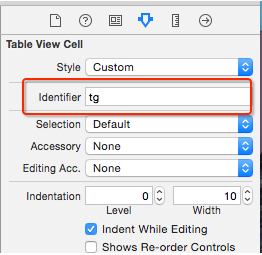
- 绑定循环利用标识(此时就不用在控制器中注册了)
- 添加子控件,设置子控件约束
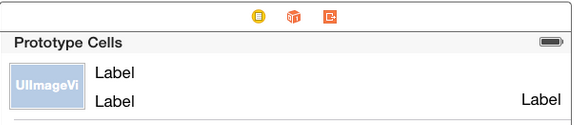
- 将子控件连线到类扩展中
@interface LJTgCell()

@property (weak, nonatomic) IBOutlet UIImageView *iconImageView;

@property (weak, nonatomic) IBOutlet UILabel *titleLabel;

@property (weak, nonatomic) IBOutlet UILabel *priceLabel;

@property (weak, nonatomic) IBOutlet UILabel *buyCountLabel;

@end
cell不等高的方法(2种)
方法一:直接在控制器设置height的viewDidLoad方法中设置
- (void)viewDidLoad {

    [super viewDidLoad];

    // 告诉tableView所有cell的真实高度是自动计算(根据设置的约束来计算)

    self.tableView.rowHeight = UITableViewAutomaticDimension;

    // 告诉tableView所有cell的估算高度

    self.tableView.estimatedRowHeight = 44;

}
方法二:给模型增加frame数据
在LJStatus.m中
- 所有子控件的frame
- cell的高度
@interface LJStatus : NSObject

/**** 文字\图片数据 ****/

// .....

/**** frame数据 ****/

/** 头像的frame */

@property (nonatomic, assign) CGRect iconFrame;

// .....

/** cell的高度 */

@property (nonatomic, assign) CGFloat cellH;

@end- 重写模型cellH属性的get方法
- (CGFloat)cellH

{

    if (_cellH == 0) {

        // ... 计算所有子控件的frame、cell的高度

    }

    return _cellH;

}
在控制器中
- 实现一个返回cell高度的代理方法
- 在这个方法中返回indexPath位置对应cell的高度
/**

 *  返回每一行cell的具体高度

 */

- (CGFloat)tableView:(UITableView *)tableView heightForRowAtIndexPath:(NSIndexPath *)indexPath

{

    LJStatus *status = self.statuses[indexPath.row];

    return status.cellH;

}- 给cell传递模型数据
- (UITableViewCell *)tableView:(UITableView *)tableView cellForRowAtIndexPath:(NSIndexPath *)indexPath

{

    static NSString *ID = @"status";

    // 访问缓存池

    LJStatusCell *cell = [tableView dequeueReusableCellWithIdentifier:ID];

    // 设置数据(传递模型数据)

    cell.status = self.statuses[indexPath.row];

    return cell;

}新建一个继承自UITableViewCell的子类,比如LJStatusCell
@interface LJStatusCell : UITableViewCell

@end
在LJStatusCell.m文件中
- 重写
-initWithStyle:reuseIdentifier:方法- 在这个方法中添加所有可能显示的子控件
- 给子控件做一些初始化设置(设置字体、文字颜色等)
/**

 *  在这个方法中添加所有的子控件

 */

- (instancetype)initWithStyle:(UITableViewCellStyle)style reuseIdentifier:(NSString *)reuseIdentifier

{

    if (self = [super initWithStyle:style reuseIdentifier:reuseIdentifier]) {

        // ......

    }

    return self;

}
在LJStatusCell.h文件中提供一个模型属性,比如LJStatus模型
@class LJStatus;

@interface LJStatusCell : UITableViewCell

/** 团购模型数据 */

@property (nonatomic, strong) LJStatus *status;

@end
在LJStatusCell.m文件中重写模型属性的set方法
- 在set方法中给子控件设置模型数据
- (void)setStatus:(LJStatus *)status

{

    _status = status;

    // .......

}重写-layoutSubviews方法
- 一定要调用
[super layoutSubviews] - 在这个方法中
设置所有子控件的frame
/**

 *  在这个方法中设置所有子控件的frame

 */

- (void)layoutSubviews

{

    [super layoutSubviews];

    // ......

}
ios之UI中自定义cell的更多相关文章
- ios中自定义cell 设置cell的分组结构
ios系统默认的cell并不能满足我们的需求 这个时候就需要自定义我们的cell 自定义cell为分组的时候 需要设置分组样式 以下是我常用分组的二种方法: 第一是 在自定义的UITableView ...
- iOS中 自定义cell升级版 (高级)
接上次分享的自定义cell进行了优化:http://blog.csdn.net/qq_31810357/article/details/49611255 指定根视图: self.window.root ...
- iOS之UITableView中的cell因为重用机制导致新的cell的数据出现重复或者错乱
UITableView中的cell可以有很多,一般会通过重用cell来达到节省内存的目的:通过为每个cell指定一个重用标识符(reuseIdentifier),即指定了单元格的种类,当cell滚 ...
- iOS中 自定义cell分割线/分割线偏移 韩俊强的博客
在项目开发中我们会常常遇到tableView 的cell分割线显示不全,左边会空出一截像素,更有甚者想改变系统的分割线,并且只要上下分割线的一个等等需求,今天重点解决以上需求,仅供参考: 每日更新关注 ...
- iOS 中自定义 cell,点击cell的时候文字不出现的原因
解决方案: 在setSelected方法中设置要显示label的背景颜色即可
- iOS开发UI中懒加载的使用方法
1.懒加载基本 懒加载——也称为延迟加载,即在需要的时候才加载(效率低,占用内存小).所谓懒加载,写的是其getter方法.说的通俗一点,就是在开发中,当程序中需要利用的资源时.在程序启动的时候不加载 ...
- iOS开发总结-UITableView 自定义cell和动态计算cell的高度
UITableView cell自定义头文件:shopCell.h#import <UIKit/UIKit.h>@interface shopCell : UITableViewCell@ ...
- iOS开发UI篇—自定义layer
一.第一种方式 1.简单说明 以前想要在view中画东西,需要自定义view,创建一个类与之关联,让这个类继承自UIView,然后重写它的DrawRect:方法,然后在该方法中画图. 绘制图形的步骤: ...
- iOS开发——UI基础-自定义构造方法,layoutSubviews,Xib文件,利用Xib自定义View
一.自定义构造方法 有时候需要快速创建对象,可以自定义构造方法 + (instancetype)shopView { return [[self alloc] init]; } - (instance ...
随机推荐
- JsTree异步加载数据实现多级菜单
最近在搞一个项目的维护,有一个问题是把原来的树导航变成多级的,原来的那个导航是JsTree的,但我又不熟悉,遂头疼了好久... 终于,他还是出来了,下面就贴上主要代码和思路,因为我在搞这个东西的时候在 ...
- MongoDB入门三步曲1--安装、基本操作
mongodb 基本操作 目录 mongodb安装 mongod启动 mongo shell启动 mongod 停止 mongodb基本操作:CRUD 数据插入 数据查询 数据更新 数据删除 集合删除 ...
- Oracle表空间传输测试
源数据库平台:window 7 64bit Oracle 11g 64bit目标数据库平台:RHEL6 64bit Oracle 11g 64bit 1.查看数据集 select * from nls ...
- 同样的一句SQL语句在pl/sql 代码块中count 没有数据,但是直接用SQl 执行却可以count 得到结果
pl/sql 代码块: SELECT count(distinct t2.so_nbr) INTO v_count2 FROM KFGL_YW_STEP_qd t2 WHERE t2.partitio ...
- 【WPF】路由事件
总结WPF中的路由事件,我将学到的内容分为四部分来逐渐掌握 第一部分:wpf中内置的路由事件 以Button的Click事件来说明内置路由事件的使用 XAML代码: <Window x:Clas ...
- hive--UDF、UDAF
1.UDF package com.example.hive.udf; import org.apache.hadoop.hive.ql.exec.UDF; import org.apache.had ...
- MVC-内容详情页显示内容
@model InfoDataProvider.DataModel.FAQ_ContentUser 内容Content字段:如果里面有html标签. @Html.DisplayFor(p => ...
- 深度(Depth)概念
强化对深度的理解 在老版本的NGUI中,UI的显示层次关系是依靠z轴进行的.在新版本的NGUI中,所有UI的z轴都被统一,然后用深度来决定和管理显示的层次关系.关于深度,要记住一下关键点: 1.每一个 ...
- Git权威指南 读笔(3)
第九章 恢复进度: $ git stash list 显示存储的工作进度列表. $ git stash 保存当前的工作进度,分别对暂存区和工作区的状态进行保存. $ git stash pop [-- ...
- 关于新的man版本出现“无法解析 /usr/share/man/zh_CN/man1/ls.1.gz: 没有那个文件或目录“
今天学习了下man,有关详细资料参考:http://www.cnblogs.com/hnrainll/archive/2011/09/06/2168604.html toor@door:/usr/sh ...