
cocos2d-x游戏开发 跑酷(三) 人物跑动
原创。转载请注明出处:http://blog.csdn.net/dawn_moon/article/details/21245881
好吧。最终要跑起来了。
要实现跑酷须要用到帧动画,什么是帧动画,不解释行么。
介绍一个将小图打包的工具TexturePacker,这是一个非常强大的工具,另外另一个物理编辑器PhysicsEditor,也不错,地址:http://www.codeandweb.com。刚好上周收到工具作者给的free
licences,感谢一下。有兴趣的同学能够去申请一下。
载入精灵的一个比較高效的方式是用CCSpriteFrameCache和CCSpriteBatchNode配合使用。先讲一下这个使用方法。
以下几个步骤:
1.将打包好的大图和生成的plist文件载入到CCSpriteFrameCache,假设这两个文件名称除后缀不同其他全然一样的话。直接载入plist文件就能够了。
2.用大图生成一个CCSpriteBatchNode对象batch_node,并将其增加到当前场景addChild(batch_node)。
3.通过CCSprite::spriteWithSpriteFrame或CCSprite::spriteWithSpriteFrameName创建精灵。
4.将上一步生成的精灵通过addChild增加到bath_node就可以。
后面会有具体代码
创建Runner.cpp
- //
- // Runner.h
- // Parkour
- //
- // Created by lerry on 14-3-14.
- //
- //
- #ifndef __Parkour__Runner__
- #define __Parkour__Runner__
- #include "cocos2d.h"
- #include "Box2D.h"
- #include "resources.h"
- enum RunnerState{
- running,
- jumping,
- crouch
- };
- class Runner : public cocos2d::CCNode
- {
- cocos2d::CCSprite* mRunner;
- cocos2d::CCSize mRunningSize;
- cocos2d::CCAction* mRunningAction;
- cocos2d::CCSpriteBatchNode* mBatchNode;
- b2World* mWorld;
- RunnerState mState;
- private:
- void initAction();
- void initBody();
- void initShape();
- public:
- bool init(b2World* world, cocos2d::CCSpriteBatchNode* batchNode);
- virtual void update(float dt);
- static Runner* create(b2World* world, cocos2d::CCSpriteBatchNode* batchNode);
- };
- #endif /* defined(__Parkour__Runner__) */
继承CCnode,由于后面会有一个物理世界,所以重写了create函数和init函数。这两个函数还是保持与引擎一致,创建的对象也是自己主动释放对象。本节没有增加物理世界的实现,仅仅是实现一个跑动的人物。
- //
- // Runner.cpp
- // Parkour
- //
- // Created by lerry on 14-3-14.
- //
- //
- #include "Runner.h"
- USING_NS_CC;
- Runner* Runner::create(b2World *world, CCSpriteBatchNode* batchNode)
- {
- Runner* runner = new Runner();
- if (runner && runner->init(world, batchNode)) {
- runner->autorelease();
- return runner;
- }else
- {
- delete runner;
- runner = NULL;
- return NULL;
- }
- }
- bool Runner::init(b2World *world, CCSpriteBatchNode* batchNode)
- {
- if (!CCNode::init()) {
- return false;
- }
- // box2d的物理世界
- this->mWorld = world;
- this->mBatchNode = batchNode;
- initAction();
- initBody();
- initShape();
- mRunner = CCSprite::createWithSpriteFrameName(runner0);
- // 通过名字获取animation
- CCAnimation* animation = CCAnimationCache::sharedAnimationCache()->animationByName("running");
- mRunner->setPosition(ccp(85, 50));
- mRunner->runAction(CCRepeatForever::create(CCAnimate::create(animation)));
- mBatchNode->addChild(mRunner);
- return true;
- }
- void Runner::update(float dt)
- {
- }
- void Runner::initAction()
- {
- CCArray* animateFrames = CCArray::create();
- char str[50] = {0};
- for (int i = 0; i != 8; ++i) {
- sprintf(str, "runner%d.png", i);
- animateFrames->addObject(CCSpriteFrameCache::sharedSpriteFrameCache()->spriteFrameByName(str));
- }
- CCAnimation* animation = CCAnimation::createWithSpriteFrames(animateFrames, 0.1);
- animation->setRestoreOriginalFrame(true);
- // animation 命名
- CCAnimationCache::sharedAnimationCache()->addAnimation(animation, "running");
- }
- void Runner::initBody()
- {
- }
- void Runner::initShape()
- {
- }
mWorld和mBatchNode会由PlayScene传进来。
这里主要实现了initAction。动画的实现与JS版的稍稍有点差别。
由于命名问题。我将资源文件又又一次命名了一下
- //
- // resources.h
- // Parkour
- //
- // Created by lerry on 14-3-13.
- // Copyright (c) 2014年 Goonear Co.,Ltd. All rights reserved.
- //
- #ifndef Parkour_resources_h
- #define Parkour_resources_h
- static const char backmusic[] = "background.mp3";
- static const char jummpmusic[] = "jump.mp3";
- static const char crouchmusic[] = "crouch.mp3";
- static const char spritesheet[] = "parkour.plist";
- static const char spritePacker[] = "parkour.png";
- static const char runner0[] = "runner0.png";
- #endif
如今须要改动PlayerScene的init函数,增加人物,变成以下这样:
- bool PlayScene::init()
- {
- if(!CCLayer::init()){
- return false;
- }
- initPhysics();
- CCSpriteFrameCache::sharedSpriteFrameCache()->addSpriteFramesWithFile(spritesheet);
- CCSpriteBatchNode* spriteBatch = CCSpriteBatchNode::create(spritePacker);
- this->addChild(spriteBatch);
- mRunner = Runner::create(mWorld, spriteBatch);
- this->addChild(mRunner);
- // 调用update函数
- scheduleUpdate();
- return true;
- }
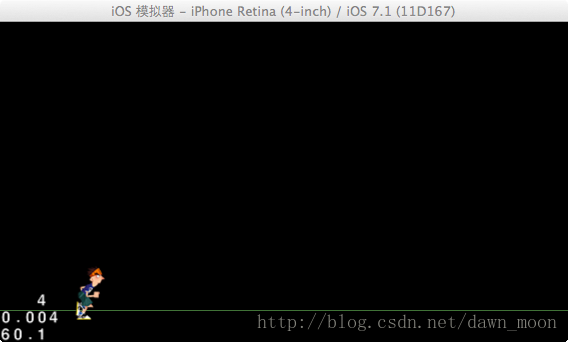
好了,跑起来了
cocos2d-x游戏开发 跑酷(三) 人物跑动的更多相关文章
- iOS cocos2d 2游戏开发实战(第3版)书评
2013是游戏爆发的一年,手游用户也是飞速暴增.虽然自己不做游戏,但也是时刻了解手机应用开发的新动向.看到CSDN的"写书评得技术图书赢下载分"活动,就申请了一本<iOS c ...
- cocos2d-x游戏开发 跑酷(两) 物理世界
原创.转载请注明出处:http://blog.csdn.net/dawn_moon/article/details/21240343 泰然的跑酷用的chipmunk物理引擎.我没有细致学过这个东西. ...
- HTML5 Canvas游戏开发(三)lufylegend开源库件(上)
lufylegend可以解决HTML5开发游戏中会遇到的一些问题: 1.各种浏览器对于JavaScript和HTML的解析是不一致的. 2.手机浏览器和PC浏览器的区别. 3.JavaScript并非 ...
- cocos2d-x游戏开发 跑酷(四) 关联与物理世界
原创.转载注明出处http://blog.csdn.net/dawn_moon/article/details/21451077 前面一节尽管实现了一个跑动的人物,可是他只不过一个精灵在运行一个跑动的 ...
- cocos2d-x游戏开发 跑酷(八) 对象管理 碰撞检測
对象管理类的原理是这种: ObjectManager类是一个单例类,全局仅仅有一个对象实例存在.初始化的时候创建两个数组CCArray来保存金币和岩石.为什么要保存,由于在地图重载的时候.要销毁看不见 ...
- cocos2d-x游戏开发 跑酷(九) 源代码下载及小结
这个东西零零碎碎写了一个礼拜吧. 事实上也没多少东西在里面.文章后附下载地址 博客地址:http://blog.csdn.net/dawn_moon 由于我没用过chipmunk,并且它是面向过程的东 ...
- three.js尝试(二)模拟游戏开发:3D人物在地图上行走
本次尝试,模拟了一个小人物在场景中行走,使用简单模型建立了森林,图片纹理模拟草地,加载3D模型呈现人物,使用按键asdw模拟人物的行走,行走和站立时人物的切换等. 主要用到点:3D模型的加载,模型的动 ...
- (转载)如何学好iphone游戏开发
转自:http://www.cnblogs.com/zilongshanren/archive/2011/09/19/2181558.html 自从发布<如何学习iphone游戏开发>到 ...
- 整理了一下浅墨大神的Visual C++/DirectX 9.0c的游戏开发手记
还是非常棒的博客,只是没有一个文件夹.所以自己做了一个山寨文件夹在这里.便于随时查找. 前面31期从略. [Visual C++]游戏开发笔记三十二 浅墨DirectX提高班之中的一个 DirectX ...
随机推荐
- B2C B2B C2C O2O模式的介绍
b2c:天猫 商家对客户 c2c:淘宝 客户到客户(卖家也是阿里公司的客户) o2o:美团 线上花费,下 ...
- 特殊权限stick_bit
stick_bit 防删除位:文件是否可以被某用户删除,主要取决于该文件所在的目录是否对该用户具有写权限.如果没有写权限,则这个目录下的所有文件都不能删除,同时也不能添加新的文件.如果希望用户能够添加 ...
- Beta阶段冲刺---Day1
一.Daily Scrum Meeting照片 二.讨论项目每个成员的昨天进展 由于今天是Beta阶段冲刺的第一天,因此每个成员没有昨日进展. 我们在昨天把未来五天的其他科目的作业都一起做完了(手动斜 ...
- $_SERVER['URI']
WordPress通过301重定向实现非首先域(非www)跳转向本来是一个很简单事情,由于没弄清楚$_SERVER['HTTP_X_REWRITE_URL'] 和$_SERVER['REQUEST_U ...
- JavaScript循环语句-6---for语句,while语句的应用逻辑
JavaScript循环语句 学习目标 1.掌握for语句的语法结构 2.掌握for语句的应用逻辑 for语句 语法: For(语句1:语句2:语句3){ 被执行的代码块: } 语句1:在循环(代码块 ...
- The group WHATEVER is formed today
Duang Duang!我们团队今天正式成立啦 团队名称:WHATEVER 团队成员如下: 个人介绍:天明宝,性别:女,爱好:偷懒 心有鸿鹄大志,却只有麻雀之行.一直在与自己做斗争,是个矛盾的综合体. ...
- block-chain
维护一条链,只能增加记录,不能删除.修改. 去中心化,达到共识 密码学,保证交易无法抵赖和破坏 共识机制 PoW(Proof of Work),工作量证明,是一个博弈论的应用,来防止作恶. 示例:两个 ...
- PHP设计模式之观察者模式(转)
开篇还是从名字说起,“观察者模式”的观察者三个字信息量很大.玩过很多网络游戏的童鞋们应该知道,即便是斗地主,除了玩家,还有一个角色叫“观察者".在我们今天他谈论的模式设计中,观察者也是如此. ...
- 【linux基础】linux远程登录
可以用ssh命令行方式登录.对方需要开启ssh服务. 1. https://blog.csdn.net/zilaike/article/details/78922524 2. https://blog ...
- python 网络数据采集1
python3 网络数据采集1 第一部分: 一.可靠的网络连接: 使用库: python标准库: urllib python第三方库:BeautifulSoup 安装:pip3 install be ...