
恶意代码分析-使用apataDNS+inetsim模拟网络环境
准备工作
虚拟机安装:
Win7
Ubuntu
apateDNS 密码:wplo
inetsim 密码:ghla
客户端Win7需要做的工作
安装apateDNS
服务器端Ubuntu需要做的工作
下载inetsim,解压后将文件夹拷贝到Ubuntu系统。在 inetsim-1.2.5/cnf 下,将原本的配置文件 inetsim.conf 重名为任意不同于此的文件名(使其失效)。创建新的配置文件inetsim.conf ,并在其中写入(且将下列内容中的 xx.xx.xx.xx 替换为自己Ubuntu系统的IP地址):
#############################################################
#
# INetSim configuration file
#
#############################################################

#############################################################
# Main configuration
#############################################################

#########################################
# start_service
#
# The services to start
#
# Syntax: start_service <service name>
#
# Default: none
#
# Available service names are:
# dns, http, smtp, pop3, tftp, ftp, ntp, time_tcp,
# time_udp, daytime_tcp, daytime_udp, echo_tcp,
# echo_udp, discard_tcp, discard_udp, quotd_tcp,
# quotd_udp, chargen_tcp, chargen_udp, finger,
# ident, syslog, dummy_tcp, dummy_udp, smtps, pop3s,
# ftps, irc, https
#
start_service dns
start_service http
start_service https
start_service smtp
start_service smtps
start_service pop3
start_service pop3s
start_service ftp
start_service ftps
start_service tftp
start_service irc
start_service ntp
start_service finger
start_service ident
start_service syslog
start_service time_tcp
start_service time_udp
start_service daytime_tcp
start_service daytime_udp
start_service echo_tcp
start_service echo_udp
start_service discard_tcp
start_service discard_udp
start_service quotd_tcp
start_service quotd_udp
start_service chargen_tcp
start_service chargen_udp
start_service dummy_tcp
start_service dummy_udp

#########################################
# service_bind_address
#
# IP address to bind services to
#
# Syntax: service_bind_address <IP address>
#
# Default: 127.0.0.1
#
service_bind_address    xx.xx.xx.xx

#########################################
# service_run_as_user
#
# User to run services
#
# Syntax: service_run_as_user <username>
#
# Default: nobody
#
#service_run_as_user    inetsim

#########################################
# service_max_childs
#
# Maximum number of child processes (parallel connections)
# for each service
#
# Syntax: service_max_childs [1..30]
#
# Default: 10
#
#service_max_childs 15

#########################################
# service_timeout
#
# If a client does not send any data for the number of seconds
# given here, the corresponding connection will be closed.
#
# Syntax: service_timeout [1..600]
#
# Default: 120
#
#service_timeout    60

#########################################
# create_reports
#
# Create report with a summary of connections
# for the session on shutdown
#
# Syntax: create_reports [yes|no]
#
# Default: yes
#
#create_reports     no

#########################################
# report_language
#
# Set language for reports
# Note: Currently only languages 'en' and 'de' are supported
#
# Syntax: report_language <language>
#
# Default: en
#
#report_language    de

#############################################################
# Faketime
#############################################################

#########################################
# faketime_init_delta
#
# Initial number of seconds (positive or negative)
# relative to current date/time for fake time used by all services
#
# Syntax: faketime_init_delta <number of seconds>
#
# Default: 0  (use current date/time)
#
#faketime_init_delta    1000

#########################################
# faketime_auto_delay
#
# Number of seconds to wait before incrementing fake time
# by value specified with 'faketime_auto_increment'.
# Setting to '0' disables this option.
#
# Syntax: faketime_auto_delay [0..86400]
#
# Default: 0  (disabled)
#
#faketime_auto_delay    1000

#########################################
# faketime_auto_increment
#
# Number of seconds by which fake time is incremented at
# regular intervals specified by 'faketime_auto_delay'.
# This option only takes effect if 'faketime_auto_delay'
# is enabled (not set to '0').
#
# Syntax: faketime_auto_increment [-31536000..31536000]
#
# Default: 3600
#
#faketime_auto_increment    86400

#############################################################
# Service DNS
#############################################################

#########################################
# dns_bind_port
#
# Port number to bind DNS service to
#
# Syntax: dns_bind_port <port number>
#
# Default: 53
#
#dns_bind_port      53

#########################################
# dns_default_ip
#
# Default IP address to return with DNS replies
#
# Syntax: dns_default_ip <IP address>
#
# Default: 127.0.0.1
#
dns_default_ip      xx.xx.xx.xx

#########################################
# dns_default_hostname
#
# Default hostname to return with DNS replies
#
# Syntax: dns_default_hostname <hostname>
#
# Default: www
#
#dns_default_hostname       somehost

#########################################
# dns_default_domainname
#
# Default domain name to return with DNS replies
#
# Syntax: dns_default_domainname <domain name>
#
# Default: inetsim.org
#
#dns_default_domainname     some.domain

#########################################
# dns_static
#
# Static mappings for DNS
#
# Syntax: dns_static <fqdn hostname> <IP address>
#
# Default: none
#
#dns_static www.foo.com 10.10.10.10
#dns_static ns1.foo.com 10.70.50.30
#dns_static ftp.bar.net 10.10.20.30

#########################################
# dns_version
#
# DNS version
#
# Syntax: dns_version <version>
#
# Default: "INetSim DNS Server"
#
#dns_version "9.2.4"

#############################################################
# Service HTTP
#############################################################

#########################################
# http_bind_port
#
# Port number to bind HTTP service to
#
# Syntax: http_bind_port <port number>
#
# Default: 80
#
#http_bind_port     80

#########################################
# http_version
#
# Version string to return in HTTP replies
#
# Syntax: http_version <string>
#
# Default: "INetSim HTTP server"
#
#http_version       "Microsoft-IIS/4.0"

#########################################
# http_fakemode
#
# Turn HTTP fake mode on or off
#
# Syntax: http_fakemode [yes|no]
#
# Default: yes
#
#http_fakemode      no

#########################################
# http_fakefile
#
# Fake files returned in fake mode based on the file extension
# in the HTTP request.
# The fake files must be placed in <data-dir>/http/fakefiles
#
# Syntax: http_fakefile <extension> <filename> <mime-type>
#
# Default: none
#
http_fakefile       txt sample.txt  text/plain
http_fakefile       htm sample.html text/html
http_fakefile       html    sample.html text/html
http_fakefile       php sample.html text/html
http_fakefile       gif sample.gif  image/gif
http_fakefile       jpg sample.jpg  image/jpeg
http_fakefile       jpeg    sample.jpg  image/jpeg
http_fakefile       png sample.png  image/png
http_fakefile       bmp sample.bmp  image/x-ms-bmp
http_fakefile       ico favicon.ico image/x-icon
http_fakefile       exe sample_gui.exe  x-msdos-program
http_fakefile       com sample_gui.exe  x-msdos-program

#########################################
# http_default_fakefile
#
# The default fake file returned in fake mode if the file extension
# in the HTTP request does not match any of the extensions
# defined above.
#
# The default fake file must be placed in <data-dir>/http/fakefiles
#
# Syntax: http_default_fakefile <filename> <mime-type>
#
# Default: none
#
http_default_fakefile   sample.html text/html

#########################################
# http_static_fakefile
#
# Fake files returned in fake mode based on static path.
# The fake files must be placed in <data-dir>/http/fakefiles
#
# Syntax: http_static_fakefile <path> <filename> <mime-type>
#
# Default: none
#
#http_static_fakefile   /path/          sample_gui.exe  x-msdos-program
#http_static_fakefile   /path/to/file.exe   sample_gui.exe  x-msdos-program

#############################################################
# Service HTTPS
#############################################################

#########################################
# https_bind_port
#
# Port number to bind HTTPS service to
#
# Syntax: https_bind_port <port number>
#
# Default: 443
#
#https_bind_port        443

#########################################
# https_version
#
# Version string to return in HTTPS replies
#
# Syntax: https_version <string>
#
# Default: "INetSim HTTPs server"
#
#https_version      "Microsoft-IIS/4.0"

#########################################
# https_fakemode
#
# Turn HTTPS fake mode on or off
#
# Syntax: https_fakemode [yes|no]
#
# Default: yes
#
#https_fakemode     no

#########################################
# https_fakefile
#
# Fake files returned in fake mode based on the file extension
# in the HTTPS request.
# The fake files must be placed in <data-dir>/http/fakefiles
#
# Syntax: https_fakefile <extension> <filename> <mime-type>
#
# Default: none
#
https_fakefile      txt sample.txt  text/plain
https_fakefile      htm sample.html text/html
https_fakefile      html    sample.html text/html
https_fakefile      php sample.html text/html
https_fakefile      gif sample.gif  image/gif
https_fakefile      jpg sample.jpg  image/jpeg
https_fakefile      jpeg    sample.jpg  image/jpeg
https_fakefile      png sample.png  image/png
https_fakefile      bmp sample.bmp  image/x-ms-bmp
https_fakefile      ico favicon.ico image/x-icon
https_fakefile      exe sample_gui.exe  x-msdos-program
https_fakefile      com sample_gui.exe  x-msdos-program

#########################################
# https_default_fakefile
#
# The default fake file returned in fake mode if the file extension
# in the HTTPS request does not match any of the extensions
# defined above.
#
# The default fake file must be placed in <data-dir>/http/fakefiles
#
# Syntax: https_default_fakefile <filename> <mime-type>
#
# Default: none
#
https_default_fakefile  sample.html text/html

#########################################
# https_static_fakefile
#
# Fake files returned in fake mode based on static path.
# The fake files must be placed in <data-dir>/http/fakefiles
#
# Syntax: https_static_fakefile <path> <filename> <mime-type>
#
# Default: none
#
#https_static_fakefile  /path/          sample_gui.exe  x-msdos-program
#https_static_fakefile  /path/to/file.exe   sample_gui.exe  x-msdos-program

#########################################
# https_ssl_keyfile
#
# Name of the SSL private key PEM file.
# The key MUST NOT be encrypted!
#
# The file must be placed in <data-dir>/certs/
#
# Syntax: https_ssl_keyfile <filename>
#
# Default: default_key.pem
#
#https_ssl_keyfile  https_key.pem

#########################################
# https_ssl_certfile
#
# Name of the SSL certificate file.
#
# The file must be placed in <data-dir>/certs/
#
# Syntax: https_ssl_certfile <filename>
#
# Default: default_cert.pem
#
#https_ssl_certfile https_cert.pem

#########################################
# https_ssl_dhfile
#
# Name of the Diffie-Hellman parameter PEM file.
#
# The file must be placed in <data-dir>/certs/
#
# Syntax: https_ssl_dhfile <filename>
#
# Default: none
#
#https_ssl_dhfile   https_dh1024.pem

#############################################################
# Service SMTP
#############################################################

#########################################
# smtp_bind_port
#
# Port number to bind SMTP service to
#
# Syntax: smtp_bind_port <port number>
#
# Default: 25
#
#smtp_bind_port     25

#########################################
# smtp_fqdn_hostname
#
# The FQDN hostname used for SMTP
#
# Syntax: smtp_fqdn_hostname <string>
#
# Default: mail.inetsim.org
#
#smtp_fqdn_hostname foo.bar.org

#########################################
# smtp_banner
#
# The banner string used in SMTP greeting message
#
# Syntax: smtp_banner <string>
#
# Default: "INetSim Mail Service ready."
#
#smtp_banner        "SMTP Mailer ready."

#########################################
# smtp_helo_required
#
# Client has to send HELO/EHLO before any other command
#
# Syntax: smtp_helo_required [yes|no]
#
# Default: no
#
#smtp_helo_required yes

#########################################
# smtp_extended_smtp
#
# Turn support for extended smtp (ESMTP) on or off
#
# Syntax: smtp_extended_smtp [yes|no]
#
# Default: yes
#
#smtp_extended_smtp no

#########################################
# smtp_service_extension
#
# SMTP service extensions offered to client.
# For more information, see
# <http://www.iana.org/assignments/mail-parameters>
#
# Syntax: smtp_service_extension <extension [parameter(s)]>
#
# Supported extensions and parameters:
# VRFY
# EXPN
# HELP
# 8BITMIME
# SIZE          # one optional parameter
# ENHANCEDSTATUSCODES
# AUTH          # one or more of [PLAIN LOGIN ANONYMOUS CRAM-MD5 CRAM-SHA1]
# DSN
# SEND
# SAML
# SOML
# TURN
# ETRN
# ATRN
# VERP
# MTRK
# CHUNKING
# STARTTLS
# DELIVERBY     # one optional parameter
# SUBMITTER
# CHECKPOINT
# BINARYMIME
# NO-SOLICITING     # one optional parameter
# FUTURERELEASE     # two required parameters
#
# Default: none
#
smtp_service_extension      VRFY
smtp_service_extension      EXPN
smtp_service_extension      HELP
smtp_service_extension      8BITMIME
smtp_service_extension      SIZE 102400000
smtp_service_extension      ENHANCEDSTATUSCODES
smtp_service_extension      AUTH PLAIN LOGIN ANONYMOUS CRAM-MD5 CRAM-SHA1
smtp_service_extension      DSN
smtp_service_extension      ETRN
smtp_service_extension      STARTTLS
#

#########################################
# smtp_auth_reversibleonly
#
# Only offer authentication mechanisms which allow reversing
# the authentication information sent by a client
# to clear text username/password.
# This option only takes effect if 'smtp_extended_smtp' is
# enabled and 'smtp_service_extension AUTH' is configured.
#
# Syntax: smtp_auth_reversibleonly [yes|no]
#
# Default: no
#
#smtp_auth_reversibleonly   yes

#########################################
# smtp_auth_required
#
# Force the client to authenticate.
# This option only takes effect if 'smtp_extended_smtp' is
# enabled and 'smtp_service_extension AUTH' is configured.
#
# Syntax: smtp_auth_required [yes|no]
#
# Default: no
#
#smtp_auth_required yes

#########################################
# smtp_ssl_keyfile
#
# Name of the SSL private key PEM file.
# The key MUST NOT be encrypted!
#
# This option only takes effect if 'smtp_extended_smtp' is
# enabled and 'smtp_service_extension STARTTLS' is configured.
#
# The file must be placed in <data-dir>/certs/
#
# Note: If no key file is specified, the extension STARTTLS
# will be disabled.
#
# Syntax: smtp_ssl_keyfile <filename>
#
# Default: default_key.pem
#
#smtp_ssl_keyfile   smtp_key.pem

#########################################
# smtp_ssl_certfile
#
# Name of the SSL certificate PEM file.
#
# This option only takes effect if 'smtp_extended_smtp' is
# enabled and 'smtp_service_extension STARTTLS' is configured.
#
# The file must be placed in <data-dir>/certs/
#
# Note: If no cert file is specified, the extension STARTTLS
# will be disabled.
#
# Syntax: smtp_ssl_certfile <filename>
#
# Default: default_cert.pem
#
#smtp_ssl_certfile  smtp_cert.pem

#########################################
# smtp_ssl_dhfile
#
# Name of the Diffie-Hellman parameter PEM file.
#
# The file must be placed in <data-dir>/certs/
#
# Syntax: smtp_ssl_dhfile <filename>
#
# Default: none
#
#smtp_ssl_dhfile    smtp_dh1024.pem

#############################################################
# Service SMTPS
#############################################################

#########################################
# smtps_bind_port
#
# Port number to bind SMTPS service to
#
# Syntax: smtps_bind_port <port number>
#
# Default: 465
#
#smtps_bind_port    465

#########################################
# smtps_fqdn_hostname
#
# The FQDN hostname used for SMTPS
#
# Syntax: smtps_fqdn_hostname <string>
#
# Default: mail.inetsim.org
#
#smtps_fqdn_hostname    foo.bar.org

#########################################
# smtps_banner
#
# The banner string used in SMTPS greeting message
#
# Syntax: smtps_banner <string>
#
# Default: "INetSim Mail Service ready."
#
#smtps_banner       "SMTPS Mailer ready."

#########################################
# smtps_helo_required
#
# Client has to send HELO/EHLO before any other command
#
# Syntax: smtps_helo_required [yes|no]
#
# Default: no
#
#smtps_helo_required    yes

#########################################
# smtps_extended_smtp
#
# Turn support for extended smtp (ESMTP) on or off
#
# Syntax: smtps_extended_smtp [yes|no]
#
# Default: yes
#
#smtps_extended_smtp    no

#########################################
# smtps_service_extension
#
# SMTP service extensions offered to client.
# For more information, see
# <http://www.iana.org/assignments/mail-parameters>
#
# Syntax: smtp_service_extension <extension [parameter(s)]>
#
# Supported extensions and parameters:
# VRFY
# EXPN
# HELP
# 8BITMIME
# SIZE          # one optional parameter
# ENHANCEDSTATUSCODES
# AUTH          # one or more of [PLAIN LOGIN ANONYMOUS CRAM-MD5 CRAM-SHA1]
# DSN
# SEND
# SAML
# SOML
# TURN
# ETRN
# ATRN
# VERP
# MTRK
# CHUNKING
# DELIVERBY     # one optional parameter
# SUBMITTER
# CHECKPOINT
# BINARYMIME
# NO-SOLICITING     # one optional parameter
# FUTURERELEASE     # two required parameters
#
# Default: none
#
smtps_service_extension     VRFY
smtps_service_extension     EXPN
smtps_service_extension     HELP
smtps_service_extension     8BITMIME
smtps_service_extension     SIZE 102400000
smtps_service_extension     ENHANCEDSTATUSCODES
smtps_service_extension     AUTH PLAIN LOGIN ANONYMOUS CRAM-MD5 CRAM-SHA1
smtps_service_extension     DSN
smtps_service_extension     ETRN
#

#########################################
# smtps_auth_reversibleonly
#
# Only offer authentication mechanisms which allow reversing
# the authentication information sent by a client
# to clear text username/password.
# This option only takes effect if 'smtps_extended_smtp' is
# enabled and 'smtps_service_extension AUTH' is configured.
#
# Syntax: smtps_auth_reversibleonly [yes|no]
#
# Default: no
#
#smtps_auth_reversibleonly  yes

#########################################
# smtps_auth_required
#
# Force the client to authenticate.
# This option only takes effect if 'smtps_extended_smtp' is
# enabled and 'smtp_service_extension AUTH' is configured.
#
# Syntax: smtps_auth_required [yes|no]
#
# Default: no
#
#smtps_auth_required    yes

#########################################
# smtps_ssl_keyfile
#
# Name of the SSL private key PEM file.
# The key MUST NOT be encrypted!
#
# The file must be placed in <data-dir>/certs/
#
# Syntax: smtps_ssl_keyfile <filename>
#
# Default: default_key.pem
#
#smtps_ssl_keyfile  smtps_key.pem

#########################################
# smtps_ssl_certfile
#
# Name of the SSL certificate PEM file.
#
# The file must be placed in <data-dir>/certs/
#
# Syntax: smtps_ssl_certfile <filename>
#
# Default: default_cert.pem
#
#smtps_ssl_certfile smtps_cert.pem

#########################################
# smtps_ssl_dhfile
#
# Name of the Diffie-Hellman parameter PEM file.
#
# The file must be placed in <data-dir>/certs/
#
# Syntax: smtps_ssl_dhfile <filename>
#
# Default: none
#
#smtps_ssl_dhfile   smtps_dh1024.pem

#############################################################
# Service POP3
#############################################################

#########################################
# pop3_bind_port
#
# Port number to bind POP3 service to
#
# Syntax: pop3_bind_port <port number>
#
# Default: 110
#
#pop3_bind_port     110

#########################################
# pop3_banner
#
# The banner string used in POP3 greeting message
#
# Syntax: pop3_banner <string>
#
# Default: "INetSim POP3 Server ready"
#
#pop3_banner        "POP3 Server ready"

#########################################
# pop3_hostname
#
# The hostname used in POP3 greeting message
#
# Syntax: pop3_hostname <string>
#
# Default: pop3host
#
#pop3_hostname      pop3server

#########################################
# pop3_mbox_maxmails
#
# Maximum number of e-mails to select from supplied mbox files
# for creation of random POP3 mailbox
#
# Syntax: pop3_mbox_maxmails <number>
#
# Default: 10
#
#pop3_mbox_maxmails 20

#########################################
# pop3_mbox_reread
#
# Re-read supplied mbox files if POP3 service was inactive
# for <number> seconds
#
# Syntax: pop3_mbox_reread <number>
#
# Default: 180
#
#pop3_mbox_reread   300

#########################################
# pop3_mbox_rebuild
#
# Rebuild random POP3 mailbox if POP3 service was inactive
# for <number> seconds
#
# Syntax: pop3_mbox_rebuild <number>
#
# Default: 60
#
#pop3_mbox_rebuild  120

#########################################
# pop3_enable_apop
#
# Turn APOP on or off
#
# Syntax: pop3_enable_apop [yes|no]
#
# Default: yes
#
#pop3_enable_apop   no

#########################################
# pop3_auth_reversibleonly
#
# Only offer authentication mechanisms which allow reversing
# the authentication information sent by a client
# to clear text username/password
#
# Syntax: pop3_auth_reversibleonly [yes|no]
#
# Default: no
#
#pop3_auth_reversibleonly   yes

#########################################
# pop3_enable_capabilities
#
# Turn support for pop3 capabilities on or off
#
# Syntax: pop3_enable_capabilities [yes|no]
#
# Default: yes
#
#pop3_enable_capabilities   no

#########################################
# pop3_capability
#
# POP3 capabilities offered to client.
# For more information, see
# <http://www.iana.org/assignments/pop3-extension-mechanism>
#
# Syntax: pop3_capability <capability [parameter(s)]>
#
# Supported capabilities and parameters:
# TOP
# USER
# UIDL
# SASL          # one or more of [PLAIN LOGIN ANONYMOUS CRAM-MD5 CRAM-SHA1]
# RESP-CODES
# EXPIRE        # one required parameter and one optional parameter
# LOGIN-DELAY       # one required parameter and one optional parameter
# IMPLEMENTATION    # one required parameter
# AUTH-RESP-CODE
# STLS
#
# Default: none
#
pop3_capability     TOP
pop3_capability     USER
pop3_capability     SASL PLAIN LOGIN ANONYMOUS CRAM-MD5 CRAM-SHA1
pop3_capability     UIDL
pop3_capability     IMPLEMENTATION "INetSim POP3 server"
pop3_capability     STLS
#

#########################################
# pop3_ssl_keyfile
#
# Name of the SSL private key PEM file.
# The key MUST NOT be encrypted!
#
# This option only takes effect if 'pop3_enable_capabilities' is
# true and 'pop3_capability STLS' is configured.
#
# The file must be placed in <data-dir>/certs/
#
# Note: If no key file is specified, capability STLS will be disabled.
#
# Syntax: pop3_ssl_keyfile <filename>
#
# Default: default_key.pem
#
#pop3_ssl_keyfile   pop3_key.pem

#########################################
# pop3_ssl_certfile
#
# Name of the SSL certificate PEM file.
#
# This option only takes effect if 'pop3_enable_capabilities' is
# true and 'pop3_capability STLS' is configured.
#
# The file must be placed in <data-dir>/certs/
#
# Note: If no cert file is specified, capability STLS will be disabled.
#
# Syntax: pop3_ssl_certfile <filename>
#
# Default: default_cert.pem
#
#pop3_ssl_certfile  pop3_cert.pem

#########################################
# pop3_ssl_dhfile
#
# Name of the Diffie-Hellman parameter PEM file.
#
# The file must be placed in <data-dir>/certs/
#
# Syntax: pop3_ssl_dhfile <filename>
#
# Default: none
#
#pop3_ssl_dhfile    pop3_dh1024.pem

#############################################################
# Service POP3S
#############################################################

#########################################
# pop3s_bind_port
#
# Port number to bind POP3S service to
#
# Syntax: pop3s_bind_port <port number>
#
# Default: 995
#
#pop3s_bind_port        995

#########################################
# pop3s_banner
#
# The banner string used in POP3 greeting message
#
# Syntax: pop3s_banner <string>
#
# Default: "INetSim POP3 Server ready"
#
#pop3s_banner       "POP3 Server ready"

#########################################
# pop3s_hostname
#
# The hostname used in POP3 greeting message
#
# Syntax: pop3s_hostname <string>
#
# Default: pop3host
#
#pop3s_hostname     pop3server

#########################################
# pop3s_mbox_maxmails
#
# Maximum number of e-mails to select from supplied mbox files
# for creation of random POP3 mailbox
#
# Syntax: pop3s_mbox_maxmails <number>
#
# Default: 10
#
#pop3s_mbox_maxmails    20

#########################################
# pop3s_mbox_reread
#
# Re-read supplied mbox files if POP3S service was inactive
# for <number> seconds
#
# Syntax: pop3s_mbox_reread <number>
#
# Default: 180
#
#pop3s_mbox_reread  300

#########################################
# pop3s_mbox_rebuild
#
# Rebuild random POP3 mailbox if POP3S service was inactive
# for <number> seconds
#
# Syntax: pop3s_mbox_rebuild <number>
#
# Default: 60
#
#pop3s_mbox_rebuild 120

#########################################
# pop3s_enable_apop
#
# Turn APOP on or off
#
# Syntax: pop3s_enable_apop [yes|no]
#
# Default: yes
#
#pop3s_enable_apop  no

#########################################
# pop3s_auth_reversibleonly
#
# Only offer authentication mechanisms which allow reversing
# the authentication information sent by a client
# to clear text username/password
#
# Syntax: pop3s_auth_reversibleonly [yes|no]
#
# Default: no
#
#pop3s_auth_reversibleonly  yes

#########################################
# pop3s_enable_capabilities
#
# Turn support for pop3 capabilities on or off
#
# Syntax: pop3s_enable_capabilities [yes|no]
#
# Default: yes
#
#pop3s_enable_capabilities  no

#########################################
# pop3s_capability
#
# POP3 capabilities offered to client.
# For more information, see
# <http://www.iana.org/assignments/pop3-extension-mechanism>
#
# Syntax: pop3s_capability <capability [parameter(s)]>
#
# Supported capabilities and parameters:
# TOP
# USER
# UIDL
# SASL          # one or more of [PLAIN LOGIN ANONYMOUS CRAM-MD5 CRAM-SHA1]
# RESP-CODES
# EXPIRE        # one required parameter and one optional parameter
# LOGIN-DELAY       # one required parameter and one optional parameter
# IMPLEMENTATION    # one required parameter
# AUTH-RESP-CODE
#
# Default: none
#
pop3s_capability    TOP
pop3s_capability    USER
pop3s_capability    SASL PLAIN LOGIN ANONYMOUS CRAM-MD5 CRAM-SHA1
pop3s_capability    UIDL
pop3s_capability    IMPLEMENTATION "INetSim POP3s server"
#

#########################################
# pop3s_ssl_keyfile
#
# Name of the SSL private key PEM file.
# The key MUST NOT be encrypted!
#
# The file must be placed in <data-dir>/certs/
#
# Syntax: pop3s_ssl_keyfile <filename>
#
# Default: default_key.pem
#
#pop3s_ssl_keyfile  pop3s_key.pem

#########################################
# pop3s_ssl_certfile
#
# Name of the SSL certificate PEM file.
#
# The file must be placed in <data-dir>/certs/
#
# Syntax: pop3s_ssl_certfile <filename>
#
# Default: default_cert.pem
#
#pop3s_ssl_certfile pop3s_cert.pem

#########################################
# pop3s_ssl_dhfile
#
# Name of the Diffie-Hellman parameter PEM file.
#
# The file must be placed in <data-dir>/certs/
#
# Syntax: pop3s_ssl_dhfile <filename>
#
# Default: none
#
#pop3s_ssl_dhfile   pop3s_dh1024.pem

#############################################################
# Service TFTP
#############################################################

#########################################
# tftp_bind_port
#
# Port number to bind TFTP service to
#
# Syntax: tftp_bind_port <port number>
#
# Default: 69
#
#tftp_bind_port     69

#########################################
# tftp_allow_overwrite
#
# Allow overwriting of existing files
#
# Syntax: tftp_allow_overwrite [yes|no]
#
# Default: no
#
#tftp_allow_overwrite   yes

#########################################
# tftp_enable_options
#
# Turn support for tftp options on or off
#
# Syntax: tftp_enable_options [yes|no]
#
# Default: yes
#
#tftp_enable_options    no

#########################################
# tftp_option
#
# TFTP extensions offered to client.
# For more information, see RFC 2347
#
# Syntax: tftp_option <option [parameter(s)]>
#
# Supported extensions and parameters:
# BLKSIZE       # two optional parameters
# TIMEOUT       # two optional parameters
# TSIZE         # one optional parameter
#
# Default: none
#
tftp_option     BLKSIZE 512 65464
tftp_option     TIMEOUT 5 60
tftp_option     TSIZE 10485760
#

#############################################################
# Service FTP
#############################################################

#########################################
# ftp_bind_port
#
# Port number to bind FTP service to
#
# Syntax: ftp_bind_port <port number>
#
# Default: 21
#
#ftp_bind_port      21

#########################################
# ftp_version
#
# Version string to return in replies to the STAT command
#
# Syntax: ftp_version <string>
#
# Default: "INetSim FTP Server"
#
#ftp_version        "vsFTPd 2.0.4 - secure, fast, stable"

#########################################
# ftp_banner
#
# The banner string used in FTP greeting message
#
# Syntax: ftp_banner <string>
#
# Default: "INetSim FTP Service ready."
#
#ftp_banner     "FTP Server ready"

#########################################
# ftp_recursive_delete
#
# Allow recursive deletion of directories,
# even if they are not empty
#
# Syntax: ftp_recursive_delete [yes|no]
#
# Default: no
#
#ftp_recursive_delete   yes

#############################################################
# Service FTPS
#############################################################

#########################################
# ftps_bind_port
#
# Port number to bind FTP service to
#
# Syntax: ftp_bind_port <port number>
#
# Default: 990
#
#ftps_bind_port     990

#########################################
# ftps_version
#
# Version string to return in replies to the STAT command
#
# Syntax: ftps_version <string>
#
# Default: "INetSim FTPs Server"
#
#ftps_version       "vsFTPd 2.0.4 - secure, fast, stable"

#########################################
# ftps_banner
#
# The banner string used in FTP greeting message
#
# Syntax: ftps_banner <string>
#
# Default: "INetSim FTP Service ready."
#
#ftps_banner        "FTP Server ready"

#########################################
# ftps_recursive_delete
#
# Allow recursive deletion of directories,
# even if they are not empty
#
# Syntax: ftps_recursive_delete [yes|no]
#
# Default: no
#
#ftps_recursive_delete  yes

#########################################
# ftps_ssl_keyfile
#
# Name of the SSL private key PEM file.
# The key MUST NOT be encrypted!
#
# The file must be placed in <data-dir>/certs/
#
# Syntax: ftps_ssl_keyfile <filename>
#
# Default: default_key.pem
#
#ftps_ssl_keyfile   ftps_key.pem

#########################################
# ftps_ssl_certfile
#
# Name of the SSL certificate PEM file.
#
# The file must be placed in <data-dir>/certs/
#
# Syntax: ftps_ssl_certfile <filename>
#
# Default: default_cert.pem
#
#ftps_ssl_certfile  ftps_cert.pem

#########################################
# ftps_ssl_dhfile
#
# Name of the Diffie-Hellman parameter PEM file.
#
# The file must be placed in <data-dir>/certs/
#
# Syntax: ftps_ssl_dhfile <filename>
#
# Default: none
#
#ftps_ssl_dhfile    ftps_dh1024.pem

#############################################################
# Service NTP
#############################################################

#########################################
# ntp_bind_port
#
# Port number to bind NTP service to
#
# Syntax: ntp_bind_port <port number>
#
# Default: 123
#
#ntp_bind_port      123

#########################################
# ntp_server_ip
#
# The IP address to return in NTP replies
#
# Syntax: ntp_server_ip <IP address>
#
# Default: 127.0.0.1
#
#ntp_server_ip      10.15.20.30

#########################################
# ntp_strict_checks
#
# Turn strict checks for client packets on or off
#
# Syntax: ntp_strict_checks [yes|no]
#
# Default: yes
#
#ntp_strict_checks  no

#############################################################
# Service IRC
#############################################################

#########################################
# irc_bind_port
#
# Port number to bind IRC service to
#
# Syntax: irc_bind_port <port number>
#
# Default: 6667
#
#irc_bind_port      6667

#########################################
# irc_fqdn_hostname
#
# The FQDN hostname used for IRC
#
# Syntax: irc_fqdn_hostname <string>
#
# Default: irc.inetsim.org
#
#irc_fqdn_hostname  foo.bar.org

#########################################
# irc_version
#
# Version string to return
#
# Syntax: irc_version <string>
#
# Default: "INetSim IRC Server"
#
#irc_version        "Unreal3.2.7"

#############################################################
# Service Time
#############################################################

#########################################
# time_bind_port
#
# Port number to bind time service to
#
# Syntax: time_bind_port <port number>
#
# Default: 37
#
#time_bind_port     37

#############################################################
# Service Daytime
#############################################################

#########################################
# daytime_bind_port
#
# Port number to bind daytime service to
#
# Syntax: daytime_bind_port <port number>
#
# Default: 13
#
#daytime_bind_port  13

#############################################################
# Service Echo
#############################################################

#########################################
# echo_bind_port
#
# Port number to bind echo service to
#
# Syntax: echo_bind_port <port number>
#
# Default: 7
#
#echo_bind_port     7

#############################################################
# Service Discard
#############################################################

#########################################
# discard_bind_port
#
# Port number to bind discard service to
#
# Syntax: discard_bind_port <port number>
#
# Default: 9
#
#discard_bind_port  9

#############################################################
# Service Quotd
#############################################################

#########################################
# quotd_bind_port
#
# Port number to bind quotd service to
#
# Syntax: quotd_bind_port <port number>
#
# Default: 17
#
#quotd_bind_port    17

#############################################################
# Service Chargen
#############################################################

#########################################
# chargen_bind_port
#
# Port number to bind chargen service to
#
# Syntax: chargen_bind_port <port number>
#
# Default: 19
#
#chargen_bind_port  19

#############################################################
# Service Finger
#############################################################

#########################################
# finger_bind_port
#
# Port number to bind finger service to
#
# Syntax: finger_bind_port <port number>
#
# Default: 79
#
#finger_bind_port   79

#############################################################
# Service Ident
#############################################################

#########################################
# ident_bind_port
#
# Port number to bind ident service to
#
# Syntax: ident_bind_port <port number>
#
# Default: 113
#
#ident_bind_port    113

#############################################################
# Service Syslog
#############################################################

#########################################
# syslog_bind_port
#
# Port number to bind syslog service to
#
# Syntax: syslog_bind_port <port number>
#
# Default: 514
#
#syslog_bind_port   514

#########################################
# syslog_trim_maxlength
#
# Chop syslog messages at 1024 bytes.
#
# Syntax: syslog_trim_maxlength [yes|no]
#
# Default: no
#
#syslog_trim_maxlength      yes

#########################################
# syslog_accept_invalid
#
# Accept invalid syslog messages.
#
# Syntax: syslog_accept_invalid [yes|no]
#
# Default: no
#
#syslog_accept_invalid      yes

#############################################################
# Service Dummy
#############################################################

#########################################
# dummy_bind_port
#
# Port number to bind dummy service to
#
# Syntax: dummy_bind_port <port number>
#
# Default: 1
#
#dummy_bind_port    1

#########################################
# dummy_banner
#
# Banner string sent to client if no data has been
# received for 'dummy_banner_wait' seconds since
# the client has established the connection.
# If set to an empty string (""), only CRLF will be sent.
# This option only takes effect if 'dummy_banner_wait'
# is not set to '0'.
#
# Syntax: dummy_banner <string>
#
# Default: "220 ESMTP FTP +OK POP3 200 OK"
#
#dummy_banner       ""

#########################################
# dummy_banner_wait
#
# Number of seconds to wait for client sending any data
# after establishing a new connection.
# If no data has been received within this amount of time,
# 'dummy_banner' will be sent to the client.
# Setting to '0' disables sending of a banner string.
#
# Syntax: dummy_banner_wait [0..600]
#
# Default: 5
#
#dummy_banner_wait  3

#############################################################
# Redirect
#############################################################

#########################################
# redirect_enabled
#
# Turn connection redirection on or off.
#
# Syntax: redirect_enabled [yes|no]
#
# Default: no
#
redirect_enabled    yes

#########################################
# redirect_unknown_services
#
# Redirect connection attempts to unbound ports
# to dummy service
#
# Syntax: redirect_unknown_services [yes|no]
#
# Default: yes
#
#redirect_unknown_services  no

#########################################
# redirect_external_address
#
# IP address used as source address if INetSim
# acts as a router for redirecting packets to
# external networks.
# This option only takes effect if static rules
# for redirecting packets to external networks
# are defined (see 'redirect_static_rule' below).
#
# Syntax: redirect_external_address <IP address>
#
# Default: none
#
redirect_external_address   xx.xx.xx.xx

#########################################
# redirect_static_rule
#
# Static mappings for connection redirection.
# Note: Currently only protocols tcp, udp and icmp are supported.
#
# Syntax: redirect_static_rule tcp|udp <IP address:port>      <IP address:port>
#         redirect_static_rule tcp|udp <IP address:>          <IP address:>
#         redirect_static_rule tcp|udp <:port>                <IP address:>
#         redirect_static_rule tcp|udp <:port>                <:port>
#         redirect_static_rule icmp    <IP address:icmp-type> <IP address>
#         redirect_static_rule icmp    <IP address:>          <IP address>
#         redirect_static_rule icmp    <:icmp-type>           <IP address>
#
# Default: none
#
# Examples:
#
# WWW caching service
#redirect_static_rule   tcp             :8080           :80
#
# Submission [RFC4409]
#redirect_static_rule   tcp             :587            :25
#
# Echo-Request [RFC792]
#redirect_static_rule   icmp 10.10.10.20:echo-request   10.1.0.25
#
# Redirection based on IP address and/or port:
#redirect_static_rule   tcp 10.10.10.55:88       10.10.10.1:80
#redirect_static_rule   tcp            :99      192.168.1.1:25
#redirect_static_rule   tcp 10.10.10.20:         172.16.1.2:

#########################################
# redirect_change_ttl
#
# Change the time-to-live header field to a random value
# in outgoing IP packets.
#
# Syntax: redirect_change_ttl [yes|no]
#
# Default: no
#
#redirect_change_ttl    yes

#########################################
# redirect_exclude_port
#
# Connections to <service_bind_address> on this port
# are not redirected
#
# Syntax: redirect_exclude_port <protocol:port>
#
# Default: none
#
redirect_exclude_port       tcp:22
#redirect_exclude_port      udp:111

#########################################
# redirect_ignore_bootp
#
# If set to 'yes', BOOTP (DHCP) broadcasts will not be redirected
# (UDP packets with source address 0.0.0.0, port 68 and
# destination address 255.255.255.255, port 67 or vice versa)
#
# Syntax: redirect_ignore_bootp [yes|no]
#
# Default: no
#
#redirect_ignore_bootp      yes

#########################################
# redirect_ignore_netbios
#
# If set to 'yes', NetBIOS broadcasts will not be redirected
# (UDP packets with source/destination port 137/138
# and destination address x.x.x.255 on the local network)
#
# Syntax: redirect_ignore_netbios [yes|no]
#
# Default: no
#
#redirect_ignore_netbios    yes

#########################################
# redirect_icmp_timestamp
#
# If set to 'ms', ICMP Timestamp requests will be answered
# with number of milliseconds since midnight UTC according
# to faketime.
# If set to 'sec', ICMP Timestamp requests will be answered
# with number of seconds since epoch (high order bit of the
# timestamp will be set to indicate non-standard value).
# Setting to 'no' disables manipulation of ICMP Timestamp
# requests.
#
# Syntax: redirect_icmp_timestamp [ms|sec|no]
#
# Default: ms
#
#redirect_icmp_timestamp    sec

#############################################################
# End of INetSim configuration file
#############################################################
测试是否成功
- 在win7下cmd使用命令
ipconfig查看win7 IP地址为:192.168.2.2

在ubuntu下使用命令
ifconfig -a查看ubuntu IP地址为:192.168.2.167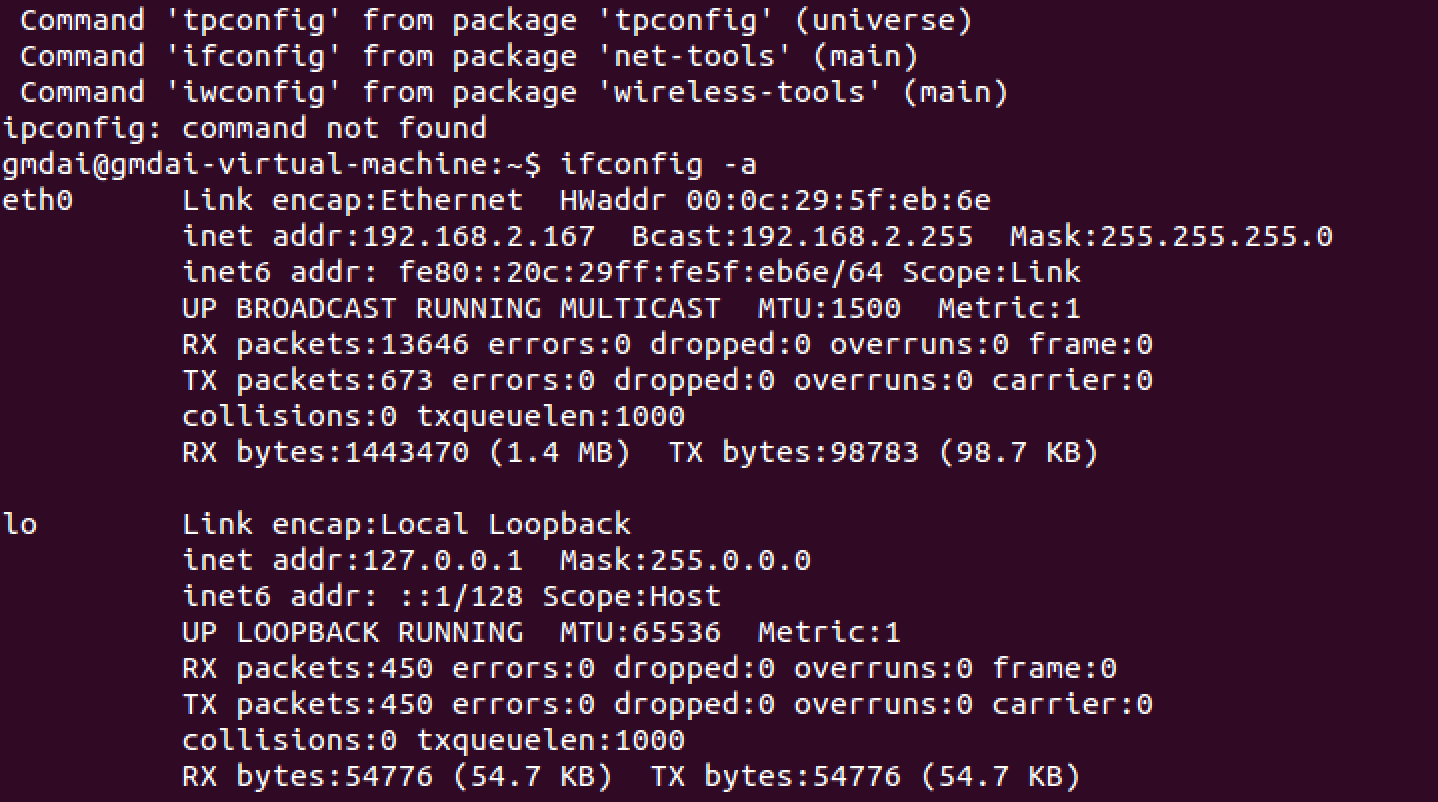
使用
ping命令查看两个系统能否连通,如下图则确认连通。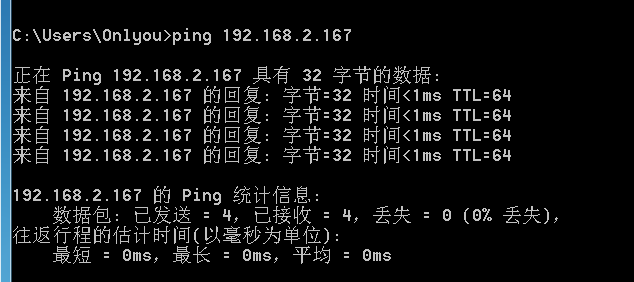
Ubuntu下使用终端进入
inetsim目录下:
接着运行命令
sudo ./inetsim,运行结果如下:
至此,ubuntu服务器端前期工作完成。
Win7客户端启动 apateDNS 软件,输入Ubuntu服务器端的IP地址,点击 Start Server 按钮。如图
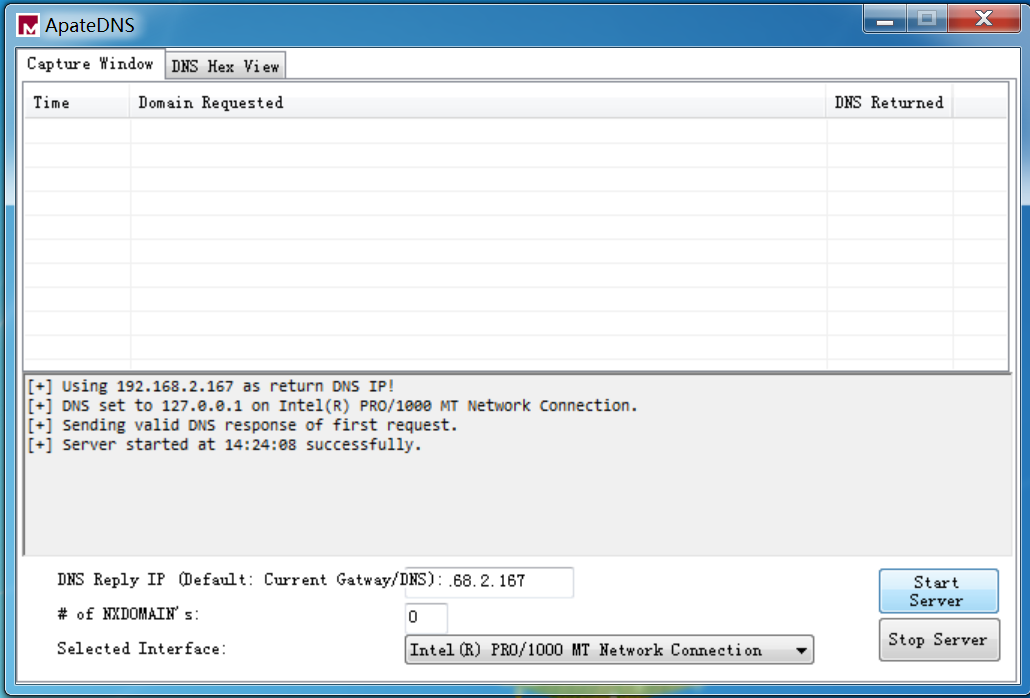
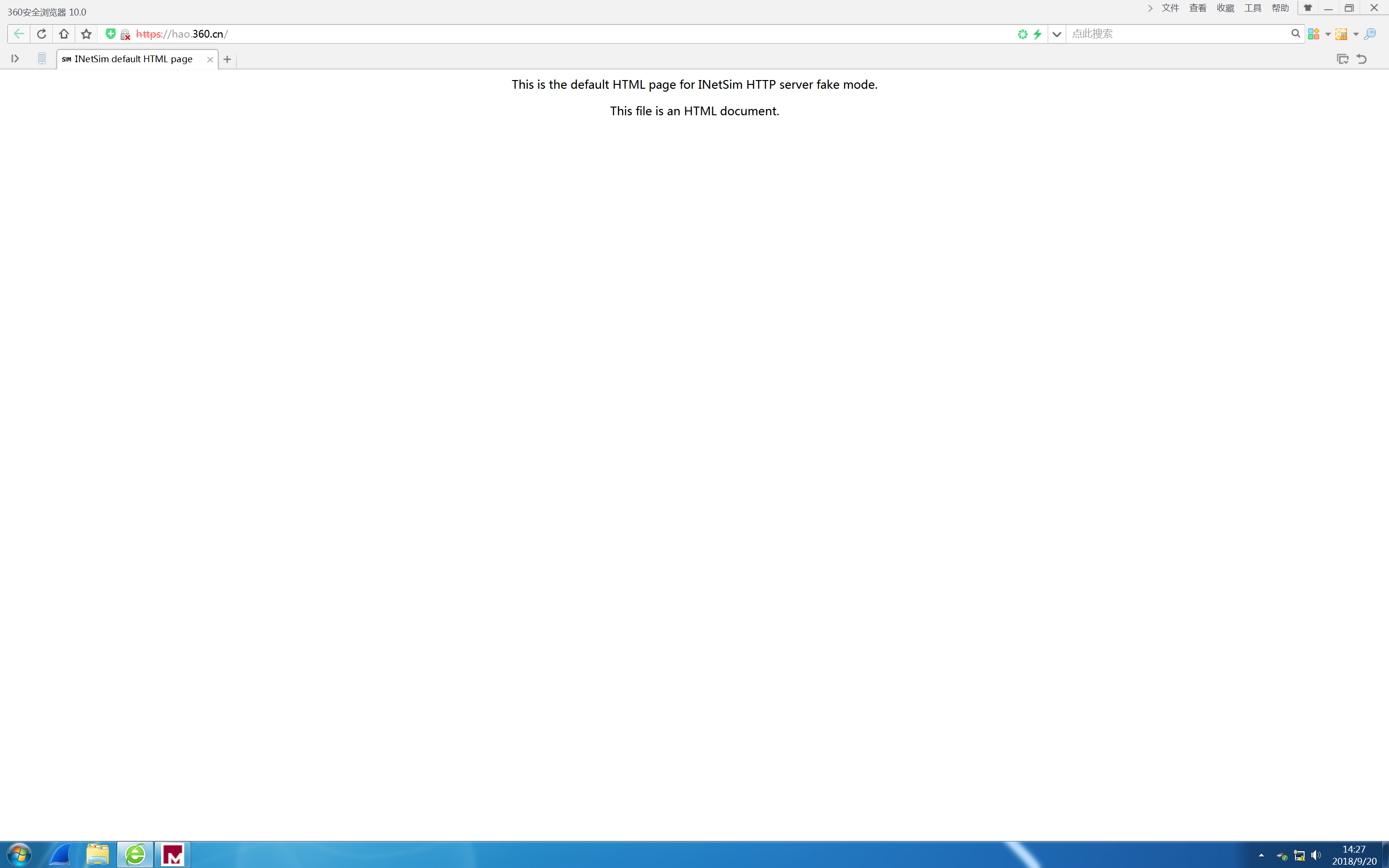
win7下,在浏览器中访问任意网站,或者启动应用。可以观察应用或网页请求服务器的行为。本例中我们试着访问 https://hao.360.cn/ 。显示效果如下,可见返回了Ubuntu服务器端的请求数据。
接着在Ubuntu服务器端ctrl+c。在
inetsim-1.2.5/report目录下生成日志报告。
使用命令
sudo cat report.2629.txt查看日志内容: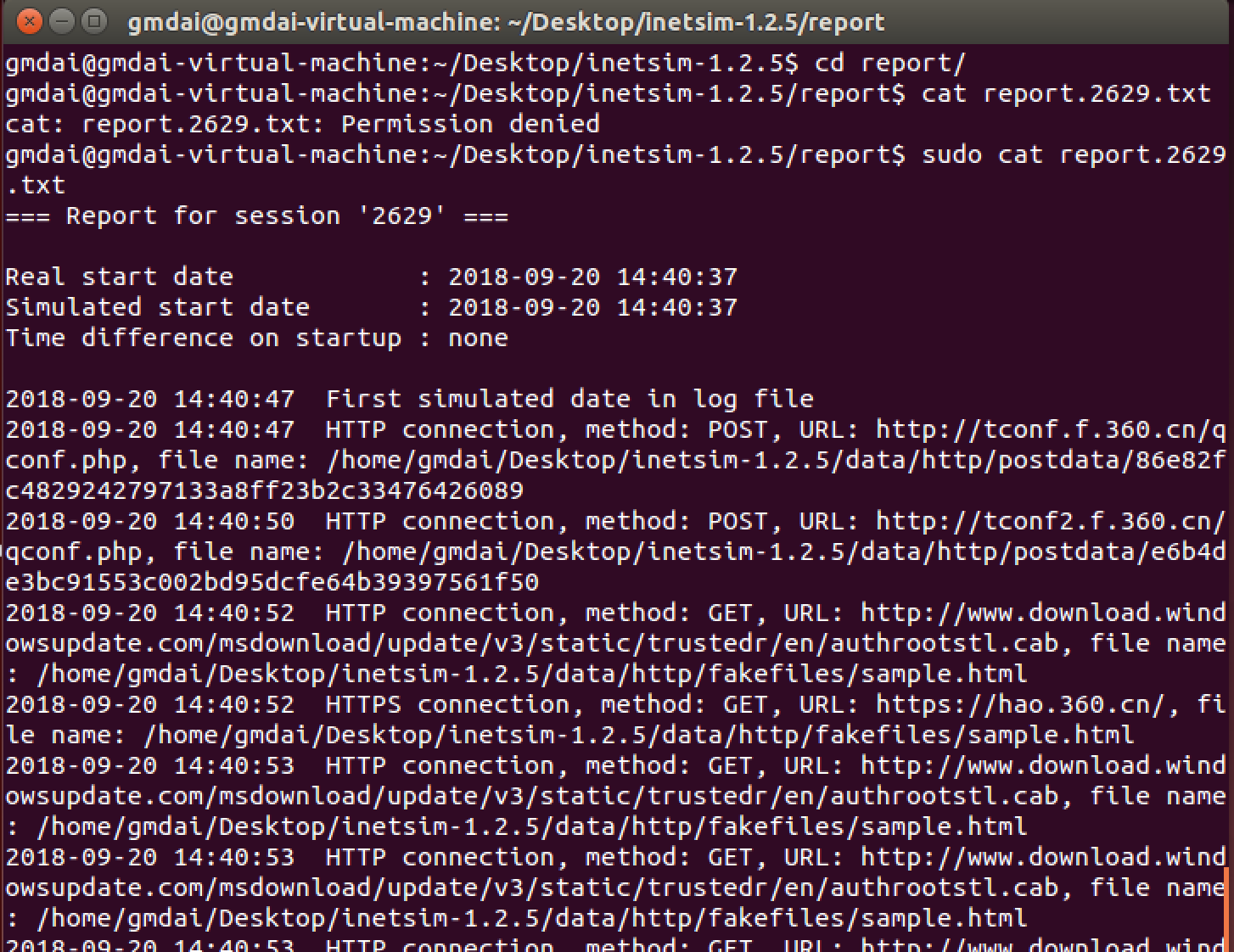
可以看到我们的网址请求在服务器端都请求了什么。
注:sample.html就是服务器返回给客户端的样例网页(倒数第三张图片)。
恶意代码分析-使用apataDNS+inetsim模拟网络环境的更多相关文章
- 20165223《网络对抗技术》Exp4 恶意代码分析
目录 -- 恶意代码分析 恶意代码分析说明 实验任务目标 实验内容概述 schtasks命令使用 实验内容 系统运行监控 恶意软件分析 静态分析 virscan分析和VirusTotal分析 PEiD ...
- 2018-2019-2 网络对抗技术 20165206 Exp4 恶意代码分析
- 2018-2019-2 网络对抗技术 20165206 Exp4 恶意代码分析 - 实验任务 1系统运行监控(2分) (1)使用如计划任务,每隔一分钟记录自己的电脑有哪些程序在联网,连接的外部IP ...
- 2018-2019-2 20165239《网络对抗技术》Exp4 恶意代码分析
Exp4 恶意代码分析 实验内容 一.基础问题 1.如果在工作中怀疑一台主机上有恶意代码,但只是猜想,所有想监控下系统一天天的到底在干些什么.请设计下你想监控的操作有哪些,用什么方法来监控. •使用w ...
- 2018-2019 20165235 网络对抗 Exp4 恶意代码分析
2018-2019 20165235 网络对抗 Exp4 恶意代码分析 实验内容 系统运行监控 使用如计划任务,每隔一分钟记录自己的电脑有哪些程序在联网,连接的外部IP是哪里.运行一段时间并分析该文件 ...
- 20155312 张竞予 Exp4 恶意代码分析
Exp4 恶意代码分析 目录 基础问题回答 (1)如果在工作中怀疑一台主机上有恶意代码,但只是猜想,所有想监控下系统一天天的到底在干些什么.请设计下你想监控的操作有哪些,用什么方法来监控. (2)如果 ...
- 2018-2019-2 网络对抗技术 20165336 Exp4 恶意代码分析
2018-2019-2 网络对抗技术 20165336 Exp4 恶意代码分析 1.实践目标 1.1是监控你自己系统的运行状态,看有没有可疑的程序在运行. 1.2是分析一个恶意软件,就分析Exp2或E ...
- 20165306 Exp4 恶意代码分析
Exp4 恶意代码分析 一.实践概述 1.实践目标 1.1是监控你自己系统的运行状态,看有没有可疑的程序在运行. 1.2是分析一个恶意软件,就分析Exp2或Exp3中生成后门软件:分析工具尽量使用原生 ...
- 2018-2019-2 网络对抗技术 20165308 Exp4 恶意代码分析
2018-2019-2 网络对抗技术 20165308 Exp4 恶意代码分析 实验过程 一.系统运行监控 (1)使用如计划任务,每隔一分钟记录自己的电脑有哪些程序在联网,连接的外部IP是哪里.运行一 ...
- 2018-2019-2 网络对抗技术 20165304 Exp4 恶意代码分析
2018-2019-2 网络对抗技术 20165304 Exp4 恶意代码分析 原理与实践说明 1.实践目标 监控你自己系统的运行状态,看有没有可疑的程序在运行. 分析一个恶意软件,就分析Exp2或E ...
随机推荐
- 动态规划之132 Palindrome Partitioning II
题目链接:https://leetcode-cn.com/problems/palindrome-partitioning-ii/description/ 参考链接:https://blog.csdn ...
- Objective-C 【init/initWithFrame调用机制】
这是一个自定义view: @implementation MyView - (instancetype)init { if (self = [super init]) { NSLog(@"调 ...
- Testng测试报告
执行完测试用例之后,会在项目的test-output(默认目录)下生成测试报告
- 内置函数之sorted,filter,map
# 4,用map来处理字符串列表,把列表中所有人都变成sb,比方alex_sb # name=['oldboy','alex','wusir'] # print(list(map(lambda i:i ...
- Python3 tkinter基础 LabelFrame Radiobutton 形成两组不相互限制的单选按钮
Python : 3.7.0 OS : Ubuntu 18.04.1 LTS IDE : PyCharm 2018.2.4 Conda ...
- 再次安装fedora23的一些遗留问题的解决
当你习惯了某个版本后, 就不想再更换了. 安装fedora23的磁盘空间 获得? 在安装新的fedora23 的时候, 原来的磁盘没有清空, 于是 就 have not enough free apa ...
- python 之 运算符
Python 运算符 Python 运算符 什么是运算符? 本章节主要说明Python的运算符.举个简单的例子 4 +5 = 9 . 例子中,4和5被称为操作数,"+"号为运算 ...
- p1654 OSU!
期望DP 设\(g[i]\)表示前i个的连续1的期望长度,\(h[i]\)表示前i个连续1的长度的平方的期望,\(f[i]\)表示前i个的期望得分 由期望的线性性质,我们可以考虑统计新增一个对答案的贡 ...
- Shiro学习笔记四(Shiro集成WEB)
这两天由于家里出了点事情,没有准时的进行学习.今天补上之前的笔记 -----没有学不会的技术,只有不停找借口的人 学习到的知识点: 1.Shiro 集成WEB 2.基于角色的权限控制 3.基于权限的控 ...
- facebook api之Access Tokens
Access Tokens When someone connects with an app using Facebook Login and approves the reqest for per ...