
c/c++ 软件集成 安装和可卸载软件
作为一个工程师应具备的一些能力:
1. 首先具备这款软件:
>inno Setup 免费版还开源,良心货,妥妥的。
2. 这款软件上手也比较款,可自行参考使用文档
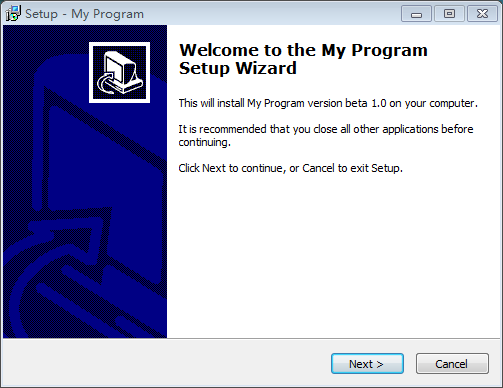
3.编译成功,生成代码之后,样子可能如下:
 ; Script generated by the Inno Setup Script Wizard.

 ; SEE THE DOCUMENTATION FOR DETAILS ON CREATING INNO SETUP SCRIPT FILES!

 #define MyAppName "My Program"

 #define MyAppVersion "beta 1.0"

 #define MyAppPublisher "精灵球网络科技有限公司, Inc."

 #define MyAppURL "http://www.cnblogs.com/gongxijun/"

 #define MyAppExeName "startup.bat"

 [Setup]

 ; NOTE: The value of AppId uniquely identifies this application.

 ; Do not use the same AppId value in installers for other applications.

 ; (To generate a new GUID, click Tools | Generate GUID inside the IDE.)

 AppId={{FA1B17D2-4CC5-465E-9A5F-DCA022B6EA1A}

 AppName={#MyAppName}

 AppVersion={#MyAppVersion}

 ;AppVerName={#MyAppName} {#MyAppVersion}

 AppPublisher={#MyAppPublisher}

 AppPublisherURL={#MyAppURL}

 AppSupportURL={#MyAppURL}

 AppUpdatesURL={#MyAppURL}

 DefaultDirName={pf}\{#MyAppName}

 DefaultGroupName={#MyAppName}

 AllowNoIcons=yes

 OutputDir=D:\Users\gxj\Desktop\TFriend

 OutputBaseFilename=setup

 Compression=lzma

 SolidCompression=yes

 [Languages]

 Name: "english"; MessagesFile: "compiler:Default.isl"

 Name: "brazilianportuguese"; MessagesFile: "compiler:Languages\BrazilianPortuguese.isl"

 Name: "catalan"; MessagesFile: "compiler:Languages\Catalan.isl"

 Name: "corsican"; MessagesFile: "compiler:Languages\Corsican.isl"

 Name: "czech"; MessagesFile: "compiler:Languages\Czech.isl"

 Name: "danish"; MessagesFile: "compiler:Languages\Danish.isl"

 Name: "dutch"; MessagesFile: "compiler:Languages\Dutch.isl"

 Name: "finnish"; MessagesFile: "compiler:Languages\Finnish.isl"

 Name: "french"; MessagesFile: "compiler:Languages\French.isl"

 Name: "german"; MessagesFile: "compiler:Languages\German.isl"

 Name: "greek"; MessagesFile: "compiler:Languages\Greek.isl"

 Name: "hebrew"; MessagesFile: "compiler:Languages\Hebrew.isl"

 Name: "hungarian"; MessagesFile: "compiler:Languages\Hungarian.isl"

 Name: "italian"; MessagesFile: "compiler:Languages\Italian.isl"

 Name: "japanese"; MessagesFile: "compiler:Languages\Japanese.isl"

 Name: "norwegian"; MessagesFile: "compiler:Languages\Norwegian.isl"

 Name: "polish"; MessagesFile: "compiler:Languages\Polish.isl"

 Name: "portuguese"; MessagesFile: "compiler:Languages\Portuguese.isl"

 Name: "russian"; MessagesFile: "compiler:Languages\Russian.isl"

 Name: "scottishgaelic"; MessagesFile: "compiler:Languages\ScottishGaelic.isl"

 Name: "serbiancyrillic"; MessagesFile: "compiler:Languages\SerbianCyrillic.isl"

 Name: "serbianlatin"; MessagesFile: "compiler:Languages\SerbianLatin.isl"

 Name: "slovenian"; MessagesFile: "compiler:Languages\Slovenian.isl"

 Name: "spanish"; MessagesFile: "compiler:Languages\Spanish.isl"

 Name: "turkish"; MessagesFile: "compiler:Languages\Turkish.isl"

 Name: "ukrainian"; MessagesFile: "compiler:Languages\Ukrainian.isl"

 [Tasks]

 Name: "desktopicon"; Description: "{cm:CreateDesktopIcon}"; GroupDescription: "{cm:AdditionalIcons}"; Flags: unchecked

 Name: "quicklaunchicon"; Description: "{cm:CreateQuickLaunchIcon}"; GroupDescription: "{cm:AdditionalIcons}"; Flags: unchecked; OnlyBelowVersion: ,6.1

 [Files]

 Source: "C:\Data\TFriend\RT\Kehu\x64\Release\startup.bat"; DestDir: "{app}"; Flags: ignoreversion

 Source: "C:\Data\TFriend\RT\Kehu\x64\Release\_x64.exe"; DestDir: "{app}"; Flags: ignoreversion

 Source: "C:\Data\TFriend\RT\Kehu\x64\Release\_x64.exe"; DestDir: "{app}"; Flags: ignoreversion

 Source: "C:\Data\TFriend\RT\Kehu\x64\Release\_IA64.exe"; DestDir: "{app}"; Flags: ignoreversion

 Source: "C:\Data\TFriend\RT\Kehu\x64\Release\_x64.exe"; DestDir: "{app}"; Flags: ignoreversion

 Source: "C:\Data\TFriend\RT\Kehu\x64\Release\_x64.exe"; DestDir: "{app}"; Flags: ignoreversion

 Source: "C:\Data\TFriend\RT\Kehu\x64\Release\_x64.exe"; DestDir: "{app}"; Flags: ignoreversion

 Source: "C:\Data\TFriend\RT\Kehu\x64\Release\cmd5.obj"; DestDir: "{app}"; Flags: ignoreversion

 Source: "C:\Data\TFriend\RT\Kehu\x64\Release\explorer1.obj"; DestDir: "{app}"; Flags: ignoreversion

 Source: "C:\Data\TFriend\RT\Kehu\x64\Release\GetSysInfo.obj"; DestDir: "{app}"; Flags: ignoreversion

 Source: "C:\Data\TFriend\RT\Kehu\x64\Release\GoodInf.obj"; DestDir: "{app}"; Flags: ignoreversion

 Source: "C:\Data\TFriend\RT\Kehu\x64\Release\jietu.obj"; DestDir: "{app}"; Flags: ignoreversion

 Source: "C:\Data\TFriend\RT\Kehu\x64\Release\json_reader.asm"; DestDir: "{app}"; Flags: ignoreversion

 Source: "C:\Data\TFriend\RT\Kehu\x64\Release\json_value.asm"; DestDir: "{app}"; Flags: ignoreversion

 Source: "C:\Data\TFriend\RT\Kehu\x64\Release\json_writer.asm"; DestDir: "{app}"; Flags: ignoreversion

 Source: "C:\Data\TFriend\RT\Kehu\x64\Release\Kehu.Build.CppClean.log"; DestDir: "{app}"; Flags: ignoreversion

 Source: "C:\Data\TFriend\RT\Kehu\x64\Release\Kehu.exe"; DestDir: "{app}"; Flags: ignoreversion

 Source: "C:\Data\TFriend\RT\Kehu\x64\Release\Kehu.log"; DestDir: "{app}"; Flags: ignoreversion

 Source: "C:\Data\TFriend\RT\Kehu\x64\Release\Kehu.obj"; DestDir: "{app}"; Flags: ignoreversion

 Source: "C:\Data\TFriend\RT\Kehu\x64\Release\Kehu.res"; DestDir: "{app}"; Flags: ignoreversion

 Source: "C:\Data\TFriend\RT\Kehu\x64\Release\KehuDlg.obj"; DestDir: "{app}"; Flags: ignoreversion

 Source: "C:\Data\TFriend\RT\Kehu\x64\Release\libmysql.dll"; DestDir: "{app}"; Flags: ignoreversion

 Source: "C:\Data\TFriend\RT\Kehu\x64\Release\MainMenu.obj"; DestDir: "{app}"; Flags: ignoreversion

 Source: "C:\Data\TFriend\RT\Kehu\x64\Release\MyTracker.obj"; DestDir: "{app}"; Flags: ignoreversion

 Source: "C:\Data\TFriend\RT\Kehu\x64\Release\News.obj"; DestDir: "{app}"; Flags: ignoreversion

 Source: "C:\Data\TFriend\RT\Kehu\x64\Release\ScreepJieTu.obj"; DestDir: "{app}"; Flags: ignoreversion

 Source: "C:\Data\TFriend\RT\Kehu\x64\Release\startup.bat"; DestDir: "{app}"; Flags: ignoreversion

 Source: "C:\Data\TFriend\RT\Kehu\x64\Release\stdafx.obj"; DestDir: "{app}"; Flags: ignoreversion

 Source: "C:\Data\TFriend\RT\Kehu\x64\Release\vc120.pdb"; DestDir: "{app}"; Flags: ignoreversion

 Source: "C:\Data\TFriend\RT\Kehu\x64\Release\WMI_DeviceQuery.obj"; DestDir: "{app}"; Flags: ignoreversion

 ; NOTE: Don't use "Flags: ignoreversion" on any shared system files

 [Icons]

 Name: "{group}\{#MyAppName}"; Filename: "{app}\{#MyAppExeName}"

 Name: "{group}\{cm:ProgramOnTheWeb,{#MyAppName}}"; Filename: "{#MyAppURL}"

 Name: "{group}\{cm:UninstallProgram,{#MyAppName}}"; Filename: "{uninstallexe}"

 Name: "{commondesktop}\{#MyAppName}"; Filename: "{app}\{#MyAppExeName}"; Tasks: desktopicon

 Name: "{userappdata}\Microsoft\Internet Explorer\Quick Launch\{#MyAppName}"; Filename: "{app}\{#MyAppExeName}"; Tasks: quicklaunchicon

 [Run]

 Filename: "{app}\{#MyAppExeName}"; Description: "{cm:LaunchProgram,{#StringChange(MyAppName, '&', '&&')}}"; Flags: shellexec postinstall skipifsilent
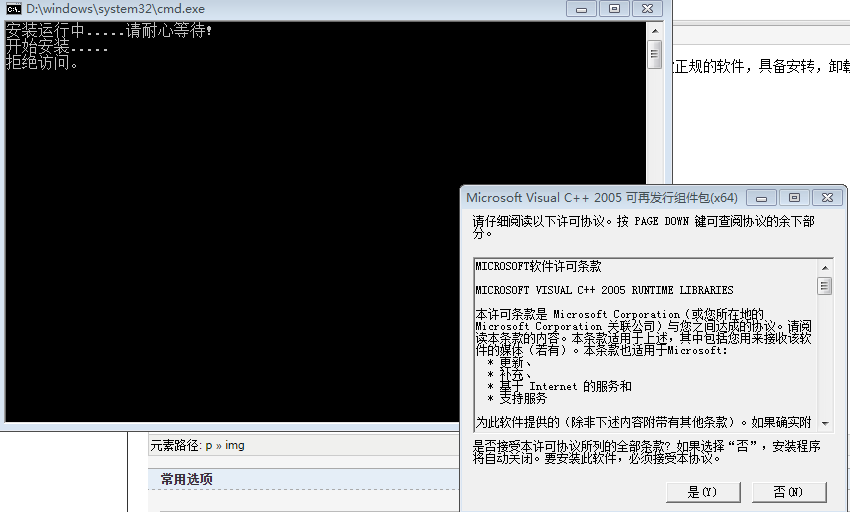
3. 在集成的时候,有时,如果有特殊的条件需要集成运行库,那就得写下如下的批处理文件,并将要集成的运行库下载放到打包文件中,然后参考如下文件:
 @echo off

 ::::::查询微软软件当前的注册表

 set "HKLMU=HKLM\SOFTWARE\Microsoft\Windows\CurrentVersion\Uninstall"

 reg query %HKLMU%\{6E8E85E8-CE4B-4FF5-91F7-04999C9FAE6A}>nul >nul&&set VC2005=Microsoft Visual C++  Redistributable X64

 reg query %HKLMU%\{071C9B48-7C32--A0AC-3F809523288F}>nul >nul&&set VC2005=Microsoft Visual C++  SP1 Redistributable X64

 reg query %HKLMU%\{6CE5BAE9-D3CA-4B99-891A-1DC6C118A5FC}>nul >nul&&set VC2005=Microsoft Visual C++  SP1 Redistributable ATL Security Update X64

 reg query %HKLMU%\{03ED71EA-F531--AABD-1C31BCE8E187}>nul >nul&&set VC2005=Microsoft Visual C++  Redistributable IA64

 reg query %HKLMU%\{0F8FB34E-675E-42ED-850B-29D98C2ECE08}>nul >nul&&set VC2005=Microsoft Visual C++  SP1 Redistributable IA64

 reg query %HKLMU%\{-A784-46D8-950D-05CB3CA43A13}>nul >nul&&set VC2005=Microsoft Visual C++  SP1 Redistributable ATL Security Update IA64

 if defined VC2005 (echo %VC2005% 已安装!&ping -n  127.1>nul) else (goto VC2005)

 :VC2005Install

 @echo on

 @echo 安装运行中.....请耐心等待!

 :::::将运行库放置打包到和需要支持的软件一起

 @if exist 2005_x64.exe (echo 开始安装..... &start 2005_x64.exe &ping -n  127.1 >nul) else (echo 没有找到安装包!请自己下载VC2005并按照  &goto QVC2008)

 :QVC2008

 set "HKLMU=HKLM\SOFTWARE\Microsoft\Windows\CurrentVersion\Uninstall"

 reg query %HKLMU%\{350AA351-21FA--8B7A-835434E766AD}>nul >nul&&set VC2008=Microsoft Visual C++  Redistributable X64

 reg query %HKLMU%\{8220EEFE-38CD-377E-8595-13398D740ACE}>nul >nul&&set VC2008=Microsoft Visual C++  SP1 Redistributable X64

 reg query %HKLMU%\{4B6C7001-C7D6--913E-5BC23FCE91E6}>nul >nul&&set VC2008=Microsoft Visual C++  SP1 Redistributable ATL Security Update X64

 reg query %HKLMU%\{2B547B43-DB50--9EBE-37D419E0F5FA}>nul >nul&&set VC2008=Microsoft Visual C++  Redistributable IA64

 reg query %HKLMU%\{5827ECE1-AEB0-328E-B813-6FC68622C1F9}>nul >nul&&set VC2008=Microsoft Visual C++  SP1 Redistributable IA64

 reg query %HKLMU%\{977AD349-C2A8-39DD--285C08987C7B}>nul >nul&&set VC2008=Microsoft Visual C++  SP1 Redistributable ATL Security Update IA64

 if defined VC2008 (echo %VC2008% 已安装!&ping -n  127.1>nul) else (goto VC2008)

 @if exist 2008_x64.exe (echo 开始安装..... &start 2008_x64.exe &ping -n  127.1 >nul) else (echo 没有找到安装包!请自己下载VC2005并按照  &goto QVC2010)

 :QVC2010

 @if exist 2010_IA64 (start 2010_IA64.exe) else goto CC

 @echo 开始安装.....

 @ping -n  127.1 >nul

 :CC

 @if exist 2012_x64.exe (start 2012_x64.exe) else goto DD

 @echo 开始安装.....

 @ping -n  127.1 >nul

 :DD

 @if exist 2013_x64.exe (start 2013_x64.exe) else goto EE

 @echo 开始安装.....

 @ping -n  127.1 >nul

 :EE

 @if exist 2014_x64.exe (start 2014_x64.exe) else goto FF

 @echo 开始安装.....

 @ping -n  127.1 >nul

 :FF

 @if exist Kehu.exe (start Kehu.exe) else echo 安装失败,请重新安装

 @echo 按任意键结束.........

 pause

 @echo off
这样之后,当你点击生成的软件之后,它就会像我们以前首先的软件一样,成为一款正规的软件,具备安转,卸载,注册,以及自动检测运行库是否安装,并自动安装的软件了!!!
c/c++ 软件集成 安装和可卸载软件的更多相关文章
- Linux安装/卸载软件教程
一.源码安装 ./configure #环境检查.生成makefile make #编译 make install #安装 这三条命令是最经典的Linux软件安装,适用于所有发行版 二.软件包管理工具 ...
- ubuntu的dpkg命令安装和卸载软件
实际使用中,可以先到网上下载deb文件,然后用dpkg命令来安装. sudo dpkg -l | grep 360 #查看包含360的软件sudo dpkg -i browser360-cn-stab ...
- Linux 学习记录 五(软件的安装升级).
一.gcc gcc是Linux上面最标准的C语言的编译程序,用来源代码的编译链接. gcc -c hello.c 编译产生目标文件hello.o gcc -O hello.c 编译产生目标文件,并进行 ...
- Oracle客户端、服务的安装及干净卸载Oracle
软件下载地址: 链接:https://pan.baidu.com/s/1Sluf890eNuaV8muL55eO2w 提取码:oez7 服务端因文件过大,所以分了两个文件压缩包,下载后将内容解压后放置 ...
- 如何在Mac上安全彻底的卸载软件?
文章来源:知乎 收录于:风云社区(SCOEE)[提供mac软件下载] 更多专题,可关注小编[磨人的小妖精],查看我的文章,也可上[风云社区 SCOEE],查找和下载相关软件资源. (一)综合类: 新买 ...
- 一、Vim编辑器 二、用户和组管理 三、软件的安装(jdk,mysql) 四、Shell编程
一.Vim编辑器的使用 1. vim编辑器的运行模式 编辑模式:等待用户编辑命令的输入 插入模式:编辑文本内容 命令模式:执行命令 2. 使用 :vim 文件名 3. 查看当前vim编辑器介绍:vim ...
- Linux 学习记录五(软件的安装升级).
一.gcc gcc是Linux上面最标准的C语言的编译程序,用来源代码的编译链接. gcc -c hello.c 编译产生目标文件hello.o gcc -O hello.c 编译产生目标文件,并进行 ...
- Linux(ubuntu)软件的安装
通过apt安装/卸载软件 apt是advanced packaging tool,是Linxu下的一款安装包管理程序 可以在终端中方便的安装/卸载/更新软件包 # 安装软件 sudo apt inst ...
- PyCharm编程软件详细安装教程
PyCharm编程软件安装教程&破解 一.官网下载软件 1. 网页搜索进入PyCharm官网下载页面(https://www.jetbrains.com/pycharm/download/ ) ...
随机推荐
- join用法
join命令可以将多个文件结合在一起,每个文件里的每条记录,都共享一个键值(key),键值指的是记录中的主字段,通常会是用户名称.个人姓氏.员工编号之类的数据. join - join lines o ...
- [SLAM] GMapping SLAM源码阅读(草稿)
目前可以从很多地方得到RBPF的代码,主要看的是Cyrill Stachniss的代码,据此进行理解. Author:Giorgio Grisetti; Cyrill Stachniss http: ...
- Nginx+Lua(OpenResty)开发高性能Web应用
使用Nginx+Lua(OpenResty)开发高性能Web应用 博客分类: 跟我学Nginx+Lua开发 架构 ngx_luaopenresty 在互联网公司,Nginx可以说是标配组件,但是主要场 ...
- struts2-通配符映射(基本没啥卵用)和动态调用
通配符 使用*代表任意字符 一般在action的name中使用*,并可以使用多个 可以使用{通配符的序号}引用对应的通配符所代表的值,序号从1开始 {0}代表整个URI 匹配规则 首先完全匹配,没有完 ...
- js实现发送短信验证码后的倒计时功能(无视页面刷新)
[1].[代码] 这是页面上的发送验证码按钮 跳至 [1] [2] [3]<input id="second" type="button" value=& ...
- windows环境下Django安装配置
--python下载 https://www.python.org/downloads/ --pip 下载 https://pypi.python.org/pypi/pip --pip 安装及路径 解 ...
- servlet1
1.jsp其实就是servlet 2.一个java类实现servlet接口,然后在浏览器端访问即可
- MSDeploy
http://blogs.iis.net/jamescoo/default.aspx Web Deployment Tool Now Works With Credential Store Feb ...
- Objective-C语言Foundation框架
Mac OS X开发会使用Cocoa框架,它是一种支持应用程序提供丰富用户体验的框架,它实际上由:Foundation和Application Kit(AppKit)框架组成.iOS开发,会使用Coc ...
- s3c2440 移值u-boot-2016.03 第1篇 新建单板
目前除RC版外,最新的就是 u-boot-2016.03.tar.bz2 ,大概看了几个年份的u-boot 发现,现在 更像是 linux kernel .有 menuconfig . 对比2012年 ...