
CSharpGL(21)用鼠标拾取、拖拽VBO图元内的点、线或本身
CSharpGL(21)用鼠标拾取、拖拽VBO图元内的点、线或本身
效果图
以最常见的三角形网格(用GL_TRIANGLES方式进行渲染)为例。
在拾取模式为GeometryType.Point时,你可以拾取单个的顶点。
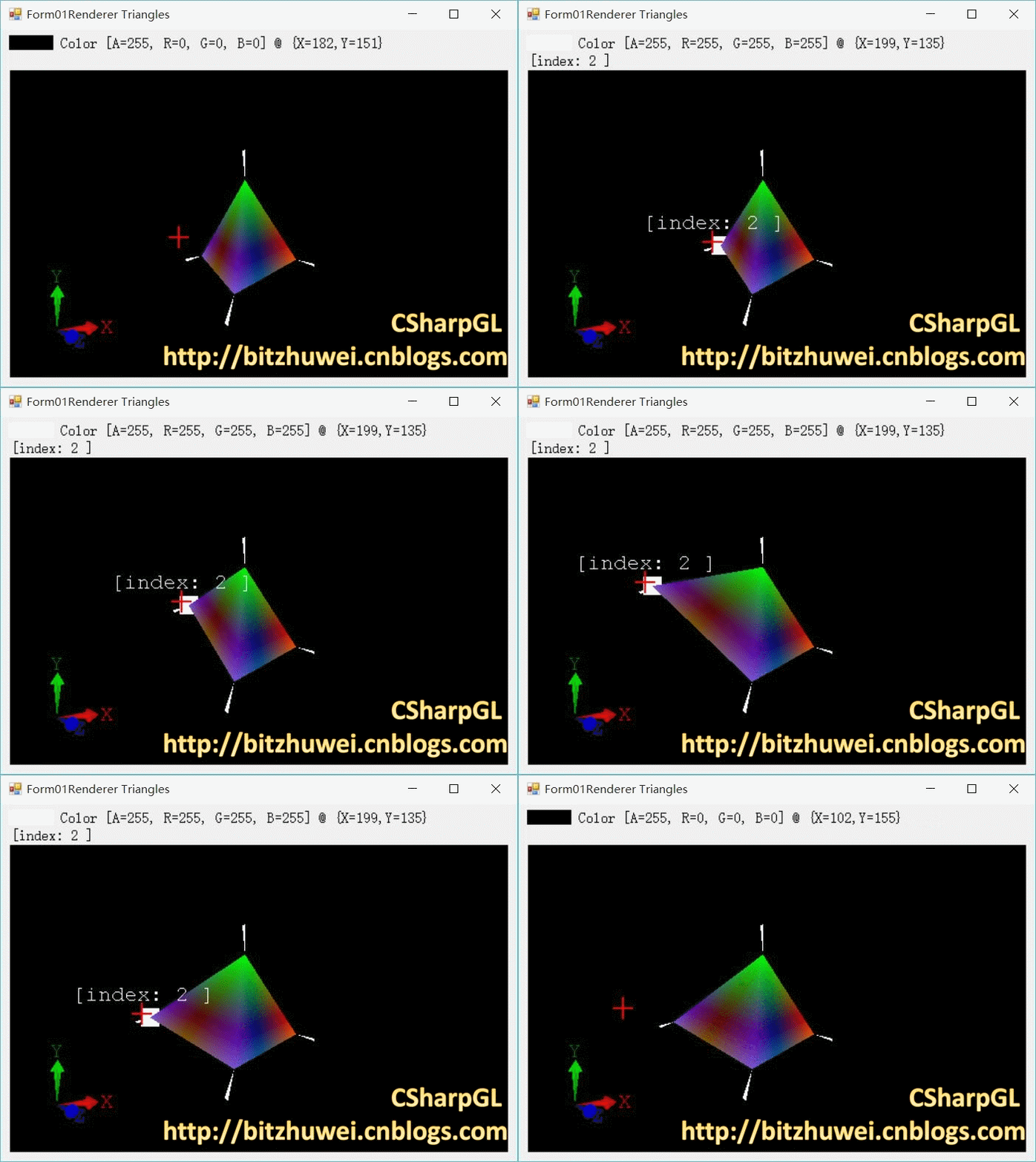
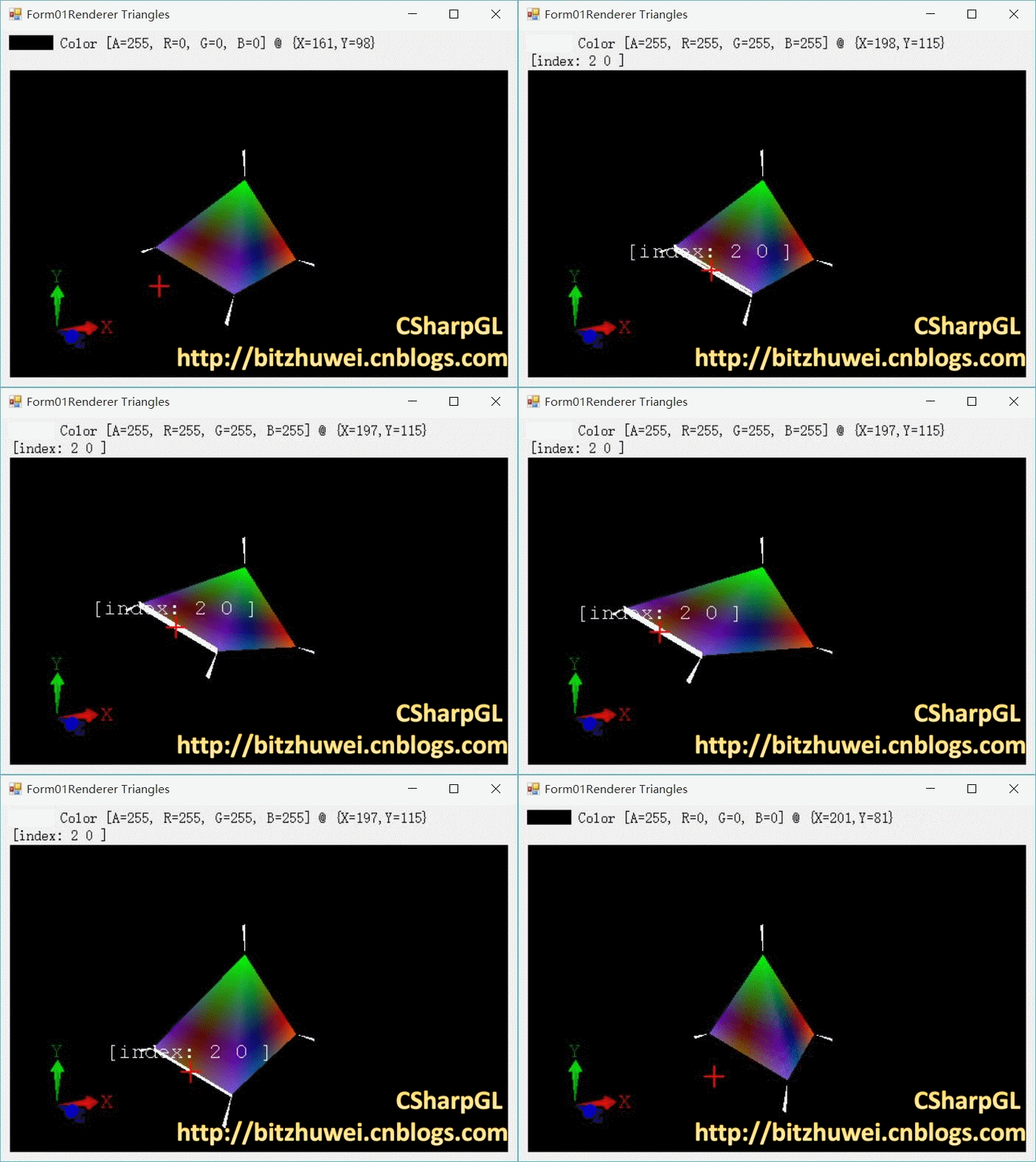
在拾取模式为GeometryType.Line时,你可以拾取任意一个三角形里的任意一条线。即同时拾取此线段的两个顶点。
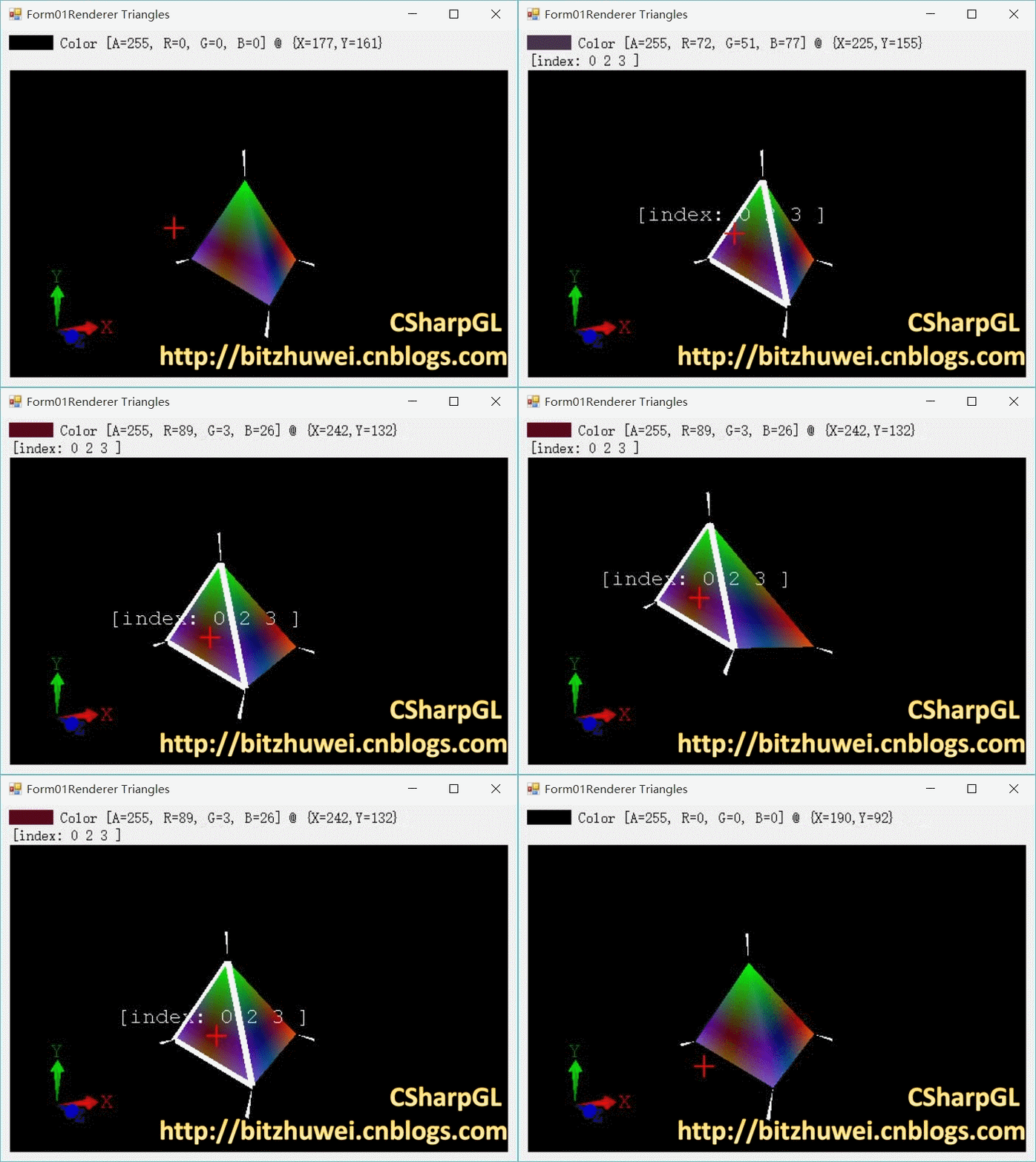
在拾取模式为GeometryType.Triangle时,你可以拾取任意一个三角形。即同时拾取此三角形的三个顶点。
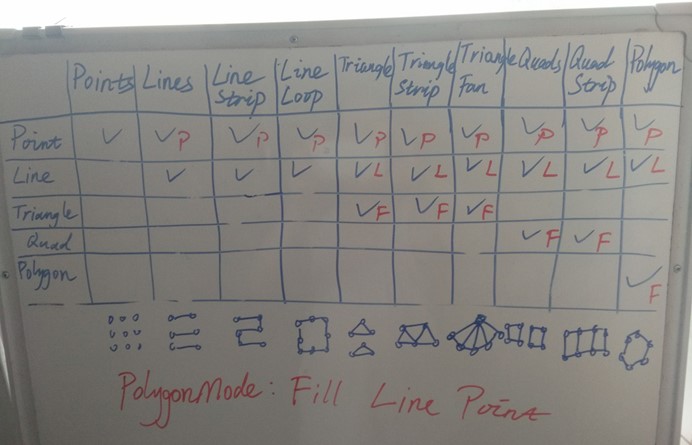
实际上,CSharpGL实现了在所有渲染模式下拾取Point、Line、Triangle、Quad和Polygon的功能。(当然,你可以想象,如果想在一个GL_TRIANGLES渲染方式下拾取一个Quad,那是什么都拾取不到的)下面是描述这一功能的图示。由于我的白板小,就没有列出GL_TRIANGLES_ADJACENCY、GL_TRIANGLE_STRIP_ADJACENCY、GL_LINES_ADJACENCY、GL_LINE_STRIP_ADJCANCEY这几个情况。
下载
CSharpGL已在GitHub开源,欢迎对OpenGL有兴趣的同学加入(https://github.com/bitzhuwei/CSharpGL)
规定
为了简便描述,我用GL_LINE*代表GL_LINES、GL_LINE_STRIP、GL_LINES_ADJACENCY、GL_LINE_STRIP_ADJACENCY,用GL_TRIANGLE*代表GL_TRIANGLES、GL_TRIANGLE_STRIP、GL_TRIANGLE_FAN、GL_TRIANGLES_ADJACENCY、GL_TRIANGLE_STRIP_ADJACENCY,用GL_QUAD*代表GL_QUADS、GL_QUAD_STRIP。
如何使用
使用方式十分简单,只需给RenderEventArgs传入如下的参数:
 GeometryType PickingGeometryType = Geometry.Point;

 var arg = new RenderEventArgs(

     // 为了拾取而进行的渲染

     RenderModes.ColorCodedPicking,

     this.glCanvas1.ClientRectangle,

     this.camera,

     // 我想拾取的类型(Geometry)

     this.PickingGeometryType);

 // 要拾取的位置(鼠标位置)

 Point mousePostion = GetMousePosition();

 // 支持Picking的Renderer列表

 PickableRenderer[] pickableElements = GetRenderersInScene();

 // 执行拾取操作

 PickedGeometry pickedGeometry = ColorCodedPicking.Pick(arg, mousePostion, pickableElements);
具体用法详见(CSharpGL(20)用unProject和Project实现鼠标拖拽图元)
如何实现
在GL_POINTS时拾取Point,在GL_LINE*时拾取Line,在GL_TRIANGL*时拾取Triangle,在GL_QUAD*时拾取Quad,在GL_POLYGON时拾取Polygon,这都是已经实现了的(CSharpGL(18)分别处理glDrawArrays()和glDrawElements()两种方式下的拾取(ColorCodedPicking))。这些不再详述。
拾取Point
ZeroIndexRenderer
在除了GL_POINTS时,想拾取一个Point,只能用 glDrawArrays(GL_POINTS, ..); 来代替原有的 glDrawArrays(OriginalMode, ..); 。但这会渲染所有的顶点。而在OriginalMode下,未必渲染所有的顶点。所以在拾取到一个Point后要判断一下是否真的应该拾取到它。
         /// <summary>

         /// 现在,已经判定了鼠标在某个点上。

         /// 我需要判定此点是否出现在图元上。

         /// now that I know the mouse is picking on some point,

         /// I need to make sure that point should appear.

         /// </summary>

         /// <param name="lastVertexId"></param>

         /// <param name="mode"></param>

         /// <returns></returns>

         private bool OnPrimitiveTest(uint lastVertexId, DrawMode mode)

         {

             bool result = false;

             int first = this.zeroIndexBufferPtr.FirstVertex;

             if (first < ) { return false; }

             int vertexCount = this.zeroIndexBufferPtr.VertexCount;

             if (vertexCount <= ) { return false; }

             int last = first + vertexCount - ;

             switch (mode)

             {

                 case DrawMode.Points:

                     result = true;

                     break;

                 case DrawMode.LineStrip:

                     result = vertexCount > ;

                     break;

                 case DrawMode.LineLoop:

                     result = vertexCount > ;

                     break;

                 case DrawMode.Lines:

                     if (vertexCount > )

                     {

                         if (vertexCount %  == )

                         {

                             result = (first <= lastVertexId && lastVertexId <= last);

                         }

                         else

                         {

                             result = (first <= lastVertexId && lastVertexId <= last - );

                         }

                     }

                     break;

                 case DrawMode.LineStripAdjacency:

                     if (vertexCount > )

                     {

                         result = (first < lastVertexId && lastVertexId < last);

                     }

                     break;

                 case DrawMode.LinesAdjacency:

                     if (vertexCount > )

                     {

                         var lastPart = last - (last +  - first) % ;

                         if (first <= lastVertexId && lastVertexId <= lastPart)

                         {

                             var m = (lastVertexId - first) % ;

                             result = (m ==  || m == );

                         }

                     }

                     break;

                 case DrawMode.TriangleStrip:

                     if (vertexCount > )

                     {

                         result = vertexCount > ;

                     }

                     break;

                 case DrawMode.TriangleFan:

                     if (vertexCount > )

                     {

                         result = vertexCount > ;

                     }

                     break;

                 case DrawMode.Triangles:

                     if (vertexCount > )

                     {

                         if (first <= lastVertexId)

                         {

                             result = ((vertexCount %  == ) && (lastVertexId <= last))

                                 || ((vertexCount %  == ) && (lastVertexId < last))

                                 || ((vertexCount %  == ) && (lastVertexId +  < last));

                         }

                     }

                     break;

                 case DrawMode.TriangleStripAdjacency:

                     if (vertexCount > )

                     {

                         var lastPart = last - (last +  - first) % ;

                         if (first <= lastVertexId && lastVertexId <= lastPart)

                         {

                             result = (lastVertexId - first) %  == ;

                         }

                     }

                     break;

                 case DrawMode.TrianglesAdjacency:

                     if (vertexCount > )

                     {

                         var lastPart = last - (last +  - first) % ;

                         if (first <= lastVertexId && lastVertexId <= lastPart)

                         {

                             result = (lastVertexId - first) %  == ;

                         }

                     }

                     break;

                 case DrawMode.Patches:

                     // not know what to do for now

                     break;

                 case DrawMode.QuadStrip:

                     if (vertexCount > )

                     {

                         if (first <= lastVertexId && lastVertexId <= last)

                         {

                             result = (vertexCount %  == )

                                 || (lastVertexId < last);

                         }

                     }

                     break;

                 case DrawMode.Quads:

                     if (vertexCount > )

                     {

                         if (first <= lastVertexId && lastVertexId <= last)

                         {

                             var m = vertexCount % ;

                             if (m == ) { result = true; }

                             else if (m == ) { result = lastVertexId +  < last; }

                             else if (m == ) { result = lastVertexId +  < last; }

                             else if (m == ) { result = lastVertexId +  < last; }

                             else { throw new Exception("This should never happen!"); }

                         }

                     }

                     break;

                 case DrawMode.Polygon:

                     if (vertexCount > )

                     {

                         result = (first <= lastVertexId && lastVertexId <= last);

                     }

                     break;

                 default:

                     throw new NotImplementedException();

             }

             return result;

         }
bool OnPrimitiveTest(uint lastVertexId, DrawMode mode)
OneIndexBuffer
如果是用glDrawElements(OriginalMode, ..);渲染,此时想拾取一个Point,那么我就不做类似的OnPrimitiveTest了。因为情况太复杂,且必须用MapBufferRange来检测大量的顶点情况。而这仅仅是因为导入的IBufferable模型本身没有使用某些顶点。没用你就删了它啊!这我就不管了。
         /// <summary>

         /// I don't know how to implement this method in a high effitiency way.

         /// So keep it like this.

         /// Also, why would someone use glDrawElements() when rendering GL_POINTS?

         /// </summary>

         /// <param name="lastVertexId"></param>

         /// <param name="mode"></param>

         /// <returns></returns>

         private bool OnPrimitiveTest(uint lastVertexId, DrawMode mode)

         {

             return true;

         }
拾取Line
ZeroIndexRenderer
如果是在GL_LINE*下拾取线,那么这是上一篇文章已经实现了的情况。如果是想在GL_TRIANGLE*、GL_QUAD*、GL_POLYGON模式下拾取其某个图元的某条Line,那么就分两部走:第一,像上一篇一样拾取图元;第二,设计一个新的小小的索引,即用GL_LINES模式渲染此图元(三角形、四边形、多边形)的所有边的索引。用此索引重新执行渲染、拾取,那么就可以找到鼠标所在位置的Line了。
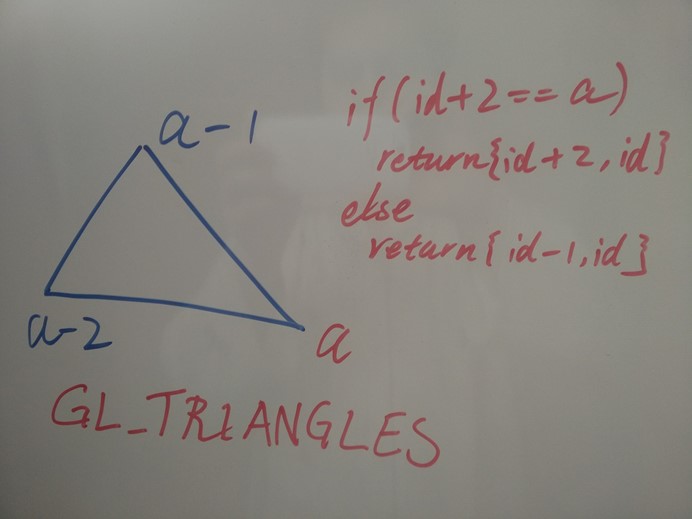
例如,下面是在一个三角形图元中找到那个你想要的Line的过程。
     class ZeroIndexLineInTriangleSearcher : ZeroIndexLineSearcher

     {

         /// <summary>

         /// 在三角形图元中拾取指定位置的Line

         /// </summary>

         /// <param name="arg">渲染参数</param>

         /// <param name="x">指定位置</param>

         /// <param name="y">指定位置</param>

         /// <param name="lastVertexId">三角形图元的最后一个顶点</param>

         /// <param name="modernRenderer">目标Renderer</param>

         /// <returns></returns>

         internal override uint[] Search(RenderEventArgs arg,

             int x, int y,

             uint lastVertexId, ZeroIndexRenderer modernRenderer)

         {

             // 创建临时索引

             OneIndexBufferPtr indexBufferPtr = null;

             using (var buffer = new OneIndexBuffer<uint>(DrawMode.Lines, BufferUsage.StaticDraw))

             {

                 buffer.Alloc();

                 unsafe

                 {

                     var array = (uint*)buffer.FirstElement();

                     array[] = lastVertexId - ; array[] = lastVertexId - ;

                     array[] = lastVertexId - ; array[] = lastVertexId - ;

                     array[] = lastVertexId - ; array[] = lastVertexId - ;

                 }

                 indexBufferPtr = buffer.GetBufferPtr() as OneIndexBufferPtr;

             }

             // 用临时索引渲染此三角形图元(仅渲染此三角形图元)

             modernRenderer.Render4InnerPicking(arg, indexBufferPtr);

             // id是拾取到的Line的Last Vertex Id

             uint id = ColorCodedPicking.ReadPixel(x, y, arg.CanvasRect.Height);

             indexBufferPtr.Dispose();

             // 对比临时索引,找到那个Line

             if (id +  == lastVertexId)

             { return new uint[] { id + , id, }; }

             else

             { return new uint[] { id - , id, }; }

         }

     }
OneIndexBuffer
用glDrawElements()时,实现思路与上面一样,只不过Index参数变化一下而已。
在(CSharpGL(18)分别处理glDrawArrays()和glDrawElements()两种方式下的拾取(ColorCodedPicking)),已经能够找到目标图元的所有顶点,所以就简单了。
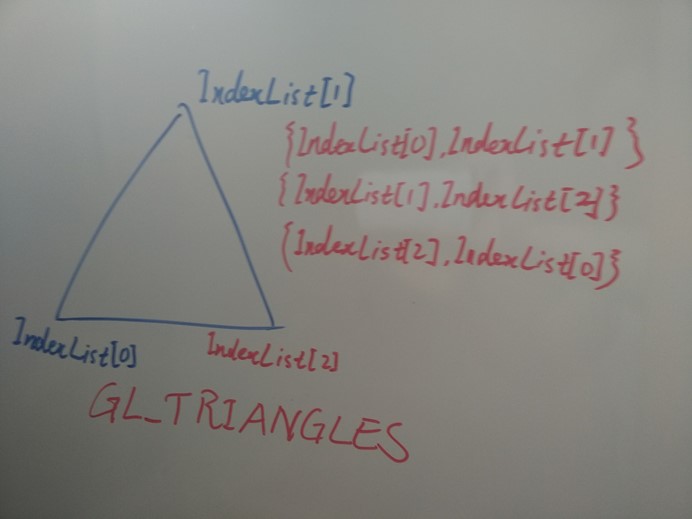
继续用"在一个三角形图元中找到那个你想要的Line的过程"来举例。
     class OneIndexLineInTrianglesSearcher : OneIndexLineSearcher

     {

         internal override uint[] Search(RenderEventArgs arg,

             int x, int y,

             RecognizedPrimitiveIndex lastIndexId,

             OneIndexRenderer modernRenderer)

         {

             if (lastIndexId.IndexIdList.Count != ) { throw new ArgumentException(); }

             List<uint> indexList = lastIndexId.IndexIdList;

             if (indexList[] == indexList[]) { return new uint[] { indexList[], indexList[], }; }

             else if (indexList[] == indexList[]) { return new uint[] { indexList[], indexList[], }; }

             else if (indexList[] == indexList[]) { return new uint[] { indexList[], indexList[], }; }

             OneIndexBufferPtr indexBufferPtr = null;

             using (var buffer = new OneIndexBuffer<uint>(DrawMode.Lines, BufferUsage.StaticDraw))

             {

                 buffer.Alloc();

                 unsafe

                 {

                     var array = (uint*)buffer.FirstElement();

                     array[] = indexList[]; array[] = indexList[];

                     array[] = indexList[]; array[] = indexList[];

                     array[] = indexList[]; array[] = indexList[];

                 }

                 indexBufferPtr = buffer.GetBufferPtr() as OneIndexBufferPtr;

             }

             modernRenderer.Render4InnerPicking(arg, indexBufferPtr);

             uint id = ColorCodedPicking.ReadPixel(x, y, arg.CanvasRect.Height);

             indexBufferPtr.Dispose();

             if (id == indexList[])

             { return new uint[] { indexList[], indexList[], }; }

             else if (id == indexList[])

             { return new uint[] { indexList[], indexList[], }; }

             else if (id == indexList[])

             { return new uint[] { indexList[], indexList[], }; }

             else

             { throw new Exception("This should not happen!"); }

         }

     }
Polygon
这里顺便提一下GL_POLYGON,这是个特别的图元,因为它的顶点数是不确定的。它产生的临时小索引就可能不再小。但神奇的是,它不再需要OneIndexBufferPtr类型的临时索引,而只需一个几乎不占空间的ZeroIndexBufferPtr。
     class ZeroIndexLineInPolygonSearcher : ZeroIndexLineSearcher

     {

         internal override uint[] Search(RenderEventArgs arg,

             int x, int y,

             uint lastVertexId, ZeroIndexRenderer modernRenderer)

         {

             var zeroIndexBufferPtr = modernRenderer.GetIndexBufferPtr() as ZeroIndexBufferPtr;

             ZeroIndexBufferPtr indexBufferPtr = null;

             // when the temp index buffer could be long, it's no longer needed.

             // what a great OpenGL API design!

             using (var buffer = new ZeroIndexBuffer(DrawMode.LineLoop,

                 zeroIndexBufferPtr.FirstVertex, zeroIndexBufferPtr.VertexCount))

             {

                 indexBufferPtr = buffer.GetBufferPtr() as ZeroIndexBufferPtr;

             }

             modernRenderer.Render4InnerPicking(arg, indexBufferPtr);

             uint id = ColorCodedPicking.ReadPixel(x, y, arg.CanvasRect.Height);

             indexBufferPtr.Dispose();

             if (id == zeroIndexBufferPtr.FirstVertex)

             { return new uint[] { (uint)(zeroIndexBufferPtr.FirstVertex + zeroIndexBufferPtr.VertexCount - ), id, }; }

             else

             { return new uint[] { id - , id, }; }

         }

     }
拾取本身
所谓拾取本身,就是:如果用GL_TRIANGLE*进行渲染,就拾取一个Triangle;如果用GL_QUAD*进行渲染,就拾取一个Quad;如果用GL_POLYGON进行渲染,就拾取一个Polygon。这都是在(CSharpGL(18)分别处理glDrawArrays()和glDrawElements()两种方式下的拾取(ColorCodedPicking))中已经实现了的功能。
整合
三种情况都解决了,下面整合进来就行了。
ZeroIndexRenderer
这是对ZeroIndexRenderer的Pick。
         public override PickedGeometry Pick(RenderEventArgs arg, uint stageVertexId,

             int x, int y)

         {

             uint lastVertexId;

             if (!this.GetLastVertexIdOfPickedGeometry(stageVertexId, out lastVertexId))

             { return null; }

             GeometryType geometryType = arg.PickingGeometryType;

             if (geometryType == GeometryType.Point)

             {

                 DrawMode mode = this.GetIndexBufferPtr().Mode;

                 if (this.OnPrimitiveTest(lastVertexId, mode))

                 { return PickPoint(stageVertexId, lastVertexId); }

                 else

                 { return null; }

             }

             else if (geometryType == GeometryType.Line)

             {

                 DrawMode mode = this.GetIndexBufferPtr().Mode;

                 GeometryType typeOfMode = mode.ToGeometryType();

                 if (geometryType == typeOfMode)

                 { return PickWhateverItIs(stageVertexId, lastVertexId, mode, typeOfMode); }

                 else

                 {

                     ZeroIndexLineSearcher searcher = GetLineSearcher(mode);

                     if (searcher != null)// line is from triangle, quad or polygon

                     { return SearchLine(arg, stageVertexId, x, y, lastVertexId, searcher); }

                     else if (mode == DrawMode.Points)// want a line when rendering GL_POINTS

                     { return null; }

                     else

                     { throw new Exception(string.Format("Lack of searcher for [{0}]", mode)); }

                 }

             }

             else

             {

                 DrawMode mode = this.GetIndexBufferPtr().Mode;

                 GeometryType typeOfMode = mode.ToGeometryType();

                 if (typeOfMode == geometryType)// I want what it is

                 { return PickWhateverItIs(stageVertexId, lastVertexId, mode, typeOfMode); }

                 else

                 { return null; }

                 //{ throw new Exception(string.Format("Lack of searcher for [{0}]", mode)); }

             }

         }
public override PickedGeometry Pick(RenderEventArgs arg, uint stageVertexId, int x, int y)
OneIndexRenderer
这是对OneIndexRenderer的Pick。
         public override PickedGeometry Pick(RenderEventArgs arg, uint stageVertexId,

             int x, int y)

         {

             uint lastVertexId;

             if (!this.GetLastVertexIdOfPickedGeometry(stageVertexId, out lastVertexId))

             { return null; }

             GeometryType geometryType = arg.PickingGeometryType;

             if (geometryType == GeometryType.Point)

             {

                 DrawMode mode = this.GetIndexBufferPtr().Mode;

                 if (this.OnPrimitiveTest(lastVertexId, mode))

                 { return PickPoint(stageVertexId, lastVertexId); }

                 else

                 { return null; }

             }

             else if (geometryType == GeometryType.Line)

             {

                 // 找到 lastIndexId

                 RecognizedPrimitiveIndex lastIndexId = this.GetLastIndexIdOfPickedGeometry(

                     arg, lastVertexId, x, y);

                 if (lastIndexId == null)

                 {

                     Debug.WriteLine(

                         "Got lastVertexId[{0}] but no lastIndexId! Params are [{1}] [{2}] [{3}] [{4}]",

                         lastVertexId, arg, stageVertexId, x, y);

                     { return null; }

                 }

                 else

                 {

                     // 获取pickedGeometry

                     DrawMode mode = this.GetIndexBufferPtr().Mode;

                     GeometryType typeOfMode = mode.ToGeometryType();

                     if (geometryType == typeOfMode)

                     { return PickWhateverItIs(stageVertexId, lastIndexId, typeOfMode); }

                     else

                     {

                         OneIndexLineSearcher searcher = GetLineSearcher(mode);

                         if (searcher != null)// line is from triangle, quad or polygon

                         { return SearchLine(arg, stageVertexId, x, y, lastVertexId, lastIndexId, searcher); }

                         else if (mode == DrawMode.Points)// want a line when rendering GL_POINTS

                         { return null; }

                         else

                         { throw new Exception(string.Format("Lack of searcher for [{0}]", mode)); }

                     }

                 }

             }

             else

             {

                 // 找到 lastIndexId

                 RecognizedPrimitiveIndex lastIndexId = this.GetLastIndexIdOfPickedGeometry(

                     arg, lastVertexId, x, y);

                 if (lastIndexId == null)

                 {

                     Debug.WriteLine(

                         "Got lastVertexId[{0}] but no lastIndexId! Params are [{1}] [{2}] [{3}] [{4}]",

                         lastVertexId, arg, stageVertexId, x, y);

                     { return null; }

                 }

                 else

                 {

                     DrawMode mode = this.GetIndexBufferPtr().Mode;

                     GeometryType typeOfMode = mode.ToGeometryType();

                     if (typeOfMode == geometryType)// I want what it is

                     { return PickWhateverItIs(stageVertexId, lastIndexId, typeOfMode); }

                     else

                     { return null; }

                     //{ throw new Exception(string.Format("Lack of searcher for [{0}]", mode)); }

                 }

             }

         }
public override PickedGeometry Pick(RenderEventArgs arg, uint stageVertexId, int x, int y)
总结
在完成后,我以为彻底解决了拾取问题。等完成本文后,我不再这么想了。还是谦虚点好。
原CSharpGL的其他功能(3ds解析器、TTF2Bmp、CSSL等),我将逐步加入新CSharpGL。
欢迎对OpenGL有兴趣的同学关注(https://github.com/bitzhuwei/CSharpGL)
CSharpGL(21)用鼠标拾取、拖拽VBO图元内的点、线或本身的更多相关文章
- Qt窗口添加鼠标移动拖拽事件
1. .h文件中添加 private: QPoint dragPosition; 2. 在cpp文件中重写鼠标点击和拖拽函数 void ShapeWidget::mousePressEvent( ...
- JS鼠标的拖拽原理
拖拽功能主要是用在让用户做一些自定义的动作,比如拖动排序,弹出框拖动移动等等,效果还是蛮不错的.下面讲解一下拖拽的原理,希望可以帮助到有需要的朋友! 一.拖拽的流程动作①鼠标按下②鼠标移动③鼠标松开 ...
- 鼠标事件-拖拽2(不能拖出指定对象的div)
<!DOCTYPE html><html> <head> <meta charset="UTF-8"> <title>& ...
- 鼠标事件-拖拽(不能拖出窗口的div)
<!DOCTYPE html><html> <head> <meta charset="UTF-8"> <title>& ...
- CSharpGL(20)用unProject和Project实现鼠标拖拽图元
CSharpGL(20)用unProject和Project实现鼠标拖拽图元 效果图 例如,你可以把Big Dipper这个模型拽成下面这个样子. 配合旋转,还可以继续拖拽成这样. 当然,能拖拽的不只 ...
- Arcgis for qml - 鼠标拖拽移动
以实现鼠标拖拽文本图层为例 GitHub:ArcGIS拖拽文本 作者:狐狸家的鱼 目的是利用鼠标进行拖拽. 实现两种模式,一种是屏幕上的拖拽,第二种是地图上图层的挪动. 屏幕上的拖拽其实跟ArcGIS ...
- 鼠标拖拽移动Java界面组件
默认的,Frame或者JFrame自身已经实现了鼠标拖拽标题栏移动窗口的功能. 只是,当你不满意java的JFrame样式,隐藏了标题栏和边框,又或者干脆直接使用JWindow,那你又该怎么实现鼠标拖 ...
- 完美实现鼠标拖拽事件,解决各种小bug,基于jquery
鼠标拖拽事件是web中使用频率极高的事件,之前写过的代码包括网上的代码,总存在各种各样的问题,包括拖拽体验差,松开鼠标后拖拽效果仍存在以及代码冗余过大等 本次我才用jQuery实现一个尽可能高效的拖拽 ...
- Javascript之盒子拖拽(跟随鼠标、边界限定、轨迹回放)
本文通过拖拽案例,实现"跟随鼠标.边界限定.轨迹回放"三大效果: 完整代码中有详尽注释,故不再进行细致讲解: 对于案例中需要注意的重点或易错点问题,会总结在最后. 效果图(仅演示左 ...
随机推荐
- Fis3前端工程化之项目实战
Fis3项目 项目目录结构: E:. │ .gitignore │ fis-conf.js │ index.html │ package.json │ README.md │ ├─material │ ...
- CMS模板应用调研问卷
截止目前,已经有数十家网站与我们合作,进行了MIP化改造,在搜索结果页也能看到"闪电标"的出现.除了改造方面的问题,MIP项目组被问到最多的就是:我用了wordpress,我用了织 ...
- 再讲IQueryable<T>,揭开表达式树的神秘面纱
接上篇<先说IEnumerable,我们每天用的foreach你真的懂它吗?> 最近园子里定制自己的orm那是一个风生水起,感觉不整个自己的orm都不好意思继续混博客园了(开个玩笑).那么 ...
- 菜鸟学Struts2——Actions
在对Struts2的工作原理学习之后,对Struts2的Action进行学习.主要对Struts2文档Guides中的Action分支进行学习,如下图: 1.Model Driven(模型驱动) St ...
- JavaScript Array对象
介绍Js的Array 数组对象. 目录 1. 介绍:介绍 Array 数组对象的说明.定义方式以及属性. 2. 实例方法:介绍 Array 对象的实例方法:concat.every.filter.fo ...
- JavaScript动画-碰撞检测
▓▓▓▓▓▓ 大致介绍 碰撞检测是指在页面中有多个元素时,拖拽一个元素会出现碰撞问题,碰撞检测是以模拟拖拽和磁性吸附中的范围限定为基础的 效果:碰撞检测 ▓▓▓▓▓▓ 碰撞检测 先来看看碰撞检测的原理 ...
- 终端mysql Operation not permitted错误解决方案
前言 前段时间装mysql,就遇到了ln: /usr/bin/mysql: Operation not permitted的错误,网上好多方法都过时了,下边是我的解决方法 原因 这是因为苹果在OS X ...
- Autofac - MVC/WebApi中的应用
Autofac前面写了那么多篇, 其实就是为了今天这一篇, Autofac在MVC和WebApi中的应用. 一.目录结构 先看一下我的目录结构吧, 搭了个非常简单的架构, IOC(web), IBLL ...
- 一个软件开发者的BPM之路
我是小林,一名普通的软件工程师,从事BPM(业务流程管理)软件开发工作.我没有几十年的技术底蕴,无法像大牛们一样高谈阔论,品评BPM开发之道:也不是资深的流程管理专家,能与大家分析流程管理的时弊.我只 ...
- KOTLIN开发语言文档(官方文档) -- 2.基本概念
网页链接:https://kotlinlang.org/docs/reference/basic-types.html 2. 基本概念 2.1. 基本类型 从可以在任何变量处理调用成员函数和属性 ...