
spring-mvc-两个个小例子
1.用Eclipse创建一个工程,命名为spring2.0 并添加相应的jar包(我用的是4.0.5的版本)到 lib 包下:
spring-webmvc-4.0.5.RELEASE.jar
spring-web-4.0.5.RELEASE.jar
commons-logging-1.1.jar
spring-aop-4.0.5.RELEASE.jar
spring-context-4.0.5.RELEASE.jar
2.在web.xml中配置好DispatcherServlet。让spring mvc的小心脏跳动起来
web.xml
<?xml version="1.0" encoding="UTF-8"?>

<web-app version="2.5"

 xmlns="http://java.sun.com/xml/ns/javaee"

 xmlns:xsi="http://www.w3.org/2001/XMLSchema-instance"

 xsi:schemaLocation="http://java.sun.com/xml/ns/javaee

 http://java.sun.com/xml/ns/javaee/web-app_2_5.xsd">

  <welcome-file-list>

    <welcome-file>index.jsp</welcome-file>

  </welcome-file-list>

  <context-param>

    <param-name>contextConfigLocation</param-name>

    <!-- 默认为applicationContext.xml -->

    <param-value>/WEB-INF/applicationContext.xml</param-value>

</context-param>

  <servlet>

   <servlet-name>springMVC</servlet-name>

   <!-- DispatcherServlet 会自动加载/wef-inf/下的springMVC-servlet.xml -->

   <servlet-class>org.springframework.web.servlet.DispatcherServlet</servlet-class>

   <load-on-startup>1</load-on-startup>

  </servlet>

  <servlet-mapping>

   <servlet-name>springMVC</servlet-name>

   <url-pattern>/</url-pattern><!-- 意思是拦截所有请求 -->

  </servlet-mapping>

  <!-- 配置spring监听 -->

     <listener>

        <listener-class>org.springframework.web.context.ContextLoaderListener</listener-class>

    </listener>

</web-app>
3.在 WebContent/WEB-INF 下创建两个配置文件
applicationContext.xml(暂时没有用处,但是为了方便程序启动可以先添加)
<?xml version="1.0" encoding="UTF-8"?>

<beans xmlns="http://www.springframework.org/schema/beans"

 xmlns:xsi="http://www.w3.org/2001/XMLSchema-instance"

 xsi:schemaLocation="http://www.springframework.org/schema/beans

 http://www.springframework.org/schema/beans/spring-beans-3.0.xsd">

</beans>
springMVC-servlet.xml
<?xml version="1.0" encoding="UTF-8"?>

<beans

 xmlns="http://www.springframework.org/schema/beans"

 xmlns:context="http://www.springframework.org/schema/context"

 xmlns:p="http://www.springframework.org/schema/p"

 xmlns:mvc="http://www.springframework.org/schema/mvc"

 xmlns:xsi="http://www.w3.org/2001/XMLSchema-instance"

 xsi:schemaLocation="http://www.springframework.org/schema/beans

                    http://www.springframework.org/schema/beans/spring-beans-3.0.xsd

                    http://www.springframework.org/schema/context

                    http://www.springframework.org/schema/context/spring-context-3.0.xsd

                    http://www.springframework.org/schema/mvc

                    http://www.springframework.org/schema/mvc/spring-mvc-3.0.xsd">

                      <!-- 实现支持注解的IOC 这个将会在web层容器启动时自动扫面src下的package v19961996-->

     <context:component-scan base-package="v19961996" />

     <!-- 配置视图解析器 -->

     <bean id="viewResolver" class="org.springframework.web.servlet.view.InternalResourceViewResolver">

         <property name="prefix" value="/"/>

         <property name="suffix" value=".jsp"/>

     </bean>

 </beans>
4.在src下创建一个package , 命名为v19961996
在v19961996下创建一个类 , 命名为 HelloWorldController
HelloWorldController.java
@Controller

@RequestMapping("/Hello")

public class HelloWorldController {

    @RequestMapping("/World") //url将映射到这里

    public ModelAndView SayHi() {

        System.out.println("这是一个springmvc小例子");

        return new ModelAndView("HelloWorld");

    }

}
注解为@Controller是为了让Spring IOC容器初始化时自动扫描到;@RequestMapping是为了映射请求路径,因为类与方法上都有映射所以访问时应该是/Hello/World
5.在WebContent下创建视图
HelloWorld.jsp
<%@ page language="java" import="java.util.*" pageEncoding="UTF-8"%>

<!DOCTYPE HTML PUBLIC "-//W3C//DTD HTML 4.01 Transitional//EN">

<html>

  <head>

    <title>HelloWorld</title>

 <meta http-equiv="pragma" content="no-cache">

 <meta http-equiv="cache-control" content="no-cache">

 <meta http-equiv="expires" content="0">

 <meta http-equiv="keywords" content="keyword1,keyword2,keyword3">

  </head>

  <body>

    HelloWorld!<br>

  </body>

</html>
项目图:
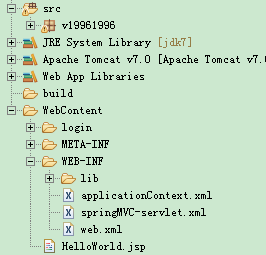
6.启动Tomcat,输入 http://localhost:8080/spring2.0/Hello/World
spring-mvc-两个个小例子的更多相关文章
- spring+spring mvc+JdbcTemplate 入门小例子
大家使用这个入门时候 最好能够去 搜一下 spring mvc 的 原理,我放一张图到这里,自己琢磨下,后面去学习就容易了 给个链接 (网上一把,千万不能懒) https://www.cnblo ...
- vuex2.0+两个小例子
首先vuex概念比较多,一定要搞懂里面的概念,可以参考官网Vuex2.0概念,我写此文的目的是希望能对前端爱好者提供个参考,加深对vuex2.0各核心概念的理解. 废话少说,直接上干货.这是官网上的一 ...
- Vuex2.0边学边记+两个小例子
最近在研究Vuex2.0,搞了好几天终于有点头绪了. 首先vuex概念比较多,一定要搞懂里面的概念,可以参考官网Vuex2.0概念,我写此文的目的是希望能对前端爱好者提供个参考,加深对vuex2.0各 ...
- 初始Spring MVC——练手小项目
初始Spring MVC 前几天开始了我的spring学习之旅,由于之前使用过MVC模式来做项目,所以我先下手的是 Spring MVC,做个练手项目,非常简单 项目介绍: 用户输入信息 -> ...
- Spring MVC的Hello World例子
以下内容引用自http://wiki.jikexueyuan.com/project/spring/mvc-framework/spring-mvc-hello-world-example.html: ...
- php操作redis的两个个小脚本
redis这东西,查询起来没有mysql那么方便,只能自己写脚本了.下面是工作中写的两个小脚本 第一个脚本,查找有lottery|的键,将他们全部删除|打印出来 <?php $redis = n ...
- libconfig第二篇----两个小例子
本文只看粗体即可,太多catch语句.两个例子均来自libconfig包的example文件夹下面,. 例子一: #include <iostream> #include <ioma ...
- 学习HttpClient,从两个小例子开始
前言 HTTP(Hyper-Text Transfer Protocol,超文本传输协议)在如今的互联网也许是最重要的协议,我们每天做的很多事情都与之有关,比如,网上购物.刷博客.看新闻等.偶尔你的上 ...
- Spring MVC简单的HelloWorld例子
1.web.xml配置(主要配置Servlet)[默认情况 Spring的配置文件在WEB-INF的<servlet-name>-servlet.xml] <?xml version ...
随机推荐
- [css]《css揭秘》学习(四)-一个元素实现内圆角边框
如图所示的圆角边框有两个元素很好实现,用一个元素也可以实现. <html> <head> <meta charset="utf-8"> < ...
- js中的3种弹出式消息提醒(警告窗口,确认窗口,信息输入窗口)的命令式
alert("A"); confirm("B");var name = confirm("B");if(name){ alert(" ...
- 2.JAVA垃圾回收机制
前言 线程独享的内存区域有程序计数器,虚拟机栈,本地方法栈,这些区域不用考虑内存回收的问题,随着线程的执行结束,自然就回收了,而堆内存和方法区的回收则不一样,他们的内存分配和回收是动态的. 1.对象存 ...
- io的四个分类
1.首先是字节操作:InputStream和OutputStream 2.字符操作:Reader和Writer 3.磁盘操作:File 4.网络操作:scoket(不在java.io包)
- 5个步骤创建你的第一个RESTFul 服务
1.啥是RESTFul 服务 在我们创建简单小程序前,先来学习下RESTFul 服务.RESTFul服务就是遵循了 Representational State Transfer(可以参考http:/ ...
- excel中VBA的使用
遇到的问题 在工作中遇到了一点小小的问题,需要给我负责带的班级的同学们测试男生1000米,女生800米的成绩.表格是这样的: 体育成绩表 序号 班级 姓名 性别 男1000.女800 成绩 1 1 张 ...
- nodejs笔记2 --关于nodejs最新启动方式
1,运行应用以前是node app.js或者 supervisor app.js 2, 现在的应用方式是npm start或者supervisor bin/www
- Python2和Python3中除法操作/的不同
X/Y 在3.0版本之前的Python中 >>>1/2 0 即一个整数(无小数部分的数)被另外一个整数除,计算结果的小数部分被截除了,只留下了整数部分 有时候,这个功能比较有用,譬如 ...
- java-9 异常处理
1.异常处理的基础知识 异常是程序中的一些错误,但并不是所有的错误都是异常,并且错误有时候是可以避免的. 比如说,你的代码少了一个分号,那么运行出来结果是提示是错误 java.lang.Error:如 ...
- jquery实现全选、全不选、反选、获取选中的所有值总结
HTML 我们的页面上有一个歌曲列表,列出多行歌曲名称,并匹配复选框供用户选择,并且在列表下方有一排操作按钮. <!doctype html> <html> <head& ...