
CSS 案例学习
1.样式 display:inline-block;可改变a标签,合其可定义宽高
2.a:hover表示鼠标经过
3.background:url(110.png) bottom 表示:给链接一个图片 并底端对齐 代码
<!DOCTYPE html>

<html>

<head>

<meta charset="utf-8">

<style type="text/css">

a{

    display: inline-block;

    width:67px;

    height:32px;

    background: url("110.png");

}

a:hover{

    background: url(110.png) bottom;

}

</style>

    <title></title>

</head>

<body>

<a href="#"></a>

</body>

</html>
4.text-align:center 水平剧中
5.一行文字行高与父元素等高时 文字垂直居中
6.text-decoration:none去掉下划线
eg:
<!DOCTYPE html>

<html>

<head>

<meta charset="utf-8">

<style type="text/css">

    a{

        display: inline-block;

        width: 120px;

        height: 58px;

        text-align: center;

        text-decoration: none;

        color: white;

        line-height: 50px;

    }

    a.one{

    background: url(images/bg1.png);

    }

    a.two{

    background: url(images/bg2.png);

    }

    a.three{

    background: url(images/bg3.png);

    }

    a.four{

    background: url(images/bg4.png);

    }

    a:hover{

    background: url(images/bg6.png)

    }

}

</style>

    <title></title>

</head>

<body>

<a href="#" class="one">五彩导行</a>

<a href="#" class="two">五彩导行</a>

<a href="#" class="three">五彩导行</a>

<a href="#" class="four">五彩导行</a>

</body>

</html>
效果:

7.padding 学习
<!DOCTYPE html>

<html>

<head>

<meta charset="utf-8">

<style type="text/css">

    .nav{

        height: 40px;

        background: #eee;

        border-top: 3px solid orange;

        border-bottom: 1px solid #aaa

    }

    .nav-con{

        width:1000px;

        height: 40px;

        margin: 0 auto;

        line-height: 40px;

    }

    a{

        display: inline-block;

        height: 40px;

        color:#aaa;

        font:12px/40px 微软雅黑;

        text-decoration: none;

        padding: 0 12px;

    }

    a:hover{

        background: #999;

    }

</style>

    <title></title>

</head>

<body>

<div class="nav">

    <div class="nav-con">

        <a href="#">设为首页</a>

        <a href="#">手机新浪网</a>

        <a href="#">移动客户端</a>

    </div>

</div>

</body>

</html>
效果:

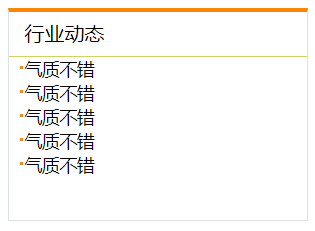
8.列表
<!DOCTYPE html>

<html>

<head>

<meta charset="utf-8">

    <title></title>

    <style type="text/css">

        .news{

            width: 238px;

            height: 166px;

            border:1px solid #d9e0ee;

            border-top: 3px solid #ff8400;

            margin: 0 auto;

        }

        .news-title{

            height: 35px;

            border-bottom: 1px solid #d9e000;

            line-height: 35px;

            padding-left: 12px;

        }

        ul{

            margin-top: 12px;

        }

        ul,li{

            list-style: none;

            margin: 0;

            padding: 0;

        }

        li{

            padding-left: 12px;

            background: url("li_bg.jpg") no-repeat

            9px 7px;

            font: 14px 微软雅黑;

        }

    </style>

</head>

<body>

    <div class="news">

        <div class="news-title">行业动态</div>

        <ul>

            <li>气质不错</li>

            <li>气质不错</li>

            <li>气质不错</li>

            <li>气质不错</li>

            <li>气质不错</li>

        </ul>

    </div>

</body>

</html>
效果:
9.浮动
作用:1.文字环绕图片
2.导航
3布局
<!DOCTYPE html>

<html>

<head>

    <title></title>

    <style type="text/css">

        body,ul,li{

            margin: 0;

            padding: 0;

        }

        ul,li{

            list-style: none;

        }

        .nav{

            width: 800px;

            height: 40px;

            background: pink;

            margin: 20px auto;

        }

        .nav ul li{

            float: left;

        }

        .nav ul li a{

            display: inline-block;

            height: 40px;

            font: 14px/40px 微软雅黑;

            padding: 0 20px ;

            text-decoration: none;

        }

        .nav ul li a:hover{

            background: #aaa;

        }

    </style>

</head>

<body>

<div class="nav">

    <ul>

        <li><a href="#">百度</a></li>

        <li><a href="#">百度</a></li>

        <li><a href="#">百度</a></li>

    </ul>

</div>

</body>

</html>
效果:

<!DOCTYPE html>

<html>

<head>

    <title></title>

    <style type="text/css">

        body,ul,li{

            margin: 0;

            padding: 0;

        }

        li{

            list-style: none;

        }

        .nav{

            height: 55px;

            background: url("img/head_bg.jpg");

            margin-top: 30px;

            border-top: 1px solid #666;

        }

        .nav .nav-con{

            width: 1000px;

            margin: 0 auto;

            height: 55px;

        }

        .nav-con ul li{

            float: left;

            background: url("img/li_bg.png") no-repeat right;

            height: 55px;

            padding:0 30px;

        }

        a{

            display:inline-block;

            height: 55px;

            font: 14px/55px 微软雅黑;

            text-decoration: none;

            color: gray;

        }

        a:hover{

            color: green;

        }

    </style>

</head>

<body>

<div class="nav">

    <div class="nav-con">

        <ul>

            <li><a href="#" >智能手机</a></li>

            <li><a href="#">平板电脑</a></li>

            <li><a href="#" >百度</a></li>

            <li><a href="#" >么么么哒</a></li>

        </ul>

    </div>

</div>

</body>

</html>
效果:

<!DOCTYPE html>

<html>

<head>

    <title></title>

    <style>

        .header,.main,.footer{

            width: 500px;

        }

        .header,.footer{

            height: 100px;

            background: #000;

            margin: 10px 0;

        }

        .main{

            height: 300px;

            background: #eee;

        }

        .content{

            width: 300px;

            height: 300px;

            background: orange;

            float: left;

        }

        .sidebar{

            width: 190px;

            height:300px;

            background: green;

            float: right;

        }

    </style>

</head>

<body>

<div class="header"></div>

<div class="main">

    <div class="content"></div>

    <div class="sidebar"></div>

</div>

<div class="footer"></div>

</body>

</html>
效果:

10 .清除浮动
1).clear:both 浮动最后加一个标签 样式加这个 清除浮动
2).overflow:hidden 在父盒子里用 当浮动出合子时不可使用
3).clearfix:after{content:"";display:block;height:0;line-height:0;visibility:hidden;clear:both} .clearfix{zoom:1;} 兼容IE 伪元素清除 (常用)最后把这个样式给要清除的父元素
CSS 案例学习的更多相关文章
- css案例学习之table tr th td ul li实现日历
效果 代码 <html> <head> <title>Calendar</title> <style> <!-- .month { b ...
- css案例学习之盒子模型
定义:每个盒子都有:边界.边框.填充.内容四个属性: 每个属性都包括四个部分:上.右.下.左:这四部分可同时设置,也可分别设置:里的抗震辅料厚度,而边框有大小和颜色之分,我们又可以理解为生活中所见盒子 ...
- css案例学习之继承关系
代码 <html> <head> <title>继承关系</title> <style> body{ color:blue; /* 颜色 * ...
- css案例学习之用thead、tbody、tfoot实现漂亮的table布局
首先说说thead.tbody.tfoot <thead> <tbody> <tfoot> 无论前后顺序如何改变, <thead> 内的元素总是在表的最 ...
- css案例学习之ul li dl dt dd实现二级菜单
效果 代码实现 <!DOCTYPE html PUBLIC "-//W3C//DTD XHTML 1.0 Transitional//EN" "http://www ...
- css案例学习之按钮超链接
效果 css实现 <html> <head> <title>按钮超链接</title> <style> a{ /* 统一设置所有样式 */ ...
- css案例学习之relative与absolute
代码 <!DOCTYPE html PUBliC "-//W3C//DTD XHTML 1.0 Transitional//EN" "http://www.w3.o ...
- css案例学习之float浮动
代码: <!DOCTYPE html PUBliC "-//W3C//DTD XHTML 1.0 Transitional//EN" "http://www.w3. ...
- css案例学习之父子块的margin
两边还会有些距离,这是body默认的. 代码: <head> <title>父子块的margin</title> <style type="text ...
随机推荐
- PAT甲级——A1151 LCA_in_a_BinaryTree【30】
The lowest common ancestor (LCA) of two nodes U and V in a tree is the deepest node that has both U ...
- token的创建及解析
<dependency> <groupId>io.jsonwebtoken</groupId> <artifactId>jjwt</artifac ...
- 04、python的基础-->列表跟元组
一.列表list 1.列表的新增元素(三种方法) >>>第1种方法(append 增加到最后): li = ['Peter','Henrry','Wode','鸭子','xiaoxi ...
- zoom:1总结
zoom:1确实帮我们解决了不少ie下的bug,但是它的来龙去脉,又有多少人知道呢? 所以我老生常谈,说一下它的来龙去脉. Zoom属性是IE浏览器的专有属性, 它可以设置或检索对象的缩放比例.先来一 ...
- Mysql 主从同步(转载)
第一步: 在master上创建用于同步的用户 GRANT FILE,REPLICATION SLAVE,REPLICATION CLIENT,SUPER ON *.* TObackup@'192.16 ...
- CentOS7下yum安装Jenkins
Jenkins官网最新稳定版:https://pkg.jenkins.io/redhat-stable/ 1.下载依赖 sudo wget -O /etc/yum.repos.d/jenkins.re ...
- Python第十二节 异常
Python 第十三节 异常 python的错误一般包含两类: 语法错误 : 语法错误一般就是, 当你写完程序提交的时候, 发现无法提交, 提示存在错误.例如: 英文逗号 错写成了 中文逗号 异常 : ...
- Django rest_framework 自动生成接口文档
自动生成接口文档 REST framework可以自动帮助我们生成接口文档. 接口文档以网页的方式呈现. 自动接口文档能生成的是继承自APIView及其子类的视图. 1. 安装依赖 REST fram ...
- strings - 显示文件中的可打印字符
总览 (SYNOPSIS) strings [-a|-|--all] [-f|--print-file-name] [-o] [--help] [-v|--version] [-n min-len|- ...
- struct解决socket黏包问题 (指令传输)
服务端代码如下 import struct import subprocess import socket server = socket.socket() server.bind(()) serve ...