
css案例学习之float浮动
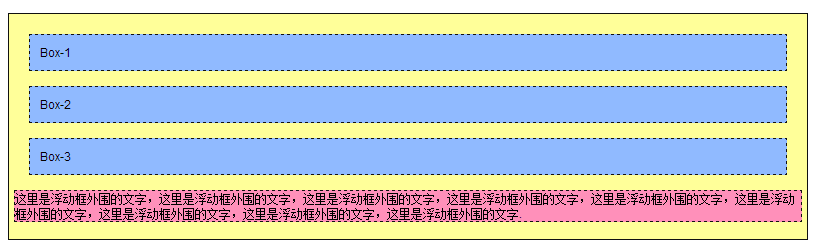
代码:
<!DOCTYPE html PUBliC "-//W3C//DTD XHTML 1.0 Transitional//EN"

 "http://www.w3.org/TR/xhtml1/DTD/xhtml1-transitional.dtd">

<html xmlns="http://www.w3.org/1999/xhtml">

<head>

    <title>float属性</title>

<style type="text/css">

body{

    margin:15px;

    font-family:Arial; font-size:12px;

    }

.father{

    background-color:#ffff99;

    border:1px solid #111111;

    padding:5px;

    }

.father div{

    padding:10px;

    margin:15px;

    border:1px dashed #111111;

    background-color:#90baff;

    }

.father p{

    border:1px dashed #111111;

    background-color:#ff90ba;

    }

.son1{

/* 这里设置son1的浮动方式*/

}

.son2{

/* 这里设置son1的浮动方式*/

}

.son3{

/* 这里设置son1的浮动方式*/

}

</style>

</head>

<body>

    <div class="father">

        <div class="son1">Box-1</div>

        <div class="son2">Box-2</div>

        <div class="son3">Box-3</div>

        <p>这里是浮动框外围的文字,这里是浮动框外围的文字,这里是浮动框外围的文字,这里是浮动框外围的文字,这里是浮动框外围的文字,这里是浮动框外围的文字,这里是浮动框外围的文字,这里是浮动框外围的文字,这里是浮动框外围的文字.</p>

    </div>

</body>

</html>


代码:
<!DOCTYPE html PUBliC "-//W3C//DTD XHTML 1.0 Transitional//EN"

 "http://www.w3.org/TR/xhtml1/DTD/xhtml1-transitional.dtd">

<html xmlns="http://www.w3.org/1999/xhtml">

<head>

    <title>float属性</title>

<style type="text/css">

body{

    margin:15px;

    font-family:Arial; font-size:12px;

    }

.father{

    background-color:#ffff99;

    border:1px solid #111111;

    padding:5px;

    }

.father div{

    padding:10px;

    margin:15px;

    border:1px dashed #111111;

    background-color:#90baff;

    }

.father p{

    border:1px dashed #111111;

    background-color:#ff90ba;

    }

.son1{

/* 这里设置son1的浮动方式*/

float:left;

}

.son2{

/* 这里设置son1的浮动方式*/

float:left;

}

.son3{

/* 这里设置son1的浮动方式*/

float:left;

}

</style>

</head>

<body>

    <div class="father">

        <div class="son1">Box-1</div>

        <div class="son2">Box-2</div>

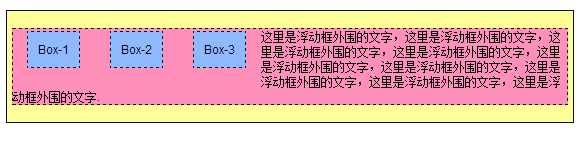
        <div class="son3">Box-3</div> <!-- 当所有div都浮动的时候,块空间就不占据一行了,下面的内容会自动填充 ,div只占据属于自己的那一部分,后面的元素会自动补齐行剩余空间-->

        <p>这里是浮动框外围的文字,这里是浮动框外围的文字,这里是浮动框外围的文字,这里是浮动框外围的文字,这里是浮动框外围的文字,这里是浮动框外围的文字,这里是浮动框外围的文字,这里是浮动框外围的文字,这里是浮动框外围的文字.</p>

    </div>

</body>

</html>
说明:浏览器宽度改变时,样子相应的也会改变,浮动之后,默认的占据一行的宽度没有了,剩下的是css中设置的padding、margin、width、height等效果。

代码:
<!DOCTYPE html PUBliC "-//W3C//DTD XHTML 1.0 Transitional//EN"

 "http://www.w3.org/TR/xhtml1/DTD/xhtml1-transitional.dtd">

<html xmlns="http://www.w3.org/1999/xhtml">

<head>

    <title>float属性</title>

<style type="text/css">

body{

    margin:15px;

    font-family:Arial; font-size:12px;

    }

.father{

    background-color:#ffff99;

    border:1px solid #111111;

    padding:5px;

    }

.father div{

    padding:10px;

    margin:15px;

    border:1px dashed #111111;

    background-color:#90baff;

    }

.father p{

    border:1px dashed #111111;

    background-color:#ff90ba;

    }

.son1{

/* 这里设置son1的浮动方式*/

float:left;

}

.son2{

/* 这里设置son1的浮动方式*/

float:left;

}

.son3{

/* 这里设置son1的浮动方式*/

float:right;

}

</style>

</head>

<body>

    <div class="father">

        <div class="son1">Box-1</div>

        <div class="son2">Box-2</div>

        <div class="son3">Box-3</div>

        <p>这里是浮动框外围的文字,这里是浮动框外围的文字,这里是浮动框外围的文字,这里是浮动框外围的文字,这里是浮动框外围的文字,这里是浮动框外围的文字,这里是浮动框外围的文字,这里是浮动框外围的文字,这里是浮动框外围的文字.</p>

    </div>

</body>

</html>
说明:div1、div2左浮动,div3右浮动,p文字被夹中间。

div1 div3 左浮动 div2 右浮动
代码:
<!DOCTYPE html PUBliC "-//W3C//DTD XHTML 1.0 Transitional//EN"

 "http://www.w3.org/TR/xhtml1/DTD/xhtml1-transitional.dtd">

<html xmlns="http://www.w3.org/1999/xhtml">

<head>

    <title>float属性</title>

<style type="text/css">

body{

    margin:15px;

    font-family:Arial; font-size:12px;

    }

.father{

    background-color:#ffff99;

    border:1px solid #111111;

    padding:5px;

    }

.father div{

    padding:10px;

    margin:15px;

    border:1px dashed #111111;

    background-color:#90baff;

    }

.father p{

    border:1px dashed #111111;

    background-color:#ff90ba;

    clear:right;

    }

.son1{

/* 这里设置son1的浮动方式*/

float:left;

}

.son3{

/* 这里设置son3 的浮动方式*/

float:right;

}

.son2 {

/* 这里设置son2 的浮动方式*/

float:left;

}

</style>

</head>

<body>

    <div class="father">

        <div class="son1">Box-1</div>

        <div class="son2">Box-2</div>

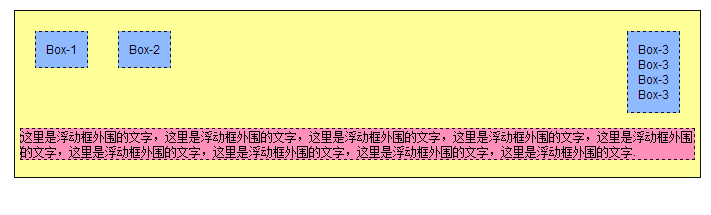
        <div class="son3">Box-3<br/>Box-3<br/>Box-3<br/>Box-3<br/></div> <!-- 换行重新占据了三行内容 -->

        <p>这里是浮动框外围的文字,这里是浮动框外围的文字,这里是浮动框外围的文字,这里是浮动框外围的文字,这里是浮动框外围的文字,这里是浮动框外围的文字,这里是浮动框外围的文字,这里是浮动框外围的文字,这里是浮动框外围的文字.</p>

    </div>

</body>

</html>
说明:有了br之后,浮动元素所在行又被重新占据了,p元素不会上来填充。
代码:
<!DOCTYPE html PUBliC "-//W3C//DTD XHTML 1.0 Transitional//EN" "http://www.w3.org/TR/xhtml1/DTD/xhtml1-transitional.dtd">

<html xmlns="http://www.w3.org/1999/xhtml">

<head>

    <title>float属性</title>

<style type="text/css">

body{

    margin:15px;

    font-family:Arial; font-size:12px;

    }

.father{

    background-color:#ffff99;

    border:1px solid #111111;

    padding:5px;

    }

.father div{

    padding:10px;

    margin:15px;

    border:1px dashed #111111;

    background-color:#90baff;

    }

.father p{

    border:1px dashed #111111;

    background-color:#ff90ba;

    clear:right;

    }

.son1{

float:left;

/* 这里设置son1的浮动方式*/

}

.son2{

/* 这里设置son1的浮动方式*/

float:left;

}

.son3{

/* 这里设置son1的浮动方式*/

float:right;

}

.father .clear{

margin:0;

padding:0;

border:0;

clear:both;    }

</style>

</head>

<body>

    <div class="father">

        <div class="son1">Box-1</div>

        <div class="son2">Box-2</div>

        <div class="son3">Box-3</div>

        <div class="clear"></div>

        <p>这里是浮动框外围的文字,这里是浮动框外围的文字,这里是浮动框外围的文字,这里是浮动框外围的文字,这里是浮动框外围的文字,这里是浮动框外围的文字,这里是浮动框外围的文字,这里是浮动框外围的文字,这里是浮动框外围的文字.</p>

    </div>

</body>

</html>
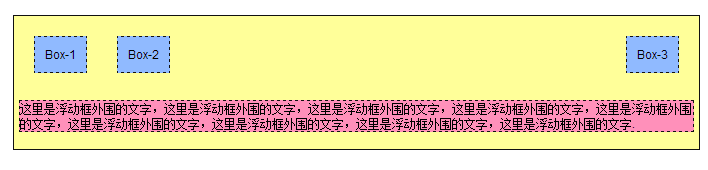
说明:添加一个clear:both;属性之后,之前的空当地方就会被清理掉,p元素就只能另起一行了。
css案例学习之float浮动的更多相关文章
- 【CSS学习】--- float浮动属性
一.前言 浮动元素以脱离标准流的方式来实现元素的向左或向右浮动,并且浮动元素还是在原来的行上进行浮动的.float浮动属性的四个参数:left:元素向左浮动:right:元素向右浮动:none:默认值 ...
- CSS| position定位和float浮动
对基础知识再度做个巩固和梳理. 一.position定位 (一):position的属性 1.absolute:生成绝对定位的元素,相对于最近一级定位不是static的父元素来进行定位: 2.rela ...
- CSS 案例学习
1.样式 display:inline-block;可改变a标签,合其可定义宽高 2.a:hover表示鼠标经过 3.background:url(110.png) bottom 表示:给链接一个图片 ...
- css案例学习之table tr th td ul li实现日历
效果 代码 <html> <head> <title>Calendar</title> <style> <!-- .month { b ...
- css案例学习之ul li dl dt dd实现二级菜单
效果 代码实现 <!DOCTYPE html PUBLIC "-//W3C//DTD XHTML 1.0 Transitional//EN" "http://www ...
- css案例学习之盒子模型
定义:每个盒子都有:边界.边框.填充.内容四个属性: 每个属性都包括四个部分:上.右.下.左:这四部分可同时设置,也可分别设置:里的抗震辅料厚度,而边框有大小和颜色之分,我们又可以理解为生活中所见盒子 ...
- css案例学习之继承关系
代码 <html> <head> <title>继承关系</title> <style> body{ color:blue; /* 颜色 * ...
- css案例学习之用thead、tbody、tfoot实现漂亮的table布局
首先说说thead.tbody.tfoot <thead> <tbody> <tfoot> 无论前后顺序如何改变, <thead> 内的元素总是在表的最 ...
- css案例学习之span边框实现的特殊效果
bottom left bottom right top left top right 配合颜色来使用,实现一些神奇的效果 #menu a span{ height:; width:; /*borde ...
随机推荐
- Qt带来的是更加低廉的开发成本和学习成本,对于很多小公司而言,这种优势足以让他们获得更大的利润空间 good
不能单纯从技术上来看待这个问题,Qt本来是小众的开发平台,个人认为,它的出现只是解决特性场景的特定问题,Qt带来的是更加低廉的开发成本和学习成本,对于很多小公司而言,这种优势足以让他们获得更大的利润空 ...
- cf478A Initial Bet
A. Initial Bet time limit per test 1 second memory limit per test 256 megabytes input standard input ...
- Windows多线程同步系列之一-----互斥对象
多线程同步之互斥对象 作者:vpoet mail:vpoet_sir@163.com 对卖票问题进行线程间同步,本文将在上文的基础上,使用互斥对象对线程进行同步. 首先看看windows API ...
- No enclosing instance of type Outer is accessible. Must qualify the allocation with an enclosing instance of type Outer (e.g. x.new A() where x is an instance of Outer)
之前看内部类的时候没发现这个问题,今天写代码的时候遇到,写个最简单的例子: 下面这一段代码 红色的部分就是编译报错: No enclosing instance of type Outer is ac ...
- PCRE的安装及使用
摘自http://www.cnblogs.com/renhao/archive/2011/08/17/2143264.html PCRE的安装及使用 1.主页地址:http://www.pcre.or ...
- 总结 XSS 与 CSRF 两种跨站攻击
前言 在那个年代,大家一般用拼接字符串的方式来构造动态 SQL 语句创建应用,于是 SQL 注入成了很流行的攻击方式.在这个年代, 参数化查询 [1] 已经成了普遍用法,我们已经离 SQL 注入很远了 ...
- Oracle 取上周一到周末日期的查询语句
-- Oracle 取上周一到周末的sql -- 这样取的是 在一周内第几天,是以周日为开始的 select to_char(to_date('20130906','yyyymmdd'),'d') f ...
- error: ‘for’ loop initial declarations are only allowed in
使用gcc,出现如下错误: thread_join.c:7:5: error: 'for' loop initial declarations are only allowed in C99 mode ...
- 3GP文件格式研究
需要看的文档 http://www.3gpp.org/ftp/Specs/archive/26_series/ 3GPP TS 26.233 3GPP TS 26.243 3GPP TS 26.244 ...
- Android 关于屏幕适配
android屏幕适配详解 官方地址:http://developer.android.com/guide/practices/screens_support.html 转自:http://www.c ...