
css案例学习之table tr th td ul li实现日历
效果
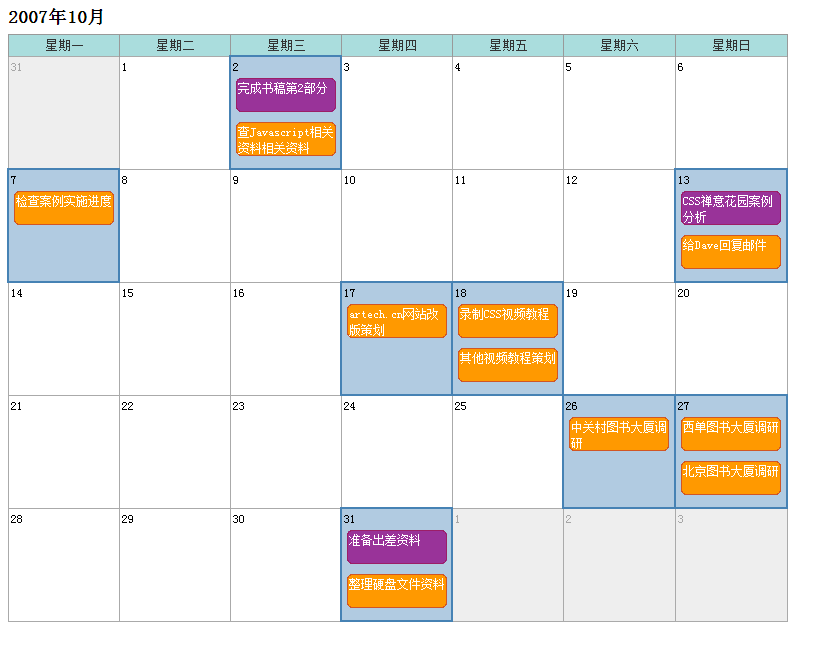
代码
<html>

<head>

<title>Calendar</title>

<style>

<!--

.month {

    border-collapse: collapse;

    table-layout:fixed;

    width:;

}

.month caption {

    text-align: left;

    font-family: normal % 宋体, arial;

     font-size:12px;

    font-weight:normal;

    padding-bottom: 6px;

}

.month caption .date{

    font-size:%;

    font-weight:bold;

}

.month th {

    border: 1px solid #;

    border-bottom: none;

    padding: 3px 2px 2px;

    margin:;

    background-color: #ADD;

    color: #;

    font: % 宋体;

}

.month td {

    border: 1px solid #AAA;

    font: 12px 宋体;

   line-height:16px;

    padding: 2px 2px;

    margin:;

    vertical-align: top;

    }

.month td.previous, .month td.next {

    background-color: #eee;

    color: #A6A6A6;

}

.month td.active {

    background-color: #B1CBE1;

    border: 2px solid #4682B4;

}

.month ul {

    list-style-type: none;

    margin: 3px;

    padding:;

}

.month li {

    color:#fff;

   background:transparent url(level-.gif) no-repeat;

   padding:2px;

    margin-bottom: 6px;

    height:34px;

    overflow:hidden;

    width:100px;

}

.month td li.important{

   background:transparent url(level-.gif) no-repeat;

}

-->

</style>

</head>

<body>

<table class="month" summary="Calendar for 2007.10">

    <caption><span class="date">2007年10月 </span></caption>

    <tr>

        <th scope="col"><span>星期</span>一</th>

        <th scope="col"><span>星期</span>二</th>

        <th scope="col"><span>星期</span>三</th>

        <th scope="col"><span>星期</span>四</th>

        <th scope="col"><span>星期</span>五</th>

        <th scope="col"><span>星期</span>六</th>

        <th scope="col"><span>星期</span>日</th>

    </tr>

    <tr>

        <td class="previous"></td>

        <td></td>

        <td class="active">

        <ul>

            <li class="important">完成书稿第2部分</li>

            <li>查Javascript相关资料相关资料</li>

        </ul>

        </td>

        <td></td>

        <td></td>

        <td></td>

        <td></td>

    </tr>

    <tr>

        <td class="active">

        <ul>

            <li>检查案例实施进度</li>

        </ul>

        </td>

        <td></td>

        <td></td>

        <td></td>

        <td></td>

        <td></td>

        <td class="active">

        <ul>

            <li class="important">CSS禅意花园案例分析</li>

            <li>给Dave回复邮件</li>

        </ul>

        </td>

    </tr>

    <tr>

        <td></td>

        <td></td>

        <td></td>

        <td class="active">

        <ul>

            <li>artech.cn网站改版策划</li>

        </ul>

        </td>

        <td class="active">

        <ul>

            <li>录制CSS视频教程</li>

            <li>其他视频教程策划</li>

        </ul>

        </td>

        <td></td>

        <td></td>

    </tr>

    <tr>

        <td></td>

        <td></td>

        <td></td>

        <td></td>

        <td></td>

        <td class="active">

        <ul>

            <li>中关村图书大厦调研</li>

        </ul>

        </td>

        <td class="active">

        <ul>

            <li>西单图书大厦调研</li>

            <li>北京图书大厦调研</li>

        </ul>

        </td>

    </tr>

    <tr>

        <td></td>

        <td></td>

        <td >

        </td>

        <td class="active">

            <ul>

            <li class="important">准备出差资料</li>

            <li>整理硬盘文件资料</li>

            </ul>

        </td>

        <td class="next"></td>

        <td class="next"></td>

        <td class="next"></td>

    </tr>

</table>

</body>

</html>
说明:
巧妙的布局
巧妙的样式
scope定义和用法
scope 属性定义将表头单元与数据单元相关联的方法。
scope 属性标识某个单元是否是列、行、列组或行组的表头。
scope 属性不会在普通浏览器中产生任何视觉变化。
屏幕阅读器可以利用该属性。
详细解释
使用 scope 属性,可以将数据单元格与表头单元格联系起来。
通过属性值 row,表头行包括的所有表格都将和表头单元格联系起来。指定 col,会将当前列的所有单元格和表头单元格绑定起来。
css案例学习之table tr th td ul li实现日历的更多相关文章
- css案例学习之用thead、tbody、tfoot实现漂亮的table布局
首先说说thead.tbody.tfoot <thead> <tbody> <tfoot> 无论前后顺序如何改变, <thead> 内的元素总是在表的最 ...
- css案例学习之ul li dl dt dd实现二级菜单
效果 代码实现 <!DOCTYPE html PUBLIC "-//W3C//DTD XHTML 1.0 Transitional//EN" "http://www ...
- css案例学习之盒子模型
定义:每个盒子都有:边界.边框.填充.内容四个属性: 每个属性都包括四个部分:上.右.下.左:这四部分可同时设置,也可分别设置:里的抗震辅料厚度,而边框有大小和颜色之分,我们又可以理解为生活中所见盒子 ...
- css案例学习之继承关系
代码 <html> <head> <title>继承关系</title> <style> body{ color:blue; /* 颜色 * ...
- CSS 案例学习
1.样式 display:inline-block;可改变a标签,合其可定义宽高 2.a:hover表示鼠标经过 3.background:url(110.png) bottom 表示:给链接一个图片 ...
- table tr foreach td 换行
@{ ;} <table style=" class="sy_table"> <tr> @foreach (DataRow dr in (View ...
- css案例学习之relative与absolute
代码 <!DOCTYPE html PUBliC "-//W3C//DTD XHTML 1.0 Transitional//EN" "http://www.w3.o ...
- css案例学习之float浮动
代码: <!DOCTYPE html PUBliC "-//W3C//DTD XHTML 1.0 Transitional//EN" "http://www.w3. ...
- css案例学习之class执行的顺序
<!DOCTYPE html PUBLIC "-//W3C//DTD XHTML 1.0 Transitional//EN" "http://www.w3.org/ ...
随机推荐
- tmux 配置
tmux配置文件名为.tmux.conf,位于用户根目录下. 常用的配置为: # vimsetw -g mode-keys vibind [ copy-modebind -t vi-copy v be ...
- ubuntu 右键新建文档
第一步.创建一个空白doc文档. 一定要是空白的,然后保存(另存为)到桌面,注意细节:1.保存到你能找到的地方,最好是桌面,以方便第二步拖动 2.注意下方的 “文件类型”,要选择doc格式. 3.注意 ...
- UIView 转 UIImage
这个方法很实用,特别是在做水印相机得时候... - (UIImage*) imageWithUIView:(UIView*) view{ // 创建一个bitmap的context // 并把它设置成 ...
- 用Less循环生成样式
需求是这样的,我要给一个轮播图设置不同的背景图,由于每张图片的背景图路劲都不一样,所以需要对每个单独的元素自定义图片路径.然后想到Less语法有mixin机制,就这样实现了一个递归function,然 ...
- redmine fastcgi常常崩溃的解决方式
最终找到了解决方法,在以下的文件里加入两行就可以: /home/redmine/redmine-2.5.1/public/dispatch.fcgi require 'rubygems' requir ...
- 在Maven的配置文件中,自定义私有仓库地址和设置下载的jar包的保存位置
在Maven的settings.xml,可以设置Maven的私有仓库的地址,还可以设置所下载jar包在自己电脑的保存地址(默认不设置保存在个人文件夹的.m2文件夹下). 1.设置私有仓库地址: < ...
- drwtsn32.exe 遇到问题须要关闭。我们对此引起的不便表示抱歉
我的机器老是这样.启动起来就有这个... 那位高手能告诉我这是怎么会事.故障的原因以及解决的办法. 最佳答案 drwtsn32.exe是windows的一项磁盘检查程序,同一时候也是鸡肋程序,最好的办 ...
- Myeclipse安装破解
- maven报错cannot change version of project facet
用Eclipse创建Maven结构的web项目的时候选择了默认的catalog,由于这个catalog比较老,用的servlet还是2.3,而现在最少也是2.5,所以经常会出现问题,在Projecdt ...
- Oracle字符集查看
Oracle字符集是一个字节数据的解释的符号集合,有大小之分,有相互的包容关系.ORACLE 支持国家语言的体系结构允许你使用本地化语言来存储,处理,检索数据.它使数据库工具,错误消息,排序次序,日期 ...