
Learning OSG programing---osgAnimation(3)
接下来是用createModel函数创建模型:
 osg::ref_ptr<osg::Group> createModel(bool overlay, osgSim::OverlayNode::OverlayTechnique technique)

 {

     osg::Vec3 center(0.0f,0.0f,0.0f);

     float radius = 100.0f;

     osg::ref_ptr<osg::Group> root = new osg::Group;

     float baseHeight = center.z()-radius*0.5;

     osg::ref_ptr<osg::Node> baseModel = createBase(osg::Vec3(center.x(), center.y(), baseHeight),radius);

     osg::ref_ptr<osg::Node> movingModel = createMovingModel(center,radius*0.8f);

     if (overlay)

     {

         osgSim::OverlayNode* overlayNode = new osgSim::OverlayNode(technique);

         overlayNode->setContinuousUpdate(true);

         overlayNode->setOverlaySubgraph(movingModel);

         overlayNode->setOverlayBaseHeight(baseHeight-0.01);

         overlayNode->addChild(baseModel);

         root->addChild(overlayNode);

     }

     else

     {

         root->addChild(baseModel);

     }

     root->addChild(movingModel);

     return root;

 }
这个函数首先根据前面定义的函数,创建方格地板和运动模型。根据函数的参数overlay决定是否建立重叠效果。
若指定创建重叠效果,则根据函数的参数technique创建重叠节点,并将运动模型movingModel设为其重叠的模型。将方格地板加入到重叠节点,并将重叠节点加入到根节点中。
如未指定创建重叠模式,则直接将方格地板和运动模型添加到根节点返回。
最后是主函数代码:
 int main( int argc, char **argv )

 {

     bool overlay = false;

     osg::ArgumentParser arguments(&argc,argv);

     while (arguments.read("--overlay")) overlay = true;

     osgSim::OverlayNode::OverlayTechnique technique = osgSim::OverlayNode::OBJECT_DEPENDENT_WITH_ORTHOGRAPHIC_OVERLAY;

     while (arguments.read("--object")) { technique = osgSim::OverlayNode::OBJECT_DEPENDENT_WITH_ORTHOGRAPHIC_OVERLAY; overlay=true; }

     while (arguments.read("--ortho") || arguments.read("--orthographic")) { technique = osgSim::OverlayNode::VIEW_DEPENDENT_WITH_ORTHOGRAPHIC_OVERLAY; overlay=true; }

     while (arguments.read("--persp") || arguments.read("--perspective")) { technique = osgSim::OverlayNode::VIEW_DEPENDENT_WITH_PERSPECTIVE_OVERLAY; overlay=true; }

     // initialize the viewer.

     osgViewer::Viewer viewer;

     // load the nodes from the commandline arguments.

     osg::ref_ptr<osg::Group> model = createModel(overlay, technique);

     if (!model)

     {

         return ;

     }

     // tilt the scene so the default eye position is looking down on the model.

     osg::ref_ptr<osg::MatrixTransform> rootnode = new osg::MatrixTransform;

     rootnode->setMatrix(osg::Matrix::rotate(osg::inDegrees(30.0f),1.0f,0.0f,0.0f));

     rootnode->addChild(model);

     // run optimization over the scene graph

     osgUtil::Optimizer optimzer;

     optimzer.optimize(rootnode);

     std::string filename;

     if (arguments.read("-o",filename))

     {

         osgDB::writeNodeFile(*rootnode, filename);

         return ;

     }

     // set the scene to render

     viewer.setSceneData(rootnode);

     viewer.setCameraManipulator(new osgGA::TrackballManipulator());

     // viewer.setUpViewOnSingleScreen(1);

 #if 0

     // use of custom simulation time.

     viewer.realize();

     double simulationTime = 0.0;

     while (!viewer.done())

     {

         viewer.frame(simulationTime);

         simulationTime += 0.001;

     }

     return ;

 #else

     // normal viewer usage.

     return viewer.run();

 #endif

 }
主函数中,根据运行程序时指定的命令行参数,用createModel函数创建不同的节点对象。最后对生成的节点进行选转,优化等操作。在运行程序时,若在命令行中输入 -o选项,并在其后指定文件名,则程序可将生成的模型保存在指定的文件中。
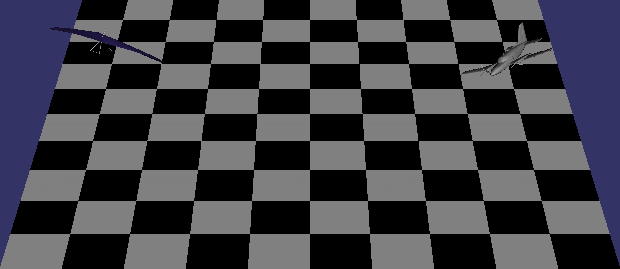
运行程序,分别指定和不指定overlay选项时,产生不同的效果。
overlay
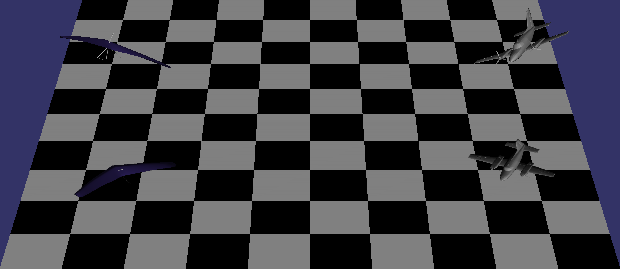
可以看到地板上会有模型的投影。
nonOverlay
Enjoy!
Learning OSG programing---osgAnimation(3)的更多相关文章
- Deep Learning论文笔记之(四)CNN卷积神经网络推导和实现(转)
Deep Learning论文笔记之(四)CNN卷积神经网络推导和实现 zouxy09@qq.com http://blog.csdn.net/zouxy09 自己平时看了一些论文, ...
- Deep Learning论文笔记之(八)Deep Learning最新综述
Deep Learning论文笔记之(八)Deep Learning最新综述 zouxy09@qq.com http://blog.csdn.net/zouxy09 自己平时看了一些论文,但老感觉看完 ...
- Deep Learning论文笔记之(六)Multi-Stage多级架构分析
Deep Learning论文笔记之(六)Multi-Stage多级架构分析 zouxy09@qq.com http://blog.csdn.net/zouxy09 自己平时看了一些 ...
- Learning Cocos2d-x for WP8(2)——深入刨析Hello World
原文:Learning Cocos2d-x for WP8(2)--深入刨析Hello World cocos2d-x框架 在兄弟篇Learning Cocos2d-x for XNA(1)——小窥c ...
- Learning Cocos2d-x for WP8(1)——创建首个项目
原文:Learning Cocos2d-x for WP8(1)--创建首个项目 Cocos2d-x for WP8开发语言是C++,系列文章将参考兄弟篇Learning Cocos2d-x for ...
- Learning Cocos2d-x for WP8(9)——Sprite到哪,我做主
原文:Learning Cocos2d-x for WP8(9)--Sprite到哪,我做主 工程文件TouchesTest.h和TouchesTest.cpp 相关素材文件 事件驱动同样适用于coc ...
- Learning Cocos2d-x for WP8(8)——动作Action
原文:Learning Cocos2d-x for WP8(8)--动作Action 游戏很大程度上是由动作画面支撑起来的. 动作分为两大类:瞬间动作和延时动作. 瞬间动作基本等同于设置节点的属性,延 ...
- Learning Cocos2d-x for WP8(7)——让Sprite动起来
原文:Learning Cocos2d-x for WP8(7)--让Sprite动起来 C#(wp7)兄弟篇Learning Cocos2d-x for XNA(7)——让Sprite动起来 本讲将 ...
- Learning Cocos2d-x for WP8(6)——场景切换和场景过渡效果
原文:Learning Cocos2d-x for WP8(6)--场景切换和场景过渡效果 C#(wp7)兄弟篇 Learning Cocos2d-x for XNA(6)——场景切换和场景过渡效果 ...
- Learning Cocos2d-x for WP8(5)——详解Menu菜单
原文:Learning Cocos2d-x for WP8(5)--详解Menu菜单 C#(wp7)兄弟篇Learning Cocos2d-x for XNA(5)——详解Menu菜单 菜单是游戏必不 ...
随机推荐
- 成为k8s大佬,从这个操作开始(伪) - 程序员学点xx 42 k8s
目录 Kubernetes -2- 这是yann的第97篇分享 本日状态: 饿着肚子写公众号的 yann 同学. 第 1 部分 反省 昨天的内容被熊哥批评了. 熊哥说,「你光想着自己爽,一句我认为 ...
- Hystrix (容错,回退,降级,缓存)
Hystrix熔断机制就像家里的保险丝一样,若同时使用高功率的电器,就会烧坏电路,这时候保险丝自动断开就有效的保护了电路.而我们程序中也同样是这样.例如若此时数据库压力太大速度很慢,此时还有不断的请求 ...
- SQL 常用语句(一)
--SQL 语句为表添加字段并设置默认值 alter table TableName add ColumnName int --字段类型 not null --是否为空 --默认值 --SQL 语句为 ...
- sqlserver 高版本迁移到低版本
奇葩事不少, 这不, 得把 sqlserver 2014 迁移到 2012 开始以为用备份再还原的方法就可以, 谁知道最终兼容性的问题无法解决(低版本不兼容高版本备份的文件, 即便在高版本中选择了兼 ...
- 在eclipse里搜索maven项目需要的dependency
eclipse直接就可以通过下载同步仓库索引,直接关键字查询需要的dependency. 前提是你已经在你的eclipse上配好了maven正确的环境. 1. 设置在开启eclipse时下载同步仓库索 ...
- linux NFS 服务器的安装
1. 安装 nfs 服务 [root@allentuns ~]# yum -y install nfs-utils rpcbind 2. 启动 nfs 服务 [root@allentuns ~]# ...
- SQL SERVER将多行数据合并成一行
1)比如表中有三列数据: 2)执行如下查询: SELECT [USER_NAME], [USER_ACCOUNT] , [ROLE_NAME] = stuff(( SELECT ',' + [ROLE ...
- 部署Tomcat服务器
部署Tomcat服务器,具体内容如下: 1.安装部署JDK基础环境; 2.安装部署Tomcat服务器; 3.创建JSP测试页面,文件名为test.jsp,显示服务器当前时间. 然后客户机访问Web服务 ...
- javaweb各种框架组合案例(七):springboot+jdbcTemplete+通用dao+restful
一.介绍 1.springboot是spring项目的总结+整合 当我们搭smm,ssh,ssjdbc等组合框架时,各种配置不胜其烦,不仅是配置问题,在添加各种依赖时也是让人头疼,关键有些jar包之间 ...
- python使用etcd
import sys import etcd client = etcd.Client( host='127.0.0.1', port=2379, allow_reconnect=True) clie ...