
Python爬虫(二):写一个爬取壁纸网站图片的爬虫(图片下载,词频统计,思路)
好家伙,写爬虫
代码:


import requests

import re

import os

from collections import Counter

import xlwt

# 创建Excel文件

workbook = xlwt.Workbook(encoding='utf-8')

worksheet = workbook.add_sheet('url_list')

# 将数据写入Excel文件

worksheet.write(0, 0, '序号') #写入对应的字段

worksheet.write(0, 1, '图片详细地址')

worksheet.write(0, 2, '图片TAG')

def get_response(html_url):

    headers ={

        'User-Agent':'Mozilla/5.0 (Windows NT 10.0; Win64; x64) AppleWebKit/537.36 (KHTML, like Gecko) Chrome/114.0.0.0 Safari/537.36 Edg/114.0.1823.43'

    }

    response = requests.get(url=html_url,headers=headers)

    return response

def get_img_src(html_url):

    #获取榜单地址

    response =get_response(html_url)

    list_url =re.findall('<img src="(.*?)"',response.text)

    return list_url

def get_img_src_ciping(html_url):

    #获取榜单地址

    response =get_response(html_url)

    # print(response.text)

    list_url =re.findall('title="(.*?)">',response.text)

    if(list_url):

        return list_url[0]

    else:

        return "无内容"

url = 'https://wallspic.com/cn/topic/pc_wallpapers'

response = get_response(html_url=url)

html_code = response.text

# print(html_code)

# 定义正则表达式匹配模式

pattern = r'"link":"(.*?)"'

# 使用re.findall()方法获取所有匹配结果

result_list = re.findall(pattern, html_code)

cleaned_urls_1 = []

for url in result_list:

    cleaned_url = url.replace("\\/\\/", "/")

    cleaned_url = url.replace("\\/", "/")

    cleaned_urls_1.append(cleaned_url)

    print(cleaned_url)

cleaned_urls_2 = []

cleaned_urls_3 = []

for url in cleaned_urls_1:

    # 使用os.path.splitext()方法将URL路径拆分为文件名和扩展名

    filename, ext = os.path.splitext(url)

    # 判断扩展名是否为.jpg

    if ext.lower() == '.jpg':

        cleaned_urls_2.append(url)

    if ext.lower() != '.jpg' and ext.lower() !='.webp':

        cleaned_urls_3.append(url)

# print(cleaned_urls_2)

save_dir = 'C:/Users/10722/Desktop/python答辩/canuse/img/'  # 指定保存路径

if not os.path.exists(save_dir):

    os.makedirs(save_dir)

#下载图片

row = 1

for url in cleaned_urls_2:

    worksheet.write(row, 0, row+1) #将排行写入excel表格

    worksheet.write(row, 1, url)          #将歌名写入excel表格

    filename = os.path.basename(url)  # 获取文件名

    filepath = os.path.join(save_dir, filename)  # 拼接保存路径和文件名

    response = requests.get(url)

    with open(filepath, 'wb') as f:

        f.write(response.content)

        print(f'{filename} 下载完成')

    row+=1

print('全部图片下载完成')

cleaned_urls_4 =[]

roww = 1

for url in cleaned_urls_3:

    # print(url)

    response=get_img_src_ciping(html_url=url)

    # print(response)

    worksheet.write(roww, 2, response)        #将tag写入excel表格

    roww+=1

    cleaned_urls_4.append(response)

print(cleaned_urls_4)

# urls=str(cleaned_urls_4)

# 将数组中的字符串拼接成一个长字符串

long_string = " ".join(cleaned_urls_4)

# 使用空格将长字符串分割成一个单词列表

word_list = long_string.split()

# 使用Counter对单词列表进行词频统计

word_counts = Counter(word_list)

words =str(word_counts)

worksheet.write(roww, 2, words)        #将歌手写入excel表格

print(word_counts)

workbook.save('C:/Users/10722/Desktop/python答辩/canuse/图片详情.xls')
Pachong.py
效果展示
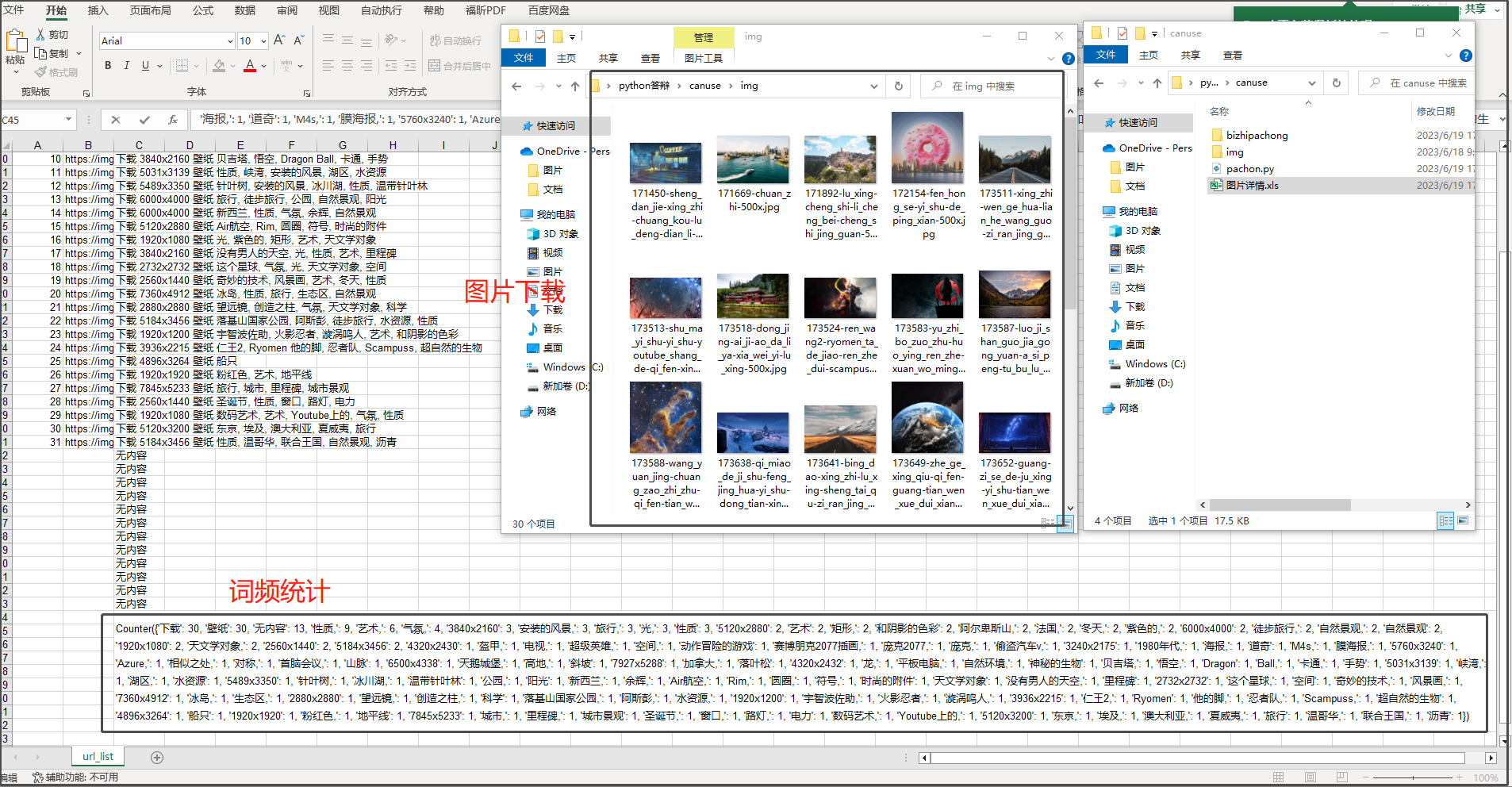
上次爬虫去答辩了,爬的酷狗音乐的某个排行榜,
老师问我为什么没有把音乐也爬下来,
然后去翻了一下,这个音乐加密有点超出我的能力范围了(他真的太会藏了)

重写吧
我决定换个网站,爬个图片吧
找个壁纸网站
最佳 电脑壁纸 [30000+] |在 Wallspic 上免费下载
看上去好爬
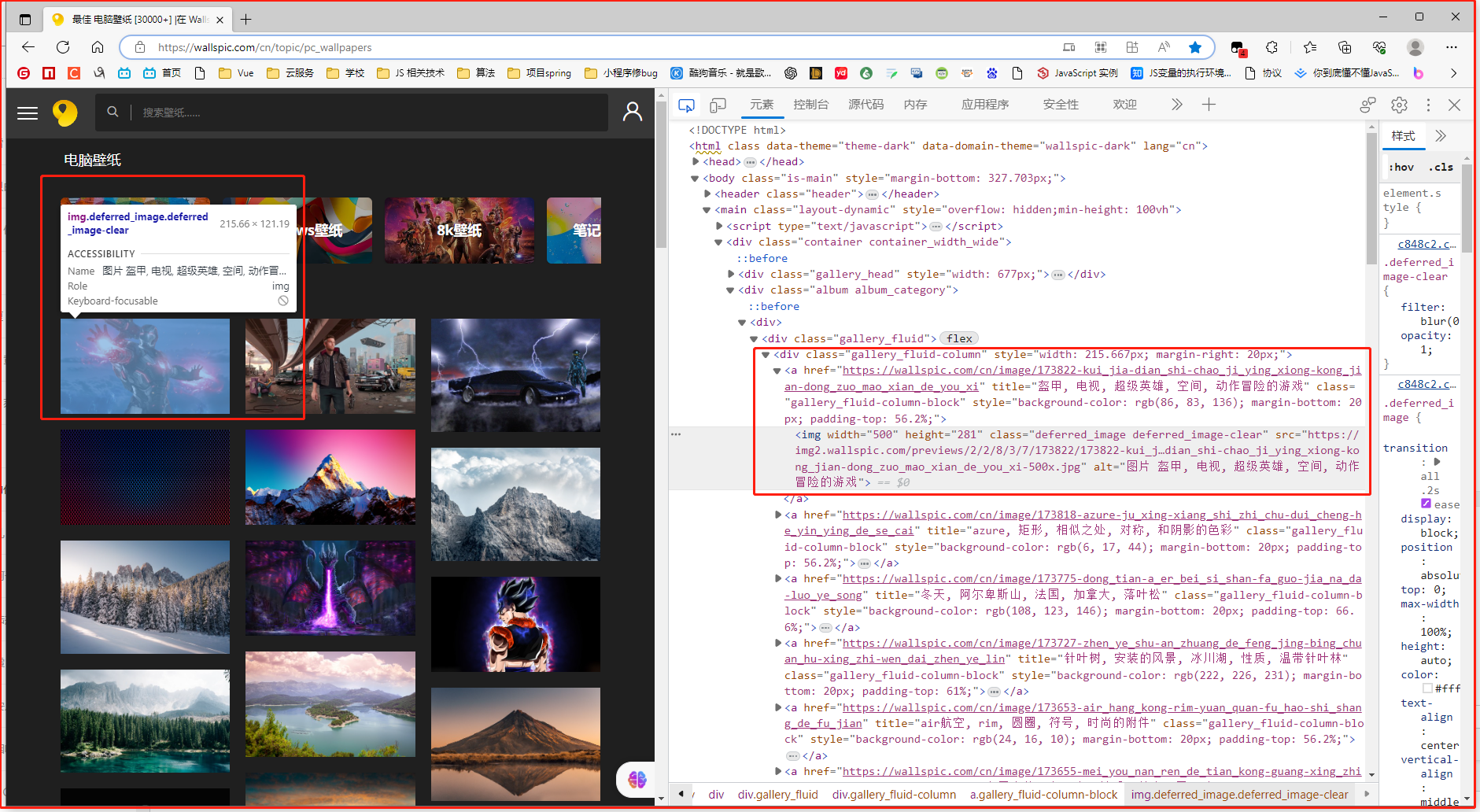
可以直接拿到图片的src
开干!
依旧按照以下思路进行
1.发请求,随后拿到服务器发过来的.html文件
2.用正则表达式去套对应的,我们需要的数据
3.处理数据,最后把他们以某种方式呈现
1.发请求拿到.html文件
url = 'https://wallspic.com/cn/topic/pc_wallpapers'

response = get_response(html_url=url)

html_code = response.text

print(html_code)
来看看拿到的.html文本
我们并不能很直观的直接拿到<img>标签中的src
他似乎是通过某种方式注入
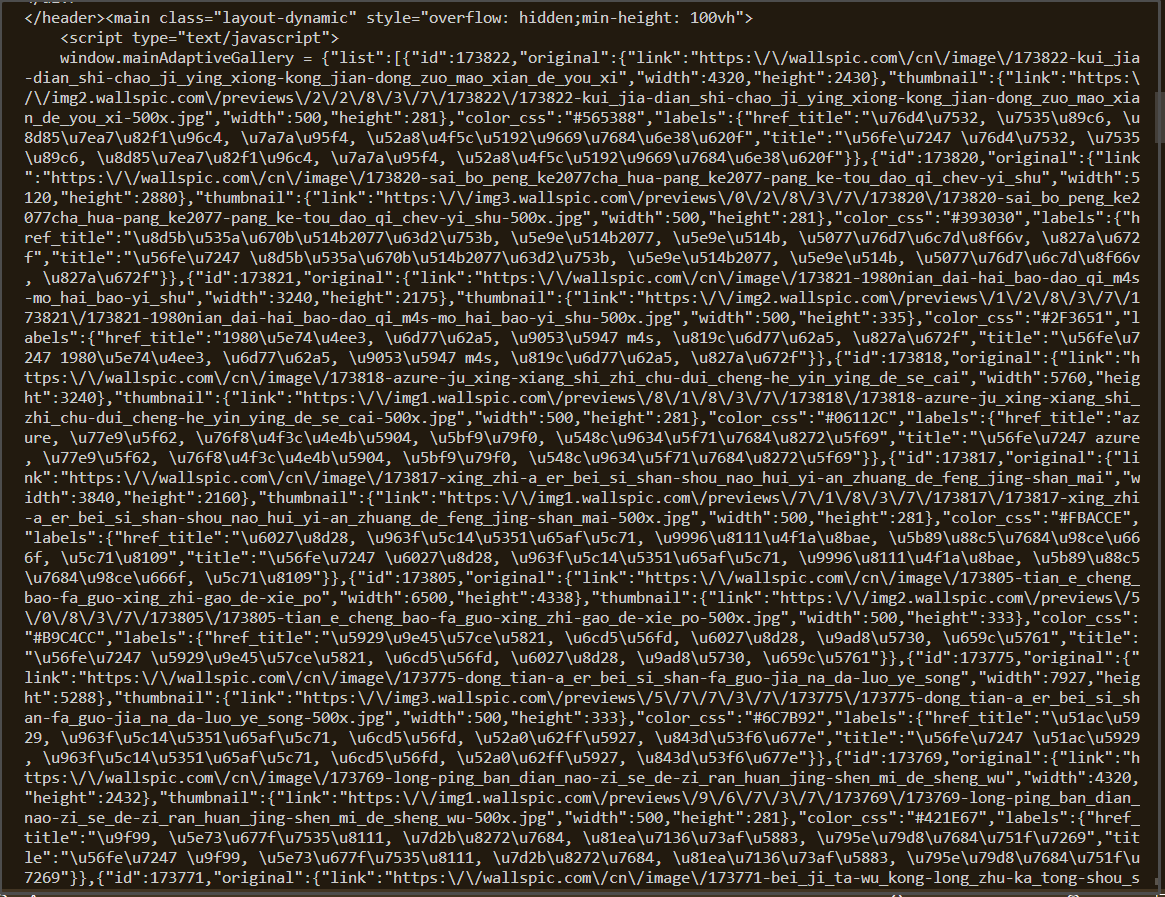
2.拿到图片的src

但是没有太大问题,我们依旧能够找到其中的src
用一个方法()把他们"过滤出来"
cleaned_urls_1 = []

for url in result_list:

    cleaned_url = url.replace("\\/\\/", "/")

    cleaned_url = url.replace("\\/", "/")

    cleaned_urls_1.append(cleaned_url)

    print(cleaned_url)
来看看
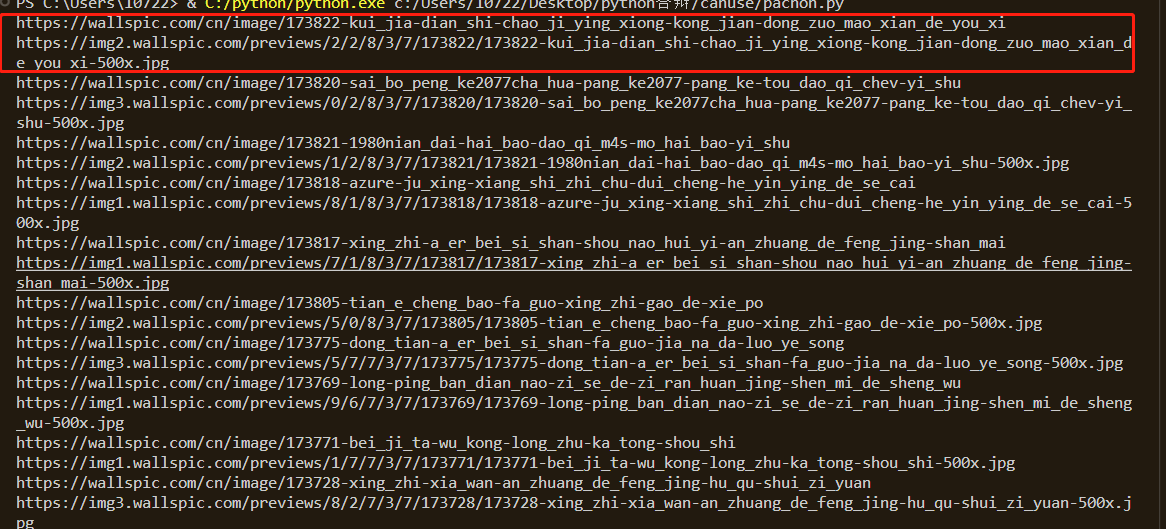
这里可以看到,在这些地址中,以两条为一组,其中,第一条为该壁纸的详情页,第二条为该壁纸的真正src
随后,可以想个办法把他们分别放到不同的数组中
cleaned_urls_2 = []

cleaned_urls_3 = []

for url in cleaned_urls_1:

    # 使用os.path.splitext()方法将URL路径拆分为文件名和扩展名

    filename, ext = os.path.splitext(url)

    # 判断扩展名是否为.jpg

    if ext.lower() == '.jpg':

        cleaned_urls_2.append(url)

    if ext.lower() != '.jpg' and ext.lower() !='.webp':

        cleaned_urls_3.append(url)
这里偷个懒,直接使用第三方插件os去做一个拆分,然后用ext.lower拿到他们的后缀,再进行一个判断
把两种地址分类,把他们放到不同的数组中,
详情页在后面有用,要对图片的TAG进行一个词频统计
3.下载图片到本地
save_dir = 'C:/Users/10722/Desktop/python答辩/canuse/img/'  # 指定保存路径

if not os.path.exists(save_dir):

    os.makedirs(save_dir)

#下载图片

row = 1

for url in cleaned_urls_2:

    worksheet.write(row, 0, row+1) #将排行写入excel表格

    worksheet.write(row, 1, url)          #将歌名写入excel表格

    filename = os.path.basename(url)  # 获取文件名

    filepath = os.path.join(save_dir, filename)  # 拼接保存路径和文件名

    response = requests.get(url)

    # with open(filepath, 'wb') as f:

    #     f.write(response.content)

        # print(f'{filename} 下载完成')

    row+=1

print('全部图片下载完成')
这里用response发一个get请求就可以了,
4.词频统计
这里同样的,我们去到图片的详情页,然后用一个正则表达式去套图片的TAG
def get_img_src_ciping(html_url):

    #获取榜单地址

    response =get_response(html_url)

    # print(response.text)

    list_url =re.findall('title="(.*?)">',response.text)

    if(list_url):

        return list_url[0]

    else:

        return "无内容"
再使用插件collections去统计词频
cleaned_urls_4 =[]

roww = 1

for url in cleaned_urls_3:

    # print(url)

    response=get_img_src_ciping(html_url=url)

    # print(response)

    worksheet.write(roww, 2, response)        #将tag写入excel表格

    roww+=1

    cleaned_urls_4.append(response)

print(cleaned_urls_4)

# urls=str(cleaned_urls_4)

# 将数组中的字符串拼接成一个长字符串

long_string = " ".join(cleaned_urls_4)

# 使用空格将长字符串分割成一个单词列表

word_list = long_string.split()

# 使用Counter对单词列表进行词频统计

word_counts = Counter(word_list)

words =str(word_counts)
然后就,搞定啦
完整代码:
import requests

import re

import os

from collections import Counter

import xlwt

# 创建Excel文件

workbook = xlwt.Workbook(encoding='utf-8')

worksheet = workbook.add_sheet('url_list')

# 将数据写入Excel文件

worksheet.write(0, 0, '序号') #写入对应的字段

worksheet.write(0, 1, '图片详细地址')

worksheet.write(0, 2, '图片TAG')

def get_response(html_url):

    headers ={

        'User-Agent':'Mozilla/5.0 (Windows NT 10.0; Win64; x64) AppleWebKit/537.36 (KHTML, like Gecko) Chrome/114.0.0.0 Safari/537.36 Edg/114.0.1823.43'

    }

    response = requests.get(url=html_url,headers=headers)

    return response

def get_img_src(html_url):

    #获取榜单地址

    response =get_response(html_url)

    list_url =re.findall('<img src="(.*?)"',response.text)

    return list_url

def get_img_src_ciping(html_url):

    #获取榜单地址

    response =get_response(html_url)

    # print(response.text)

    list_url =re.findall('title="(.*?)">',response.text)

    if(list_url):

        return list_url[0]

    else:

        return "无内容"

url = 'https://wallspic.com/cn/topic/pc_wallpapers'

response = get_response(html_url=url)

html_code = response.text

# print(html_code)

# 定义正则表达式匹配模式

pattern = r'"link":"(.*?)"'

# 使用re.findall()方法获取所有匹配结果

result_list = re.findall(pattern, html_code)

cleaned_urls_1 = []

for url in result_list:

    cleaned_url = url.replace("\\/\\/", "/")

    cleaned_url = url.replace("\\/", "/")

    cleaned_urls_1.append(cleaned_url)

    print(cleaned_url)

cleaned_urls_2 = []

cleaned_urls_3 = []

for url in cleaned_urls_1:

    # 使用os.path.splitext()方法将URL路径拆分为文件名和扩展名

    filename, ext = os.path.splitext(url)

    # 判断扩展名是否为.jpg

    if ext.lower() == '.jpg':

        cleaned_urls_2.append(url)

    if ext.lower() != '.jpg' and ext.lower() !='.webp':

        cleaned_urls_3.append(url)

# print(cleaned_urls_2)

save_dir = 'C:/Users/10722/Desktop/python答辩/canuse/img/'  # 指定保存路径

if not os.path.exists(save_dir):

    os.makedirs(save_dir)

#下载图片

row = 1

for url in cleaned_urls_2:

    worksheet.write(row, 0, row+1) #将排行写入excel表格

    worksheet.write(row, 1, url)          #将歌名写入excel表格

    filename = os.path.basename(url)  # 获取文件名

    filepath = os.path.join(save_dir, filename)  # 拼接保存路径和文件名

    response = requests.get(url)

    # with open(filepath, 'wb') as f:

    #     f.write(response.content)

        # print(f'{filename} 下载完成')

    row+=1

print('全部图片下载完成')

cleaned_urls_4 =[]

roww = 1

for url in cleaned_urls_3:

    # print(url)

    response=get_img_src_ciping(html_url=url)

    # print(response)

    worksheet.write(roww, 2, response)        #将tag写入excel表格

    roww+=1

    cleaned_urls_4.append(response)

print(cleaned_urls_4)

# urls=str(cleaned_urls_4)

# 将数组中的字符串拼接成一个长字符串

long_string = " ".join(cleaned_urls_4)

# 使用空格将长字符串分割成一个单词列表

word_list = long_string.split()

# 使用Counter对单词列表进行词频统计

word_counts = Counter(word_list)

words =str(word_counts)

worksheet.write(roww, 2, words)        #将歌手写入excel表格

print(word_counts)

workbook.save('C:/Users/10722/Desktop/python答辩/canuse/图片详情.xls')

# <img width="500" height="281" class="deferred_image deferred_image-clear" src="https://img2.wallspic.com/previews/2/2/8/3/7/173822/173822-kui_jia-dian_shi-chao_ji_ying_xiong-kong_jian-dong_zuo_mao_xian_de_you_xi-500x.jpg" alt="图片 盔甲, 电视, 超级英雄, 空间, 动作冒险的游戏">
Python爬虫(二):写一个爬取壁纸网站图片的爬虫(图片下载,词频统计,思路)的更多相关文章
- python利用urllib实现的爬取京东网站商品图片的爬虫
本例程使用urlib实现的,基于python2.7版本,采用beautifulsoup进行网页分析,没有第三方库的应该安装上之后才能运行,我用的IDE是pycharm,闲话少说,直接上代码! # -* ...
- scrapy框架来爬取壁纸网站并将图片下载到本地文件中
首先需要确定要爬取的内容,所以第一步就应该是要确定要爬的字段: 首先去items中确定要爬的内容 class MeizhuoItem(scrapy.Item): # define the fields ...
- # [爬虫Demo] pyquery+csv爬取猫眼电影top100
目录 [爬虫Demo] pyquery+csv爬取猫眼电影top100 站点分析 代码君 [爬虫Demo] pyquery+csv爬取猫眼电影top100 站点分析 https://maoyan.co ...
- 利用requests和BeautifulSoup爬取菜鸟教程的代码与图片并保存为markdown格式
还是设计模式的开卷考试,我想要多准备一点资料,于是写了个爬虫爬取代码与图片,有巧妙地进行格式化进一步处理,最终变为了markdown的格式 import requests from bs4 impor ...
- Hello Python!用 Python 写一个抓取 CSDN 博客文章的简单爬虫
网络上一提到 Python,总会有一些不知道是黑还是粉的人大喊着:Python 是世界上最好的语言.最近利用业余时间体验了下 Python 语言,并写了个爬虫爬取我 csdn 上关注的几个大神的博客, ...
- 初识python 之 爬虫:爬取某网站的壁纸图片
用到的主要知识点:requests.get 获取网页HTMLetree.HTML 使用lxml解析器解析网页xpath 使用xpath获取网页标签信息.图片地址request.urlretrieve ...
- python爬虫--爬取某网站电影下载地址
前言:因为自己还是python世界的一名小学生,还有很多路要走,所以本文以目的为向导,达到目的即可,对于那些我自己都没弄懂的原理,不做去做过多解释,以免误人子弟,大家可以网上搜索. 友情提示:本代码用 ...
- 用Python爬虫爬取炉石原画卡牌图片
前段时间看了点Python的语法以及制作爬虫常用的类库,于是动手制作了一个爬虫尝试爬取一些炉石原画图片.本文仅记录对特定目标网站的分析过程和爬虫代码的编写过程.代码功能很局限,无通用性,仅作为一个一般 ...
- Python爬虫之selenium爬虫,模拟浏览器爬取天猫信息
由于工作需要,需要提取到天猫400个指定商品页面中指定的信息,于是有了这个爬虫.这是一个使用 selenium 爬取天猫商品信息的爬虫,虽然功能单一,但是也算是 selenium 爬虫的基本用法了. ...
- Scrapy分布式爬虫打造搜索引擎- (二)伯乐在线爬取所有文章
二.伯乐在线爬取所有文章 1. 初始化文件目录 基础环境 python 3.6.5 JetBrains PyCharm 2018.1 mysql+navicat 为了便于日后的部署:我们开发使用了虚拟 ...
随机推荐
- Lombok首字母小写,第二个字母大写,jackson反序列化失败
记一次接口调用字段映射失败问题排查 在写接口的时候遇到一个很神奇的问题,编写一个post接口,在使用包装类接收body的时候发现有个字段映射不上.代码如下 @RestController public ...
- linux 安装 node 和 npm 服务
1.安装文件下载 下载地址:https://nodejs.org/zh-cn/download/ 2.安装步骤 1.将安装包上传到指定位置(我习惯放到:/usr/local/application/目 ...
- 让SQL起飞(优化)
最近博主看完了<SQL进阶教程>这本书,看完后给博主打开了SQL世界的新大门,对于 SQL 的理解不在局限于以前的常规用法.借用其他读者的评论, ❝ 读完醍醐灌顶,对SQL做到了知其然更能 ...
- 深入理解 python 虚拟机:字节码教程(3)——深入剖析循环实现原理
深入理解 python 虚拟机:字节码教程(3)--深入剖析循环实现原理 在本篇文章当中主要给大家介绍 cpython 当中跟循环相关的字节码,这部分字节码相比起其他字节码来说相对复杂一点,通过分析这 ...
- AI人工智能简史
AI人工智能简史 最近学习AI,顺便整理了一份AI人工智能简史,大家参考: 1951年 第一台神经网络机,称为SNARC: 1956年 达特茅斯学院会议,正式确立了人工智能的研究领域: 1966年 M ...
- js-函数记忆
函数记忆: 指将上次的(计算结果)缓存起来,当下次调用时,如果遇到相同的(参数),就直接返回(缓存中的数据). 实现原理:将参数和对应的结果保存在对象中,再次调用时,判断对象 key 是否存在,存在返 ...
- vue3.0
https://www.yuque.com/gdnnth/vue-v3 http://www.liulongbin.top:8085/#/ https://www.yuque.com/woniuppp ...
- SpringBoot SpringSecurity 介绍(基于内存的验证)
SpringBoot 集成 SpringSecurity + MySQL + JWT 附源码,废话不多直接盘 SpringBoot已经为用户采用默认配置,只需要引入pom依赖就能快速启动Spring ...
- ChatGPT在工业领域的研究与应用探索-数据与工况认知
1. ChatGPT发展现状... 2 2. ChatGPT如何与工业相结合... 2 3. ChatGPT在工业领域的研究与应用... 3 1. ChatGPT发展 ...
- 【Visual C#】基于《斗鱼弹幕服务器第三方接入协议v1.6.2》实现斗鱼弹幕服务器接入
最近在给某个主播开发斗鱼直播间辅助工具,为了程序的高效稳定,也搜索了大量的资料,经过大量什么百度,谷歌搜索... 虽然有很多Python的脚本及JS脚本实现了拉取斗鱼弹幕信息,但是这些年来的开发职业病 ...