
Netcore webapi action swagger response返回参数使用匿名类型
问题:action中返回匿名对象时,swagger只能按强类型生成返回值描述
解决办法:使用roslyn在内存中动态执行代码,使用json.net反序列化匿名对象,向swagger返回动态匿名对象
效果:


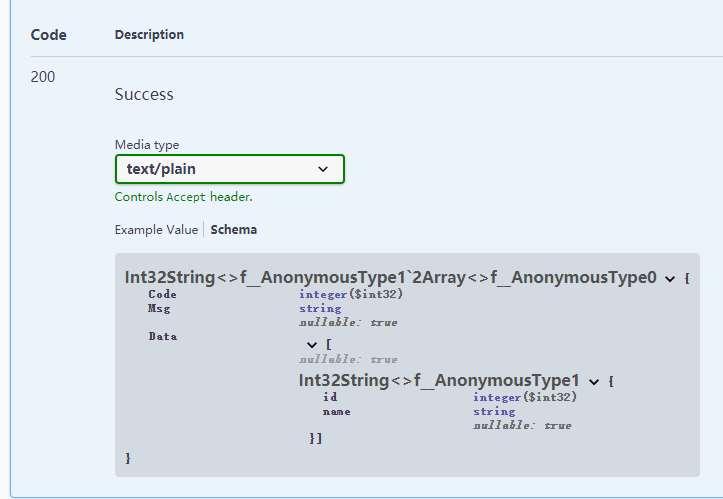

Swaager在描述控制器的方法时,可以使用以下方法
<response code="400">如果id为空</response>
或
[ProducesResponseType(typeof(ResponseT<User>),
200)]
Openapi json如下

生成效果如下图

上述方法必须存在强类型user
代码
@@@code

[AttributeUsage(AttributeTargets.Class | AttributeTargets.Method, AllowMultiple = true, Inherited = true)]

public class AnonymousTypeProducesResponseTypeAttribute : Microsoft.AspNetCore.Mvc.ProducesResponseTypeAttribute

{

public AnonymousTypeProducesResponseTypeAttribute(string typeJson, int statusCode) : base(getAnonymousType(typeJson), statusCode)

{

}

/// <summary>

///

/// </summary>

/// <param name="typeJson">匿名类型描述串

/// </param>

/// <example>new {id=1,name=""}</example>

/// <param name="statusCode"></param>

static System.Type getAnonymousType(string typeJson)

{

var code = @"

public class Result {

public System.Type GetType2(){

var t = Newtonsoft.Json.JsonConvert.DeserializeAnonymousType(""{}"", #T#);

return t.GetType();

}

}

".Replace("#T#", typeJson.Replace("'", @""""));


 List<PortableExecutableReference> refList = new List<PortableExecutableReference>();

refList.Add(MetadataReference.CreateFromFile(typeof(object).Assembly.Location));

refList.Add(MetadataReference.CreateFromFile(typeof(Newtonsoft.Json.JsonConvert).Assembly.Location));

refList.Add(MetadataReference.CreateFromFile(typeof(System.Runtime.AssemblyTargetedPatchBandAttribute).Assembly.Location));

refList.Add(MetadataReference.CreateFromFile(System.IO.Path.Combine(System.IO.Path.GetDirectoryName(typeof(object).Assembly.Location), "netstandard.dll")));


 var tree = CSharpSyntaxTree.ParseText(code);

var compilation = CSharpCompilation.Create("test")

.WithOptions(new CSharpCompilationOptions(OutputKind.DynamicallyLinkedLibrary))

.AddReferences(refList.ToArray()).AddSyntaxTrees(tree);

using (var stream = new MemoryStream())

{

var emitResult = compilation.Emit(stream);

if (emitResult.Success)

{

stream.Seek(0, SeekOrigin.Begin);

var assembly = Assembly.Load(stream.ToArray());

var typeResult = assembly.GetType("Result");

var m = Activator.CreateInstance(typeResult);

var Type = m.GetType();

return typeResult.GetMethod("GetType2").Invoke(m, null) as Type;

}

}


 return null;

}

}

@@#
使用
@@@code

[HttpGet("Dept/Get")]

[AnonymousTypeProducesResponseType(@"new {Code=0,Msg='',Data=new []{new {id=0,name=''}}}", 200)]

public object DeptGet()

{

return new

{

Code = 0,

Msg = string.Empty,

Data = _context. Group.Select(r => new

{

id = r. ID,

name = r. Name

}).ToList()

};

}

@@#
另一种借助元组实现的方法
花了大量时间获取属性名没有结果,泛型传递时的方法获取 不到TupleElementNamesAttribute,只能走动态方法获取 返回值 ,再利用TupleElementNamesAttribute获取 名称
@@@code

public class ResponseT<T>

{

//有效 [JsonProperty("haaa")]

public int Code { get; set; }

// 无效 [JsonConverter(typeof(Q.DevExtreme.Tpl.Json.IPAddressConverter))]

public string Msg { get; set; }

public T Data { get; set; }


 public T[] GetData()

{

//泛型,丢失名称信息,没有TupleElementNamesAttribute属性

		return new[] { Data };

}

public (int a, string b) GetData2()

{

//可以使用下列方法获得名称

//Type t = typeof(C);

//MethodInfo method = t.GetMethod(nameof(C.M));

//var attr = method.ReturnParameter.GetCustomAttribute<TupleElementNamesAttribute>();


 //string[] names = attr.TransformNames;


 return (1, "2");

}

}

@@#
使用
@@@code

[ProducesResponseType(typeof(ResponseT<(int id,string name)>), 400)]

@@E
Netcore webapi action swagger response返回参数使用匿名类型的更多相关文章
- 使用ActionFilterAttribute 记录 WebApi Action 请求和返回结果记录
使用ActionFilterAttribute 记录 WebApi Action 请求和返回结果记录 C#进阶系列——WebApi 异常处理解决方案 [ASP.NET Web API教程]4.3 AS ...
- Web API系列(四) 使用ActionFilterAttribute 记录 WebApi Action 请求和返回结果记录
转自:https://www.cnblogs.com/hnsongbiao/p/7039666.html 需要demo在github中下载: https://github.com/shan333cha ...
- Asp.NetCore WebApi 引入Swagger
一.创建一个Asp.NetCore WebApi 项目 二.引入NuGet包 SwashBuckle.AspNetCore 三.在项目属性配置中设置 四.修改项目的启动文件Startup.cs 1). ...
- .NetCore WebApi利用Swagger文档实现选择文件上传
介绍 实现这个功能主要还是依赖过滤器 在Swagger中利用 IOperationFilter 操作来实现文件上传 与之前处理结合Idr4授权一样的处理方式,不同的是授权处理的是Security,而文 ...
- .NetCore WebApi——基于JWT的简单身份认证与授权(Swagger)
上接:.NetCore WebApi——Swagger简单配置 任何项目都有权限这一关键部分.比如我们有许多接口.有的接口允许任何人访问,另有一些接口需要认证身份之后才可以访问:以保证重要数据不会泄露 ...
- .NetCore WebApi——Swagger简单配置
在前后端分离的大环境下,API接口文档成为了前后端交流的一个重点.Swagger让开发人员摆脱了写接口文档的痛苦. 官方网址:https://swagger.io/ 在.Net Core WebApi ...
- .NetCore WebApi —— Swagger版本控制
目录: .NetCore WebApi——Swagger简单配置 .NetCore WebApi——基于JWT的简单身份认证与授权(Swagger) .NetCore WebApi —— Swagge ...
- VS2012 Unit Test(Void, Action, Func) —— 对无返回值、使用Action或Func作为参数、多重载的方法进行单元测试
[提示] 1. 阅读文本前希望您具备如下知识:了解单元测试,了解Dynamic,熟悉泛型(协变与逆变)和Lambda,熟悉.NET Framework提供的 Action与Func委托.2.如果您对单 ...
- 对无返回值、使用Action或Func作为参数、多重载的方法进行单元测试
VS2012 Unit Test(Void, Action, Func) —— 对无返回值.使用Action或Func作为参数.多重载的方法进行单元测试 [提示] 1. 阅读文本前希望您具备如下知识: ...
随机推荐
- 12月17日BGV币行情分析
目前BGV收于353.95美金,较前一交易日上涨28.25%. 非小号数据显示,BGV最大客户aofexpay.ngk出现+490.2349的持币变化,其次减仓数额均不大,分别为-80.1,-30,- ...
- 教你玩转CSS border(边框)
边框样式 边框样式属性指定要显示什么样的边界. border-style属性用来定义边框的样式 border-style的值 代码演示: <!DOCTYPE html> <html ...
- Scrapy 项目:QuotesBot
QuotesBot This is a Scrapy project to scrape quotes from famous people from http://quotes.toscrape.c ...
- ArrayList的简单实现
class AList<E>{ //属性:数组和实际元素个数 private Object[] data; private int size; //构造函数:有参.无参 public AL ...
- Nearby Service新特性:Wi-Fi分享
PART 1: Wi-Fi分享功能介绍 朋友来家里做客.顾客到店里用餐-当他们想要给自己的手机链接Wi-Fi时,总免不了询问Wi-Fi名称和密码..这种问密码和给密码的过程十分麻烦,常常还会有听错或者 ...
- 2021-2-27:Linux 下如何优化 Java MMAP 写入
主要是调整 pdflush 相关参数. 在linux操作系统中,写操作是异步的,即写操作返回的时候数据并没有真正写到磁盘上,而是先写到了系统cache里,随后由pdflush内核线程将系统中的脏页写到 ...
- vue3 一些关键属性
环境搭建 尤大开发了一个项目构建工具vite npm init vite-app <project-name> cd <project-name> npm install np ...
- 用go实现常见的数据结构
目录 1 golang常见数据结构实现 1.1 链表 1.2 可变数组 1.3 栈和队列 1.3.1 原生切片实现栈和队列 1.3.1.1 切片原生栈实现 1.3.1.2 切片原生队列实现 1.3.2 ...
- 381. O(1) 时间插入、删除和获取随机元素 - 允许重复
381. O(1) 时间插入.删除和获取随机元素 - 允许重复 LeetCode_381 题目详情 题解分析 代码实现 package com.walegarrett.interview; impor ...
- MVC模式从Controller返回内容协商格式(Json或者Xml)
WebAPI默认的返回格式Json,但是MVC是View,如果在MVC的控制器中,想要返回Json格式该怎么操作呢 在MVC的控制器中返回json数据只需要然会JsonResult而不是ActionR ...