
springmvc简单的流程说明及源码分析
框架流程图
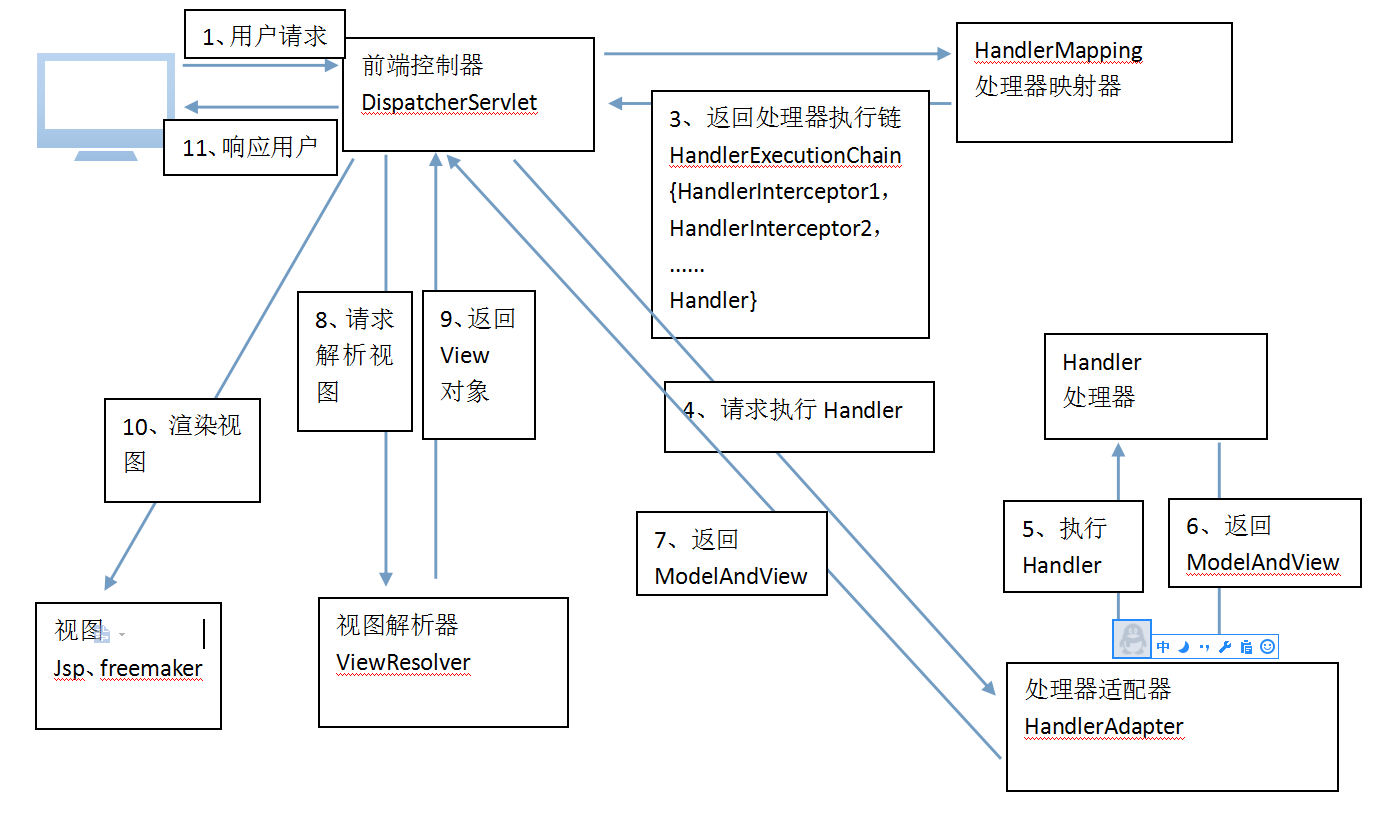
springmvc的核心类org.springframework.web.servlet.DispatcherServlet,是一个servlet,间接继承了httpservlet;重写了doService方法
@Override

    protected void doService(HttpServletRequest request, HttpServletResponse response) throws Exception {

        if (logger.isDebugEnabled()) {

            String resumed = WebAsyncUtils.getAsyncManager(request).hasConcurrentResult() ? " resumed" : "";

            logger.debug("DispatcherServlet with name '" + getServletName() + "'" + resumed +

                    " processing " + request.getMethod() + " request for [" + getRequestUri(request) + "]");

        }

        // Keep a snapshot of the request attributes in case of an include,

        // to be able to restore the original attributes after the include.

        Map<String, Object> attributesSnapshot = null;

        if (WebUtils.isIncludeRequest(request)) {

            attributesSnapshot = new HashMap<String, Object>();

            Enumeration<?> attrNames = request.getAttributeNames();

            while (attrNames.hasMoreElements()) {

                String attrName = (String) attrNames.nextElement();

                if (this.cleanupAfterInclude || attrName.startsWith("org.springframework.web.servlet")) {

                    attributesSnapshot.put(attrName, request.getAttribute(attrName));

                }

            }

        }

        // Make framework objects available to handlers and view objects.

        request.setAttribute(WEB_APPLICATION_CONTEXT_ATTRIBUTE, getWebApplicationContext());

        request.setAttribute(LOCALE_RESOLVER_ATTRIBUTE, this.localeResolver);

        request.setAttribute(THEME_RESOLVER_ATTRIBUTE, this.themeResolver);

        request.setAttribute(THEME_SOURCE_ATTRIBUTE, getThemeSource());

        FlashMap inputFlashMap = this.flashMapManager.retrieveAndUpdate(request, response);

        if (inputFlashMap != null) {

            request.setAttribute(INPUT_FLASH_MAP_ATTRIBUTE, Collections.unmodifiableMap(inputFlashMap));

        }

        request.setAttribute(OUTPUT_FLASH_MAP_ATTRIBUTE, new FlashMap());

        request.setAttribute(FLASH_MAP_MANAGER_ATTRIBUTE, this.flashMapManager);

        try {

            doDispatch(request, response);

        }

        finally {

            if (!WebAsyncUtils.getAsyncManager(request).isConcurrentHandlingStarted()) {

                // Restore the original attribute snapshot, in case of an include.

                if (attributesSnapshot != null) {

                    restoreAttributesAfterInclude(request, attributesSnapshot);

                }

            }

        }

    }
最重要的就是执行了 doDispatch(request, response);都只是对参数的处理
protected void doDispatch(HttpServletRequest request, HttpServletResponse response) throws Exception {

        HttpServletRequest processedRequest = request;

        HandlerExecutionChain mappedHandler = null;

        boolean multipartRequestParsed = false;

        WebAsyncManager asyncManager = WebAsyncUtils.getAsyncManager(request);

        try {

            ModelAndView mv = null;

            Exception dispatchException = null;

            try {

                processedRequest = checkMultipart(request);

                multipartRequestParsed = (processedRequest != request);

                //为当前请求确定处理器

                mappedHandler = getHandler(processedRequest);

                if (mappedHandler == null || mappedHandler.getHandler() == null) {

                    noHandlerFound(processedRequest, response);

                    return;

                }

                //为当前请求确定处理程序适配器。

                HandlerAdapter ha = getHandlerAdapter(mappedHandler.getHandler());

                // Process last-modified header, if supported by the handler.

                String method = request.getMethod();

                boolean isGet = "GET".equals(method);

                if (isGet || "HEAD".equals(method)) {

                    long lastModified = ha.getLastModified(request, mappedHandler.getHandler());

                    if (logger.isDebugEnabled()) {

                        logger.debug("Last-Modified value for [" + getRequestUri(request) + "] is: " + lastModified);

                    }

                    if (new ServletWebRequest(request, response).checkNotModified(lastModified) && isGet) {

                        return;

                    }

                }

          //执行所有拦截器的preHandle方法,如果有拦截器的prhandle方法返回false就直接结束,return

                if (!mappedHandler.applyPreHandle(processedRequest, response)) {

                    return;

                }

                // 由适配器调用实际的处理器

                mv = ha.handle(processedRequest, response, mappedHandler.getHandler());

            if (asyncManager.isConcurrentHandlingStarted()) {

                    return;

                }

          //将逻辑路径转换为物理路径,将配置文件中配置的前缀和后缀拼接上返回的视图名字;

                applyDefaultViewName(processedRequest, mv);
          //执行所有拦截器的postHandle方法

                mappedHandler.applyPostHandle(processedRequest, response, mv);

            }

            catch (Exception ex) {

                dispatchException = ex;

            }

            processDispatchResult(processedRequest, response, mappedHandler, mv, dispatchException);

        }

        catch (Exception ex) {

            triggerAfterCompletion(processedRequest, response, mappedHandler, ex);

        }

        catch (Error err) {

            triggerAfterCompletionWithError(processedRequest, response, mappedHandler, err);

        }

        finally {

            if (asyncManager.isConcurrentHandlingStarted()) {

                // Instead of postHandle and afterCompletion

                if (mappedHandler != null) {

                    mappedHandler.applyAfterConcurrentHandlingStarted(processedRequest, response);

                }

            }

            else {

                // Clean up any resources used by a multipart request.

                if (multipartRequestParsed) {

                    cleanupMultipart(processedRequest);

                }

            }

        }

    }
一 首先前端控制器获取到请求,首先获取到请求有没有文件的上传,调用方法
processedRequest = checkMultipart(request);
protected HttpServletRequest checkMultipart(HttpServletRequest request) throws MultipartException {

        if (this.multipartResolver != null && this.multipartResolver.isMultipart(request)) {

            if (WebUtils.getNativeRequest(request, MultipartHttpServletRequest.class) != null) {

                logger.debug("Request is already a MultipartHttpServletRequest - if not in a forward, " +

                        "this typically results from an additional MultipartFilter in web.xml");

            }

            else if (request.getAttribute(WebUtils.ERROR_EXCEPTION_ATTRIBUTE) instanceof MultipartException) {

                logger.debug("Multipart resolution failed for current request before - " +

                        "skipping re-resolution for undisturbed error rendering");

            }

            else {

                return this.multipartResolver.resolveMultipart(request);

            }

        }

        // If not returned before: return original request.

        return request;

    }
二.然后调用mappedHandler = getHandler(processedRequest),在这个方法中再调用处理器映射器的getHandler(processedRequest)方法
1.遍历所有的处理器映射器,
2.获取到xml中配置的处理器映射器,或者没有配置使用默认的处理器映射器;
3.然后有处理器映射器调用getHandler(request)方法,返回处理器执行链
3.1通过url获取处理器,如果获取不到,就会走默认的处理器,如果还没有,就返回null;
3.2同时看处理器是否是字符串,如果是字符串就通这个字符串去spring工厂中找到这个处理器
43.3然后通过处理器获取到处理器执行链,然后返回处理器执行链(包含处理器,拦截器链,拦截器prehander方法执行到那一个拦截器在拦截器链中的下标)
    protected HandlerExecutionChain getHandler(HttpServletRequest request) throws Exception {

        for (HandlerMapping hm : this.handlerMappings) {

            if (logger.isTraceEnabled()) {

                logger.trace(

                        "Testing handler map [" + hm + "] in DispatcherServlet with name '" + getServletName() + "'");

            }

            HandlerExecutionChain handler = hm.getHandler(request);

            if (handler != null) {

                return handler;

            }

        }

        return null;

    }
public final HandlerExecutionChain getHandler(HttpServletRequest request) throws Exception {

        Object handler = getHandlerInternal(request);

        if (handler == null) {

            handler = getDefaultHandler();

        }

        if (handler == null) {

            return null;

        }

        // Bean name or resolved handler?

        if (handler instanceof String) {

            String handlerName = (String) handler;

            handler = getApplicationContext().getBean(handlerName);

        }

        HandlerExecutionChain executionChain = getHandlerExecutionChain(handler, request);

        if (CorsUtils.isCorsRequest(request)) {

            CorsConfiguration globalConfig = this.corsConfigSource.getCorsConfiguration(request);

            CorsConfiguration handlerConfig = getCorsConfiguration(handler, request);

            CorsConfiguration config = (globalConfig != null ? globalConfig.combine(handlerConfig) : handlerConfig);

            executionChain = getCorsHandlerExecutionChain(request, executionChain, config);

        }

        return executionChain;

    }
三.通过处理器执行链(HandlerExecutionChain)找到对应的处理器适配器(HandlerAdapter)
调用HandlerAdapter ha = getHandlerAdapter(mappedHandler.getHandler())
protected HandlerAdapter getHandlerAdapter(Object handler) throws ServletException {

        for (HandlerAdapter ha : this.handlerAdapters) {

            if (logger.isTraceEnabled()) {

                logger.trace("Testing handler adapter [" + ha + "]");

            }

            if (ha.supports(handler)) {

                return ha;

            }

        }

        throw new ServletException("No adapter for handler [" + handler +

                "]: The DispatcherServlet configuration needs to include a HandlerAdapter that supports this handler");

    }
四:执行处理器执行链中的applyPreHandle(processedRequest, response)方法,并且进行了判断,是false就直接return
if (!mappedHandler.applyPreHandle(processedRequest, response)) {

                    return;

                }
applyPreHandle(processedRequest, response)方法:
1.循环执行处理器执行链中的拦截器链的preHandle方法,如果都没有拦截,就直接走下一步
2.如果有拦截器拦截了,
2-1.preHandle方法返回了false,就记录下这个拦截器的前一个的下标,就是记录所有已经执行了prehandler方法返回true的拦截器,
2-2.然后遍历已经执行了prehandler方法返回true的拦截器,再执行他们的afterCompletion方法
boolean applyPreHandle(HttpServletRequest request, HttpServletResponse response) throws Exception {

        HandlerInterceptor[] interceptors = getInterceptors();

        if (!ObjectUtils.isEmpty(interceptors)) {

            for (int i = 0; i < interceptors.length; i++) {

                HandlerInterceptor interceptor = interceptors[i];

                if (!interceptor.preHandle(request, response, this.handler)) {

                    triggerAfterCompletion(request, response, null);

                    return false;

                }

                this.interceptorIndex = i;

            }

        }

        return true;

    }
所以当有拦截器拦截了时,就不执行下面的代码了,直接return,但是在return之前会执行已经执行了prehandler方法返回true的拦截器的afterCompletion方法
当没有拦截器拦截时执行
六:通过适配器执行处理器,并且返回一个ModelAndView,模型视图对象
mv = ha.handle(processedRequest, response, mappedHandler.getHandler());
七:然后将ModelAndView传递给ViewResolver视图解析器,将逻辑视图转换为物理视图,就是拼接xml中的配置的前缀和后缀,然后返回一个视图对象
applyDefaultViewName(processedRequest, mv);
private void applyDefaultViewName(HttpServletRequest request, ModelAndView mv) throws Exception {

        if (mv != null && !mv.hasView()) {

            mv.setViewName(getDefaultViewName(request));

        }

    }
protected String getDefaultViewName(HttpServletRequest request) throws Exception {

        return this.viewNameTranslator.getViewName(request);

    }
public String getViewName(HttpServletRequest request) {

        String lookupPath = this.urlPathHelper.getLookupPathForRequest(request);

        return (this.prefix + transformPath(lookupPath) + this.suffix);

    }
八:mappedHandler.applyPostHandle(processedRequest, response, mv);执行所有拦截器的postHandler方法,并且遍历是逆序遍历的,所以后配置的会先执行postHandler方法
void applyPostHandle(HttpServletRequest request, HttpServletResponse response, ModelAndView mv) throws Exception {

        HandlerInterceptor[] interceptors = getInterceptors();

        if (!ObjectUtils.isEmpty(interceptors)) {

            for (int i = interceptors.length - 1; i >= 0; i--) {

                HandlerInterceptor interceptor = interceptors[i];

                interceptor.postHandle(request, response, this.handler, mv);

            }

        }

    }
九都是捕获异常的操作,捕获到异常之后最后还是会执行已经执行了prehandler方法返回true的拦截器的afterCompletion方法
catch (Exception ex) {

            triggerAfterCompletion(processedRequest, response, mappedHandler, ex);

        }

        catch (Error err) {

            triggerAfterCompletionWithError(processedRequest, response, mappedHandler, err);

        }
private void triggerAfterCompletion(HttpServletRequest request, HttpServletResponse response,

            HandlerExecutionChain mappedHandler, Exception ex) throws Exception {

        if (mappedHandler != null) {

            mappedHandler.triggerAfterCompletion(request, response, ex);

        }

        throw ex;

    }

    private void triggerAfterCompletionWithError(HttpServletRequest request, HttpServletResponse response,

            HandlerExecutionChain mappedHandler, Error error) throws Exception {

        ServletException ex = new NestedServletException("Handler processing failed", error);

        if (mappedHandler != null) {

            mappedHandler.triggerAfterCompletion(request, response, ex);

        }

        throw ex;

    }
void triggerAfterCompletion(HttpServletRequest request, HttpServletResponse response, Exception ex)

            throws Exception {

        HandlerInterceptor[] interceptors = getInterceptors();

        if (!ObjectUtils.isEmpty(interceptors)) {

            for (int i = this.interceptorIndex; i >= 0; i--) {

                HandlerInterceptor interceptor = interceptors[i];

                try {

                    interceptor.afterCompletion(request, response, this.handler, ex);

                }

                catch (Throwable ex2) {

                    logger.error("HandlerInterceptor.afterCompletion threw exception", ex2);

                }

            }

        }

    }
最后就是对如果是文件上传的话,进行关流等操作
finally {

            if (asyncManager.isConcurrentHandlingStarted()) {

                // Instead of postHandle and afterCompletion

                if (mappedHandler != null) {

                    mappedHandler.applyAfterConcurrentHandlingStarted(processedRequest, response);

                }

            }

            else {

                // Clean up any resources used by a multipart request.

                if (multipartRequestParsed) {

                    cleanupMultipart(processedRequest);

                }

            }

        }
springmvc简单的流程说明及源码分析的更多相关文章
- 面试高频SpringMVC执行流程最优解(源码分析)
文章已托管到GitHub,大家可以去GitHub查看阅读,欢迎老板们前来Star! 搜索关注微信公众号 码出Offer 领取各种学习资料! SpringMVC执行流程 SpringMVC概述 Spri ...
- SpringMVC视图机制详解[附带源码分析]
目录 前言 重要接口和类介绍 源码分析 编码自定义的ViewResolver 总结 参考资料 前言 SpringMVC是目前主流的Web MVC框架之一. 如果有同学对它不熟悉,那么请参考它的入门bl ...
- SpringMVC拦截器详解[附带源码分析]
目录 前言 重要接口及类介绍 源码分析 拦截器的配置 编写自定义的拦截器 总结 总结 前言 SpringMVC是目前主流的Web MVC框架之一. 如果有同学对它不熟悉,那么请参考它的入门blog:h ...
- SpringMVC异常处理机制详解[附带源码分析]
目录 前言 重要接口和类介绍 HandlerExceptionResolver接口 AbstractHandlerExceptionResolver抽象类 AbstractHandlerMethodE ...
- 基于vue实现一个简单的MVVM框架(源码分析)
不知不觉接触前端的时间已经过去半年了,越来越发觉对知识的学习不应该只停留在会用的层面,这在我学jQuery的一段时间后便有这样的体会. 虽然jQuery只是一个JS的代码库,只要会一些JS的基本操作学 ...
- [转]SpringMVC拦截器详解[附带源码分析]
目录 前言 重要接口及类介绍 源码分析 拦截器的配置 编写自定义的拦截器 总结 前言 SpringMVC是目前主流的Web MVC框架之一. 如果有同学对它不熟悉,那么请参考它的入门blog:ht ...
- SpringMVC拦截器详解[附带源码分析](转)
本文转自http://www.cnblogs.com/fangjian0423/p/springMVC-interceptor.html 感谢作者 目录 前言 重要接口及类介绍 源码分析 拦截器的配置 ...
- Django drf:序列化增删改查、局部与全局钩子源码流程、认证源码分析、执行流程
一.序列化类的增.删.改.查 用drf的序列化组件 -定义一个类继承class BookSerializer(serializers.Serializer): -写字段,如果不指定source ...
- Flask - 请求处理流程和上下文源码分析
目录 Flask - 请求处理流程和上下文 WSGI Flask的上下文对象及源码解析 0. 请求入口 1.请求上下文对象的创建 2. 将请求上下文和应用上下文入栈 3.根据请求的URl执行响应的视图 ...
随机推荐
- 调试利器GDB(上)
什么是GDB: GDB应用: 静态分析工具与动态分析工具: GDB启动方式: GDB启动之后会有一个交互式的命令行,可以输入GDB特定的命令让GDB去工作. gdb test.out意思是这一次gdb ...
- svn 部署
安装svn [root@localhost ~]# yum -y install subversion 创建两个目录 一个 数据存储 一个用户密码 [root@localhost ~]# mkdir ...
- Spark的mlib中的稠密向量和稀疏向量
spark mlib中2种局部向量:denseVector(稠密向量)和sparseVector(稀疏向量) denseVector向量的生成方法:Vector.dense() sparseVecto ...
- skynet的火焰图
之前搞过一下systemtap(systemtap折腾笔记),可惜很快琐事缠身,没有继续搞下去.最近偷空搞了一下,有点意思. 章大大的思路,是用perl生成systemtap脚本,从/proc/$pi ...
- react native 键盘弹起时必须点击两次才能成功
在scrollview或者flatlist上设置一个参数,即可解决 keyboardShouldPersistTaps="handled"
- log4net使用中loginfo.IsInfoEnabled=false问题解决方法
引用了其他项目中的日志组件,调试时发现IsInfoEnabled属性一直为false 找了很多的解决办法,都不行 program.cs里面也不用添加 log4net.Config.XmlConfigu ...
- c语言设计实验报告
试验项目:1.字符与ASCLL码 2.运算符与表达式的运用 3.顺序结构应用程序 4.数学函数的算法描述 5.鸡兔同笼的算法描述 6.确定坐标的算法描述 姓名:熊承启 实验地点:514实验室 1.字符 ...
- JavaScript之更改闭包内的变量值
var f = function( ) { var x = 1 function fo() { console.log( x++ ) } return fo } var fn = f() fn() ...
- js···DOM2动态创建节点
1.生成节点的方法 document.createElement(“div”) 2.插入节点的方法 父元素.appendChild(新节点) 在父节点中的子节点后面插入新的节点 3.在指定的位置 ...
- OO第一次博客作业(第一单元总结)
Q:菜是绿的,鸡是黄的,那菜鸡是什么颜色的? A:红的,强测全WA了,能不红么. 菜不菜的问题先不说了,认真研究一下这次的题目,以及WA的原因吧. 程序结构简析 三次实验的核心结构都是差不多 第一次的 ...