
springcloud 学习
参考:
spring cloud 入门系列一:初识spring cloud
http://blog.didispace.com/Spring-Cloud%E5%9F%BA%E7%A1%80%E6%95%99%E7%A8%8B/
这里总结一些内容
一,spring cloud 入门系列一:初识spring cloud
了解spring cloud,不赘述
二,spring cloud 入门系列二:使用Eureka 进行服务治理
功能:创建服务注册和发现中心
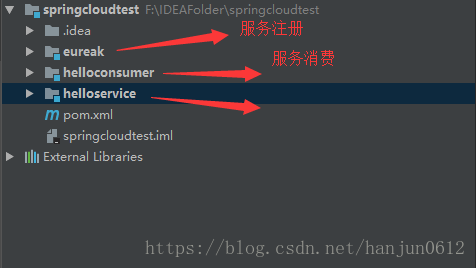
首先,创建一个总的maven项目,然后里面其他的都创建 maven-module
关于pom文件,
springcloudtest总的pom文件
<?xml version="1.0" encoding="UTF-8"?>

<project xmlns="http://maven.apache.org/POM/4.0.0"

         xmlns:xsi="http://www.w3.org/2001/XMLSchema-instance"

         xsi:schemaLocation="http://maven.apache.org/POM/4.0.0 http://maven.apache.org/xsd/maven-4.0.0.xsd">

    <modelVersion>4.0.0</modelVersion>

    <groupId>com.mytest</groupId>

    <artifactId>springcloudtest</artifactId>

    <packaging>pom</packaging>

    <version>1.0-SNAPSHOT</version>

    <modules>

        <module>eureak</module>

        <module>helloservice</module>

        <module>helloconsumer</module>

    </modules>

    <parent>

        <groupId>org.springframework.boot</groupId>

        <artifactId>spring-boot-starter-parent</artifactId>

        <version>1.5.1.RELEASE</version>

    </parent>

    <properties>

        <javaVersion>1.8</javaVersion>

    </properties>

    <dependencyManagement>

        <dependencies>

            <dependency>

                <groupId>org.springframework.cloud</groupId>

                <artifactId>spring-cloud-dependencies</artifactId>

                <version>Camden.SR6</version>

                <type>pom</type>

                <scope>import</scope>

            </dependency>

        </dependencies>

    </dependencyManagement>

</project>
eureak pom文件:
<?xml version="1.0" encoding="UTF-8"?>

<project xmlns="http://maven.apache.org/POM/4.0.0"

         xmlns:xsi="http://www.w3.org/2001/XMLSchema-instance"

         xsi:schemaLocation="http://maven.apache.org/POM/4.0.0 http://maven.apache.org/xsd/maven-4.0.0.xsd">

    <parent>

        <artifactId>springcloudtest</artifactId>

        <groupId>com.mytest</groupId>

        <version>1.0-SNAPSHOT</version>

    </parent>

    <modelVersion>4.0.0</modelVersion>

    <artifactId>eureak</artifactId>

    <dependencies>

        <!-- 引入eureka server依赖 -->

        <dependency>

            <groupId>org.springframework.cloud</groupId>

            <artifactId>spring-cloud-starter-eureka-server</artifactId>

        </dependency>

    </dependencies>

</project>
consumer pom文件:
<?xml version="1.0" encoding="UTF-8"?>

<project xmlns="http://maven.apache.org/POM/4.0.0"

         xmlns:xsi="http://www.w3.org/2001/XMLSchema-instance"

         xsi:schemaLocation="http://maven.apache.org/POM/4.0.0 http://maven.apache.org/xsd/maven-4.0.0.xsd">

    <parent>

        <artifactId>springcloudtest</artifactId>

        <groupId>com.mytest</groupId>

        <version>1.0-SNAPSHOT</version>

    </parent>

    <modelVersion>4.0.0</modelVersion>

    <artifactId>hello-consumer</artifactId>

    <dependencies>

        <!-- 引入eureka 客户端依赖 -->

        <dependency>

            <groupId>org.springframework.cloud</groupId>

            <artifactId>spring-cloud-starter-eureka</artifactId>

        </dependency>

        <!-- 引入ribbon 依赖 ,用来实现负载均衡,我们这里只是使用,先不作其他介绍-->

        <dependency>

            <groupId>org.springframework.cloud</groupId>

            <artifactId>spring-cloud-starter-ribbon</artifactId>

        </dependency>

    </dependencies>

</project>
service pom文件:
<?xml version="1.0" encoding="UTF-8"?>

<project xmlns="http://maven.apache.org/POM/4.0.0"

         xmlns:xsi="http://www.w3.org/2001/XMLSchema-instance"

         xsi:schemaLocation="http://maven.apache.org/POM/4.0.0 http://maven.apache.org/xsd/maven-4.0.0.xsd">

    <parent>

        <artifactId>springcloudtest</artifactId>

        <groupId>com.mytest</groupId>

        <version>1.0-SNAPSHOT</version>

    </parent>

    <modelVersion>4.0.0</modelVersion>

    <artifactId>hello-service</artifactId>

    <dependencies>

        <!-- 引入eureka 客户端依赖 -->

        <dependency>

            <groupId>org.springframework.cloud</groupId>

            <artifactId>spring-cloud-starter-eureka</artifactId>

        </dependency>

    </dependencies>

</project>
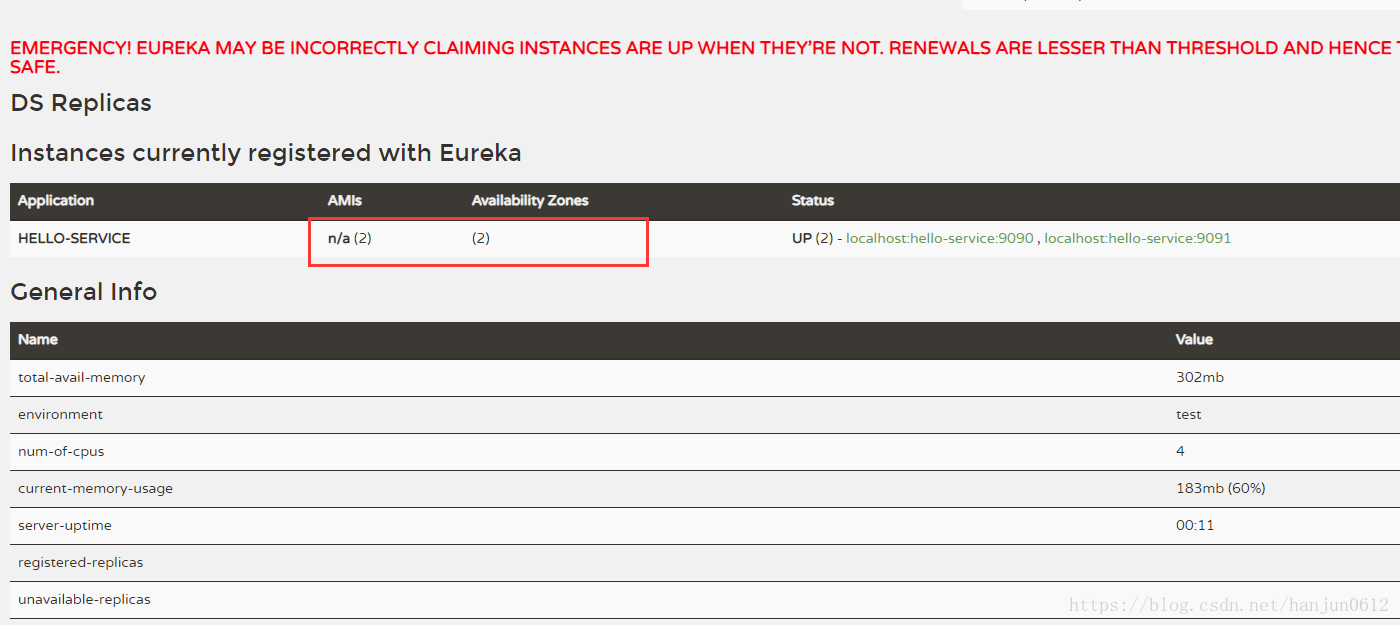
关于同一个service启动两个不同端口:
1 先启动service,然后选择 edit configuration,配置如下:
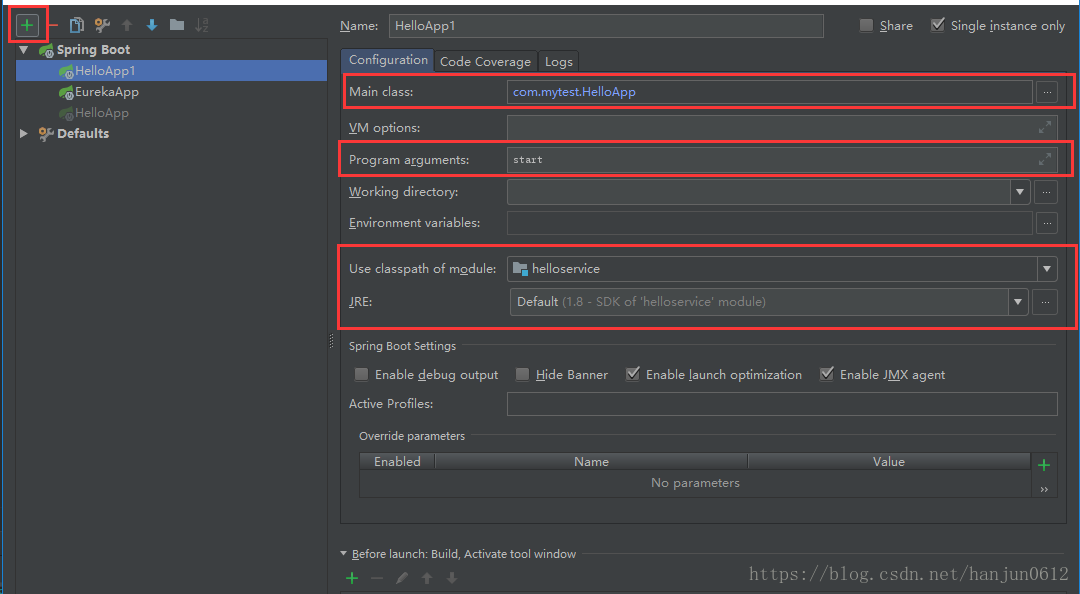
2 修改application.properties中的port端口
3 启动就可以了。
结果如下:
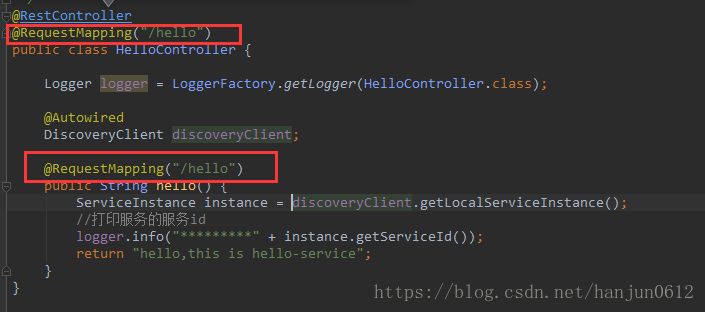
访问页面:
PS:
如果controller和action都设置了@RequestMapping("/hello")
地址是:http://localhost:9090/hello/hello
如果只有action设置了@RequestMapping("/hello")
地址是:http://localhost:9090/hello
ConsumerApp中,
如果controller和action都设置了@RequestMapping("/hello")
restTemplate.getForObject("http://hello-service/hello/hello", String.class);如果只有action设置了@RequestMapping("/hello")
restTemplate.getForObject("http://hello-service/hello", String.class);三,spring cloud 入门系列三:使用Eureka 搭建高可用服务注册中心
功能:分布式
这个目前没测试。
四,spring cloud 入门系列四:使用Hystrix 实现断路器进行服务容错保护
功能:熔断措施
跟着教程配置service层,然后写入对应代码,重点是下面的注解。
@SpringCloudApplication = @EnableDiscoveryClient +@SpringBootApplication+@EnableCircuitBreaker@HystrixCommand(fallbackMethod = "errorMsg")值得注意的是运行顺序:
① eureka-->helloservice1-->helloservice2-->consumer
②单独关闭helloservice2
③多次刷新页面,会出现 error!!! 字符串
五,spring cloud 入门系列五:使用Feign 实现声明式服务调用
功能:分布式和熔断措施
照着文章来 ,没什么问题。
不过这里要注意几点:
先看一下model结构:
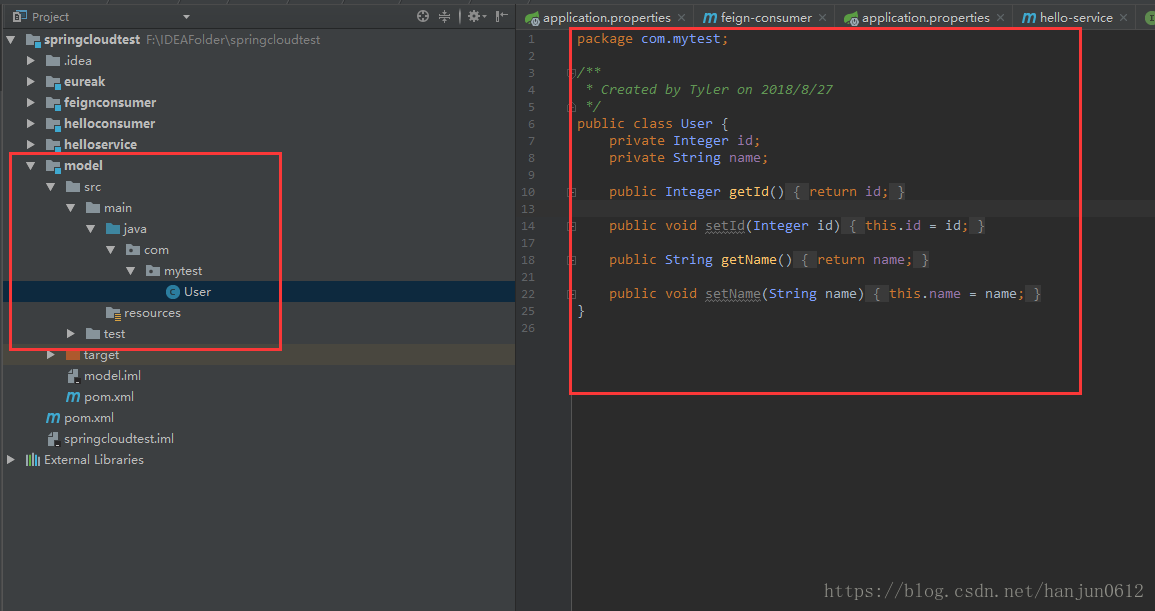
1 首先我创建了一个 model层。所以每个运用到model的项目都要引入pom文件。
下面这个是我的feignconsumer的pom,其中model就是我创建的
<?xml version="1.0" encoding="UTF-8"?>

<project xmlns="http://maven.apache.org/POM/4.0.0"

         xmlns:xsi="http://www.w3.org/2001/XMLSchema-instance"

         xsi:schemaLocation="http://maven.apache.org/POM/4.0.0 http://maven.apache.org/xsd/maven-4.0.0.xsd">

    <parent>

        <artifactId>springcloudtest</artifactId>

        <groupId>com.mytest</groupId>

        <version>1.0-SNAPSHOT</version>

    </parent>

    <modelVersion>4.0.0</modelVersion>

    <artifactId>feign-consumer</artifactId>

    <dependencies>

        <!--引入model-->

        <dependency>

            <groupId>com.mytest</groupId>

            <artifactId>model</artifactId>

            <version>1.0-SNAPSHOT</version>

        </dependency>

        <!-- 引入eureka 客户端依赖 -->

        <dependency>

            <groupId>org.springframework.cloud</groupId>

            <artifactId>spring-cloud-starter-eureka</artifactId>

        </dependency>

        <!-- 引入feign 依赖 -->

        <dependency>

            <groupId>org.springframework.cloud</groupId>

            <artifactId>spring-cloud-starter-feign</artifactId>

        </dependency>

    </dependencies>

</project>
2 路由的controller问题
如果前面我们在hello-service中的controller和action上设定了
@RequestMapping("/hello")那么在feignConsumerService中,记得要带上controller的路由
我的是如下:@RequestMapping("/hello/hello")
package com.mytest.service;

import com.mytest.User;

import org.springframework.cloud.netflix.feign.FeignClient;

import org.springframework.web.bind.annotation.RequestBody;

import org.springframework.web.bind.annotation.RequestMapping;

/**

 * Created by Tyler on 2018/8/27

 */

@FeignClient(name="hello-service")

public interface FeignConsumerService{

    @RequestMapping("/hello/hello")

    public void hello();

    @RequestMapping("/hello/hello1")

    public void hello1(@RequestBody User user);

}
3 我尝试了使用重载,既
@RequestMapping("/hello/hello")

public void hello();

@RequestMapping("/hello/hello")

public void hello(@RequestBody User user);
可是这样是错误的。
现阶段项目下载地址:(运行--eurake--helloservice--helloservice1--feignconsumer)
https://pan.baidu.com/s/1vjNM_Ud0D53U7LJEScidXw
六,spring cloud 入门系列六:使用Zuul 实现API网关服务
功能:设置路由规则
1,构建网关,配置路由
没什么问题,照着做就好了。
启动顺序:eureka---helloservice---feignconsumer--apigetway
访问地址:http://localhost:5555/api-a/feign-consumer
2,面向服务的路由
我的hello-service中设置了controller的@RequestMapping("/hello/hello"),所以地址如下
访问地址:http://localhost:5555/api-a/hello/hello
3,服务路由的默认规则
这里要访问:hello-service和feign-consumer的路径分别如下
http://localhost:5555/api-a/hello/hello
http://localhost:5555/api-b/feign-consumer
配置如下:
server.port=5555

spring.application.name=api-gateway

zuul.routes.api-a.path=/api-a/**

#这里用serviceId代替url,用服务名代替ip+端口号

zuul.routes.api-a.serviceId=hello-service

zuul.routes.api-b.path=/api-b/**

#这里用serviceId代替url,用服务名代替ip+端口号

zuul.routes.api-b.serviceId=feign-consumer

eureka.client.service-url.defaultZone=http://localhost:1111/eureka
现阶段项目下载地址:
https://pan.baidu.com/s/1D-ui1dMEHCAGsHWIrb94mQ
七,spring cloud 入门系列七:基于Git存储的分布式配置中心--Spring Cloud Config
首先,需要学习Git --> Git学习
springcloud 学习的更多相关文章
- SpringCloud学习之Ribbon
一.负载均衡与Ribbon 负载均衡,在集群中是很常见的一个“名词”,顾名思义是根据一定的算法将请求分摊至对应的服务节点上,常见的算法有如下几种: 轮询法:所有请求被依次分发到每台应用服务器上,每台服 ...
- SpringCloud学习之feign
一.关于feigin feigin是一种模板化,声明式的http客户端,feign可以通过注解绑定到接口上来简化Http请求访问.当然我们也可以在创建Feign对象时定制自定义解码器(xml或者jso ...
- SpringCloud学习系列之三----- 断路器(Hystrix)和断路器监控(Dashboard)
前言 本篇主要介绍的是SpringCloud中的断路器(Hystrix)和断路器指标看板(Dashboard)的相关使用知识. SpringCloud Hystrix Hystrix 介绍 Netfl ...
- SpringCloud学习(二):微服务入门实战项目搭建
一.开始使用Spring Cloud实战微服务 1.SpringCloud是什么? 云计算的解决方案?不是 SpringCloud是一个在SpringBoot的基础上构建的一个快速构建分布式系统的工具 ...
- SpringCloud学习系列之七 ----- Zuul路由网关的过滤器和异常处理
前言 在上篇中介绍了SpringCloud Zuul路由网关的基本使用版本,本篇则介绍基于SpringCloud(基于SpringBoot2.x,.SpringCloud Finchley版)中的路由 ...
- springCloud学习总览
写完最后一篇特意去看了看第一篇是什么时候写的---2018/11/19,到现在三个月多一点,总的来说这三个月通过<Spring 微服务实战>这本书,算是对微服务进行了一次扫盲学习. ...
- SpringCloud学习笔记(2):使用Ribbon负载均衡
简介 Spring Cloud Ribbon是基于Netflix Ribbon实现的一套客户端负载均衡工具,在注册中心对Ribbon客户端进行注册后,Ribbon可以基于某种负载均衡算法,如轮询(默认 ...
- SpringCloud学习笔记(3):使用Feign实现声明式服务调用
简介 Feign是一个声明式的Web Service客户端,它简化了Web服务客户端的编写操作,相对于Ribbon+RestTemplate的方式,开发者只需通过简单的接口和注解来调用HTTP API ...
- SpringCloud学习笔记(4):Hystrix容错机制
简介 在微服务架构中,微服务之间的依赖关系错综复杂,难免的某些服务会出现故障,导致服务调用方出现远程调度的线程阻塞.在高负载的场景下,如果不做任何处理,可能会引起级联故障,导致服务调用方的资源耗尽甚至 ...
- SpringCloud学习笔记(5):Hystrix Dashboard可视化监控数据
简介 上篇文章中讲了使用Hystrix实现容错,除此之外,Hystrix还提供了近乎实时的监控.本文将介绍如何进行服务监控以及使用Hystrix Dashboard来让监控数据图形化. 项目介绍 sc ...
随机推荐
- .net core实践系列之SSO-同域实现
前言 SSO的系列还是以.Net Core作为实践例子与大家分享,SSO在Web方面复杂度分同域与跨域.本篇先分享同域的设计与实现,跨域将在下篇与大家分享. 如有需要调试demo的,可把SSO项目部署 ...
- COMCMS 微进阶篇,从0开始部署到Centos 7.4
言:上一篇,我们介绍了,如何本地调试和部署到windows服务器. 本篇,将带大家,从0到1,开始部署到Centos系统上... 经过测试,可以完美支持Centos.这也是.net core 跨平台的 ...
- Jmeter(三十七)循环控制器+交替控制器+事务控制器 完美实现接口字段参数化校验
我们在做接口自动化的时候,常常因为无法灵活的的校验接口字段而烦恼.不能自动校验接口字段的脚本,也就不能称之为接口自动化.因此,我设计了一套组合式的控制器,可以完美的解决这个问题 1:首先我们需要在本地 ...
- C#.NET 大型通用信息化系统集成快速开发平台 4.1 版本 - 严格的用户账户审核功能
整个集团有几万个用户,一个个用户添加是不现实的,只有每个公司的系统管理员添加.或者用户申请帐户,然后有相应的管理员审核,才会更准确一些. 每个公司.分公司.部门的账户情况只有所在公司的管理员是最清楚的 ...
- codeforces#1090 D. New Year and the Permutation Concatenation(打表找规律)
题意:给出一个n,生成n的所有全排列,将他们按顺序前后拼接在一起组成一个新的序列,问有多少个长度为n的连续的子序列和为(n+1)*n/2 题解:由于只有一个输入,第一感觉就是打表找规律,虽然表打出来了 ...
- hdu1201,hdu6252差分约束系统
差分约束系统一般用来解决a-b>=c的问题,有n个这样的限制条件,求出某个满足这些条件的解 可以将这个问题转化成最长路问题,即b到a的距离最少为c,而有多条b到a的路的话,我们就取最长的b到a的 ...
- Servlet 转发请求与重定向,以及路径问题
转发请求 当一个servlet接收到请求后,如果需要将请求转发给另外一个servlet或者jsp文件,可使用下面这种方法: package cn.ganlixin.servlet; import ja ...
- Memcache之安装篇
本篇文章会介绍memcache在Windows和Linux下的具体安装过程,详细的记录其中的流程内容,帮助小伙伴们快速的搭建起memcache服务,废话少说,直接上!!! Windows: Memca ...
- [官网]How to use distributed transactions with SQL Server on Docker
How to use distributed transactions with SQL Server on Docker https://docs.microsoft.com/en-us/sql/l ...
- LLDB 3.9.1 安装方法
1. baidu到一个安装方法 进行尝试: 来源: https://zhuanlan.zhihu.com/p/40780819https://www.jianshu.com/p/f965bbba6eb ...