
TensorFlow从入门到理解(四):你的第一个循环神经网络RNN(分类例子)
运行代码:
import tensorflow as tf

from tensorflow.examples.tutorials.mnist import input_data

# set random seed for comparing the two result calculations

tf.set_random_seed(1)

# this is data

mnist = input_data.read_data_sets('MNIST_data', one_hot=True)

# hyperparameters

lr = 0.001

training_iters = 100000

batch_size = 128

n_inputs = 28   # MNIST data input (img shape: 28*28)

n_steps = 28    # time steps

n_hidden_units = 128   # neurons in hidden layer

n_classes = 10      # MNIST classes (0-9 digits)

# tf Graph input

x = tf.placeholder(tf.float32, [None, n_steps, n_inputs])

y = tf.placeholder(tf.float32, [None, n_classes])

# Define weights

weights = {

    # (28, 128)

    'in': tf.Variable(tf.random_normal([n_inputs, n_hidden_units])),

    # (128, 10)

    'out': tf.Variable(tf.random_normal([n_hidden_units, n_classes]))

}

biases = {

    # (128, )

    'in': tf.Variable(tf.constant(0.1, shape=[n_hidden_units, ])),

    # (10, )

    'out': tf.Variable(tf.constant(0.1, shape=[n_classes, ]))

}

def RNN(X, weights, biases):

    # hidden layer for input to cell

    # transpose the inputs shape from

    # X ==> (128 batch * 28 steps, 28 inputs)

    X = tf.reshape(X, [-1, n_inputs])

    # into hidden

    # X_in = (128 batch * 28 steps, 128 hidden)

    X_in = tf.matmul(X, weights['in']) + biases['in']

    # X_in ==> (128 batch, 28 steps, 128 hidden)

    X_in = tf.reshape(X_in, [-1, n_steps, n_hidden_units])

    # cell

    ##########################################

    # basic LSTM Cell.

    cell = tf.contrib.rnn.BasicLSTMCell(n_hidden_units)

    # lstm cell is divided into two parts (c_state, h_state)

    init_state = cell.zero_state(batch_size, dtype=tf.float32)

    outputs, final_state = tf.nn.dynamic_rnn(cell, X_in, initial_state=init_state, time_major=False)

    # unpack to list [(batch, outputs)..] * steps

    outputs = tf.unstack(tf.transpose(outputs, [1,0,2]))

    results = tf.matmul(outputs[-1], weights['out']) + biases['out']    # shape = (128, 10)

    return results

pred = RNN(x, weights, biases)

cost = tf.reduce_mean(tf.nn.softmax_cross_entropy_with_logits(logits=pred, labels=y))

train_op = tf.train.AdamOptimizer(lr).minimize(cost)

correct_pred = tf.equal(tf.argmax(pred, 1), tf.argmax(y, 1))

accuracy = tf.reduce_mean(tf.cast(correct_pred, tf.float32))

with tf.Session() as sess:

    init = tf.global_variables_initializer()

    sess.run(init)

    step = 0

    while step * batch_size < training_iters:

        batch_xs, batch_ys = mnist.train.next_batch(batch_size)

        batch_xs = batch_xs.reshape([batch_size, n_steps, n_inputs])

        sess.run([train_op], feed_dict={

            x: batch_xs,

            y: batch_ys,

        })

        if step % 20 == 0:

            print(sess.run(accuracy, feed_dict={

            x: batch_xs,

            y: batch_ys,

            }))

        step += 1
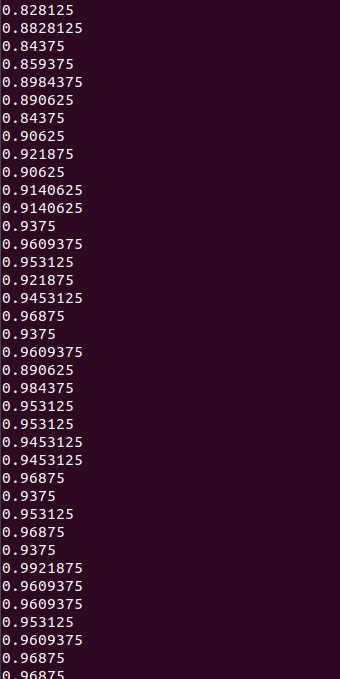
运行结果:
TensorFlow从入门到理解(四):你的第一个循环神经网络RNN(分类例子)的更多相关文章
- TensorFlow从入门到理解(五):你的第一个循环神经网络RNN(回归例子)
运行代码: import tensorflow as tf import numpy as np import matplotlib.pyplot as plt BATCH_START = 0 TIM ...
- TensorFlow从入门到理解
一.<莫烦Python>学习笔记: TensorFlow从入门到理解(一):搭建开发环境[基于Ubuntu18.04] TensorFlow从入门到理解(二):你的第一个神经网络 Tens ...
- 通过keras例子理解LSTM 循环神经网络(RNN)
博文的翻译和实践: Understanding Stateful LSTM Recurrent Neural Networks in Python with Keras 正文 一个强大而流行的循环神经 ...
- 基于TensorFlow的循环神经网络(RNN)
RNN适用场景 循环神经网络(Recurrent Neural Network)适合处理和预测时序数据 RNN的特点 RNN的隐藏层之间的节点是有连接的,他的输入是输入层的输出向量.extend(上一 ...
- TensorFlow从入门到理解(六):可视化梯度下降
运行代码: import tensorflow as tf import numpy as np import matplotlib.pyplot as plt from mpl_toolkits.m ...
- TensorFlow从入门到理解(三):你的第一个卷积神经网络(CNN)
运行代码: from __future__ import print_function import tensorflow as tf from tensorflow.examples.tutoria ...
- TensorFlow从入门到理解(二):你的第一个神经网络
运行代码: from __future__ import print_function import tensorflow as tf import numpy as np import matplo ...
- TensorFlow从入门到理解(一):搭建开发环境【基于Ubuntu18.04】
*注:教程及本文章皆使用Python3+语言,执行.py文件都是用终端(如果使用Python2+和IDE都会和本文描述有点不符) 一.安装,测试,卸载 TensorFlow官网介绍得很全面,很完美了, ...
- 循环神经网络-RNN入门
首先学习RNN需要一定的基础,即熟悉普通的前馈神经网络,特别是BP神经网络,最好能够手推. 所谓前馈,并不是说信号不能反向传递,而是网络在拓扑结构上不存在回路和环路. 而RNN最大的不同就是存在环路. ...
随机推荐
- Building Microservices with Spring Boot and Apache Thrift. Part 1 with servlet
https://dzone.com/articles/building-microservices-spring In the modern world of microservices it's i ...
- linux server 产生大量 Too many open files CLOSE_WAIT激增
情景描述:系统产生大量“Too many open files” 原因分析:在服务器与客户端通信过程中,因服务器发生了socket未关导致的closed_wait发生,致使监听port打开的句柄数到了 ...
- MongoDB 学习记录(一)
前言:之前一直只是简单了解MongoDB,而且是随便看看的那种,今天决定好好的整理一下,以便自己能 温故而知新 1.MongoDB是什么 MongoDB 是一个高性能,开源,无模式的文档型数据库,开 ...
- mfc 中的error RC2104 : undefined keyword or key name
http://bbs.csdn.net/topics/340253236 需要在此文件中添加该按钮 声明一下. 但是在resource.h中已经定义了:#define IDC_ETHCONF_CHKP ...
- windows怎样查看被程序占用的端口
1. netstat -ano 显示所有端口与任务管理器中的pid对应,通过pid打开任务管理器查询占用进程 附录:在命令行中输入netstat /? 可以查看netstat的相关信息.C:\Doc ...
- shell数组等基本用法
"shell"既是一种解释型编程语言,也是一个这种编程语言的解释器的名字 shell是解释型语言,就是解释器会一条一条的翻译每一条语句并执行,对比之下,C语言是编译型语言,编译器把 ...
- 2017-12-15python全栈9期第二天第七节之练习题
#!/user/bin/python# -*- coding:utf-8 -*-print(6 or 2 > 1)print(3 or 2 >1 )print(0 or 5 <4)p ...
- 利用jieba,word2vec,LR进行搜狐新闻文本分类
一.简介 1)jieba 中文叫做结巴,是一款中文分词工具,https://github.com/fxsjy/jieba 2)word2vec 单词向量化工具,https://radimrehurek ...
- 【JS】JavaScript中Null和undefind区别
1.undefined:只有一个值,及特殊的undefined.在使用var声明变量但未对其初始化时,这个变量的值是undefined,简言之,undefined就是表示变量申明了但未初始化时的值. ...
- 设计模式---数据结构模式之迭代器模式(Iterate)
一:概念 迭代模式是行为模式之一,它把对容器中包含的内部对象的访问委让给外部类,使用Iterator(遍历)按顺序进行遍历访问的设计模式. 在应用Iterator模式之前,首先应该明白Iterator ...