
三、SpringBoot整合Thymeleaf视图
3.1 Thymeleaf视图介绍
先看下官网的介绍:
Thymeleaf是适用于Web和独立环境的现代服务器端Java模板引擎。
Thymeleaf的主要目标是为您的开发工作流程带来优雅的自然模板 -HTML可以在浏览器中正确显示,也可以作为静态原型工作,从而可以在开发团队中加强协作。
Thymeleaf拥有适用于Spring Framework的模块,与您喜欢的工具的大量集成以及插入您自己的功能的能力,对于现代HTML5 JVM Web开发而言,Thymeleaf是理想的选择。
在SpringBoot中,SpringBoot对Thymeleaf提供了良好的支持,同时也提供了自动化配置,因此在SpringBoot中使用Thymeleaf非常快捷方便。
3.2 创建SpringBoot项目
创建方法建议使用IDEA快速创建SpringBoot项目,并选择web、Thymeleaf依赖:
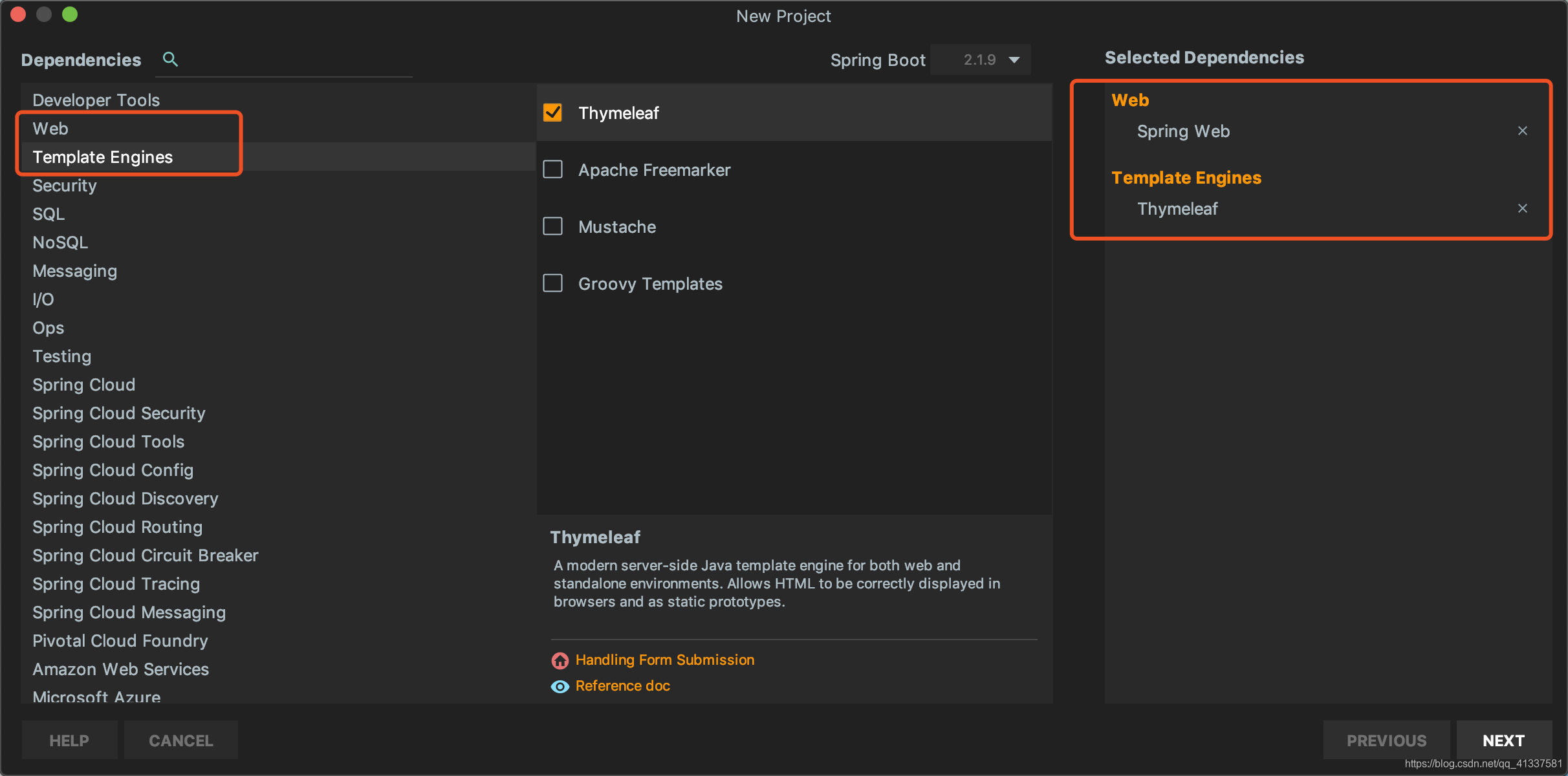
创建完成后,IDEA自动在pom中加入了web和Thymeleaf依赖管理,pom.xml:
    <dependencies>

        <dependency>

            <groupId>org.springframework.boot</groupId>

            <artifactId>spring-boot-starter-thymeleaf</artifactId>

        </dependency>

        <dependency>

            <groupId>org.springframework.boot</groupId>

            <artifactId>spring-boot-starter-web</artifactId>

        </dependency>

        <dependency>

            <groupId>org.springframework.boot</groupId>

            <artifactId>spring-boot-starter-test</artifactId>

            <scope>test</scope>

        </dependency>

    </dependencies>
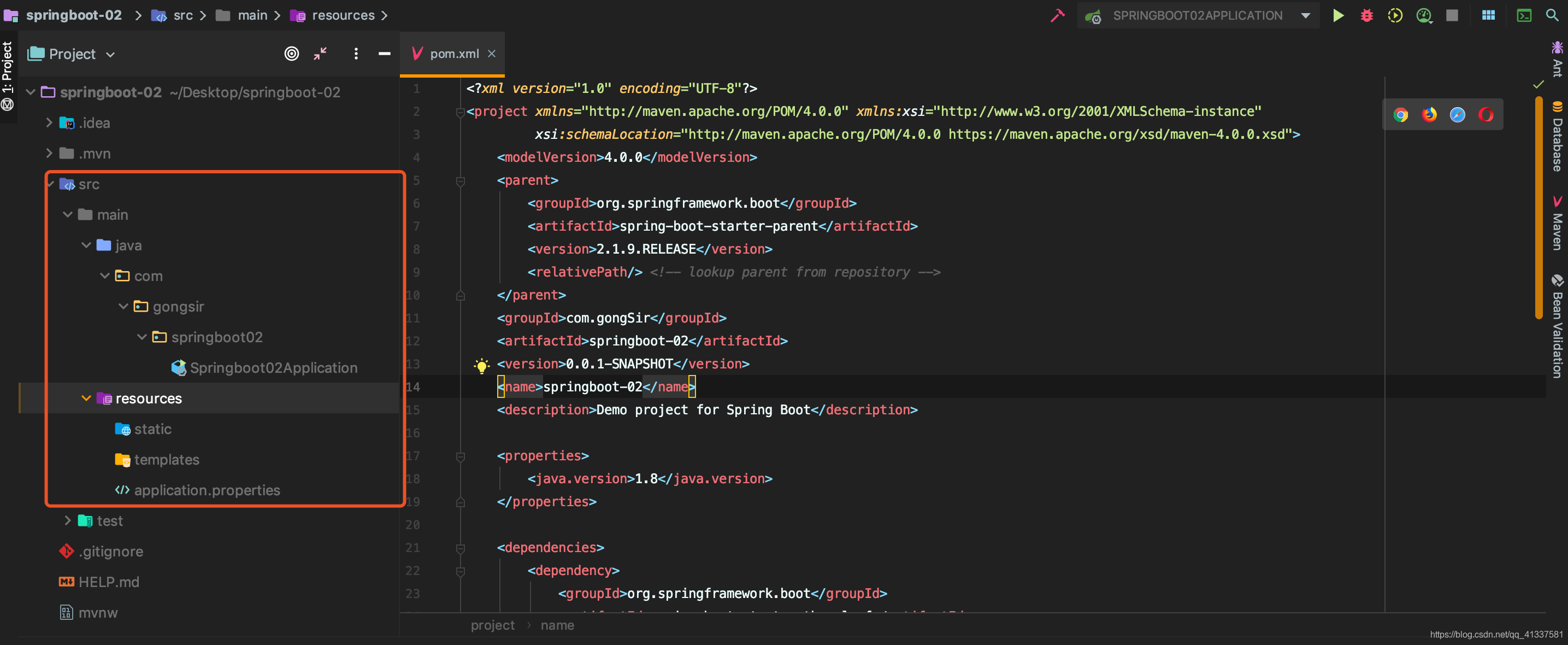
项目架构:
3.2 配置Thymeleaf
SpringBoot为Thymeleaf提供了自动化配置类ThymeleafAutoConfiguration,源码:
@Configuration

@EnableConfigurationProperties({ThymeleafProperties.class})

@ConditionalOnClass({TemplateMode.class, SpringTemplateEngine.class})

@AutoConfigureAfter({WebMvcAutoConfiguration.class, WebFluxAutoConfiguration.class})

public class ThymeleafAutoConfiguration {...}
可以看出相关的配置信息是从ThymeleafProperties类中获得的,进一步查看ThymeleafProperties的源码:
@ConfigurationProperties(

    prefix = "spring.thymeleaf"

)

public class ThymeleafProperties {

    private static final Charset DEFAULT_ENCODING;

    public static final String DEFAULT_PREFIX = "classpath:/templates/";

    public static final String DEFAULT_SUFFIX = ".html";

    private boolean checkTemplate = true;

    private boolean checkTemplateLocation = true;

    private String prefix = "classpath:/templates/";

    private String suffix = ".html";

    private String mode = "HTML";

    //省略

}
从该配置可以看出默认的Thymeleaf存放位置是classpath:/templates/,即resources/templates/下,刚刚我们使用IDEA创建项目时,已经自动生成了该目录。
我们如果需要对Thymeleaf的配置进行更改,可直接在application.properties中配置:
#是否开启缓存,默认为true

spring.thymeleaf.cache=false

#检查模板文件是否存在

spring.thymeleaf.check-template=true

#检查模本目录是否存在

spring.thymeleaf.check-template-location=true

#模板文件编码

spring.thymeleaf.encoding=UTF-8

#模板位置

spring.thymeleaf.prefix=classpath:/templates/

#模板文件后缀名

spring.thymeleaf.suffix=.html

#Content-type

spring.thymeleaf.servlet.content-type=text/html
3.3 编写Demo
1、新建User和UserController:
User.java:
package com.gongsir.springboot02.pojo;

public class User {

    private String name;

    private String major;

    private String grade;

    public String getName() {

        return name;

    }

    public void setName(String name) {

        this.name = name;

    }

    public String getMajor() {

        return major;

    }

    public void setMajor(String major) {

        this.major = major;

    }

    public String getGrade() {

        return grade;

    }

    public void setGrade(String grade) {

        this.grade = grade;

    }

}
UserController.java:
@Controller

public class UserController {

    @GetMapping(path = "/users")

    public ModelAndView getUsers(){

        List<User> list = new ArrayList<>();

        User u1 = new User();

        u1.setName("龚涛");

        u1.setMajor("计算机");

        u1.setGrade("2017");

        list.add(u1);

        User u2 = new User();

        u2.setName("李诗雅");

        u2.setMajor("网络工程");

        u2.setGrade("2017");

        list.add(u2);

        //视图模板文件的名字,需在template目录下创建同名模板文件

        ModelAndView mv = new ModelAndView("users");

        mv.addObject("users",list);

        return mv;

    }

}
2、在模板目录下新建users.html模板文件,显示数据:
<!DOCTYPE html>

<html lang="en" xmlns:th="http://www.thymeleaf.org">

<head>

    <meta charset="UTF-8">

    <title>用户列表</title>

</head>

<body>

    <table border="1px sold black">

        <tr>

            <td>姓名</td>

            <td>专业</td>

            <td>年级</td>

        </tr>

        <tr th:each="user:${users}">

            <td th:text="${user.name}"></td>

            <td th:text="${user.major}"></td>

            <td th:text="${user.grade}"></td>

        </tr>

    </table>

</body>

</html>
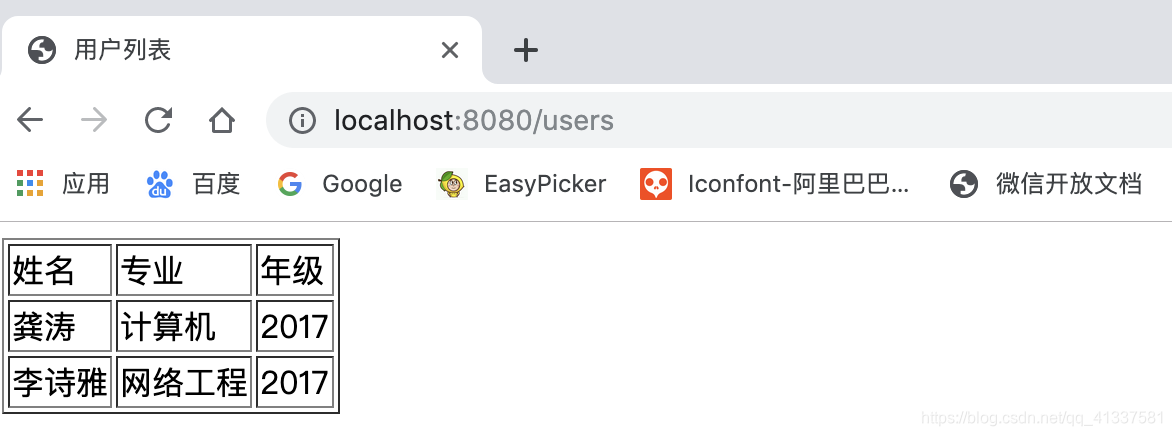
3、启动项目,访问http://localhost:8080/users,如图:
3.4 小结
本文主要介绍SpringBoot整合Thymeleaf视图技术,并给了一个简单demo演示,想学习更多Thymeleaf知识?看官网吧:https://www.thymeleaf.org/.
不过当前流行前后端分离技术,大多数开发不需要在后端整合视图技术,后端只需要提供接口即可,待续.....
三、SpringBoot整合Thymeleaf视图的更多相关文章
- Springboot整合thymeleaf模板
Thymeleaf是个XML/XHTML/HTML5模板引擎,可以用于Web与非Web应用. Thymeleaf的主要目标在于提供一种可被浏览器正确显示的.格式良好的模板创建方式,因此也可以用作静态建 ...
- SpringBoot 整合 Thymeleaf & 如何使用后台模板快速搭建项目
如果你和我一样,是一名 Java 道路上的编程男孩,其实我不太建议你花时间学 Thymeleaf,当然他的思想还是值得借鉴的.但是他的本质在我看来就是 Jsp 技术的翻版(Jsp 现在用的真的很少很少 ...
- 【Java Web开发学习】Spring4整合thymeleaf视图解析
[Java Web开发学习]Spring4整合thymeleaf视图解析 目录 1.简单介绍2.简单例子 转载:https://www.cnblogs.com/yangchongxing/p/9111 ...
- 【Springboot】Springboot整合Thymeleaf模板引擎
Thymeleaf Thymeleaf是跟Velocity.FreeMarker类似的模板引擎,它可以完全替代JSP,相较与其他的模板引擎,它主要有以下几个特点: 1. Thymeleaf在有网络和无 ...
- SpringBoot学习9:springboot整合thymeleaf
1.创建maven项目,添加项目所需依赖 <!--springboot项目依赖的父项目--> <parent> <groupId>org.springframewo ...
- SpringBoot 整合thymeleaf
1.Thymeleaf介绍(官网推荐:https://www.thymeleaf.org/doc/articles/thymeleaf3migration.html) Thymeleaf是跟Veloc ...
- SpringBoot:2.SpringBoot整合Thymeleaf模板引擎渲染web视图
在Web开发过程中,Spring Boot可以通过@RestController来返回json数据,那如何渲染Web页面?Spring Boot提供了多种默认渲染html的模板引擎,主要有以下几种: ...
- springboot整合Thymeleaf模板引擎
引入依赖 需要引入Spring Boot的Thymeleaf启动器依赖. <dependency> <groupId>org.springframework.boot</ ...
- springboot整合thymeleaf+tiles示例
网上关于此框架的配置实在不多,因此想记录下来以防忘记 因为公司框架基于上述(公司采用gradle构建项目,楼主采用的是maven),所以楼主能少走些弯路: 1.创建springboot-maven项目 ...
随机推荐
- 模拟测试20191017~18 lrd Day1& Day2
$Day1:$ $T1:位运算$ 从低位到高位分类讨论就好了 记得判$inf$ $T2:集合论$ 考场上差点就打线段树了 用一个数组维护,同时用一个变量代表当前总体$+$&&$-$的值 ...
- Spring概念详解
1.什么是 Spring ? Spring是一个开源框架,Spring是于2003 年兴起的一个轻量级的Java 开发框架,由Rod Johnson 在其著作Expert One-On-One J2E ...
- js 数组元素位置互换
如下实现的是,先将数组反转,然后将第二个元素与倒数第三个元素位置互换 ,,,,,,,); arr.reverse(); two=arr.splice(,,); three=arr.splice(-,, ...
- python: isdigit int float 使用
>>> num1 = '2.0' >>> print num1.isdigit() False >>> num2 = ' >>> ...
- Mac版最详细的Flutter开发环境搭建
上周任务不多,闲来无事想学习一下flutter耍一耍,发现flutter的环境搭建步骤还是很繁琐的,官网的搭建教程只是按步骤让你进行操作,中间出现的问题完全没有提及,对我这种没搞过原生开发的小白来说超 ...
- Zabbix实战-简易教程--中间件ZooKeeper监控
一.监控思路 通过zabbix trapper方式监控,之前看到网友们都是通过定时任务进行主动上传数据,但是,zabbix还有另外一神器--自动发现,也能达到同样的功能. 二.实现步骤 1.准备脚本 ...
- mpvue中按需引入echarts
大家都知道小程序文件大小不能超过2M, 在项目中引入echarts后,文件大小远远超出2M了.因为echarts文件默认是包含所有图表代码的,所以文件体积会比较大.解决办法如下: 安装 首先我们先安装 ...
- RPGMaker MV 入门教程
RPG Maker是一个十分优秀的rpg游戏制作引擎 恩 一个被定义为游戏的游戏引擎 可以用来十分便捷的制作rpg游戏 有兴趣的可以尝试一下 满足自己想做游戏的愿望. Step1 决定你的RPG形 ...
- 批量实现ssh免密登录
本节索引 场景分析 ssh免密登录 pssh工具批量管理 SHELL自动化脚本 本篇总结 场景分析 作为一个运维工程师,不是每个人工作的环境都想阿里.腾讯那样,动不动就上亿的PV量,上万台服务器.我们 ...
- snf快速开发平台试用演示地址
BS演示地址: http://49.4.68.200:65432 administrator / Administrator snf-cs试用版本下载地址:https://pan.baid ...