
Redis Server分布式缓存编程
这篇文章我将介绍如果用最简洁的方式配置Redis Server,
以及如何使用C#和它交互编程
一. 背景介绍
Redis是最快的key-value分布式缓存之一
缺点: 没有本地数据缓冲, 目前还没有完整的数据聚集化支持
优点: 配置简单, 使用方便, 高性能,支持不同的数据类型(hashes, lists, sets, sorted sets)
ASP.NET WebUI for viewing content of the cache
二. 安装Redis
1) 从github下载最新的32/64位安装
https://github.com/dmajkic/redis/downloads
解压到你自己的目录
eg: d:\RedisServer
2) 从github下载Redis服务程序
dll手工版
https://github.com/kcherenkov/redis-windows-service/downloads
安装版
https://github.com/rgl/redis/downloads
拷贝到RedisServer的安装目录
eg: d:\RedisServer
3) 安装redis服务
进入你的应用程序目录,运行下面的命令
sc create %name% binpath= "\"%binpath%\" %configpath%" start= "auto" DisplayName= "Redis"
%name% -- name of service instance, ex. redis-instance;
%binpath% -- path to this project exe file, ex. C:\Program Files\Redis\RedisService_1.1.exe;
%configpath% -- path to redis configuration file, ex. C:\Program Files\Redis\redis.conf;
sc create my-redis binpath= "\"D:\RedisServer\RedisService_1.1.exe\" D:\RedisServer\redis.conf" start="auto" DisplayName= "MyRedis"

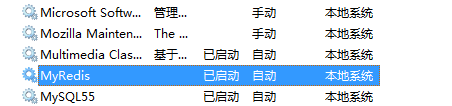
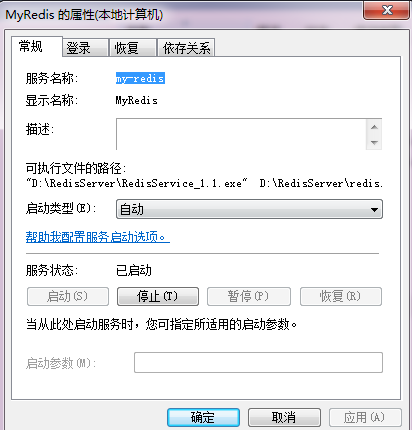
4) 基本配置
redis.conf
# requirepass foobared
去掉注释,重启服务
这样实例化一个Redis服务的时候,就需要密码
RedisClient client = new RedisClient(serverHost, port, redisPassword);
Redis server replication (master - slave配置)
# slaveof <masterip> <masterport>
eg:
slaveof 192.168.1.1 6379
三. 客户端编程
1) 安装Redis包

2) 简单例子

using System;

using System.Collections.Generic;

using System.Linq;

using System.Text;

using ServiceStack.Redis;

using System.Threading;

namespace Zeus.Cache.Redis.Demo

{

    public class SimpleRedisDemo

    {

        public void SimpleDemo()

        {

            string host = "localhost";

            string elementKey = "testKeyRedis";

            using (RedisClient redisClient = new RedisClient(host))

            {

                if (redisClient.Get<string>(elementKey) == null)

                {

                    // adding delay to see the difference

                    Thread.Sleep(2000);

                    // save value in cache

                    redisClient.Set(elementKey, "default value");

                }

                //change the value

                redisClient.Set(elementKey, "fuck you value");

                // get value from the cache by key

                string message = "Item value is: " + redisClient.Get<string>(elementKey);

                Console.WriteLine(message);

            }

        }

    }

}
运行结果:

Redis Server分布式缓存编程的更多相关文章
- C# Redis Server分布式缓存编程 --网络转载
这篇文章我将介绍如果用最简洁的方式配置Redis Server, 以及如何使用C#和它交互编程 一. 背景介绍 Redis是最快的key-value分布式缓存之一 缺点: 没有本地数据缓冲, 目前还没 ...
- C# Redis Server分布式缓存编程(一)(转)
出处:http://www.cnblogs.com/davidgu/p/3262571.html 这篇文章我将介绍如果用最简洁的方式配置Redis Server, 以及如何使用C#和它交互编程 一. ...
- C# Redis Server分布式缓存编程(一)
这篇文章我将介绍如果用最简洁的方式配置Redis Server, 以及如何使用C#和它交互编程 一. 背景介绍 Redis是最快的key-value分布式缓存之一 缺点: 没有本地数据缓冲, 目前还没 ...
- C# Redis Server分布式缓存编程(二)
在Redis编程中, 实体和集合类型则更加有趣和实用 namespace Zeus.Cache.Redis.Demo { public class Person { public int Id { g ...
- C# Redis Server分布式缓存编程(二)(转)
出处;http://www.cnblogs.com/davidgu/p/3263485.html 在Redis编程中, 实体和集合类型则更加有趣和实用 namespace Zeus.Cache.Red ...
- 在AspNetCore 中 使用Redis实现分布式缓存
AspNetCore 使用Redis实现分布式缓存 上一篇讲到了,Core的内置缓存:IMemoryCache,以及缓存的基础概念.本篇会进行一些概念上的补充. 本篇我们记录的内容是怎么在Core中使 ...
- 【转载】在AspNetCore 中 使用Redis实现分布式缓存
原文地址:https://www.cnblogs.com/szlblog/p/9045209.html AspNetCore 使用Redis实现分布式缓存 上一篇讲到了,Core的内置缓存:IMemo ...
- ASP.NET Core 使用 Redis 实现分布式缓存:Docker、IDistributedCache、StackExchangeRedis
ASP.NET Core 使用 Redis 实现分布式缓存:Docker.IDistributedCache.StackExchangeRedis 前提:一台 Linux 服务器.已安装 Docker ...
- WEB 应用缓存解析以及使用 Redis 实现分布式缓存
什么是缓存? 缓存就是数据交换的缓冲区,用于临时存储数据(使用频繁的数据).当用户请求数据时,首先在缓存中寻找,如果找到了则直接返回.如果找不到,则去数据库中查找.缓存的本质就是用空间换时间,牺牲数据 ...
随机推荐
- onPullDownRefresh函数没有被正确执行
原因 问题原因很多,我遇到的这个问题的原因是: 页面有两个同名的onPullDownRefresh函数,导致只执行最后的一个. 解决 只留一个onPullDownRefresh函数
- 优化UITableView
在iOS应用中,UITableView应该是使用率最高的视图之一了.iPod.时钟.日历.备忘录.Mail.天气.照片.电话.短信.Safari.App Store.iTunes.Game Cente ...
- react随笔-1(为什么在react使用jq无法正确渲染组件位置)
今天心血来潮,打开了sublime想玩玩react,然后大家都知道的先引入一大串 就是在百度静态资源库里找到的. 然后贴html代码 对的,没错,就这么一行,毕竟只是测试嘛 然后js代码 大家一定要注 ...
- 洛谷 P3146 248 题解
https://www.luogu.org/problemnew/show/P3146 区间dp,这次设计的状态和一般的有一定的差异. 这次我们定义$dp[i][j]$表示$[i,j]$的可以合并出来 ...
- 枚举为何不能设置成public?
听到测试与开发争论,为何枚举不能用public,用public怎么了?对于这个我也不知道到底能不能用,于是就去查了查资料. 解答: 枚举被设计成是单例模式,即枚举类型会由JVM在加载的时候,实例化枚举 ...
- LinkedList集合(JDK1.8)
简述 按照上篇笔记ArrayList集合继续进行介绍list的另一个常见子类LinkedList ?LinkedList介绍 1.数据结构 说明:linkedlist的底层数据结构是个双向链表结构,也 ...
- spring tool suite (sts) 创建springmvc(没有实践)
摘自:STS(Spring Tool Suite)建立默认的spring mvc项目 老外的原创,网址:http://www.codejava.NET/frameworks/spring/spring ...
- django的基本操作流程
pip install django cd Desktop/课上代码02/ #进入到创建项目的目录 django-admin startproject 项目的名称 #创建项目 __ini ...
- python基础——8(装饰器)
一.nonlocal关键字 def outer(): num = 0 def inner(): # 如果想在被嵌套的函数中修改外部函数变量(名字)的值 nonlocal num # 将 L 与 E(E ...
- Leetcode 273.整数转换英文表示
整数转换英文表示 将非负整数转换为其对应的英文表示.可以保证给定输入小于 231 - 1 . 示例 1: 输入: 123 输出: "One Hundred Twenty Three" ...