
C# Redis Server分布式缓存编程(一)
这篇文章我将介绍如果用最简洁的方式配置Redis Server,
以及如何使用C#和它交互编程
一. 背景介绍
Redis是最快的key-value分布式缓存之一
缺点: 没有本地数据缓冲, 目前还没有完整的数据聚集化支持
优点: 配置简单, 使用方便, 高性能,支持不同的数据类型(hashes, lists, sets, sorted sets)
ASP.NET WebUI for viewing content of the cache
二. 安装Redis
1) 从github下载最新的32/64位安装
https://github.com/dmajkic/redis/downloads
解压到你自己的目录
eg: d:\RedisServer
2) 从github下载Redis服务程序
dll手工版
https://github.com/kcherenkov/redis-windows-service/downloads
安装版
https://github.com/rgl/redis/downloads
拷贝到RedisServer的安装目录
eg: d:\RedisServer
3) 安装redis服务
进入你的应用程序目录,运行下面的命令
sc create %name% binpath= "\"%binpath%\" %configpath%" start= "auto" DisplayName= "Redis"
%name% -- name of service instance, ex. redis-instance;
%binpath% -- path to this project exe file, ex. C:\Program Files\Redis\RedisService_1.1.exe;
%configpath% -- path to redis configuration file, ex. C:\Program Files\Redis\redis.conf;
sc create my-redis binpath= "\"D:\RedisServer\RedisService_1.1.exe\" D:\RedisServer\redis.conf" start= "auto" DisplayName= "MyRedis"

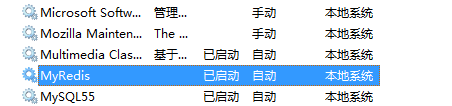
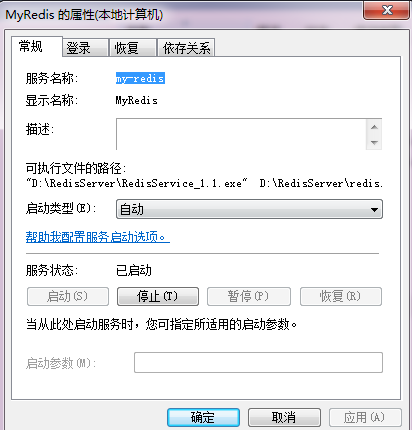
4) 基本配置
redis.conf
# requirepass foobared
去掉注释,重启服务
这样实例化一个Redis服务的时候,就需要密码
RedisClient client = new RedisClient(serverHost, port, redisPassword);
Redis server replication (master - slave配置)
# slaveof <masterip> <masterport>
eg:
slaveof 192.168.1.1 6379
三. 客户端编程
1) 安装Redis包

2) 简单例子
using System;

using System.Collections.Generic;

using System.Linq;

using System.Text;

using ServiceStack.Redis;

using System.Threading;

namespace Zeus.Cache.Redis.Demo

{

    public class SimpleRedisDemo

    {

        public void SimpleDemo()

        {

            string host = "localhost";

            string elementKey = "testKeyRedis";

            using (RedisClient redisClient = new RedisClient(host))

            {

                if (redisClient.Get<string>(elementKey) == null)

                {

                    // adding delay to see the difference

                    Thread.Sleep();

                    // save value in cache

                    redisClient.Set(elementKey, "default value");

                }

                //change the value

                redisClient.Set(elementKey, "fuck you value");

                // get value from the cache by key

                string message = "Item value is: " + redisClient.Get<string>(elementKey);

                Console.WriteLine(message);

            }

        }

    }

}
运行结果:

C# Redis Server分布式缓存编程(一)的更多相关文章
- C# Redis Server分布式缓存编程 --网络转载
这篇文章我将介绍如果用最简洁的方式配置Redis Server, 以及如何使用C#和它交互编程 一. 背景介绍 Redis是最快的key-value分布式缓存之一 缺点: 没有本地数据缓冲, 目前还没 ...
- C# Redis Server分布式缓存编程(一)(转)
出处:http://www.cnblogs.com/davidgu/p/3262571.html 这篇文章我将介绍如果用最简洁的方式配置Redis Server, 以及如何使用C#和它交互编程 一. ...
- Redis Server分布式缓存编程
这篇文章我将介绍如果用最简洁的方式配置Redis Server, 以及如何使用C#和它交互编程 一. 背景介绍 Redis是最快的key-value分布式缓存之一 缺点: 没有本地数据缓冲, 目前还没 ...
- C# Redis Server分布式缓存编程(二)
在Redis编程中, 实体和集合类型则更加有趣和实用 namespace Zeus.Cache.Redis.Demo { public class Person { public int Id { g ...
- C# Redis Server分布式缓存编程(二)(转)
出处;http://www.cnblogs.com/davidgu/p/3263485.html 在Redis编程中, 实体和集合类型则更加有趣和实用 namespace Zeus.Cache.Red ...
- 在AspNetCore 中 使用Redis实现分布式缓存
AspNetCore 使用Redis实现分布式缓存 上一篇讲到了,Core的内置缓存:IMemoryCache,以及缓存的基础概念.本篇会进行一些概念上的补充. 本篇我们记录的内容是怎么在Core中使 ...
- 【转载】在AspNetCore 中 使用Redis实现分布式缓存
原文地址:https://www.cnblogs.com/szlblog/p/9045209.html AspNetCore 使用Redis实现分布式缓存 上一篇讲到了,Core的内置缓存:IMemo ...
- ASP.NET Core 使用 Redis 实现分布式缓存:Docker、IDistributedCache、StackExchangeRedis
ASP.NET Core 使用 Redis 实现分布式缓存:Docker.IDistributedCache.StackExchangeRedis 前提:一台 Linux 服务器.已安装 Docker ...
- WEB 应用缓存解析以及使用 Redis 实现分布式缓存
什么是缓存? 缓存就是数据交换的缓冲区,用于临时存储数据(使用频繁的数据).当用户请求数据时,首先在缓存中寻找,如果找到了则直接返回.如果找不到,则去数据库中查找.缓存的本质就是用空间换时间,牺牲数据 ...
随机推荐
- linu触摸屏幕
一..前提知识 1.Linux输入子系统(Input Subsystem): 在Linux中,输入子系统是由输入子系统设备驱动层.输入子系统核心层(Input Core)和输入子系统事件处理层(Eve ...
- shell编程学习笔记【原创】
本文为本人学习笔记,如有转载请注明出处,谢谢 一.Bourne Shell 有如下四种变量: 用户自定义变量 位置变量,即命令行参数 预定义变量 环境变量 二.位置变量 $ 与键入的命令行一样,包含脚 ...
- vboxmanage查询正在运行的vbox虚拟机
系统:linux通用,virtualbox5.0 每次用下面命令启动vm虚拟机时,发现没办法知道它的IP. $ vboxmanage startvm <vmname> --type hea ...
- Centos 6.3软件安装
一.软件安装包的类型: 1. tar包,如software-1.2.3-1.tar.gz.它是使用UNIX系统的打包工具tar打包的. 2. rpm包,如software-1.2.3-1.i386.r ...
- 基于最新友盟开发文档,集成友盟分享功能,赋demo
集成准备 获取Appkey 快速集成 获取SDK,页面截图: 下载后打开 导入jar和res 添加回调Activity 微信 在包名目录下创建wxapi文件夹,新建一个名为WXEntryActivit ...
- [BZOJ1601][Usaco2008 Oct]灌水 最小生成树水题
1601: [Usaco2008 Oct]灌水 Time Limit: 5 Sec Memory Limit: 162 MBSubmit: 2121 Solved: 1393[Submit][St ...
- Ubuntu14.04配置VIM与GVIM 高亮、跳转与变量函数列表
一.环境:刚安装好的Ubuntu14.04,本文只能保证 在Ubuntu下能达到效果. 二.安装GVim. sudo apt-get update sudo apt-get install vim-g ...
- 洛谷 P1739 表达式括号匹配【STL/stack/模拟】
题目描述 假设一个表达式有英文字母(小写).运算符(+,-,*,/)和左右小(圆)括号构成,以"@"作为表达式的结束符.请编写一个程序检查表达式中的左右圆括号是否匹配,若匹配,则返 ...
- Codeforces 908D New Year and Arbitrary Arrangement(概率DP,边界条件处理)
题目链接 Goodbye 2017 Problem D 题意 一个字符串开始,每次有$\frac{pa}{pa+pb}$的概率在后面加一个a,$\frac{pb}{pa+pb}$的概率在后面加一个 ...
- codevs——1230 元素查找
时间限制: 1 s 空间限制: 128000 Ks 题目等级 : 钻石 Diamond 题解 查看运行结果 题目描述 Description 给出n个正整数,然后有m个询问,每个询问一个整数 ...