
C# Redis Server分布式缓存编程(一)(转)
出处:http://www.cnblogs.com/davidgu/p/3262571.html
这篇文章我将介绍如果用最简洁的方式配置Redis Server,
以及如何使用C#和它交互编程
一. 背景介绍
Redis是最快的key-value分布式缓存之一
缺点: 没有本地数据缓冲, 目前还没有完整的数据聚集化支持
优点: 配置简单, 使用方便, 高性能,支持不同的数据类型(hashes, lists, sets, sorted sets)
ASP.NET WebUI for viewing content of the cache
二. 安装Redis
1) 从github下载最新的32/64位安装
https://github.com/dmajkic/redis/downloads
解压到你自己的目录
eg: d:\RedisServer
2) 从github下载Redis服务程序
dll手工版
https://github.com/kcherenkov/redis-windows-service/downloads
安装版
https://github.com/rgl/redis/downloads
拷贝到RedisServer的安装目录
eg: d:\RedisServer
3) 安装redis服务
进入你的应用程序目录,运行下面的命令
sc create %name% binpath= "\"%binpath%\" %configpath%" start= "auto" DisplayName= "Redis"
%name% -- name of service instance, ex. redis-instance;
%binpath% -- path to this project exe file, ex. C:\Program Files\Redis\RedisService_1.1.exe;
%configpath% -- path to redis configuration file, ex. C:\Program Files\Redis\redis.conf;
sc create my-redis binpath= "\"D:\RedisServer\RedisService_1.1.exe\" D:\RedisServer\redis.conf" start="auto" DisplayName= "MyRedis"

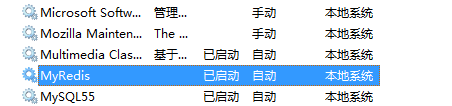
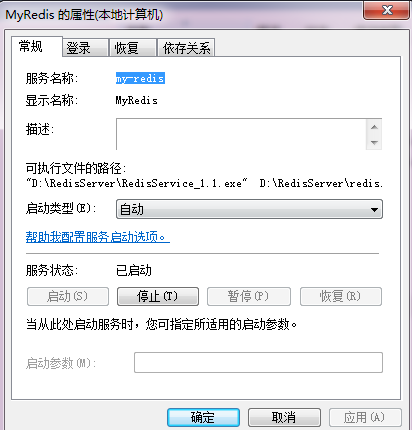
4) 基本配置
redis.conf
# requirepass foobared
去掉注释,重启服务
这样实例化一个Redis服务的时候,就需要密码
RedisClient client = new RedisClient(serverHost, port, redisPassword);
Redis server replication (master - slave配置)
# slaveof <masterip> <masterport>
eg:
slaveof 192.168.1.1 6379
三. 客户端编程
1) 安装Redis包

2) 简单例子

using System;

using System.Collections.Generic;

using System.Linq;

using System.Text;

using ServiceStack.Redis;

using System.Threading;

namespace Zeus.Cache.Redis.Demo

{

    public class SimpleRedisDemo

    {

        public void SimpleDemo()

        {

            string host = "localhost";

            string elementKey = "testKeyRedis";

            using (RedisClient redisClient = new RedisClient(host))

            {

                if (redisClient.Get<string>(elementKey) == null)

                {

                    // adding delay to see the difference

                    Thread.Sleep(2000);

                    // save value in cache

                    redisClient.Set(elementKey, "default value");

                }

                //change the value

                redisClient.Set(elementKey, "fuck you value");

                // get value from the cache by key

                string message = "Item value is: " + redisClient.Get<string>(elementKey);

                Console.WriteLine(message);

            }

        }

    }

}
运行结果:

C# Redis Server分布式缓存编程(一)(转)的更多相关文章
- C# Redis Server分布式缓存编程 --网络转载
这篇文章我将介绍如果用最简洁的方式配置Redis Server, 以及如何使用C#和它交互编程 一. 背景介绍 Redis是最快的key-value分布式缓存之一 缺点: 没有本地数据缓冲, 目前还没 ...
- C# Redis Server分布式缓存编程(一)
这篇文章我将介绍如果用最简洁的方式配置Redis Server, 以及如何使用C#和它交互编程 一. 背景介绍 Redis是最快的key-value分布式缓存之一 缺点: 没有本地数据缓冲, 目前还没 ...
- Redis Server分布式缓存编程
这篇文章我将介绍如果用最简洁的方式配置Redis Server, 以及如何使用C#和它交互编程 一. 背景介绍 Redis是最快的key-value分布式缓存之一 缺点: 没有本地数据缓冲, 目前还没 ...
- C# Redis Server分布式缓存编程(二)
在Redis编程中, 实体和集合类型则更加有趣和实用 namespace Zeus.Cache.Redis.Demo { public class Person { public int Id { g ...
- C# Redis Server分布式缓存编程(二)(转)
出处;http://www.cnblogs.com/davidgu/p/3263485.html 在Redis编程中, 实体和集合类型则更加有趣和实用 namespace Zeus.Cache.Red ...
- 在AspNetCore 中 使用Redis实现分布式缓存
AspNetCore 使用Redis实现分布式缓存 上一篇讲到了,Core的内置缓存:IMemoryCache,以及缓存的基础概念.本篇会进行一些概念上的补充. 本篇我们记录的内容是怎么在Core中使 ...
- 【转载】在AspNetCore 中 使用Redis实现分布式缓存
原文地址:https://www.cnblogs.com/szlblog/p/9045209.html AspNetCore 使用Redis实现分布式缓存 上一篇讲到了,Core的内置缓存:IMemo ...
- ASP.NET Core 使用 Redis 实现分布式缓存:Docker、IDistributedCache、StackExchangeRedis
ASP.NET Core 使用 Redis 实现分布式缓存:Docker.IDistributedCache.StackExchangeRedis 前提:一台 Linux 服务器.已安装 Docker ...
- WEB 应用缓存解析以及使用 Redis 实现分布式缓存
什么是缓存? 缓存就是数据交换的缓冲区,用于临时存储数据(使用频繁的数据).当用户请求数据时,首先在缓存中寻找,如果找到了则直接返回.如果找不到,则去数据库中查找.缓存的本质就是用空间换时间,牺牲数据 ...
随机推荐
- cratedb 集群搭建说明
此为搭建说明,实际上搭建过es 集群的都是可以的,和es 基本一样 配置文件 crate.yaml 参考集群架构图 集群名称 cluster.name: my_cluster 每个node节点名称 如 ...
- FastAdmin 前台会员分组的权限分析
FastAdmin 前台会员分组的权限分析 之前有用户反馈前台用户组权限无法选中无子节点的节点 1. 其实这个理解是不对的,是无法选中菜单可视的节点. 从这里 UserRule.php 可能可以看出. ...
- 解决 eclipse tomcat cannot create a server using the selected type
解决的方法 1.退出eclipse: 2.打开 [工程目录下]/.metadata/.plugins/org.eclipse.core.runtime/.settings目录: 3.删除org.ecl ...
- sdk manager 代理,解决下载速度慢的问题
原文:http://blog.csdn.net/android_panda/article/details/18598883 地址:mirrors.neusoft.edu.cn 端口:80 要勾选:F ...
- emacs之配置代码风格
emacsConfig/code-style-setting.el (add-hook 'c-mode-common-hook ( lambda() ( c-set-style "java& ...
- Hive默认分割符
1.Hive默认的分隔符 Hive的表数据,不管导出到HDFS还是本地文件系统,如果用户在导出时没有指定分割符,那么Hive表的数据在写入文件时,会使用默认的分隔符作为列分隔符,该默认的分割是“CTR ...
- 030:Cetus中间件和MHA读写分离
030:Cetus中间件和MHA读写分离 line:V1.1 mail: gczheng@139.com date: 2018-08-30 一.主机环境 虚拟机配置 CPU 内存 硬盘 OS版本 My ...
- probably another instance of uWSGI is running on the same address (127.0.0.1:9090). bind(): Address already in use
probably another instance of uWSGI is running on the same address (127.0.0.1:9090). bind(): Address ...
- Spring MVC 学习 之 - URL参数传递
在学习 Spring Mvc 过程中,有必要来先了解几个关键参数: @Controller: 在类上注解,则此类将编程一个控制器,在项目启动 Spring 将自动扫描此类,并进行对应URL路由映 ...
- Spring Boot实践——Spring AOP实现之动态代理
Spring AOP 介绍 AOP的介绍可以查看 Spring Boot实践——AOP实现 与AspectJ的静态代理不同,Spring AOP使用的动态代理,所谓的动态代理就是说AOP框架不会去修改 ...