
Vue+Bootstrap实现购物车程序(3)
效果展示:(说明:使用webpack重构购物车程序,使用vue-cli生成项目脚手架)
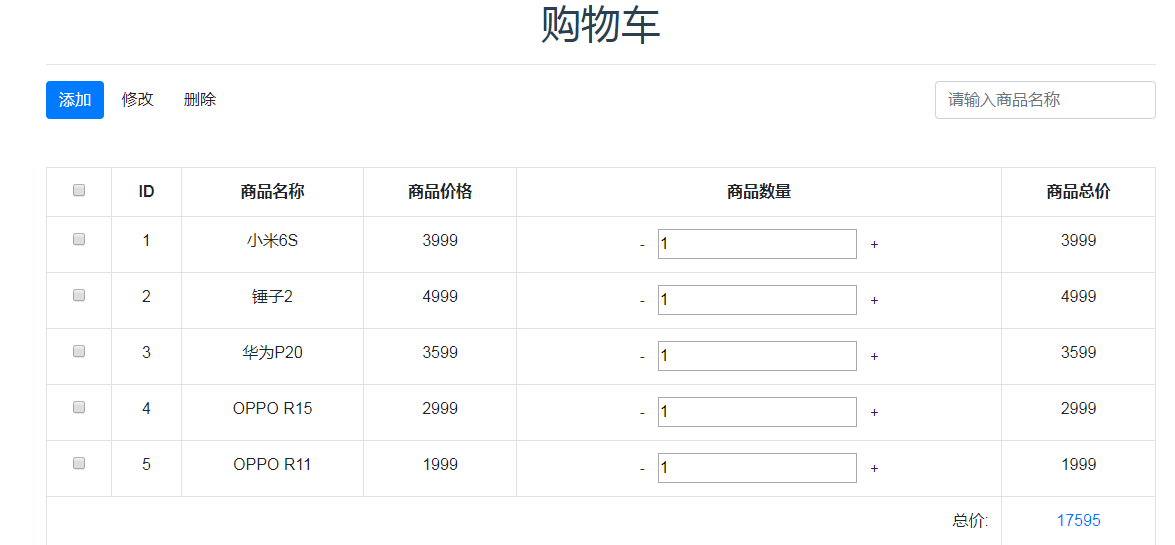
文件结构:
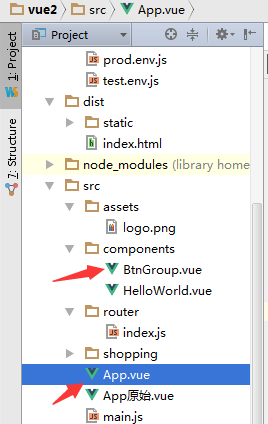
代码:
(1)将原来编写的btn-grp组件单独编写到BtnGrp.vue文件中
可以看到现在代码清晰了很多,template标签部分编写模板,script标签部分编写组件的交互代码,编写方式和原先写在HTML的代码一致
现在整个前端应用都是基于组件化的,代码变得更加清晰了
<!--vue组件-->

<template>

    <div style="float:right;">

      <input class="form-control"

             v-model="searchProduct"

             @keyup.enter="filterProduct"

             type="text"

             placeholder="请输入商品名称"/>

    </div>

</template>

<script type="application/javascript">

//    import App from '../App';

    export default{

      name:"BtnGroup",

      props:['products'],

      data:function(){

        return {

          searchProduct:''

        }

      },

      methods:{

        /* 商品筛选 */

        filterProduct:function(){

//          console.log(this.$parent.products)

          var searchArr = [];

          for(let i=;i<this.$parent.products.length;i++){

            searchArr.push(this.$parent.products[i].name)

          }

          var searchIndex = searchArr.indexOf(this.searchProduct);

          if(searchIndex !== -){

            this.$parent.products = this.$parent.products.filter(function(element, index, self){

              /* element数组元素、index元素索引、self数组本身 */

              return index == searchIndex;

            })

          }else{

            alert('暂无符合商品');

          }

        }

      }

    }

//    module.exports = BtnGroup;

//    export default BtnGroup;

//  export default {

//    props: ['buttons']

//  }

</script>

<!-- Add "scoped" attribute to limit CSS to this component only -->

<!--翻译:添加“scoped”属性以仅将CSS限制为此组件-->

<style type="text/css" scoped>

</style>
(2)将原来写在HTML中的代码重构到App.vue中
此处因为需要用到BtnGrp组件,所以需要先import 组件,然后在components中引用该组件
<!--主页组件-->

<template>

  <div id="app" class="container">

    <h1>购物车</h1>

    <hr>

    <!--<BtnGroup v-bind:buttons="buttons"></BtnGroup>-->

    <div style="overflow: hidden">

      <div style="float: left">

        <button type="button" v-on:click="addHandler" class="btn btn-primary">添加</button>

        <button type="button" v-on:click="changeHandler" class="btn btn-default">修改</button>

        <button type="button" v-on:click="delateHandler" class="btn btn-default">删除</button>

      </div>

      <BtnGroup :products="products"></BtnGroup>

    </div>

    <br>

    <br>

    <table class="table table-bordered table-striped table-hover">

      <tr>

        <td><input type="checkbox" v-on:click="selectAll" name="selectAllBtn" v-model="selectAllState"/></td>

        <th>ID</th>

        <th>商品名称</th>

        <th>商品价格</th>

        <th>商品数量</th>

        <th>商品总价</th>

      </tr>

      <tr v-for="(product,index) in products">

        <td>

          <input type="checkbox" v-on:click="checkItem(product)" v-model="product.state" name="checkbox" />

        </td>

        <td>{{index+}}</td>

        <td>{{product.name}}</td>

        <td>{{product.price}}</td>

        <td>

          <!--可以将两个按钮的方法合成一个,通过传参-->

          <!--<button @click="changeCount(prod, -1)">-</button>-->

          <button @click="cutCount(product)" class="btn btn-default btn-sm">-</button>

          <input type="number" v-model="product.count"/>

          <!--<button @click="changeCount(prod, 1)">-</button>-->

          <button @click="addCount(product)" class="btn btn-default btn-sm">+</button>

        </td>

        <td>{{product.price * product.count}}</td>

      </tr>

      <tr>

        <!--text-right排版文本右对齐-->

        <td colspan="" class="text-right">总价:</td>

        <!--text-primary辅助类文本-->

        <td class="text-primary">{{totalMoney}}</td>

      </tr>

    </table>

  </div>

</template>

<script>

  /* eslint-disable no-new */

  import 'bootstrap/dist/css/bootstrap.min.css'

  import BtnGroup from './components/BtnGroup'

  export default{

    name: 'App',

    components: {BtnGroup},

    data:function(){

      return{

        products: [

          {

            name: '小米6S',

            price: ,

            count: ,

            state:false

          },

          {

            name: '锤子2',

            price: ,

            count: ,

            state:false

          },

          {

            name: '华为P20',

            price: ,

            count: ,

            state:false

          },

          {

            name: 'OPPO R15',

            price: ,

            count: ,

            state:false

          },

          {

            name: 'OPPO R11',

            price: ,

            count: ,

            state:false

          },

        ],

        selectAllState:false

        /*

          注意:这里修正下,页面里的死数据,操作类的直接写好即可,不用遍历数据获取。

          只有页面中的展示信息即动态设置

         */

        /*

        buttons:[

          {title:'添加',class:'btn-primary',handler:function(){alert('点击添加按钮')}},

          {title:'修改',class:'btn-default',handler:function(){alert('点击修改按钮')}},

          {title:'删除',class:'btn-default',handler:function(){

            for(let i =0;i<app.data().products.length;i++){

//              console.log(app.data().products[i].state)

              if(app.data().products[i].state){

                app.data().products.splice(i,1);

                i--;

              }

            };

            全选按钮状态清空

            document.querySelectorAll('input[name="selectAllBtn"]')[0].checked = false;

          }}

        ]

  */

      }

    },

    methods:{

      // 用户点击加减数量时调用

      cutCount:function(product){

        if(product.count>){

          product.count--

        }else{

          alert('商品数量不能小于0')

        }

      },

      addCount:function(product){

        product.count++

      },

      checkItem:function(product){

        product.state = !product.state;

      },

      selectAll:function() {

        var checkObj = document.querySelectorAll('input[name="checkbox"]'); // 获取所有checkbox项

        if (event.target.checked) {

          // 点击全选事件

          for (var i = ; i < checkObj.length; i++) {

            checkObj[i].checked = true;//选中样式

            this.products[i].state = true;//动态改变值,供删除用

          }

        } else {

          for (var i = ; i < checkObj.length; i++) {

            checkObj[i].checked = false;

            this.products[i].state = false;

          }

        }

      },

      /*添加 */

      addHandler:function(){

        alert("点击添加按钮")

      },

      /* 修改 */

      changeHandler:function(){

        alert("点击修改按钮")

      },

      /* 删除 */

      delateHandler:function(){

        for(let i=;i<this.products.length;i++){

          if(this.products[i].state){

            this.products.splice(i,);

            i--;

          }

        }

         /* 注意:vue里尽量避免DOM操作。所有的操作都是数据驱动 */

        this.selectAllState = false;//还原全选按钮状态

      }

    },

    computed:{

      totalMoney:function(){

        var price = ;

        for(var i = ; i < this.products.length; ++i) {

          price += parseFloat(this.products[i].price * this.products[i].count);

        }

        return price;

      }

    }

  }

//  module.exports = App;

//  export default app;

</script>

<style>

  #app {

    font-family: 'Avenir', Helvetica, Arial, sans-serif;

    -webkit-font-smoothing: antialiased;

    -moz-osx-font-smoothing: grayscale;

    text-align: center;

    color: #2c3e50;

    margin-top: 60px;

  }

</style>
Vue+Bootstrap实现购物车程序(3)的更多相关文章
- Vue+Bootstrap实现购物车程序(2)
先简单看下效果图:(在原先基础上添加了删除和筛选操作) 代码: <!DOCTYPE html> <html> <head lang="en"> ...
- Vue+Bootstrap实现购物车程序(1)
先看下案例效果:(简单的数量控制及价格运算) 代码: <!DOCTYPE html> <html> <head lang="en"> <m ...
- vue.js实现购物车功能
购物车是电商必备的功能,可以让用户一次性购买多个商品,常见的购物车实现方式有如下几种: 1. 用户更新购物车里的商品后,页面自动刷新. 2. 使用局部刷新功能,服务器端返回整个购物车的页面html 3 ...
- 基于 Vue BootStrap的迷你Chrome插件
代码地址如下:http://www.demodashi.com/demo/14306.html 安装 安装 Visual Studio Code 和Chrome, 自行FQ 详细安装这里略过 安装包管 ...
- 用vue.js实现购物车功能
购物车是电商必备的功能,可以让用户一次性购买多个商品,常见的购物车实现方式有如下几种: 1. 用户更新购物车里的商品后,页面自动刷新. 2. 使用局部刷新功能,服务器端返回整个购物车的页面html 3 ...
- 利用JSP编程技术实现一个简单的购物车程序
实验二 JSP编程 一.实验目的1. 掌握JSP指令的使用方法:2. 掌握JSP动作的使用方法:3. 掌握JSP内置对象的使用方法:4. 掌握JavaBean的编程技术及使用方法:5. 掌握JSP ...
- 简单购物车程序(Python)
#简单购物车程序:money_all=0tag=Trueshop_car=[]shop_info={'apple':10,'tesla':100000,'mac':3000,'lenovo':3000 ...
- vue项目向小程序迁移调研
概述 今天调研了一下vue项目怎么向小程序迁移,有些心得,记录下来,供以后开发时参考,相信对其他人也有用. 基本上vue项目向小程序迁移不外乎2种方法,一种是用小程序的web-view组件,另一种是用 ...
- python学习:购物车程序
购物车程序 product_list = [ ('mac',9000), ('kindle',800), ('tesla',900000), ('python book',105), ('bike', ...
随机推荐
- MyEclipse8.5优化
MyEclipse8.5优化 第一步: 取消自动validation validation有一堆,什么xml.jsp.jsf.js等等,我们没有必要全部都去自动校验一下,只是需要的时候才会手工校验一下 ...
- Masonry整体动画更新约束
前言 说到iOS自动布局,有很多的解决办法.有的人使用xib/storyboard自动布局,也有人使用frame来适配.对于前者,笔者并不喜欢,也不支持.对于后者,更是麻烦,到处计算高度.宽度等,千万 ...
- Python: PS 图像调整--亮度调整
本文用 Python 实现 PS 图像调整中的亮度调整,具体的算法原理和效果可以参考之前的博客: http://blog.csdn.net/matrix_space/article/details/2 ...
- Ruby: Call the system and get system information.
1. Kill the task cmd2="taskkill /F /IM typeperf.exe"stdout2=%x{#{cmd2}} 2. Start counters: ...
- less 使用入门
LESSS是基于JavaScript,所以,是在客户端处理的. 使用less很简单: 1 下载less.js 2 新建less文件后缀名称是.less 3 在页面中引入less文件,跟引入普通的css ...
- 【OpenFOAM】——OpenFOAM入门算例学习
1 明确目标——为啥费老大劲儿学习OpenFOAM 学习OpenFOAM主要出于课题需要,希望实现以下几个目标: l [ ]学会用SnappyHexMesh生成高质量网格: l [ ]学习使用O ...
- java笔记之线程方式1启动线程
* 需求:我们要实现多线程的程序. * 如何实现呢? * 由于线程是依赖进程而存在的,所以我们应该先创建一个进程出来. * 而进程是由系统创建的,所以我们应该去调用系统功能创建一个进程. * ...
- java面试(上)
http://blog.csdn.net/jackfrued/article/details/44921941 1.面向对象的特征有哪些方面? 答:面向对象的特征主要有以下几个方面: - 抽象:抽象是 ...
- bzoj 1497 [NOI2006]最大获利【最大权闭合子图+最小割】
不要被5s时限和50000点数吓倒!大胆网络流!我一个5w级别的dinic只跑了1s+! 看起来没有最大权闭合子图的特征--限制,实际上还是有的. 我们需要把中转站看成负权点,把p看成点权,把客户看成 ...
- USACO Training3.3 A Game【区间Dp】 By cellur925
题目传送门 一股浓浓的博弈论香气...然而本蒟并不会博弈论. 开始用双端队列+假的dp水过了24pts水数据. 其实是布星的,两人都绝顶聪明会深谋远虑不像我只看眼前,所以上述算法错误. 正解:区间dp ...