
树莓派 - 蓝牙 (1) 试试Beacon
首先先了解一下bluez, 以及常用的tools.
- hcitool、bluetoothctl等工具,可以进行BLE设备的扫描、连接、配对、广播等操作;
- hcitool可以发送HCI command,设置BLE的广播数据;
- gatttool可以在GATT层面,完成GATT profile的连接、service attribute的读写等操作;
bluez
安装
sudo apt-get install bluez
hciconfig
查看蓝牙设备
pi@raspberrypi:~ $ hciconfig

hci0:   Type: Primary  Bus: UART

    BD Address: B8:27:EB:26:23:F1  ACL MTU: 1021:8  SCO MTU: 64:1

    UP RUNNING

    RX bytes:822 acl:0 sco:0 events:57 errors:0

    TX bytes:4231 acl:0 sco:0 commands:57 errors:0
所有命令如下
pi@raspberrypi:~ $ hciconfig --help

hciconfig - HCI device configuration utility

Usage:

    hciconfig

    hciconfig [-a] hciX [command ...]

Commands:

    up                  Open and initialize HCI device

    down                Close HCI device

    reset               Reset HCI device

    rstat               Reset statistic counters

    auth                Enable Authentication

    noauth              Disable Authentication

    encrypt             Enable Encryption

    noencrypt           Disable Encryption

    piscan              Enable Page and Inquiry scan

    noscan              Disable scan

    iscan               Enable Inquiry scan

    pscan               Enable Page scan

    ptype      [type]   Get/Set default packet type

    lm         [mode]   Get/Set default link mode

    lp         [policy] Get/Set default link policy

    name       [name]   Get/Set local name

    class      [class]  Get/Set class of device

    voice      [voice]  Get/Set voice setting

    iac        [iac]    Get/Set inquiry access code

    inqtpl     [level]  Get/Set inquiry transmit power level

    inqmode    [mode]   Get/Set inquiry mode

    inqdata    [data]   Get/Set inquiry data

    inqtype    [type]   Get/Set inquiry scan type

    inqparms   [win:int]    Get/Set inquiry scan window and interval

    pageparms  [win:int]    Get/Set page scan window and interval

    pageto     [to]     Get/Set page timeout

    afhmode    [mode]   Get/Set AFH mode

    sspmode    [mode]   Get/Set Simple Pairing Mode

    aclmtu     <mtu:pkt>    Set ACL MTU and number of packets

    scomtu     <mtu:pkt>    Set SCO MTU and number of packets

    delkey     <bdaddr> Delete link key from the device

    oobdata             Get local OOB data

    commands            Display supported commands

    features            Display device features

    version             Display version information

    revision            Display revision information

    block      <bdaddr> Add a device to the blacklist

    unblock    <bdaddr> Remove a device from the blacklist

    lerandaddr <bdaddr> Set LE Random Address

    leadv      [type]   Enable LE advertising

            0 - Connectable undirected advertising (default)

            3 - Non connectable undirected advertising

    noleadv             Disable LE advertising

    lestates            Display the supported LE states
hcitool
pi@raspberrypi:~ $ hcitool --help

hcitool - HCI Tool ver 5.43

Usage:

    hcitool [options] <command> [command parameters]

Options:

    --help  Display help

    -i dev  HCI device

Commands:

    dev     Display local devices

    inq     Inquire remote devices

    scan    Scan for remote devices

    name    Get name from remote device

    info    Get information from remote device

    spinq   Start periodic inquiry

    epinq   Exit periodic inquiry

    cmd     Submit arbitrary HCI commands

    con     Display active connections

    cc      Create connection to remote device

    dc      Disconnect from remote device

    sr      Switch master/slave role

    cpt     Change connection packet type

    rssi    Display connection RSSI

    lq      Display link quality

    tpl     Display transmit power level

    afh     Display AFH channel map

    lp      Set/display link policy settings

    lst     Set/display link supervision timeout

    auth    Request authentication

    enc     Set connection encryption

    key     Change connection link key

    clkoff  Read clock offset

    clock   Read local or remote clock

    lescan  Start LE scan

    leinfo  Get LE remote information

    lewladd Add device to LE White List

    lewlrm  Remove device from LE White List

    lewlsz  Read size of LE White List

    lewlclr Clear LE White List

    lerladd Add device to LE Resolving List

    lerlrm  Remove device from LE Resolving List

    lerlclr Clear LE Resolving List

    lerlsz  Read size of LE Resolving List

    lerlon  Enable LE Address Resolution

    lerloff Disable LE Address Resolution

    lecc    Create a LE Connection

    ledc    Disconnect a LE Connection

    lecup   LE Connection Update

For more information on the usage of each command use:

    hcitool <command> --help
bluetoothctl
打开bluetoochctl工具: bluetoothctl
pi@raspberrypi:/etc/systemd/system $ bluetoothctl

[NEW] Controller B8:27:EB:26:23:F1 raspberrypi [default]
扫描: scan on
[bluetooth]# scan on

Discovery started

[CHG] Controller B8:27:EB:26:23:F1 Discovering: yes

[NEW] Device 00:26:5E:DD:78:E6 00-26-5E-DD-78-E6列出扫描到的设备:devices
[bluetooth]# devices

Device 00:26:5E:DD:78:E6 00-26-5E-DD-78-E6退出:exit
[bluetooth]# exit

[DEL] Controller B8:27:EB:26:23:F1 raspberrypi [default]

pi@raspberrypi:/etc/systemd/system $
所有的命令如下:
[bluetooth]# help

Available commands:

  list                       List available controllers

  show [ctrl]                Controller information

  select <ctrl>              Select default controller

  devices                    List available devices

  paired-devices             List paired devices

  power <on/off>             Set controller power

  pairable <on/off>          Set controller pairable mode

  discoverable <on/off>      Set controller discoverable mode

  agent <on/off/capability>  Enable/disable agent with given capability

  default-agent              Set agent as the default one

  advertise <on/off/type>    Enable/disable advertising with given type

  set-advertise-uuids [uuid1 uuid2 ...] Set advertise uuids

  set-advertise-service [uuid][data=[xx xx ...] Set advertise service data

  set-advertise-manufacturer [id][data=[xx xx ...] Set advertise manufacturer data

  set-advertise-tx-power <on/off> Enable/disable TX power to be advertised

  set-scan-filter-uuids [uuid1 uuid2 ...] Set scan filter uuids

  set-scan-filter-rssi [rssi] Set scan filter rssi, and clears pathloss

  set-scan-filter-pathloss [pathloss] Set scan filter pathloss, and clears rssi

  set-scan-filter-transport [transport] Set scan filter transport

  set-scan-filter-clear      Clears discovery filter.

  scan <on/off>              Scan for devices

  info [dev]                 Device information

  pair [dev]                 Pair with device

  trust [dev]                Trust device

  untrust [dev]              Untrust device

  block [dev]                Block device

  unblock [dev]              Unblock device

  remove <dev>               Remove device

  connect <dev>              Connect device

  disconnect [dev]           Disconnect device

  list-attributes [dev]      List attributes

  set-alias <alias>          Set device alias

  select-attribute <attribute> Select attribute

  attribute-info [attribute] Select attribute

  read                       Read attribute value

  write <data=[xx xx ...]>   Write attribute value

  notify <on/off>            Notify attribute value

  register-profile <UUID ...> Register profile to connect

  unregister-profile         Unregister profile

  version                    Display version

  quit                       Quit program
RaspberryPi 发送beacon
苹果在BLE的基础上推出了iBeacon协议。iBeacon使用了BLE的广播部分,但不建立连接。一个遵守iBeacon协议的外设称为Beacon。Beacon会广播自己的身份信息和发射信号的强度。中心设备接收到广播之后,除了可以获知Beacon的身份之外,还能通过信号的衰减算出自己与Beacon的距离。
pi@raspberrypi:~ $ sudo hciconfig hci0 noscan

pi@raspberrypi:~ $ sudo hciconfig hci0 leadv 3

pi@raspberrypi:~ $ sudo hcitool -i hci0 cmd 0x08 0x0008 1E 02 01 1A 1A FF 4C 00 02 15 63 6F 3F 8F 64 91 4B EE 95 F7 D8 CC 64 A8 63 B5 00 01 00 02 C5

< HCI Command: ogf 0x08, ocf 0x0008, plen 31

  1E 02 01 1A 1A FF 4C 00 02 15 63 6F 3F 8F 64 91 4B EE 95 F7

  D8 CC 64 A8 63 B5 00 01 00 02 C5

> HCI Event: 0x0e plen 4

  01 08 20 00
使用Android APP测试Beacon功能
iBeacon & Eddystone Scanner Google开发的,可以从Google Play下载运行(地址为:https://play.google.com/store/apps/details?id=de.flurp.beaconscanner.app&hl=zh_CN)。
如果你的Android设备不能访问Google Play,也可以通过在线APK下载网站(https://apkpure.com/)将APK下载到电脑后安装。
测试结果
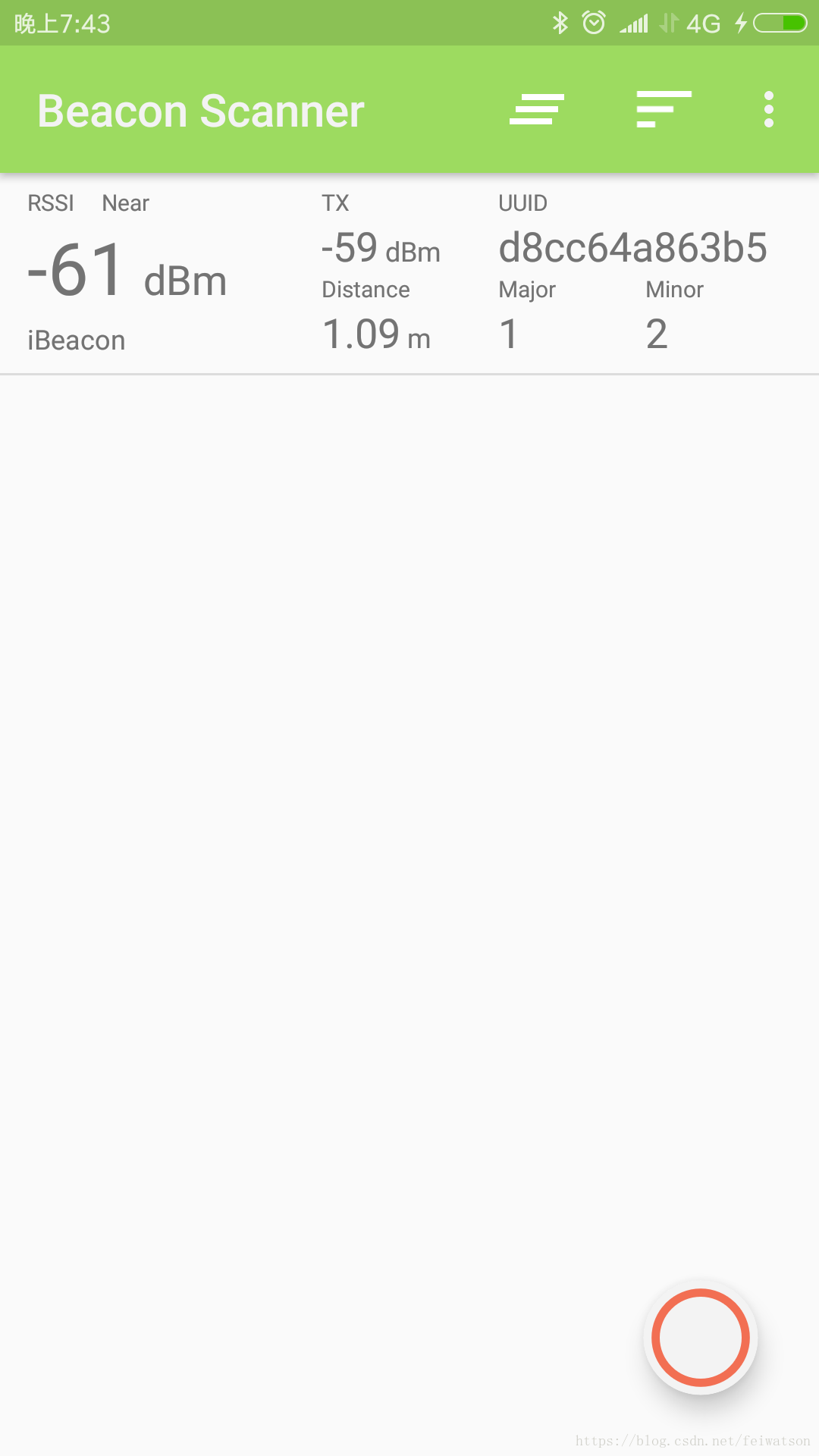
拿着手机走几步看看:
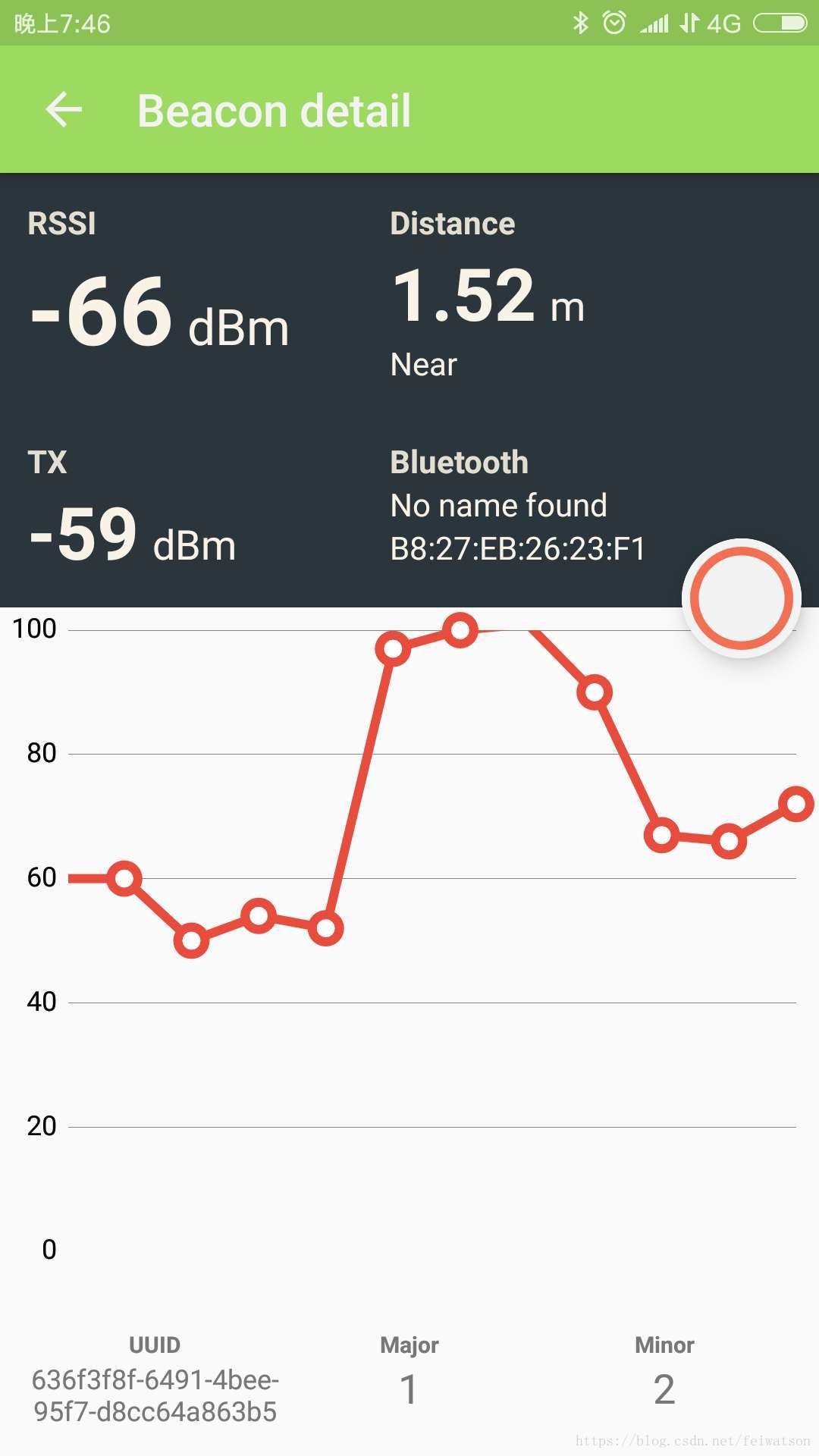
使用结束后,可以用下面命令来恢复扫描和停止广播:
sudo hciconfig hci0 piscan # 恢复扫描
sudo hciconfig hci0 noleadv # 停止广播
Reference
蓝牙串口
https://www.raspberrypi.org/forums/viewtopic.php?p=919420
https://blog.csdn.net/wanyeye/article/details/52909869?fps=1&locationNum=10
使用Beacon:
https://www.cnblogs.com/vamei/p/6753531.html
http://www.wowotech.net/bluetooth/eddystone_test.html
gatttool hcitool
https://blog.csdn.net/talkxin/article/details/50610984
https://blog.csdn.net/Chuck_lin/article/details/78846165
SPP
https://baike.baidu.com/item/%E8%93%9D%E7%89%99%E4%B8%B2%E5%8F%A3/1415870?fr=aladdin
SDP
https://www.cnblogs.com/hzl6255/p/3826558.html
树莓派 - 蓝牙 (1) 试试Beacon的更多相关文章
- 树莓派开发笔记(十一):蓝牙的使用,BlueZ协议(双树莓探测rssi并通过蓝牙互传获取的rssi信号强度)
若该文为原创文章,转载请注明原文出处本文章博客地址:https://blog.csdn.net/qq21497936/article/details/110940484长期持续带来更多项目与技术分享, ...
- Java 学习文章汇总
目前JAVA可以说是产业界和学术界最热门的语言,许多人都很急切想把JAVA学好. 但学习是需要步骤的,除非像电影中演的那样,能够把需要的专业技巧下载到脑海:主角只花了几秒下载资料,就马上具备飞行员的技 ...
- Linux 应用笔记
Linux 应用笔记 Linux 应用笔记 小书匠 Raspberry Pi 常用命令 CentOs Raspberry Ubuntu python 实用教程 Vim 权限问题 内存分配 shell ...
- 在树莓派3B、Ubuntu 18.04关闭板载Wifi、蓝牙
树莓派没有传统的BIOS设置界面,文件/boot/firmware/config.txt就相当一个BIOS设置.这里是config.txt的详细文档:https://github.com/raspbe ...
- 【树莓派】【转】树莓派3装Android 6.0,支持Wi-Fi和蓝牙
树莓派3装Android 6.0,支持Wi-Fi和蓝牙 相信对于许多树莓派初学者(包括我)来说,Android系统的确是一个不错的选择.但国内这方面资源稀缺,经本人FQ苦寻,找到了老外的树莓派Andr ...
- 蓝牙Beacon广播数据包格式以及解析
目录 1. 获取原始蓝牙广播包 2. 安装WireShark软件 3. 分析Beacon广播包数据 3.1 第一个数据包格式 3.2 第二个数据包格式 3.3 Android程序开发中的蓝牙广播包 4 ...
- 树莓派二:apt-get出错、蓝牙、汉化、输入法
用apt-get install一个软件的时候出现了一个错误: E: Encountered a section with no Package: header E: Problem with Mer ...
- 让你少走弯路的搭建树莓派的Net与NodeJS运行环境
树莓派是当前最火的嵌入计算平台没有之一,树莓派可以给我们无数的想象,树莓派的高性能.低功耗.低成本.可扩展性(最新的树莓派原生支持WIFI和蓝牙,这功能太赞了)深受大家的喜爱.虽然树莓派到目前为止 ...
- Beacon浅析
作者:hongbosun 一.Beacon简介 Beacon是基于BLE技术实现的物理设备.BLE(全称Bluetooth Low Energy)是蓝牙4.0技术规范的一部分.它起源于Nokia的Wi ...
随机推荐
- bzoj 2067: [Poi2004]SZN【贪心+二分+树形dp】
第一问就是Σ(deg[u]-1)/2+1 第二问是二分,判断的时候考虑第一问的贪心规则,对于奇度数的点,两两配对之后一条延伸到上面:对于欧度数的点,两两配对或者deg[u]-2的点配对,然后一条断在这 ...
- (一)搭建自己的SpringBoot后台框架整合MyBatis
一:通过idea工具构建基础框架 1. 打开idea,左上角File→New→Project, 2. 点击Next 3. 点击Next,配置如下图,这里我们选择数据库MySQL和持久层框架MyB ...
- 关于AFNetWorking 2.5.4之后版本编译报错问题解决方案
最近升级了AFN框架到2.6版本然后编译却出错了 错误如下: 错误出现在 AFSecurityPolicy.h 这个类中 解决办法如下: 在项目的.pch文件里添加 #ifndef TARGET_OS ...
- echartShow
echartShow 基于echart和bootstrap的大屏展示 以下是已经运用的成品图片.有一些数据运用的是json文件,实际成品中运用的是真实数据,除了公司内网访问不了. 需注意的地方 图表 ...
- Selenium | 网上教程
java selenium (一) selenium 介绍 java selenium (二) 环境搭建方法一 java selenium (三) 环境搭建 基于Maven java selenium ...
- 后缀数组 DC3构造法 —— 详解
学习了后缀数组,顺便把DC3算法也看了一下,传说中可以O(n)复杂度求出文本串的height,先比较一下倍增算法和DC3算法好辣. DC3 倍增法 时间复杂度 O(n)(但是常数很大) O(nlo ...
- 常用的DOCS命令
1.Help 可以查看当前DOS常用命令,是帮助2.Help dir 查看Dir命令的帮助,使用帮助3.ipconfig 查看当前电脑的IP地址4.ping 127.0.0.1 测试与某一台电脑之间网 ...
- COPY, RETAIN, ASSIGN , READONLY , READWRITE,STRONG,WEAK,NONATOMIC整理--转
copy:建立一个索引计数为1的对象,然后释放旧对象 对NSString 对NSString 它指出,在赋值时使用传入值的一份拷贝.拷贝工作由copy方法执行,此属性只对那些实行了NSCopying协 ...
- [在读]javascript框架设计
司徒正美的书,内容我觉得不错,国内的书很少会讲这些.当然也有很多人吐槽它只贴代码没有解释,文笔不够优美啥啥的,我想说,不要在意这些细节,反正是值得买的一本.
- JavaScript中,有三种常用的绑定事件的方法
要想让 JavaScript 对用户的操作作出响应,首先要对 DOM 元素绑定事件处理函数.所谓事件处理函数,就是处理用户操作的函数,不同的操作对应不同的名称. 在JavaScript中,有三种常用的 ...