
扩展视图之xpath用法
在视图扩展中,需要定位扩展字段需要显示的位置,通过xpath来实现定位
odoo 视图函数 在整个项目文件中,结构并不是十分明显,虽然它也遵循MVC设计,类比django的MTV模式,各个模块区分的十分明显,在Odoo中,视图的概念不是特别明显,很多时候,我们会将调用模型的函数直接写在models里边(即:类中)。
而对于模版Tempelate部分,odoo里边反而称做“views”,如下是odoo典型模块,销售模块sale的代码结构:
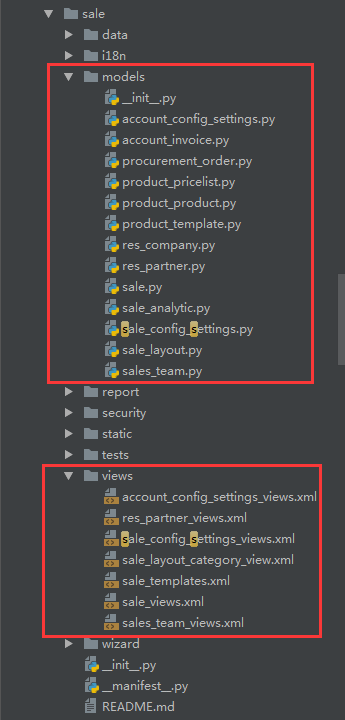
可以看到odoo的前端显示部分,对应的就是views,它是基于xml来实现的,而不是我们日常的html;
今天要说的xpath语法,就是针对于xml文件的一种语法格式。
通过xpath语法,可以对xml文件中要显示的内容,进行自定义的显示,比如:我们要插入一个新的标签在当前已经存在的标签的后边,前边,里边甚至替换。。。
这种语法看着还有点像JS的寻找父子节点。。。
1. xpath有一个用法,就是当你要修改的多个标签是在同一个目录节点下的时候,多个xpath标签可以写在同一个<record>标签中,而不用每次都去声明定义一遍,
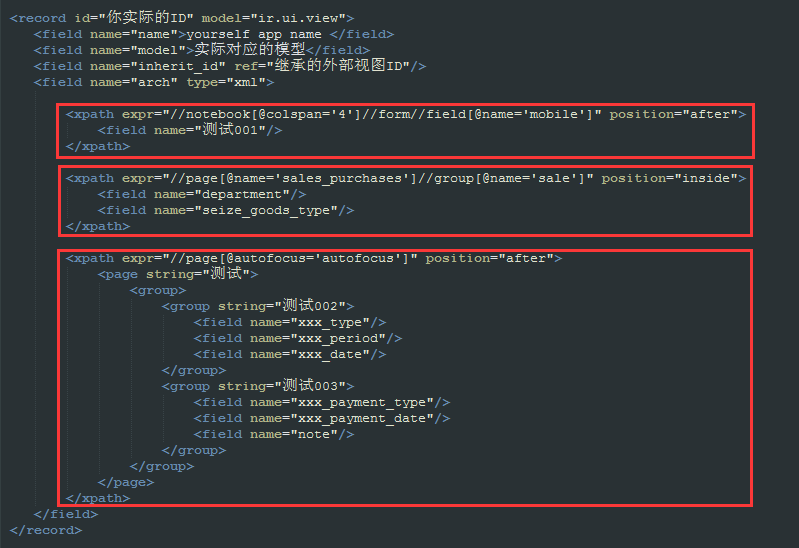
支持的视图类型:form、tree、search ...支持的定位方法:
<notebook position="inside">

       <xpath expr="//page[@name='page_history']" position="inside">

                 <field name="mobile" position="after">

                 <filter name="consumable" position="after">

                 <group name="bank" position="after">

                 <xpath expr="//field[@name='standard_price']" position="replace">

                 <xpath expr="//button[@name='open_ui']" position="replace">

                 <xpath expr="//div[@class='oe_employee_details']/h4/a" position="after">

                 <xpath expr="/form/sheet/notebook/page/field[@name='line_ids']/tree/field[@name='analytic_account_id']" position="replace">

                 <xpath expr="/form/sheet/notebook/page/field[@name='line_ids']/form/group/field[@name='analytic_account_id']" position="replace">
支持的规则:before、after、replace、inside、attributes
插入:
position='before'
position="after"
      <field name="mobile" position="after">

       <field name="sale_order_count"/>

      </field>

          <filter name="consumable" position="after">

            <separator/>

             <filter name="filter_to_qty_available" string="在手数量>0" icon="terp-accessories-archiver+" domain="[('qty_available', '>', 0)]"/>

             <filter name="filter_to_virtual_available" string="预测数量>0" icon="terp-accessories-archiver+" domain="[('virtual_available', '>', 0)]"/>

          </filter>
替换:
position="replace"
               <xpath expr="//field[@name='standard_price']" position="replace">

                        <group name='cost_prices' colspan="2" col="4">

                            <field name="standard_price" nolabel="1" attrs="{'readonly':[('cost_method','=','average')]}"/>

                            <field name="cost_price_extra" groups="product.group_product_variant"/>

                        </group>

                 </xpath>

                 <xpath expr="//button[@name='open_ui']" position="replace">

                     <button name="open_ui" type="object" string="Start Selling" attrs="{'invisible' : [('pos_state', 'not in', ('opened',))]}" class="oe_highlight" invisible="True"/>

</xpath>内部创建:position="inside
               <xpath expr="//page[@name='page_history']" position="inside">

                    <group name="grp_task" string="Tasks">

                        <field name="task_ids" colspan="4" nolabel="1">

                            <tree string="Tasks" editable="bottom">

                                <field name="name"/>

                                <field name="user_id"/>

                                <field name="date_deadline"/>

                                <field name="state" invisible="1"/>

                                <button name="do_open" states="pending,draft,done,cancelled" string="Start Task" type="object" icon="gtk-media-play" help="For changing to open state" invisible="context.get('set_visible',False)"/>

                                <button name="action_close" states="draft,pending,open" string="Done" type="object" icon="terp-dialog-close" help="For changing to done state"/>

                            </tree>

                        </field>

                      </group>

                </xpath>
修改属性:修改属性能够实现的功能,不要使用 replace
position="attributes"
<xpath expr="//field[@name='name']" position="attributes"
<attribute name="required">1</attribute>
</xpath1
        <record id="product_normal_variant_form_view" model="ir.ui.view">

            <field name="name">product.normal.variant.form</field>

            <field name="model">product.product</field>

            <field name="type">form</field>

            <field name="inherit_id" ref="product.product_normal_form_view" />

            <field name="arch" type="xml">

             <data>

                    <xpath expr="//field[@name='name']" position="attributes">

                        <attribute name="required">1</attribute>

                    </xpath>

                    <xpath expr="//field[@name='standard_price']" position="replace">

                        <group name='cost_prices' colspan="2" col="4">

                            <field name="standard_price" nolabel="1" attrs="{'readonly':[('cost_method','=','average')]}"/>

                            <field name="cost_price_extra" groups="product.group_product_variant"/>

                        </group>

                    </xpath>

                <sheet>

                    <group col="2" colspan="2" groups="base.group_extended" position="replace">

                         <group colspan="2" col="6" name="weight" groups="base.group_extended">

                            <field name="is_multi_variants" invisible="1"/>

                            <group colspan="2" col="2">

                                <separator string="Template Weights" colspan="2"/>

                                <field digits="(14, 3)" name="volume" attrs="{'readonly':[('type','=','service')]}"/>

                                <field digits="(14, 3)" name="weight" attrs="{'readonly':[('type','=','service')]}"/>

                                <field digits="(14, 3)" name="weight_net" attrs="{'readonly':[('type','=','service')]}"/>

                            </group>

                            <group colspan="2" col="2" attrs="{'invisible':[('is_multi_variants','=',False)]}">

                                <separator string="Variant Weights" colspan="2"/>

                                <field digits="(14, 3)" name="additional_volume" attrs="{'readonly':[('type','=','service')]}"/>

                                <field digits="(14, 3)" name="additional_weight" attrs="{'readonly':[('type','=','service')]}"/>

                                <field digits="(14, 3)" name="additional_weight_net" attrs="{'readonly':[('type','=','service')]}"/>

                            </group>

                            <group colspan="2" col="2" attrs="{'invisible':[('is_multi_variants','=',False)]}">

                                <separator string="Total Weights" colspan="2"/>

                                <field digits="(14, 3)" name="total_volume"/>

                                <field digits="(14, 3)" name="total_weight"/>

                                <field digits="(14, 3)" name="total_weight_net"/>

                            </group>

                        </group>

                    </group>

                </sheet>

                </data>

            </field>

        </record>

        <!-- 隐藏 open_ui 按钮 -->

        <record model="ir.ui.view" id="pos_session_opening_form_view_openui">

            <field name="name">pos.session.opening.form.view.openui</field>

            <field name="model">pos.session.opening</field>

            <field name="inherit_id"ref="point_of_sale.pos_session_opening_form_view"/>

            <field name="arch"type="xml">

                 <xpath expr="//button[@name='open_ui']"position="replace">

                     <button name="open_ui"type="object"string="Start Selling"attrs="{'invisible' : [('pos_state', 'not in', ('opened',))]}"class="oe_highlight"invisible="True"/>

                 </xpath>

            </field>

        </record>

        <record id="product_search_form_view_filter"model="ir.ui.view">

            <field name="name">product.search.form.filter</field>

            <field name="model">product.product</field>

            <field name="inherit_id"ref="product.product_search_form_view"/>

            <field name="arch"type="xml">

                <filter name="consumable"position="after">

                   <separator/>

                   <filter name="filter_to_qty_available"string="在手数量>0"icon="terp-accessories-archiver+"domain="[('qty_available', '>', 0)]"/>

                   <filter name="filter_to_virtual_available"string="预测数量>0"icon="terp-accessories-archiver+"domain="[('virtual_available', '>', 0)]"/>

                </filter>

            </field>

        </record>

        <!-- Partner kanban view inherte -->

        <record model="ir.ui.view"id="crm_lead_partner_kanban_view">

            <field name="name">res.partner.kanban.saleorder.inherit</field>

            <field name="model">res.partner</field>

            <field name="inherit_id"ref="base.res_partner_kanban_view"/>

            <field name="priority"eval="20"/>

            <field name="arch"type="xml">

                <field name="mobile"position="after">

                    <field name="sale_order_count"/>

                </field>

                <xpath expr="//div[@class='oe_kanban_partner_links']"position="inside">

                    <a name="%(sale.act_res_partner_2_sale_order)d"type="action"t-if="record.sale_order_count.value>0">

                        <t t-esc="record.sale_order_count.value"/> Sales

                    </a>

                </xpath>

            </field>

        </record>

         <!--  Partners inherited form -->

        <record id="view_task_partner_info_form"model="ir.ui.view">

            <field name="name">res.partner.task.info.inherit</field>

            <field name="model">res.partner</field>

            <field name="inherit_id"ref="base.view_partner_form"/>

            <field name="arch"type="xml">

                <xpath expr="//page[@name='page_history']"position="attributes">

                    <attribute name="invisible">False</attribute>

                </xpath>

                <xpath expr="//page[@name='page_history']"position="inside">

                    <group name="grp_task"string="Tasks">

                        <field name="task_ids"colspan="4"nolabel="1">

                            <tree string="Tasks"editable="bottom">

                                <field name="name"/>

                                <field name="user_id"/>

                                <field name="date_deadline"/>

                                <field name="state"invisible="1"/>

                                <button name="do_open"states="pending,draft,done,cancelled"string="Start Task"type="object"icon="gtk-media-play"help="For changing to open state"invisible="context.get('set_visible',False)"/>

                                <button name="action_close"states="draft,pending,open"string="Done"type="object"icon="terp-dialog-close"help="For changing to done state"/>

                            </tree>

                        </field>

                      </group>

                </xpath>

            </field>

       </record>
扩展视图之xpath用法的更多相关文章
- BrnShop开源网上商城第六讲:扩展视图功能
在正式讲解扩展视图功能以前,我们有必要把视图的工作原理简单说明下.任何一个视图都会被翻译成一个c#类,并保存到指定的位置,然后被编译.这也就是为什么能在视图中包含c#代码片段的原因.下面我们通过一个项 ...
- xPath 用法总结整理
xPath 用法总结整理 一.xpath介绍 XPath 是一门在 XML 文档中查找信息的语言.XPath 用于在 XML 文档中通过元素和属性进行导航. XPath 使用路径表达式在 XML ...
- 修复Windows XP服务扩展视图显示空白
在服务管理控制台(Services.msc)扩展视图显示服务的描述,也有启动或停止服务的链接.在某些系统中,扩展视图可能出现一片空白,如图所示: 这是因为没有注册 JScript.dll文件,要解决此 ...
- scrapy xpath用法
一.实验环境 1.Windows7x64_SP1 2.anaconda3 + python3.7.3(anaconda集成,不需单独安装) 3.scrapy1.6.0 二.用法举例 1.开启scrap ...
- Xpath用法
在进行网页抓取的时候,分析定位html节点是获取抓取信息的关键,目前我用的是lxml模块(用来分析XML文档结构的,当然也能分析html结构), 利用其lxml.html的xpath对html进行分析 ...
- odoo 开发基础 -- 视图之xpath语法
odoo 视图函数 在整个项目文件中,结构并不是十分明显,虽然它也遵循MVC设计,类比django的MTV模式,各个模块区分的十分明显,在Odoo中,视图的概念不是特别明显,很多时候,我们会将调用模型 ...
- Python re模块, xpath 用法
1.re正则的用法总结 (1). ^ 表示以哪个字符为开头 eg: '^g' 表示以g开头的字符串 . 表示任意字符 '^g.d' 表示以g开头第二个为任意字符,第三个为b的字 ...
- 网络爬虫之Xpath用法汇总
众所周知,在设计爬虫时,最麻烦的一步就是对网页元素进行分析,目前流行的网页元素获取的工具有BeautifulSoup,lxml等,而据我使用的体验而言,Scrapy的元素选择器Xpath(结合正则表达 ...
- XPath用法详解
1.XPath是什么 XPath 是一门在 XML 文档中查找信息的语言.XPath 用于在 XML 文档中通过元素和属性进行导航(你可以理解为一种类似正则表达式的方法) 2.XPath的语法 表达式 ...
随机推荐
- hiho 1098 最小生成树二·Kruscal算法 (最小生成树)
题目: 时间限制:10000ms 单点时限:1000ms 内存限制:256MB 描述 随着小Hi拥有城市数目的增加,在之间所使用的Prim算法已经无法继续使用了——但是幸运的是,经过计算机的分析, ...
- Django部署方法
Windows方案: Apache2.4 + Django2.0 网上的方法乱七八糟: 那么接下来:最好的方法,不行吃屎. 当前环境是Django2.0+ python35(64bit) 部署原因: ...
- Mysql --数据库概述1
什么是数据(Data)? 描述事物的符号记录称为数据,描述事物的符号既可以是数字,也可以是文字.图片,图像.声音.语言等,数据由多种表现形式,它们都可以经过数字化后存入计算机 在计算机中描述一个事物, ...
- 【原创】大叔问题定位分享(22)hive同时执行多个insert overwrite table只有1个可以执行
hive 2.1 一 问题 最近有一个场景,要向一个表的多个分区写数据,为了缩短执行时间,采用并发的方式,多个sql同时执行,分别写不同的分区,同时开启动态分区: set hive.exec.dyna ...
- php 常用的自定义函数
1. 发送 SMS 在开发 Web 或者移动应用的时候,经常会遇到需要发送 SMS 给用户,或者因为登录原因,或者是为了发送信息.下面的 PHP 代码就实现了发送 SMS 的功能. 为了使用任何的语言 ...
- ESP8266代码中的存储标记
const uint8 MyArr[1024] ICACHE_RODATA_ATTR = {0}; void MyFun() ICACHE_FLASH_ATTR { } 这种 ICACHE 开头的宏作 ...
- pip install psycopg2出现python setup.py egg_info failed with error code 1 in /tmp/pip-build-YtLeN3/psycopg2错误处理
折腾了一上午flask部署,到最后访问域名还是出现Application Error错误提示.估计是程序还有问题,想着直接clone书中作者的代码先试试能不能部署成功.结果在执行pip install ...
- Penettation testing with the bush Shell
1. Network Reconnaissance first we can use the command to gather the site information by whois eg : ...
- zt 正则
http://deerchao.net/tutorials/regex/regex.htm 正则表达式30分钟入门教程 版本:v2.3.5 (2017-6-12) 作者:deerchao 转载 ...
- loj6077
题解: 网上的做法好像都是容斥 那就先说一下容斥 首先问题等价于求下面这个式子的方案数 $$\sum_{i=1}^{n} ai (0<ai<i) =k$$ 直接$dp$复杂度是$nk$的, ...