
MQTT服务器搭建——Liunx安装mosquitto,并设置用户密码
一、安装
1、下载mosquitto安装包
地址:http://mosquitto.org/files/source/
2、安装依赖包
yum install gcc gcc-c++ libstdc++-devel

yum install openssl-devel -y

yum install c-ares-devel -y

yum install uuid-devel -y

yum install libuuid-devel -y

yum install c-ares-devel
3、编译并安装
解压下载的安装包:tar zxvf mosquitto-2.0.10.tar.gz
进入解压后的文件夹:cd mosquitto-2.0.10
执行命令:make && make install
4、安装后进入 /etc/mosquitto中,复制配置文件
cp mosquitto.conf.example mosquitto.conf
5、启动
mosquitto -c /etc/mosquitto/mosquitto.conf

//后台启动

mosquitto -c /etc/mosquitto/mosquitto.conf -d
6、关闭,kill进程
ps -aux | grep mosquitto

kill -9 2438
至此安装mosquitto完毕!
二、设置用户密码
1、打开配置文件为/etc/mosquitto/mosquitto.conf
配置如下 :
listener 1883  //配置允许外部访问的端口设置

allow_anonymous false  //配置不允许匿名访问,需输入账号密码才可订阅或者发布

password_file /etc/mosquitto/pwfile.example  //配置账号密码存放的路径
2、设置用户密码
命令如下:
mosquitto_passwd /etc/mosquitto/pwfile.example 用户名
回车后,按照提示输入两次密码即可!

3、用户测试验证
启动 mosquitto:
mosquitto -c /etc/mosquitto/mosquitto.conf

(订阅端)客户端启动:
mosquitto_sub -h 地址 -t 主题 -u 用户名 -P 密码

(发布者)客户端启动:
mosquitto_pub -h 地址 -t 主题 -u 用户名 -P 密码 -m 发布内容

三、补充问题
编译问题
1、fatal error: cjson/cJSON.h: No such file or directory
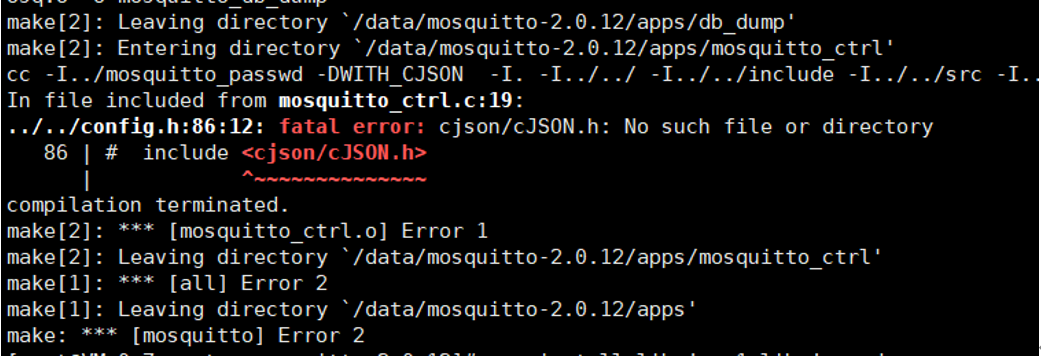
解决:需要安装cJSON(这里cJSON的安装,yum和apt不一定能找到,可以直接从github上下载源码压缩包,然后解压,进入目录,并make,make install)
启动订阅客户端问题
1、error while loading shared libraries: libmosquitto.so.1: cannot open shared object file: No such file or directory
解决:执行以下命令:
sudo ln -s /usr/local/lib/libmosquitto.so.1 /usr/lib/libmosquitto.so.1

ldconfig
2、error while loading shared libraries: libcjson.so.1: cannot open shared object file: No such file or directory

解决:
方法1:
编辑/etc/ld.so.conf文件,在新的一行中加入库文件所在目录(/usr/local/lib);
运行ldconfig,以更新/etc/ld.so.cache文件;
方法2:
在/etc/ld.so.conf.d/目录下新建任何以.conf为后缀的文件(touch mqtt.conf),在该文件中加入库文件所在的目录;
运行ldconfig,以更新/etc/ld.so.cache文件;
3、Warning: Unable to drop privileges to 'mosquitto' because this user does not exist. Trying 'nobody' instead.

解决:
在allow_anonymous 前面加一个 user root
user root

allow_anonymous false
或者创建mosquitto用户和组
groupadd mosquitto

useradd -g mosquitto mosquitto

chown -R mosquitto:mosquitto /etc/mosquitto/
四、参考以下文章
https://www.cnblogs.com/chen1-kerr/p/7258487.html
https://www.cnblogs.com/IC1101/p/14749722.html
https://blog.csdn.net/u012377333/article/details/69397124
https://www.cnblogs.com/x_wukong/p/4722903.html
https://blog.csdn.net/houjixin/article/details/46711547
MQTT服务器搭建——Liunx安装mosquitto,并设置用户密码的更多相关文章
- 常见MQTT服务器搭建与试用
常见MQTT服务器搭建与试用 简介 MQTT(Message Queuing Telemetry Transport,消息队列遥测传输)是IBM开发的一个即时通讯协议,它比较适合于在低带宽.不可靠 ...
- 个人智能家居系统 - MQTT服务器搭建(centOS7.3)
个人智能家居系统 - MQTT服务器搭建(centOS7.3) 0x00 参考 在CentOS7 上安装mosquitto1.4.1服务器,实现MQTT信息推送功能并增加websocket功能 mos ...
- Mqtt服务器搭建
.bg { background: #99CC99 } Mqtt服务器搭建 测试环境:CentOS64位 1.安装基础软件 yum install gcc-c++ yum install cmake ...
- 服务器搭建--Linux安装rabbitmq
安装rabbitmq需要先安装erlang:安装erlang参考https://blog.csdn.net/ztx114/article/details/79912570 1.下载rabbitmq-s ...
- 服务器搭建--Linux安装erlang
1.安装依赖环境: 1)安装GCC GCC-C++ Openssl等模块,安装过就不需要安装了 yum -y install make gcc gcc-c++ kernel-devel m4 ncur ...
- MariaDB数据库设置用户密码
SET PASSWORD [FOR user] = { PASSWORD('some password') | OLD_PASSWORD('some password') | 'encrypted p ...
- MQTT服务器搭建--Mosquitto用户名密码配置
Mosquitto用户认证配置 前言:基于Mosquitto服务器已经搭建成功,大部分都是采用默认的是允许匿名用户登录模式,正式上线的系统需要进行用户认证. 1.用户参数说明 Mosquitto服务器 ...
- 常见MQTT服务器搭建[转载]
简介 MQTT(Message Queuing Telemetry Transport,消息队列遥测传输)是IBM开发的一个即时通讯协议,它比较适合于在低带宽.不可靠的网络的进行远程传感器和控制设备通 ...
- Apollo mqtt 服务器搭建
html { overflow-x: initial !important } :root { --bg-color: #ffffff; --text-color: #333333; --select ...
- MQTT服务器搭建-mosquitto1.4.4安装指南
Mosquitto mosquitto是一款实现了 MQTT v3.1 协议的开源的消息代理服务软件. 其提供了非常轻量级的消息数据传输协议,采用发布/订阅模式进行工作,可用于物联设备.中间件.APP ...
随机推荐
- centos7.8 安装 redis5.0.2
1.安装gcc依赖 redis是由C语言开发,因此安装之前必须要确保服务器已经安装了gcc,可以通过如下命令查看机器是否安装: gcc -v 如果没有安装则通过以下命令安装: yum install ...
- linux 复合页( Compound Page )的介绍
1.复合页的定义: 复合页(Compound Page)就是将物理上连续的两个或多个页看成一个独立的大页,它可以用来创建hugetlbfs中使用的大页(hugepage), 也可以用来创建透明大页( ...
- Rocky linux command-1
在Linux下一切皆文件 everything is file,包括目录也是文件的一种而这些文件被分为七种类型: • -:普通文件 • d: 目录文件 • b: 块设备 • c: 字符设备 • l: ...
- JAVA仓库管理系统(附源码+调试)
JAVA仓库管理系统--三只松鼠仓库管理系统功能描述(1)登录模块:登录信息等存储在数据库中(2)基本档案管理模块:供货商管理,销售商管理,货品档案管理,仓库管理(3)采购订货模块:用户可以通过查询条 ...
- IPC,进程间通信
信号机制 也叫软中断,软件层次上对中断的模拟 kill -9 加进程号可以终止进程 linux下执行kill -l可以看到 这里面居然没有32 33 直接从31到34 所以一共是62个信号 1) SI ...
- C#基础篇【类型转换原则】
C#可以提供兼容类型的转换,转换始终会根据一个存在的值创建另一个新的值,转换分为两种,显式转换 隐式转换 隐式转换:自动发生 显示转换:需要添加强制转换 在一下案列中 我们把Int 32隐式转换为Do ...
- Django 知识点总结
知识点总结 一.URL: 1.在python 正则表达式中,正则表达式命名组的语法是(?P<name>pattern),其中命名组中的命名就是name,并且pattern 是某些匹配的模式 ...
- 怎么解决CMD下执行Go出现中文乱码问题?
目录 1.报错信息如下 2.原因分析 3.解决方法 4.封装处理乱码方法 5.解决乱码完整代码 1.报错信息如下 2.原因分析 因为Go的编码是UTF-8,而CMD的活动页是cp936(GBK),因此 ...
- Flink 同时按照计数和时间触发窗口计算
自定义trigger 继承 抽象类 Trigger<T, TimeWindow> 主要实现 Trigger类的四个方法(onElement.onEventTime.onProcessin ...
- ORACLE 查看用户下表占用空间大小
方式一: select * from user_segments s where s.BYTES is not null order by s.BYTES desc 方式二: select s ...