
vim设置自动添加头部注释
#自己改了改vim开头文件,如下图#
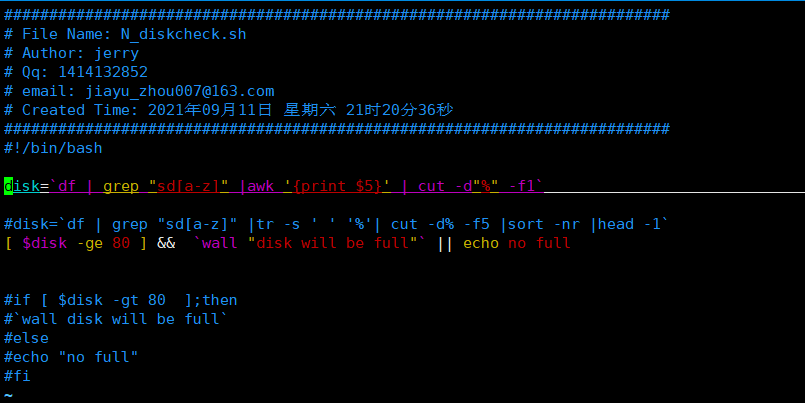
友友们可以直接修改·SetTitle()
if v:lang =~ "utf8$" || v:lang =~ "UTF-8$"
set fileencodings=ucs-bom,utf-8,latin1
endif
set nocompatible " Use Vim defaults (much better!)
set bs=indent,eol,start " allow backspacing over everything in insert mode
"set ai " always set autoindenting on
"set backup " keep a backup file
set viminfo='20,\"50 " read/write a .viminfo file, don't store more
" than 50 lines of registers
set history=50 " keep 50 lines of command line history
set ruler " show the cursor position all the time
" Only do this part when compiled with support for autocommands
if has("autocmd")
augroup redhat
autocmd!
" In text files, always limit the width of text to 78 characters
" autocmd BufRead *.txt set tw=78
" When editing a file, always jump to the last cursor position
autocmd BufReadPost *
\ if line("'\"") > 0 && line ("'\"") <= line("$") |
\ exe "normal! g'\"" |
\ endif
" don't write swapfile on most commonly used directories for NFS mounts or USB sticks
autocmd BufNewFile,BufReadPre /media/*,/run/media/*,/mnt/* set directory=~/tmp,/var/tmp,/tmp
" start with spec file template
autocmd BufNewFile *.spec 0r /usr/share/vim/vimfiles/template.spec
augroup END
endif
if has("cscope") && filereadable("/usr/bin/cscope")
set csprg=/usr/bin/cscope
set csto=0
set cst
set nocsverb
" add any database in current directory
if filereadable("cscope.out")
cs add $PWD/cscope.out
" else add database pointed to by environment
elseif $CSCOPE_DB != ""
cs add $CSCOPE_DB
endif
set csverb
endif
" Switch syntax highlighting on, when the terminal has colors
" Also switch on highlighting the last used search pattern.
if &t_Co > 2 || has("gui_running")
syntax on
set hlsearch
endif
filetype plugin on
if &term=="xterm"
set t_Co=8
set t_Sb=[4%dm
set t_Sf=[3%dm
endif
" Don't wake up system with blinking cursor:
" http://www.linuxpowertop.org/known.php
let &guicursor = &guicursor . ",a:blinkon0"
filetype on
set rtp+=~/.vim/bundle/Vundle.vim
set runtimepath+=~/.vim/bundle/YouCompleteMe
autocmd InsertLeave * if pumvisible() == 0|pclose|endif
let g:ycm_collect_identifiers_from_tags_files = 1
let g:ycm_collect_identifiers_from_comments_and_strings = 1
let g:syntastic_ignore_files=[".*\.py$"]
let g:ycm_seed_identifiers_with_syntax = 1
let g:ycm_complete_in_comments = 1
let g:ycm_confirm_extra_conf = 0
let g:ycm_key_list_select_completion = ['<c-n>', '<Down>']
let g:ycm_key_list_previous_completion = ['<c-p>', '<Up>']
let g:ycm_complete_in_comments = 1
let g:ycm_complete_in_strings = 1
let g:ycm_collect_identifiers_from_comments_and_strings = 1
let g:ycm_global_ycm_extra_conf='~/.vim/bundle/YouCompleteMe/third_party/ycmd/cpp/ycm/.ycm_extra_conf.py'
let g:ycm_show_diagnostics_ui = 0
inoremap <expr> <CR> pumvisible() ? "\<C-y>" : "\<CR>"
nnoremap <c-j> :YcmCompleter GoToDefinitionElseDeclaration<CR>
let g:ycm_min_num_of_chars_for_completion=2
autocmd BufNewFile *.cpp,*.[ch],*.sh,*.java exec ":call SetTitle()"
func SetTitle()
if &filetype == 'sh'
call setline(1, "##########################################################################")
call append(line("."), "# File Name: ".expand("%"))
call append(line(".")+1, "# Author: jerry")
call append(line(".")+2, "# mail: jiayu_zhou007@163.com")
call append(line(".")+3, "# Created Time: ".strftime("%c"))
call append(line(".")+4, "#########################################################################")
call append(line(".")+5, "#!/bin/bash")
call append(line(".")+6, "")
else
call setline(1, "/*************************************************************************")
call append(line("."), " > File Name: ".expand("%"))
call append(line(".")+1, " > Author: jerry")
call append(line(".")+2, " > Mail: jiayu_zhou007@163.com ")
call append(line(".")+3, " > Created Time: ".strftime("%c"))
call append(line(".")+4, " ************************************************************************/")
call append(line(".")+5, "")
endif
endfunc
"突出显示当前行
set cursorline
" 语法高亮
set syntax=on
" 去掉输入错误的提示声音
set noeb
"背景使用黑色
"set background=dark
vim设置自动添加头部注释的更多相关文章
- vim创建程序文件自动添加头部注释/自动文件头注释与模板定义
Vim 自动文件头注释与模板定义 在vim的配置文件.vimrc添加一些配置可以实现创建新文件时自动添加文件头注释,输入特定命令可以生成模板. 使用方法 插入模式输入模式输入seqlogic[Ente ...
- Visual Studio 20**自动添加头部注释信息
关于Visual Studio 20**自动添加头部注释信息 作为一个万年潜水党,不关这一篇文章技术含量如何,也算是一个好的开始吧. 在日常的开发中我们经常需要为类库添加注释和版权等信息,这样 ...
- Visual Studio自动添加头部注释
VS2013 自动添加头部注释 1.找到VS2013的安装目录 下文以安装目录 C:\Program Files (x86)\Microsoft Visual Studio 12.0 为例 2.修改C ...
- VS2015 自动添加头部注释
让VS自动生成类的头部注释,只需修改两个文集即可,一下两个路径下个有一个 Class.cs文件 D:\Program Files (x86)\Microsoft Visual Studio 14.0\ ...
- VS自动添加头部注释
让VS自动生成类的头部注释,只需修改两个文集即可,一下两个路径下个有一个 Class.cs文件 D:\Program Files (x86)\Microsoft Visual Studio 14.0\ ...
- VS2017自动添加头部注释
让VS自动生成类的头部注释,只需修改两个文集即可,一下两个路径下个有一个 Class.cs文件 D:\Program Files (x86)\Microsoft Visual Studio\2017\ ...
- Visual Studio自动添加头部注释 -C#开发2010-2013验证
在团队开发中,头部注释是必不可少的.但在开发每次新建一个类都要复制一个注释模块也很不爽,所以得想个办法让开发工具自动生成我们所需要的模板.....操作方法如下: 找你的vs安装目录, 比如我的是在D盘 ...
- VS2013 自动添加头部注释 -C#开发
在团队开发中,头部注释是必不可少的.但在开发每次新建一个类都要复制一个注释模块也很不爽,所以得想个办法让开发工具自动生成我们所需要的模板.....操作方法如下: 方法/步骤 1 找你的vs安装目录, ...
- 让Visual Studio 自动添加头部注释信息
在日常的开发过程中我们经常需要为我们的类文件添加注释和版权等信息,以前都是将信息文本复制.粘贴,要是添加一两个个还好,要是添加很多就显得很麻烦了.为了减少这种重复性的工作,有没有好的解决办法呢?答案是 ...
随机推荐
- 「游记」CSP-S 2021 爆零记
推荐访问本人自建博客 \(\text{cjwen.top}\) 初赛 之前参加过「难度介于 J 组(基础组)和 S 组(提高组)之间」的 [LGR-(-13) ]SCP 2021 第一轮(初赛)模拟, ...
- JavaWeb中jsp路径斜杆(/)跟没斜杆的路径映射问题
在JavaWeb开发中,只要是写URL地址,那么建议最好以"/"开头,也就是使用绝对路径的方式,那么这个"/"到底代表什么呢?可以用如下的方式来记忆" ...
- Solution -「SDOI 2016」「洛谷 P4076」墙上的句子
\(\mathcal{Description}\) Link. (概括得说不清话了还是去看原题吧 qwq. \(\mathcal{Solution}\) 首先剔除回文串--它们一定对答案产 ...
- Solution -「ARC 104C」Fair Elevator
\(\mathcal{Description}\) Link. 数轴从 \(1\sim 2n\) 的整点上有 \(n\) 个闭区间.你只知道每个区间的部分信息(可能不知道左或右端点,或者都不知 ...
- 详细介绍rar是什么由谁发明
RAR是一种专利文件格式,用于数据紧缩与归档打包,开发者为尤金·罗谢尔(俄语:Евгений Лазаревич Рошал,拉丁转写:Yevgeny Lazarevich Roshal),RAR的全 ...
- Xshell在Windows和Linux间文件的上传和下载
本文通过lrzsz来实现Windows和Linux间文件间的文件传输. lrzsz使用 XMODEM.YMODEM 和 ZMODEM 文件传输协议来实现文件的上传和下载.相比 FTP 或者 WinSC ...
- web开发 小方法3-position
值 描述 absolute 生成绝对定位的元素,相对于 static 定位以外的第一个父元素进行定位. 元素的位置通过 "left", "top", " ...
- Python培训:绘制饼图或圆环图
使用pyplot的pie()函数可以快速地绘制饼图或圆环图,pie()函数的语法格式如下所示: 该函数常用参数的含义如下. ·x:表示扇形或楔形的数据. ·explode:表示扇形或楔形离开圆心的距离 ...
- Meterpreter后渗透阶段关闭防火墙与杀毒软件
- Renix中如何实现流调速——网络测试仪实操
在Renix操作中有时我们需要进行流调速,那么如何实现呢?接下来为您详细介绍. 第一步:预约测试资源 首先打开Renix软件,连接机箱, 预约端口 第二步:流调速 例如:端口下有3条流,分别设置为10 ...