
quick cocos2d-x 入门---井字棋
学习quick cocos2d-x 第二天 ,使用quick-x 做了一个井字棋游戏 。
我假设读者已经 http://wiki.quick-x.com/doku.php?id=zh_cn阅读了这个链接下的内容 ,并学会了如何搭建环境和创建新的工程,并假高读者有一定cocos2d-x基础
建议读者多研究一下quick-x自带的例子coinflip。并阅读framework下的lua源码,尤其注意用lua模拟出面象对象的部分(可参考《Lua程序设计》第二版的13,16两章)。
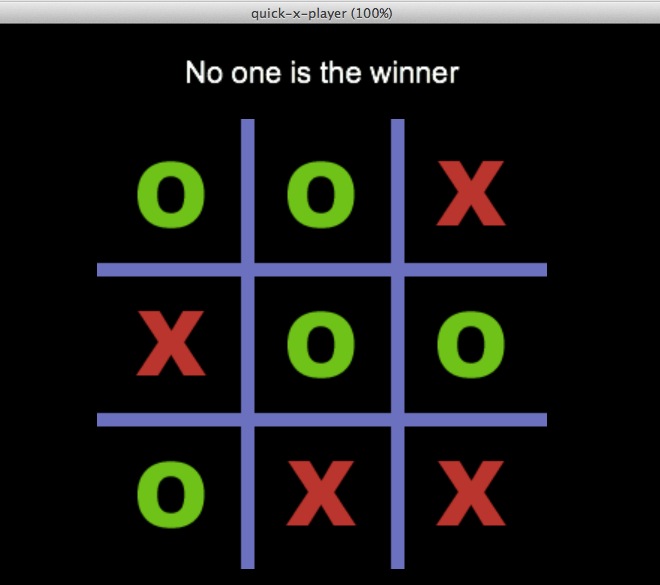
一。准备工作:
1.如何在场景(层)添加一个Sprite
我们在MainScene中添加一个Sprite
function MainScene:ctor()

    self.bg = display.newSprite("board.png", display.cx, display.cy)

    self:addChild(self.bg)

    -- keypad layer, for android

    self.layer = Board.new()

    self:addChild(self.layer)

end
display 是处理显示有关的一个“类”。
newSprite则类似cocos2d-x中的CCSprite::create()
注意:Lua中除用local 修饰的变量都是全局变量。我们self.bg这样定义,而不直接定义,目的是不污染全局环境,和把bg作为MainScene“类”(其实是表)的一个变量。
2.定义一个Layer
Board是我定义的一个层,添加在MainScene上。
定义层的方法为:
在Board.lua文件 中
local Board = class("Board", function()

    return display.newLayer()

end)
return Board
大家可以到framework下看看class是如何实现的。
3.如何增加touch事件
3.1在 Board:actor中增加以下代码
self:addTouchEventListener(handler(self, self.onTouch))

self:setNodeEventEnabled(true)
3.2 在onEnter,onExit中分别设置和移除相关事件监听
function Board:onEnter()

    self:setTouchEnabled(true)

end

function Board:onExit()

    self:removeAllEventListeners()

end
3.3 在Board:onTouch中处理事件
function Board:onTouch(event, x, y)

    //TODO 处理点击事件

end
二。定义数据
我使用一个2维的表来描述整个棋盘(也可以使用一维表)
myBoard = {{"-","-","-"},

            {"-","-","-"},

            {"-","-","-"}}

theWiner = "-1"
myBoard即棋盘,“-1”表示没有棋子,“X”表示有“X”形棋子,“O”表示有“O”型棋子。
theWiner表示获胜者,初始为-1。
三。程序流程
1.玩家点击事件后,在相应的位置放置棋子,并修改myBoard数据
比如简单,直接附代码了,写的比较粗糙,因为 也刚学Lua才两三天。
turn = "O"

function Board:makeMove(x,y)

    if theWiner ~= "-1" then

        return

    end

    row,co = self:getBoardLocation(x,y)

    if row == - then

        return

    end

    self:makeEle(row,co)

end

function Board:makeEle(row,co)

    local file = "piece_o.png"

    if turn == "X" then

        file = "piece_x.png"

    else

        file = "piece_o.png"

       end

       myBoard[row][co] = turn;

       self.ele = display.newSprite(file, display.cx+*(co-)  , display.cy+*(-row))

       self:addChild(self.ele)

    local ret = Board:winCheck(row,co)

    print("winCheck",ret)

    if ret == "O" then

        self.lable:setString("O is the winer")

    end

    if ret == "X" then

        self.lable:setString("X is the winner")

    end

    if ret == "He" then

        self.lable:setString("No one is the winner")

    end

    if ret == "Wh" then

        self.lable:setString("Continue")

    end

    if turn == "X" then

        turn = "O"

    else

        turn = "X"

       end

end
function Board:getBoardLocation(x,y)

    if x < display.cx- or x >display.cx+ then

        return  -

    end

    if y > display.cy+ or y < display.cy- then

        return  -

    end

    local co

    if x <= display.cx -   then

        co =

    elseif x > display.cx- and x < display.cx+ then

        co =

    else

        co =

    end

    local row

    if y <= display.cy -   then

        row =

    elseif y > display.cy- and y < display.cy+ then

        row =

    else

        row =

    end

    return row,co

end
2.检查玩家是否获胜或平局
function Board:winCheck(row,co)

    local cur = myBoard[row][co]

    if myBoard[][] == cur and myBoard[][] == cur and myBoard[][] ==cur  then

        return cur

    end

    if myBoard[][] == cur and myBoard[][] == cur and myBoard[][]  == cur then

        return cur

    end

    if myBoard[][] == cur and myBoard[][] == cur and myBoard[][] == cur then

        return cur

    end

    if myBoard[][] == cur and myBoard[][] == cur and myBoard[][] ==  cur then

        return cur

    end

    if myBoard[][] == cur and myBoard[][] == cur and myBoard[][] == cur then

        return cur

    end

    if myBoard[][] == cur and myBoard[][] == cur and myBoard[][] == cur then

        return cur

    end

    if myBoard[][] == cur and myBoard[][] == cur and myBoard[][] == cur  then

        return cur

    end

    if myBoard[][] == cur and myBoard[][] == cur and myBoard[][] == cur then

        return cur

    end

    open = true;

    for i = , do

        for j = , do

            if myBoard[i][j] == "-" then

                open = false

            end

        end

    end

    if open then

        return "He"

    else

        return "Wh"

    end

end
搞了一天,有点累了,写的不详细,有问题请大家在评论里问吧
quick cocos2d-x 入门---井字棋的更多相关文章
- 程序设计入门—Java语言 第五周编程题 2井字棋(5分)
2 井字棋(5分) 题目内容: 嗯,就是视频里说的那个井字棋.视频里说了它的基本思路,现在,需要你把它全部实现出来啦. 你的程序先要读入一个整数n,范围是[3,100],这表示井字棋棋盘的边长.比如n ...
- TicTacToe井字棋 by reinforcement learning
对于初学强化学习的同学,数学公式也看不太懂, 一定希望有一些简单明了的代码实现加强对入门强化学习的直觉认识,这是一篇初级入门代码, 希望能对你们开始学习强化学习起到基本的作用. 井字棋具体玩法参考百度 ...
- [CareerCup] 17.2 Tic Tac Toe 井字棋游戏
17.2 Design an algorithm to figure out if someone has won a game oftic-tac-toe. 这道题让我们判断玩家是否能赢井字棋游戏, ...
- [C++] 井字棋游戏源码
TicTac.h #define EX 1 //该点左鼠标 #define OH 2 //该点右鼠标 class CMyApp : public CWinApp { public: virtual B ...
- [游戏学习22] MFC 井字棋 双人对战
>_<:太多啦,感觉用英语说的太慢啦,没想到一年做的东西竟然这么多.....接下来要加速啦! >_<:注意这里必须用MFC和前面的Win32不一样啦! >_<:这也 ...
- 井字棋(Tic-Tac-Toe)
井字棋介绍:https://en.wikipedia.org/wiki/Tic-tac-toe 井字棋简单,但是获胜策略却和直觉不同,四角比中间重要性要高,而且先手有很大的获胜概率获胜(先手胜:91, ...
- [HTML5实现人工智能]小游戏《井字棋》发布,据说IQ上200才能赢
一,什么是TicTacToe(井字棋) 本 游戏 为在下用lufylegend开发的第二款小游戏.此游戏是大家想必大家小时候都玩过,因为玩它很简单,只需要一张草稿纸和一只笔就能开始游戏,所以广受儿 ...
- [LeetCode] Valid Tic-Tac-Toe State 验证井字棋状态
A Tic-Tac-Toe board is given as a string array board. Return True if and only if it is possible to r ...
- python 井字棋(Tic Tac Toe)
说明 用python实现了井字棋,整个框架是本人自己构思的,自认为比较满意.另外,90%+的代码也是本人逐字逐句敲的. minimax算法还没完全理解,所以参考了这里的代码,并作了修改. 特点 可以选 ...
随机推荐
- sqlite的增删改查
// 基本步骤 // 1. 打开数据库 // 2. 处理数据 // 3. 关闭数据库 //先设置全局变量 lazy var documentsPath: String = { let paths = ...
- 微信企业号-JS-SDK图像接口
使用JS-SDK需要进行四步 主要是步骤二和步骤三,步骤二需要配置,步骤三具体使用相关接口,这里以使用图像接口为例 php页面代码主要用来完成步骤二,也就是配置接口 public function ...
- JavaScript基础认知
此文只适用于初学者,大神们就不要看了,嘿嘿~ 一.定义变量 关键字 var,由此关键字定义变量,例如:var a =21:就把21这个数定义给了变量a 二.基本数据类型 1.Number类型 表示数字 ...
- XUtils——GET请求
//HttpUtils实例化对象 HttpUtils http = new HttpUtils(); /* *发送请求send(HttpMethod ...
- 使用guava进行对字符串的加锁
java的synchronized关键字是堆某对象加锁,但是我们当需要对某个字符串加锁怎么办 比如对同一个订单只能有一个操作,但是对其他订单的操作不影响 使用 guava包下的 Interner 类 ...
- JsonWriter使用
Example: 拼一个如下的json格式String { [ { "id": 912345678901, &quo ...
- 在 JQuery Mobile 中实现瀑布流图库布局
先来看在Windows系统的1080P显示器中显示的效果: 这个整合方式几乎没有现存的实例,是自己总结出来的方法,在此记录下来. 首先访问Masonry官网下载masonry.pkgd.min.js: ...
- B-Tree 学习
算法导论 第18章 B树与其他树的结构不同的是 B数是多叉而不是二叉树 而且分叉因子很大一般使用于数据库 针对需要硬盘IO的情况而使用 可以降低磁盘IOB树的一个节点是以磁盘的页面为单位,而不是数据 ...
- python中几个常见的黑盒子之“字典dict” 与 “集合set”
这里说到"字典dict" 和 "集合set"类型,首先,先了解一下,对于python来说,标准散列机制是有hash函数提供的,对于调用一个__hash__方法: ...
- JSTL和EL
JSTL和EL 1.EL表达式总是放在大括号里,而且前面有一个美元符前缀. person.name2.相似点:(1).都可以让我们在静态内蓉中插入动态信息.EL:室外温度是{emp}度 JSP:室外温 ...