
快速入门Pandas
教你十分钟学会使用pandas。
pandas是python数据分析的一个最重要的工具。
基本使用
# 一般以pd作为pandas的缩写

import pandas as pd

# 读取文件

df = pd.read_csv('file.csv')

# 返回数据的大小

df.shape

# 显示数据的一些对象信息和内存使用

df.info()

# 显示数据的统计量信息

df.describe()
花式索引
我们的主要数据结构就是DataFrame了,DataFrame有两部分构成,一个是列(columns)。列是有名称的或者说有标签的。另一个是索引(index),这里我们为了避孕歧义称之为行(rows),行一般没有名称,但是也可以有名称。
如图所示:

data = {'animal': ['cat', 'cat', 'snake', 'dog', 'dog', 'cat', 'snake', 'cat', 'dog', 'dog'],

        'age': [2.5, 3, 0.5, np.nan, 5, 2, 4.5, np.nan, 7, 3],

        'visits': [1, 3, 2, 3, 2, 3, 1, 1, 2, 1],

        'priority': ['yes', 'yes', 'no', 'yes', 'no', 'no', 'no', 'yes', 'no', 'no']}

labels = ['a', 'b', 'c', 'd', 'e', 'f', 'g', 'h', 'i', 'j']

df = pd.DataFrame(data, index=labels)
>>> df

   age animal priority  visits

a  2.5    cat      yes       1

b  3.0    cat      yes       3

c  0.5  snake       no       2

d  NaN    dog      yes       3

e  5.0    dog       no       2

f  2.0    cat       no       3

g  4.5  snake       no       1

h  NaN    cat      yes       1

i  7.0    dog       no       2

j  3.0    dog       no       1
原始索引
原始索引就是类list的索引方式。
当索引对象是切片时就是行索引。
>>> df[1:3]

   age animal priority  visits

b  3.0    cat      yes       3

c  0.5  snake       no       2
当索引对象是list时就是列索引。
>>> df[['age', 'animal']]

   age animal

a  2.5    cat

b  3.0    cat

c  0.5  snake

d  NaN    dog

e  5.0    dog

f  2.0    cat

g  4.5  snake

h  NaN    cat

i  7.0    dog

j  3.0    dog
跟上面等效,上面是用了列名称,这里用了列序号。
>>> df[[0,1]]

   age animal

a  2.5    cat

b  3.0    cat

c  0.5  snake

d  NaN    dog

e  5.0    dog

f  2.0    cat

g  4.5  snake

h  NaN    cat

i  7.0    dog

j  3.0    dog
位置索引
>>> df.iloc[0:2, 0:2]

   age animal

a  2.5    cat

b  3.0    cat
标签索引
loc与iloc的主要区别就是索引要用标签不能用序号。
>>> df.loc[['a', 'b'], ['animal', 'age']]

  animal  age

a    cat  2.5

b    cat  3.0
混合索引
其实就是位置索引和标签索引的混合使用方式。
>>> df.ix[0:2, ['animal', 'age']]

  animal  age

a    cat  2.5

b    cat  3.0
条件索引
>>> df[(df['animal'] == 'cat') & (df['age'] < 3)]

   age animal priority  visits

a  2.5    cat      yes       1

f  2.0    cat       no       3
数据清洗
找到缺失值。
>>> df[df['age'].isnull()]

   age animal priority  visits

d  NaN    dog      yes       3

h  NaN    cat      yes       1
填充缺失值。
>>> df['age'].fillna(0, inplace=True)

>>> df

   age animal priority  visits

a  2.5    cat      yes       1

b  3.0    cat      yes       3

c  0.5  snake       no       2

d  0.0    dog      yes       3

e  5.0    dog       no       2

f  2.0    cat       no       3

g  4.5  snake       no       1

h  0.0    cat      yes       1

i  7.0    dog       no       2

j  3.0    dog       no       1
将字符值替换成布尔值
>>> df['priority'] = df['priority'].map({'yes': True, 'no': False})

>>> df

   age animal priority  visits

a  2.5    cat     True       1

b  3.0    cat     True       3

c  0.5  snake    False       2

d  0.0    dog     True       3

e  5.0    dog    False       2

f  2.0    cat    False       3

g  4.5  snake    False       1

h  0.0    cat     True       1

i  7.0    dog    False       2

j  3.0    dog    False       1
速查表
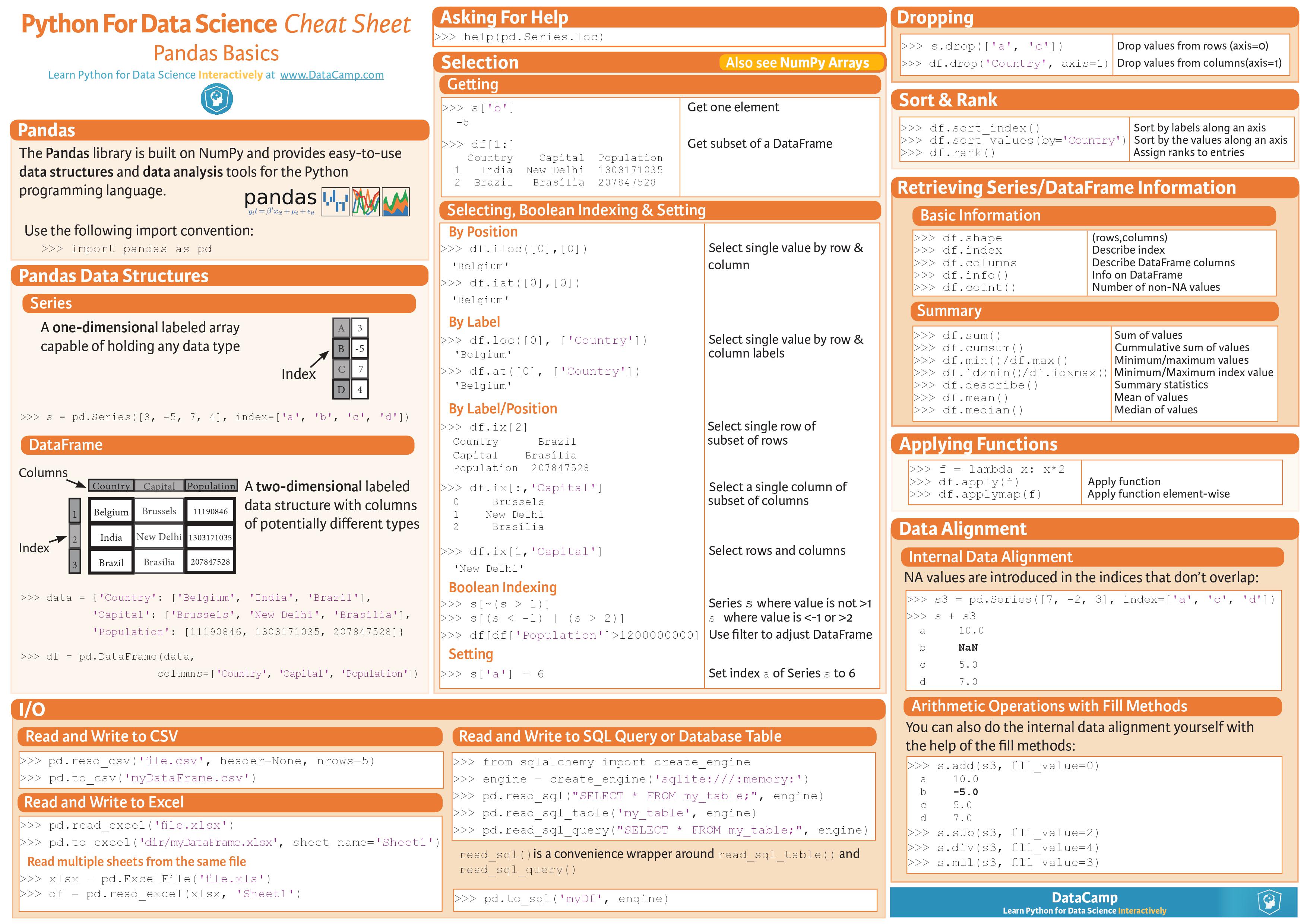
练习
老样子,来写点习题吧。
100道pandas练习题
pandas练习库
参考
官方版十分钟入门pandas
pandas cookbook
快速入门Pandas的更多相关文章
- 快速入门 Pandas
先po几个比较好的Pandas入门网站十分钟入门:http://www.codingpy.com/article/a-quick-intro-to-pandas/手册前2章:http://pda.re ...
- pandas快速入门
pandas快速入门 numpy之后让我们紧接着学习pandas.Pandas最初被作为金融数据分析工具而开发出来,后来因为其强大性以及友好性,在数据分析领域被广泛使用,下面让我们一窥究竟. 本文参考 ...
- Python pandas快速入门
Python pandas快速入门2017年03月14日 17:17:52 青盏 阅读数:14292 标签: python numpy 数据分析 更多 个人分类: machine learning 来 ...
- Pandas 快速入门(二)
本文的例子需要一些特殊设置,具体可以参考 Pandas快速入门(一) 数据清理和转换 我们在进行数据处理时,拿到的数据可能不符合我们的要求.有很多种情况,包括部分数据缺失,一些数据的格式不正确,一些数 ...
- Jupyter 快速入门——写python项目博客非常有用!!!
from:https://blog.csdn.net/m0_37338590/article/details/78862488 一.简介: Jupyter Notebook(此前被称为 IPython ...
- python快速入门——进入数据挖掘你该有的基础知识
这篇文章是用来总结python中重要的语法,通过这些了解你可以快速了解一段python代码的含义 Python 的基础语法来带你快速入门 Python 语言.如果你想对 Python 有全面的了解请关 ...
- 快速入门 Python 数据分析实用指南
Python 现如今已成为数据分析和数据科学使用上的标准语言和标准平台之一.那么作为一个新手小白,该如何快速入门 Python 数据分析呢? 下面根据数据分析的一般工作流程,梳理了相关知识技能以及学习 ...
- 数据分析入门——pandas之DataFrame基本概念
一.介绍 数据帧(DataFrame)是二维数据结构,即数据以行和列的表格方式排列. 可以看作是Series的二维拓展,但是df有行列索引:index.column 推荐参考:https://www. ...
- 数据分析入门——pandas之Series
一.介绍 Pandas是一个开源的,BSD许可的库(基于numpy),为Python编程语言提供高性能,易于使用的数据结构和数据分析工具. 官方中文文档:https://www.pypandas.cn ...
随机推荐
- Linux —— 常用命令集合
关机和重启命令 shutdown [选项] 时间 (添加&,把关机任务放在后台执行) 只有shutdown可以保存关机时资源 操作选项 重启: r 关机: h 取消一个关机任务: c 关机命令 ...
- python开篇随记
脚本环境,解释器处理 #!/usr/bin/env python # -*- coding:utf-8 -*- 变量 ■ 变量名只能由字母.数字和下划线组合 ■ 变量名不能以数字开头 ■ 关键字不能自 ...
- mac Latex dvipdfm 缺少字体错误 Failed to read UCS2/UCS4 TrueType cmap
dvipdfmx 命令产生 ** ERROR ** Failed to read UCS2/UCS4 TrueType cmap... 错误的原因是没有把 simsun.ttf simkai.ttf ...
- elasticsearch的模糊查询
https://blog.csdn.net/a772304419/article/details/78951561
- vue使用props动态传值给子组件里的函数用,每次更新,呼叫函数
父组件 <template> <div id="app"> <div>详情内容</div> <button v-on:clic ...
- leetcode134 Gas Station
思路: https://leetcode.com/problems/gas-station/discuss/269604/Java-Greedy-thought-process 关键是要想清楚如果从加 ...
- 引用library之——带有自定义属性的自定义控件的library包
一般来讲,当自定义一个控件Panel并且此控件有自定义属性时(例如:panel:closedHandle="@drawable/foot_bar_right"),xml中需要定义此 ...
- Easyui combobox如何默认选中第一项???
以下代码可以实现combobox默认选中第一项,在实际开发中我们可能会用到! // 处理combobox默认选中的问题 <input id="user_type" class ...
- Java之instanceof
class Base{ int x = 1; static int y = 2; String name(){ return "mother" ...
- Redis学习笔记(一)五种数据类型
1.字符串(String) 基本操作:SET(设置).GET(获取).DEL(删除)其他操作传送门 root@localhost:~# redis-cli > set msg hello OK ...